How to Install CCTV System
You've bought the cameras, opened the boxes, and now you're looking at a drill, a recorder, and a confusing bundle of cables. The temptation is to mount the units where they look most visible and sort out the software later. That approach often leaves blind spots, poor night images, insecure remote access, or footage that can't be used confidently after an incident.
A reliable CCTV project is a complete operational system. It starts with a site survey and legal check, then moves through safe installation, recording configuration, testing, and planned maintenance. The process below is written for UK homeowners and small businesses that want practical results without taking on electrical, access, or compliance work they aren't equipped to handle.
Table of Contents
- Preparing for a Safe CCTV Installation
- Planning Camera Coverage and Equipment
- Meeting UK CCTV Compliance Requirements
- Mounting Cameras and Connecting the System
- Configuring Recording and Remote Access
- Testing and Troubleshooting CCTV Systems
- Maintaining CCTV and Knowing When to Hire a Professional
Preparing for a Safe CCTV Installation
Start by writing down what the system must achieve. Protecting a rear door calls for a different view from monitoring a staff-only entrance, checking a driveway, or recording vehicle number plates. Each camera should have a defined purpose, because a vague brief usually produces expensive coverage that doesn't provide useful identification.
Walk around the property and record the likely entry points, lighting conditions, available power, wall construction, roof and gutter condition, and possible cable routes. Add photographs or a sketch to your notes. The NSI CCTV installation guidance supports a documented site survey before installation, and that record becomes valuable when you need to explain why each camera was placed where it was.
Set safe limits before drilling
Low-voltage mounting and plug-in equipment may suit a capable DIY installer. Fixed mains wiring is different. Work involving a fused spur, consumer unit, RCBO, or exposed live conductor should be completed or certified by a qualified electrician. A pre-wired Power over Ethernet kit can reduce the electrical scope, but it doesn't remove the need to route cables safely and protect equipment from moisture.
Also assess access. If a camera can't be reached safely from stable ground or a suitable stepladder, don't improvise with stacked ladders or unstable platforms. Anyone working at height should understand the relevant precautions, and a resource such as working at heights ticket online can help clarify training expectations before work at height begins.
Practical rule: If the installation requires unsafe access or alteration of mains wiring, the correct next step is a qualified installer, not a more ambitious ladder setup.
Before purchasing equipment, gather a spirit level, suitable drill bits, wall plugs, cable strippers, crimpers, a multimeter, labels, external-grade sealant, and cable protection. Keep the workflow organised: survey, design, purchase, install, configure, test, then hand over. SafeContractor accreditation is one useful credential to check when comparing professional providers, as shown by this accreditation information.
Planning Camera Coverage and Equipment
A site survey should decide the equipment, not the other way around. Visit the property in daylight, at dusk, and after dark if possible. Note glare from the sun, reflective surfaces, shadows, vehicle headlights, foliage movement, and areas where an intruder could approach unseen.
Draw a simple plan and give every proposed camera a job. A front-door camera might need a relatively narrow, face-focused view, while a side passage may benefit from wider coverage. Avoid pointing a lens straight at the sky or a bright security light. A camera that technically sees an entrance but records silhouettes isn't doing its job.
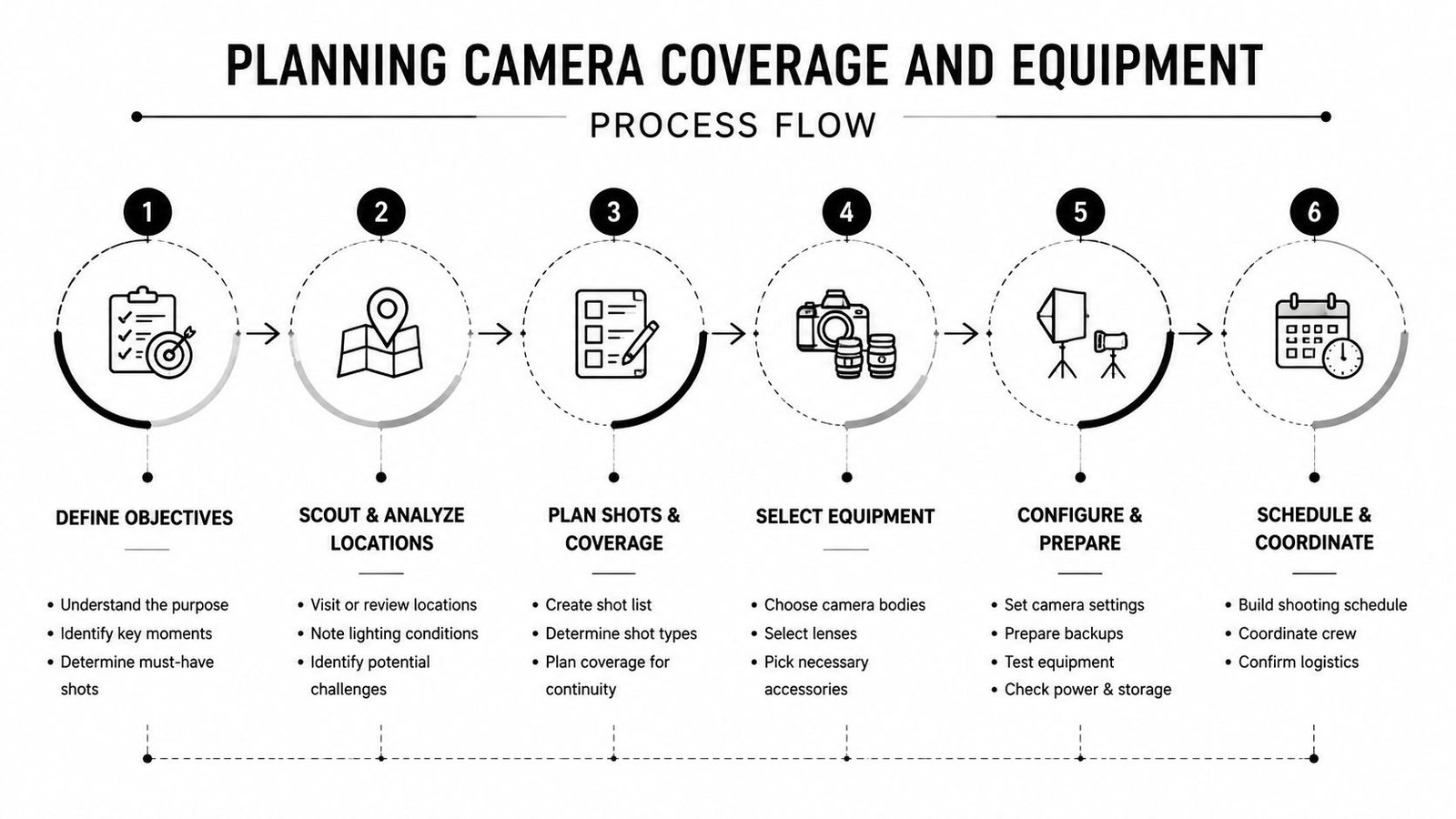
Match the camera to the task
An analogue DVR system uses coaxial cable and can be a practical choice for a modest property where cost and straightforward replacement matter. An IP/NVR system uses network cabling, commonly CAT6, and normally provides more flexible remote access and higher-resolution options. That flexibility comes with a greater dependence on network design, switch capacity, cable quality, and secure configuration.
Lens selection affects the result more than many buyers expect. A wide lens can cover a doorway and its approach, but a narrower or varifocal lens is more appropriate when the target is farther away. Don't assume a camera's headline resolution guarantees identification. The useful image depends on distance, angle, lighting, compression, and the size of the person or vehicle in the frame.
For external units, choose housings designed for outdoor exposure, with appropriate protection from rain, dust, condensation, and tampering. Check low-light performance in the actual mounting position rather than relying only on a product description. Built-in infrared can help, but nearby walls, soffits, or reflective objects may cause glare.
Map the infrastructure
Mark the recorder location, power supply, network equipment, and every cable run. Keep cables away from trip hazards, sharp edges, hot pipework, and locations where rodents or machinery can damage them. Use conduit or trunking where a cable is exposed, and plan service loops so a camera can be removed without cutting the cable.
The CCTV camera types guide can help compare fixed, dome, bullet, and other designs before you commit to hardware. Buy for the coverage you need, not the highest specification on the box.
Meeting UK CCTV Compliance Requirements
The first legal question is what area the camera will capture, not just where you can mount it. A domestic system covering only your own property is treated differently from one recording a neighbour's garden, a shared access route, or a public pavement. Once a domestic camera captures beyond the property boundary, data protection responsibilities can apply.
The ICO's guidance for home CCTV systems explains the boundary and its practical consequences. The UK business CCTV and GDPR guide provides further context for commercial operators. Depending on the coverage, you may need suitable signage, secure storage, regular deletion, and a process for handling access requests. Privacy masking or a changed camera angle can reduce unnecessary recording of neighbouring or public space.
Commercial operators have wider duties. Signs should explain that recording is taking place. Keep footage only as long as the business purpose requires, and normally provide images to a recorded person within one calendar month. Set viewing permissions, brief staff, protect accounts, and check that the system is proportionate to the stated security purpose.
The Surveillance Camera Code of Practice contains 12 guiding principles. Its current updated version came into effect on 12 January 2022, and public authorities in England and Wales are required by law to have regard to it. Other operators can use the code as a practical benchmark because it covers purpose, design, operation, access, retention, and governance.
| Aspect | Domestic User | Commercial / Business |
|---|---|---|
| Coverage | Keep cameras within the property boundary where possible. | Define a lawful business purpose and limit capture to what is necessary. |
| Neighbouring or public areas | Capturing these areas can bring data protection duties into scope. | Plan privacy controls, signage, access, and retention from the outset. |
| Signage | May be needed when footage goes beyond purely private domestic use. | Clear signs should explain that recording is taking place. |
| Retention | Delete footage regularly when it's no longer needed. | Set and document a retention policy linked to the business purpose. |
| Access | Protect recordings and respond appropriately to valid requests. | Restrict viewing rights, keep access secure, and normally handle image requests within the stated period. |
For systems operating in public places in England and Wales, the statutory framework created by the Protection of Freedoms Act 2012 is especially relevant. If cameras cover public-facing areas, complete the compliance review before fitting them. Correcting excessive coverage after installation can mean repositioning cameras, changing privacy settings, revising signage, and reviewing stored footage.
Mounting Cameras and Connecting the System
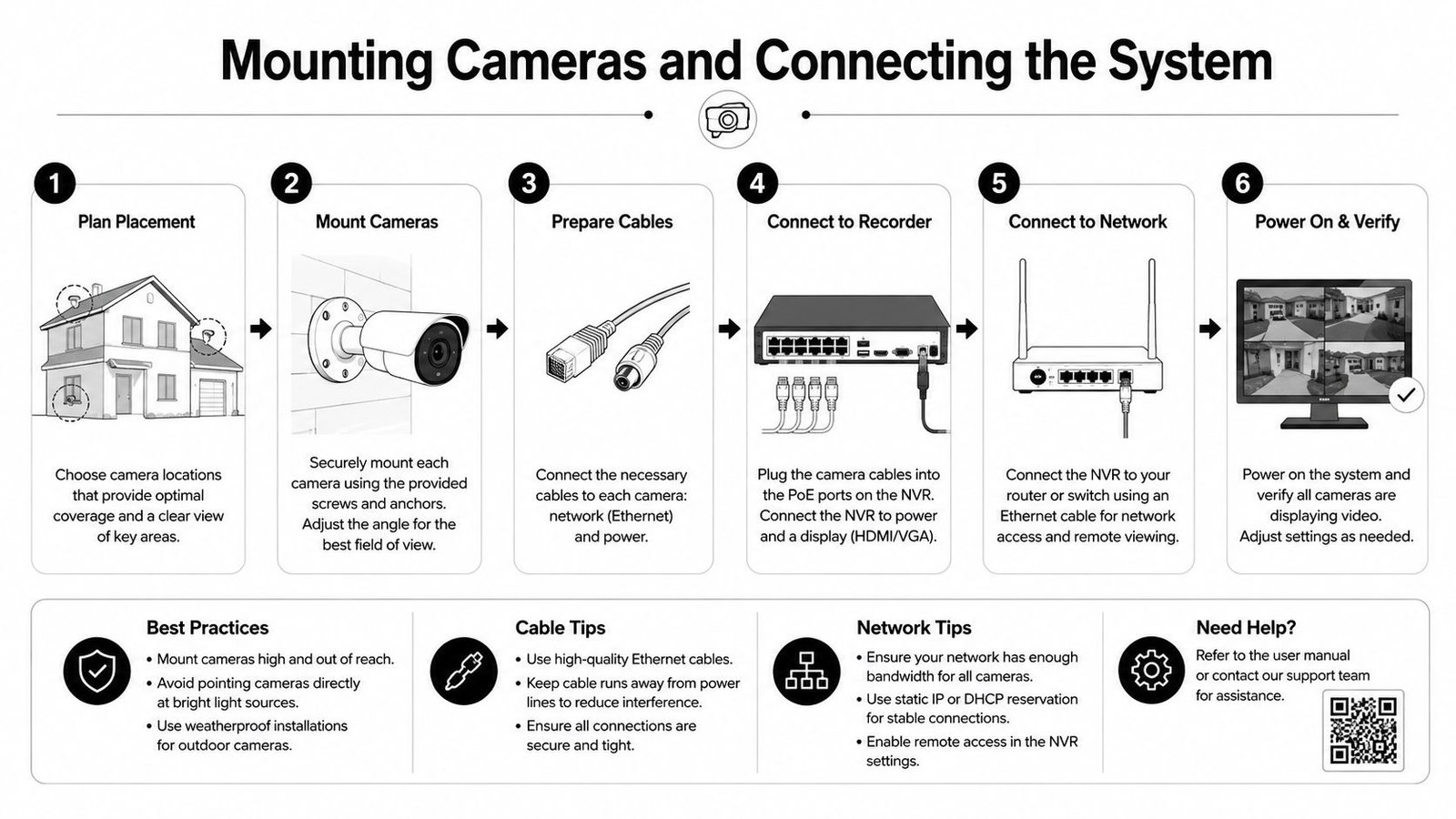
Once the design is settled, test each camera at ground level before fixing it permanently. Confirm that the live image shows the intended zone, the network connection is stable, and the cable reaches the planned recorder or PoE switch. This simple check prevents drilling a neat hole for a camera that has the wrong lens or an unreliable connection.
Mark the fixing points with the bracket held level. Choose anchors for the actual surface, not the material you hope is behind it. Brick, block, timber, and uPVC each need different fixing methods. Drill pilot holes carefully, remove dust, fit the correct plugs, and tighten the bracket without crushing the housing.
Protect the cable route
For IP systems, route CAT6 through a loft, soffit, conduit, or internal void where appropriate. Analogue systems generally use RG59 or a manufacturer-approved equivalent. Keep low-voltage CCTV cabling separate from mains wiring and avoid crushing, tight bends, and unsupported spans.
Leave a service loop at the camera and another at the recorder or switch. Terminate RJ45 or BNC connectors cleanly, test continuity, and label both ends. A weatherproof junction box can protect joins, but it must be installed so water drains away rather than collecting around the connector. Seal the wall penetration with exterior-grade silicone after the cable has been routed, while leaving a sensible drip loop outside the entry point.
Installation detail: The most attractive cable route is not automatically the most reliable. A protected, labelled route that can be inspected later is more valuable than hidden cable that cannot be serviced.
Aim the lens after the camera is powered. Keep direct sun out of the field of view where possible, avoid placing the infrared beam against a nearby wall, and check that the mounting position doesn't allow easy tampering. Tighten the final adjustment only after viewing the image at the times of day that matter.
Connect power responsibly
Small systems may use plug-in transformers or PoE from a suitable switch. Larger systems may need a dedicated circuit, UPS protection, or surge protection for the recorder and network equipment. Any new fixed mains wiring in the UK must be carried out or certified by a qualified electrician in line with the applicable requirements of BS 7671. Don't open a consumer unit or work on exposed conductors as part of a camera installation.
After connection, check that every camera receives power, the recorder sees each channel, and network equipment remains stable under the expected load. The physical installation is complete only when the system is ready for commissioning.
Configuring Recording and Remote Access
A camera that produces a live picture but fails to record is not a finished system. Start at the DVR or NVR and change the administrator password immediately. Use a unique password, create separate user accounts where supported, and remove or disable accounts that nobody needs.
Install or format a surveillance-rated hard drive according to the recorder manufacturer's instructions. Choose overwrite or fixed retention settings that match the documented storage policy. GOV.UK advises commercial operators to keep footage only as long as necessary for the business purpose, while the DWP CCTV policy uses no more than 30 calendar days for its own system as a concrete storage-limitation benchmark. That benchmark should not be copied automatically to every site, but it illustrates the need for a written, purpose-led policy.
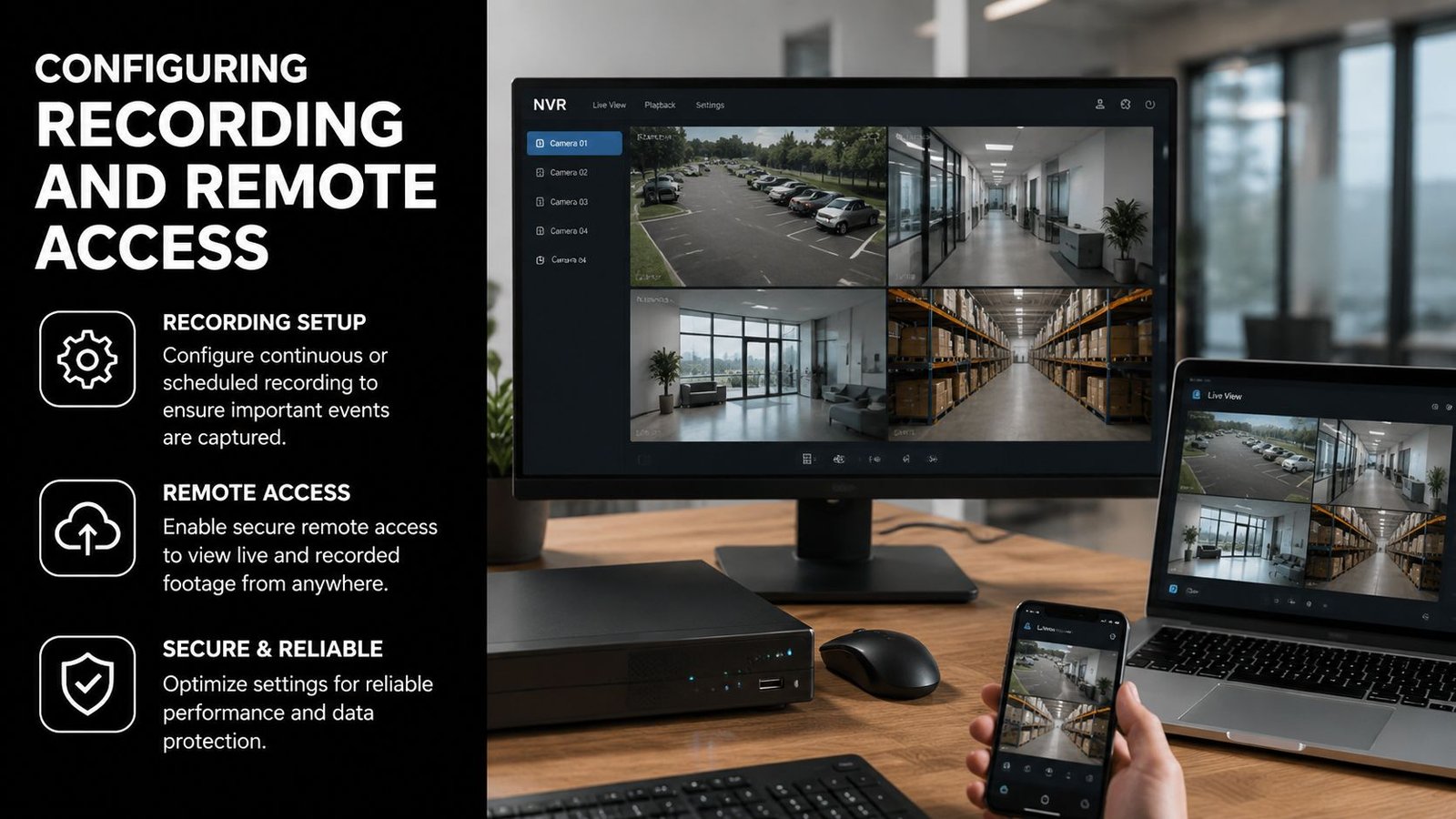
Configure each channel separately. Continuous recording can suit entrances or high-risk areas, while motion or event recording may reduce unnecessary footage in quieter zones. Draw detection areas around doors, gates, and vehicle approaches, then exclude roads, moving trees, reflective surfaces, and public areas that don't form part of the security purpose. Give cameras useful names such as “Rear Door” or “Loading Bay” so an incident can be found quickly.
Secure remote viewing
Connect the recorder to the local network using the manufacturer's supported method. If remote viewing uses a cloud or peer-to-peer service, review the provider's security settings and enable two-factor authentication where available. Avoid exposing unnecessary services to the internet, and don't leave default ports, default credentials, or unrestricted administrator access in place.
Enable firmware updates through a controlled process, restrict mobile access to named users, and review the account list periodically. Set accurate time synchronisation, because GOV.UK guidance highlights clock accuracy as important to evidential value. Check the recorder's capacity before commissioning and export a short clip to a secure location so you know the evidence can be retrieved and played back.
Testing and Troubleshooting CCTV Systems
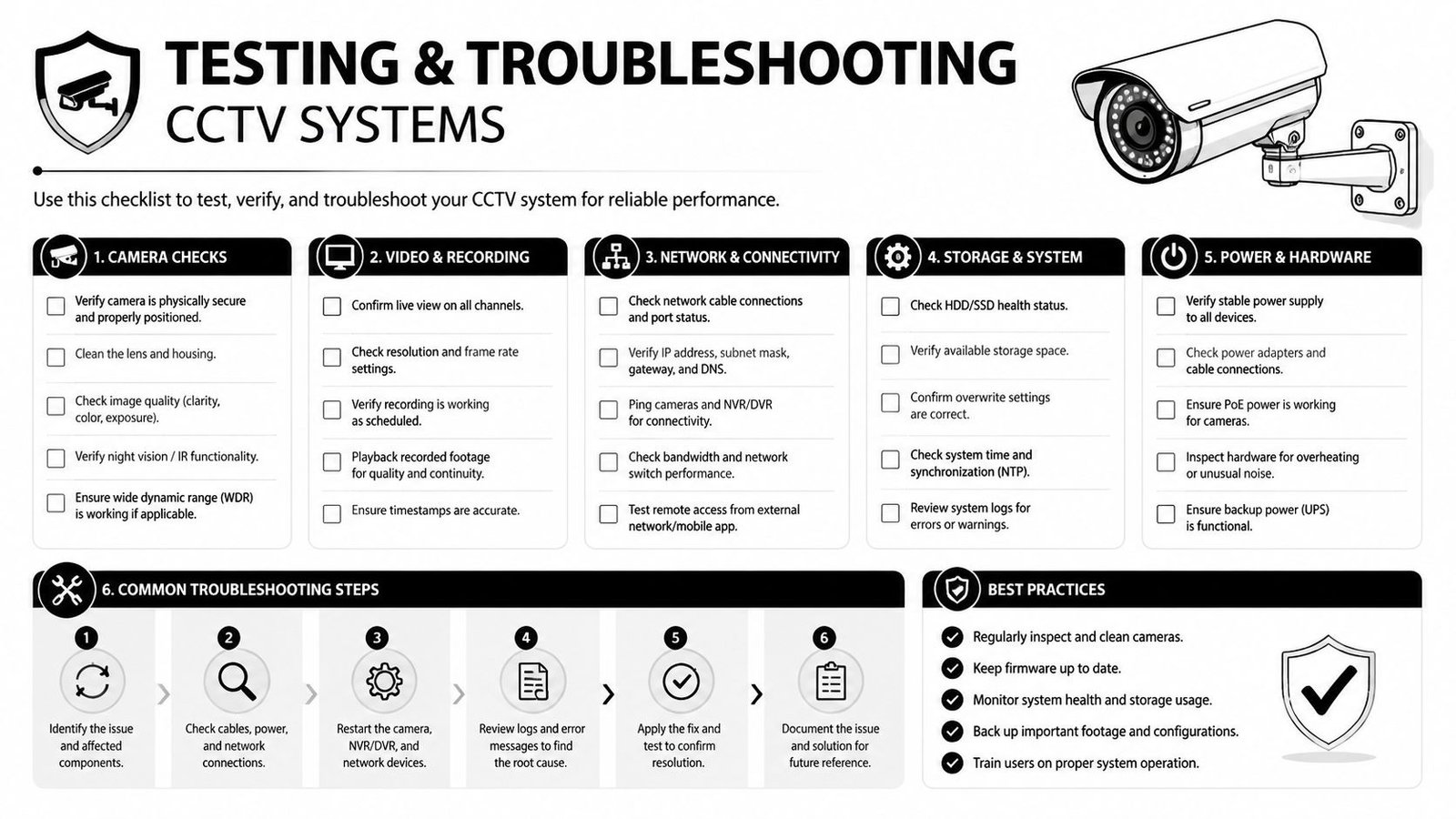
Commission the system as if you were already investigating an incident. Walk through every protected route during daylight, at dusk, and after dark. At each camera, check the field of view, focus, exposure, infrared performance, and whether headlights or low sun turn faces into silhouettes.
Trigger a controlled motion event and confirm that the recorder saves it. Test playback on the local monitor, then test remote viewing and notifications from an authorised mobile device. Check that camera names, timestamps, exported files, and audio settings, where applicable, match the operational and privacy requirements.
Fix faults methodically
A camera dropping offline usually points to power, cabling, network equipment, or PoE capacity. Check the switch port, connector, cable route, and available PoE budget before replacing the camera. If night footage is too dark or washed out, adjust infrared intensity, remove nearby reflective surfaces, or improve the surrounding lighting.
Recordings that stop early require a review of disk health, overwrite settings, recording schedules, and available capacity. Constant motion alerts often come from oversized detection areas, high sensitivity, moving foliage, or vehicle headlights. Redraw the zones and test again rather than disabling alerts completely.
Commissioning standard: Save a dated test clip from each important camera, record the result of the remote-view test, and keep the final camera plan with the system documents.
Maintaining CCTV and Knowing When to Hire a Professional
Maintenance determines whether the system remains useful after installation. Clean lenses and housings, inspect external seals, check cable entries, review hard-drive health, verify time synchronisation, and apply firmware updates through a controlled process. Recheck camera angles after building work, landscaping, insulation changes, or seasonal growth has altered the view.
Different failures call for different responses. A loft camera that loses focus after insulation work may need recalibration. A retail refit can create a new blind spot that requires a fresh survey. Repeated condensation inside a warehouse housing points to an environmental or installation fault, not a setting that should be ignored. A failing multi-camera DVR in a car park may require specialist migration to an NVR so recordings and evidential continuity are handled properly.
Hire a qualified professional for mains fault repairs, difficult access, compliance reviews, GDPR sign-off, insurance conditions, monitored alarm integration, and any installation that affects shared or public areas. Businesses with several connected systems may also benefit from structured IT maintenance services for businesses to keep network equipment, user access, and firmware under review.
At six months, inspect images, storage, alerts, seals, cable routes, user accounts, and the retention process. At twelve months, repeat the site-risk review, test power resilience, confirm documentation, and decide whether camera positions still match the property's use.
Wisenet Security Ltd provides CCTV site surveys, professional installation, configuration, user training, and ongoing maintenance for homes and businesses across South Wales and the South West. Visit Wisenet Security Ltd to discuss a system designed around your coverage, compliance, remote-access, and reliability requirements.