CCTV Installation Barry: Your 2026 Security Guide
You’re usually not looking into cctv installation barry because you’re casually browsing. It’s more often because something has shifted. A van has been parked outside a bit too long. A side gate has been left open. Staff are locking up in the dark. A delivery has gone missing, and nobody can say exactly when. Once that unease starts, a common desire emerges: Clear visibility, reliable evidence, and the reassurance that they can check their property without guessing.
That’s where a properly planned CCTV system earns its keep. Not just a camera on a wall, but a system designed for the right areas, recording properly, handling Barry weather, and avoiding legal trouble with neighbours or the council. CCTV adoption keeps growing for a reason. The global CCTV camera market was valued at USD 56.52 billion in 2025 and is projected to grow to USD 66.01 billion in 2026, with a compound annual growth rate of 16.80% through 2034, reflecting wider use across homes and businesses to reduce crime and protect assets, as noted in CCTV market data from CCTV Security Pros.
If you’re weighing up cameras for a house, shop, office, warehouse, or shared property, this guide is built around what matters locally. That includes practical design, sensible kit choices, and the compliance points many national guides skip. For a wider look at integrated options beyond CCTV alone, it helps to review CCTV and security systems for South Wales properties.
Table of Contents
- Securing Your Peace of Mind in Barry
- Why Modern CCTV is a Smart Investment for Your Property
- Decoding CCTV Technology Choosing the Right System
- Your Professional CCTV Installation From Survey to Sign-off
- CCTV Rules in Barry Your Legal and Insurance Duties
- How to Choose a Trusted Local CCTV Installer
- System Maintenance and Monitoring Options
- Frequently Asked Questions about CCTV in Barry
Securing Your Peace of Mind in Barry
A lot of Barry properties share the same pressure points. Front drives that need clear vehicle coverage. Side access that disappears into shadow. Rear lanes, garden paths, stock areas, staff entrances, and bins or outbuildings that sit just outside normal sightlines. Trouble usually starts in those spaces, not directly in front of the main door.
A well-installed system closes those blind spots without turning your home or premises into something that feels over-secured. The right setup is quiet, tidy, and easy to use. You should be able to check live footage on your phone, review an event quickly, and know the cameras are capturing usable images rather than vague movement.

What good coverage looks like
For most properties, effective CCTV starts with a simple question. What do you need to identify, and where is the decision point?
- At a house: Usually the front entrance, driveway, side gate, and rear access matter most.
- At a shop: Doorway activity, till area approaches, stock movement, and external loading points tend to matter more than broad, empty footage.
- At a business unit: Vehicle gates, shutter doors, staff access, and perimeter edges often need attention first.
Practical rule: A camera that sees everything often proves nothing. Better results come from targeted views that capture faces, vehicles, entry points, and movement routes.
In Barry, weather and layout matter as much as the camera itself. Salt air near the coast, driving rain, changing light levels, and awkward property lines all affect placement. A good design accounts for that early, before equipment is chosen.
Why Modern CCTV is a Smart Investment for Your Property
People often think CCTV is only there for after something has already gone wrong. In practice, the strongest systems work earlier than that. They change behaviour, tighten routines, and give you a way to spot issues before they grow legs.
For a homeowner, that might mean seeing who approached the side path, checking whether a parcel was delivered, or confirming a tradesperson’s arrival while you’re out. For a business owner, it can mean reviewing how stock moves, confirming an opening or closing procedure, or checking that a lone worker got to their car safely.
It deters, documents, and reassures
Modern CCTV works a bit like a digital neighbourhood watch that never blinks. It doesn’t get distracted, it doesn’t go off shift, and it keeps a consistent record.
The value usually lands in three areas:
- Visible deterrent: A clearly positioned camera at the right entrance often makes a would-be intruder think twice.
- Usable evidence: Clear footage is far more helpful than merely knowing an incident happened.
- Remote confidence: Being able to check your phone while away from the property removes a lot of second-guessing.
What doesn’t work is installing cameras wherever there’s wall space. Random placement creates dead areas, glare, and footage you can’t rely on. I’ve seen systems where the owner thought they had full coverage, but the only useful angle missed the gate entirely.
The investment is in prevention
Cheap kit can give a false sense of security. The app may work. The picture may look fine in daylight. Then night arrives, condensation builds, the Wi-Fi drops, or the camera is mounted too high to identify a face properly.
That’s the difference between owning cameras and owning a security system.
Good CCTV doesn’t just record incidents. It helps prevent disputes, supports claims, and gives people confidence when they lock up and walk away.
For small firms, that confidence matters every day. Staff feel safer opening and closing. Managers spend less time guessing. If you want an outside perspective on camera planning for commercial premises, this round-up of expert advice on business security is a useful companion read.
Decoding CCTV Technology Choosing the Right System
Most confusion around CCTV starts with product terms. IP, analogue HD, PoE, NVR, varifocal, Lux, WDR. The wording can make a simple buying decision feel technical when it doesn’t need to be.
The practical approach is easier. Start with image quality, then look at reliability, then storage, then how you’ll use the footage day to day. If a system is awkward to search, weak at night, or unreliable in bad weather, the extra features won’t save it.
What the key specifications mean in practice
For commercial applications in the UK, professional systems are expected to meet HD 1080P minimum standards, with emerging 4K capability also in the mix. Professional UK installations also commonly deliver over 1080p HD streaming, use sensors capable of minimum illumination in colour mode of 0.7 Lux, often rely on PoE for simpler cabling, and use housings with an IP54 rating or better for weather protection, according to technical guidance referenced for Barry CCTV installations.
Here’s what that means in plain English:
- Resolution: Think of the jump from older low-grade footage to HD like moving from a blurred old telly to a sharp modern screen. Higher resolution gives you a better chance of identifying detail.
- Low-light performance: A camera that holds colour in poor light is far more useful around entrances, car parks, and side passages.
- PoE cabling: One cable can handle power and data. That usually means neater installation and fewer weak points.
- Weather rating: Outdoor cameras in Barry need proper protection from rain and damp. Indoor-only units outside don’t last.
A practical system also needs enough retention. In many UK installations, NVR systems must maintain a minimum of 30 days continuous recording at full HD, 24 hours a day. For a typical 4-camera system, that often means 2-4TB of storage per month, as set out in NVR technical requirements for continuous CCTV recording.
Trade reality: A sharp camera with poor storage planning is a weak system. If footage overwrites too soon, the best image in the world won’t help you.
If you’re comparing system architecture, this guide on the difference between IP cameras and HD analogue CCTV gives a useful overview.
CCTV System Comparison Analogue HD vs Digital IP
| Feature | Analogue HD (TVI/AHD) | Digital IP (Internet Protocol) | Wisenet Recommends For… |
|---|---|---|---|
| Image quality | Strong HD option for straightforward coverage | More flexible for higher detail and advanced features | IP where detail, expansion, or analytics matter |
| Cabling | Often suits upgrades where coax is already present | Usually uses network cabling and PoE | IP for new installs, analogue HD for sensible upgrades |
| Remote access | Available, depending on recorder and setup | Common and usually more feature-rich | Both can work, but IP tends to be more flexible |
| Scalability | Good for smaller, simpler systems | Better for larger or mixed-use sites | IP for shops, offices, warehouses, multi-area premises |
| Analytics | Usually more limited | Better suited to motion zones, line crossing, intrusion alerts | IP where active monitoring matters |
| Budget fit | Can be cost-effective where infrastructure already exists | Often stronger long-term flexibility | Depends on site layout and retention needs |
One practical note. A local installer may specify equipment from manufacturers such as Hikvision, Paxton, Pyronix, or Fike as part of a broader security setup. The brand matters less than whether the design suits the site, the recorder is sized properly, and the cameras are mounted where they can capture evidence.
Your Professional CCTV Installation From Survey to Sign-off
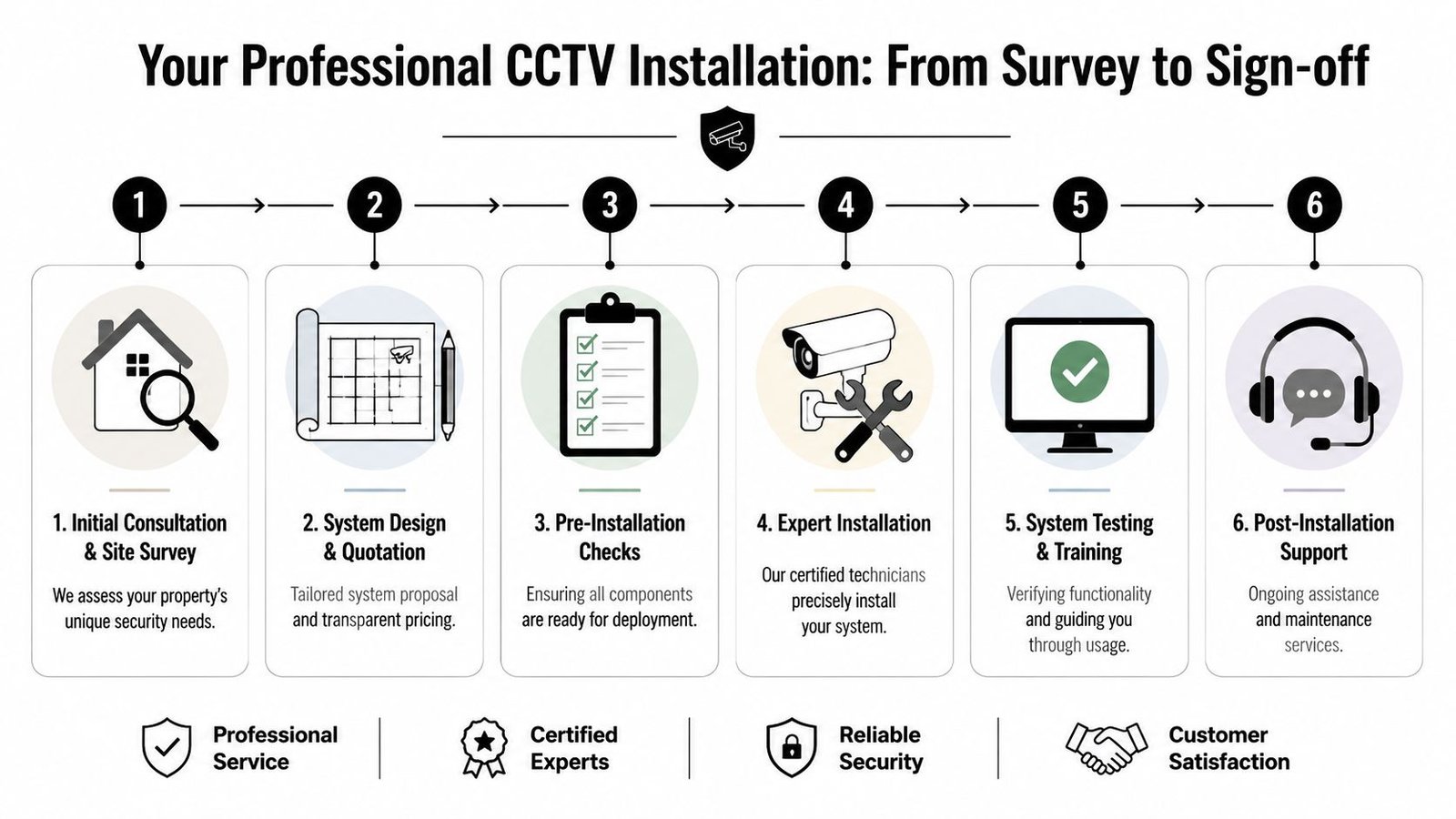
A proper installation should feel organised from the first conversation. If it doesn’t, that usually shows up later as messy cable routes, odd camera positions, and weak aftercare.
What happens before the first drill hole
The first useful step is the site survey. Not a rushed glance around, but a proper look at approach routes, lighting, likely entry points, neighbour boundaries, and where the recorder can live safely. At this stage, a good engineer should also ask how you’ll use the system. Live viewing only, incident review, staff safety, stock monitoring, or all of the above.
From there, the design should answer practical questions:
- Where are the critical views? Front doors, gates, rear access, shutters, or vehicle routes.
- What detail is needed? General overview is different from identifying a face or plate.
- How will footage be stored and accessed? Recorder location, app access, and retention planning all matter.
- Are there legal or planning concerns? This is especially important for shared boundaries and prominent external units.
Installation day and handover
On the day, the difference between a professional job and a hurried one is obvious. Camera heights should be deliberate. Cable runs should be discreet. External fixings should be weather-conscious. Recorder placement should be secure but still serviceable.
For domestic and commercial clients alike, the handover matters just as much as the install. You should be shown:
- How to view live cameras
- How to search playback
- How exported footage works
- How alerts behave
- What to do if broadband or power drops
That part is often skipped by rushed installers, and it’s where many owners end up frustrated. A system nobody knows how to use properly is money on a wall.
For a wider homeowner-focused take on planning and installation decisions in another market, this article on securing your Brisbane property is worth a look because the practical thinking translates well, even though local rules differ.
CCTV Rules in Barry Your Legal and Insurance Duties
This is the part many people underestimate. They assume CCTV is mostly about camera choice and placement. It isn’t. In Barry, as elsewhere in the UK, the moment your system captures areas beyond your private boundary, you may also be stepping into data protection responsibilities.
When a domestic system becomes a data protection issue
Homeowners need to comply with the Data Protection Act 2018 and ICO guidance. That includes respecting neighbour privacy, understanding signage needs, and potentially carrying out a privacy impact assessment where cameras capture public spaces. Generic placement guides often miss that point, as noted in this overview of common CCTV placement mistakes and UK privacy duties.
That matters in Barry because many properties sit close together. Terraced housing, shared side access, rear lanes, communal parking, and neighbour-facing gardens can all create problems if a camera sees more than it needs to.
A few practical points apply straight away:
- Aim tightly: Don’t use a broad angle if a narrower view covers the entrance you need.
- Review what the camera sees at night: Infrared spread and reflected light can reveal more of a neighbour’s property than expected.
- Think about signage: If the system captures people outside your immediate private space, signage may be appropriate.
- Retain only what you need: Keeping footage without a clear reason can create avoidable issues.
If your camera sees the public pavement, a shared alley, or your neighbour’s doorway, you should treat the setup as more than a simple DIY gadget.
Local planning and insurance points people miss
There’s another local issue people often discover too late. Some exterior installations may raise planning consent questions with the local authority, especially if the camera is prominent or the property has special characteristics. That doesn’t mean every camera needs permission, but it does mean assuming “it’ll be fine” isn’t a safe approach.
Insurance creates a second layer. If you expect CCTV to support a claim, the system should be compliant, functional, and properly maintained. A badly installed recorder, non-working camera, or a setup that creates privacy complaints can turn what should be useful evidence into an argument.
The smart approach is simple. Treat CCTV as both a security system and a responsibility. The legal side isn’t there to put people off installing cameras. It’s there to make sure they’re used fairly, proportionately, and in a way that stands up if challenged.
How to Choose a Trusted Local CCTV Installer
Choosing an installer isn’t just about who can fit cameras quickest. You’re trusting someone to assess weak points in your home or business, advise on privacy issues, route cables through your building, and leave behind a system you may rely on for years.

A reliable local installer usually shows a few clear signs. They’re willing to inspect the site properly. They explain trade-offs instead of pushing one package for everyone. They talk about retention, lighting, and privacy, not just megapixels.
Questions worth asking before you book
Ask direct questions and listen to how they answer.
- Are engineers DBS-checked? That matters when people are working in homes, schools, offices, and sensitive premises.
- Do they hold recognised accreditations? SafeContractor is one practical sign that standards and processes are taken seriously.
- Can they support the system after installation? Faults, app changes, storage issues, and camera cleaning all come up eventually.
- Do they understand local property types? Terraces, shops with flats above, small industrial units, and exposed coastal sites all need different thinking.
One factual local option in this market is Wisenet Security Ltd, which provides CCTV design, installation, and maintenance across South Wales and works with integrated systems including alarms and access control. The main thing that matters is whether the installer in front of you can design for your actual site rather than selling a generic kit.
A quick visual walkthrough of practical CCTV considerations can help before you commit to a quote:
The wrong installer often gives themselves away early. They don’t ask about legal boundaries. They dismiss maintenance. They promise blanket coverage without discussing glare, height, or recording retention. That usually leads to disappointment later.
System Maintenance and Monitoring Options
CCTV isn’t fit-and-forget equipment. It keeps working best when somebody checks it, cleans it, and notices problems before an incident exposes them.
What you can do yourself
Basic owner checks make a difference:
- Clean lenses carefully: Dirt, salt residue, and spider webs can ruin otherwise good footage.
- Check timestamps: If the time is wrong, exported footage becomes harder to use.
- Review sample playback: Don’t assume recording is happening just because live view works.
- Trim vegetation: Branches and leaves trigger motion events and block key views.
When ongoing support makes sense
Professional maintenance becomes more valuable when the system covers a business, a larger home, shared areas, or remote buildings. Recorders, hard drives, power supplies, apps, and network settings all need occasional attention.
This matters even more where continuous recording is expected. As noted earlier, NVR systems often need to hold 30 days of full HD recording, and that storage demand can be significant. Professional-grade hardware and periodic checks help avoid the nasty surprise of discovering missing footage when you need it.
If you’re weighing the pros and cons of ongoing support, this guide to what CCTV maintenance involves is a useful starting point.
Monitoring options also vary:
- Self-monitoring: You receive app alerts and review footage yourself.
- Managed response: Better suited to some commercial environments where someone must react quickly.
- Hybrid setups: Useful where owners want app access but also want support for out-of-hours periods.
Frequently Asked Questions about CCTV in Barry
Is wired CCTV better than wireless?
In most fixed installations, wired systems are the more dependable choice. They’re usually better for stable recording, stronger image delivery, and fewer dropouts. Wireless products can suit lighter domestic use, but they need careful thought around signal strength, battery routines, and long-term reliability.
Can I view my cameras on my phone?
Yes, that’s a standard expectation with modern systems. The important part isn’t just having an app. It’s having one that’s set up properly, tested at handover, and simple enough that you’ll use it.
Do I need CCTV signs at home?
Sometimes, yes. If your cameras only view within your own boundary, the position is simpler. If they capture public space or neighbouring property, signage and wider privacy responsibilities may come into play.
Will CCTV still work during a power cut?
Not unless the system has backup power in place. If continuity matters, ask about a UPS so the recorder and key equipment have some resilience during short outages.
How much does cctv installation barry usually cost?
The honest answer is that it depends on layout, camera count, cable routes, night performance, recorder capacity, and whether the system is domestic or commercial. A small house and a mixed-use business unit are completely different jobs. Any installer giving a firm price without a survey is guessing.
Should I buy a DIY kit or have it installed professionally?
DIY can work for simple, contained situations. Professional installation tends to make more sense where you need proper retention, legal guidance, discreet cabling, stable remote access, and evidence you can depend on.
If you want clear advice on cctv installation barry, Wisenet Security Ltd can help you assess the property, identify the legal and practical issues, and decide whether a professionally installed system is the right fit for your home or business.