Expert CCTV and Alarm Systems for UK Protection
You're probably in one of two positions right now. Either you've had a near miss, a delivery go missing, a gate left unsecured, a late-night alarm with no clear answer about what happened. Or you're looking at your property, home or business, and realising that a camera on its own or a bell box on its own doesn't fully solve the problem.
That's the point where individuals often begin searching for cctv and alarm systems, but the core question isn't which gadget to buy first. It's how to build a setup that detects trouble early, shows you what's happening clearly, and gives you a sensible way to respond. For homeowners and SMEs across South Wales and the South West, that matters because the risk profile is rarely simple. A terraced home in Cardiff, a retail unit in Bristol, a warehouse in Swansea, and a mixed-use building in Newport all need protection, but not in the same way.
Modern security works best when it behaves like a joined-up system. Cameras provide the visual story. Alarms provide fast detection and the first warning. When those two parts are designed together, the result is far more useful than either one standing alone.
Table of Contents
- Your Guide to Complete Property Protection
- The Two Pillars How CCTV and Alarms Work
- Essential Tech Features for Clear Evidence and Reliable Detection
- The Power of an Integrated System
- Smart Control Monitoring and Remote Access Explained
- Choosing Your System A Practical Guide for Homes and Businesses
- FAQs on CCTV and Alarm Systems
Your Guide to Complete Property Protection
A trader in Newport closes up for the night. The front shutter is down, the rear fire door is out of sight, and the van is parked beside the unit because there is nowhere else to leave it. At 2:13am, a motion alert comes through. Without a joined-up system, that alert can mean anything. With an integrated setup, the owner can see the camera view, confirm whether someone is on site, and decide whether to call out, trigger audio, or pass it straight to monitoring.
That is the difference between owning security equipment and having a security system.
For homes across South Wales and the South West, the pattern is similar. A side gate, a back garden, a driveway, or a porch camera all help, but separate devices often leave gaps in the moments that matter. One app shows video, another app handles the alarm, and neither gives a clear picture quickly enough. Integration fixes that by linking detection, verification, and response into one flow.
Good security design starts with behaviour, not hardware. It starts with how the property is used, where people approach from, which doors are used, and what would cause the biggest loss or disruption if something happened overnight.
In practice, that means planning around the property rather than buying isolated products. A detached house in Cardiff with rear lane access needs a different setup from a shop in Bristol with a stockroom and staff entrance. The right result is rarely “more cameras” or “more sensors”. It is coverage in the right places, alerts that make sense, and footage you can act on.
Modern buyers also expect more than a loud siren or a basic recording box. Remote viewing, usable night footage, and app control are now part of day-to-day expectations, and cloud-managed video has become a realistic option for some sites. For businesses comparing newer video platforms, MV cloud cameras for modern venues show how centralised viewing and management can fit into a broader security setup.
The alarm side matters just as much. If you want a plain-English breakdown of zones, sensors, signalling, and response paths, this guide on how alarm systems work in practice covers the basics well.
A sensible system should do three jobs well:
- Deter clearly: visible cameras, external sounders, lighting, and signage should make the site look defended before anyone tests it.
- Detect early: doors, windows, internal routes, yards, and vulnerable access points should raise the right alert without constant false alarms.
- Confirm quickly: the person receiving the alert should be able to check footage fast and decide what needs doing.
That last point is often missed. In the field, the systems that perform best are not always the ones with the longest feature list. They are the ones that make it easy to tell whether an alert is a real threat, a delivery, a member of staff, or a fox crossing the yard.
The Two Pillars How CCTV and Alarms Work
A common South Wales scenario goes like this. A shop owner in Cardiff gets an alert after closing time, opens the app, and sees only a blur at the rear fire exit. The alarm did its job by raising attention, but the camera view was not planned well enough to confirm what caused it. In a detached home in the South West, the problem can be the reverse. Clear footage exists, but nobody knows there is an issue until the next morning because no detector triggered an alert.
CCTV and alarms solve different problems. CCTV shows what is happening around the property. The alarm system detects a security event and pushes that event into a response, whether that is a local siren, an app notification, or monitoring.
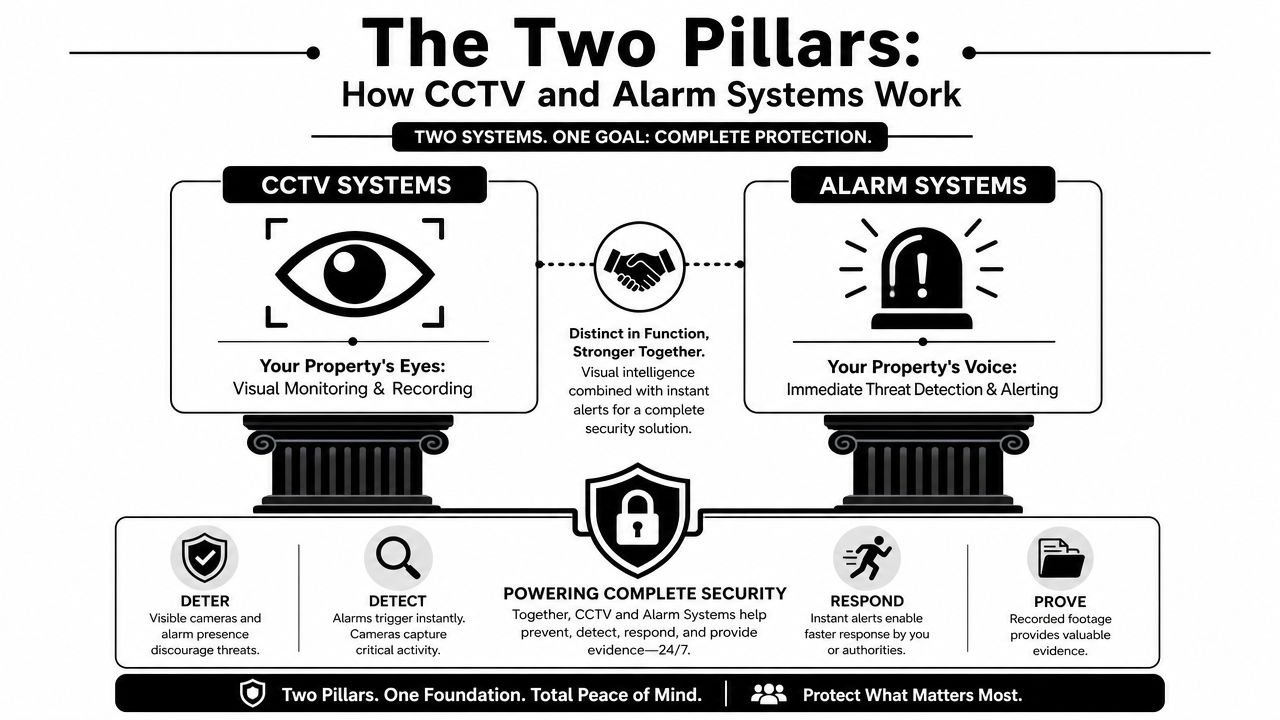
CCTV is the visual layer
Good CCTV does three practical jobs. It makes the site look defended, it lets someone check an alert quickly, and it preserves footage that may help with an insurance claim, staff incident, neighbour dispute, or police enquiry.
Deterrence matters, but camera position matters more. One camera covering a gate, front path, trade entrance, or loading door at the right height usually does more than several wide shots with no facial detail. That comes up often on homes with side access and on small business units where the rear elevation is a better target than the front.
Verification is where CCTV earns its keep day to day. If a sensor trips at 2am, the first question is simple. Is this a person who needs a response, or something harmless? For owners comparing newer connected video options, MV cloud cameras for modern venues show how centralised viewing can fit into a broader setup, especially for multi-site operators across Bristol, Newport, Swansea, or the wider South West.
Evidence is the third job. That depends less on the number of cameras and more on whether each one is aimed at a decision point such as a doorway, gate, till, corridor, or vehicle entrance. Wide coverage feels reassuring during a sale. Usable close detail is what matters after an incident.
Alarms are the detection and alert layer
An alarm system watches for conditions that should never be ignored. A door contact opens out of hours. A PIR sees movement in a protected room. A shock sensor picks up an attack on a window or door. A tamper circuit reports interference with the equipment itself.
That speed is the main advantage. Cameras often need a person to review the image. An alarm is built to spot the event and raise attention straight away.
A bell-only setup can still suit some properties. On a terraced street or in a small workshop with nearby neighbours, a loud external sounder may be enough to cut an intrusion short. For a larger house, a pharmacy, a trade counter, or any site that sits empty for long periods, app alerts and monitored signalling usually make more sense because somebody needs to know about the activation even when nobody is nearby.
If you want the alarm side explained in plain English, this guide on how alarm systems work in practice covers zones, sensors, signalling paths, and response options clearly.
The practical point is simple. CCTV helps confirm and evidence an incident. Alarms help catch it at the moment it starts. For homes and SMEs in South Wales and the South West, the strongest systems are planned as one joined-up setup so detection, verification, and response support each other instead of leaving gaps.
Essential Tech Features for Clear Evidence and Reliable Detection
A camera either gives you a usable image of the event, or it gives you footage that looks fine until you try to identify a face, a vehicle, or the point of entry. The same goes for alarms. A detector either trips at the right moment and reports clearly, or it creates nuisance activations that get ignored.
For homes and SMEs across South Wales and the South West, the strongest results usually come from getting a few technical choices right rather than chasing long feature lists.
What makes footage usable
Resolution matters, but only as part of the whole design. A 4K camera mounted too high, covering too wide an area, or looking into a badly lit driveway will still disappoint. In practice, clear evidence depends on matching the camera position, lens, lighting, and recording settings to the job you need it to do.
The better question is simple. Will this camera identify a face at the gate at night, or read what happened near the shutter door after closing time?
That is why I usually split camera planning into two jobs. One camera can give broad scene awareness. Another can give identification detail at the choke point. Trying to get both from one ultra-wide view often leaves you with neither.
Three camera features make the biggest difference on real sites:
| Feature | What it does well | Where it matters most |
|---|---|---|
| HD or 4K recording | Preserves more detail in faces, clothing, and vehicle activity when the scene is set up properly | Front doors, receptions, tills, loading areas |
| Low-light performance or controlled illumination | Keeps images readable after dark without turning people into blur or silhouette | Gardens, car parks, side access, yards |
| Correct lens and viewing angle | Puts detail where identification is actually needed instead of wasting pixels on empty space | Gates, paths, entrances, barriers |
In the UK, this matters even more because so many incidents happen in poor weather, low winter light, or mixed lighting around entrances and car parks. A small shop in Newport, a yard in Llanelli, or a detached house on the edge of Bath all face the same problem. Coverage is easy to sell. Useful evidence takes planning.
If you are weighing up camera platforms before you buy, this explanation of the difference between IP cameras and HD analog CCTV gives a solid starting point.
What makes alarms dependable
Alarm reliability comes from sensor choice, zone design, and signalling paths that still work when there is a problem on site.
Pet-tolerant detectors are a good example. They can work well in houses where a dog has access to part of the ground floor overnight, but they still need sensible placement and realistic expectations. A detector aimed across a staircase, near a radiator, or into direct sun can still cause trouble. Good setup matters more than the label on the box.
Commercial systems need a tighter design. A small office in Cardiff will not need the same grading, detector mix, or reporting path as a builders merchant in Bristol or a storage unit in Bridgend. Standards such as BS EN 50131 shape that decision by risk level, detector performance, tamper protection, and signalling options.
The alarm features worth checking are straightforward:
- Zoned detection: separate areas such as office, warehouse, stock room, upstairs rooms, or garage should report independently.
- Tamper protection: interference with detectors, keypads, bell boxes, or the control panel should trigger a report.
- Entry and exit setup: the system should match the way people enter, leave, and lock up.
- Reliable signalling: alerts need to reach the user or monitoring service with enough context to support a decision.
A technically advanced system that irritates the user gets bypassed, part-armed, or left unset. A simpler system that people trust usually protects the site better.
Storage and system design matter too
Footage is only useful if you can find it, keep it for long enough, and export it without a fight. That means planning storage around the number of cameras, recording mode, image quality, and the level of activity on site. A quiet rural property outside Abergavenny needs a different retention plan from a busy trade counter in Exeter.
Business owners should also look beyond the recorder itself. Network stability, backups, user permissions, and protection against drive failure all affect whether evidence is still available when it is needed. Guidance on Ensuring secure data storage for SMBs is worth reviewing alongside the cameras and alarm hardware.
The practical test is simple. After an incident, can you pull the right clip quickly, prove what happened, and keep that evidence safe? If the answer is unclear, the specification still needs work.
The Power of an Integrated System
An alarm event at 2:14 am means very little on its own. If that same alert arrives with the exact door zone, the nearest camera view, and a clip of what triggered it, the person responding can make a sound decision straight away.
That is the value of integration. It turns separate bits of hardware into one working system.
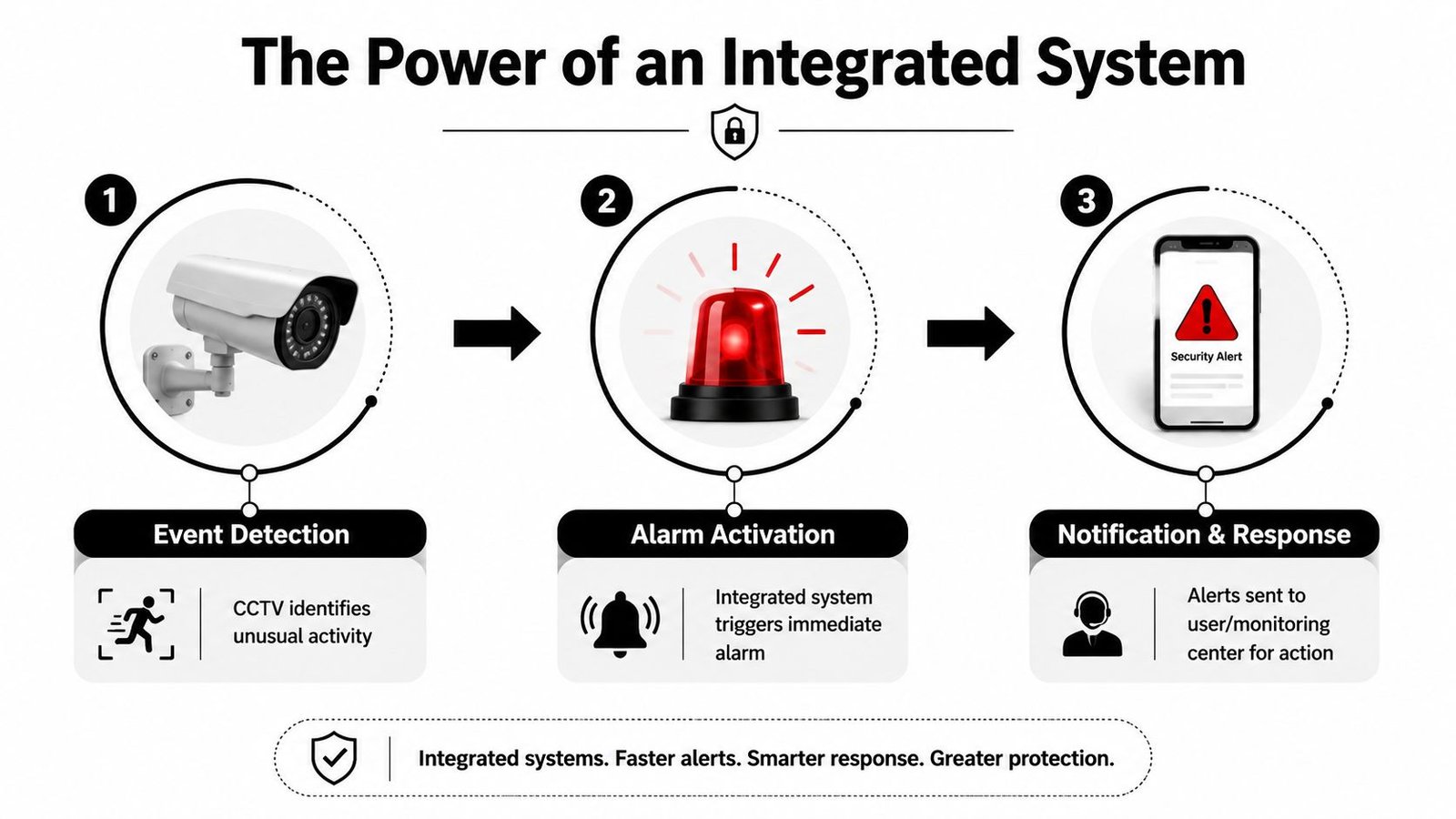
How one event should flow
Take a common out-of-hours case at a warehouse in Swansea or a retail unit in Bristol. A rear service door opens outside normal access times. The intruder alarm logs the exact zone. The linked camera for that area is brought forward, recording is flagged around the event, and the alert sent to the user or monitoring team includes the right context from the start.
When integration is set up properly, the sequence is straightforward:
A detector starts the event
A door contact, PIR, or perimeter device activates in a defined area.Video gives immediate context
The linked camera shows whether the trigger is a person, a delivery mistake, staff error, or something harmless such as wind or wildlife on an exposed site.Someone responds with evidence
The owner, keyholder, or monitoring service decides what to do based on what they can see.
That saves time, but the bigger gain is accuracy. Good integration cuts down guesswork.
Why integration changes the outcome
A stand-alone alarm tells you something happened. An integrated system helps show what happened, where it happened, and whether it needs an urgent response.
For homes and small businesses across South Wales and the South West, that matters more than long feature lists. A detached property outside Monmouth may need perimeter awareness and quick video checks without repeated false alerts. A shop in Cardiff, Newport, or Exeter may care more about confirming whether an activation is a break-in, a staff access issue, or a cleaner arriving outside the usual routine. The same principle applies in both cases. Faster verification leads to better decisions.
Without integration, the usual problems are familiar:
- an alarm notification with little detail
- time lost opening the wrong camera views
- uncertainty about whether anyone is on site
- unnecessary keyholder attendance or delayed police contact where applicable
With integration, the response is usually more controlled:
- the alert names the zone
- the relevant camera opens with it
- the user can check the event quickly
- the incident record is easier to review afterward
I see this make the biggest difference on sites that have more than one risk to manage. A mixed-use building might need separate arming for common areas, offices, and stock rooms, while still tying all video to the right alarm events. A small industrial unit may want shutters, rear doors, and internal detection treated differently after hours. Those decisions are practical, not cosmetic.
There are trade-offs. Integrated systems need better planning than separate products bought one at a time. The network has to be stable, device permissions need to be set correctly, and the app experience must be simple enough that people use it under pressure. If the setup is too complicated, users ignore alerts or switch parts of it off. If it is designed properly, day-to-day operation stays clear.
One local example is a custom approach to integrated security solutions for CCTV, alarms, access control, and remote management, where the system is designed to work as a coordinated whole rather than as separate installations. The same connected approach is common in wider building technology too, including specialist IoT services that link devices, data, and remote management across one platform.
If an alarm cannot be checked quickly, people tend to overreact or ignore it. Neither response protects the property well.
Smart Control Monitoring and Remote Access Explained
A common real-world scenario is an alert arriving at 2:13am while you are away from the property. The question is not whether the system can make noise. The question is whether someone can check the event quickly, confirm what is happening, and decide on the right response without guessing.
That is where smart control matters. Good remote access shortens the gap between alarm activation and a sensible decision. For homeowners in South Wales and the South West, that can mean checking a rear garden camera during a storm in Swansea, or confirming whether a delivery yard alert in Bristol is a person, a fox, or a gate moving in high wind.
Bell-only self-monitoring or professional monitoring
A bell-only system still suits some properties. It is simple, lower in cost, and can deter opportunists if neighbours are close enough to notice. The limitation is obvious. If nobody hears it, or nobody can verify the cause, you still do not know what happened until later.
Self-monitoring is where integrated systems start to show their value. The phone alert arrives, the app shows which detector activated, and linked cameras let you check the area straight away. For an owner-managed shop, a holiday let, or a family home, that is often the right balance between cost and control.
Professional monitoring adds another layer of discipline. Signals are received off site and handled through an agreed process, which is useful for vacant premises, managed buildings, and businesses where the keyholder cannot always respond. It costs more, and it only works well if signalling paths, contact lists, and user procedures are kept up to date.
| Monitoring option | What happens when triggered | Best suited to |
|---|---|---|
| Bell-only | Local siren sounds on site | Smaller homes, low-complexity sites |
| Self-monitored app alerts | User receives notification and checks remotely | Homes, owner-managed shops, small offices |
| Professionally monitored | Event follows a managed response pathway | Warehouses, managed properties, higher-risk businesses |
This short explainer is useful if you want to see the topic discussed visually:
What BS EN 50131 means in practice
For UK intruder alarms, BS EN 50131 affects more than paperwork. It sets out grades based on risk and environment, and those grades influence the equipment, signalling method, and maintenance standard that should be used. On many commercial jobs, insurers, landlords, and managing agents expect that level of system design because it reduces avoidable faults and supports a clearer response process.
For the user, the standard shows up in day-to-day reliability.
- System grade: the risk level of the property helps determine the right control equipment, detectors, and signalling options.
- Detector choice: a stock room, communal entrance, pet area, and draughty outbuilding do not all suit the same sensor.
- Signalling resilience: if one communication path fails, a second path may still carry the alarm event.
Remote access is only useful when it is clear and quick
Remote control should make routine jobs easier under normal conditions and under pressure. Set the system when leaving. Part-set the ground floor at night. Check whether the cleaner has unset the office on time. Review the clip attached to an activation instead of scrolling through hours of footage. On integrated systems, those actions sit in one place, which is far more practical than switching between separate apps.
I see one mistake regularly. People buy devices with plenty of features, then live with a poor app that hides the information they need. If remote access is slow, cluttered, or unreliable on mobile signal, users stop trusting it. In parts of South Wales and the South West, where some rural sites still deal with patchy connectivity, that trade-off needs testing before the system is signed off.
If you're evaluating how security systems fit into broader connected environments, it's worth understanding the role of IoT services in linking devices, apps, and remote management workflows.
Remote access should reduce uncertainty. A good system shows the event, the location, and the next action without delay.
Choosing Your System A Practical Guide for Homes and Businesses
A good security system matches how the property is used. A family house in Newport, a rural home outside Carmarthen, and a small trade unit in Bristol may all need CCTV and an intruder alarm, but they should not be specified the same way. The right choice comes from risk, layout, daily routine, and how quickly someone can respond when something happens.
What homeowners should prioritise
For most homes, the job is simple. Detect the approach, record a usable image, and make it easy to arm the system every day.
That starts outside. Front doors, driveways, side paths, rear gates, and detached garages usually deserve attention before any wider garden view. Inside, the better approach is to protect the route an intruder is likely to take after entry. Hallways, landings, and through-routes often give better coverage than filling the house with devices that add cost without adding much protection.
A sensible home setup usually includes:
- A front-facing camera with a clear purpose: caller activity, parcel issues, and anyone approaching the entrance.
- Coverage of side and rear access: these areas are often less visible from the street and more attractive to intruders.
- Internal detection on circulation routes: enough to confirm movement through the property without overcomplicating the system.
- Controls the household will use: quick arming, clear part-set options, and simple notifications.
In South Wales and the South West, I often see homeowners ask for more cameras than they need and too little thought about response. Four average views are less useful than two well-placed cameras tied to an alarm that tells you exactly which area triggered.
What businesses and landlords should prioritise
Commercial properties need clearer zoning and better discipline around who can access what. A convenience shop, a block of flats, and a workshop all have different risks, but the same principle applies. Protect the points where loss, trespass, or dispute is most likely.
For a shop, that may mean entry doors, till positions, stock areas, and the rear exit. For a workshop or small warehouse, it often means yard access, roller shutters, tool storage, loading areas, and staff entrances. In multi-occupancy buildings, shared corridors, bin stores, and main entrances matter just as much as the individual units because that is where responsibility can become unclear after an incident.
Alarm design also needs to reflect the site. Higher-risk premises may need graded equipment, tamper protection, resilient signalling paths, and monitoring arrangements that suit insurer or police response requirements, as noted earlier in the article. The point is not paperwork for its own sake. It is making sure the system still performs when there is an attempted break-in, a communication fault, or a dispute about what happened and when.
A business buyer should ask:
| Question | Why it matters |
|---|---|
| What am I protecting? | Tools, stock, vehicles, cash areas, offices, and shared spaces need different coverage and different alarm logic |
| Who opens and closes the site? | Daily routines affect user permissions, entry times, and the risk of false alarms |
| What response do I need out of hours? | Some sites only need a local audible alarm. Others need keyholding, monitoring, or verified video review |
| Do I need a record of events? | User logs, alarm history, and linked video clips are useful for landlords, SMEs, and sites with several staff |
Integrated systems earn their keep here. If the back door contact activates at 22:14, the owner or keyholder should be able to see the matching camera view and the alarm event together, not piece it together from separate apps and timestamps.
Why professional installation usually pays off
DIY systems can work in smaller, lower-risk properties, but the weak points show up quickly. Cameras get mounted too high to identify faces. Wireless devices end up at the edge of signal range. External lighting blows out the night image. The alarm covers the wrong room because nobody mapped the likely entry route.
Professional installation improves the outcome because the design starts with the building and the users, not the box contents. Cable routes are planned properly. Detection is chosen for the room conditions. Camera positions are set for recognition or identification rather than general viewing. Testing happens in daylight and after dark.
That has a direct effect on reliability later. Fault-finding is easier, maintenance is cleaner, and the whole system is more likely to be used properly because it fits the site. For homeowners, that means fewer blind spots and fewer nuisance alerts. For SMEs and landlords, it usually means better records, fewer avoidable callouts, and a system that stands up better when an incident has to be reviewed.
FAQs on CCTV and Alarm Systems
Do I need to think about GDPR if I have CCTV at home or at my business
Yes. The legal obligations differ by setting, but the core principles are practical. The Information Commissioner's Office emphasises data minimisation, retention control, and signage for domestic and commercial CCTV in the UK, and the bigger issue is whether the system is configured to capture usable identification at the moment an alarm triggers while staying compliant, as discussed in this article covering CCTV evidence handling and compliance questions.
For most users, that means don't collect more footage than you need, don't keep it longer than necessary, and make sure people are informed where required.
Can cctv and alarm systems work with my existing Wi-Fi
Often, yes, but that doesn't mean Wi-Fi is always the best backbone for every part of the system. Many smaller home setups use wireless elements successfully. Larger homes, businesses, and camera-heavy sites usually benefit from hardwired connections for stability, especially where multiple cameras record continuously.
What happens in a power cut
A properly specified system should include backup arrangements so it doesn't die the moment mains power drops. The exact design varies, but this is something to ask about before installation, not after the first outage.
How long should a professionally installed system last
The hardware can last well when it's installed correctly and maintained, but lifespan depends on environment, usage, firmware support, and whether the original design still fits the property. Outdoor cameras on exposed elevations, for example, have a harder life than indoor detectors in stable conditions.
Is more coverage always better
No. More cameras can create more clutter, more storage demand, and more footage to review without improving outcomes. What matters is whether the system captures usable identification where it counts and whether the alarm event leads you straight to the right footage.
If you want a clear plan for cctv and alarm systems at your home, shop, warehouse, or managed property, Wisenet Security Ltd can assess the site, identify key risk points, and recommend a setup that fits how the building is used. That's usually the fastest way to avoid blind spots, nuisance alarms, and expensive features that don't improve protection.