Trusted Access Control Installers for Your Security
You’re usually looking for access control installers when something has already gone wrong, or nearly has. A member of staff leaves and never returns the key. A cleaner still has out-of-hours access months later. A side entrance gets used more than the main door and nobody can tell who opened it, or when. In a small office in Cardiff, a retail unit in Newport, or a warehouse near Swansea, the problem is the same. A physical key gives access, but it gives no control.
That’s where buyers in South Wales often get caught. They know they need more than locks, but most guides online are written for other markets and skip over the UK-specific detail that matters when you’re appointing an installer. Compliance, engineer screening, documentation, fire door coordination, insurance acceptance, and standards such as BS EN 50131 are what separate a tidy-looking installation from one that stands up when there’s an incident, an audit, or a claim.
This is the practical view. Not the sales brochure version. If you’re comparing access control installers for a shop, office, school gate, multi-tenant building, or industrial unit, you need to know what works, what causes trouble later, and what a competent installer should sort out before the first reader goes on the wall.
Table of Contents
- Why Your Keys Are Your Biggest Security Risk
- Decoding Access Control Systems Keypad Card or Biometric
- Finding Reputable Access Control Installers in South Wales
- Vetting Installers Beyond the Quote
- Essential Questions and Cost Considerations
- Your Access Control Installation Checklist
Why Your Keys Are Your Biggest Security Risk
A key feels simple because it is simple. That’s the problem.
If one goes missing, you’ve got a decision to make straight away. Ignore it and accept the risk, or change cylinders, issue new keys, and hope nobody copied the old one. For a business with staff turnover, shared doors, delivery access, or multiple entrances, that cycle gets expensive and messy very quickly.

Modern access control fixes the core weakness. Instead of handing out permanent physical access, you issue permissions that can be changed, removed, scheduled, and logged. Someone leaves on Friday. Their credential stops working on Friday. A contractor only needs the plant room on Tuesdays. The system can enforce that. If you need a broader security response, it often sits well alongside services such as professional key holding support for managed out-of-hours access and incident response.
What keys can’t do
A key can’t tell you who entered first thing in the morning. It can’t stop one person lending access to another. It can’t create an audit trail for a disputed incident. It also can’t be updated when your building use changes.
That’s why so many sites move away from keys once they start taking security management seriously. The wider market reflects that shift. The global access control market was valued at USD 9.8 billion in 2023, with projections indicating growth to USD 15.2 billion by 2029, according to access control market data compiled here. The reason is straightforward. Electronic access is easier to manage, easier to review, and usually far easier to scale.
Practical rule: If losing one key means changing locks, your access system is costing more than it looks.
Where local businesses usually feel the pain first
In South Wales and the South West, the early warning signs are usually operational rather than dramatic:
- Staff turnover: Former staff still have access unless someone physically collects every key.
- Shared buildings: Tenants, cleaners, delivery drivers, and maintenance teams all need different access windows.
- Rear or side doors: These become unmanaged entry points unless they’re controlled properly.
- Insurance concerns: After a loss or dispute, you may need evidence of who could access what.
For homeowners, the same principle applies on a smaller scale. Lost keys, trades access, annexes, side gates, and short-term occupancy all create avoidable risk when control depends on a piece of cut metal.
Decoding Access Control Systems Keypad Card or Biometric
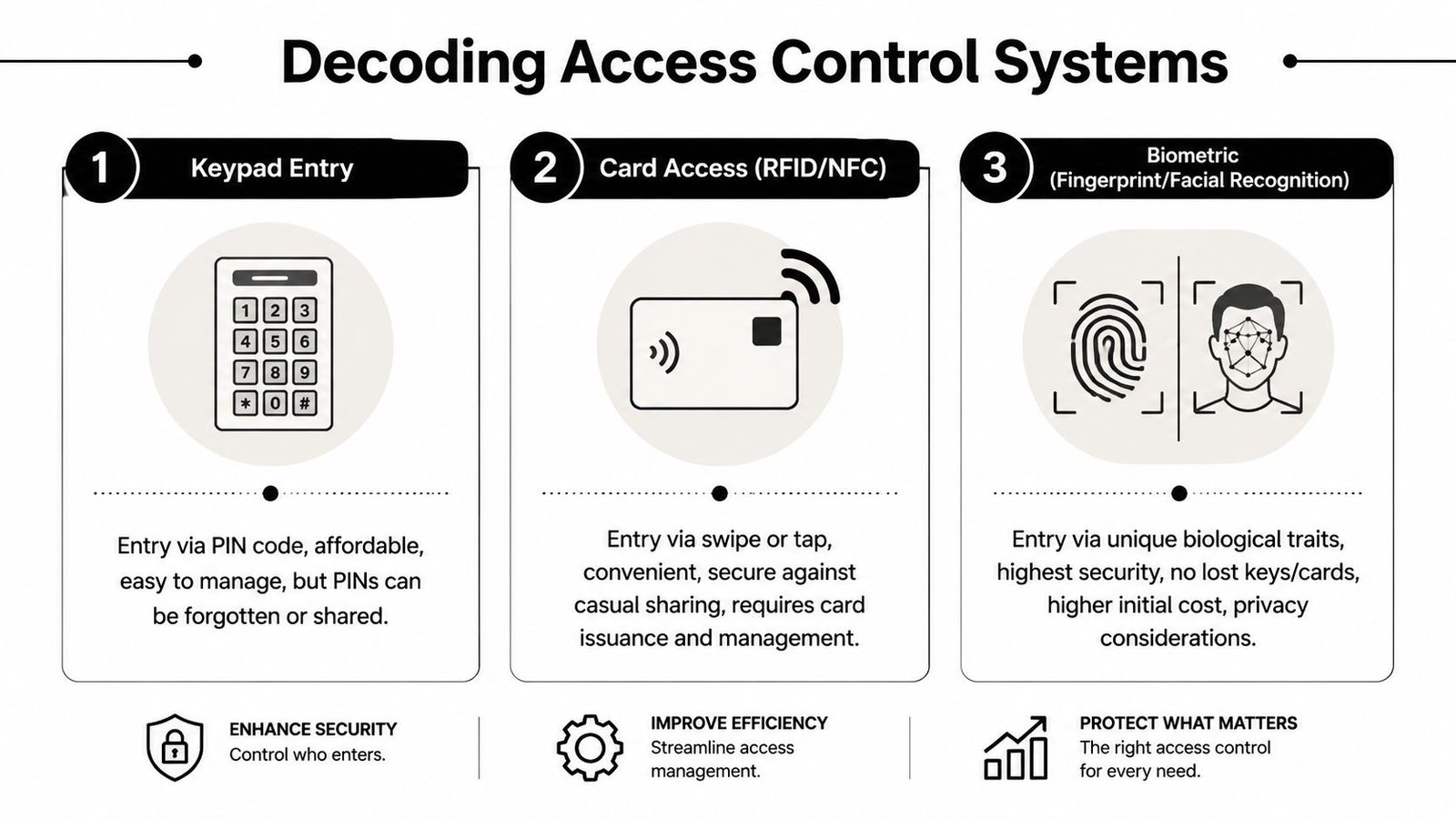
Most buyers don’t need every option on the market. They need the right option for the door, the users, and the level of risk. In practice, most systems you’ll be offered will revolve around three reader types: keypad, card or fob, and biometric.
Keypad systems
Keypads are often the cheapest entry point and they suit low to moderate risk internal doors well. Think stockrooms, staff-only areas, small offices, bin stores, or communal doors where simplicity matters more than forensic accountability.
The strength is convenience. There’s nothing to issue and nothing to carry. Change the code and access changes with it.
The weakness is obvious too. People share PINs. They write them down. They choose easy sequences. If a code spreads around a site, you don’t really know who used it.
Best fit: smaller premises, back-of-house retail areas, or residential side access where budgets are tight and user numbers are modest.
Less suitable: high-turnover teams, high-risk areas, or any site where you need a clean audit trail tied to a named person.
Card and fob systems
Card and fob systems are still the most common setup for many commercial sites because they strike a sensible balance between control, cost, and ease of use. Staff tap a credential. Managers can add or revoke permissions quickly. Lost fobs are inconvenient, but they’re usually far less disruptive than lost keys because they can be cancelled rather than replaced physically.
For offices, schools, multi-tenant buildings, and many industrial units, this is often the practical middle ground. You can set time schedules, restrict zones, and assign credentials by role. That makes them especially useful where reception, stores, offices, and external doors all need different rules.
Card and fob systems usually work best when the installer also thinks about enrolment, leavers, visitor access, and who in your business actually administers the software.
Biometric systems
Biometric readers, such as fingerprint or facial recognition, suit sites where identity matters more than simple possession of a token. They reduce the old problem of a card being handed from one worker to another and can tie in well with time and attendance in warehouses, logistics sites, and controlled industrial spaces.
That said, biometrics are not a magic upgrade for every door. They need careful setup, user education, data handling discipline, and hardware that’s appropriate for the environment. Wet hands, gloves, outdoor exposure, and fast-moving shift changes all affect what works in practice.
Biometric access control installations grew by 35% in South West industrial hubs like Bristol and Swansea during 2025, according to NSI statistics referenced here. That aligns with what many warehouse and multi-user sites want now. Fewer shared credentials, cleaner user logs, and better operational control.
If you run a leisure site, member access adds another layer of consideration around throughput, convenience, and remote management. This guide on how to secure your gym facility is useful because it looks at how access control affects day-to-day operations, not just hardware choice.
A quick comparison
| System type | Usually strongest for | Main drawback | Typical local use case |
|---|---|---|---|
| Keypad | Low-cost controlled entry | PINs get shared or forgotten | Small office internal door, stockroom, gate |
| Card or fob | Everyday commercial access | Credentials must be issued and replaced | Retail, offices, schools, apartment common doors |
| Biometric | Identity-based control | Setup, privacy, and environment matter more | Warehouses, restricted areas, multi-user industrial sites |
What usually works best
Very few sites should be designed around a single idea of “best”. Good access control installers match the method to the risk. A front office may suit cards. A server room may need biometric or dual credentialing. A cleaner’s cupboard may only need a keypad. Mixed systems are common because doors don’t all do the same job.
If you’re still narrowing down the right setup, this guide to choosing the right access control system for your premises helps frame the decision around how your building is used.
Finding Reputable Access Control Installers in South Wales
The best place to start isn’t the cheapest search result. It’s the shortlist of firms that already work properly within the security trade.
A decent installer should understand door hardware, cabling, software permissions, life-safety coordination, and UK compliance expectations. A general electrician or handyman may be capable with wiring, but access control problems usually appear in the details. Door release logic, fail safe versus fail secure, emergency egress, audit trails, and user administration are where amateur installations come unstuck.
Where to build your shortlist
Start with the manufacturer side. If you already know you want a platform such as Paxton or Hikvision, look for installers that regularly specify and maintain those products. Product familiarity matters because good installation isn’t just fitting readers. It’s commissioning the system properly and handing over a setup your team can use.
Then check UK security accreditation directories and trade bodies. This helps filter out firms that market security systems but don’t operate like dedicated security specialists. Local business referrals can be helpful too, especially from property managers, facilities teams, or neighbouring firms with similar buildings.
For another useful perspective on screening providers, this article with expert access control insights from Constructive-IT is worth reading because it focuses on what trust looks like before work starts, not after something fails.
What to avoid early
Some warning signs show up before the site survey is even booked:
- They quote too fast: If someone prices a full system without asking about door types, occupancy, fire routes, or existing infrastructure, they’re guessing.
- They only talk hardware: Readers and locks matter, but so do permissions, maintenance, and compliance records.
- They can’t describe similar work: A shop front, a school gate, and a warehouse roller shutter all raise different issues.
- They dismiss standards: If a firm treats UK standards as paperwork rather than part of the installation, keep looking.
A good installer asks awkward questions early. A poor installer avoids them until the variation costs start.
Local knowledge matters
South Wales jobs often involve older buildings, mixed-use sites, awkward cable routes, weather-exposed entrances, and doors that have been altered over time. A local installer should recognise those realities and design around them. They should also understand how local insurers, landlords, and managing agents tend to assess security upgrades.
That local grounding matters more than flashy branding. The right access control installers are the ones who can walk your site, identify what’s compliant, spot what isn’t, and explain the trade-offs in plain English.
Vetting Installers Beyond the Quote
A quote tells you what a company wants to supply. It doesn’t tell you whether they should be trusted to install it.
That distinction matters more in access control than many buyers realise. The hardware can be excellent and the result can still be poor if the installer gets the design, commissioning, documentation, or handover wrong.

A 2023 UK report found that 42% of small businesses in Wales had insurance claims denied due to non-certified security installations, with only 28% aware of the mandatory BS 7858 security screening for engineers, according to this report summary on certified installations and screening awareness. That should change the way you read every quote that lands in your inbox. Price matters. Installer legitimacy matters more.
The checks that actually matter
DBS checks are straightforward. If engineers are going to work in schools, care settings, residential developments, or anywhere with sensitive access, you should know who is being sent to site.
BS 7858 screening matters for security personnel because it deals with vetting and screening standards for people working in security environments. Many buyers have never heard of it until there’s a compliance question after the event.
SafeContractor accreditation isn’t a badge for the brochure. It’s a sign the company has been assessed around health and safety processes. For work on live premises, shared sites, and occupied buildings, that matters.
Insurance and written method statements are just as important. Access control work often affects doors, escape routes, glazing, and the daily use of the premises. You want to know how they plan to do the job safely and what happens if something is damaged or misconfigured.
Where BS EN 50131 fits
Buyers often hear BS EN 50131 in relation to intruder alarms, but it matters in mixed security environments where systems are linked or expected to perform within broader security and insurer requirements. If an installer proposes an integrated setup involving intruder alarms, door control, monitored signalling, or shared event reporting, they should be able to explain how standards apply and where the boundaries are.
That doesn’t mean every access control door is “under BS EN 50131” in a simplistic sense. It means competent access control installers must understand when the project touches standards, how that affects design, and what documentation is needed.
Check this carefully: If an installer can’t explain how access control interacts with fire escape, alarm response, and door hardware standards, they’re not ready to lead the job.
Questions that separate professionals from box movers
Ask these in plain language and listen to how they answer:
- Who will attend site? You want to know whether the surveyor is also the project lead, or whether the job gets handed to subcontractors you’ve never met.
- What paperwork will I receive? A proper handover should include user guides, permissions structure, device schedules, and test records.
- How do you handle emergency egress? This is essential on access-controlled doors.
- Will you coordinate with fire alarm, CCTV, or gate automation providers if needed? Good installers work across interfaces, not in silos.
A short explainer helps here:
What a proper survey should feel like
A real survey is detailed. The installer should inspect the door construction, frame condition, lock compatibility, power routes, network needs if relevant, user numbers, visitor flow, and any linking systems such as CCTV or intercoms. They should ask who needs access, when, and who will manage adds and deletes after handover.
If they don’t ask about leavers, holiday cover, delivery access, and what happens during a fire alarm, they’re not surveying the job properly. They’re pricing hardware.
Cheap quotes usually hide expensive problems
The lowest quote often omits the awkward work. Cable containment. Door upgrades. Fire relay coordination. Software setup. User training. Final testing. Site return visits. Those don’t disappear just because they weren’t written down.
What works is a complete scope, a competent install team, and clear compliance evidence. What doesn’t work is buying readers and hoping the details sort themselves out later.
Essential Questions and Cost Considerations
Once you’ve got a shortlist, the final decision usually comes down to how well each installer answers practical questions. Not marketing questions. Operational ones.
Poor implementation causes 34% of access control system failures, according to industry data on installation quality and testing protocols. That’s why the interview matters. You’re not just buying hardware. You’re buying design judgement, commissioning quality, and support after handover.
Ask about integration first
A standalone door on a small unit is one thing. Most business sites aren’t that simple.
If you already have CCTV, an intruder alarm, an intercom, gate automation, or a fire alarm interface, ask exactly how the new system will interact with what’s already there. Don’t accept “it should work”. Ask what events can be linked, what gets recorded, and who is responsible if one system affects another.
Here are the questions worth asking:
- How will this integrate with my existing CCTV or intercom? You want a clear answer on event linkage and operator workflow.
- What happens on fire alarm activation? Controlled doors must behave correctly for safe egress.
- Can it handle multiple doors or sites later? Even if you’re starting small, expansion should be considered now.
Clarify what is included in the install
Many disputes come from assumptions. One party thinks training is included. The other thinks software setup beyond basic enrolment is extra. Get the detail in writing.
A sound proposal should make these points clear:
| Cost area | What to clarify |
|---|---|
| Hardware | Readers, locks, power supplies, exit buttons, enclosures, credentials |
| Installation | Cabling, door interface work, making good, commissioning |
| Software | Licensing, setup, remote management, user permissions structure |
| Handover | Training, admin guides, as-fitted records, test results |
| Aftercare | Maintenance visits, callout terms, fault response, replacement parts |
Don’t ignore the admin burden
The best technical system can still become a headache if nobody can manage it easily. Ask who adds new users, who deletes leavers, whether permissions can be grouped by role, and whether reports are easy to pull when there’s a problem.
That matters for one door as much as twenty. Systems that are awkward to administer get neglected. Old users remain active. Temporary workarounds become permanent. Eventually the building ends up less secure than the client expected.
“If your manager needs to ring the installer every time a member of staff changes, the system has been handed over badly.”
Maintenance is part of the purchase
Access control is not fit-and-forget. Door closers drift, locks wear, credentials are lost, users change, and software settings need review. A proper maintenance arrangement should say what is tested, how often, and what support is available when there’s a fault.
Ask direct questions:
- What does the maintenance agreement cover?
- Are labour and parts both included, or only one?
- What is the response process for a failed door during trading hours?
- Will you review user permissions during service visits, or only fix faults?
What usually drives costs up later
The surprise costs aren’t always in the reader itself. They tend to sit in surrounding work and future admin.
Common examples include:
- Door suitability issues: Existing doors may need new locks, closers, or release hardware.
- Cabling challenges: Older buildings and finished interiors can make neat cable routes harder.
- Software additions: Extra operators, doors, or remote management features may change the licence requirement.
- Out-of-hours working: Busy sites often need installation outside trading hours to avoid disruption.
The right installer won’t pretend those issues don’t exist. They’ll identify them early and tell you what’s optional, what’s advisable, and what is not optional.
Your Access Control Installation Checklist
The final decision is easier when you reduce it to checks you can use. A good access control installation should still look sensible when you review it from four angles: security, compliance, usability, and maintenance.
One issue gets missed constantly after handover. A common pitfall in access control management is failing to conduct regular audits, leading to privilege creep, where users retain access rights they no longer need. A professional installation should include a system that supports easy auditing from day one, as noted in this guidance on avoiding common access control pitfalls.
For homeowners and residential sites
Use this list if you’re securing a house, gated entrance, small block, or shared residential access point:
- Choose the right reader type: Keypad for simplicity, fob for better day-to-day control, biometric only where the use case justifies it.
- Confirm engineer screening: Ask who will attend and whether engineers are DBS-checked where appropriate.
- Check external suitability: Outdoor gates and exposed doors need hardware suited to weather and daily use.
- Ask about fire and escape routes: Even domestic and mixed-use settings need safe door behaviour.
- Make sure you can manage users easily: Adding and removing users shouldn’t depend on specialist callouts for every small change.
For businesses and commercial premises
For offices, retail, schools, warehouses, industrial units, and multi-tenant buildings, the checklist should be stricter:
- Verify compliance competence: The installer should understand standards, documentation, and how access control interacts with the wider security setup.
- Demand a full survey: Door type, lock type, occupancy pattern, and integration points should all be assessed.
- Insist on audit-friendly setup: User groups, access levels, and reports should be easy to review.
- Get handover documents in writing: Ask for training records, device schedules, and system admin guidance.
- Review support terms before signing: Don’t wait until a fault to discover what isn’t covered.
Before you approve the quote
Run through a final sense check:
- Does the quote solve the actual access problem, not just replace the key?
- Can you see how leavers, contractors, and temporary access will be managed?
- Has emergency egress been addressed properly?
- Is there a clear route for maintenance and future expansion?
- Will the system still be easy to audit a year from now?
For a fuller overview of what good delivery should look like on site, this guide to what’s involved in the installation process of an access control system is a useful benchmark.
Good access control is never just about getting people in. It’s about controlling who gets in, where they go, when they can enter, and how you prove it later.
If you’re in Cardiff, Newport, Swansea, Bristol, or the wider South Wales and South West area and want practical advice from a local specialist, Wisenet Security Ltd designs, installs, and maintains access control systems with DBS-checked engineers, SafeContractor accreditation, and integrated security expertise across CCTV, alarms, intercoms, gates, and fire systems. If you need a site survey, a second opinion on a quote, or a compliant upgrade from keys to managed access, they’re a sensible place to start.