
How to Add a Device to the Hik-Connect App (IP/Domain and QR Code)
How to add device into Hik-Connect App Through IP/Domain
1) Launch Hik-Connect App;
2) Adding device through input the IP, port ,user name and password manually
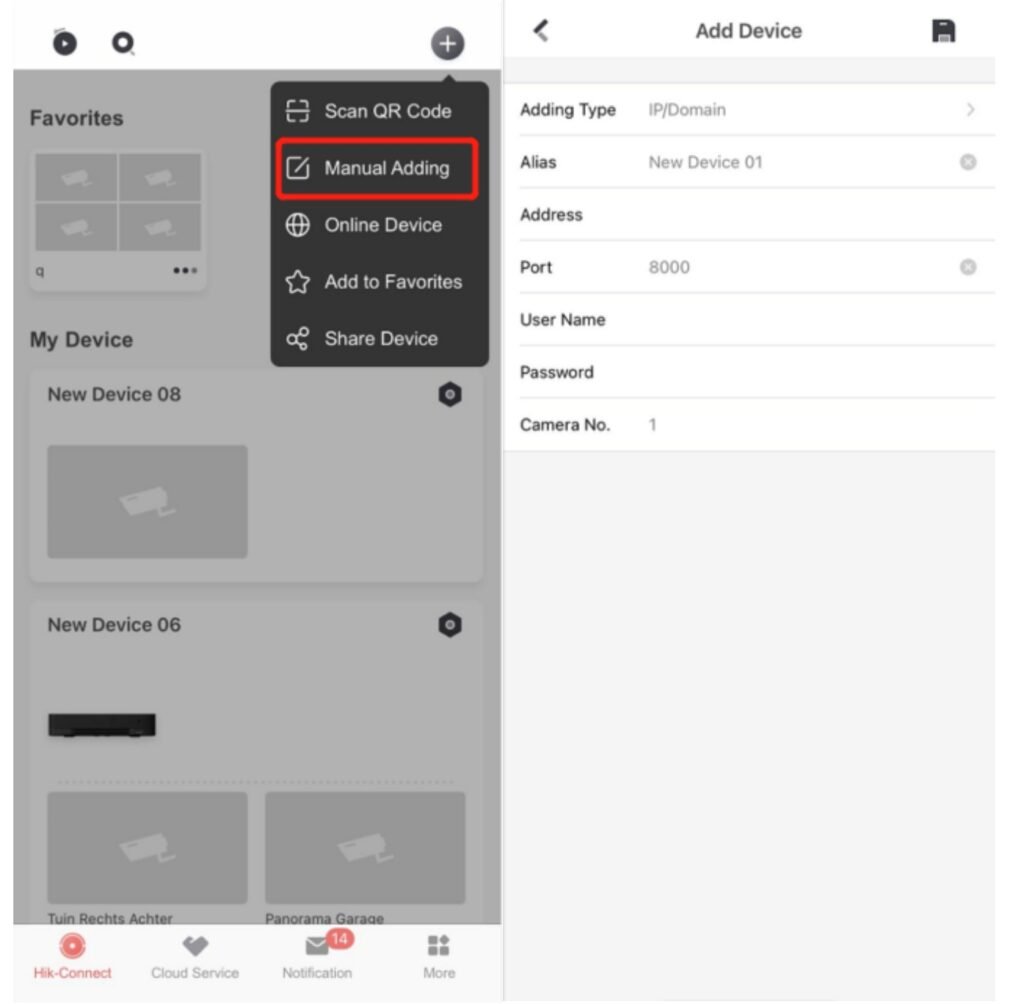
3 Once completes the adding process, users can live view, play back, and make some remote
configuration.
Since it is not necessary to register a Hik-Connect account to add a device in this way, so
the device is not bound to the account, only bound to the current mobile phone.
For more information please visit our Home page
Two ways to add a device There are two common ways to add a Hikvision recorder or camera to Hik-Connect: – By IP address or domain (above): quick, no account needed, but the device is only saved on that one phone. – By QR code or serial number with a Hik-Connect account: the device is linked to your account, so it appears on any phone you log into and can be shared with family or staff.
Adding a device with your Hik-Connect account 1. Download the Hik-Connect app and create an account, or log in. 2. Tap the + icon and choose to scan a QR code. 3. Scan the QR code on the device label, or on the recorder’s screen in its network settings. You can also enter the serial number manually. 4. Make sure the Hik-Connect service is enabled on the recorder and enter its verification code when asked. 5. Give the device a name and tap to finish. Your cameras should now appear for live view and playback.
If the device shows as offline – Check the recorder is connected to your router and has internet access – Confirm the Hik-Connect service is enabled in the recorder’s network settings – Restart the router and the recorder – Check the recorder’s firmware is up to date – If the device is already linked to someone else’s account (for example a previous owner or installer), it must be unlinked from that account first
Keep your system secure – Use a strong, unique password for both your Hik-Connect account and the recorder – Don’t share your main login; use the app’s share feature instead, so you can control what each person can see. See how to share Hik-Connect using a QR code – Remove access for anyone who no longer needs it
Want it set up for you? When we install a Hikvision system, we set up Hik-Connect on your phones, show you live view and playback, and make sure remote access is secure. If your existing system won’t connect, we can help with that too. As an authorised Hikvision installer, we work with this equipment every day.
Need this installed? Wisenet Security provides CCTV installation in Cardiff and across South Wales. Call 029 2252 0809 or request a free survey.