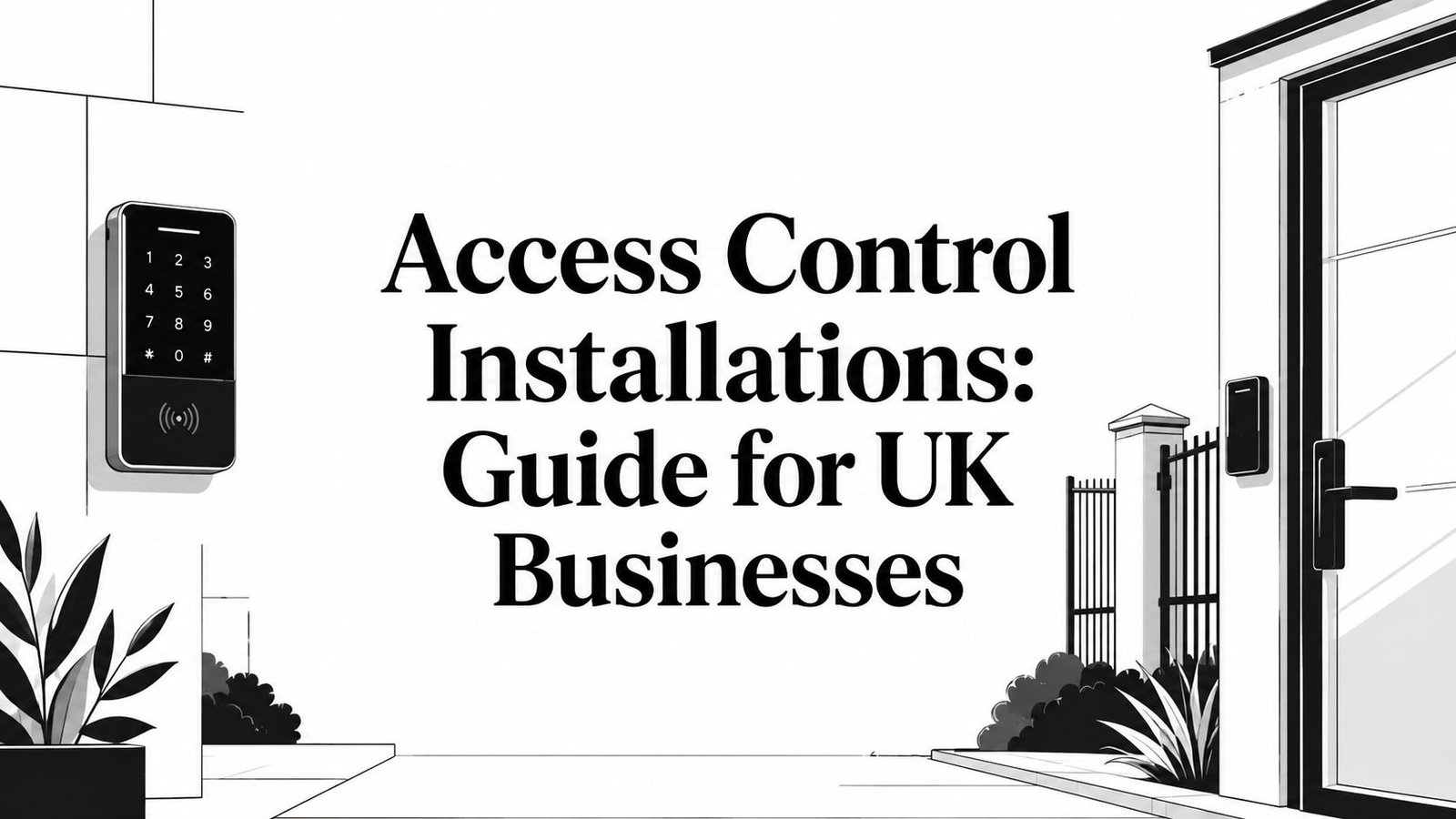
Access Control Installations: Guide for UK Businesses
If you're still passing keys around, changing cylinders after a staff member leaves, or relying on someone at reception to notice who shouldn't be in the building, you're already feeling the limits of old-fashioned security. It usually starts with one awkward problem. A contractor needs temporary access. A cleaner needs entry after hours. A tenant loses a fob. Then you realise the underlying issue isn't just the door. It's control, accountability, and who can prove what happened.
That's where access control installations change the conversation. Instead of hoping the right people have the right keys, you decide who can enter, where they can go, and when that access stops. For a warehouse in Newport, that might mean keeping delivery bays separate from offices. For a block of flats in Cardiff, it might mean managing shared entrances without endless callouts. For a family home, it might be a single smart entry point that's easier to manage than a bunch of copied keys.
In South Wales and the South West, the details matter more than most generic guides admit. Older buildings, retrofit projects, mixed-use sites, insurance requirements, and integration with CCTV, intruder alarms, fire systems, or gates all shape what will work on site. A system that looks tidy on a brochure can become a headache if the doors, cabling, power, or day-to-day management were never properly thought through.
Table of Contents
- Your Introduction to Modern Access Control
- What Is an Access Control System
- Types of Access Control and Their Features
- Key Benefits for Your Home or Business
- The Installation and System Integration Process
- Understanding UK Compliance and Maintenance
- How to Choose a Trusted Installer in South Wales
- Frequently Asked Questions
- How much do access control installations cost
- Can I add access control to my existing doors
- Can I manage the system from my phone or remotely
- Are cards and fobs better than PIN codes
- Are biometrics always the most secure option
- Do I need access control at home, or is it mainly for businesses
- How often should the system be maintained
Your Introduction to Modern Access Control
A member of staff leaves on poor terms on Friday. By Monday, they still have a key, the alarm code is known by half the team, and nobody can say for certain which doors they used last month. That is usually the point where a business stops seeing access control as a door gadget and starts treating it as part of site security and day-to-day management.
A well-specified access control installation gives you control over who can enter, where they can go, and what record is left behind. It also cuts out one of the biggest weaknesses I still see across South Wales and the South West. Mechanical keys passed around for years, copied without permission, and never fully accounted for.
The local detail matters. A retail unit in Cardiff, a school in Newport, an industrial site near Bridgend, and a converted listed building in Bath will not have the same cabling routes, fire door constraints, user volumes, or insurance expectations. Generic advice tends to skip that. On real projects, the right answer depends on the building, the people using it, and who will be responsible for the system after handover.
Good access control is not just about getting people through a door. It has to stand up to staff turnover, visitor handling, out-of-hours access, delivery drivers, and the practical question every owner asks after installation: who is going to manage this system on a wet Tuesday morning when someone's fob stops working?
That is also why installer choice matters early. In this region, buyers often need a system that fits existing CCTV, intruder alarms, fire door release requirements, and remote management without overcomplicating the site. If you want a practical example of how changing permissions and recurring users affect system design in membership settings, Fitness GM access solutions gives a useful sector-specific view.
My advice is simple. Start with the site, the users, and the risk. Then choose the hardware and software that fit those realities, not the other way round.
What Is an Access Control System
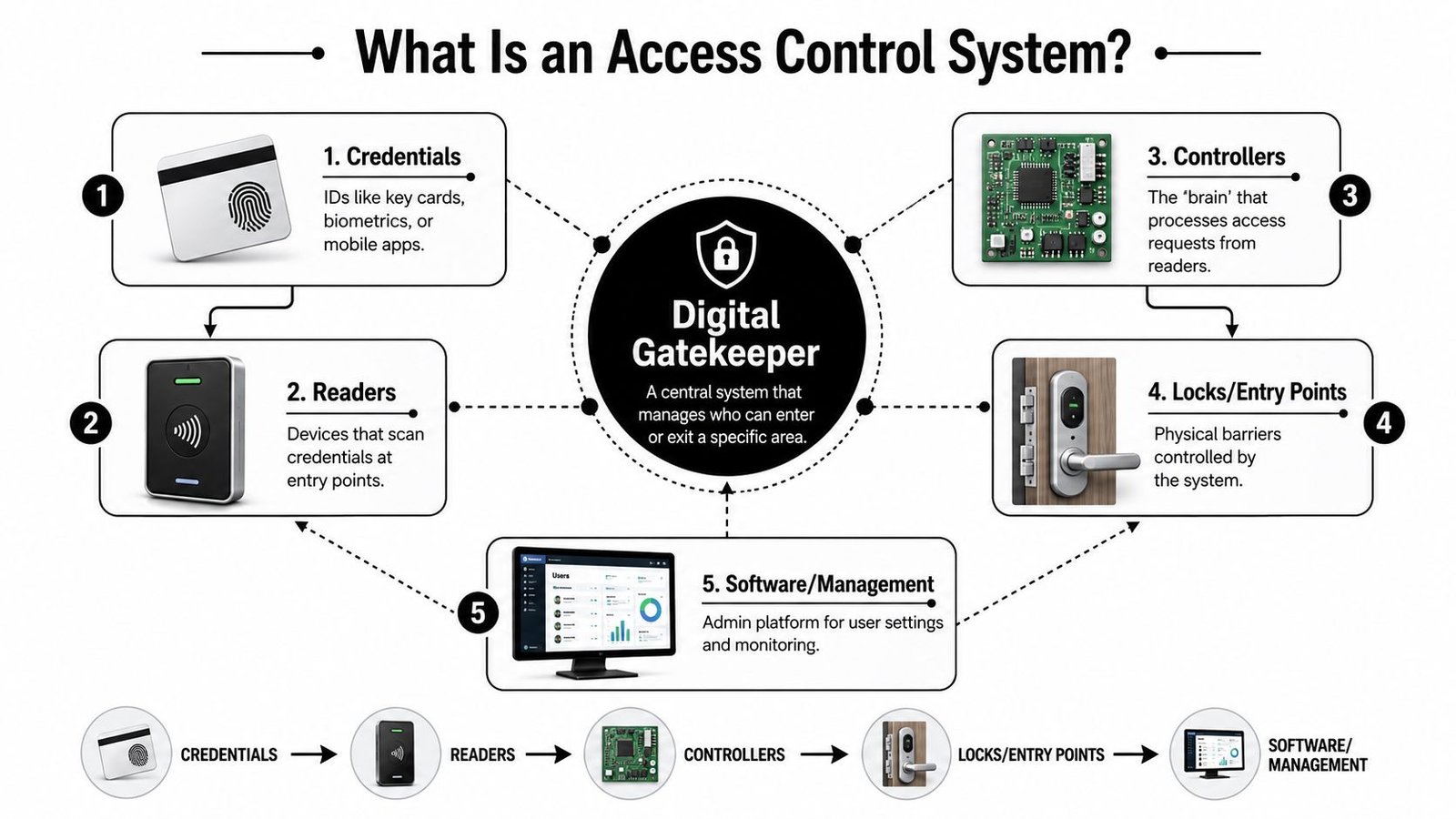
An access control system is best understood as a digital gatekeeper with a perfect memory. Someone presents a credential. The system checks whether that person should be allowed through that specific door at that specific time. Then it records the event and either releases the lock or keeps the door secure.
That's why it isn't just a fancy lock. It's a connected decision-making system.
The digital gatekeeper at each door
At a simple front entrance, the process feels instant. A user taps a card, enters a code, uses a phone, or presents a biometric credential. Behind that simple action, the system is checking identity, permissions, and door rules.
That matters because not every opening should behave the same way. A main office entrance may allow broad staff access during business hours. A stock room, plant area, or server cupboard shouldn't. If you treat every door as one big zone, you lose the main advantage of access control.
If you want a practical example of how this thinking applies in membership-based sites with recurring users and changing permissions, Fitness GM access solutions gives a useful look at operational access management rather than just hardware.
The four parts that matter
Most access control installations are built around four core parts:
Credentials
These are the user identities. Cards, fobs, PINs, mobile credentials, and biometrics all sit here. The right choice depends on convenience, risk level, and how often users change.Readers
These are fitted at the door or entry point. They capture the credential and pass the request into the system. Reader placement matters more than people think, especially at exposed entrances or in awkward circulation areas.Controllers
Controllers make the decisions. The controller checks the rules and tells the locking hardware what to do. If the design is poor, the whole system feels unreliable even when the reader itself is fine.Management software
This is the admin side. You add users, remove access, assign permissions, check event history, and manage the estate. On multi-door or multi-site jobs, the software often determines whether the system is easy to live with or a daily nuisance.
A well-designed system feels boring in the best possible way. Doors behave properly, permissions make sense, and nobody has to invent workarounds.
The hardware also includes the actual lock release side. Electric strikes, maglocks, monitored lock status, exit devices, and door contacts all play their part. If the lock hardware and the door itself are weak, the reader on the wall won't rescue the installation.
Types of Access Control and Their Features
The first real design decision isn't usually card versus keypad. It's scope. How many doors are you controlling, how many user groups are involved, and what authentication model does each opening need. Independent guidance points to the number of controlled openings and the authentication model per opening as the key design variable, because they affect controller capacity and audit-log complexity, as outlined in Infassure's access control system design guide.
Standalone or networked
A standalone system suits simple jobs. One door. Maybe two. A small office, stock cupboard, side entrance, or residential communal door where you don't need broad reporting or central management. It can work well if the requirement is basic and the user list is stable.
A networked system is the better fit once the site has multiple doors, departments, tenants, or time-based rules. This is where access control starts doing real work. You can manage permissions centrally, remove users quickly, and review event history across the whole property.
If you're comparing architectures and want a broader overview of available system formats, this guide to different access control system options is a useful starting point.
The mistake I see most often is under-specifying the system to save money at the start. That usually leads to bolt-ons later, and bolt-ons are where awkward management, mismatched hardware, and poor user experience creep in.
Credential choices and where they fit
The credential is what the user presents to gain entry. That choice affects convenience, security, admin workload, and how the system feels in day-to-day use.
| Credential Type | How It Works | Best For | Pros | Cons |
|---|---|---|---|---|
| Keypad PIN | User enters a code on a keypad | Low-traffic doors, smaller sites, temporary access | Simple, no card to issue, useful for short-term users | Codes get shared, forgotten, or written down |
| Proximity card or fob | User presents a programmed card or fob to a reader | Offices, schools, warehouses, communal entrances | Familiar, quick, easy to revoke and replace | Lost credentials still create admin work |
| Biometric | System verifies fingerprint or other biometric identifier | Higher-security rooms, restricted internal areas | Ties access closely to a person | Needs careful planning around user acceptance and environment |
| Mobile credential | User presents a smartphone-based credential | Modern offices, managed buildings, flexible user groups | Convenient, remote provisioning is straightforward | Depends on user device habits and platform compatibility |
Role-based permissions matter just as much as the credential itself. If you want a useful plain-English explanation of permission structures, DynamicsHub's RBAC guide is worth reading because it helps non-technical decision-makers think in user groups rather than one-off exceptions.
A few practical points matter on almost every site:
- Shared buildings need tighter zoning because cleaners, contractors, tenants, and delivery staff rarely need the same routes.
- Outdoor or low-light entries need reader positioning thought through so users can present credentials cleanly and any linked identification remains usable.
- Biometrics aren't automatically the premium answer. On some sites they're ideal. On others they complicate use without solving the underlying issue.
What works is matching each door to its actual risk and traffic pattern. What doesn't work is fitting the same reader and rule set everywhere because it looks tidy on a quote.
Key Benefits for Your Home or Business
The strongest argument for access control isn't that it looks modern. It's that it solves routine operational problems while tightening security.
Security that helps operations
For many organisations, access control installations are part of operational risk management, not just perimeter security. UK government guidance for sensitive facilities uses layered controls such as zoning and identity verification to prevent unauthorised access, which makes event logging tied to user identities a critical function according to the referenced UK security guidance summary.
That translates into everyday value very quickly. If someone leaves the business, you remove access instead of chasing keys. If a contractor needs access for one evening, you can limit it to a time window and a specific route. If there's an incident, you have a record of who presented a credential and when.
In a busy building, the biggest improvement often isn't stopping obvious intruders. It's stopping casual over-access that nobody had properly questioned before.
For homes and smaller residential properties, the benefits are different but still practical. Controlled entry reduces spare-key problems, helps with family or service access, and gives you more certainty over who can get in without replacing locks every time arrangements change.
Where the value shows up day to day
A well-set-up system usually pays for itself in reduced friction:
- No routine rekeying when a card or fob can be revoked.
- Faster admin because permissions can be assigned by role, tenant, or staff group.
- Cleaner investigations when there's a time-stamped record instead of guesswork.
- Better contractor control for deliveries, maintenance teams, and temporary workers.
In an industrial unit in Swansea, that might mean restricting warehouse access to shift staff while office users enter through a separate door. In a Bristol office, it might mean limiting archive or comms room access to named users only. In a residential block, it may stop shared front-door credentials drifting between former tenants.
A short demonstration helps if you want to see how these systems are used in practice.
The point isn't adding technology for its own sake. The point is making access predictable, manageable, and recorded.
The Installation and System Integration Process
A proper installation starts long before the first hole is drilled. The survey and design stage decides whether the system will feel reliable for years or become one of those jobs everyone keeps apologising for.
What a proper project looks like
A major challenge, especially for property managers, is retrofitting access control into occupied and mixed-tenant buildings without disrupting operations or creating safety conflicts. That gap between product features and real installation decisions is highlighted in Avigilon's access control overview.
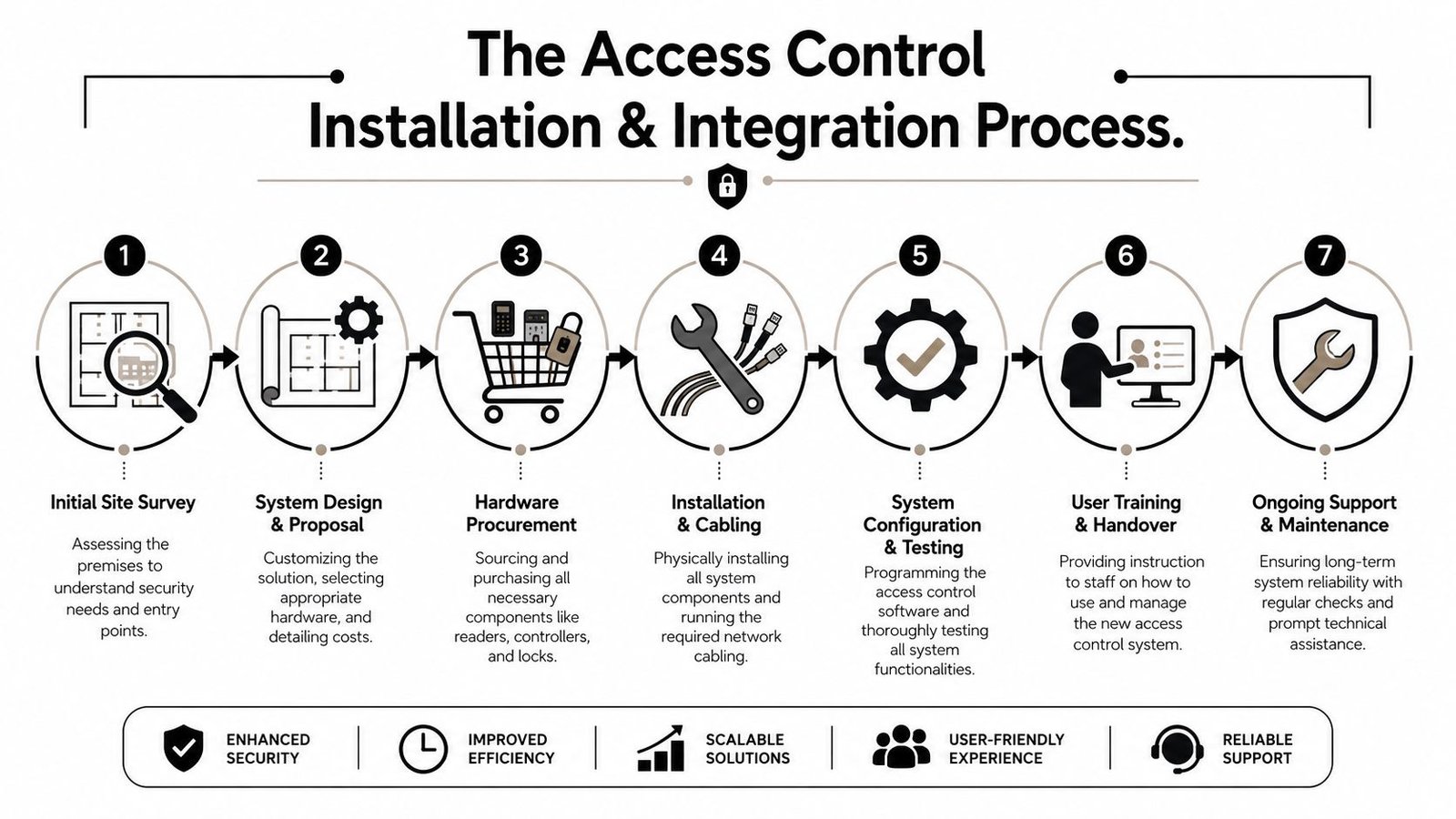
A sound workflow usually includes:
Site survey
The installer checks door construction, lock condition, fire routes, power availability, cable routes, user flow, and any problem points such as shared entrances or exposed external doors.System design
User groups, schedules, door rules, and hardware choices are decided during system design. A quote without a clear design behind it is just a shopping list.Installation and cabling
Readers, locks, controllers, power supplies, exit devices, and door monitoring are fitted. On occupied sites, tidy phasing matters because doors still need to function safely throughout the work.Configuration and testing
Permissions are programmed, events are checked, and fail conditions are tested. This is the point where many rushed projects fall down.Handover and training
Someone on your side needs to know how to issue credentials, remove users, and review activity without calling an engineer for every small change.
If you want a more client-focused summary of the stages involved, this explanation of what the installation process includes is a sensible reference.
Why integration decisions matter
Access control works best when it's part of a wider security setup. The obvious integrations are:
- CCTV, so door events can be reviewed against video
- Intruder alarms, so entry rules align with set and unset states
- Intercoms, especially at shared entrances or gated sites
- Fire alarm interfaces, so doors release or behave correctly during alarm conditions where required by the overall design
One example in the local market is Wisenet Security Ltd, which installs access control alongside CCTV, intruder alarms, fire alarm systems, intercoms, and gate automation across South Wales and the South West. That kind of integrated approach is often more important than the badge on the reader because most real issues happen between systems, not inside one box.
On retrofit sites: the weak point is often the existing door, frame, closer, or release hardware. If those parts aren't right, the software won't save the installation.
What doesn't work is treating integration as an afterthought. A door linked badly to fire, video, or alarm systems causes false assumptions and awkward behaviour. On a live site, those mistakes show up fast.
Understanding UK Compliance and Maintenance
A door can look fine on handover day and still cause trouble six months later. I see it on occupied sites across South Wales and the South West. Permissions drift, leavers still have active credentials, a release starts sticking, or a fire interface change is never reflected in the access software. Compliance problems usually start there, in ordinary day-to-day management rather than in the reader on the wall.
Why standards and accreditation matter
UK access control sits inside a wider set of duties around life safety, security, and record-keeping. Standards such as BS EN 60839-11-1 matter because they push installers and clients to define how the system should behave before hardware goes in. Certifying bodies such as SSAIB and NSI also matter, especially where insurers, schools, healthcare settings, housing providers, and public-sector buyers want evidence that design, installation, and maintenance are being handled properly.
On a real project, that usually means four things.
- The design should be written down so each door has clear operating logic, release conditions, and user permissions.
- Hardware selection has to match the door set because a good controller will not compensate for the wrong lock, poor closer pressure, or a weak frame.
- Records need to be usable if a manager, insurer, or investigator needs to confirm who had access and when.
- Maintenance has to be planned because compliance is not just about installation day. It depends on how the system is looked after afterwards.
That last point is often missed. A compliant installation can become a non-compliant one if changes are made casually, software is left unpatched, or staff keep overriding door behaviour to work around faults.
For sites that hold personal data, medicines, stock, cash, keys, or restricted files, physical access control also supports wider governance. If a business says an area is restricted, it should be able to show that the restriction is enforced and reviewed. If you are comparing local providers, it helps to start with firms that specialise in access control installation and support in South Wales rather than general electrical contractors who only fit this equipment occasionally.
Maintenance is part of the system
The system does not stop needing attention once the doors are live. It starts needing a different kind of attention.
A sensible maintenance arrangement should cover routine checks on readers, locks, request-to-exit devices, power supplies, backup batteries, and door alignment. It should also cover software support, user administration, log review where appropriate, and a clear fault response process. On multi-door sites, I also advise a periodic review of access levels. Old permissions are one of the most common weaknesses I find.
The trade-off is straightforward. A low-cost, reactive approach can look attractive at the start, but it usually means longer outages, more callouts, and more time spent by office staff trying to work around a door that does not behave properly. Planned support costs more on paper and less in disruption.
If your business already values preventative support in other parts of the operation, the model behind Amax IT's proactive IT support is a useful comparison. The systems are different, but the principle is the same. Regular attention prevents small faults, outdated permissions, and overlooked updates from turning into operational problems.
Good maintenance is quiet work. That is usually the sign it is being done properly.
How to Choose a Trusted Installer in South Wales
Plenty of firms can supply a reader, a controller, and a lock release. Fewer can design a system that suits an occupied building, works cleanly with other security systems, and remains manageable after six months of staff changes and real-world use.
Questions worth asking before you sign
Ask direct questions. If the answers are vague, walk away.
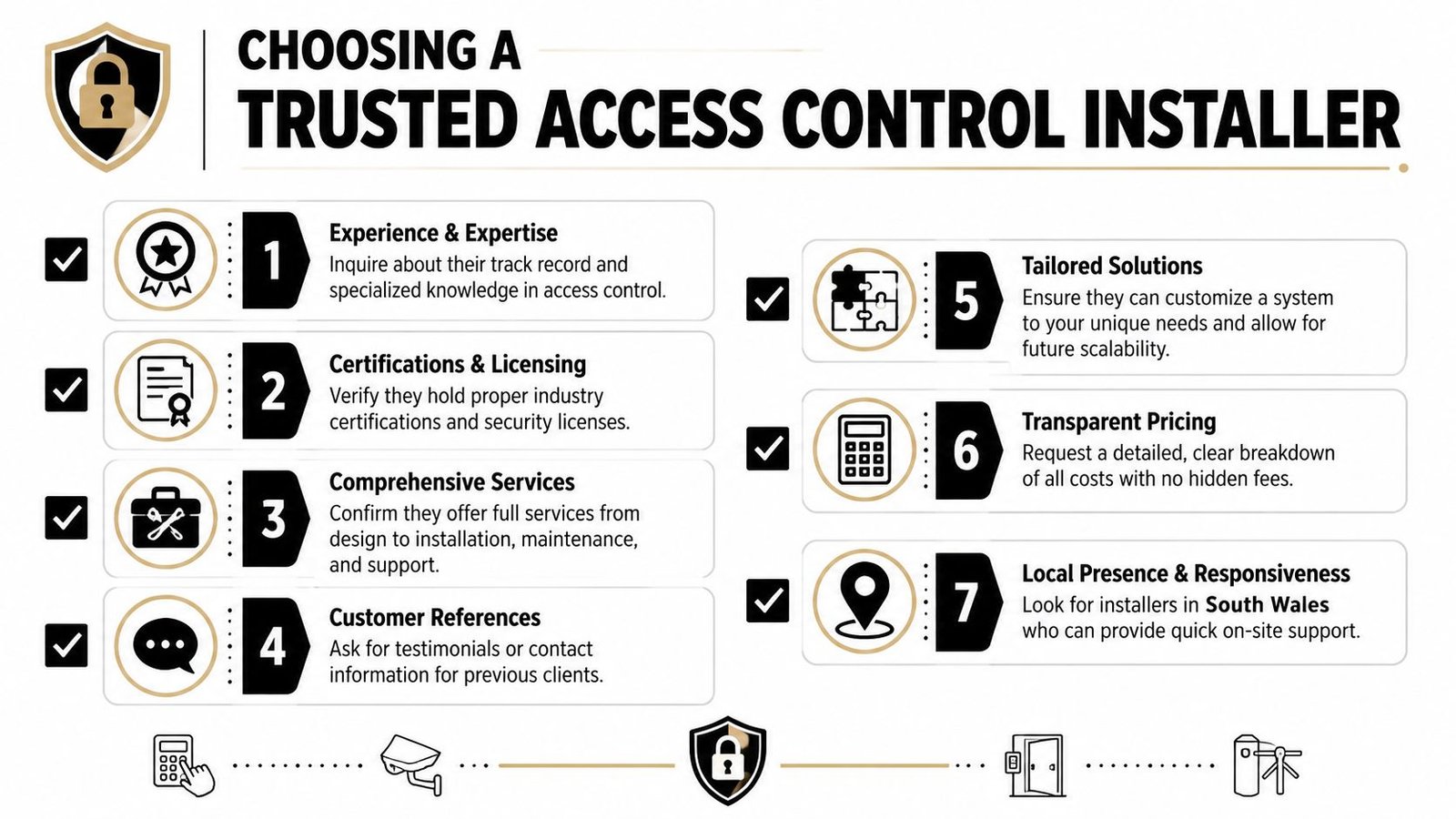
What similar sites have you worked on locally
South Wales jobs vary a lot. A school in Cardiff, a warehouse in Newport, and a mixed-tenant building in Bristol don't present the same challenges.Who handles design as well as fitting
You want someone who can explain door-by-door logic, not just name hardware brands.Are you working to recognised standards and accreditation expectations
That doesn't need a sales speech. It needs a clear answer.How will this integrate with existing CCTV, alarms, intercoms, or gates
If the installer can't discuss interfaces confidently, the project may end up fragmented.What happens after handover
User admin, support, maintenance, and fault response should be clear before the order is placed.
If you're comparing providers in the region, this page covering local access control installers gives a useful picture of what a specialist service should include.
What good local support looks like
Local presence matters more than people think. On paper, two proposals can look similar. In practice, a nearby installer who understands local property stock, can attend site when needed, and has experience with retrofit work is often the safer choice.
A good installer doesn't start by asking which reader you want. They start by asking how the building is used, who moves through it, and what must never happen at the doors.
I'd also look for signs of discipline in the survey itself. Are they checking door condition, escape routes, tenant separation, and management workflows. Or are they just counting doors. Access control installations succeed when the installer understands the building as an operating environment, not just a hardware location.
Frequently Asked Questions
How much do access control installations cost
Cost depends on the number of doors, the credential type, the condition of the existing doors, and how much integration is needed. A single-door standalone keypad setup is a very different job from a networked system across offices, warehouses, gates, and communal entrances. The right way to compare quotes is by scope, not just price. Check exactly what hardware, software, permissions setup, cabling, and support are included.
Can I add access control to my existing doors
Usually, yes. The primary question is whether the door set is suitable in its current state. Existing frames, closers, locks, escape hardware, and cable routes all affect what can be fitted cleanly. Retrofit work is common across South Wales and the South West, especially in older buildings and mixed-use premises, but it needs careful surveying because the legacy door hardware often determines what will work reliably.
Can I manage the system from my phone or remotely
Many modern systems support remote management, but the level of control varies. Some allow user changes, remote door release, schedule edits, and event review from an app or browser. Others are much more limited. Before buying, check what the software lets you do and who will administer it day to day.
Are cards and fobs better than PIN codes
Often, yes, for shared commercial environments. Cards and fobs are easier to revoke individually, while PINs tend to get shared. That said, keypads still have their place for lower-risk doors, temporary access, or out-of-hours service use. The best choice depends on the building and the users, not on what seems newest.
Are biometrics always the most secure option
Not automatically. Biometrics can be useful for restricted areas where identity certainty matters, but they're not the answer to every project. In many buildings, stronger zoning, better role permissions, and properly managed credentials solve more problems than adding biometric readers everywhere.
Do I need access control at home, or is it mainly for businesses
It's mainly associated with business premises, but it can work well in residential settings too. Gated entries, detached offices, annexes, shared entrances, and homes where key control is awkward can all benefit. The scale is smaller, but the principle is the same. Controlled access is easier to manage than copied keys.
How often should the system be maintained
That depends on usage, risk, and the type of site, but regular maintenance is sensible because doors are moving parts and admin settings change over time. If the building relies on the system every day, it needs periodic checks, not just emergency callouts when something fails.
If you're planning access control installations for a home, office, warehouse, block, or mixed-tenant site in South Wales or the South West, Wisenet Security Ltd can help you assess the building, identify the right door-by-door approach, and plan a system that integrates properly with the rest of your security setup.