Alarm Systems for Schools: A Practical UK Guide
A school alarm usually gets noticed only when it fails. A head teacher wants a quicker lockdown, the site manager wants fewer false callouts, and the business manager wants a quote that won't create headaches at audit time. In a real school week, those pressures collide fast, especially when the current system was fitted for a different building layout, a different safeguarding expectation, or a simpler time.
Alarm systems for schools now sit inside a wider UK compliance stack, not beside it. Fire safety law, safeguarding duties, and risk assessment all shape what the hardware should do, who must hear it, and how the school proves it works when someone asks for evidence. Get the specification wrong and you don't just buy the wrong box on the wall, you create a gap between the school's actual procedures and the procedures governors think they have.
Table of Contents
- Why School Alarm Choices Matter More Than They Look
- UK Regulations and Standards You Must Meet
- Main Alarm System Types for Schools
- Monitored Versus Bell-Only Systems
- Integrating Alarms With CCTV, Access Control, and Fire Systems
- Design, Siting, and Resilient Hardware Choices
- Maintenance, Testing, and Emergency Response Planning
- Budgeting, Procurement Checklist, and Final Recommendations
Why School Alarm Choices Matter More Than They Look
Monday morning at a primary school always starts the same way for a while. Bags pile up by the cloakroom, parents drift away from the gate, and the office is already dealing with late arrivals and dinner numbers. Then the safeguarding audit lands on the desk and the head teacher realises the existing alarm can sound a bell, but it can't clearly support the lockdown procedure the school has written down.
That gap is the important issue. A school alarm is no longer just a noise maker for fire drills or a basic intruder device after hours. Following the 2005 fire-order reforms, UK schools increasingly moved toward integrated alarm and emergency-warning arrangements rather than relying only on bells or manual evacuation, especially in larger multi-building campuses where fast, auditable alerts matter Avigilon.
Practical rule: if staff can't tell, within seconds, what the alarm means and what to do next, the system is under-specified.
For a school business manager, that means the buying decision touches safeguarding, fire safety, insurance expectations, and day-to-day operations. The same campus might need evacuation during a fire, controlled lockdown during an external threat, and a clear after-hours intrusion response. Those are not interchangeable functions, and a supplier who treats them as one generic alarm has already made your life harder.
The safest way to approach the topic is to think in layers. The compliance layer defines what must happen. The hardware layer defines how reliably it happens. The operational layer defines who responds, how it's logged, and whether the school can prove the process still works next term.
UK Regulations and Standards You Must Meet
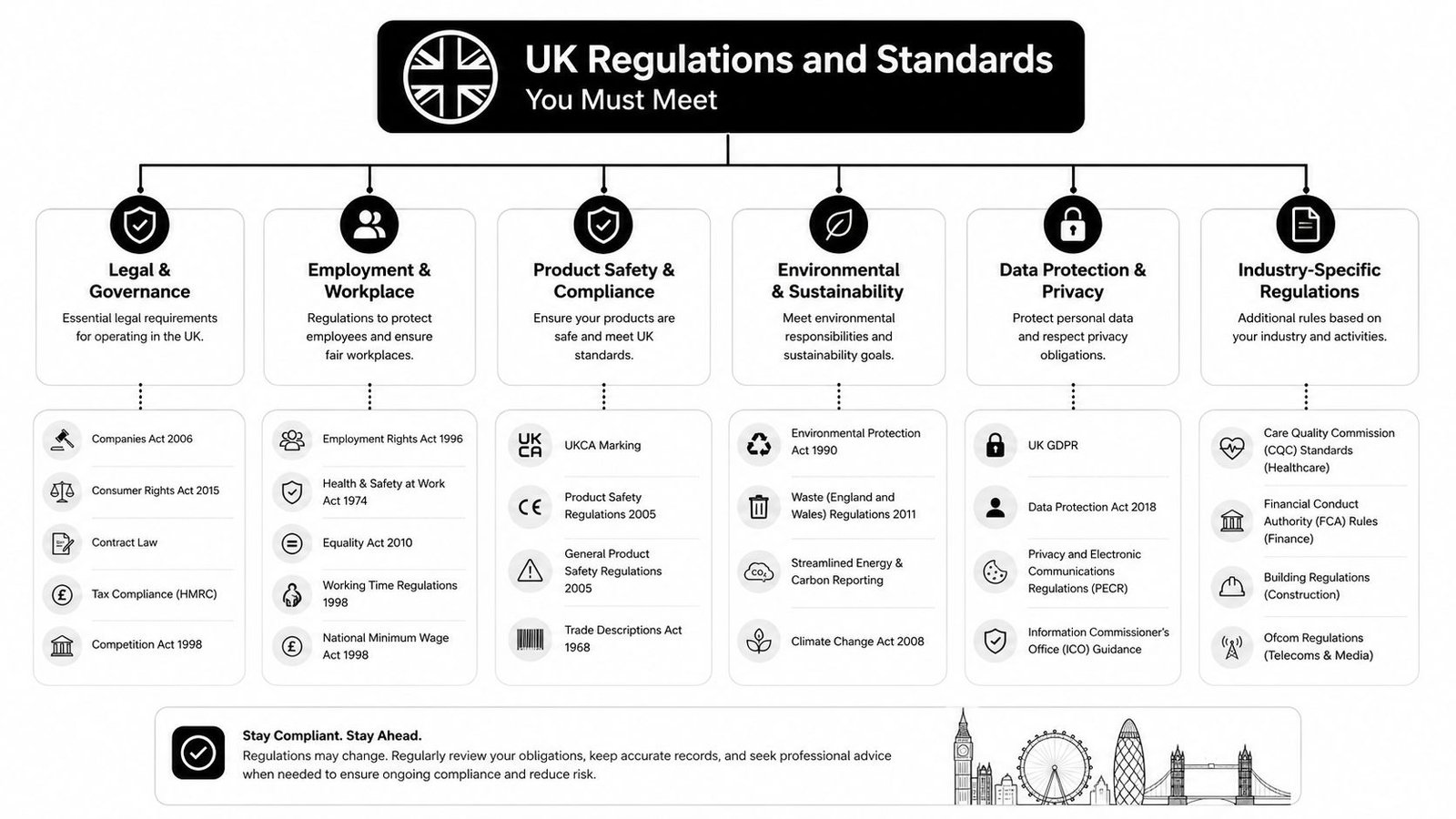
A school alarm specification in the UK sits across three overlapping duties. First, the Regulatory Reform (Fire Safety) Order 2005 drives evacuation readiness and the need for suitable warning arrangements. Second, the Department for Education expects schools to keep a behaviour policy, a safeguarding policy, and up-to-date emergency procedures that deal with serious incidents on site Avigilon. Third, HSE-style risk management expects the school to assess hazards and put suitable controls in place, rather than fitting equipment and hoping it covers the risk.
Schools frequently ask for "an alarm" without defining the function, the building area, the response, or the standard. That is where projects go wrong. Fire warning, lockdown alerting, and after-hours intrusion detection place different demands on audibility, zoning, call points, and monitoring.
What goes in the file before you go to tender
Before you ask for quotes, the governing body or responsible person should already have a short pack of documents. That pack should include the current fire risk assessment, safeguarding policy, emergency procedures, site plans, and any notes on evacuation or lockdown zoning. If the school cannot show how the alarm supports those documents, the quote is probably starting from the wrong place.
The technical standards matter as well. Fire detection and alarm arrangements are usually specified against BS 5839, while intruder alarms are commonly specified against BS EN 50131. If you want a plain-language explanation of how intruder alarm grading and equipment expectations work, this overview of BS EN 50131 alarm requirements is a useful reference point.
A quote without the standard named on it is not a proper school specification, it's a sales starting point.
A proper tender file names the duty first, then the hardware. That lets governors and business managers compare like with like, instead of comparing one supplier's fire-first proposal with another supplier's perimeter-first package. It also keeps the discussion anchored to what the school must prove, not just what the installer wants to sell.
If the spec is clear, the hardware choice becomes easier to judge. You can ask whether the proposed devices suit the building layout, whether the signalling matches the procedure, and whether the system can still be defended during an audit or after an incident.
Main Alarm System Types for Schools
Different alarms solve different problems, and schools usually need more than one category. A good spec separates the system into distinct functions first, then looks at whether they can share infrastructure. That avoids the common mistake of over-buying one type and under-buying another.
| Alarm Type | Primary Purpose | Typical Coverage | Best Fit For |
|---|---|---|---|
| Intruder alarm | After-hours protection and unauthorised entry detection | Doors, windows, circulation areas, plant rooms, store rooms | Empty buildings, equipment-heavy blocks, detached units |
| Fire detection and alarm | Life-safety warning and evacuation | Classrooms, corridors, communal areas, specialist rooms | Whole-school evacuation arrangements |
| Lockdown alarm | Rapid staff alert for live incidents | Staff areas, reception, classrooms, site-wide messaging | Schools needing a clear internal response protocol |
| Panic alarm | Discreet call for urgent help | Reception, office, isolated rooms, high-risk public-facing points | Lone-working spaces and confrontational front desks |
An intruder alarm works best when the site is empty or partly occupied. A fire system is a life-safety layer, so its coverage and audibility have to make sense for the entire building, not just the office. A lockdown alarm needs to be unmistakable to staff but not confusing for pupils, because the response is procedural, not just audible.
Where the overlap is useful, and where it isn't
Some schools want one panel to drive everything. That can work, but only if the system is designed with clear cause-and-effect rules and the building layout suits it. A fire panel can sometimes trigger evacuation sounders and a staff alert, but the school still needs separate decision logic for lockdown and incident response.
A panic button in reception, for example, is not the same thing as an intruder detector on the perimeter. One requests human help during contact with a visitor or caller, the other detects unauthorised access when nobody is there. Suppliers often blur those distinctions because it makes the package look simpler. In practice, it only makes the decision harder later.
Monitored Versus Bell-Only Systems
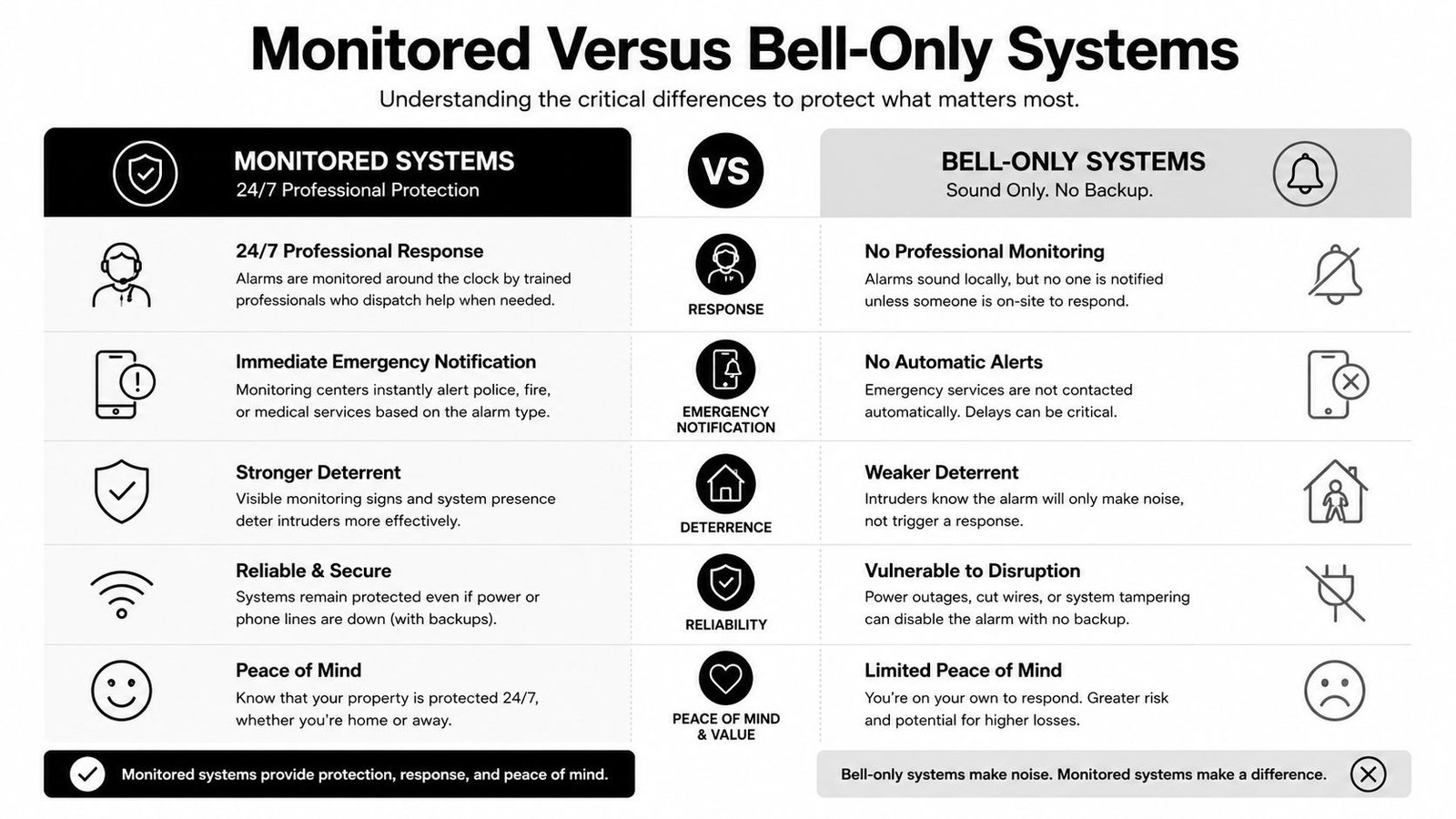
A bell-only system is exactly what it sounds like. If a sensor trips, the siren sounds and somebody nearby decides what to do. A monitored system adds a communications path to an Alarm Receiving Centre, which can escalate the event through a keyholder chain and, where applicable, a police response path tied to the system's signalling arrangements. That difference matters most when the school is empty, isolated, or sitting on expensive kit that can't just wait until the next patrol.
When bell-only is enough
Bell-only can be reasonable for some low-risk primary schools, especially where the site is small, local response is strong, and the school just needs a strong after-hours deterrent. It's also a lower-complexity option to maintain. Fewer signalling dependencies usually means fewer things for the caretaker or contractor to troubleshoot.
The trade-off is obvious. If nobody hears it, or if neighbours don't respond, the system has still technically done its job but not achieved the outcome you wanted. That's why bell-only suits some sites and not others.
When monitoring pays for itself
Monitored signalling becomes hard to ignore when buildings are remote, equipment is valuable, or false assumptions about “someone nearby will notice” don't hold up. A secondary school with detached blocks, science labs, or IT stores should usually take monitoring seriously because a callout chain is more dependable than hoping an alarm bell changes behaviour in the dark.
If you want a plain guide to the architecture and escalation logic behind that choice, this overview of a monitored alarm system is worth reading before you compare quotes.
The right comparison is not “cheap versus expensive”. It's “what response do we get when the building is empty?” If the answer is vague, the system is incomplete.
Integrating Alarms With CCTV, Access Control, and Fire Systems
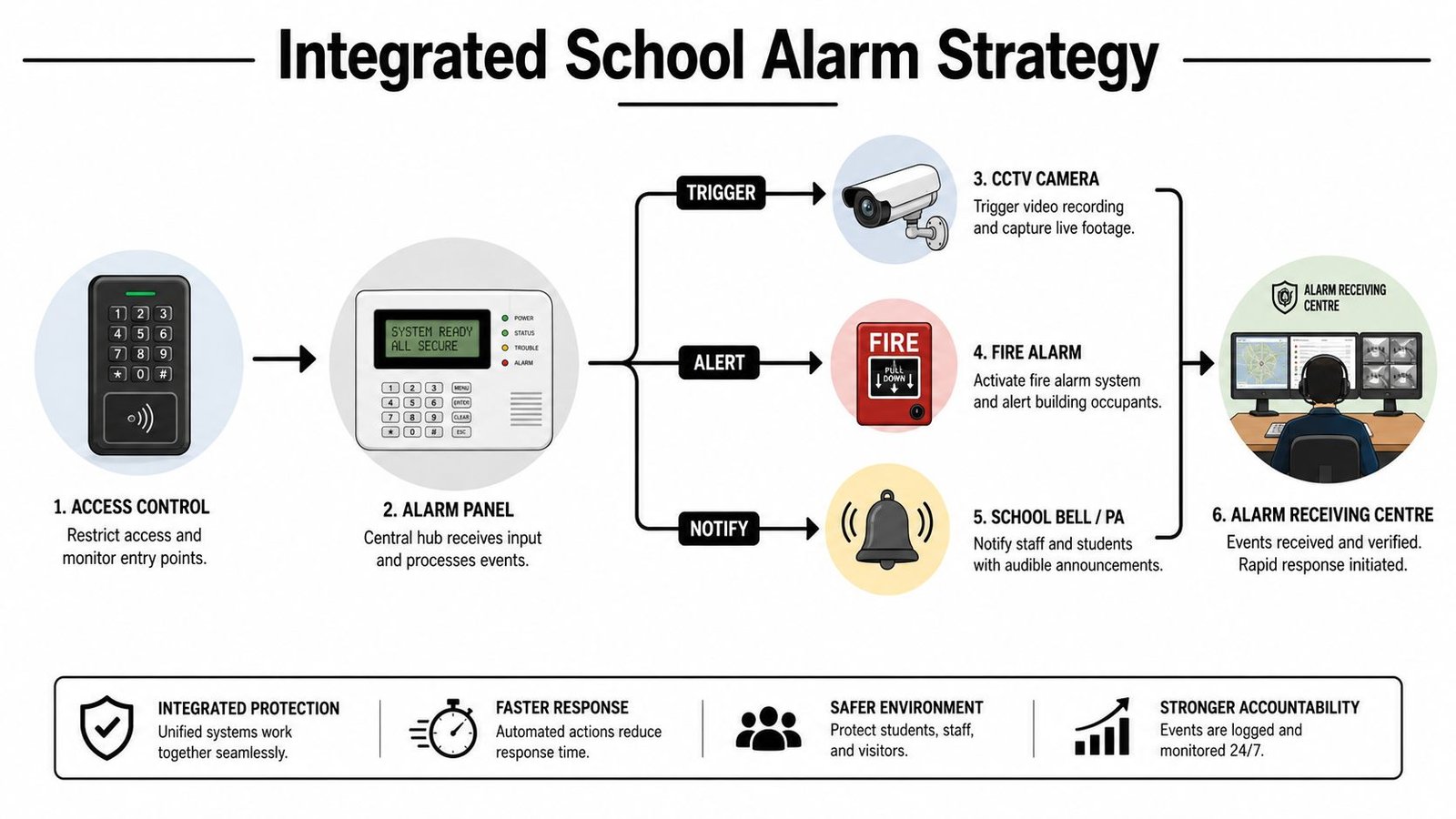
The useful integrations are the ones that reduce decision time without making the system fragile. In a well-planned school, an intruder event should pull up the nearest camera on reception's monitor, an access control fault should generate a silent alert, and a fire event should trigger the correct door release behaviour without staff having to improvise. That is a safety stack, not a pile of gadgets.
What good integration looks like
The strongest pattern is event-to-action. A door forced open after hours triggers CCTV verification. A reception panic button sends a discreet alert to the right people. An alarm event can also create a record for follow-up, which matters when the school has to explain what happened to governors, insurers, or auditors.
For schools thinking about camera analytics as part of that picture, reliable AI video monitoring is a useful reference for what smarter verification can look like when the camera layer is doing real work instead of just recording footage.
Where integration becomes a problem
The risk is over-integration. If one controller becomes the only point that links CCTV, doors, sounders, and alerts, a fault there can take too much of the system down with it. Maintenance also gets messier because every change has a side effect somewhere else.
That is why a layered approach works better in schools. Critical alerts should still function if a non-essential integration fails. The staff should not need a technical manual to tell whether the building is in fire response, lockdown, or ordinary after-hours alarm state. A clean design makes those states obvious.
Design, Siting, and Resilient Hardware Choices
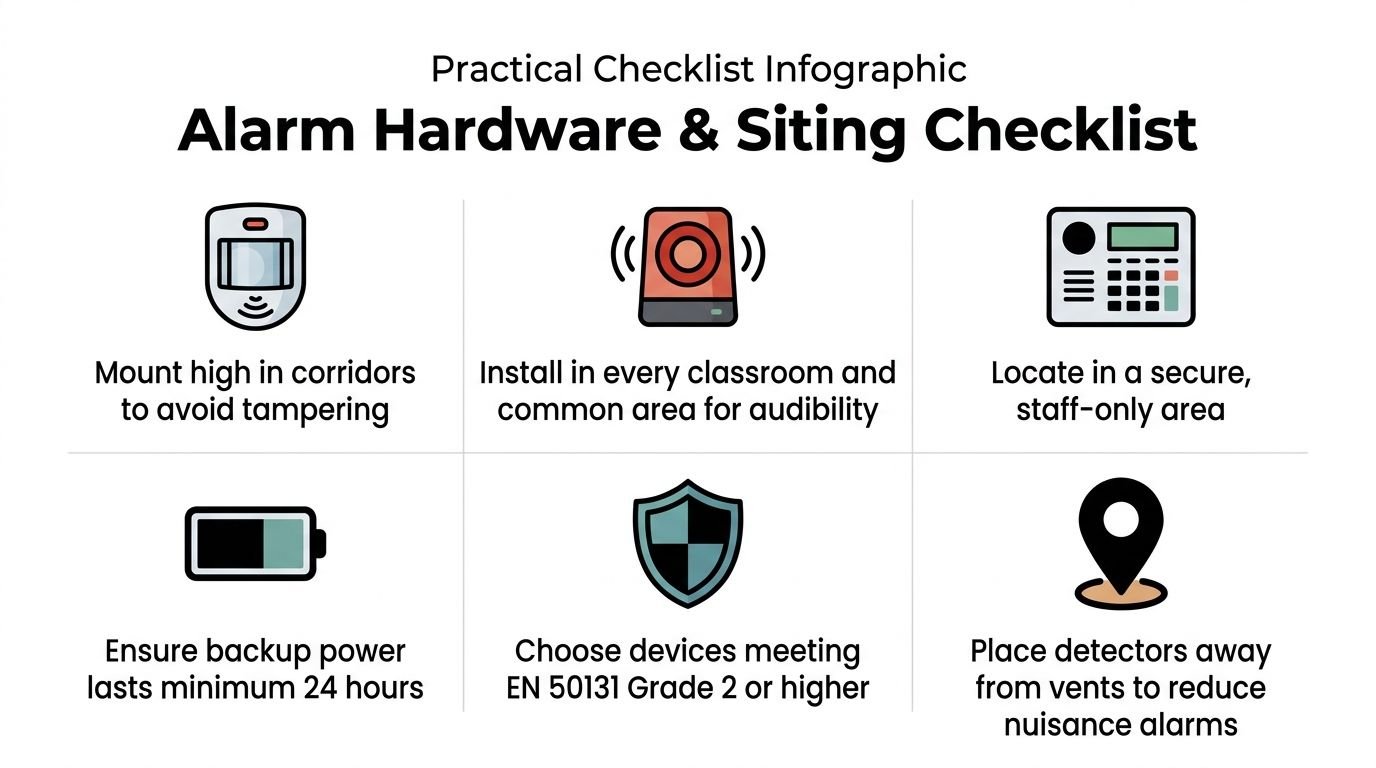
A school quote is only useful if it tells you where devices go and why. Corridor motion sensors, door contacts, sounders, and control gear all behave differently in real buildings, especially in places with dust, vibration, moisture, or heavy foot traffic. Good siting is what separates a dependable system from a nuisance-alarms machine.
Practical hardware choices that stand up on site
Motion detectors should not be dropped into open or external areas where wind, weather, or heat changes will cause false alarms. In damp or dusty rooms, ask for a suitable enclosure rating, because detectors in plant areas need more protection than a classroom device. Anti-tamper features on sensors matter too, because they make sabotage harder and remote verification more trustworthy.
Sounders are just as important as detectors. Internal warning devices need sensible placement so staff can hear them clearly, and engineering benchmarks from education-sector guidance treat around 105 dB at one metre for sirens and roughly 80 dB at ten metres for external speakers as meaningful targets for audible performance and resilience rather than consumer-grade minimums. Backup power should also be explicit in the quote, because the system has to keep working when mains power drops.
Useful rule for tenders: if the installer quotes hardware but doesn't describe mounting, sound output, tamper protection, or backup autonomy, ask for the missing line items before you compare price.
Schools also need to think about perimeter design alongside the alarm. If fencing, gates, and access points are weak, the best internal alarm still spends its life reacting to avoidable entry routes. For that wider physical-security layer, commercial security gates and fencing is a sensible resource to review when you're mapping boundaries and controlled entry points.
A maintenance schedule should be written into the spec. Daily visual checks, regular function testing by site staff, and periodic professional servicing need to be part of the same document, not an afterthought. That way the caretaker knows what to log, the contractor knows what to inspect, and the school can prove it has kept the system alive.
Maintenance, Testing, and Emergency Response Planning
A school alarm is only dependable if someone keeps checking it. Daily checks should confirm the control panel is healthy and that obvious faults have been cleared. Weekly or routine user tests should verify sounders, signalling paths, and user awareness, while professional servicing should happen on a planned cycle so technical faults don't sit hidden inside normal operations.
What the logbook must show
The logbook is not paperwork for its own sake. It is the school's evidence trail when a governor, insurer, or auditor asks what happened and who acted on it. At a minimum, it should record faults, resets, test dates, callouts, remedial work, and any changes to zones, users, or procedures.
The school should also decide who owns each task. Site teams can do basic checks, but they should not be left to interpret fault patterns without support. For a practical maintenance overview that fits school site teams, this alarm system maintenance guide is a helpful reference when building your local checklist.
Planning the human response
Alarms support emergency decisions, they don't replace them. Staff still need evacuation drills, lockdown rehearsals, and a communication tree that works when the office line is busy or the receptionist is dealing with a live incident. The alarm should make the first move clearer, not force the school to invent the rest on the spot.
A good exercise is to test different building states. An empty site after hours needs a different response chain from a full school day, and a mixed-use campus needs even more clarity. If the alarm can't map cleanly to those scenarios, the procedure is too vague.
Practical takeaway: if staff keep asking, “What does that tone mean?”, the system is already too complicated for safe use.
Budgeting, Procurement Checklist, and Final Recommendations
School buyers get into trouble when they compare headline prices instead of whole-life cost. The cheapest install can be expensive if monitoring, servicing, batteries, or eventual panel replacement weren't included in the first quote. The better way to brief governors is to split the decision into capital cost, annual support, and upgrade path.
Procurement checklist for a clean tender
- Name the function clearly: say whether you need intruder, fire, lockdown, panic, or a combination, and identify which buildings each one covers.
- Name the standard: ask for the relevant fire and intruder standards in writing, not implied by brand.
- Confirm installation quality: use accredited installers with school references and a clear commissioning process.
- Check monitoring and response: decide whether the school needs bell-only or monitored signalling before quotes arrive.
- Ask for maintenance terms: make servicing, callouts, batteries, and logbook support part of the comparison.
- Request integration details: specify what must link to CCTV, access control, or fire systems, and what must remain independent.
If you want a school-friendly comparison matrix, think in terms of site risk. Small, self-contained primary sites may be fine with a simpler after-hours arrangement and strong on-site procedures. Larger secondary or multi-building campuses usually need monitored signalling, clearer zoning, and better integration across doors, cameras, and emergency warning. Existing systems can often be brought up to standard, but only if the panel, cabling, detector locations, and maintenance history still make sense.
That is where a proper survey earns its keep. A competent engineer should tell you what can stay, what must be replaced, and what needs better documentation before the next audit. Wisenet Security Ltd designs, installs, and maintains integrated CCTV, intruder alarms, access control, fire alarm systems, intercoms, and gate automation, so it can be one route for schools that want a single contractor to assess the existing stack and propose phased upgrades.
Quick questions school leaders usually ask
Can we phase the upgrade across multiple buildings? Yes, if the risk assessment and temporary procedures are written carefully. Start with the building that has the highest occupancy or weakest protection, then move through the site in a controlled sequence.
Can old equipment stay in service? Sometimes. It depends on condition, compatibility, and whether the old parts still support the response the school now needs.
Should we buy on price alone? No. A school alarm is a compliance and resilience asset, so hidden costs matter as much as the initial install.
If you're planning an upgrade or need a second opinion on a school alarm specification, speak to a specialist who can map the system to your fire, safeguarding, and access needs first. Visit Wisenet Security Ltd to arrange a site review and get a specification that your governors can compare on a like-for-like basis.