
CCTV for Offices: Your 2026 UK Security Guide
You lock the office, hear the latch click, and assume the risk has dropped for the night. In practice, that's often the moment your exposure changes, not disappears. Empty receptions, side doors used by cleaners, shared car parks, delivery entrances, and unmonitored internal corridors all create gaps that a basic alarm or a cheap camera kit won't solve on its own.
That's why CCTV for offices has to be treated as a business system, not a box of cameras. It needs to deter opportunistic behaviour, preserve usable evidence, support staff safety, and stand up to scrutiny if footage is ever reviewed by management, police, insurers, or a data protection officer.
In the UK, CCTV is already commonplace in the commercial environment. A Journal of the Royal Statistical Society analysis estimated at least 4,285,000 CCTV cameras across the UK, roughly 1 camera for every 14 people, and found that in a sample of 211 premises including office blocks, 41% had CCTV with an average of 4.1 cameras per site, which points to broad but uneven adoption rather than universal coverage (Journal of the Royal Statistical Society analysis). That matters because merely having cameras no longer says much. The difference sits in design, governance, and maintenance.
For office teams trying to align premises security with wider governance, it also helps to get audit-ready with ISO 27001, because physical security and information security often overlap more than buyers expect.
Table of Contents
- Securing Your Business Beyond the Lock and Key
- Strategic CCTV Planning and Coverage Design
- Choosing the Right CCTV Hardware for Your Office
- Storage, Integration and Intelligent Monitoring
- Navigating UK CCTV Laws and GDPR Compliance
- How to Choose a Vetted and Certified Installer
- Ongoing Maintenance and System Management
Securing Your Business Beyond the Lock and Key
Most office security problems don't begin with a dramatic break-in. They start with a smaller failure. A rear entrance that isn't properly covered. A reception camera that sees movement but can't identify a face. A manager who assumes footage is recording, only to find the recorder ran out of storage weeks ago.
That's why effective CCTV for offices isn't about mounting cameras wherever there's a spare fixing point. The system has to answer practical questions. Who entered? Which route did they use? Can you verify what happened in a shared area? Can you review footage without turning routine monitoring into intrusive staff surveillance?
Practical rule: If a camera view can't support a real operational purpose, it probably shouldn't be there.
A professionally designed system does three jobs well:
- Deters obvious risk: Visible coverage at entrances, receptions and perimeter approach points makes people think twice.
- Supports investigation: Recorded footage needs enough clarity and continuity to help after an incident, not just confirm that “something happened”.
- Protects people as well as property: Offices need coverage that supports lone workers, early arrivals, late departures, and contractors moving through shared space.
The mistake I see most often is a business buying hardware first and asking questions later. That approach usually creates two problems at once. The coverage is patchy, and the compliance position is weak.
Strategic CCTV Planning and Coverage Design
An architect doesn't choose bricks before drawing the building. CCTV design works the same way. If you start by comparing camera models, you'll almost always miss the bigger issue, which is what the system is supposed to achieve.

Start with the security objective
Every office has a different risk pattern. A serviced office with a shared front desk doesn't need the same layout as a stand-alone premises with private parking and a delivery entrance.
The first planning question is simple. What are you trying to achieve with each camera?
Some views are there for deterrence. A clearly visible camera at the main entrance signals that the building is monitored. Some are there for identification, such as a tightly framed view covering a reception threshold or access-controlled door. Others provide general observation, such as watching circulation routes, goods movement, or after-hours activity in a car park.
Coverage without a defined purpose usually produces blind spots in the places that matter and over-monitoring in the places that don't.
Map risk before camera positions
A good office survey usually starts with movement, not hardware. Track how staff, visitors, contractors, and deliveries move through the site. Then identify where a camera view would add value.
Priority areas often include:
- Reception and main entrance: You want a clear record of who enters and leaves, especially in multi-occupancy buildings.
- Secondary doors and rear access: These points are regularly overlooked and often present the highest practical risk.
- Server rooms and comms spaces: Access here should be monitored carefully, with purpose clearly documented.
- Shared corridors and stairwells: These help trace movement between zones after an incident.
- Car parks and loading areas: They need enough coverage to remain useful outside daylight hours.
There's also a line you shouldn't cross. Office CCTV should never drift into blanket observation of staff for its own sake. Constantly covering desks, break areas, or internal working positions can create more problems than it solves.
A sound design process usually includes:
- A site walk-through with the decision-maker, facilities contact, and where relevant, IT or compliance input.
- A view-by-view justification for each proposed camera.
- A blind spot review that checks transitions between doors, corridors, and external approaches.
- A privacy check so coverage is proportionate and avoids unnecessary capture.
When that groundwork is done properly, the rest of the system becomes easier to specify. Camera choice, recording setup, and user access all follow from the design brief rather than guesswork.
Choosing the Right CCTV Hardware for Your Office
A camera choice can create a compliance problem before the system is even switched on. If hardware cannot capture usable evidence at the points you have justified, or if it gathers more footage than the purpose requires, the office ends up with equipment that is expensive, difficult to defend, and of limited value after an incident.
Hardware selection should follow the documented purpose of each view. In practice, that means choosing cameras based on identification, observation, deterrence, or scene overview, then checking whether the device can do that job in the actual lighting and layout conditions on site.
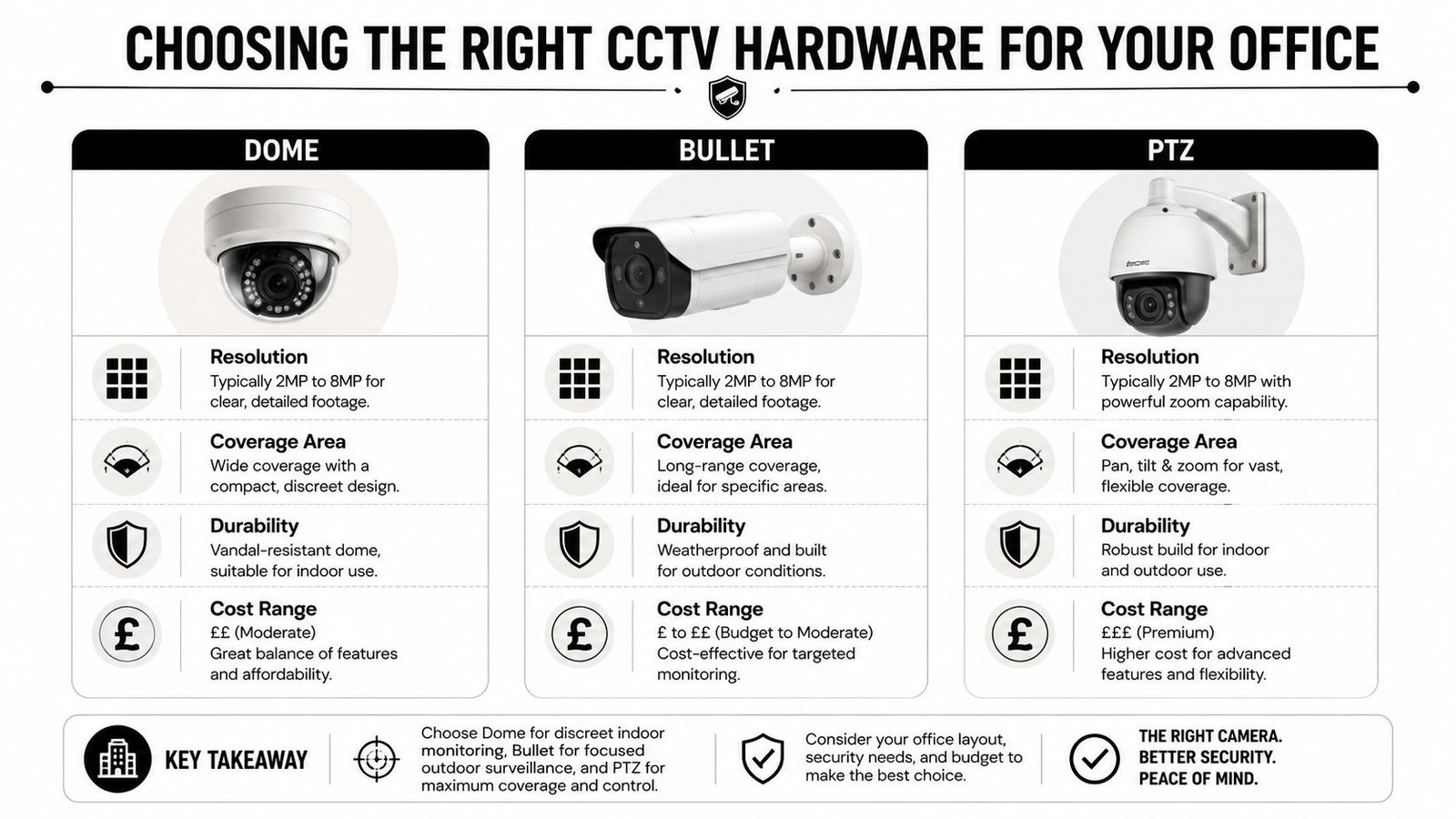
What each camera type does well
Dome cameras are usually the right starting point indoors. They suit receptions, lift lobbies, corridors, and internal doors because they are compact, difficult to interfere with, and well suited to controlled office lighting. They also tend to fit better with privacy masking where part of a scene should be excluded.
Bullet cameras are often the better choice outside. Their shape makes the direction of coverage clearer, which can support deterrence at rear access points, service yards, and car parks. The trade-off is exposure. Poor placement can leave them vulnerable to glare, weather, and dirty lenses, which is one reason external positioning should never be guessed.
PTZ cameras are useful in larger external spaces where a guard or monitoring team is actively controlling views. They are not a substitute for properly placed fixed cameras. If a PTZ is tracking movement across a yard, it is not simultaneously holding a steady evidential shot on the staff entrance.
A practical comparison looks like this:
| Camera type | Best fit in an office | Main strength | Common mistake |
|---|---|---|---|
| Dome | Reception, corridors, internal doors | Controlled coverage and tidy indoor installation | Using a wide overview where face identification is required |
| Bullet | Rear access, perimeter, car park | Visible deterrent and clear directional viewing | Mounting too high or into direct glare |
| PTZ | Large yards, active monitoring areas | Live tracking across a broad area | Treating one PTZ as cover for multiple evidence points |
For businesses weighing networked systems against legacy formats, it helps to understand the difference between IP cameras and HD analogue CCTV before choosing recorders, switches, and cabling routes.
A realistic budget discussion belongs here as well. Cheap unit pricing often hides actual cost drivers, such as low-light performance, lens choice, power provision, access equipment, and storage demand. Buyers comparing project scope can understand security camera installation prices more clearly when the full specification is priced instead of the camera alone.
Resolution, low-light performance and lens choice
Resolution needs to match the task, not the marketing label. An overview of a reception area does not need the same level of detail as a camera expected to identify a person entering through a controlled door. Higher resolution can improve evidential quality, but it also increases storage use, network load, and retrieval time if the system has been undersized.
As noted in Pelco's CCTV monitoring guide, image quality depends on more than headline resolution. Low-light performance matters just as much in offices with glazed entrances, dim rear access routes, loading areas, and car parks used outside business hours. A camera that looks sharp in daytime tests can fail badly at 6pm in winter.
Lens choice matters too. A wide lens covers more scene but spreads detail thinly. A tighter field of view captures less area and gives better subject detail where identification is required. That is one of the most common mistakes we see with off-the-shelf kits. The picture looks broad on a phone app, but the recorded detail is not good enough to support an investigation or a subject access request review.
Before you decide, it's worth watching a practical overview of what installers and buyers assess in real projects.
A professionally specified system usually costs more than a retail bundle. It also gives clearer footage, better reliability, and hardware that supports your stated purpose under UK GDPR. That is the standard office CCTV should be designed to meet.
Storage, Integration and Intelligent Monitoring
A camera captures images. The system creates usable security value. That distinction matters because many office setups fail after installation, not during it.
Recording is only one part of the system
The first storage decision is whether footage lives mainly on-site, remotely, or in a hybrid setup. For most offices, a hybrid model is practical. It keeps evidential recording on-site while allowing secure remote review for authorised users.
That approach usually works well because it balances continuity and access. If someone needs to review an overnight event, they can do so without being physically present, while the primary recording remains under controlled local management.
Storage decisions should account for:
- Footage importance: Critical entry points need dependable recording and easy retrieval.
- User access: Managers often need review access without having broad admin rights.
- Incident workflow: Exporting footage for police, HR, insurers, or landlords should be straightforward and controlled.
Why integration changes the value of CCTV
Office CCTV becomes more useful when it isn't working alone. If the intruder alarm activates, relevant camera views should be easy to review. If access control logs a door event, investigators should be able to match that event against video.
That's one reason the market has shifted. The British Security Industry Association's figures show the UK private security industry's turnover has reached £8.0 billion, with growing use of remote monitoring and video analytics, reflecting movement away from static recording and towards software-led response models (discussion of BSIA figures and market direction).
For buyers considering more advanced systems, it's worth seeing how AI CCTV systems can improve security when analytics are applied sensibly. The right setup can help filter routine motion, flag unusual activity, and reduce wasted time reviewing empty scenes.
The strongest office systems don't just store footage. They help the right person find the right event quickly.
Professional specification offers a distinct advantage over off-the-shelf kits. A small office may not need a manned control room, but it can still benefit from remote alerts, event tagging, secure smartphone access, and linked alarm actions. Those features turn CCTV from passive recording into an operational tool.
Where integrated systems are needed, Wisenet Security Ltd is one example of a UK installer that works across CCTV, intruder alarms, access control, intercoms, and related system maintenance. That matters because office security problems often sit between systems rather than inside one product line.
Navigating UK CCTV Laws and GDPR Compliance
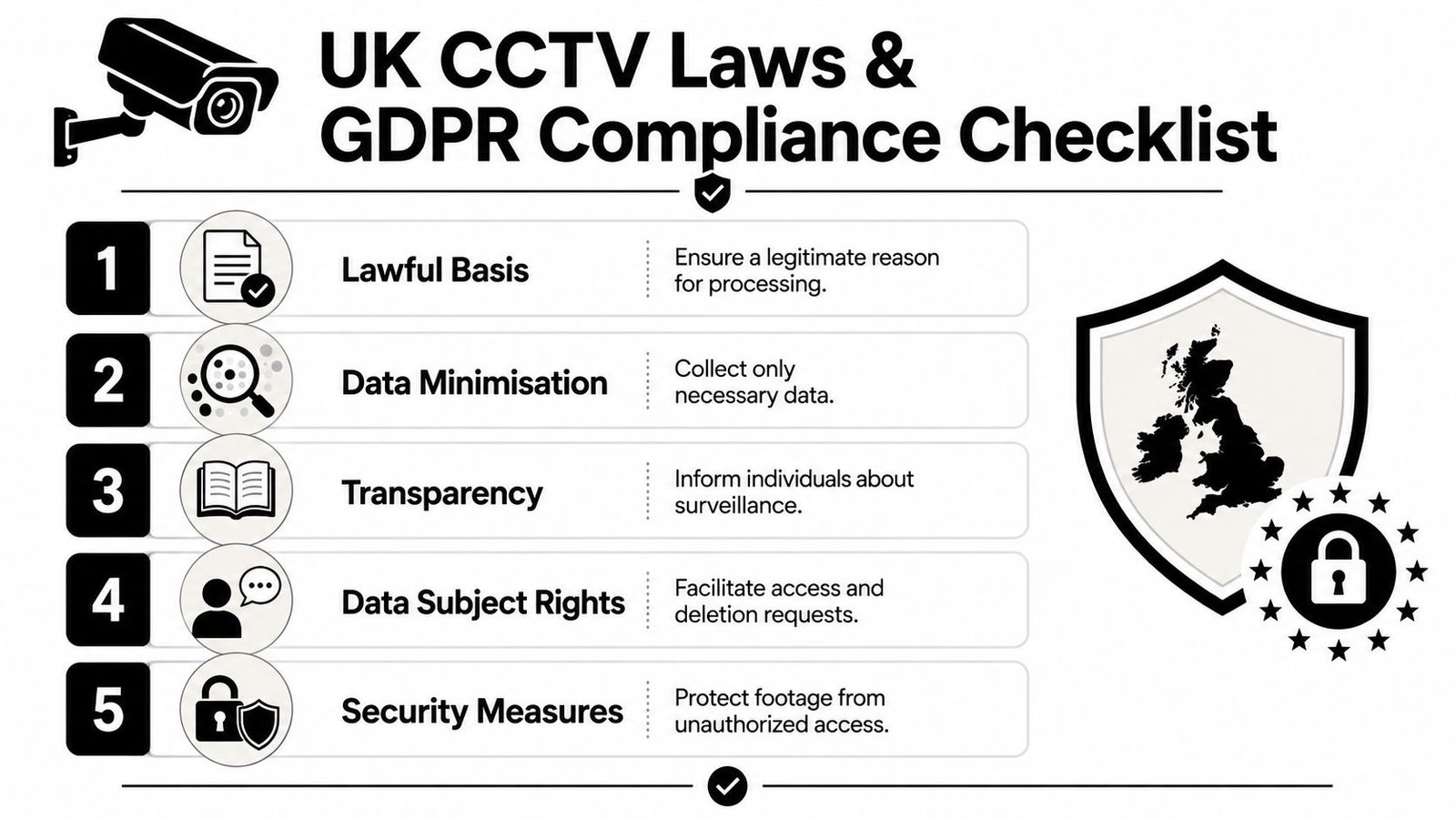
The legal position should shape the design before any camera goes on the wall. In the UK, office CCTV is a form of personal data processing. If your system captures identifiable people, you're not just buying security hardware. You're operating within the Data Protection Act 2018 and UK GDPR.
Lawful use starts before installation
Under the rules summarised in this workplace CCTV guidance, office CCTV must be lawful, fair, and transparent. Employers should carry out a legitimate interest assessment before installation, must provide clear signage, and must not place cameras in areas where staff have a reasonable expectation of privacy, such as toilets or changing rooms.
That framework is often treated as paperwork. It isn't. It answers the core design questions:
- Why is this camera needed?
- What exact risk does it address?
- Is the view proportionate to that risk?
- Have staff and visitors been told what's being recorded and why?
If an office can't answer those questions, the issue isn't just compliance. The system probably isn't well designed.
For businesses trying to connect premises surveillance with broader governance, Bridge IT Solutions explains IT security in a way that helps non-specialists understand why physical and digital controls should be managed together rather than in separate silos.
What proportional office monitoring looks like
Proportionality is where many office CCTV projects go wrong. Buyers assume more cameras equal more security. In reality, more cameras can create more compliance risk if the organisation can't justify each view, each retention decision, and each access permission.
A proportionate office setup usually focuses on places such as entrances, reception, shared access routes, loading points, and vulnerable external areas. It avoids drifting into routine observation of workers at desks unless there is a documented and defensible reason.
A practical compliance test is simple:
| Question | Good sign | Warning sign |
|---|---|---|
| Can you explain why the camera exists? | Purpose is specific and documented | “General monitoring” |
| Does the view avoid unnecessary capture? | Framed tightly to the risk area | Sweeping views of unrelated space |
| Have people been informed? | Signage and staff notice are clear | Cameras installed with little explanation |
| Is access restricted? | Named authorised users only | Informal viewing by anyone with login access |
If you're reviewing policy and deployment together, this guide on CCTV and GDPR in the UK for businesses is a useful companion to the technical design conversation.
More coverage only helps when each camera has a lawful purpose, a defined owner, and a recording policy that the business can defend.
Retention, access and staff trust
Retention should be proportionate. Access should be restricted. Viewing should be controlled and logged. Those points sound administrative, but they directly affect whether footage remains a useful security asset.
A common mistake is allowing broad internal access because “it's only CCTV”. It isn't only CCTV. It's recorded personal data. Office systems should restrict footage to authorised personnel, and records should show who accessed footage and why.
Staff trust matters as well. Clear communication reduces friction and complaint risk. When people understand that cameras cover entrances, shared areas, and vulnerable points for security reasons, the system is easier to defend. When coverage feels vague or excessive, resistance grows quickly.
Good compliance doesn't weaken office security. It sharpens it. It forces the business to define what it needs, remove unnecessary coverage, and manage footage properly after capture.
How to Choose a Vetted and Certified Installer
A poor installer can make good equipment perform badly. Misaligned lenses, weak recorder setup, poor cable routing, and vague handover procedures are all common reasons office CCTV disappoints after day one.
The safest way to buy is to treat installer selection as due diligence, not procurement admin.
Questions that expose weak installers quickly
Ask how the installer handles survey, design, compliance input, user permissions, and aftercare. If the answer is mostly about camera brands and price, that's a warning sign.
You want an installer who can explain why each camera is positioned where it is, how footage will be accessed, who will manage permissions, and what support looks like after installation. For offices in Cardiff, Bristol, Newport, Swansea, and the wider South Wales and South West area, local support also matters. When something goes wrong, response quality matters more than sales polish.
Use this checklist when comparing firms:
| Verification Item | Why It Matters | Check (Yes/No) |
|---|---|---|
| Public liability and relevant insurance | Protects your business during installation and service work | |
| DBS-checked engineers | Reduces risk when installers work in sensitive office areas | |
| Formal accreditations such as SafeContractor | Shows external scrutiny of working practices | |
| Experience with office environments | Office circulation, privacy expectations, and mixed-use areas need specific design judgement | |
| Ability to integrate CCTV with alarms or access control | Joined-up systems are easier to manage and investigate | |
| Clear maintenance and support terms | Prevents uncertainty once the project is live | |
| Manufacturer familiarity | Competence with platforms such as Hikvision, Paxton, Pyronix, or Fike often improves commissioning and support | |
| Documented handover process | Ensures your team receives user training, access controls, and system records |
A good installer won't object to scrutiny. They'll expect it. The companies worth shortlisting usually welcome detailed questions because they know office CCTV is an ongoing responsibility, not a one-off sale.
Ongoing Maintenance and System Management
CCTV systems require ongoing attention to remain effective. In offices, the risks are practical and predictable. A meeting room becomes a storage area, a reception desk is moved, external lighting is replaced, or a camera aimed at a final exit starts catching more public pavement than private premises. If nobody reviews the system after those changes, image quality, coverage, and privacy compliance can drift at the same time.
What a proper maintenance routine includes
Good maintenance is not limited to cleaning lenses and checking whether cameras are still online. It also means making sure the system still matches the purpose you documented under UK GDPR. If camera views have shifted, if user permissions have widened over time, or if retained footage sits longer than your policy allows, the issue is not only technical. It is a governance problem.
According to best practices for maintaining a business CCTV system, effective upkeep includes role-based access, encrypted remote viewing, and regular checks of camera alignment, cable integrity, power backups, and storage health. In practice, those checks help answer the only question that matters after an incident. Can the system produce usable footage, from the right area, at the right time, without creating a compliance problem of its own?
A sound routine should cover:
- Physical condition: Clean lenses, secure mounts, stable housings, and a field of view that still serves the intended purpose.
- Recording health: Confirm each camera is recording properly, timestamps are accurate, and footage can be searched and exported.
- Power resilience: Test backup power, restart behaviour, and what happens if the recorder loses supply.
- Storage and retention: Check available capacity, overwrite settings, and whether retention periods still match your documented policy.
- User access: Review who can view live feeds, export footage, or change settings, and remove access that is no longer justified.
Management discipline matters as much as servicing
A service visit every year will not fix weak day-to-day management. Someone inside the business should own the system operationally. That person should know how incidents are logged, who approves footage release, how subject access requests are handled, and when the installer needs to be called.
A CCTV system usually fails without warning.
I see the same pattern regularly. The recorder is still powered, so staff assume everything is fine. Then an incident happens and one channel stopped recording weeks ago, the export user account no longer works, or a camera meant to cover the rear door is now half-blocked by signage. Those are avoidable failures, but only if checks are scheduled and recorded.
Well-managed office CCTV keeps its evidential value and stays aligned with the reason it was installed. Poorly managed systems create false confidence, waste time during investigations, and can leave an employer exposed on both security and data protection.
If you need a compliant, professionally designed CCTV system for an office in South Wales or the South West, Wisenet Security Ltd can help assess your site, design proportionate coverage, and support the system after installation with ongoing maintenance and system management.