Access Control Panel Explained: The Complete UK Guide
An access control panel is the central hardware that manages digital credentials, enforces door permissions, and logs entry events for a building. In the UK, BS EN 60839-11-1:2013 provides the foundational technical baseline for evaluating these systems, rather than treating a panel as a simple door-release device.
A property manager usually discovers the panel's importance at the worst possible time. A former employee still has a working fob, a warehouse door shows an unexplained opening, or a fire alarm activates while electronically locked doors behave differently from what the evacuation plan assumed. The reader, card, keypad, biometric device, or mobile app gets the attention, but the panel decides how those credentials are interpreted, what happens when systems fail, and which events remain available for investigation.
Table of Contents
- What Happens When Access Control Fails
- How Access Control Panels Work and What to Compare
- Where Access Control Fits Across Property Types
- Integrating Access Control with CCTV and Alarms
- Choosing Standalone, Wired, Wireless, or Networked Panels
- Fire Safety, Governance, and Lifecycle Security
- Why Professional Installation and Local Support Matter
What Happens When Access Control Fails
A business can have good readers and expensive locks yet retain weak access control. The failure often sits in administration rather than hardware. A contractor's credential remains active after the work ends, a network outage prevents a central update from reaching a door, or nobody checks the event history until an incident has already become difficult to reconstruct.
Fire creates a different type of failure. A security team may configure doors to resist unauthorised entry, while the fire strategy requires particular doors to release or remain available for escape. If nobody has documented and tested the interaction between the access control panel, power supply, fire alarm, emergency release devices, and locking hardware, the system can protect the building while undermining evacuation.
Practical rule: Treat every access decision as a security event, every failure mode as a design requirement, and every emergency release as part of the fire strategy.
An access control panel is the central system that stores or receives credential information, applies permissions to access points, records events, and coordinates with connected security devices. It may control one door or many, but its job extends beyond energising a lock. It can decide whether a user may enter a zone at a particular time, accept a request-to-exit signal, report a forced door, and preserve an audit trail for later review.
That definition matters when comparing quotations. A proposal that lists readers, cards, and electric locks without explaining panel capacity, local operation, event logging, administration, network design, and fire release is incomplete. The visible reader is only the point at which the user presents a credential. The panel is where policy becomes a physical decision.
The hidden cost of a weak panel design
Poor design creates operational uncertainty. Managers may not know who can enter a stock cage, whether an offline controller still enforces permissions, or whether a door event can be matched with CCTV footage. A system that can't answer those questions reliably is difficult to manage and difficult to defend after an incident.
The UK's technical framework, BS EN 60839-11-1:2013, formalised minimum functionality, performance requirements, and test methods for electronic access control systems and components. It superseded BS EN 50133-1:1997 after approximately 16 years under the earlier specification, and it was identical to IEC 60839-11-1:2013, connecting UK practice with an international technical baseline. The published standard preview is useful context when asking an installer how a proposed system is being evaluated.
How Access Control Panels Work and What to Compare
Think of the panel as the building's access-rule engine. A reader collects a credential, the panel checks the relevant permissions, the locking device responds, and the system records the transaction. A request-to-exit device, door-position contact, alarm input, or CCTV platform can add context to that decision.
Standalone and networked operation
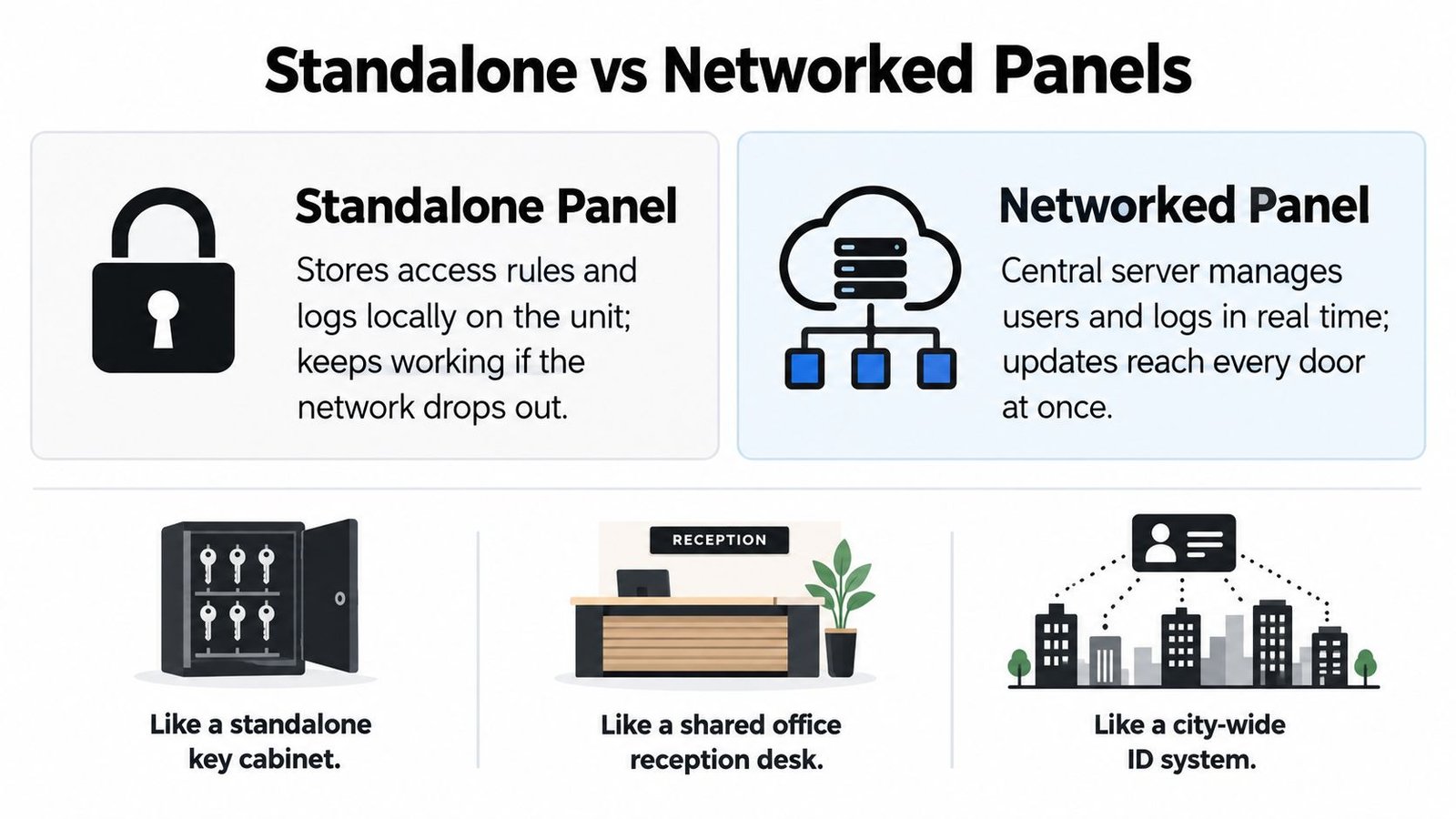
A standalone panel keeps rules and events at the local door or local controller. That can suit a small installation where one administrator manages limited access points. It may continue working during a network interruption, but administration can become fragmented. Updating users, reviewing events, or removing a lost credential may require local access or a separate process.
A networked panel communicates with a central server or management platform. It supports centralised user administration, consistent permissions, remote diagnostics, and coordinated reporting across doors. Its dependence on network availability and secure administration means the design must include local fallback behaviour, protected communications, power resilience, and a clear response to server failure.
Wired and wireless architecture
Wired readers and controllers usually offer a predictable physical path and can be appropriate for new construction, major refurbishment, and high-use portals. Wireless equipment can reduce disruption during retrofit work and may help where cable routes are difficult. That convenience doesn't remove the need to assess battery management, radio coverage, interference, encryption, local operation, and the consequences of a communications failure.
UK research illustrates why this decision isn't only about convenience. A 2021 UK wireless-access-control survey found that 38% of end-user organisations were operating some form of wireless system, while 95% considered integration with other building or security-management functions somewhat or very important. At the same time, only 23% thought wireless systems were more secure than alternatives, and 30% viewed them as a potential security risk. The UK wireless access control report shows the core trade-off: flexibility and integration matter, but resilience and cybersecurity still shape confidence.
Controller and panel are related, but not always identical
Contractors often use controller and panel interchangeably. In practice, a controller is the processing device that makes access decisions, while a panel may describe the enclosure containing the controller, power equipment, input and output modules, and associated termination points. Ask the supplier to define the terms in the quotation and identify where permissions, event records, batteries, and network connections reside.
Compare systems by asking:
- Permission handling: Can the panel apply user, zone, schedule, and approval rules locally?
- Audit quality: Does every access decision create a time-stamped event, including denied attempts and forced-door conditions?
- Failure behaviour: What continues to work during power, network, server, or reader failure?
- Integration: Can the system exchange useful events with CCTV, intruder alarms, identity platforms, and building management tools?
- Maintenance: How are firmware updates, backups, administrator changes, and access reviews managed?
A feature list is less useful than a tested sequence. The right panel is the one that continues enforcing the intended policy, records what happened, and gives authorised staff enough control to respond.
Where Access Control Fits Across Property Types
The right access control panel starts with movement through the property, not with a reader catalogue. Map who needs to enter, which areas they need, at what times, and what evidence the business may need afterwards.
A house or small office may need simple control at a front entrance, while a warehouse has pedestrian doors, loading areas, stock cages, plant rooms, offices, and vehicle routes. A multi-tenant building adds separate occupiers, shared spaces, visitors, contractors, deliveries, and changing tenancy records. A car park may need vehicle identification, barrier control, pedestrian access, and a safe fallback when the network is unavailable.

Design permissions around risk
Use least-privilege zoning as the default. General staff may need the main entrance and operational areas, but not server rooms, management offices, plant rooms, or stock cages. Give those higher-risk spaces separate readers, schedules, and approval groups so a routine credential doesn't become a master key.
For a warehouse or logistics site, document delivery processes and peak user flow before selecting hardware. A slow reader or awkward access sequence at a busy entrance can encourage door wedging or tailgating. Conversely, an unrestricted service entrance can undermine careful controls at the main reception.
Property managers comparing external entrances may also benefit from guidance on choosing keypads or intercoms, particularly where a gate, visitor call point, and vehicle route need to work together rather than operate as unrelated equipment.
Match the panel to daily administration
A landlord may need to deactivate a tenant's credentials without affecting other occupiers. A retailer may need temporary access for contractors outside trading hours. A homeowner may value straightforward control more than complex reporting. In each case, the panel should reflect the administration model, not just the number of doors.
For sites in South Wales and the South West, the design brief should record every pedestrian and vehicle access point, emergency egress route, visitor process, and fallback mode during network or power failure. A sound acceptance test proves that a lost credential can be disabled centrally, that an offline controller still applies its stored permissions, and that the event record can be reconciled with other systems.
Integrating Access Control with CCTV and Alarms
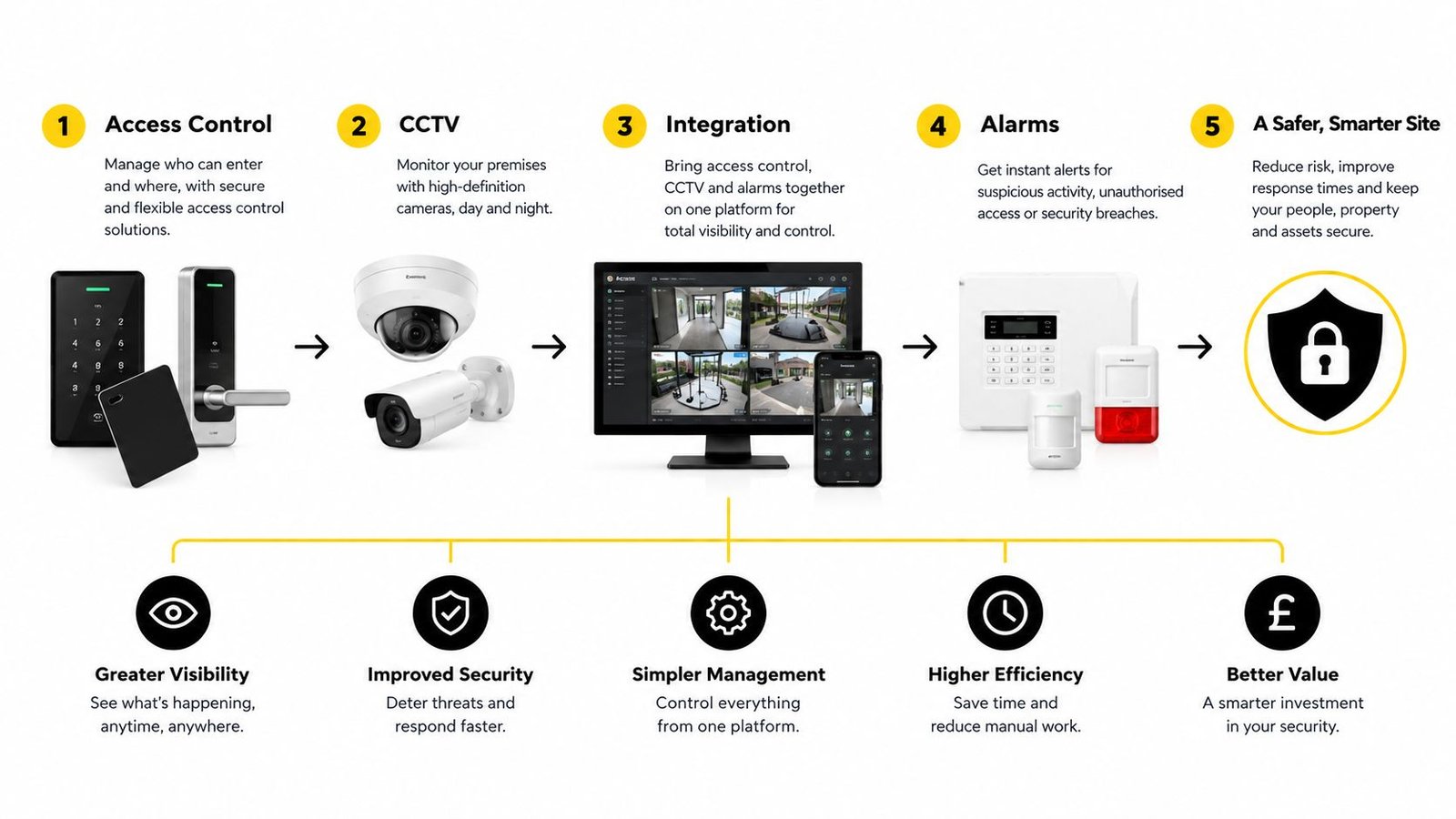
Integration works when it improves decisions, not when several products merely appear on one dashboard. A panel transaction becomes more useful when the security team can see whether the door opened normally, whether the door was held open, whether an alarm was triggered, and what the associated camera recorded.
UK guidance defines automatic access control as a mechanism controlling who can go where and when, and recommends combining it with CCTV and intruder detection. The same guidance supports least-privilege zoning, prompt removal of leavers and contractors, and correlation between panel transactions, door contacts, request-to-exit devices, forced-door alarms, and video verification. NPSA guidance on unauthorised entry sets out the security principles that should shape the specification.
Build the event chain
Start with the door, then identify the evidence needed when something goes wrong. A normal entry might show an authorised credential, a valid schedule, a door contact changing state, and a corresponding camera view. A suspicious sequence could show a denied credential, a forced-door input, an alarm notification, and video of someone entering without a valid transaction.
The value of integration is not the number of logos on a proposal. It is the quality of the timeline produced during an incident.
Specify inputs for door position, request to exit, tamper, forced entry, and door-held-open conditions. Configure the platform so security staff can distinguish a genuine authorised exit from a door that was opened without a valid transaction. A separate security system integration resource can help property teams think through how access, video, and alarm events should share operational context.
Camera positioning matters as much as software mapping. A practical Brisbane security camera installation guide offers useful general principles on coverage and placement, although UK sites still require local consideration of lighting, privacy, building layout, and the investigation purpose of each view.
Protect the panel as a networked security asset
An internet-connected controller can provide a route into the wider premises network if it is poorly specified. Use a dedicated VLAN or isolated security network, restrictive firewall rules, unique administrator accounts, encrypted communications, and MFA where the platform supports it. Protect remote administration with an appropriately assured VPN, restrict access to authorised personnel, and maintain a firmware process rather than leaving devices unchanged after installation.
Resilience belongs in the same specification:
- Power: Use a UPS-backed supply where the risk and site operation justify it, and monitor power and controller tamper.
- Door status: Monitor forced-door and door-held-open inputs, not just successful reader transactions.
- Fallback: Document what happens when the server, broadband connection, local network, or reader fails.
- Acceptance: Disable a lost credential centrally, test offline permissions, and confirm every access decision creates a time-stamped audit event.
Choosing Standalone, Wired, Wireless, or Networked Panels
Architecture should follow the building's risk, cabling constraints, administration needs, and tolerance for disruption. A single low-risk door doesn't need the same management platform as a warehouse with several zones and a changing contractor population.
| Architecture | Best For | Key Strength | Main Limitation |
|---|---|---|---|
| Standalone | A single door or small low-risk location | Local operation with limited infrastructure | Administration and investigation can become fragmented |
| Wired | New builds, refurbishments, and busy portals | Predictable physical communications | Installation can be disruptive where routes are difficult |
| Wireless | Retrofit work and locations where cabling is impractical | Flexible deployment with less building disturbance | Coverage, batteries, resilience, and security need careful assessment |
| Networked | Multi-door, multi-site, or centrally managed properties | Central permissions, reporting, and administration | Network, server, cybersecurity, and fallback design become critical |
A standalone solution is sensible when the access policy is simple and the site can tolerate local administration. It becomes a poor fit when a manager needs to remove credentials across multiple doors, compare events, or manage several tenants from one place.
Wired architecture generally suits permanent infrastructure and high-throughput access points. Wireless can make retrofit projects more practical, particularly in occupied buildings, but it should be selected because its failure behaviour and maintenance model are understood, not because it avoids cable installation.
Networked panels are usually the logical choice where central audit and prompt credential changes matter. The UK survey evidence already shows strong demand for integration, alongside continuing concern about wireless security. That makes a hybrid design reasonable in some premises, provided the installer documents which doors are wired or wireless, where decisions are stored, and how each route behaves during an outage.
Choose the least complex architecture that can still enforce your access policy, preserve the evidence you need, and release doors safely during an emergency.
Fire Safety, Governance, and Lifecycle Security
An access control panel can prevent unauthorised entry and still create a life-safety problem. Security teams must know whether each door should be fail-safe, releasing when power is removed, or fail-secure, remaining locked from the secure side while preserving lawful escape. That choice depends on the door, occupancy, fire strategy, locking equipment, and emergency arrangements. It isn't a generic setting to copy across a building.
UK government guidance requires escape routes to remain clear and emergency doors to open easily. It also identifies travel distance to a final exit as a key safety factor and says that, where a storey has only one exit route, occupancy should generally be limited to 60 people. The government's workplace fire safety guidance should be considered alongside the building's fire risk assessment and documented cause-and-effect design.
Commission the release sequence
Specify how the fire alarm interacts with locks, emergency override interfaces, door-release buttons, and break-glass units. Test the actual sequence under representative conditions, including power loss and alarm activation. Confirm that emergency egress remains available, that disabled users are included in evacuation planning, and that normal access permissions can be restored in a controlled manner after an alarm.
Do not assume a reader-controlled door, a fire door, and an escape door have identical requirements. The panel, locking hardware, alarm system, power supply, and building procedures must work as one arrangement.
Govern identities and logs
Networked access control also creates personal-data responsibilities. Event histories may reveal attendance, working patterns, tenant movements, or sensitive site activity. Give administrators only the access they need, remove ex-employees and contractors promptly, and separate installer permissions from client administration.
Ministry of Justice security guidance recommends least privilege, logging successful and unsuccessful access attempts and user activity, secure log storage and backup, and a minimum six-month retention period for access-control evidence. The benchmark appears in the Ministry of Justice access-control guide. Retention should still be aligned with the organisation's lawful purpose, data-minimisation approach, internal policy, and applicable UK GDPR obligations.
Cloud management doesn't automatically solve these issues. Require MFA for remote portals where supported, unique administrator accounts, encrypted communications, firmware and vulnerability management, offline operation during broadband loss, reliable backups, and a documented process for exporting or deleting visitor and employee records.
Why Professional Installation and Local Support Matter
Access control fails at the boundaries between systems. A panel may be configured correctly but connected to the wrong lock, omitted from the fire cause-and-effect test, placed on an unsuitable network, or left with administrator accounts that nobody reviews. Professional specification turns those dependencies into documented requirements and witnessed tests.
For property managers, ask whether the installer can provide:
- System design: A door schedule, permissions matrix, network plan, fire-release sequence, and fallback description.
- Integration testing: Evidence that CCTV, intruder alarms, fire alarms, door contacts, and panel events behave as intended.
- Lifecycle support: Firmware updates, configuration backups, credential reviews, electrical testing, and remote diagnostics.
- Competence checks: DBS-checked engineers, appropriate insurance, SafeContractor accreditation, and relevant manufacturer experience.
Wisenet Security Ltd provides access control installation and maintenance across South Wales and the South West, including Cardiff, Bristol, Newport, Swansea, and surrounding areas. Its systems cover keypad, card, fob, and biometric readers, with programmable permissions, lost-card deactivation, user logs, and central administration, alongside integration with CCTV, intruder alarms, fire systems, intercoms, and gate automation. Property owners can review the access control installation service when assessing a project.
Good access control isn't just a locked door. It's a verifiable, auditable, resilient, and fire-safe security control that remains manageable throughout the building's life.
Speak with Wisenet Security Ltd about specifying an access control panel around your doors, users, network resilience, fire strategy, and audit requirements. Visit Wisenet Security Ltd to arrange a consultation for a home, business, warehouse, managed property, or car park in South Wales or the South West.