CCTV in the Workplace: A UK SME Guide 2026
If you think workplace CCTV is still just a shop camera above the till, the UK figures tell a different story. 75% of UK employers use video surveillance, yet only 22% of employees know they're being monitored, and monitored staff are 2.3x more likely to look for another job. That gap matters. It turns CCTV from a simple security purchase into a legal, operational, and staff-management issue.
For small businesses in South Wales and the South West, that's where things usually go wrong. The kit gets installed first. The paperwork gets left until later. Nobody thinks about who can access footage, how long it's kept, or what happens when a member of staff asks for a copy of video showing them. Then a theft, accident, grievance, or SAR lands on the desk, and the weaknesses show up fast.
Used properly, CCTV in the workplace protects stock, premises, vehicles, staff, and lone workers. Used badly, it creates risk you didn't have before. The difference usually comes down to three things. Why you installed it, how you manage the footage, and whether the system is doing more than just recording.
That practical gap is what matters most for SMEs. A compliant system isn't only about cameras on walls. It's about lawful purpose, sensible camera placement, secure storage, active monitoring where needed, and having a realistic process for access requests and incident review.
Table of Contents
- Introduction
- Workplace CCTV The Legal Essentials for UK Businesses
- Key Business Benefits Beyond Basic Security
- Selecting the Right CCTV System for Your Premises
- Professional Installation and System Integration
- Your CCTV Action Checklist and Next Steps
Introduction
Most owners start looking at CCTV after a problem. Shoplifting. Missing stock. Damage in a yard. A health and safety incident no one can properly explain. That's understandable, but it's the wrong place to start if you want CCTV in the workplace to hold up under scrutiny.
In the UK, workplace CCTV sits under data protection law as well as security practice. That means every camera choice affects two things at once. It affects what you can see when something happens, and it affects whether your business can justify collecting that footage in the first place.
For a small retailer in Cardiff, a warehouse operator in Newport, or an office manager in Bristol, the practical questions are usually the same:
- Why are the cameras there? Security, safety, access control, incident review, or all of the above.
- Who will see the footage? Owners, managers, supervisors, third-party monitoring, or no one unless something goes wrong.
- Can the business manage the data properly? Storage, retention, review logs, and staff requests.
- Will the system prevent loss, or just document it later?
Those are not abstract compliance questions. They shape cost, layout, and how much value you get back from the system.
Practical rule: If you can't explain in one sentence why each camera exists, the system probably hasn't been planned properly.
A good workplace CCTV setup should do four jobs well. It should deter obvious bad behaviour, give clear evidence when incidents happen, support staff safety, and stay inside UK legal boundaries. If it can't do all four, it needs redesigning before it goes live.
Workplace CCTV The Legal Essentials for UK Businesses
Roughly half of the CCTV problems I see with small businesses are not camera problems at all. They are data handling problems. The system records what it should, but the business has no clear purpose statement, weak access controls, no retention rule, and no plan for staff requests. That is what creates legal risk.
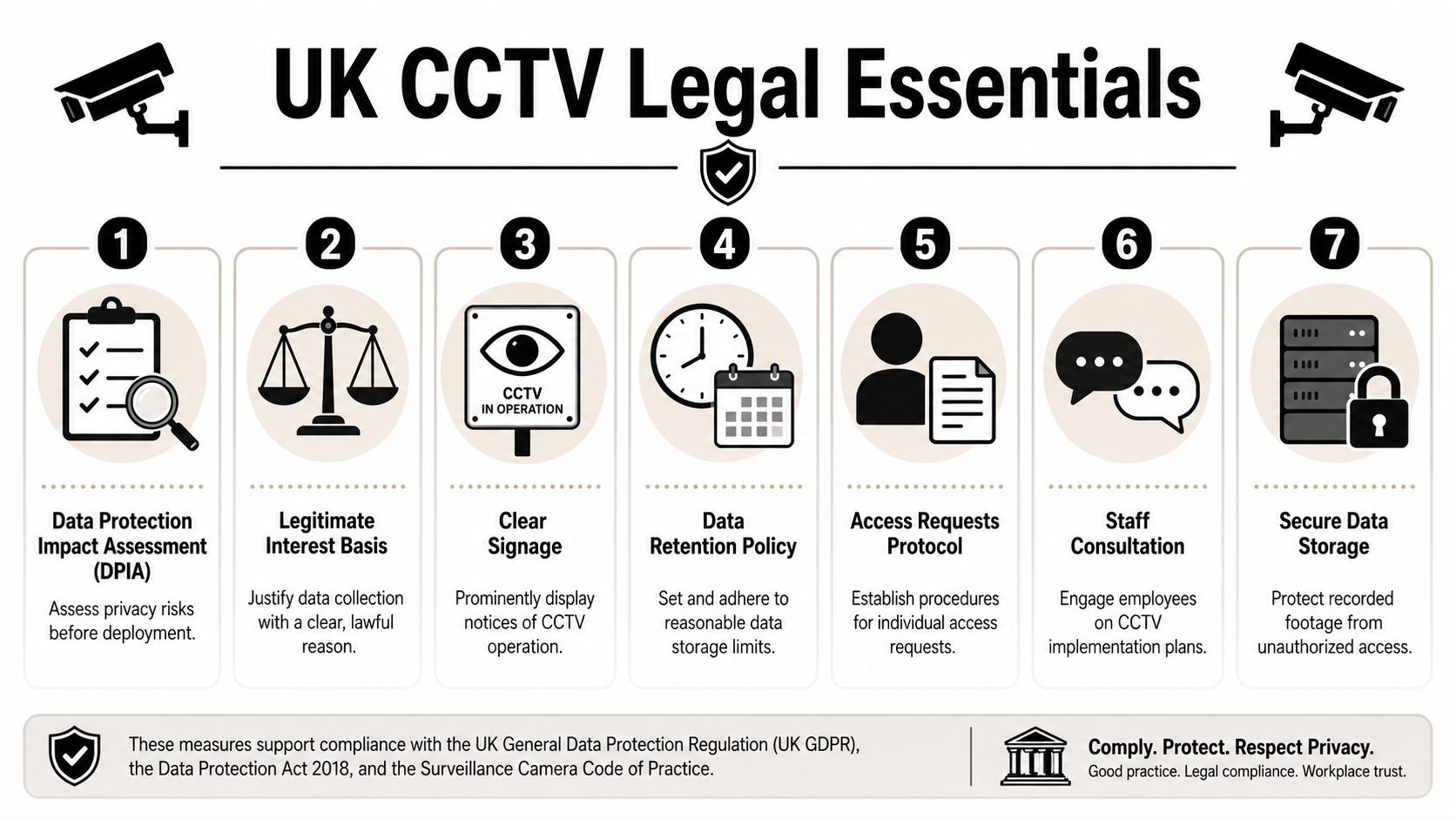
Start with purpose, not hardware
Before choosing lenses, recorder size, or remote viewing apps, define why each camera is there. Security at the rear entrance is a valid reason. Staff safety at a loading bay is a valid reason. General monitoring is too vague and causes trouble later.
Purpose drives compliance and design. A camera covering a stockroom door may be justified. A camera trained on desks to keep an eye on output is much harder to justify and will draw scrutiny if challenged. If the reason changes, your paperwork and staff notice need to change too.
Use a simple planning standard for every camera:
| Issue | Good practice | Common mistake |
|---|---|---|
| Purpose | Define one clear reason for each camera view | “General monitoring” with no detail |
| Scope | Capture only the area needed for that purpose | Filming extra space because it is easier |
| Staff notice | Put up signage and explain use in policy documents | Assuming staff already know |
| Access | Limit footage access to named people | Shared logins and informal viewing |
If your business also works with overseas teams, policy comparisons can help. A useful outside perspective is this guide to employee privacy rights for US employers, particularly if a parent company wants one standard across multiple countries. UK employers still need to follow UK law, but the contrast helps show where UK rules need tighter justification and clearer documentation.
For a practical UK reference point, use this guide on CCTV and GDPR in the UK for businesses alongside your internal policy and risk review.
Carry out a DPIA before installation
For many SMEs, a Data Protection Impact Assessment sounds like corporate paperwork. In practice, it is one of the most useful planning tools you have because it forces clear decisions before money is spent on the wrong layout.
A decent DPIA should answer five points without waffle:
- Why monitoring is needed in this workplace
- What risk it addresses, such as theft, unauthorised access, or lone-worker safety
- Who may be affected, including staff, visitors, contractors, and drivers
- How privacy impact is reduced, such as masking, limited views, retention periods, and restricted access
- Why a less intrusive option would not solve the same problem
If that document is difficult to complete, the system design is usually the issue.
I see this regularly with businesses that want one camera to do everything. They install for security, then try to use the same footage for lateness checks, performance disputes, or general supervision. That is where complaints start and trust drops. If you want to use CCTV beyond the original security or safety purpose, you need a separate justification and a clear policy position before anyone relies on the footage.
Retention, access, and audit trails matter more than most owners expect
A lot of legal trouble starts after installation. Someone exports footage to a USB stick with no record. Multiple managers share a password. Clips are kept for too long because nobody set a deletion rule. None of this is complicated to fix, but it needs setting up properly from day one.
For most SMEs, good practice is straightforward:
- Set a defined retention period based on risk, not habit
- Limit playback and export rights to named staff
- Keep an access log for reviews, exports, and disclosures
- Protect remote viewing with individual logins and strong passwords
- Check image quality is usable for the purpose you stated
That last point is often missed. If a camera is installed for incident review, but the image is too poor to identify what happened, you still carry the compliance burden without getting the security value.
Subject Access Requests are where weak systems become expensive
This is the part many installers skip and many owners only discover after a complaint. If a member of staff asks for footage showing them, the business needs to find it, review it, consider who else appears in it, redact where needed, and respond within the legal timeframe. On a cheap record-only system with poor search tools, that can take hours.
The operational answer is not more paperwork. It is better system management.
- Keep cameras named clearly by area
- Make sure footage can be searched by date and time quickly
- Know how exports work before a request arrives
- Use software or support that allows redaction where other people appear
- Record what was disclosed, to whom, and why
For a small business, the return on investment question begins to shift. A low-cost system that only records may look fine on the quote, but the first SAR, grievance, disciplinary issue, or insurer request can turn it into a drain on management time. A system that is set up for controlled access, clean exports, and proper audit trails costs more up front, but it is usually cheaper to run and easier to defend.
Key Business Benefits Beyond Basic Security
A lot of workplace CCTV is sold on one promise. It deters theft. Sometimes it does. Often it doesn't, at least not by itself.
The hard truth is that passive systems don't change much. UK data shows 68% of retail thefts occurred in premises with CCTV when systems were passive, and recovery rates were 12% for passive systems versus 74% when CCTV was actively monitored and linked to alarm systems. That tells you something important. Recording isn't the same as preventing.
Passive recording rarely changes behaviour
A passive system is one that captures footage but doesn't trigger action when something starts going wrong. No one is reviewing live events. No alerts are being generated. The alarm isn't linked. Footage only matters after the loss has already happened.
That setup can still have value. It may help with police enquiries, internal investigations, or insurance claims. But if your real problem is repeat theft, out-of-hours intrusion, unauthorised yard access, or high-risk stock movement, passive CCTV usually underdelivers.
An actively managed setup is different. It can flag line crossing, perimeter breaches, suspicious movement after closing, or forced access around delivery points. The point isn't complexity for its own sake. The point is moving from evidence collection to intervention.
Where CCTV earns its keep
For SMEs, the strongest returns usually come from practical daily use rather than dramatic crime scenarios.
Health and safety review
If there's a slip, loading incident, or vehicle movement issue, good footage helps establish what actually happened. That supports investigations and helps managers correct unsafe routines.Dispute resolution
Staff complaints, customer incidents, and contractor disagreements become easier to assess when there's clear, time-stamped video rather than conflicting accounts.Lone worker oversight
In warehouses, service yards, and industrial spaces, CCTV can support lone worker safety when combined with alarms or other monitored systems.Access and delivery verification
Businesses often need to confirm whether someone entered, where a parcel was left, or whether a gate or roller shutter was secured at a specific time.
A workplace camera should answer a business question. If it only creates more footage and no better decisions, it's badly specified.
There's also a staff protection angle that owners sometimes underestimate. Good CCTV can clear an employee as quickly as it can implicate someone. In retail counters, receptions, loading areas, and customer-facing offices, that impartial record is often one of the most valuable parts of the whole system.
The best results usually come when the cameras are matched to the risk. A till area needs facial and transaction context. A rear alley needs visibility and alerting. A warehouse aisle needs evidential coverage, not just broad shapes moving in low light. That's why “one package fits all” rarely works well for business premises.
Selecting the Right CCTV System for Your Premises
Choosing a system gets easier when you stop shopping by headline features and start with the site itself. A city-centre office, a corner shop, and a logistics unit don't need the same cameras, recording method, or viewing setup. Good design starts with entrances, blind spots, lighting conditions, stock value, staff movement, and whether you need evidence after an event or action during it.
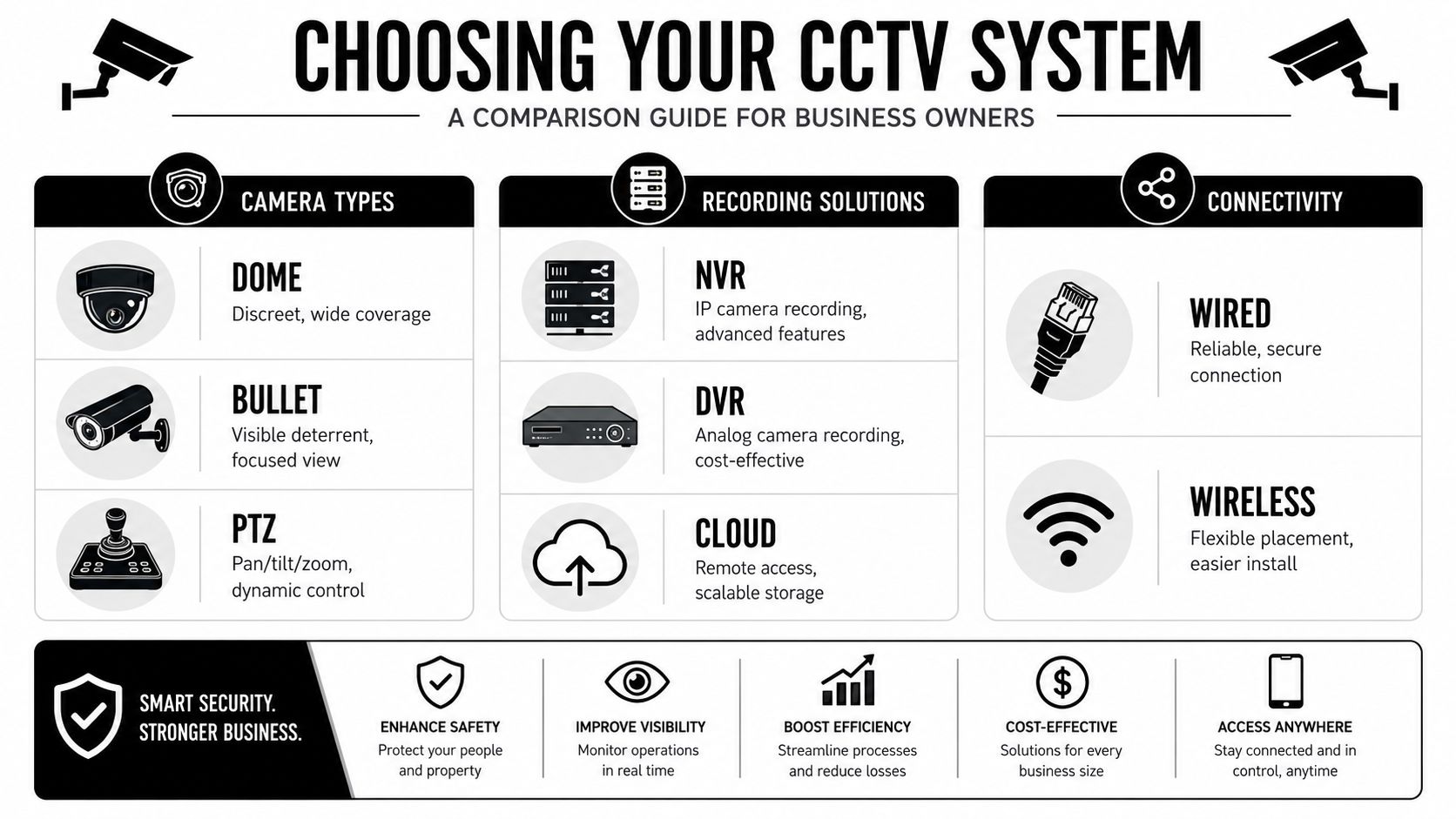
Choose cameras by environment
Different camera styles solve different problems.
| Camera type | Best suited to | Main advantage | Main trade-off |
|---|---|---|---|
| Dome | Offices, receptions, internal retail areas | Discreet look, broad coverage | Less obvious as a deterrent |
| Bullet | External walls, yards, car parks | Visible presence, focused direction | More exposed and visually prominent |
| Turret | Mixed indoor and outdoor use | Good image quality and practical mounting | Less covert than a dome |
| PTZ | Large open spaces, yards, active monitoring rooms | Operator control over pan, tilt, and zoom | Needs a clear operational reason to justify cost |
A Bristol shopfront might benefit from visible bullet cameras outside and domes inside. A Cardiff office reception often needs a discreet internal view with solid facial capture at the entrance. A Swansea warehouse usually needs tougher external coverage, wide internal aisle views, and attention to loading doors and vehicle movement.
If you want a plain-English comparison before speaking to an installer, this guide on choosing commercial surveillance solutions is a useful reference point.
A more specific look at office environments is covered in this article on CCTV for offices in the UK, especially where reception, access points, and staff areas need different treatment.
The specs that actually matter
The numbers on a product sheet only matter if they improve real-world footage. For UK compliance and evidential use, the benchmark is high-resolution 4K or HD cameras with at least 1080p at 25 FPS, plus WDR of at least 120dB for difficult lighting, with secure local or encrypted processing, user authentication, and retention policies typically not exceeding 30 days.
In plain terms, here's why that matters:
- Resolution determines whether you can identify a face, read a logo, or see what someone did with their hands.
- Frame rate affects how smooth motion appears. In busy entrances or loading points, that matters.
- WDR matters where bright daylight and darker interiors meet. Think reception doors, roller shutters, glazed shop fronts, and warehouse bays.
- Compression and storage efficiency affect how long you can retain usable footage without overspending on storage.
- Authentication and access control decide whether the system is secure or just convenient.
A useful analogy for WDR is this. Without it, a person standing in front of a bright doorway can appear as a dark outline. With proper WDR, you can still see facial detail and clothing. That can be the difference between usable evidence and a vague silhouette.
Storage and access choices
Most SMEs are deciding between local recording, cloud-based access, or a hybrid arrangement. There isn't one right answer for every site.
- Local NVR storage gives strong control and often suits fixed premises with reliable on-site equipment rooms.
- Cloud or encrypted remote access can be useful where owners or managers need secure viewing from multiple locations.
- Hybrid setups often work well when businesses want local resilience plus remote management.
The better question isn't “Which is best?” It's “Who needs access, how often, and how will you keep that access secure?” If multiple managers can log in, permissions should be specific. If footage is stored remotely, the transmission and storage both need to be secure. And whatever the setup, retention should be documented and defensible.
Professional Installation and System Integration
A well-chosen camera can still fail if it's installed badly. I've seen decent hardware produce poor evidence because the angle was wrong, the lens was aimed too wide, or the installer chased coverage and ignored identification. In business premises, placement is where compliance and performance meet.
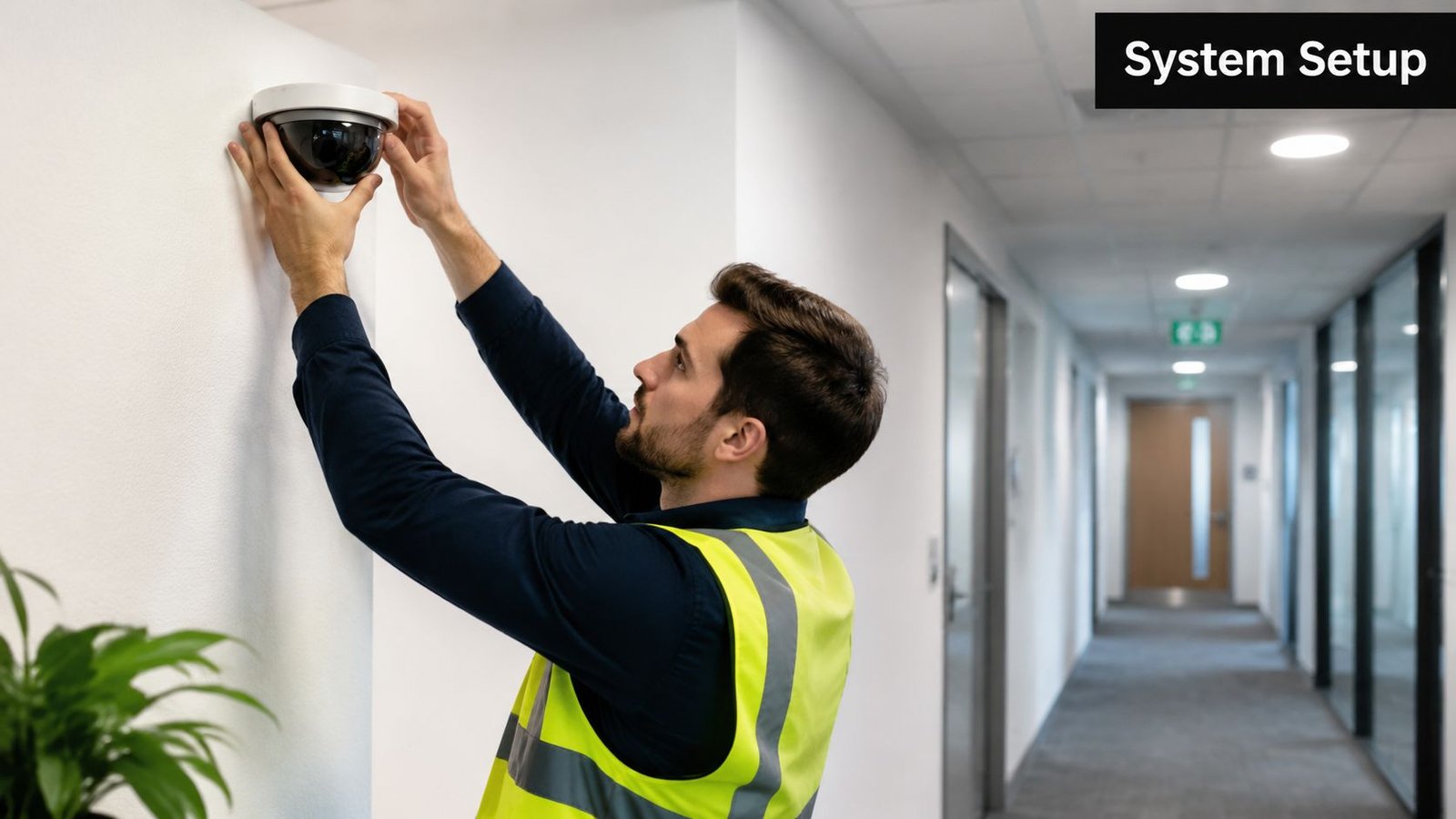
Placement decides whether footage is useful
A camera at the wrong height may catch the top of heads and very little else. A camera facing a window may struggle with glare all day. A camera covering a staff room or break area may create privacy problems you didn't intend.
Good installation means thinking about each scene properly:
- Entrances need facial capture and timing context.
- Till points and counters need enough detail to review interactions and hand movements.
- Loading bays need vehicle, pedestrian, and door activity in one usable view.
- Perimeters need clear trigger zones if alerts are part of the design.
- Private areas should be excluded where people have a reasonable expectation of privacy.
The best camera position is rarely the one that shows the most area. It's the one that gives the clearest answer to the incident you're most likely to face.
This is also where professional commissioning matters. Focus, angle, night settings, recording parameters, user permissions, and retention schedules all need setting correctly from day one. DIY installs often leave these half-finished. The cameras are online, but the system isn't ready for a real incident.
Integration is where systems become effective
Standalone CCTV can record. Integrated systems can react.
If a camera is linked with an intruder alarm, an out-of-hours alert can be verified faster. If it ties into access control, you can review who entered and what happened around that event. If it works alongside intercoms or gates, you can check visitor movement and delivery activity without relying on guesswork.
That integration matters most in places like:
- Warehouses and logistics hubs, where entry points, roller shutters, and vehicle yards create layered risk.
- Retail units, where stock loss, rear-door access, and staff safety all overlap.
- Multi-tenant buildings, where shared entrances and delivery areas need a joined-up view.
A short visual explainer on how camera systems fit into wider site security can help if you're planning a larger upgrade:
Professional installation isn't about making a system look tidy, although that matters too. It's about making sure the CCTV in the workplace is lawful, secure, supportable, and useful when pressure is on.
Your CCTV Action Checklist and Next Steps
A lot of CCTV problems do not start with the cameras. They start six months later, when someone needs footage for a theft, a grievance, an insurance claim, or a Subject Access Request and the business cannot retrieve what it needs quickly or lawfully. For most SMEs, that is where the actual cost shows up.
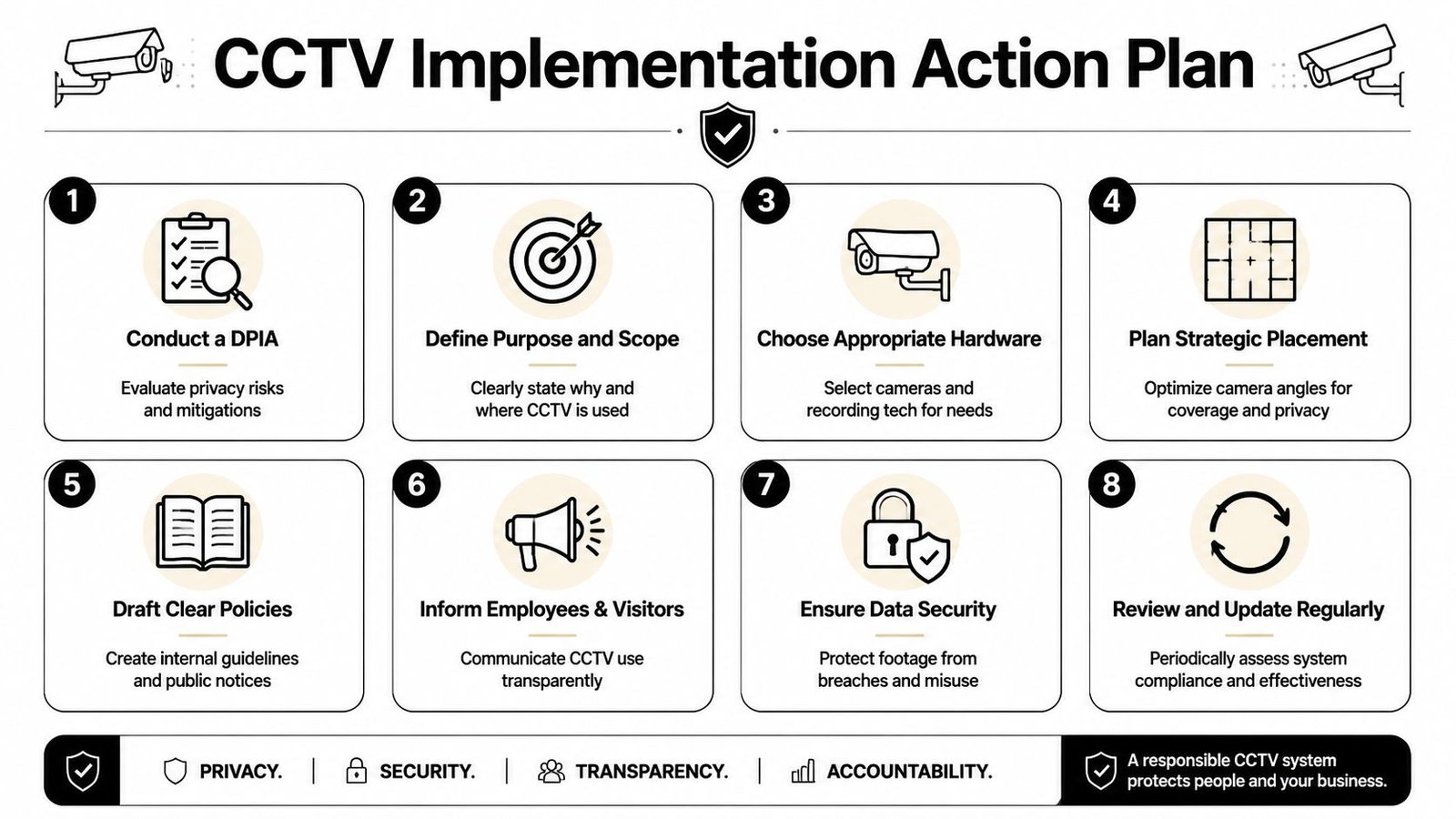
A practical checklist for SMEs
Use this checklist before approving a new system or reviewing one already in place.
Write down the purpose of each camera
Link every camera to a clear business reason such as deterring unauthorised entry, protecting stock, covering cash handling, supporting lone workers, or reviewing incidents. Vague wording causes problems if a complaint or ICO query lands on your desk.Complete the DPIA before installation
Check whether surveillance is necessary, proportionate, and fair before equipment is fitted. It is far easier to change a plan on paper than move cameras after staff concerns or privacy issues are raised.Decide whether you need record-only CCTV or active monitoring
This affects return on investment more than camera count. A record-only system may be enough for low-risk offices. Sites with repeated trespass, stock loss, yard access, or out-of-hours activity often get better value from alerts, remote response, or monitored verification.Map the views around real operational risks
Cover entrances, exits, loading areas, stock rooms, tills, vehicle gates, and other pinch points. Avoid collecting more footage than you need, especially near break areas, neighbouring property, or places where privacy expectations are higher.Set user permissions and an evidence process
Name who can view live images, search recordings, export footage, and release clips to police, insurers, or HR. Good systems fail in practice when there is no clear chain of responsibility.Prepare for Subject Access Requests
SMEs often underestimate this part. Make sure footage can be found by date and time, exported in a usable format, and redacted where other people appear in the image. If that process is clumsy, the system creates admin pressure instead of reducing risk.Put signage and staff information in place
Staff should know why CCTV is there, what areas are covered, how long footage is kept, and who handles requests. Clear notice reduces suspicion and helps show that your use of CCTV is fair and transparent.Check retention settings and storage capacity
Too short, and footage is gone before an incident is reported. Too long, and you hold more personal data than you need. Match retention to your risks, reporting times, and storage budget.Plan maintenance from the start
Dirty lenses, failed drives, wrong timestamps, and old user accounts are common faults. Regular servicing keeps footage usable and supports compliance. A planned programme of CCTV system maintenance for businesses is part of running the system properly.
The best next step is usually a short audit, not a bigger quote. Check whether the current setup can justify each camera, produce clear evidence, and handle data requests without panic. If it cannot, fix the design and management process first.
That approach saves money. In many small businesses, a smaller system with the right coverage, retention rules, and review process does more than a larger install that records everything and helps with nothing.
If you want a practical, no-obligation review of your workplace CCTV plans, Wisenet Security Ltd works across South Wales and the South West to design, install, integrate, and maintain compliant security systems for offices, shops, warehouses, and industrial sites. They can help you assess risk, choose the right setup, and put proper processes in place so your CCTV protects the business without creating avoidable compliance problems.