Security System Integration: A Complete Guide for 2026
You've inherited a site where the CCTV has its own mobile app, the intruder alarm still uses a keypad by the staff entrance, the gate runs from a separate fob system, and nobody is quite sure when the fire alarm was last tested. Each system may work perfectly on its own. The problem appears when an incident crosses from one system to another and the people responsible have to join the dots manually.
That's the practical reason security system integration matters. It connects selected systems so that an event, such as a forced door, can trigger the right camera view, create an alert, record an audit trail, and notify the correct person without relying on four separate screens and someone's memory. The right design isn't about putting every device under one logo. It's about deciding what should communicate, what must remain independent, and how the combined arrangement can stay reliable, compliant, and maintainable.
Table of Contents
- Why Integrated Security Matters for UK Homes and Businesses
- What Security System Integration Actually Means
- How the Architecture Fits Together
- Choosing Between Full Replacement and Phased Hybrid Migration
- Operational Benefits You Can Actually Measure
- UK Regulatory and Compliance Considerations
- Real-World UK Examples of Integrated Security in Action
- Your Planning Checklist and Next Steps
Why Integrated Security Matters for UK Homes and Businesses
A facilities manager at a small warehouse might start the morning by checking a CCTV recorder, reviewing alarm history on a separate panel, and downloading access reports from another application. At home, the same pattern appears in a smaller form. A resident checks cameras through a phone app, arms the intruder alarm with a different interface, answers the video intercom separately, and still has no joined-up view of what happened when a visitor arrived.
Disconnected systems create more than inconvenience. They make incident verification slower, leave gaps in records, and increase the chance that an operator misses an important relationship between events. A door forced open at the same time as a camera loses view should be treated differently from an isolated reader error, but separate systems often present both as unrelated notifications.
Integration gives the site a common operating picture. A valid access event can be logged without creating an alarm, while an invalid credential can bring the relevant camera to the operator's screen. An intruder alarm can prompt video verification, and a gate controller can pass vehicle or entry information into the same investigation record. The details depend on the equipment and the interfaces, but the principle is consistent: one event should produce a coordinated response.
Practical rule: Integrate the workflows that people actually need to manage. Don't integrate equipment simply because a supplier says it can be connected.
The UK market is large enough for integration to be a mainstream engineering discipline rather than a specialist experiment. IBISWorld's UK security system services data places the market at £2.1 billion in 2026, with 3,036 businesses operating in the sector and a 2.4% CAGR in business numbers between 2021 and 2026. That scale reflects a mature ecosystem of installers, maintainers, monitoring providers, manufacturers, and software platforms.
For a homeowner, landlord, or business operator, the useful question isn't whether integration sounds modern. It's whether joined-up control will reduce a real operational weakness, such as slow alarm verification, poor access records, difficult multi-site management, or uncertainty about who responded to an event.
What Security System Integration Actually Means
Think of each security subsystem as an instrument in a band. CCTV supplies visual information. The intruder alarm detects suspicious activity. Access control decides who can pass through a controlled door. Fire detection identifies a life-safety event. Integration is the mixing desk that lets those instruments work in time, with defined rules for what happens when their signals meet.
That distinction matters. Several devices installed in the same building aren't automatically an integrated system. Integration exists when the systems exchange meaningful information and the operator can act on it through an agreed workflow.
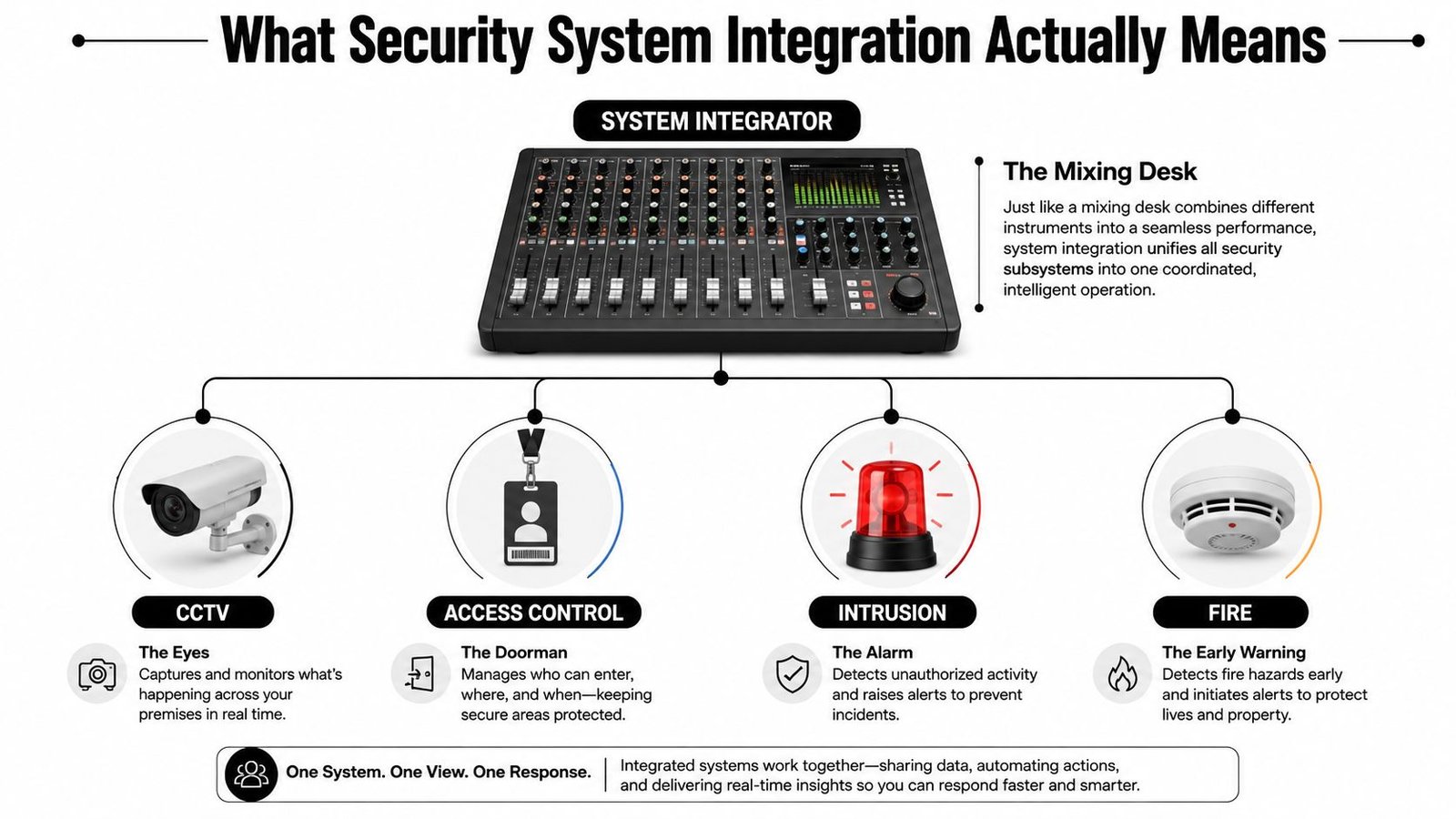
The main instruments
- CCTV and video surveillance provide live views, recorded evidence, analytics, and event verification. In a shop, that may mean checking whether a door alarm reflects a genuine intrusion or an employee mistake.
- Intruder and burglar alarms monitor protected areas using detectors, contacts, and control panels. They're designed to identify unauthorised entry or movement and communicate an alarm condition.
- Access control manages doors, gates, barriers, credentials, permissions, and user history. A system may use cards, fobs, keypads, mobile credentials, or biometric readers.
- Fire alarm systems detect fire-related conditions and initiate life-safety actions. Their relationship with access-controlled doors must be designed around safe evacuation, not convenience.
- Intercoms let occupants or reception staff identify and communicate with visitors before releasing a door or gate.
- Gate and barrier automation controls vehicle or pedestrian entry and can exchange status information with cameras, readers, and alarms.
A home might combine a video doorbell or intercom with cameras, an intruder alarm, and lighting automation. A retail premises may connect staff access, CCTV, panic signalling, and alarm monitoring. A warehouse often needs gate control, vehicle identification, perimeter detection, cameras, and remote response.
For a broader strategic view of how these pieces fit into a business protection plan, the Networking2000 strategic security guide is a useful companion resource. It's particularly relevant when security decisions sit alongside facilities, insurance, and business continuity planning.
How the Architecture Fits Together
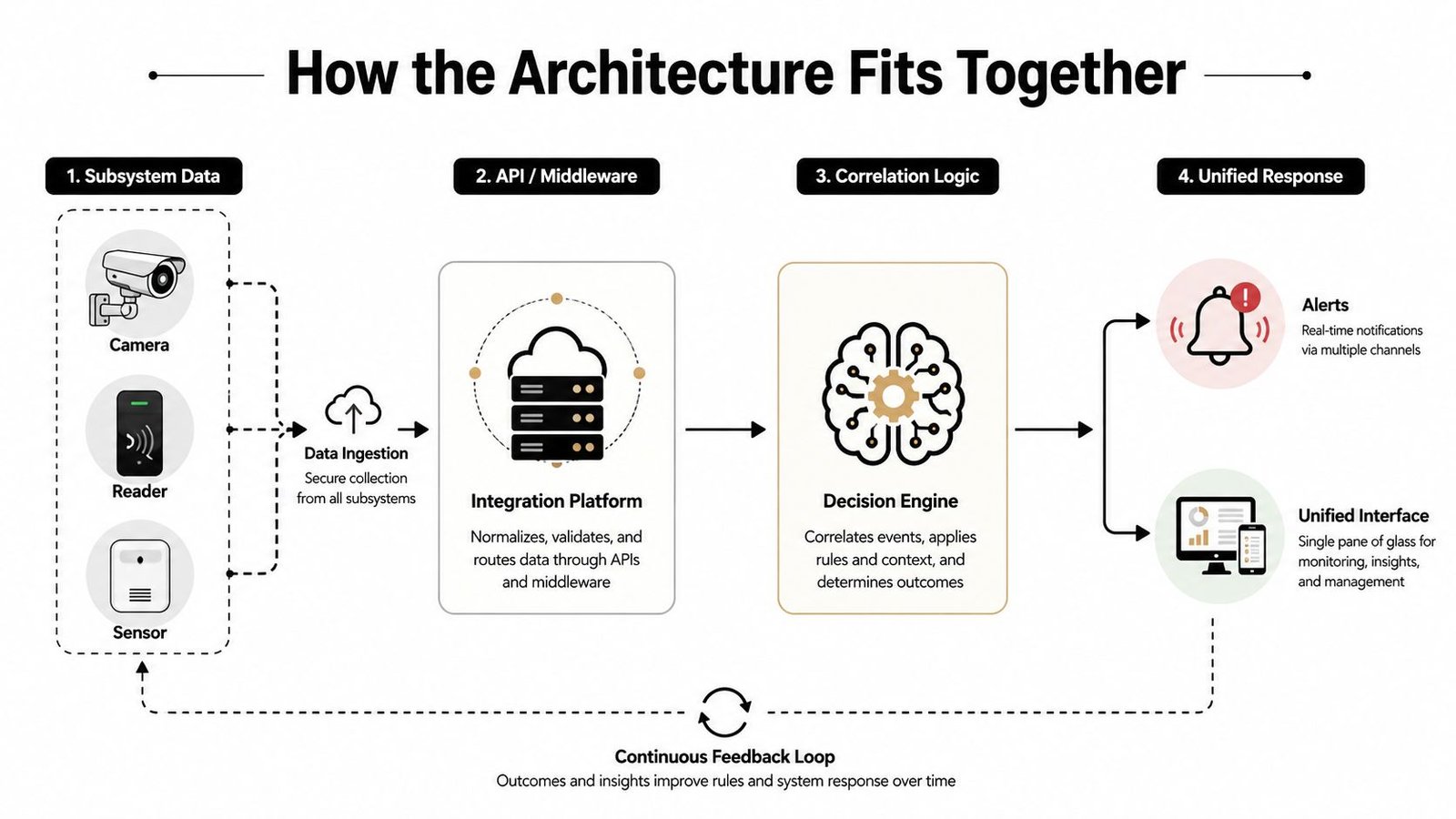
An integrated design normally has four practical layers. The first is the field layer, containing cameras, door contacts, readers, detectors, fire devices, intercom stations, and gate equipment. These devices sense conditions or accept commands, but they shouldn't be expected to make every operational decision themselves.
The second layer is local control. Intruder panels, access controllers, fire panels, and gate controllers supervise their own devices and continue to perform essential functions even if a central application or external connection becomes unavailable. This local independence is important. A network outage shouldn't leave a protected door, alarm zone, or evacuation function without its designed behaviour.
The third layer handles exchange. Depending on the equipment, that may involve supervised inputs and outputs, manufacturer APIs, middleware, event servers, or other defined interfaces. The final layer is the operator experience, such as a monitoring centre, desktop application, mobile dashboard, or facilities platform.
Standards sit across the architecture
UK fire and security design uses distinct standards families. The Fire Industry Association's explanation of integrated fire and security systems identifies BS EN 50130 for environmental and EMC requirements, BS EN 50131 for intrusion, BS EN 50132 for CCTV, BS EN 50133 for access control, BS EN 50136 for alarm transmission, and BS EN 50137 for combined or integrated systems.
That list tells you how to assess a proposal. A supplier should be able to explain the responsibility of each subsystem, the interface between them, and what happens when an interface fails. “One platform” is not a substitute for that explanation.
Consider an unauthorised door opening. The access controller identifies the door state and credential condition. The integration layer can request the associated camera view, while the intruder system may raise a wider alarm depending on the site's armed state. The monitoring or operator interface then presents the event, relevant video, location, and response instructions. Each step needs a clear source, timestamp, rule, and failure behaviour.
The fire alarm system integration guidance from Wisenet Security UK is useful when life-safety equipment is part of the design, because fire interfaces must be treated differently from ordinary convenience automation.
Cloud dashboards can simplify multi-site access and remote administration, but they introduce dependence on identity management, connectivity, vendor support, and data handling. IP and cellular signalling can improve flexibility, while dual-path arrangements may provide resilience where the risk assessment requires it. Neither option removes the need for local supervision, documented testing, and a response plan.
Facilities teams comparing security integration with wider building operations may also benefit from this guide to IWMS for facility managers. Security data can support facilities workflows, but it shouldn't be merged carelessly with building systems without defining permissions and failure boundaries.
Choosing Between Full Replacement and Phased Hybrid Migration
A full replacement is attractive on paper. The supplier removes the old DVR, alarm panel, readers, and cabling, then installs a single modern architecture. In practice, that approach can waste serviceable equipment, disrupt occupied premises, and create a large commissioning project when a staged migration would have reduced risk.
The better decision starts with an asset-by-asset assessment. Keep equipment when it has a supported firmware path, known condition, documented configuration, suitable performance, and a reliable interface. Replace it when the manufacturer no longer supports it, credentials or firmware cannot be managed securely, faults aren't supervised properly, or the hardware prevents the required response workflow.
Cabling deserves separate treatment. Existing cable may be perfectly usable, but proprietary signalling, undocumented joints, poor labelling, or shared routes can make it a hidden source of failure. A good survey tests the physical infrastructure rather than assuming either that everything must be ripped out or that every existing cable is an asset.
A practical decision framework
- Keep the field device when it meets the operational requirement and can be monitored reliably.
- Replace the controller when the panel or recorder blocks integration, has unsupported software, or can't provide useful event information.
- Use a gateway carefully when it exposes the necessary events without weakening supervision or creating an unmaintainable dependency.
- Migrate in phases when the building must remain operational, budgets are staged, or several sites need a controlled rollout.
- Choose full replacement when legacy equipment creates unacceptable cyber, reliability, support, or compliance exposure.
UK operators are already taking mixed approaches. The Security Journal UK coverage of physical security modernisation reports that over 70% of respondents use unified or integrated security platforms, 60% identify integration of new technologies as the main reason for replacing legacy systems, and 72% of consultants expect hybrid deployments to dominate within five years.
| Indicator | Reported figure |
|---|---|
| Respondents using unified or integrated platforms | Over 70% |
| Respondents replacing legacy systems to integrate new technology | 60% |
| Consultants expecting hybrid deployments to dominate within five years | 72% |
The figures don't mean hybrid is automatically correct. They do show why a supplier should explain what will remain, what will be replaced, and how the transition will be tested. A phased plan should include temporary operating procedures, rollback arrangements, user training, and a final date for removing unsupported components.
For door-by-door planning, a specialist access control installation service can help separate the reader, controller, locking hardware, exit device, fire release, and management software. They don't all need replacing at the same time.
Operational Benefits You Can Actually Measure
Integration earns its cost when it improves a task that staff perform repeatedly or a failure that carries genuine risk. The strongest benefits are operational rather than cosmetic. A central screen is useful, but the primary value comes from reducing uncertainty and making the correct response easier to follow.
Start with incident verification. An alarm signal without context forces an operator to search through cameras, logs, and site plans. A coordinated event can present the relevant camera, door, zone, and time information together. That helps the operator distinguish an intruder, a delivery, a tailgating event, a faulty contact, or an employee error before escalating the response.
What to measure after commissioning
- Verification time: Record how long it takes an operator to confirm the nature and location of an alarm.
- False alarm handling: Review how many events require an unnecessary attendance or escalation, then examine whether video and access correlation improves triage.
- Audit completeness: Check whether the system records who acknowledged, investigated, authorised, or closed an event.
- Operator workload: Count the screens, applications, manual exports, and repeated data entry needed for ordinary tasks.
- Maintenance visibility: Track whether device faults, communication failures, and battery conditions reach the people responsible for corrective action.
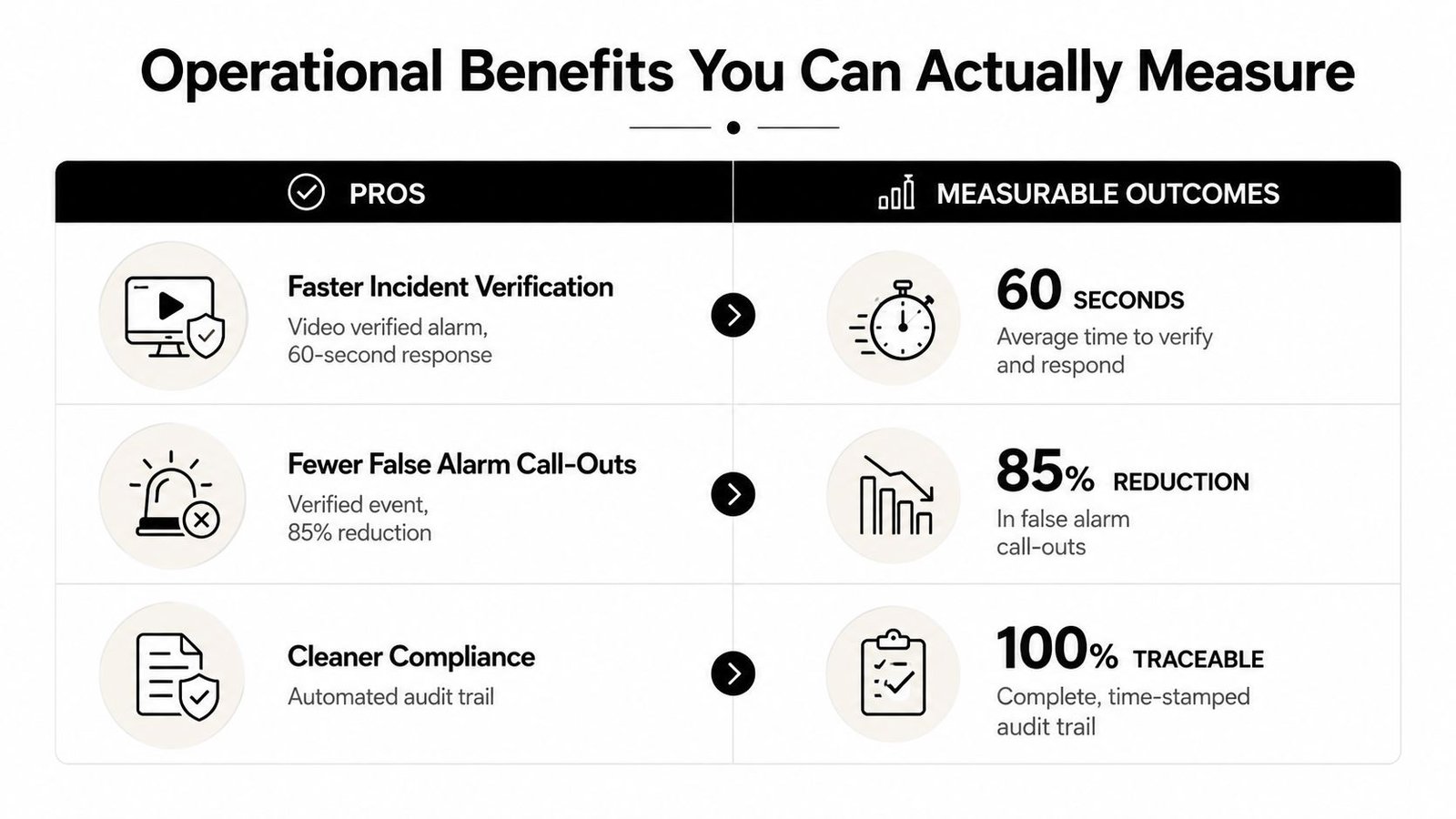
Integration can also improve evidence quality. A door event linked to a camera reference and an alarm history is easier to review than separate exports with uncertain clock settings. That doesn't make the record automatically admissible or complete, but it gives investigators a cleaner starting point.
Cyber resilience changes the operational calculation. Cameras, readers, controllers, and remote access services may connect to networks that also carry business systems. The design therefore needs named accounts, least-privilege access, secure remote support, firmware management, network separation where appropriate, and a plan for disabling compromised credentials. Remote convenience without access governance creates a new route into the system.
Measure the workflow, not the dashboard. If integration hasn't changed how quickly people verify, respond, document, or recover, the project hasn't yet demonstrated its value.
Some benefits remain site-dependent. Automation won't fix poor procedures, badly positioned cameras, weak lighting, unreliable broadband, or unclear responsibility for alarms. The board case should therefore use baseline observations from the site, followed by a commissioning review that tests whether the intended operational improvement occurred.
UK Regulatory and Compliance Considerations
Compliance isn't a document added at handover. It shapes the architecture from the first survey, especially where access control, fire safety, intrusion detection, CCTV, and remote monitoring share information.
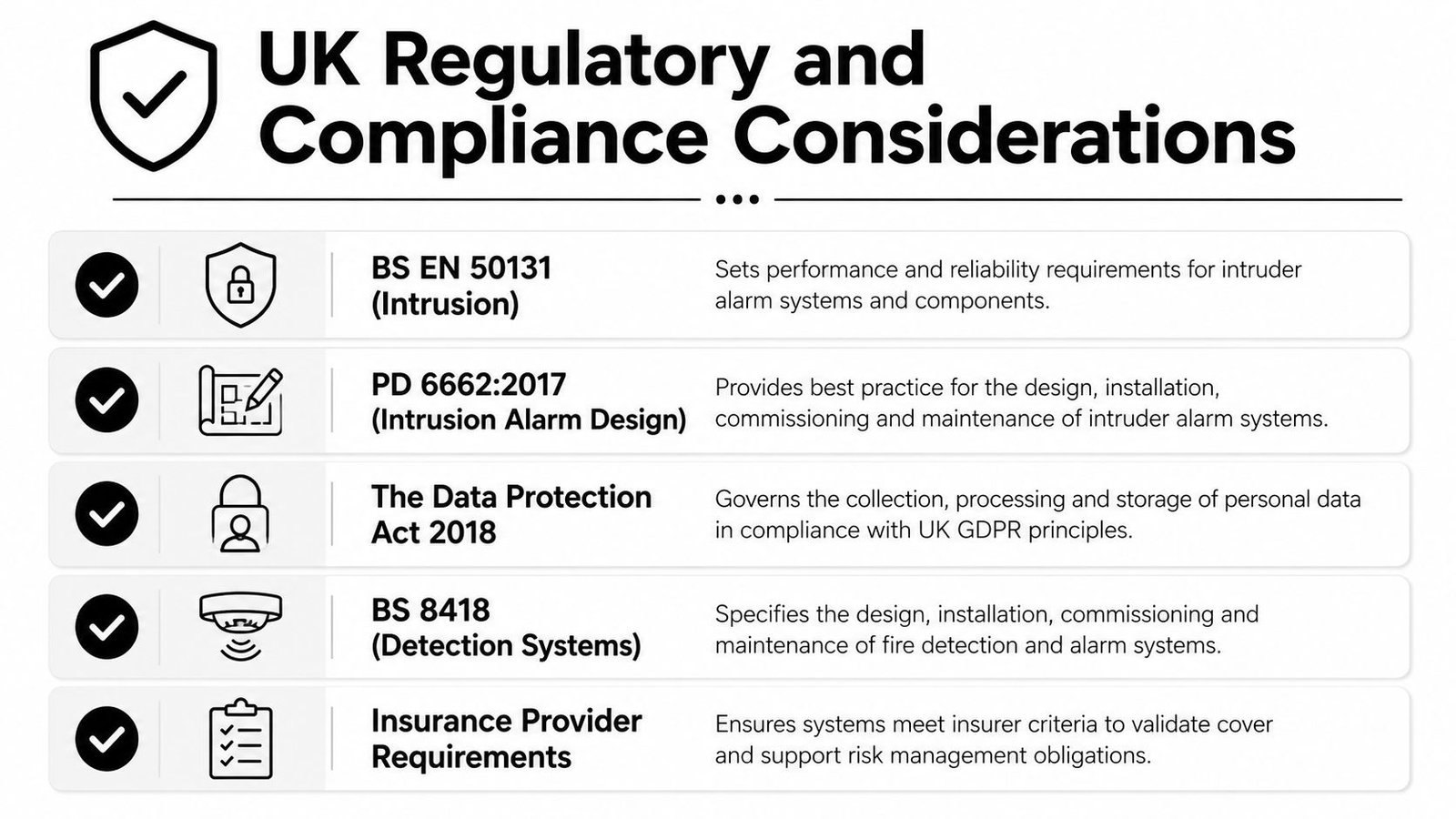
For intruder systems, BS EN 50131 sets performance expectations around areas such as grading, power supply, and operational reliability. PD 6662 provides the UK implementation foundation for intruder alarm design. Access control brings its own technical framework, including BS EN 60839-11-1:2013 for electronic access control systems. The installer should explain how the chosen products, interfaces, and operating procedures meet the relevant requirements rather than just listing standards in a quotation.
Fire release and accessible operation
Fire and security functions must cooperate safely. UK government guidance on access control in crowded places identifies the Equality Act 2010, Human Rights Act 1998, Health and Safety at Work Act 1974, Data Protection Act 2018, and Regulatory Reform (Fire Safety) Order 2005 as relevant legal requirements. It also states that access-controlled doors should automatically release when a fire alarm sounds.
That requirement has practical consequences. The fire interface, locking hardware, power supplies, break-glass arrangements, door closers, emergency exits, and reset procedure must be tested together. A system that releases the wrong doors, fails to release during a fire condition, or allows an unauthorised reset creates a life-safety problem, not merely a security inconvenience.
CCTV and access records can contain personal data. The operator needs a documented purpose, controlled access, sensible retention, appropriate signage and policies, and a process for handling requests or disclosures. The CCTV and GDPR guidance for UK businesses is a practical reference for this part of the design.
Evidence the supplier should provide
- Design records: Identify the protected areas, devices, interfaces, network dependencies, and failure modes.
- Compliance mapping: Show which standard or legal requirement applies to each subsystem and interface.
- Fire release test results: Demonstrate door behaviour during alarm, power, communication, and reset conditions.
- User and access records: Confirm who has administrative rights, how credentials are issued, and how leavers are removed.
- Data controls: Document camera locations, retention, access permissions, export handling, and remote viewing arrangements.
- Handover documents: Include drawings, device schedules, configurations, test certificates, training records, and maintenance responsibilities.
A defensible installation is one that can explain what happens during normal operation, a fault, a network outage, a fire alarm, a lost credential, and a cyber incident. If the supplier can't answer those questions before installation, the design isn't finished.
Real-World UK Examples of Integrated Security in Action
A family home in Cardiff may have started with an intruder alarm and added cameras later. The useful integration isn't a dramatic control-room setup. It might be a video intercom that identifies a visitor, a door event that records which entrance opened, and lighting that supports a clear image at night. The homeowner still needs manual control and privacy settings, but they no longer have to reconstruct every arrival from unrelated applications.
A small retail unit in Bristol faces a different problem. Staff need straightforward access at the front and rear doors, managers need a record of who entered, and a panic alarm must reach the right responder without creating confusion during a genuine incident. Linking door events with nearby CCTV lets an operator review the relevant scene, while the panic workflow can include location and user information rather than a bare alarm notification.
The warehouse pattern in Newport is more operationally demanding. Vehicle access may involve gate automation, number-plate recognition, perimeter detection, staff credentials, and remote monitoring. The sensible architecture keeps gate safety controls and alarm functions locally dependable, while the central platform joins events for investigation and response.
What each site should avoid
The Cardiff homeowner shouldn't give every family member permanent administrator rights because the app makes it easy. The Bristol retailer shouldn't use one shared credential for all staff if an individual access record is required. The Newport warehouse shouldn't allow a camera or gate controller to become an unmonitored pathway into the wider business network.
These examples are patterns, not guaranteed outcomes. The right design depends on the building layout, threat profile, evacuation arrangements, existing hardware, connectivity, insurance conditions, and the people who will respond at night or during a weekend. Integration works best when it follows the site's decisions and responsibilities, rather than forcing every location into the same product bundle.
Your Planning Checklist and Next Steps
Start with the site, not the catalogue. Write down what you need to protect, who uses each entrance, what events require immediate action, and what evidence you'll need after an incident. Include homes, shops, warehouses, offices, car parks, communal areas, plant rooms, gates, and remote locations where relevant.
Questions to settle before procurement
- Risk and coverage: Which threats matter most, and where are the blind spots, weak doors, vulnerable routes, or unmanaged credentials?
- Existing equipment: Which cameras, panels, locks, cables, and controllers are supported, serviceable, and capable of useful integration?
- Response: Who receives alarms, who verifies them, who attends, and what happens when the normal contact is unavailable?
- Compliance: Which standards, fire procedures, data protection controls, insurer requirements, and accessibility needs apply?
- Cyber security: How will accounts, remote access, firmware, network separation, backups, and supplier support be managed?
- Maintenance: Who tests the system, reviews faults, updates user permissions, and keeps drawings and records current?
- Expansion: Can the architecture support another entrance, site, camera group, tenant, or monitoring connection without a complete redesign?
A competent project usually follows a clear sequence. The supplier surveys the property, confirms risks and user workflows, designs the interfaces, identifies retained and replacement equipment, agrees the network and power arrangements, installs in controlled stages, and commissions every subsystem together. Handover should include practical training, not just passwords and a printed manual.
Testing needs to cover ordinary operation and failure. Check alarm activation, camera display, access decisions, fire release, communications loss, power failure, credential removal, remote access, event timestamps, and recovery after reset. Keep a record of what was tested, who witnessed it, and what remains outstanding.
For ongoing care, schedule inspections, review permissions, apply supported firmware updates, test batteries and signalling paths, clean and refocus cameras where needed, and revisit retention and privacy arrangements when the site changes. A system that was well designed at installation can become unsuitable after a new tenant, network change, building alteration, or staff turnover.
Wisenet Security Ltd offers site surveys, design, installation, integration, and maintenance for CCTV, intruder alarms, access control, fire systems, intercoms, and gate automation across South Wales and the South West. Visit Wisenet Security Ltd to arrange a free, no-obligation consultation focused on what to retain, what to replace, and how to build a compliant integrated system around your property.