Keypad Access Control System: Your 2026 UK Guide
You're probably here because keys have become a nuisance. Staff keep borrowing them. A tenant has moved out and still might have a copy. Someone's left a back door on a latch because fumbling for keys during a delivery round is a pain. At home, it's usually the side gate, porch door, garage, or shared entrance where the problem starts.
A keypad access control system solves that in a straightforward way. You enter a code, the lock releases, and you control who gets in without chasing keys around South Wales or the South West. For homeowners and small business owners, that simplicity is exactly why keypad systems remain so common. They're familiar, practical, and easy to live with when they're specified properly.
Table of Contents
- What Is a Keypad Access Control System
- How Do Keypad Systems Actually Work
- Standalone vs Networked Keypad Systems
- Benefits and Limitations You Need to Know
- Integrating Keypads with Other Security Systems
- How to Choose the Right Keypad System
- Expert Installation with Wisenet Security
What Is a Keypad Access Control System
A keypad access control system is an electronic entry system that lets authorised users open a door, gate, or secure area by entering a PIN code. Instead of relying on a physical key, the system checks the code and decides whether to release the lock.
That sounds simple because it is. For many homes, flats, workshops, offices, stockrooms, and small commercial units, simple is a strength. You don't need to issue metal keys, worry about copied keys, or replace a cylinder every time someone should no longer have access.
More than a digital lock
A keypad isn't just a number pad on the wall. In practice, it's a control point. It manages who can enter, when they can enter, and in better systems, whether those events are recorded. Some units are fully standalone and do the job at one door with very little fuss. Others form part of a broader access setup with logs, schedules, alarms, and remote changes.
If you're comparing options, it helps to understand the broader range of types of access control systems available, because keypad entry often sits alongside fobs, cards, biometrics, and mobile credentials rather than replacing them in every setting.
Practical rule: If your main problem is key management, a keypad is often the cleanest first step. If your main problem is oversight across multiple doors, you may need something more connected.
Why keypad systems are still widely used
These systems aren't a niche product. The global security and access control keypad market was valued at approximately $2 billion in 2023, and it is projected to grow at a CAGR of 8.8% from 2026 to 2033, reaching an estimated $4 billion by 2033, according to this keypad market study summary. That reflects broad adoption, including strong use in the UK where keypad entry remains a common, cost-conscious security method.
For homeowners, the appeal is obvious. No key under the flowerpot. No spare key handed around the family. No lock change because a key has gone missing.
For a small business, the benefits are equally practical. You can give the cleaner one code, the manager another, and remove access without replacing hardware. That matters in retail, warehousing, workshops, and shared office space, where people and access needs change regularly.
A good keypad system won't solve every security problem on its own. But when it matches the site, the users, and the compliance requirements, it gives you a solid and manageable first line of control.
How Do Keypad Systems Actually Work
The concept is readily understood once you compare it to using a PIN at a cash machine. You enter a code. The system checks whether it recognises that code. If it does, the door permits entry. If it doesn't, nothing happens or the event is logged.
This is the process at a glance:
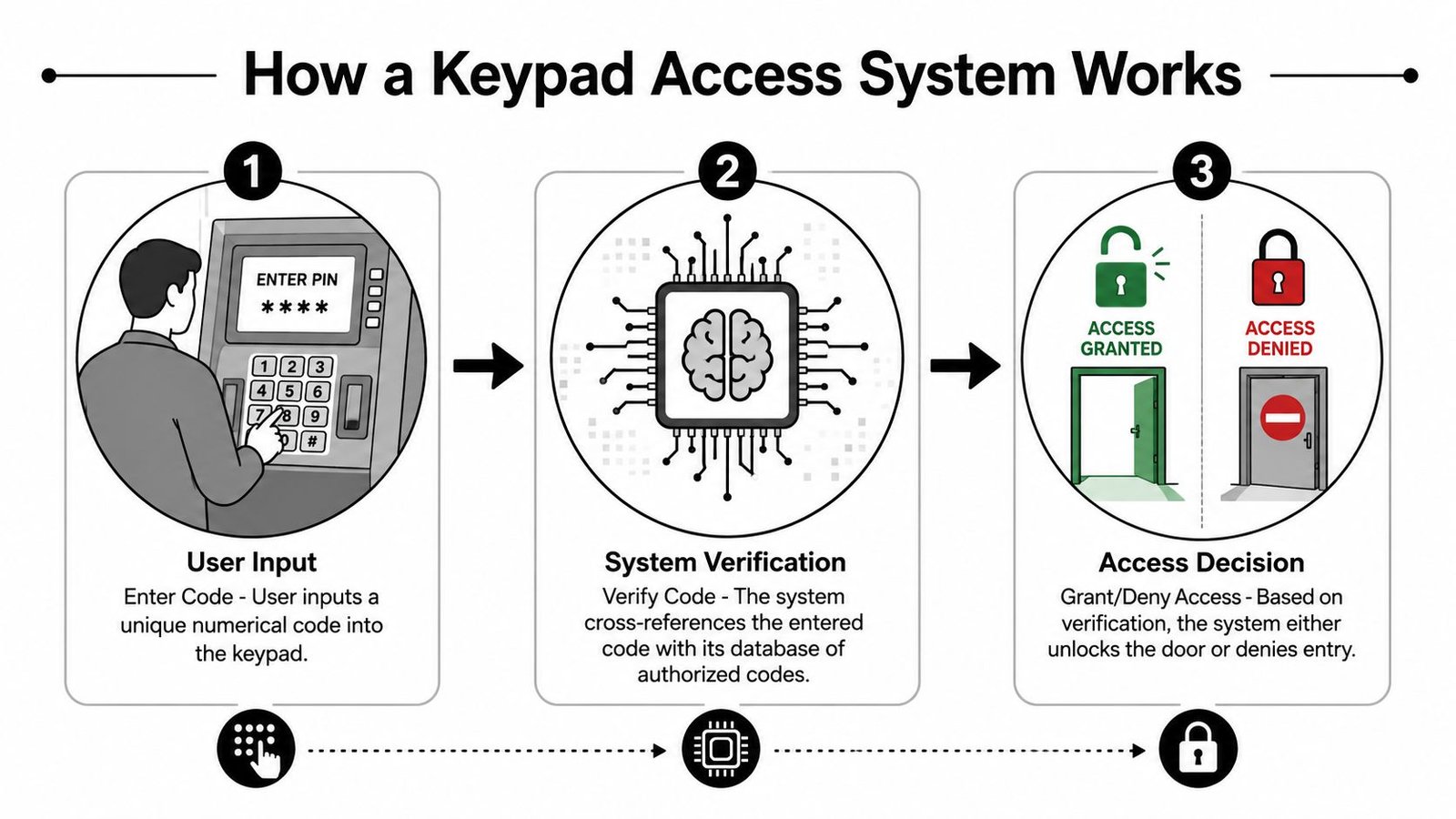
The basic chain of events
Here's what's happening behind the scenes.
- A user enters a code on the keypad at the door or gate.
- The system checks the code against stored authorised credentials.
- The lock receives a release command if the code is valid.
- The door stays secure if the code is wrong, and some systems will log the failed attempt or trigger a lockout after repeated errors.
That's the core sequence whether you're dealing with a compact standalone keypad on a side entrance or a more advanced keypad tied into a larger access platform.
A useful example comes from common standalone hardware sold in the UK. The CDVI UK model listed by SecurityInformed supports up to 8 unique user codes and requires 5-digit code entry, with surface-mount installation and a galvanised finish for durability, as shown in these CDVI UK technical details. That tells you two things. First, some keypad systems are intentionally simple. Second, the specification matters because code capacity, mounting style, and build quality affect whether the unit suits the site.
Later on, if you want a practical DIY-oriented explanation of programming and day-to-day use, the Maxess Locks keyless entry guide is a useful companion read.
The parts that matter
A keypad system usually depends on a small group of components working together:
- The keypad reader: This is the part you touch. It captures the PIN entry.
- The controller: In a standalone system, the controller may be built into the keypad. In a larger system, it may sit elsewhere and manage permissions.
- The locking hardware: Commonly an electric strike or magnetic lock. This is what physically secures and releases the door.
- The power supply: Electronic locks and readers need stable power. If the power side is poorly designed, the system becomes unreliable.
- The exit device: On many doors, there's a push-to-exit button, break-glass unit, or fire release requirement.
A keypad that's badly matched to the lock is one of the most common faults on smaller jobs. The keypad gets blamed, but the real issue is usually power, door alignment, or the wrong locking method.
If you'd rather see the process in motion, this short video gives a helpful visual overview:
The important takeaway is that a keypad access control system isn't magic and it isn't overly complex. It's a chain. User input, verification, lock release. Once you understand that chain, it becomes much easier to judge whether a system is suitable for your building.
Standalone vs Networked Keypad Systems
A lot of buying mistakes happen here. Two keypads can look almost identical on the wall, yet one is suited to a single side door and the other is built for a site with several users, several doors, and regular access changes.
The difference is where the decisions happen. In a standalone system, the keypad handles them locally. In a networked system, permissions are managed across a wider system.
Where standalone makes sense
A standalone keypad stores codes at the door itself. You add or remove users on that unit, and it does not depend on central management software to keep working. For a house, small workshop, garage, side gate, or one-door office, that can be the right level of control.
I fit standalone systems where the brief is simple. One entrance. A small user list. No real need for detailed event history. In those cases, keeping the design straightforward usually gives better reliability and lower installation cost.
That simplicity has a limit. If the cleaner needs one code, the owner wants another, a former employee needs removing, and a second entrance gets added six months later, local programming starts to become a nuisance. On some sites in South Wales and the South West, I also see worn keypads giving away the most-used digits. That is less of a problem when codes are changed regularly, but small standalone jobs are often the ones people forget to maintain.
When networked is worth it
A networked keypad links one or more doors to a central controller or software platform. That gives you one place to manage users, set time schedules, check events, and apply rules across the building.
For a small business, that matters sooner than many owners expect. A front door, rear staff entrance, stockroom, and delivery door rarely need the same access permissions. If you manage each door separately, admin time goes up and mistakes creep in. A networked setup keeps that under control, especially where staff turnover is frequent or you need a record of who accessed which area.
It also gives you a better base for compliance-led design. On commercial sites, the keypad is only part of the decision. Fire door release, lock type, power supply, emergency egress, and intrusion signalling all need to be considered together. If the site also has an intruder alarm designed to BS EN 50131, the access control side should be planned so the whole system works together rather than as a collection of unrelated parts.
Here's the practical comparison.
| Feature | Standalone System | Networked System |
|---|---|---|
| Installation style | Self-contained at one door | Connected across one or more doors |
| Best fit | Single-door homes, garages, stockrooms, small units | Offices, multi-door premises, mixed-use buildings |
| User management | Done locally at the keypad | Done centrally through software or controller interface |
| Audit trail | Often limited or basic | Usually more detailed and easier to review |
| Scalability | Limited | Better suited to growth |
| Upfront complexity | Lower | Higher |
| Ongoing administration | Fine for a few users | Far easier for larger user groups |
| Remote changes | Often unavailable or limited | Usually a core advantage |
A simple rule works well. If you have one door and the same few people using it every week, standalone is often enough. If access changes regularly, or you care about logs and control across several doors, networked is usually the better investment.
That does not mean bigger is always better. I would still choose a well-installed standalone keypad over a networked system that has been specified badly, powered badly, or fitted to the wrong lock. The right choice comes down to door count, user turnover, admin burden, and what you are protecting. If your concern includes protecting valuables in storage, a networked system often makes more sense because it is easier to control who gets into secondary areas such as stockrooms, unit corridors, and staff-only access points.
Benefits and Limitations You Need to Know
Keypads are popular for good reason. They're easy to understand, generally cost-effective, and they remove the daily friction of physical key management. But they also have weak points, and a buyer who ignores those weak points usually ends up disappointed.
This is the big-picture trade-off:
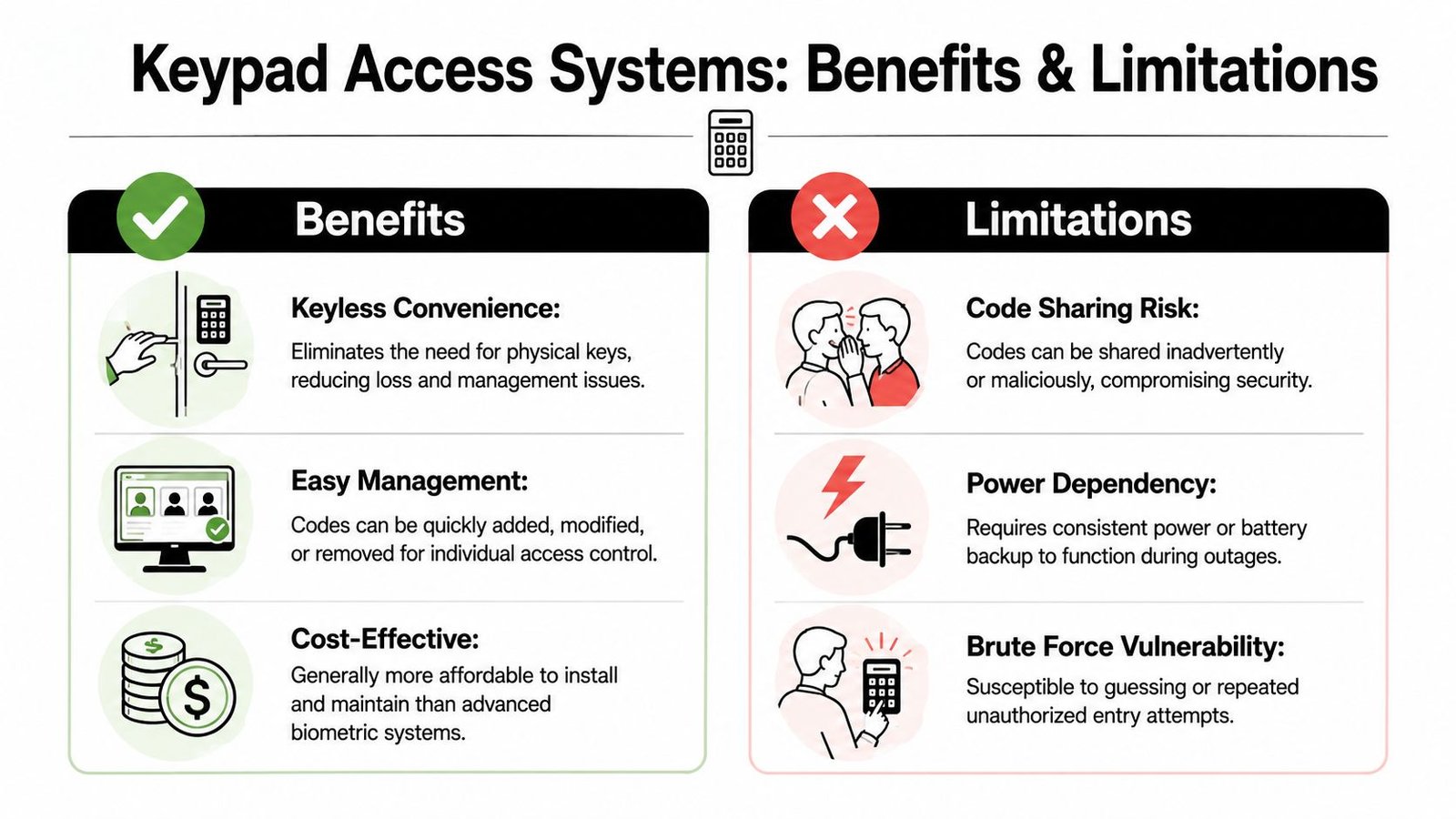
Where keypads work well
For homes and smaller business sites, the advantages are immediate.
- Keyless entry: You don't need to cut keys, collect keys back, or replace locks every time access changes.
- Faster access changes: You can remove a code and issue a new one far more easily than changing physical hardware.
- Straightforward operation: Most users already understand PIN entry. Training is minimal.
- Good value for the job: If the site doesn't justify biometrics or a full smart credential rollout, a keypad often lands in the sensible middle ground.
This is especially useful on side doors, workshop entrances, gates, shared lobbies, staff-only rooms, and storage areas. If you're assessing the broader issue of protecting valuables in storage, access control at the door is only one layer, but it's a very important one.
Where they can let you down
The weaknesses are just as real.
A PIN can be shared. Someone can watch a code being entered. Grease, dirt, or wear can tell a story. And if the keypad is low-grade or badly installed, you'll get reliability issues in bad weather and under heavy use.
One vulnerability that generic buyer guides often miss is button wear. In South Wales and the South West, 34% of residential access control breaches in 2024 to 2025 involved compromised keycodes from visibly worn ‘1' and ‘4' keys, according to this regional keypad vulnerability report. That's a practical issue, not a theoretical one. If a keypad shows obvious wear patterns, an intruder doesn't need to know the exact sequence to narrow down the likely code digits.
Worn buttons are a warning sign. If the same digits are polished smooth and everyone uses the same family or staff code for months, you're advertising part of the answer.
Other common limitations include:
- Shared credentials: If multiple people use one code, accountability disappears.
- Power dependency: Electronic access needs dependable power and, in many cases, sensible backup arrangements.
- Brute-force attempts: Better systems include lockout periods and logging. Poorer ones may not.
- Environmental wear: Outdoor locations need proper weather resistance and thoughtful siting.
The fix isn't to avoid keypad systems. It's to use them properly. Rotate codes. Avoid obvious sequences. Choose durable hardware. Don't put a budget indoor keypad on an exposed external wall and expect it to perform well through a Welsh winter. And where accountability matters, issue unique codes instead of one shared number for everyone.
Integrating Keypads with Other Security Systems
A keypad on its own controls entry. A keypad that's integrated properly becomes part of a security system that tells you what happened, responds to it, and supports compliance.
That matters more than many buyers realise.
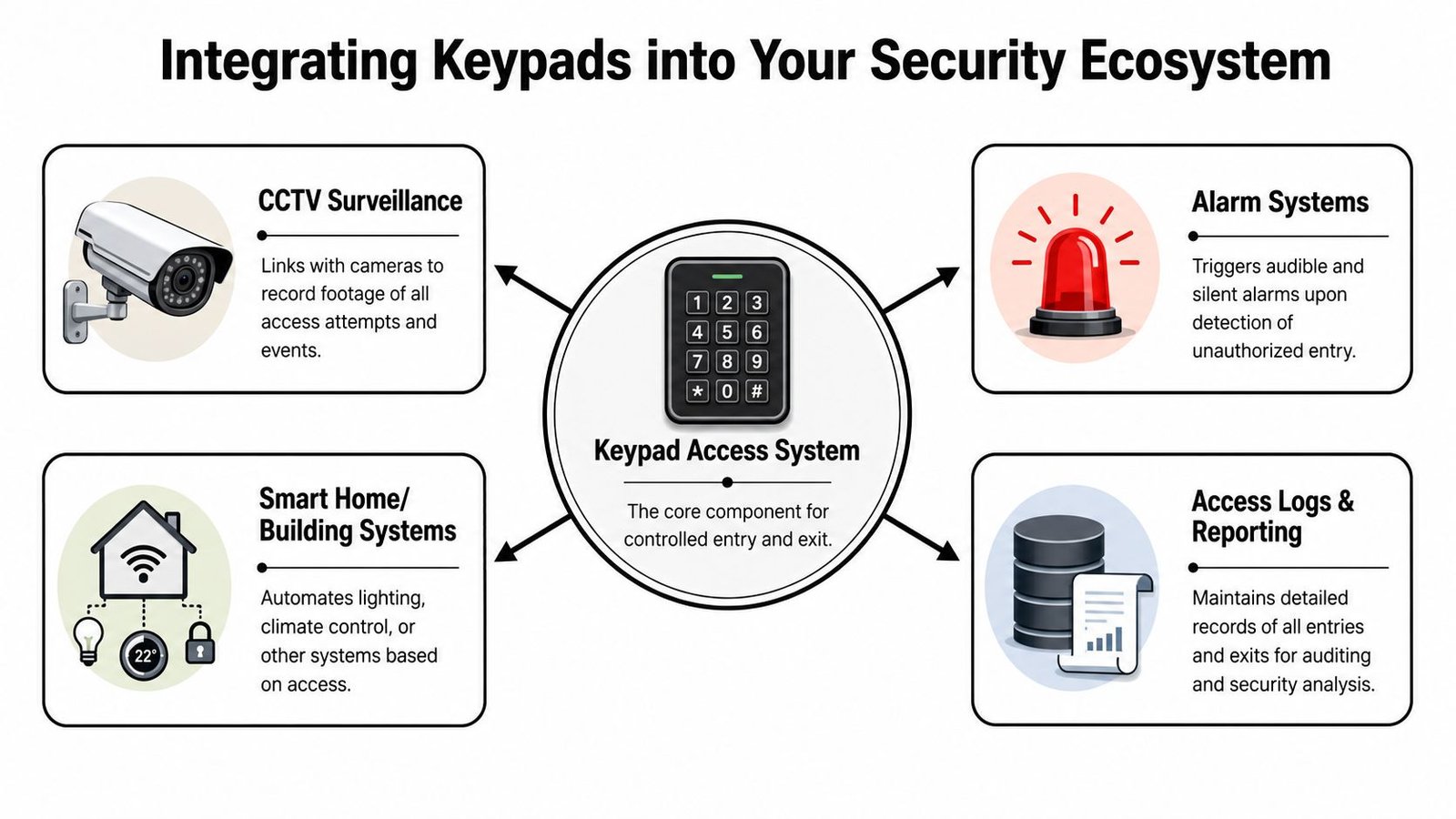
What good integration looks like
The best keypad installations aren't isolated. They connect to the rest of the site.
- CCTV linkage: A valid or failed entry attempt can be matched with camera footage at the same doorway.
- Intruder alarm interaction: Entry through the correct keypad can unset an alarm area, while an invalid or forced event can trigger a response.
- Fire safety behaviour: Some doors need to release safely under fire conditions, which means access hardware must be selected and wired with life safety in mind.
- Logs and reporting: On commercial sites, entry history is often as important as the lock itself.
For gates and perimeter points, the same principle applies. Mechanical reliability and electronic control need to work together. If you're dealing with motorised entrances, this article on automatic gate maintenance by Lighthouse is a useful reminder that access control is only as dependable as the hardware it's attached to.
If you want to see how these systems fit into a broader site design, this overview of integrated security solutions is worth reading.
The compliance gap that catches buyers out
Here's the issue I see regularly. Buyers assume any electronic keypad will work neatly with an alarm panel. That isn't always true.
New 2025 UK Security Industry data says 58% of small businesses in Cardiff and Bristol now require keypad access systems to trigger BS EN 50131-compliant alarm responses within 2 seconds of unauthorised entry, yet nearly 70% of tested standalone keypads lack that integration capability, according to this UK access control integration article. That gap matters for compliance, response speed, and day-to-day reliability.
A keypad can open a door perfectly well and still be the wrong product for the job if it can't talk properly to the alarm system that protects the rest of the building.
At this point, specification becomes engineering rather than shopping. You need to know whether the keypad can provide the right outputs, whether the lock release timing works with the door hardware, whether the alarm panel logic supports the intended sequence, and whether the whole setup behaves safely in fault conditions.
For a homeowner, integration may be as simple as combining a gate keypad with CCTV and a door release. For an SME, it often means dividing alarm areas, logging user events, and making sure staff entry doesn't create false alarms every morning.
How to Choose the Right Keypad System
Choosing a keypad system starts with the site, not the catalogue. The same keypad that works fine on a private side gate can be completely wrong for a staff entrance, warehouse office, or block access door.
Questions to answer before you buy
Start with a few blunt questions.
- How many doors need control? One door points you towards a simpler setup. Multiple doors usually change the conversation.
- How many users need access? A family home is one thing. A business with staff, cleaners, contractors, and temporary workers is another.
- Do you need to know who entered and when? If the answer is yes, basic standalone options may be too limited.
- Is the keypad going outside? Weather exposure changes the hardware choice immediately.
- What lock is the keypad controlling? Timber door, aluminium shopfront, gate, roller shutter access point, and magnetic lock arrangement all have different requirements.
- How often will access rights change? Frequent changes favour systems that are easier to administer.
- What happens in a power cut or emergency? This affects lock type, safety, and user expectations.
A buyer who answers those clearly is already ahead of the majority comparing products on price alone.
Why BS EN 50131 matters
In the UK, compliance isn't a box-ticking extra. Keypad access control systems have been institutionalised in UK security standards as a certified entry method under BS EN 50131, which governs alarm and access control systems across the country. That standard mandates requirements for data logging, authentication, and resistance to brute-force attacks, as explained in this BS EN 50131 access control overview.
That matters for two reasons. First, it helps you avoid flimsy systems that look acceptable online but fall short in real operation. Second, it pushes you towards hardware and programming methods that are more defensible if something goes wrong.
If you're choosing for a business or mixed-use building, this guide on determining the right type of access control system for your premises can help you think through the decision in a structured way.
A sensible specification usually includes the following:
- Unique user codes where practical: Better accountability and easier revocation.
- Lockout or incorrect-entry handling: Important for resisting repeated guessing attempts.
- Appropriate build quality: Especially on exposed external installations.
- Clear exit arrangements: Users must be able to leave safely and easily.
- A realistic admin plan: If the system is awkward to manage, people take shortcuts.
Buy for the building you have, not the one in the brochure. Security hardware only works well when it matches the door, the users, and the daily routine.
Expert Installation with Wisenet Security
A keypad system usually gets judged on the reader by the door. In practice, the result depends just as much on the lock, the wiring route, the controller location, the condition of the frame, and how the system is programmed after handover. I see this regularly on homes and small business sites across South Wales and the South West. The keypad is rarely the part that causes trouble on its own.
What professional installation changes
A well-installed keypad should feel predictable. The door should release properly, secure properly, and behave the same way on a wet Tuesday morning as it does during a quiet test visit. On external doors and gates, that consistency matters more than any feature list.
Problems usually start with the surrounding hardware. A twisted gate, a swollen timber door, poor cable protection, the wrong power supply, or a badly matched lock will turn a decent keypad into a nuisance. In coastal and high-exposure parts of the South West, wear shows up faster. On busy shared entrances, you also start to see polished or faded buttons, which can give away common codes if the unit is old or badly chosen.
Professional installation deals with those weak points before they become call-backs. That usually includes:
- Checking the opening first: Door closers, hinges, frames, gates, and alignment need to be right before any electronics go on.
- Choosing the right locking method: Electric strikes, maglocks, mortice releases, and gate locks each suit different doors, fire requirements, and user habits.
- Setting up safe exit arrangements: Homes, shops, offices, and shared buildings all need exit hardware that is simple and legally appropriate.
- Programming the system properly: User codes, duress options where required, lockout rules, schedules, and admin permissions should be set with the building in mind.
- Testing the whole system under real conditions: That means checking door release time, relock behaviour, battery backup if fitted, and how the keypad behaves alongside alarms or intercoms.
BS EN 50131 also matters at installation stage, not only at buying stage. Compliance is affected by how equipment is configured, protected, and integrated, especially where keypad entry sits alongside an intruder alarm or recorded event log. A poor install can undermine good hardware.
A sensible route for homes and SMEs
Local support makes a practical difference. If a keypad starts sticking, a code needs revoking, or a tenant change means the site needs reprogramming, you want an engineer who can get back to the property and sort it without guesswork.
Wisenet Security Ltd works across Cardiff, Bristol, Newport, Swansea, and surrounding areas. The company is fully insured, SafeContractor accredited, and has long experience with CCTV, intruder alarms, access control, fire alarms, intercoms, and gate automation. That matters because many keypad jobs are not standalone. A front door may need to release to an intercom, a staff entrance may need to arm or unset an alarm, and a gate may need to work reliably through poor weather and heavy daily use.
For a homeowner, that often means a tidy install, sensible code management, and hardware that does not look worn out after a short period. For an SME, it usually means auditability, easier staff changes, cleaner integration, and fewer avoidable faults.
If you want a keypad access control system that's properly matched to your property in South Wales or the South West, speak to Wisenet Security Ltd. They offer free consultations and can advise on the right hardware, compliance requirements, integration options, and installation approach for homes, SMEs, warehouses, and shared buildings.