Access Control Solutions for South Wales and the South West
A contractor holds the side door open while an employee carries boxes inside. Nobody challenges him because he looks as though he belongs there. Later, the facilities manager discovers that a former tenant still has a copied key, a delivery driver knows the usual PIN, and the CCTV shows movement without identifying who was authorised to enter.
That's the practical problem access control is meant to solve. It isn't a keypad, card reader or smart lock attached to a door. It's a managed decision about who may enter, when they may enter, which areas they may reach, and what evidence remains afterwards.
For a family home, that might mean controlling a side gate and garage. For a shop, it may involve staff access, deliveries and a stockroom. A warehouse, office block or car park needs something more structured, with permissions that change as people join, move roles or leave. The right access control solutions for South Wales and the South West therefore depend on the building, the people using it and the consequences of an access mistake.
Table of Contents
- Why Controlled Entry Is the First Layer of Security
- The Main Reader and Credential Types Explained
- How UK Businesses Already Layer Security at the Door
- Matching Solutions to Homes, Shops, Warehouses and Multi-Tenant Buildings
- Integration With CCTV, Alarms, Intercoms and Time and Attendance
- A Stepwise Selection and Procurement Checklist
- Cost, Maintenance and the Case for Local Installation
- A Short Action List Before You Speak to an Installer
Why Controlled Entry Is the First Layer of Security
A former employee still has a working fob. A contractor knows the shared PIN. A visitor follows someone through a staff door. By the time CCTV or an alarm highlights the incident, the building has already accepted the wrong person.
Access control places the decision at the entrance. The system checks a credential, applies the relevant permission, releases the lock when authorised and records the event. That connects a person, a door, a time and an outcome, giving the operator something more useful than footage of an unidentified entry.
The risk is clearer in premises that welcome the public. The UK Home Office's 2022 Commercial Victimisation Survey found that 28% of business premises in England and Wales experienced at least one surveyed crime during the previous 12 months. The figure was 34% for premises accessible to the public, compared with 21% for premises without public access. These figures are reported in the UK Commercial Victimisation Survey findings.
Those figures do not make biometric readers the right answer for every public-facing building. They do show why the entrance needs a deliberate decision about identity, permissions and accountability, rather than reliance on a traditional lock alone.
What controlled entry controls
A simple arrangement may use a PIN keypad on a garden gate or rear office door. A larger system can give employees, cleaners, contractors, tenants and visitors different permissions. Rules may limit access by door, schedule or role, while searchable records support an incident review.
The main decision concerns the identity lifecycle, not the reader's appearance:
- Joining: issue a credential and assign only the doors required for the person's role.
- Moving: change permissions when someone transfers between departments, tenants or shifts.
- Leaving: revoke access promptly instead of relying on a returned key, fob or code.
- Reviewing: check users, permissions and logs regularly so old access does not accumulate.
Practical rule: If nobody owns the process for adding, changing and removing users, the system controls the door mechanically but not the access risk.
Controlled entry also gives other security measures better context. CCTV can be checked against a valid or rejected credential. Alarm operators can distinguish a forced door from one opened by an authorised user or left propped open. Time and attendance records have a stronger basis when they come from a controlled entry event rather than an informal sign-in sheet.
In Cardiff, Bristol, Newport, Swansea and nearby areas, buildings range from homes and retail units to industrial estates and shared offices. A keypad may suit one property, while a warehouse or multi-tenant building may need networked permissions, visitor credentials and audit records. The hardware changes with the site. The identity process must remain clear in every case.
The Main Reader and Credential Types Explained
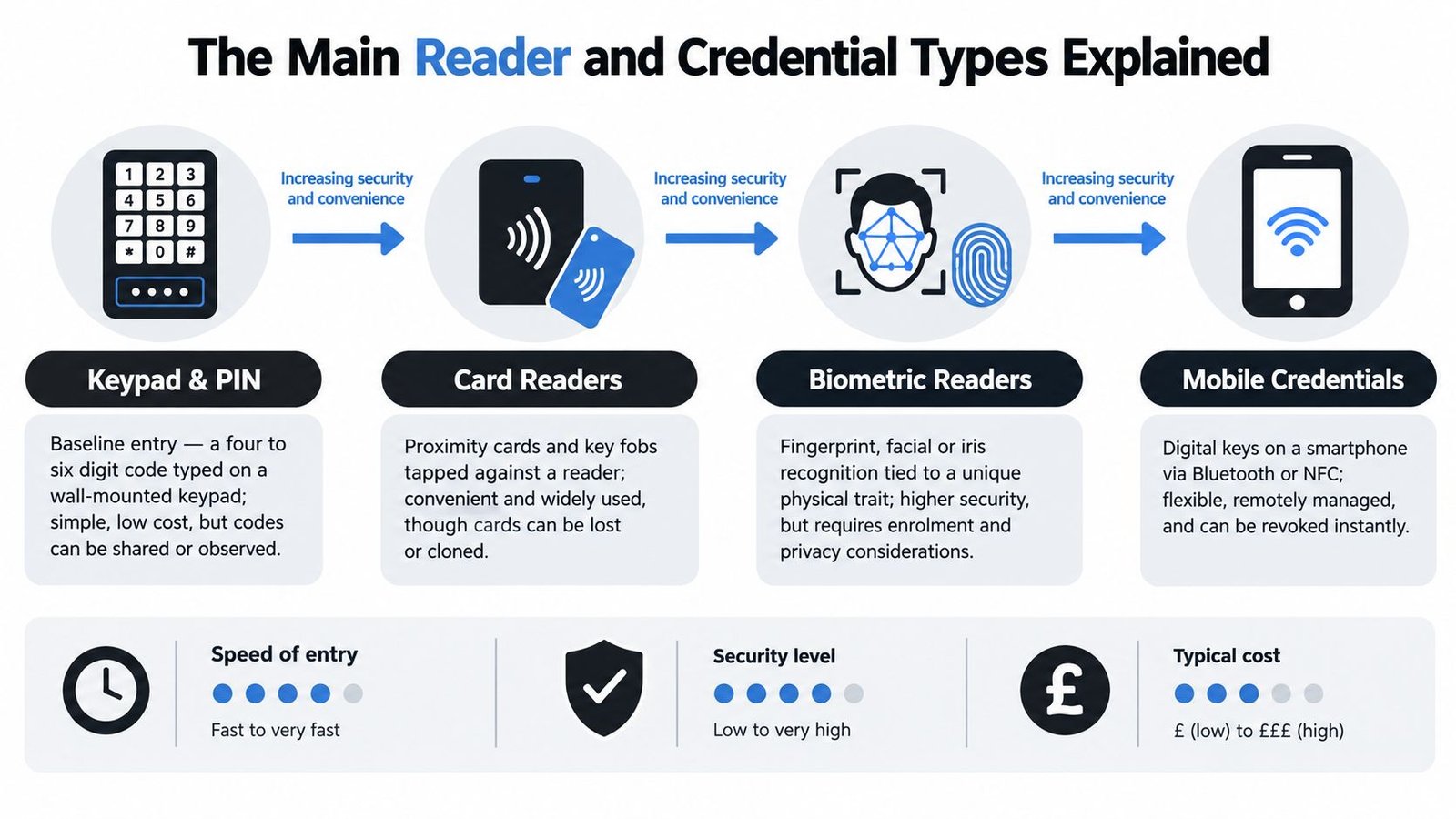
Access control has two separate questions. What does the user present, and how does the system decide whether that presentation should open the door? The reader captures the credential, the controller applies the rules, and the lock or gate responds.
Keypads and PINs
A keypad is familiar, affordable and straightforward to operate. It suits a home gate, small workshop or low-turnover site where a limited group needs access.
The weakness is the code itself. Users can share it, observe it, write it down or fail to change it after a contractor's work ends. A unique PIN per person improves accountability, but many simple standalone keypads use one shared code, which limits the audit trail.
For domestic gates and garage doors, practical installation details matter as much as the keypad specification. Drainage, weather protection, lighting and the position of the device affect reliability. Danny's advice on smart keypad installation and use is useful when you're deciding whether a keypad is suitable for a garage or gate rather than a staff entrance.
Cards and fobs
Proximity cards and fobs are common in offices, gyms, apartment blocks and warehouses. Each credential can be assigned to a named user, removed when lost and limited to selected doors or periods.
They still create responsibilities. A lost fob must be reported and cancelled, spare cards need controlled storage, and administrators should avoid giving everyone access to every area. Cards can also be lent to colleagues, so busy entrances may need anti-tailgating procedures, CCTV or a staffed reception point.
The quality of the reader, cabling, controller and lock matters. A good credential system won't compensate for a poorly aligned door, an unreliable power supply or a fire door that hasn't been fitted with suitable hardware. A plain-language overview of available access control system types can help buyers compare the complete arrangement rather than the reader alone.
Biometrics
Fingerprint and facial readers identify a physical characteristic rather than something the user carries. They can be useful where card sharing is a serious concern or where workers need hands-free access, but they create more demanding privacy and operational requirements.
The ICO classifies biometric information used to uniquely identify an employee, including facial characteristics and fingerprints, as special-category personal data. Before processing begins, an organisation needs a UK GDPR lawful basis, a separate Article 9 condition and a Data Protection Impact Assessment. The ICO guidance on biometric data for time and access control also points to necessity, retention, security, worker consultation and an alternative method where relevant.
For many small businesses, cards or PINs offer a lower-risk starting point. Biometrics should earn their place by solving a defined problem, not because the technology looks more advanced.
Intercoms, mobile credentials and automated gates
Video and audio intercoms work well where the person at the entrance isn't automatically trusted. A resident, receptionist or remote operator can speak to the visitor, view the entrance where video is available and release the door or gate.
Mobile credentials replace a physical token with an app or phone-based credential. They can be convenient for remote management and temporary permissions, but they depend on device security, account administration and a sensible fallback if the phone is lost or unavailable.
Gate automation adds mechanical considerations. The installer must account for vehicle detection, pedestrian safety, emergency release, wind loading, power failure and the relationship between the gate motor and the access controller. A phone app that opens a gate is only as dependable as the gate hardware and the process for revoking the user's account.
How UK Businesses Already Layer Security at the Door
A reader is only one part of a security arrangement. In practice, UK businesses combine entry controls with alarms, locks and cameras, giving each layer a defined job. The same Home Office survey cited earlier found that every surveyed premises had at least one crime-prevention measure. For preventing or monitoring entry while premises were closed, the most commonly reported measures included working alarms, security windows or door locks, and external CCTV.
| Measure | Premises reporting it |
|---|---|
| Working alarms | 73% |
| Security windows or door locks | 66% |
| External CCTV | 63% |
The figures do not measure reader adoption. They show the environment in which access control is installed. A credential may decide who is allowed through, but the surrounding door, alarm and camera determine whether the control withstands an attack, raises an alert and leaves useful evidence.
Give each layer a job
Credentials answer who should enter and when. The door, frame and lock resist physical attack. An alarm reports a forced or unauthorised opening. CCTV supplies visual evidence, while the access log records the credential, door, time and result.
Failures usually occur between these layers. A warehouse may control its office door but leave the yard gate on an unmanaged shared key. A shop may cover the stockroom with CCTV while giving every staff member the same PIN. A multi-tenant block may issue fobs but fail to remove former occupants promptly.
Review each entrance by asking:
- Entry permission: Who needs access, and during which operating periods?
- Physical resistance: Can the door, frame, gate or shutter withstand the expected threat?
- Detection: What happens if the door is forced, held open or used outside its permitted period?
- Evidence: Can an operator match the event with footage and a named credential?
- Response: Who receives the alert, and what action follows?
A standalone reader can open a door reliably while leaving the wider weakness untouched. It cannot secure an unprotected side entrance, monitor an isolated controller or deactivate an ex-employee's active credential. Effective access control solutions assign the right control to the exposure at each entrance, then connect permissions, physical security, detection and response into one workable process.
Matching Solutions to Homes, Shops, Warehouses and Multi-Tenant Buildings
The same reader can behave very differently depending on the building around it. A home needs convenience and privacy. A warehouse needs resilience, shift management and clear separation between people and vehicles. A shared office needs administration that doesn't collapse when tenants change.
Family home in a Cardiff suburb
A homeowner concerned about opportunist entry through a side gate may need a weather-resistant keypad, fob reader or intercom linked to a gate automation system. The gate should still have a suitable lock, lighting and a manual release for emergencies or power failure.
A single household may not need a full server-based platform. The important questions are whether temporary access can be removed, whether the code can be changed without replacing hardware and whether the gate remains safe when the controller or network is unavailable.
Bristol high-street shop
A retail unit often needs separate treatment for the public entrance, staff door, stockroom and delivery access. Staff may use cards or fobs, while a manager handles temporary contractor access through an intercom or time-limited credential.
The audit trail should identify who entered the stockroom and when, especially outside trading hours. CCTV should cover the approach and the door, while the alarm should distinguish an authorised opening from a forced entry. Staff turnover makes prompt deactivation more valuable than a feature-heavy reader.
Newport warehouse or industrial unit
A warehouse may combine a pedestrian entrance, roller shutter, loading bay, office, welfare areas and vehicle gate. Wired readers and controllers are often appropriate where there's existing containment and a stable communications route, while wireless locks can reduce disruption in areas where cabling is difficult.
Shift patterns need role- and time-based permissions. A forklift operator may need the warehouse but not the office, while a contractor may require access only to a defined area. The system should continue to enforce local permissions if the broadband connection fails, with events stored and synchronised afterwards where the chosen architecture supports it.
Swansea multi-tenant office
A multi-tenant building needs an administrator who can manage changes without granting every tenant excessive authority. Separate access groups, visitor intercoms and clear rules for shared reception, lifts, stairwells and tenant suites are more important than a fashionable credential type.
Property managers can learn from wider managed-community access-control principles, including the questions discussed in HOA access control guidance from Stormhammer Security. The geography differs, but the operational issues are familiar: resident or tenant turnover, shared entrances, visitor access and responsibility for lost credentials.
A system that is easy to install but awkward to administer becomes a security problem as soon as the building changes hands.
Integration With CCTV, Alarms, Intercoms and Time and Attendance
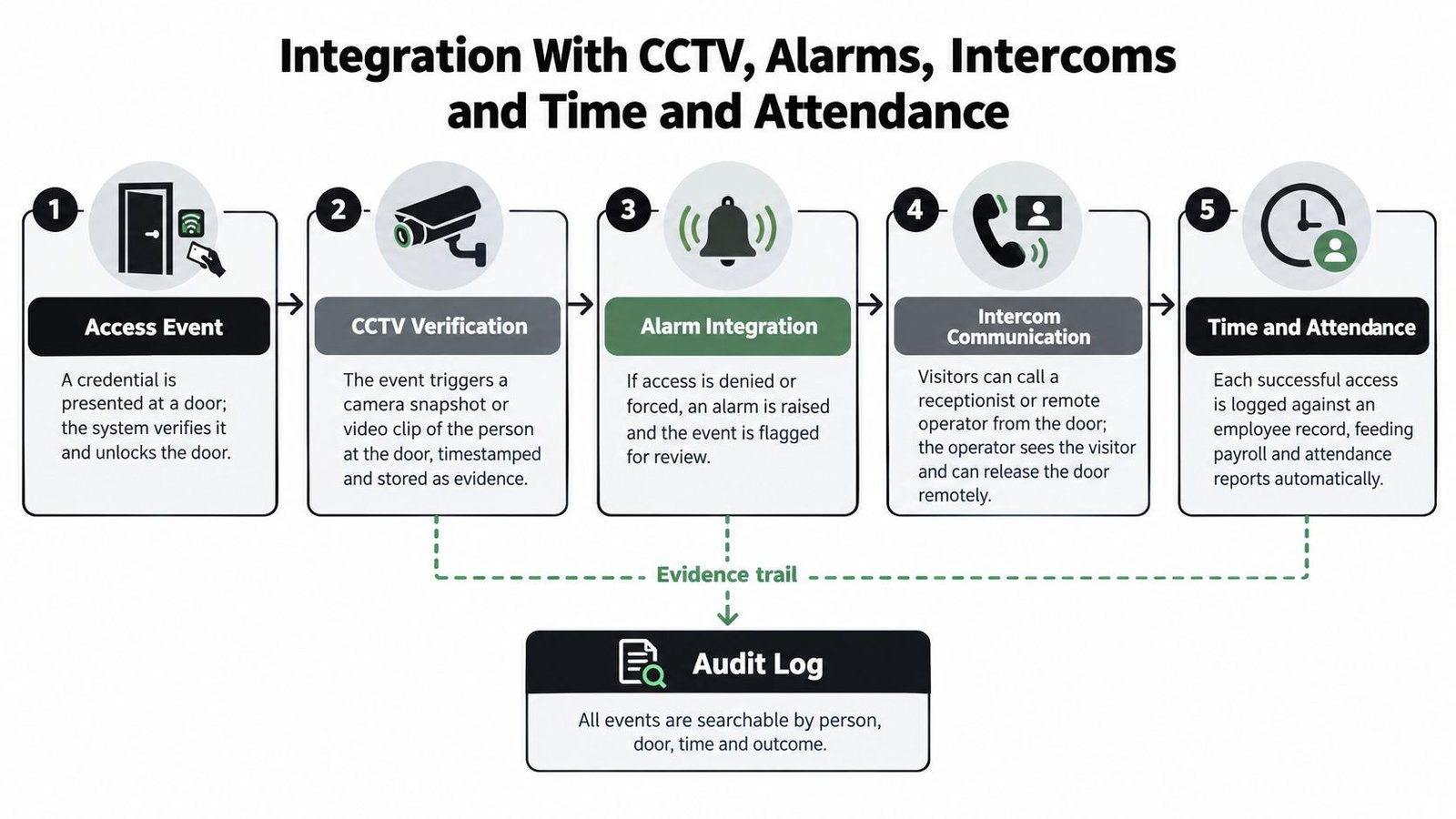
An access event becomes valuable when it triggers the right context. A rejected credential at a restricted door should be visible to an operator. A forced door should raise an appropriate alarm. A valid opening at a loading bay should be explainable against delivery activity and camera footage.
Specify the outcome, not just the connection
Ask an installer what the integration will do in practice:
- CCTV: Will a credential event call up the relevant camera or bookmark footage with the same timestamp?
- Intruder alarm: Does a forced or held-open door create an alert, and can authorised access suppress an unnecessary alarm?
- Intercom: Can a receptionist or remote operator identify a visitor before releasing the door or gate?
- Time and attendance: Are successful entries associated with named employees, and can managers export usable attendance records?
- Audit log: Can events be searched by person, door, time and outcome?
The NCSC Cyber Assessment Framework guidance on identity and access control states that users, devices and systems should be verified, authenticated and authorised before access to data or services is granted. The same discipline applies to a connected physical system. A cloud dashboard, controller, installer account and mobile app are all part of the security boundary.
Read this guide to attendance management for Dynamics 365 if access events will feed workforce administration. The integration should be agreed before installation, because different systems may use different user identifiers, schedules and export methods.
Place the second media reference where an operator might use it to understand the evidence chain:
Ownership after installation
Wireless and mobile access can reduce cabling and simplify expansion. They can also increase dependence on identity accounts, phones, cloud services and wireless infrastructure.
Put these responsibilities in writing:
- Patching: Who updates controllers, gateways, readers and management software?
- Account control: Who owns the administrator account and removes former installers or staff?
- Credential revocation: How quickly can a lost phone, card, fob or user account be disabled?
- Offline operation: What happens during broadband or power loss?
- Recovery: How are permissions and event logs restored after hardware failure or ransomware?
- Time accuracy: How are controller and camera timestamps kept aligned?
The access control system integration guidance is relevant when you're specifying these relationships. Integration is successful only when the people operating each connected system know who owns the response.
A Stepwise Selection and Procurement Checklist
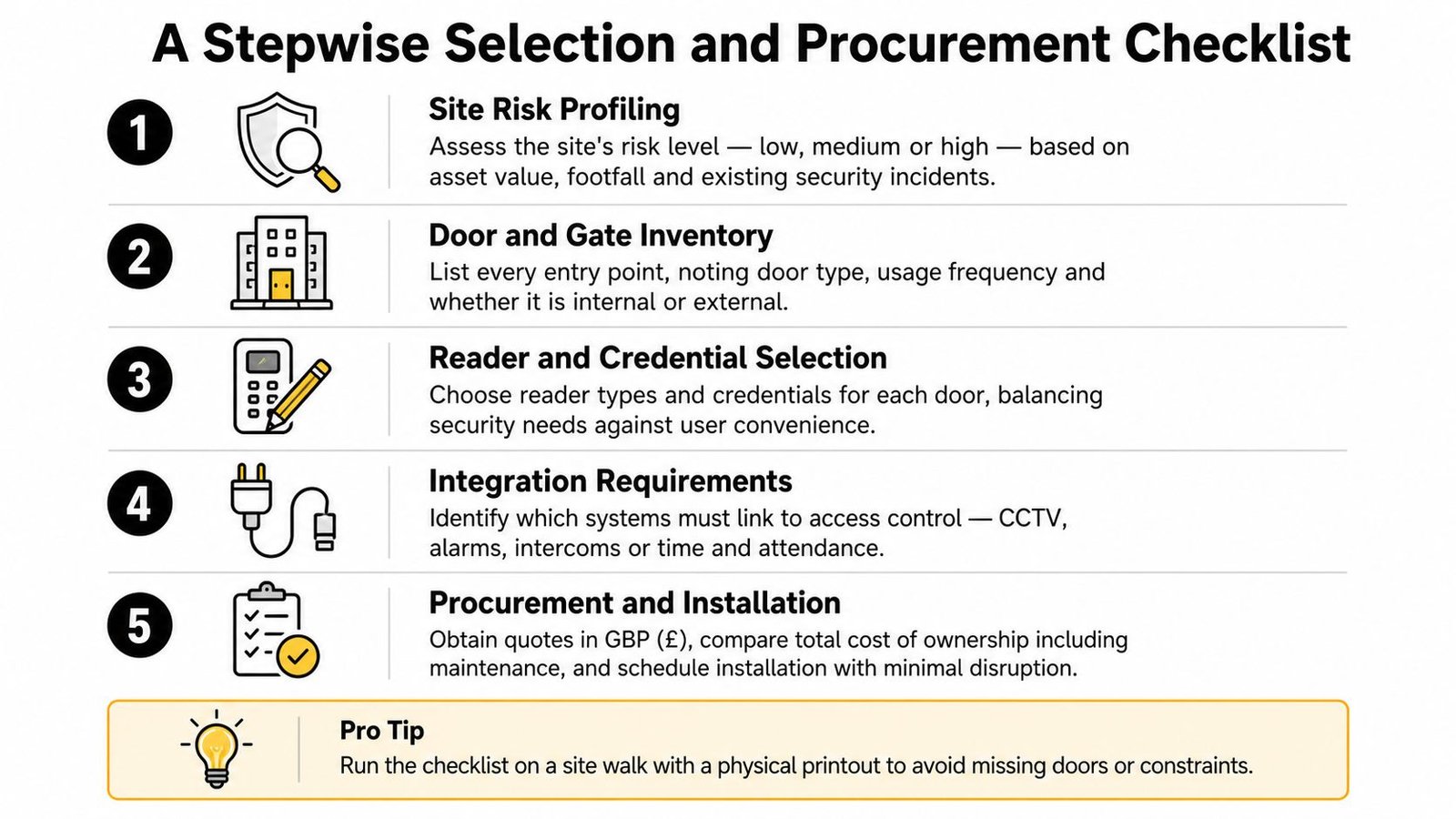
Start with the building, not the brochure. Walk the site with the person who understands daily operations, the person responsible for security and, where relevant, the person who manages staff or tenants.
Step one, define the exposure
Record valuable assets, public access, opening hours, existing incidents and the consequences of a door being misused. Separate ordinary staff access from high-risk areas such as server rooms, medication storage, cash offices or plant rooms.
Step two, inventory every entrance
List external doors, internal restricted doors, pedestrian gates, vehicle gates, roller shutters and emergency exits. Note the door material, frame condition, fire requirements, lock type, power route and whether the entrance needs fail-safe or fail-secure behaviour.
Step three, assign identities and permissions
Write down user groups rather than only counting readers. Include employees, directors, cleaners, contractors, visitors, tenants and temporary workers. Decide which people need named credentials, which areas need schedules and what evidence is necessary after an incident.
Step four, define integrations
Be precise about the required result. “Integrate with CCTV” isn't enough. Specify whether you need camera bookmarks, an operator pop-up, alarm escalation, intercom release, attendance exports or a central audit report.
Step five, test the supplier and the proposal
Ask for installer insurance, relevant manufacturer training, engineer DBS checks where appropriate, references from comparable sites and a clear support process. Check who owns the software account, what happens when the maintenance agreement ends, and whether replacement hardware or licensing is tied to one supplier.
A useful comparison looks like this:
| System type | Usually suits | Main responsibility |
|---|---|---|
| Standalone | Small sites with limited users and doors | Local administration and physical credential control |
| Networked | Offices, warehouses and buildings with several controlled areas | Controller, network and software maintenance |
| Cloud-managed | Distributed sites or teams needing remote administration | Account security, connectivity and subscription management |
The cheapest quote may omit door upgrades, power supplies, commissioning, training, integrations or future maintenance. Ask for those items separately so you can compare like with like.
Cost, Maintenance and the Case for Local Installation
The reader price is rarely the meaningful figure. Total cost includes the lock and reader, controller, power supply, cabling, door preparation, installation labour, software or cloud licences, credentials, integration work, training and maintenance.
A standalone keypad may be inexpensive to deploy, but a commercial building can need new electric locks, emergency release arrangements, network equipment, fire-alarm interfaces and additional work around gates or shutters. A cloud-managed system may reduce local hardware while introducing recurring account and service costs. Neither choice is automatically cheaper.
For a five-year ownership view, ask the installer to show:
- Initial works: hardware, wiring, door alterations and commissioning.
- Software: licences, subscriptions, mobile credentials and support.
- Service: preventative maintenance, call-outs, firmware updates and battery replacement.
- Change requests: adding doors, users, tenants or integrations.
- Failure recovery: replacement controllers, backup arrangements and restoration time.
Local coverage matters because a failed gate, locked staff entrance or unavailable controller is an operational problem, not merely a technical inconvenience. A company serving Cardiff, Bristol, Newport and Swansea may understand local building stock, travel requirements and the practical difference between a domestic gate and an industrial loading entrance.
When comparing access control installers serving the region, ask who will maintain the system after handover, whether engineers are DBS checked where appropriate, and whether the quotation includes documented acceptance testing. Wisenet Security Ltd provides keypad, card, fob and biometric access control, with remote management, user logs and integration options, alongside installation and maintenance services.
A local installer isn't automatically the right installer. The useful test is whether the company can explain failure modes, ownership and lifecycle costs in plain language.
A Short Action List Before You Speak to an Installer
Treat access control as an identity-lifecycle decision. Choose how people will be identified, define where and when they may enter, then assign responsibility for changing and removing those permissions.
Treat it as a layered security decision. Credentials manage entry, while locks, alarms, CCTV, intercoms and audit records deal with resistance, detection, verification and accountability.
Before requesting quotations, walk the site and complete these actions:
- List every entrance: Include external doors, side gates, vehicle gates, roller shutters and internal restricted areas.
- Separate control levels: Decide which entrances need named credentials and which can rely on locks, alarms and CCTV.
- Write the required evidence: Note whether you need camera bookmarks, visitor records, alarm alerts, attendance exports or a searchable access log.
- Shortlist local firms: Ask two or three suitably insured and experienced installers for like-for-like proposals, including maintenance and recovery arrangements.
Don't choose on the reader price alone. The cheapest device can become the most expensive system when permissions are difficult to manage, integrations fail or nobody is available to maintain the door after installation.
For homes, shops, warehouses and multi-tenant buildings across South Wales and the South West, Wisenet Security Ltd designs, installs and maintains access control alongside CCTV, alarms, intercoms and gate automation. Visit Wisenet Security Ltd to discuss your entrances, user permissions and the integrations you need before requesting a quotation.