Access Control System Integration Explained
A wet Tuesday at a trade counter in Swansea is when disconnected security earns its keep, or rather, fails to. A staff member presents a card, the door opens, and someone follows closely behind. The access controller records a valid credential, but the camera keeps recording without marking the moment, the intruder alarm remains unset, and nobody knows the rear door has been held open.
That isn't an unusual failure of hardware. It's a failure of coordination. Access control system integration connects the events your readers, locks, cameras, alarms, intercoms, fire panel and management software already know about, so the right system reacts at the right moment. For UK premises, that makes integration a question of safety, accountability, privacy and operational control, not just a way to replace keys.
Table of Contents
- When Three Systems Miss the Same Door
- What Access Control System Integration Actually Means
- The Standards and Protocols That Make Integration Work
- Planning an Integrated Setup for an Older Site
- The Contrarian Truth About Security and Safety Together
- Cybersecurity and Data Protection at the Integration Boundary
- Commissioning, Maintenance and Ongoing Monitoring
- Talk to a Local Specialist in South Wales and the South West
When Three Systems Miss the Same Door
The unit is busy, the rain is coming sideways, and the trade counter team is dealing with deliveries. One employee uses a card at the rear entrance. A second person walks through behind her before the door closes. The reader has done its job, but the rest of the security arrangement is blind to the context.
The DVR captures the footage, yet it doesn't flag the tailgating event or connect the images to the cardholder. The intruder alarm is already unset for daytime trading, so it stays silent. The fire panel has no input telling it that the rear door is being held open. Later, the owner can see a valid card transaction and hours of video, but can't quickly establish who entered, which camera view matters, or whether the door event was connected to an alarm condition.

What the disconnected setup costs
The immediate cost is investigation time. Staff must search recordings manually, compare timestamps, check alarm records and ask who was on site. The bigger problem is that each system holds only part of the story.
- The reader knows a credential was accepted, but not whether one or two people crossed the threshold.
- The camera sees movement, but doesn't automatically identify the relevant access event.
- The alarm knows its own status, but doesn't understand that an authorised arrival or suspicious door condition has changed the risk.
- The fire system monitors its programmed inputs, but isn't necessarily linked to access events or door-held-open alerts.
The Information Commissioner's Office treats physical security as part of information and cybersecurity governance, including controls over premises access and visitor supervision. Its physical security guidance supports the principle that a card reader, camera, alarm and audit log should operate as coordinated controls.
Integration is the wiring, configuration and software logic that makes that happen. It turns an isolated valid card read into a traceable chain involving a person, a door, a time, a video bookmark and, where appropriate, an alarm response. The architecture matters, especially in older buildings where different systems have been installed years apart.
What Access Control System Integration Actually Means
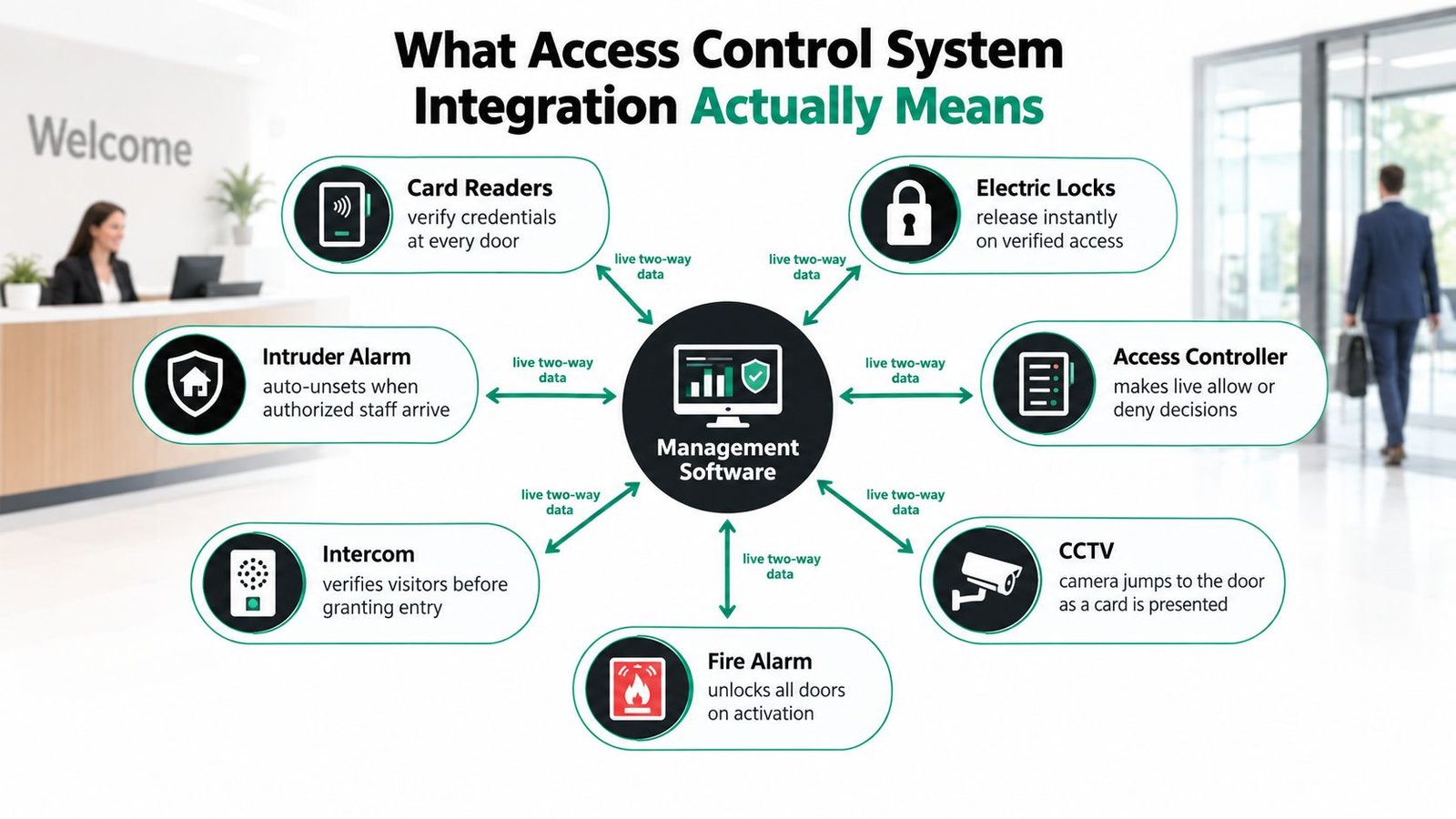
Integration means live, two-way coordination between security systems. A reader sends a credential event to the controller. The controller decides whether access is allowed, commands the lock, reports the result to management software and passes relevant information to CCTV, alarms, intercoms or other connected platforms.
Use a reception desk as the mental model. The reader is the receptionist's ears, receiving the credential. The controller is the receptionist deciding whether the person is permitted into that area. The lock is the door being released. CCTV is the witness, while the alarm is the response team. Management software gives the authorised manager the record of what happened.
A useful chain looks like this: a forced door at 02:14 creates an access event, the relevant camera view opens or receives a bookmark, the alarm platform raises a condition, and the duty manager receives an approved notification. The exact response depends on the design, but the point is that the systems act on shared information rather than operating as separate boxes.
Four boundaries to specify
Device to controller
The reader, lock, door contact and request-to-exit device must communicate reliably with the door controller. Cable condition, supervision, encryption and power affect the result here.Controller to controller
Multiple panels need a consistent view of doors, permissions and events. A controller that loses the network must have clearly defined local behaviour, including what happens to valid credentials and alarms.Controller to software
The management platform assigns users, schedules, zones and alerts. If event names, timestamps or permissions aren't consistent, the central dashboard gives a misleading picture.Software to third-party platforms
APIs and supported interfaces pass events to CCTV, intruder alarms, visitor management, HR systems, building management or time-and-attendance tools. Procurement teams also need to review SSO security for procurement compliance when central identity management is part of the platform decision.
Older Welsh buildings often contain mixed-vendor equipment, reused cabling and limited space for new panels. Integration doesn't mean ripping everything out. It means identifying which parts can exchange reliable, documented data and replacing the weak links instead of pretending incompatible equipment is a unified system.
This short visual overview shows how the main components fit together:
The Standards and Protocols That Make Integration Work
A new installation shouldn't rely on vague promises such as “compatible with CCTV”. Ask which protocol is used at each boundary, what it can supervise, how it is secured and what the system does when communication fails.
The main choices are complementary, not competing. A modern site might use OSDP between a reader and controller, TCP/IP between controllers and the management server, and an API between access software and visitor management.
| Standard | Layer | Security | Best fit |
|---|---|---|---|
| Wiegand | Reader to controller | Older, largely one-way communication with limited supervision and no modern encryption by default | Reusing serviceable legacy cabling and existing readers where replacement is not yet practical |
| OSDP | Reader to controller | Bidirectional, supervised communication, with encrypted configuration available | New doors and retrofit projects where tamper detection and stronger reader communication matter |
| TCP/IP | Controller to network and management platform | Depends on segmentation, authentication, patching and firewall design | Multi-door or multi-site systems needing central administration |
| APIs | Software to third-party platform | Depends on authentication, permissions, encryption and supplier governance | Linking access events to CCTV, HR, visitor, building or reporting systems |
Where OSDP earns its place
BS EN IEC 60839-11-5:2020 specifies OSDP for communication between access-control units and peripheral devices. Its practical value is clear: the controller can identify a disconnected or tampered reader, and encrypted communication reduces exposure compared with legacy reader links.
Specify the supported OSDP mode, encryption configuration, cable topology, controller capacity and fallback behaviour. Then test valid entry, denied entry, forced door, door held open, controller offline and reader tamper. A protocol on a quotation isn't proof of a working integration.
BS EN 60839-11-31:2017 defines a Web-services-based interoperability protocol for electronic access-control systems. That supports the broader design principle: use documented, standards-based interfaces rather than proprietary point-to-point connections that leave the building dependent on one supplier.
For a wider explanation of the available system architectures, this guide to different types of access control systems is a useful starting point. On site, the right answer still depends on the door, cable route, controller location, network and fire strategy.
Planning an Integrated Setup for an Older Site
A retrofit begins with the building, not the reader catalogue. Independent UK market analysis reported that retrofit work represented 69.55% of access-control activity in 2025, while commercial buildings accounted for 40.22% of market revenue. The same analysis reported a 45.70% share for card-based credentials and forecast 8.45% compound annual growth for cloud or access-control-as-a-service software through 2031. These figures point to a practical reality for South Wales and the South West: most buyers need to connect new control to existing premises, not build from an empty shell. UK market analysis
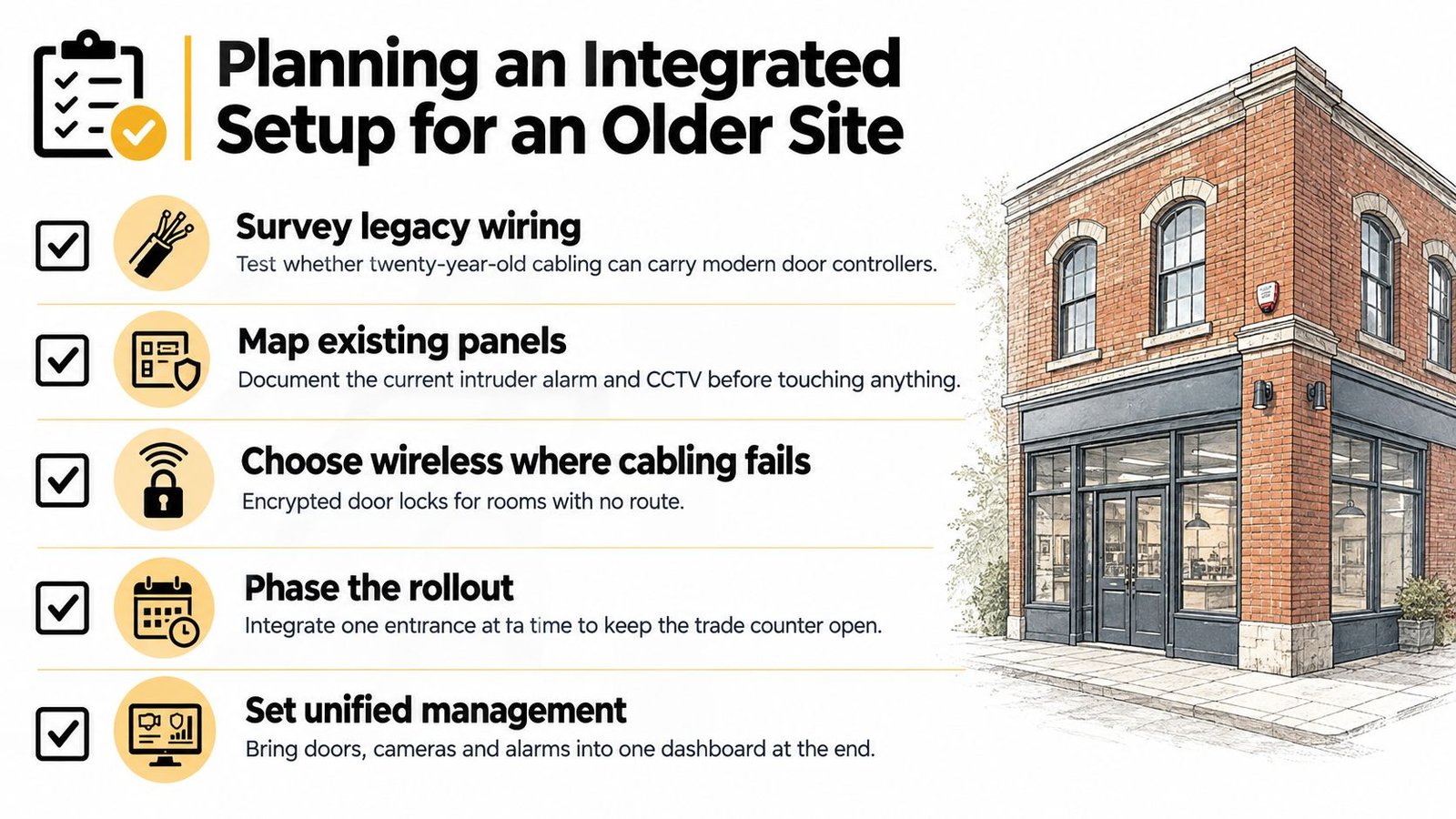
Start with a door survey
A Victorian terraced retail unit in Cardiff may have awkward voids, timber frames, shared walls and cable routes that cannot be disturbed easily. A steel-framed warehouse in Avonmouth presents different problems, including long routes, loading-bay traffic, exposed equipment and several operational zones. The same reader and controller specification won't suit both.
Walk every opening and record:
- Door and frame condition: Confirm that the leaf closes, latches and can accept the selected lock.
- Existing cabling: Test the cable rather than assuming an old run is usable.
- Power and battery capacity: Include locks, readers, controllers and emergency behaviour.
- Fire and alarm interfaces: Document existing panels, inputs, outputs and cause-and-effect logic.
- Network provision: Identify secure connection points and the location of panels.
- Data ownership: Establish who controls user records, event logs, CCTV associations and retention.
- Future tenants: Decide whether permissions, logs and administration must be separated.
Credentials should follow the users and the risk. MIFARE DESFire cards can suit a workforce already using cards, mobile credentials can reduce administration where staff turnover is high, and a keypad can provide a practical fallback for a plant room. Do not add biometrics just because the platform supports them. Choose the credential that the business can issue, revoke and support consistently.
Phase the work around trading
Replace controllers first if the existing panels limit integration or central administration. Replace readers next where communication security or credential support is weak, then move the management software once the field devices are understood. A competent installer can stage entrances so the trade counter remains open, with temporary procedures agreed before the first door is isolated.
Practical rule: Never approve a retrofit from a desktop drawing alone. The door survey decides whether the integration will work.
The Contrarian Truth About Security and Safety Together
The most secure door isn't automatically the right door. A configuration that keeps an unauthorised person out can create an unacceptable evacuation risk if it prevents people from leaving during an emergency.
UK premises need coordinated behaviour between access control, doors, intrusion detection and fire arrangements. The NPSA building protection guidance highlights the need to consider those systems together, including emergency egress and evacuation. That means the fire alarm cause-and-effect design must be agreed with the responsible person, fire-alarm contractor, access-control installer and, where appropriate, the fire risk assessor.
A maglock on an escape route may need to release when the fire input activates. A door protecting a sensitive internal area may require a different treatment, but it still needs safe egress, documented authority and a tested response. Don't let a sales label such as “high security” replace the decision about what must happen to each opening.
| Door Type | Recommended Mode | Trigger on Fire Alarm | Example Site |
|---|---|---|---|
| Main escape route | Release for safe evacuation | Release the controlled lock and confirm the door can be opened | Retail premises or office corridor |
| Staff entrance on an escape path | Release with monitored emergency operation | Release and report the event for investigation | Warehouse or trade counter |
| Internal restricted room | Risk-assessed controlled operation | Apply the documented fire strategy and preserve safe egress | Server room or controlled office |
| Pharmacy or high-risk storage cupboard | Risk-assessed secure mode with emergency arrangements | Follow the agreed cause-and-effect matrix | Care-related or medical setting |
Test the cause and effect
At a care setting in Newport, the priority is rapid, unambiguous evacuation and clear staff responsibility. In a multi-tenant office in Bristol, the challenge may be coordinating shared doors, tenant permissions, landlord controls, CCTV and the building fire panel without allowing one tenant to alter another tenant's safety settings.
The test should prove more than “the alarm sounds”. Activate the fire input and confirm the right locks release, the right doors remain controlled where justified, the event is logged, CCTV marks the change where required, and operators receive a clear message. Then restore the system and confirm that doors don't unexpectedly remain unsecured.
A locked-down corridor during a fire is a life-safety failure, not a security success.
Cybersecurity and Data Protection at the Integration Boundary
A South Wales business can connect access control to CCTV, payroll, visitor management and building systems, then create a larger security problem without realising it. If a controller shares an unsegmented network with office devices, an attacker who compromises one machine has more routes to the security system. If access events are combined with camera footage, payroll records or tenant details, the business also holds personal data that needs a clear owner, purpose and retention decision.
The UK National Protective Security Authority recommends restricting privileged access, patching systems, using access-control lists or network admission controls such as IEEE 802.1X where supported, and protecting servers, network equipment and cabling. Remote maintenance should use authenticated, authorised access with multi-factor authentication, encryption, monitoring and time limits. Follow its Network-connected security technology guidance before linking an access platform to the wider business network.
Put controls around the boundary
- Segment the network: Put controllers, readers and associated devices on a dedicated VLAN. Use deny-by-default firewall rules between security and business systems.
- Control administration: Give every administrator a named account, require MFA for remote access and restrict permissions by role, site and task.
- Protect records: Encrypt backups, protect audit logs from alteration and record a written retention schedule approved by the data owner.
- Remove access promptly: Revoke credentials when employees, tenants or contractors leave. Review administrator activity after the change.
- Control installers: Disable permanent remote-support accounts. Use time-limited, monitored access for maintenance.
A branch manager should manage that branch's doors without automatically viewing another branch's access history. The property owner, tenant, facilities manager and installer must agree who can export logs, answer data-subject requests, approve supplier access and recover records after a platform change.
Event data flowing into payroll, visitor management or reporting tools needs the same scrutiny as the access platform itself. Teams that protect streaming data pipelines should apply equivalent controls for authentication, encryption, permissions, monitoring and recovery. A weak interface can undermine otherwise well-configured doors and servers.
The ICO's information and cyber security guidance places premises access within wider security governance. Include a data map, role matrix, retention decision, export and migration plan, offline fallback, administrator offboarding and recovery test in the commissioning specification. Before connecting the platform, review cyber security for security systems and confirm who owns each control after handover.
Commissioning, Maintenance and Ongoing Monitoring
An integrated system isn't commissioned when every reader flashes green. It is commissioned when the site team can reproduce real faults and understand the response.
Test each opening with a valid credential, denied credential, expired credential, forced door, held-open door, request-to-exit operation and reader tamper. Disconnect a controller, simulate the fire alarm input and confirm that the programmed doors release as intended. Then compare the access timestamp with the CCTV bookmark and alarm record. If the clocks don't agree, the audit trail won't help much during an incident.
Test the events that matter
- Forced door: Confirm the alarm condition, camera response, operator notification and event record.
- Controller offline: Check local access behaviour, alarm reporting and restoration messages.
- Reader cable fault: Verify that the system identifies the fault rather than ignoring the reader.
- Fire input: Confirm the correct release behaviour and a clean return to normal.
- User removal: Revoke a credential and prove that access is denied without delay.
Daily monitoring should focus on meaningful exceptions, including controller offline, door forced, door held, reader tamper and power-supply fault. Reviewing every routine access event in real time creates noise and hides the conditions that need action.
Set a repeating maintenance rhythm. Review exceptions weekly, audit the complete event log monthly, and walk the site quarterly to test batteries, clean readers and inspect doors. Check that firmware and software remain supported, and include cable testing and reader replacement planning in the maintenance agreement.
Keep an as-built schematic, door schedule, credential register, cause-and-effect matrix and handover folder. Store administrator credentials separately from the controller, record supplier access, and document the recovery process. Without that information, a business can be left with a working door system that nobody can safely change.
Talk to a Local Specialist in South Wales and the South West
Integration isn't a product to add to a basket. It starts with the building, the people using it and the risks that concern the owner. Before anyone recommends a reader or cloud platform, the installer should inspect the doors, trace the existing wiring, review the fire strategy and identify who will administer the system after handover.
Ask direct questions:
- Can the existing Wiegand cabling be tested and reused, or should it be replaced?
- Which doors are shared between tenants, and who owns their permissions?
- What must happen when the fire alarm activates or the network fails?
- Which CCTV, intruder alarm, intercom or building-management events need to be linked?
- Who will revoke staff and contractor access on the day they leave?
- What support remains available after the installation team has gone?
A single-door project may need only a controlled reader, lock, door contact and sensible administration. A warehouse, retail group, car park or multi-tenant building needs a broader design covering zones, gates, cameras, alarms, fire interfaces, network security and future expansion. The specification should reflect the site, not force the site into a pre-packed kit.
Wisenet Security Ltd works from Port Talbot across South Wales and the South West, including Cardiff, Swansea, Newport and Bristol, on access control projects that may connect with CCTV, intruder alarms, fire systems, intercoms, gates and time-and-attendance platforms. Its access control installer service is relevant where the project needs a site survey, phased retrofit or coordinated maintenance rather than a standalone reader.
Start with a survey and an honest discussion about what the building will support. A good installer will tell you where existing equipment can be retained, where it creates risk and which improvements should happen first.
Wisenet Security Ltd provides site surveys, integrated access control design, installation and ongoing maintenance for businesses across South Wales and the South West. Visit Wisenet Security Ltd to discuss your doors, existing security systems and the cause-and-effect testing your premises needs.