What Is Access Control Systems: A Complete Guide for 2026
An access control system is a combination of credentials, readers, electronic locks and software that decides who may enter which area, when, and how that entry is recorded and audited. It's not a single device on a wall, it's a set of rules about identity and permission that a door, gate or barrier then carries out.
You've probably already felt the problem it solves. A set of office keys has gone missing and nobody knows who copied them, a former tenant still has a fob for the block, or a cleaner needs entry at 6pm but shouldn't have access at midnight. A traditional lock can't tell one key holder from another, can't expire at checkout time, and can't tell you who came in last Tuesday. Understanding what is access control systems in practical terms starts with that gap, because the technology only makes sense once you see it as a way to manage people, not just doors.
Table of Contents
- A Simple Way to Understand Access Control Systems
- The Core Components Behind Every Access Control System
- Main Types of Access Control Explained
- How Access Control Works With CCTV, Intercoms and Alarms
- UK Compliance, Fire Safety and Cybersecurity Essentials
- Practical Examples for Homes, SMEs, Warehouses and Carparks
- Choosing, Maintaining and Getting Support for Your System
A Simple Way to Understand Access Control Systems
Think of the fobbed door at a small office in Cardiff, the barrier at a gated car park in Bristol, or the video intercom at a block of flats in Newport. They look different, but each one runs the same quiet check before anything opens. Someone presents something, the system decides, and a lock either releases or stays shut.
That check answers three questions every time. Who is asking to come in, should they be allowed in here and now, and what should happen if the answer's no. If you keep those three questions in mind, the jargon that follows becomes much easier to place.
Identity plus permission plus record
A helpful shorthand is identity plus permission plus record. Identity is how the system recognises a person, usually through a card, fob, PIN, phone or fingerprint. Permission is the rule you set in advance, such as warehouse staff may enter the goods-in door during their shift but not the accounts office.
The record is the part most first-time buyers underestimate. Every granted or denied attempt can be logged against a person, door and time, so you're not relying on memory after an incident. That log is also why you can cancel a lost fob in seconds instead of changing every lock.
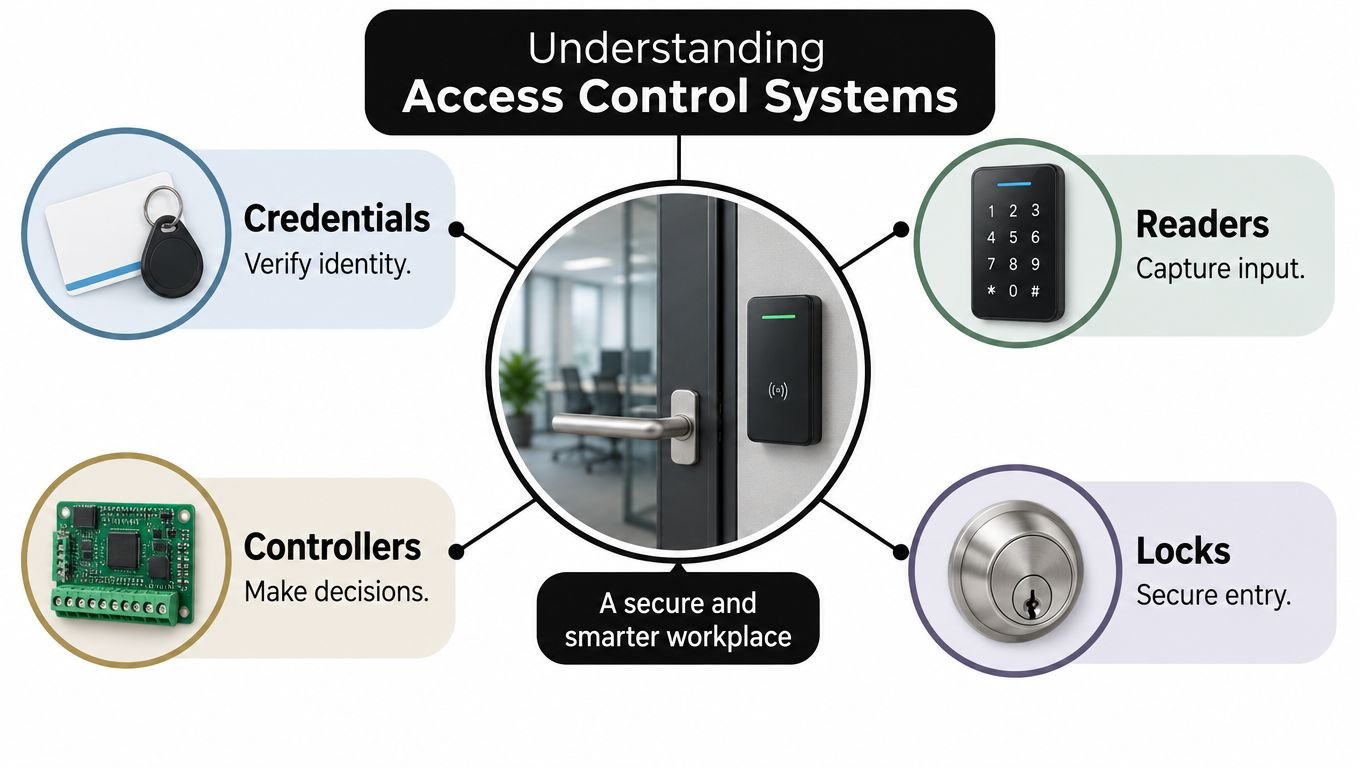
The visual below maps those ideas to the physical parts you'll see quoted on an installer's specification.
The Information Commissioner's Office describes access control as unique identification followed by granting access to particular resources during working hours, and notes those resources can include physical work areas and software systems in its guidance on biometric data for time and access control. That definition matters because it frames the system around a named person, not an anonymous key. Once a credential is tied to someone, you also take on duties about accuracy, retention and fairness.
Practical rule: Decide who should go where, and when, before you choose any reader. Hardware bought before policy usually has to be worked around later.
Many disappointing installations start in reverse. Someone likes the look of a fingerprint reader, buys it, then discovers visitors, leavers and people who can't use it haven't been planned for. Starting with identity, permission and record keeps the conversation on outcomes, and the components, types, integrations and UK rules that follow all plug into that same model.
The Core Components Behind Every Access Control System
A card reader beside a door is the part you notice, but it's only taking a message. The decision happens elsewhere, and the strength of the whole setup depends on every link in that chain working properly together.
The diagram here separates the hardware you'll see on site from the software that runs the rules behind it.
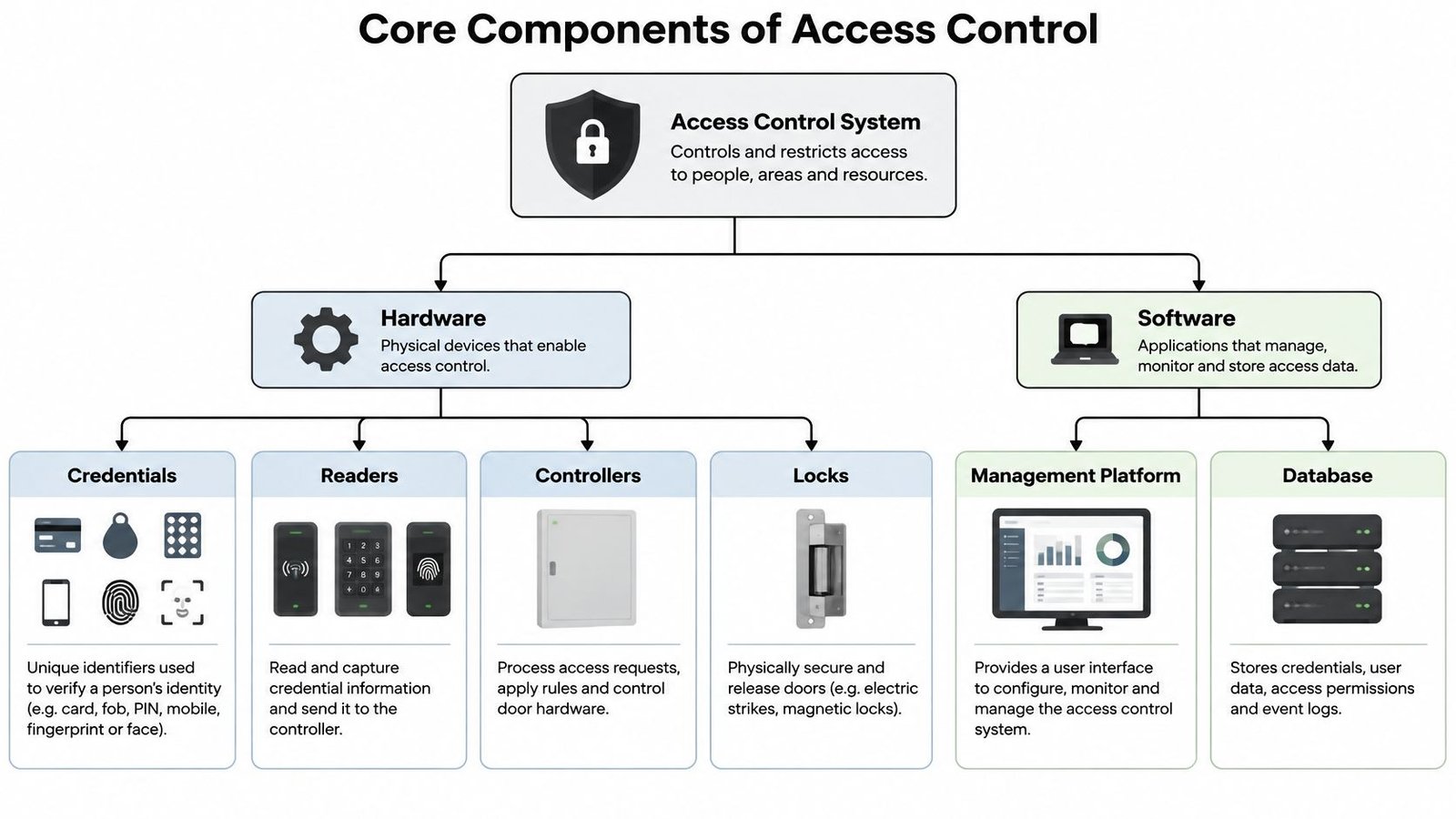
Credentials and readers
A credential is what a person presents to prove who they are. That might be something they carry, such as a card or fob, something they know, such as a PIN, something on their phone, or something they are, such as a fingerprint or face.
A reader captures that credential and turns it into data the system can check. A keypad reads typed digits, a proximity reader reads a fob held nearby, and a biometric reader compares a live fingerprint or face against an enrolled template. Readers don't decide, they report.
Controllers, locks and software
The controller is the decision maker, usually a panel tucked away from the door itself. It compares the credential data against your permission rules and tells the lock what to do, which is why comparing specifications for an access control panel deserves as much attention as choosing the reader on the wall. If the controller is poorly protected or badly configured, an expensive reader won't rescue it.
The electronic lock does the physical work. Depending on the door, that could be an electric strike that releases the latch, a magnetic lock that holds the door shut with power, or a motorised lock on a gate or barrier. Door contacts and exit buttons complete the picture by telling the system whether the door opened, closed, or was forced.
Management software is where you add people, set schedules and review logs. It's the hotel reception desk in our analogy, programming a key card to stop working after checkout rather than hoping the guest hands it back. If you're weighing how much administration a small business can realistically handle, this SMB access control guide from IT Cloud Global, LLC is a useful companion on the management side.
The short video below walks through that decision chain at a real door, which helps if you've never watched the parts interact.
Treat the chain as only as strong as its weakest link. A secure credential sent to an unprotected controller, or a strong controller driving a flimsy lock on a warped door, leaves the same gap. Good specifications name every link, including power supplies and battery backup, not just the reader.
Main Types of Access Control Explained
Most UK sites choose between four credential families, and there's no universal winner. You're trading security against convenience, accessibility, replacement hassle and, for one option in particular, UK privacy law. The right mix often varies by door, so staff might use one method at the main entrance and a stronger check at a stockroom.
Keypads and PINs are familiar and cheap to issue because there's nothing to hand out. Their weakness is sharing, since a code passed to a contractor tends to spread and rarely gets changed. They're best kept for low-risk internal doors or as a second factor alongside a card.
Cards and fobs remain the workhorse for offices, schools and blocks of flats. Each one is individually numbered, so a lost fob can be cancelled without affecting anyone else, and a modern card reader access control setup can also require a PIN for sensitive areas. The ongoing cost is modest, mainly replacements and administration when people join or leave.
Mobile credentials and biometrics
Mobile credentials store the credential in an app on a smartphone, usually using Bluetooth or NFC, the same short-range technology behind contactless payments. Issuing and revoking access can be done remotely, which suits multi-site businesses and landlords. The failure mode is mundane, a flat battery, a replaced phone, or a member of staff who doesn't want a work app on a personal device.
Biometric readers use a fingerprint or face to identify someone, so there's nothing to lose or lend. That convenience carries a legal weight the other options don't. Under UK GDPR, biometric data used to uniquely identify a person is special-category data, templates must be encrypted and retained only as long as necessary, and a usable alternative must exist for people who opt out without disadvantaging them, as set out in the ICO guidance on demonstrating compliance for biometric recognition.
That means convenience alone may not justify processing workers' biometric data. You need an additional lawful condition, a Data Protection Impact Assessment (DPIA), which is a formal assessment of privacy risks before you start, and clear answers for visitors, leavers and anyone whose fingerprint won't read reliably. Ask whether biometrics are proportionate for that door, not just whether they're secure.
| Credential type | Typical security level | Replacement cost per user | UK privacy implications | Best suited to |
|---|---|---|---|---|
| Keypad and PIN | Low on its own | Very low, code change only | Low, but shared codes weaken accountability | Low-risk internal doors, second factor use |
| Card and fob | Medium, higher with PIN | Low, new card or fob plus admin | Low to medium, logs are personal data | Offices, flats, schools, most SMEs |
| Mobile credential | Medium to high | Low, licence and phone dependent | Medium, app data and personal devices | Multi-site firms, landlords, remote issuing |
| Biometric | High when well specified | Low per user, higher reader cost | High, special-category data and DPIA duties | Higher-risk areas where cards are shared or lost often |
Read the table by failure mode as much as by security. A forgotten PIN, lost fob, dead phone and unreadable fingerprint all lock out a legitimate person, so every site needs a planned fallback that doesn't involve propping the door open.
How Access Control Works With CCTV, Intercoms and Alarms
On its own, a reader opens a door and writes a log line. Connected to your other systems, that same event becomes evidence, an alert, or an automatic safety action. Integration is a cause and effect chain you've agreed in advance, if this happens at a door, then that should happen elsewhere.
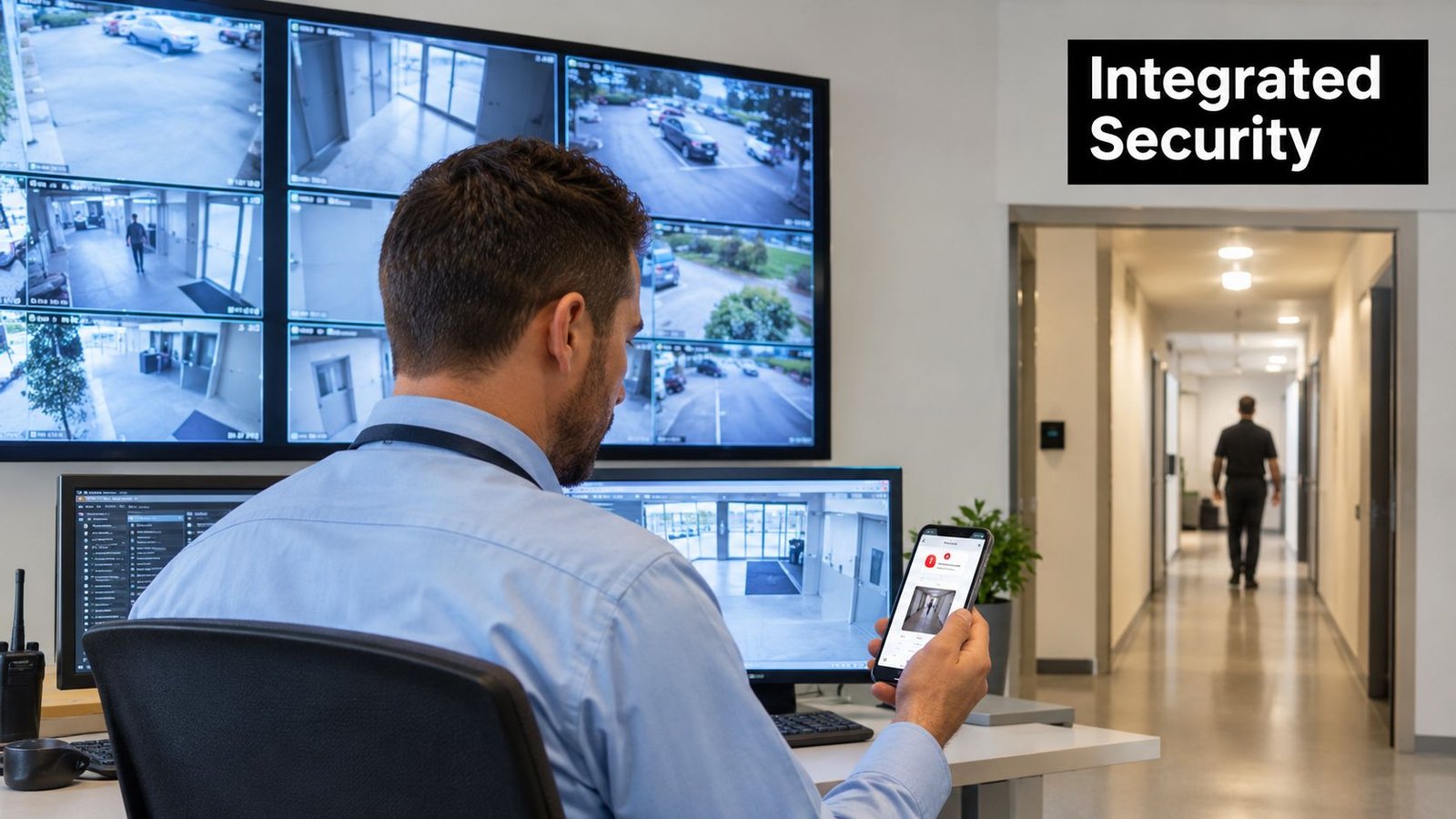
A common chain starts with a denied attempt or a door forced open. The controller records it, the CCTV system bookmarks the footage from the nearest camera, and a manager gets a phone notification with the time and door name. Instead of trawling hours of video, you're reviewing the thirty seconds that matter.
The monitoring view below shows why that link matters in practice, because door events and camera images answer different halves of the same question.
Everyday integration examples
- Home with a gate: A visitor presses the video intercom, you see and speak to them on your phone, then release the gate remotely while the driveway camera records the arrival.
- Retail unit: The first authorised fob of the morning unsets the intruder alarm for the shop floor, and the last one at night prompts the setting routine so the two systems don't contradict each other.
- Warehouse: Fobbed doors feed time and attendance, barriers control staff and delivery vehicles separately, and a door held open too long raises an alert before it becomes an overnight vulnerability.
- Multi-tenant block: Intercom, fob access and communal CCTV sit in one tenant management view, so a managing agent can revoke a departed tenant everywhere at once.
Fire integration sits above all of these in importance. When the fire alarm activates, relevant doors on escape routes must release according to the building's fire strategy, regardless of normal security rules. That relationship needs designing and testing, not assuming, and it's a central part of any access control system integration worth paying for.
A useful test for any proposed integration is simple. If it doesn't save time during an incident or prevent one, it's decoration rather than design.
Start with one or two chains you'll use, such as CCTV bookmarks and fire alarm release, and prove they work. Long lists of clever automations that nobody maintains tend to fail, which is worse than a simpler system that's tested.
UK Compliance, Fire Safety and Cybersecurity Essentials
A door that keeps the wrong people out but slows the right people escaping isn't a secure door, it's a liability. UK access control sits at the crossing point of fire safety, equality, data protection and cybersecurity, and non-specialists are often surprised that the reader technology is the least regulated part of the conversation.
ProtectUK recommends beginning with a documented risk assessment and Operational Requirement, which is a written statement of what the system must achieve, rather than selecting hardware first, as explained in the ProtectUK guidance on access control risk. That document should map assets, occupancy, operating hours, evacuation routes and what happens when things fail. It also gives you something to hold an installer, insurer or fire risk assessor to later.
Fire safety comes first
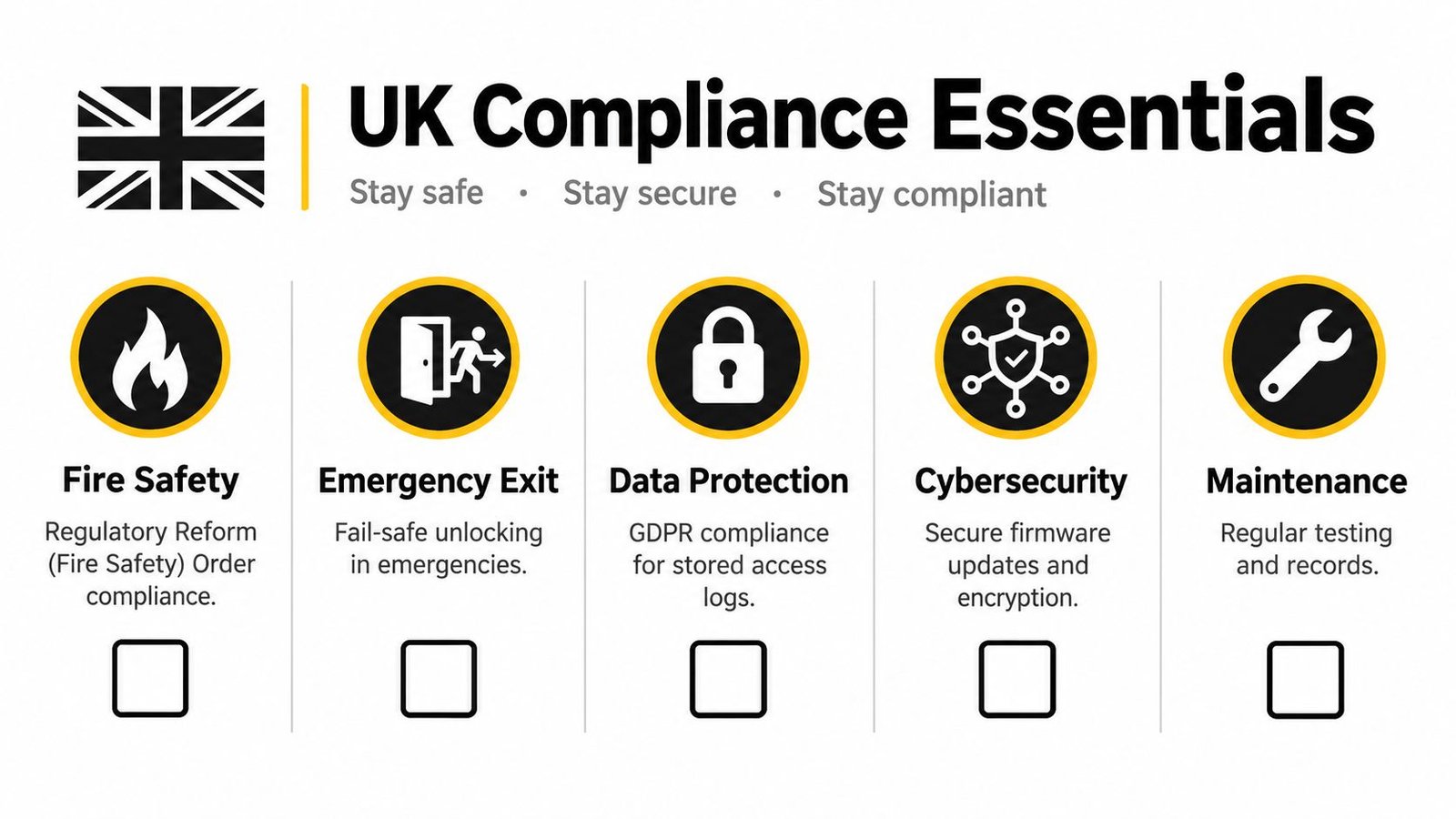
The Regulatory Reform (Fire Safety) Order 2005 places duties on the responsible person for a premises, and the Fire Safety (England) Regulations 2022, which came into force on 23 January 2023, added duties including checks of flat entrance fire doors at least every 12 months in buildings above 11 metres containing two or more domestic premises, under the Fire Safety (England) Regulations 2022. Those checks matter here because changing a lock or adding a reader to a fire door can affect the door's performance if it's done badly.
The scale of the problem isn't theoretical. In England during the year ending March 2025, fire and rescue services completed 51,020 fire-safety audits, only 29,714, which is 58%, had a satisfactory outcome, and emergency exits were the most frequently cited area of non-compliance with 10,323 breaches of Article 14. You don't want your new system adding to that list.
Escape-route doors must be openable easily, immediately and without a key or special knowledge. Guidance referenced by the National Security Inspectorate points to BS EN 179 for emergency-exit devices used by people familiar with the building, BS EN 1125 for panic-exit hardware where more than 60 people may use an exit, BS EN 13637 for electrically controlled exit systems, and BS 7273-4 for the interface between electrically powered locking and fire detection systems, as summarised in the NSI guidance on access control and safe escape. In plain language, you need to know exactly what each controlled door does on fire alarm activation, on power loss, and on manual override, and that behaviour must match your fire risk assessment.
The checklist graphic below pulls those duties into one page you could take to a site meeting.
Privacy, equality and cybersecurity
Access logs are personal data because they show where an identifiable person was and when. UK GDPR and the Data Protection Act 2018 therefore apply to retention, access rights and who inside your organisation can view those records, even if you never touch biometrics. Set a retention period you can defend and restrict log access to people who need it.
The Equality Act 2010 also shapes design. Reader height, door opening force, visual and audible feedback, and alternatives for people who can't present a fingerprint all affect whether disabled occupants can enter and escape independently. Retrofitting accessibility after installation costs more than designing it in.
Finally, a networked controller is part of your IT estate, not just your door furniture. In a survey of 561 physical-security and cybersecurity professionals, 32% believed cybersecurity features were missing from their existing access-control controllers, up from 21% in the previous survey, and 74% said coordination between cybersecurity and IT had become more complex, as reported in coverage of the Mercury Security cybersecurity gap findings. Ask whether controllers sit on a segmented network, how firmware and administrator passwords are updated, who has remote access, and what happens to doors if cloud connectivity drops.
Practical Examples for Homes, SMEs, Warehouses and Carparks
Specifications become clearer when you picture a real front door, shop or yard. The three scenarios below use the same components in different proportions, and each ends with a broad cost band described in words rather than figures, because door condition, cabling routes and fire requirements move prices more than reader choice does.
A home with a gate and intercom
A homeowner outside Swansea wants callers screened at the driveway gate and family members to come and go without keys being copied for cleaners and tradespeople. A video intercom with a phone app handles visitors, fobs or mobile credentials handle regular users, and the gate automation includes safety edges and a manual release for power cuts. Temporary codes with expiry dates cover a decorator's week of work, then stop working on their own.
That's typically the low to typical band for a single property, rising if groundwork, gate replacement or long cable runs are needed. The common mistake here is forgetting deliveries and emergency access, so agree how a parcel, a carer or a fire crew gets in before the gate becomes an obstacle.
A small office or retail unit
A ten-person business in Newport needs the public kept to the shop floor, the stockroom limited to senior staff, and cleaners admitted only in the early evening. Role-based permissions, meaning access assigned by job role rather than person by person, make that manageable. When a member of staff leaves, one revocation removes every door at once, and the log shows who last entered the stockroom if stock goes missing.
This sits in the typical band for a small commercial site, with cost driven by the number of controlled doors rather than the number of users. Budget-wise, it's usually smarter to control fewer doors properly than every internal door thinly. The stockroom, office and rear entrance usually earn their keep first.
A warehouse and carpark
A logistics unit near Bristol has high-cycle doors, meaning doors opening many times a day, plus separate flows for staff cars, vans and HGVs. Fobbed pedestrian doors link to time and attendance, barriers use longer-range readers so drivers aren't leaning out of cabs, and roller doors are controlled separately from escape routes so industrial convenience never compromises evacuation. Anti-passback, which prevents a fob being passed back for a second person to use, may be justified at the staff entrance.
That's the higher-spec band, mainly because of barriers, groundwork, door hardware rated for heavy use and integration work. The operational payoff is control over who was on site during an incident, which matters for safety roll calls as much as security. If your muster list depends on memory, that's the gap to close first.
Choosing, Maintaining and Getting Support for Your System
Buying well is a sequence, not a single decision. Each stage produces something you can check, and skipping early stages usually shows up later as doors that technically work but don't match how your building operates.
A phased way to choose
- Scope and risk assessment: Walk every entrance, escape route and restricted area, list user groups from staff and tenants to cleaners and delivery drivers, and write down what must happen on fire alarm, power loss and controller failure.
- Design and specification: Turn that into named components per door, credential types, permission groups, schedules, log retention, network arrangements and the fire interface, with standards such as BS EN 179, BS EN 1125 and BS 7273-4 referenced where they apply.
- Installation and commissioning: Test each door under normal power, standby power, fire alarm, network failure and manual override, and record the results rather than accepting a demonstration of one happy path entry.
- Handover and training: Make sure at least two named administrators know how to add and revoke users, run reports, change codes and escalate faults, and keep administrator accounts separate rather than shared.
Ask direct questions during that process. Who owns firmware updates, how are controller batteries monitored, what happens when the internet connection fails, and how quickly can a lost credential be cancelled out of hours. Vague answers at quotation stage rarely become precise after installation.
Selection check: If a proposal lists readers and locks but never mentions escape routes, log retention or administrator training, it isn't finished yet.
Maintenance that actually gets done
Access control drifts. People change roles, doors drop out of alignment, batteries age, and permission lists accumulate former staff. Planned maintenance should therefore cover physical checks, software housekeeping and life-safety interfaces together, not just a wipe of the readers.
- Firmware and software updates: Apply supported updates to controllers, readers and management software, and remove unsupported kit from the network plan.
- Batteries and power supplies: Test standby batteries under load and replace them on schedule, because a battery that fails during a power cut changes door behaviour at the worst moment.
- Permission and log reviews: Audit who has access where, remove leavers and dormant credentials, and confirm log retention still matches your stated policy.
- Fire interface and escape checks: Prove that alarm activation, emergency releases and panic or emergency hardware still operate as designed, and record remedial actions against your fire risk assessment.
- Door hardware condition: Check alignment, closing action, release timing and damage, since a misaligned door defeats both locking and fire performance.
For South Wales and the South West, Wisenet Security Ltd is one local option to consider alongside other installers, offering access control design, installation and maintenance across keypad, card, fob, biometric and mobile systems, with programmable access levels, time-based permissions, entry audit trails and remote management. The company also installs CCTV, intruder alarms, fire systems, intercoms and gate automation, uses DBS-checked engineers, carries SafeContractor accreditation, and installs intruder alarms to BS EN 50131. Whoever you appoint, judge them on the same evidence, a written specification, tested fire interfaces, clear maintenance records and administrators who've been trained.
Keep the end goal in view. You're not buying readers, you're buying the ability to say, with evidence, who could enter each area, who did, and that everyone inside could still get out quickly in an emergency. A system that delivers those three things, and is maintained so it keeps delivering them, is money properly spent.
If you're planning a new system or inheriting one you don't fully trust, Wisenet Security Ltd can survey your doors, escape routes and existing kit across South Wales and the South West, then design, install and maintain access control integrated with your CCTV, alarms, intercoms and fire detection. Book a free consultation through Wisenet Security Ltd and bring your current fob list, fire risk assessment and toughest questions about privacy, cybersecurity and safe escape.