Access Control System for Small Business: UK Guide 2026
A shop owner in Cardiff often starts with a simple concern: someone has lost a key, a former contractor still knows the entry code, or staff are letting visitors through the stockroom door because nobody wants to interrupt the counter service. The first instinct is usually to buy a stronger lock or a smarter reader.
That can help, but it doesn't solve the wider problem on its own. An access control system for small business has to connect the door, the person using it, the manager approving access, and the records showing what happened. Without that operational link, a modern reader can sit on the wall while old permissions, informal visitor arrangements, and unmanaged digital accounts continue to create risk.
Table of Contents
- Why Your First Access Control Decision Is Rarely Just About Doors
- Comparing Keypad, Card and Fob, and Biometric Access Options
- Building an Access-Control Policy Before Buying Hardware
- Connecting Physical Entry Control to Basic Cyber Identity Governance
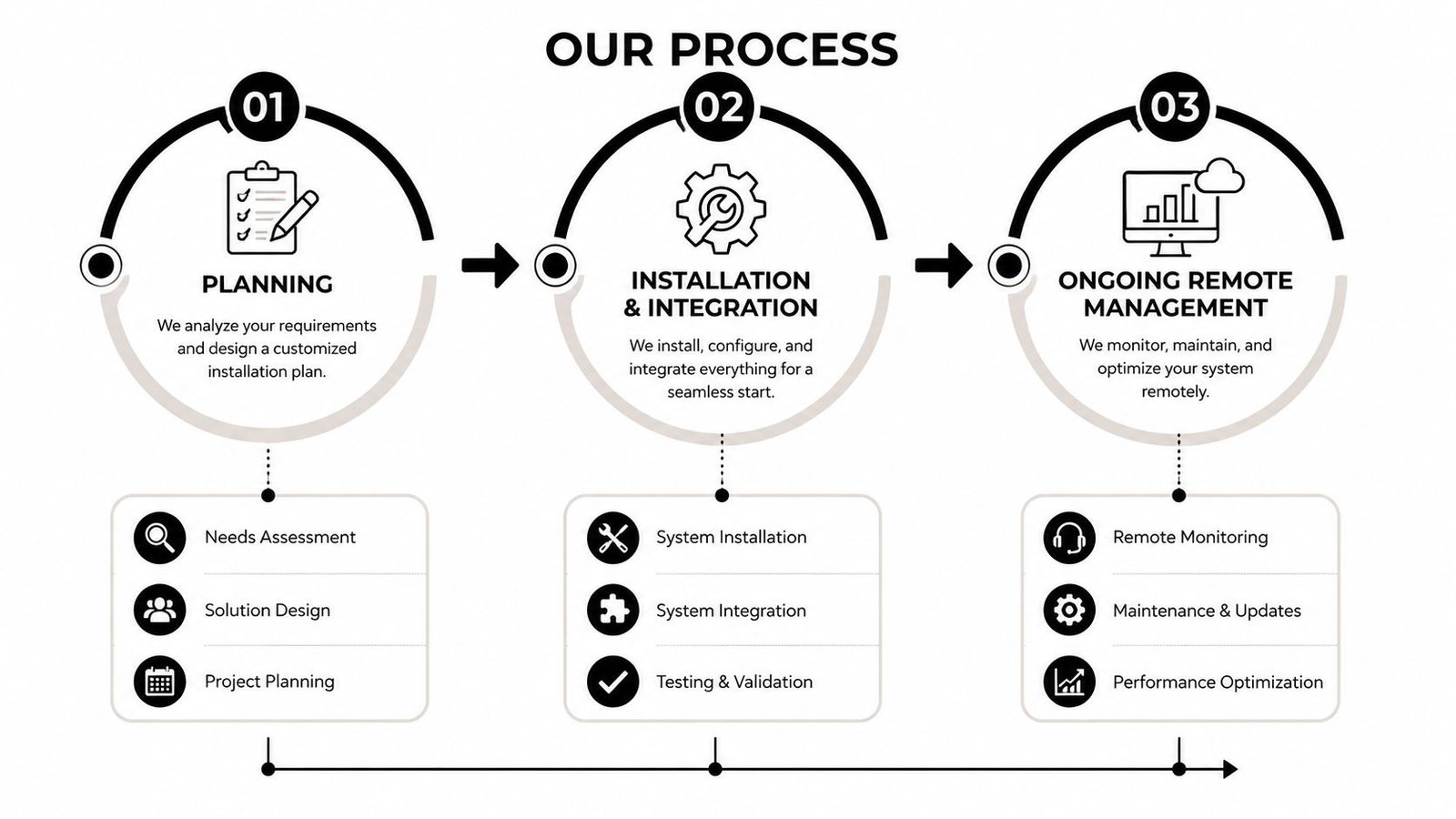
- Planning Installation, Integration, and Ongoing Remote Management
- Budgeting for Total Cost of Ownership and UK Compliance Expectations
- Choosing a UK-Based Installer and Verifying Supplier Credentials
Why Your First Access Control Decision Is Rarely Just About Doors
Consider a typical South Wales warehouse with a trade counter at the front, a delivery entrance at the rear, and an office containing stock records and customer information. The morning supervisor opens the premises, a temporary worker arrives for a shift, a courier needs access to the loading area, and an engineer visits to service equipment. Each person has a different reason to enter, but small firms often manage all four situations with the same key, shared PIN, or casually issued fob.
The hardware may work perfectly. The weakness appears later, when a temporary worker leaves, a contractor keeps a code, or nobody checks whether a visitor has left the building. In a shared Cardiff office, the same issue might involve a landlord, several tenants, cleaners, and a facilities provider, each assuming somebody else owns the access list.
Practical rule: Treat every door permission as a business decision with an owner, an expiry point, and a record.
A useful access control system starts with a short written policy. It should identify:
- Critical areas: Separate public areas, staff-only rooms, stock areas, offices, plant spaces, and rooms containing sensitive records.
- Roles: Define what a shop assistant, supervisor, warehouse operative, contractor, and business owner need to enter.
- Visitors: Decide who meets visitors, where they wait, whether they receive temporary credentials, and who closes the visit record.
- Changes: Set out what happens when someone joins, changes role, takes leave, or leaves the business.
- Review: Nominate a person to check permissions and access logs instead of assuming the system will manage itself.
This layered approach matters because a door is only one part of the boundary. Perimeter security, staff procedures, lighting, CCTV, alarms, and controlled internal areas all contribute to the result. The best first purchase is often not the most advanced reader. It's a clear description of who should be able to enter, when, and why.
Comparing Keypad, Card and Fob, and Biometric Access Options
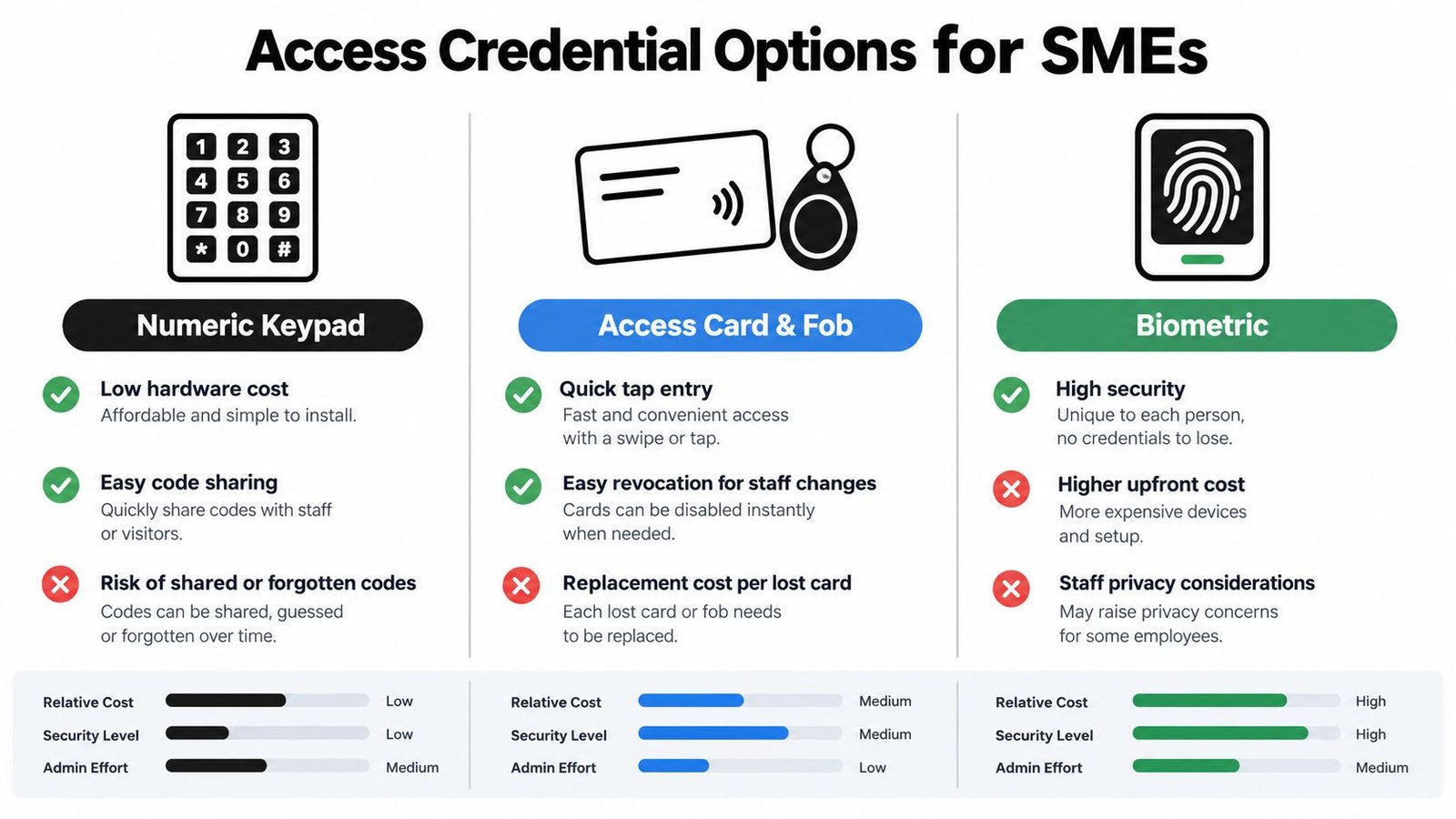
A keypad is attractive to a cautious owner because it avoids issuing physical credentials. Staff can enter a PIN, and a visitor can receive a temporary code. The problem is accountability. Shared codes spread quickly, former workers may remember them, and a person entering with someone else's PIN isn't necessarily identifiable from the credential alone.
Cards and fobs usually provide the most straightforward starting point for a small premises. Each worker receives an individual credential, access can be removed when their role changes, and readers are familiar to staff. Lost credentials still need prompt cancellation, and replacement costs can accumulate, but the administrative trail is normally clearer than it is with one shared code.
Biometric readers tie access to a physical characteristic such as a fingerprint. That removes the problem of a forgotten card or shared PIN, but it introduces higher purchase and support considerations, enrolment requirements, and privacy questions. Some workers may also need an alternative method if the reader struggles with a particular use case or if the business doesn't want biometrics used at every entrance.
The UK market still shows strong demand for physical infrastructure. It was estimated at USD 470 million in 2025, with a projection of USD 702.89 million by 2031 and a 6.94% CAGR. Hardware represented 61.05% of UK revenue in 2025, card-based credentials represented 45.70%, and mobile credentials were the fastest-growing authentication method at a projected 9.74% CAGR to 2031, according to UK access control market analysis from Mordor Intelligence.
| Credential type | Best suited for | Key maintenance consideration |
|---|---|---|
| Keypad | Small staff teams, low-risk internal areas, controlled contractor access | Change codes when trust changes and avoid shared permanent PINs |
| Card or fob | Retail premises, warehouses, offices, and role-based staff access | Cancel lost credentials quickly and keep the user register current |
| Biometric | Sensitive areas where individual verification matters | Manage enrolment, privacy expectations, reader performance, and fallback access |
| Mobile credential | Retrofit sites and teams comfortable using managed smartphones | Plan for lost phones, account recovery, and immediate revocation |
For a deeper explanation of the wider hardware categories, see this guide to access control system types. In practice, cards or fobs suit many small businesses because they balance familiar use with individual accountability. A keypad can work well at a staff entrance, while biometrics or mobile credentials may make sense for a restricted room or a business that needs tighter control over temporary access.
Building an Access-Control Policy Before Buying Hardware
Start with a floor plan, not a brochure. Mark the front entrance, delivery doors, staff areas, offices, stockrooms, server spaces, records storage, and any route that bypasses reception. Then classify each area by the consequence of unauthorised entry. A small shop may only need controlled access to the staff entrance and stockroom, while a service company may need separate rules for customer records, equipment, and office space.
UK guidance recommends that secure areas use appropriate entry controls, maintain access logs, and revoke permissions promptly when roles change. The ICO also recommends keeping records of physical access rights, auditing them regularly, and including access removal in leavers' checklists. The ProtectUK risk controls guidance also supports a layered approach, combining perimeter protection with electronic access control and adding protection around sensitive areas.
Use roles instead of individual exceptions
Create a small access matrix before choosing readers. It might look like this:
- Retail staff: Front staff entrance and sales floor during working hours.
- Supervisors: Retail areas, stockroom, opening and closing access.
- Warehouse staff: Delivery entrance and stock areas, with no automatic access to office records.
- Contractors: Only the area required for the job, for a defined period.
- Visitors: Reception or a designated waiting area, accompanied when they need to go further.
This is least privilege in practical terms. It doesn't mean making work difficult. It means giving a person the access needed for their duties instead of granting broad access because configuring exceptions feels inconvenient.
Write the joiner and leaver process
The policy should name the person who approves access, the person who creates it, and the person who checks that it has been removed. Onboarding should confirm identity, role, start date, doors, schedule, and credential issued. A role change should trigger a review rather than leaving old permissions in place.
For leavers, collect cards and fobs where possible, disable digital credentials, remove door permissions, and record completion. If a key or credential can't be recovered, treat it as compromised and replace or invalidate it. Keep the process short enough that a manager can follow it during a busy shift.
A permission that nobody reviews becomes a hidden liability, even if the reader and controller are working normally.
Visitor handling deserves its own page. Record the visitor's host, purpose, arrival, departure, and access area. Contractors should receive access that expires when the work ends, not a permanent credential that remains in circulation. If your business needs to understand its data protection responsibilities around physical access records, review the relevant ICO registration guidance, then confirm the details with an appropriate professional adviser.
Connecting Physical Entry Control to Basic Cyber Identity Governance
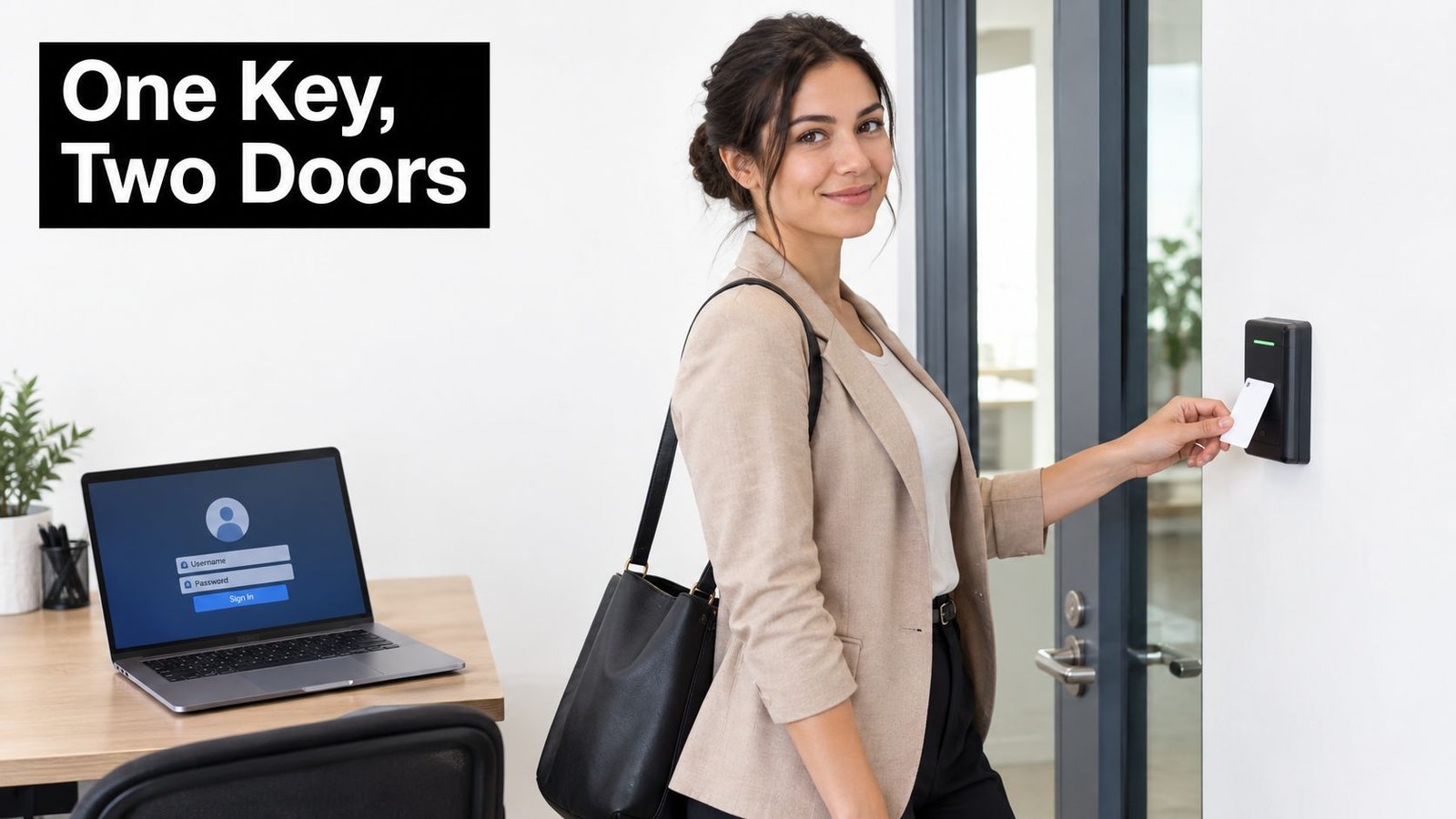
Most small-business access projects stop at the reader. That leaves three separate questions unanswered: who is allowed through the door, who can access company systems, and which device may be used to reach those systems. A worker can lose a fob, retain a cloud account, and continue using an unmanaged personal device unless one coordinated offboarding process closes all three routes.
UK survey evidence illustrates the gap. In 2025/2026, 43% of micro businesses required two-factor authentication, compared with 35% the previous year, while 64% allowed access only through company-owned devices, compared with 58% previously, according to UK access control trend coverage citing government survey data. Those figures describe cyber controls, but they raise a practical physical-security question: does the same business apply comparable discipline to door permissions and visitor access?
Build one change workflow
When a new employee joins, the manager should approve the role, the administrator should create the relevant door and system permissions, and the employee should complete identity and authentication enrolment. When that person leaves, the same workflow should remove their door credential, email and application access, remote access, and device permissions.
The workflow doesn't need an expensive identity platform to be useful. A controlled spreadsheet, a documented checklist, and named responsibility can be more effective than an automated system nobody maintains. Larger or growing firms can connect access control to remote access management so physical and digital changes follow a more consistent process.
Visitor logs should follow the same principle. A visitor entry should identify the host and purpose, but it shouldn't become an unreviewed permanent record. Set a retention approach suitable for the business, restrict who can view the log, and investigate unusual out-of-hours activity when the system makes that visible.
For firms worried about identity compromise, an identity compromise simulation guide can help explain how attackers exploit weak account governance. The useful lesson for a small business is straightforward: a door credential, staff account, and device should be treated as connected parts of one identity lifecycle.
A short training video can help managers understand how physical credentials fit into broader access governance.
Planning Installation, Integration, and Ongoing Remote Management
A good installation begins with a door survey. Check the lock type, door condition, escape arrangements, power availability, network route, reader position, and the relationship with existing CCTV and intruder alarms. On a small site, the front entrance may need a simple reader, while the stockroom needs a restricted schedule and a camera view that can help confirm who used the credential.
Retrofit disruption matters in older South Wales premises. Wireless readers and escutcheons can reduce the need for extensive cabling, but wireless doesn't remove the need for secure configuration, reliable connectivity, battery planning, and permission reviews. UK survey evidence found that 37% of organisations used some wireless technology in physical access control, while fully wireless systems rose from 6% to 8%, as reported in the ABLOY UK Wireless Access Control Report.
Plan the operating routine
Agree these points before commissioning:
- Remote administrators: Limit management rights to named people and protect administrator accounts with strong authentication.
- CCTV association: Decide which doors need camera coverage and how staff will find the relevant footage after an incident.
- Alarm interaction: Confirm how access events, forced doors, and alarm states should interact, including what happens outside normal opening hours.
- Visitor access: Use temporary permissions with an end time, record the host, and close the visit rather than leaving an open entry.
- Audit ownership: Assign someone to review denied attempts, unusual access times, former staff, contractors, and inactive credentials.
Remote management is useful when a supervisor needs to cancel a lost fob after closing time or grant a contractor limited entry without travelling to the premises. It also creates responsibility. If nobody checks notifications or updates user records, remote access only makes stale information available from more locations.
For a broader way to think about the systems a growing firm depends on, this overview of a tech stack for growing companies provides useful context. Your access platform should fit that wider environment rather than becoming an isolated dashboard.
Test the system with real scenarios, including a new starter, a leaver, a lost credential, a visitor, a delivery outside normal hours, a network interruption, and an alarm event. Installation is complete only when staff can follow the policy without workarounds.
Budgeting for Total Cost of Ownership and UK Compliance Expectations
A supplier's headline price rarely represents the full cost of access control. The proposal should separate readers, controllers, locks, credentials, cabling, labour, configuration, software or cloud charges, training, maintenance, replacement credentials, and support. A cheap keypad may look attractive until managers spend time changing shared codes and reconstructing who entered a restricted room.
Independent UK market research estimates the access control market at USD 524.6 million in 2024, with a projection of USD 830.7 million by 2030 at an 8.1% CAGR. Hardware was the largest revenue segment, while services were identified as the most lucrative and fastest-growing offering for SMEs in the UK market study from MarketsandMarkets. For a small business, that reinforces the value of installation quality, maintenance, integration, and dependable administration after the equipment is fitted.
Price the work that follows installation
Ask each supplier to show how the system handles:
- Staff turnover: Credential cancellation, replacement, role changes, and leaver checks.
- Contractors: Temporary access, expiry, approval, and records.
- Visitors: Host confirmation, arrival and departure records, and privacy controls.
- Multiple sites: Central administration, local responsibility, and reporting.
- Failures: Battery replacement, network loss, damaged locks, and emergency access.
- Reviews: Routine permission audits and support when the business changes layout or staffing.
UK SME reporting also highlights weak visitor-security maturity. Twenty-three per cent of businesses had very little visitor security and 36% had none, while 41% reported more complex measures such as ID cards or restrictive access gates, according to UK SME security reporting. The same source reports that many SMEs said they were prepared to invest up to £10,000 in building security, yet formal visitor processes remained inconsistent.
That contrast is important. Spending on equipment without budgeting for administration can produce a system that looks controlled but leaves incomplete records. A useful explanation of how subscription, support, training, and administration can create hidden costs in employee platforms applies equally well to access control procurement.
For South Wales premises, ask how the proposed access system will coexist with existing fire arrangements, intruder alarms, CCTV, and emergency procedures. Don't accept a generic package without checking the door hardware, escape requirements, data handling, maintenance schedule, and responsibilities after handover.
Choosing a UK-Based Installer and Verifying Supplier Credentials
A local installer should do more than sell a reader. They should inspect the doors, understand the building's existing security, document the proposed permissions, and explain how staff changes and visitors will be managed after commissioning. For a shop, warehouse, or shared office, integration experience often matters more than a long list of reader models.
Before accepting a quotation, ask:
- Who will install it: Check insurance, engineer training, DBS arrangements where relevant, and experience with comparable premises.
- Which systems can connect: Confirm compatibility with CCTV, intruder alarms, intercoms, gates, and any existing door hardware.
- How access is administered: Ask to see the process for adding, changing, suspending, and removing a user.
- What support includes: Clarify response arrangements, maintenance visits, software support, battery replacement, and credential replacement.
- Which standards apply: Ask the installer to explain the relevant UK requirements for the doors, alarms, fire interfaces, electrical work, and records in your premises.
- How the system can grow: Make sure another door, site, staff group, or temporary access schedule can be added without discarding the original investment.
A free survey should produce a written scope, door schedule, access matrix, integration notes, and clear exclusions. Be cautious if a provider refuses to discuss ongoing administration or focuses only on reader appearance and initial price.
For South Wales and the South West, a fully insured regional specialist can also make maintenance and fault response more practical. The right choice is the supplier that can connect physical installation with a workable policy, train the people who will administer it, and remain accountable when staff, visitors, and premises change.
Wisenet Security Ltd provides access control installations across South Wales and the South West, including keypad, card and fob systems, biometric readers, remote management, user logs, and integration with CCTV and intruder alarms. Arrange a consultation through Wisenet Security Ltd to review your doors, permissions, visitor process, and ongoing maintenance requirements.