Security Cameras for Business Installation: A UK Guide
Stop shopping for cameras first. That's the most popular advice in security cameras for business installation, and it's backwards. Resolution, night vision and an app don't make footage usable. A system fails when you can't justify why a camera is there, when nobody owns the passwords, when recorded quality is worse than the live view, or when an export for police or an insurer takes three days and a phone call to a former employee.
Treat the project as governance first, hardware second. Buy fewer cameras, placed deliberately, with a written purpose for each one. You'll spend less, you'll upset fewer staff, and you'll be able to use what you recorded. If an installer opens with a catalogue instead of asking what incidents you've had, who can view footage, and how long you'll keep it, find another installer.
Table of Contents
- How to Plan a Business Camera Installation Step by Step
- Lawful Use, Signage and Retention Rules for UK Businesses
- Choosing Camera Types, Resolution and Night Vision
- Placing Cameras, Mounts and Blind Spot Checks
- Cabling, Power, Storage and Alarm Integration
- Testing, Commissioning and Ongoing Monitoring
- Costs and How to Confirm Your Installer Before You Sign
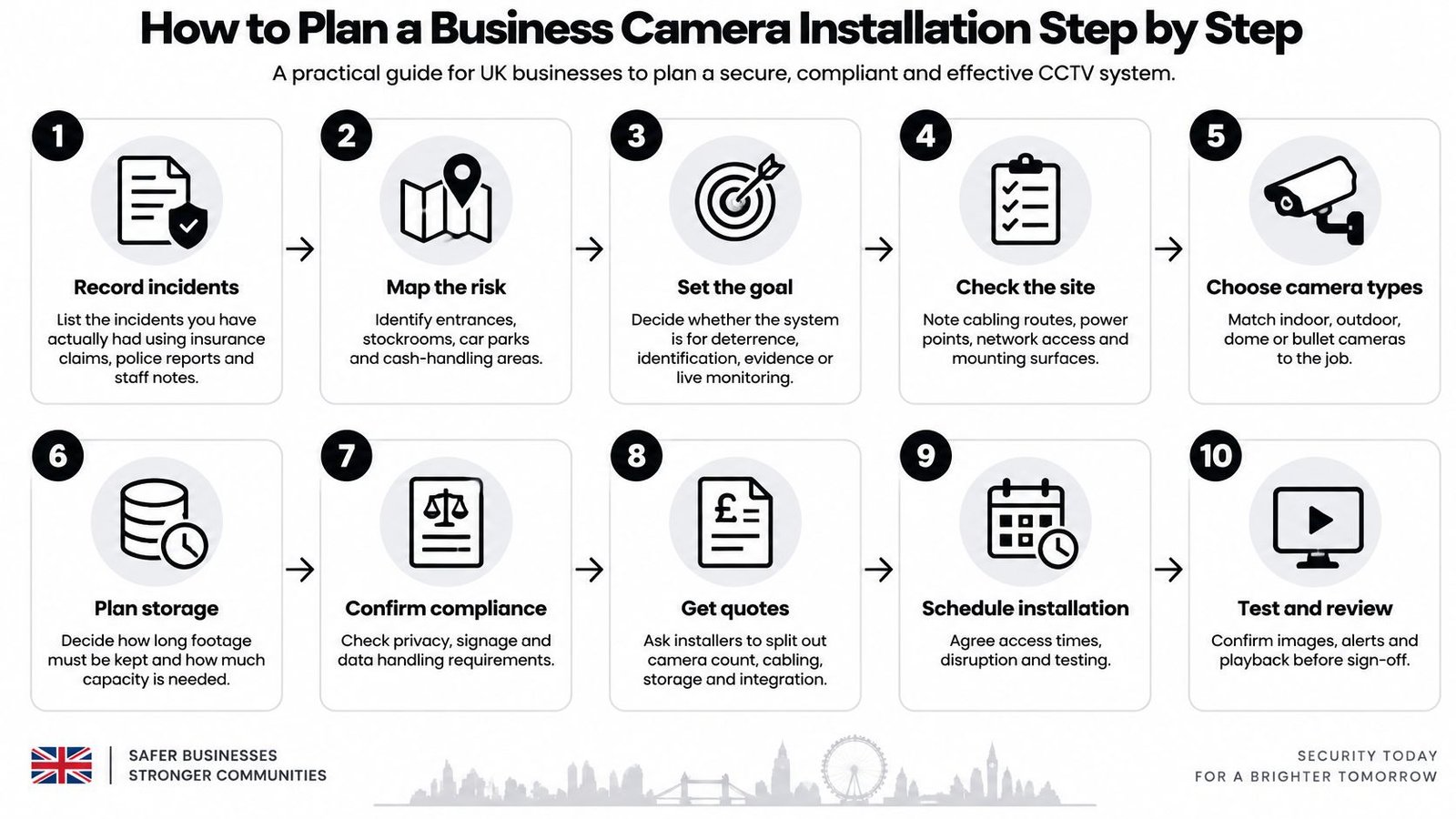
How to Plan a Business Camera Installation Step by Step
A camera plan is only as good as the decisions behind it. Work through these steps before approving a quote:
- Record incidents: List losses and security concerns from insurance claims, police reports and staff logs.
- Walk the site after dark: Mark entrances, tills, yards, loading bays, car parks and areas with poor visibility.
- Set one objective per camera: Specify whether it must detect, recognise, identify or capture a number plate. One camera cannot be expected to do all four equally well.
- Check privacy impact: Record the purpose of each view and whether a formal assessment is needed.
- Shortlist equipment against objectives: Match camera type, lens and illumination to the job each camera must do.
- Draw the coverage plan: Mark camera positions, mounting heights, viewing angles, cable routes and recorder location.
- Request comparable quotes: Give each installer the same written brief so you can compare equipment, coverage and work included.
- Install infrastructure first: Fit cabling, power, network and recorder before aiming the cameras.
- Commission the system: Test views in daylight and darkness, check playback, and export a recording.
- Take control at handover: Get passwords, retention settings, signage wording and a maintenance schedule in writing.
Follow the sequence. Defining the incidents and camera objectives first prevents wasted coverage and gives installers a clear specification to price.
Why Your Own Incident List Beats a Sales Survey
National surveys show that crime against businesses is common, but they cannot tell you which parts of your site need cameras. Use your own incident records to set priorities. If losses occur at the rear delivery door between 6pm and 8pm, specify that location and time. If the recurring problem is yard break-ins, prioritise the perimeter rather than adding cameras over tills without evidence of internal theft.
The One-Page Brief to Write This Week
Keep the brief to one page. For each proposed camera, record its location, single objective, areas it must not capture and who may view its footage. Add opening hours, known dark spots, broadband upload speed if remote viewing is required, and the proposed location of the locked recorder.
Practical rule: If you cannot state a camera's job in one sentence, leave it out of the plan until you can.
Use the same brief to request quotes and guide installation. At commissioning, check each camera against its stated objective and excluded areas, then confirm playback and footage export work as expected.
Lawful Use, Signage and Retention Rules for UK Businesses
More cameras don't mean more security. They often mean more personal data, more staff complaints, more footage nobody checks, and a weaker defence when someone asks why you were recording them. A narrower system covering entrances, yards and cash handling, with private spaces excluded, is easier to justify and usually works better.
Do the compliance work before procurement, not after the drills come out. Once cameras are fixed and cables are run, you won't move them because a form says you should.
Start With Purpose, Lawful Basis and a DPIA Check
Write down why you're recording, who is affected, and what less intrusive option you considered. Better locks, lighting, stock layout or a gated yard sometimes solve the problem without recording people all day.
Use this trigger checklist:
- Staff areas: Does any view cover desks, rest areas or changing spaces where monitoring needs strong justification and consultation?
- Public and neighbouring space: Does any view take in pavements, neighbouring windows or another tenant's premises?
- Audio: Are microphones enabled? Audio is far harder to justify than video, so leave it off unless you have a specific, documented reason.
- Identification: Will footage identify employees, customers or visitors regularly, not just during incidents?
- Third-party access: Will a landlord, tenant, managing agent or monitoring company need live or recorded access?
If several answers are yes, complete a Data Protection Impact Assessment. The Information Commissioner's Office guidance on data protection principles for surveillance says the DPIA should assess necessity, proportionality, risks to individuals, and additional safeguards, and if high residual risk remains, you must consult the ICO before proceeding. Don't deploy first and assess later.
Consult staff where monitoring affects them and keep a note of what you changed as a result. For a fuller walkthrough, read this guide to CCTV and GDPR duties for UK businesses before you sign a quote.
Signage, Retention and Who Can Export
Put clear signs at entrances and inside monitored areas. State who operates the system, how to contact them, and where to find the privacy notice. A tiny sticker behind a door isn't transparency.
Don't copy a generic retention period from another business. UK GDPR and the Data Protection Act 2018 prescribe neither a minimum nor maximum CCTV retention period, so keep footage for the shortest period necessary for your stated purpose, delete it securely, and check deletion is happening. If incidents are normally reported within a few days, a long archive is hard to defend.
Decide now who can view, export and disclose footage, and log every access and disclosure. Restrict administrator rights, protect recorder credentials, and test that an authorised person can find and export a clip quickly for police, an insurer or a subject access request. Remote apps multiply accounts and phones, so remove leavers the same day they leave.
After installation, maintain an Article 30 processing record covering purposes, sharing arrangements, retention periods and who is responsible for the system. Check whether you owe the ICO data protection fee. The ICO CCTV checklist for small organisations notes non-domestic users are likely to owe a fee, with published tiers ranging from £52 to £3,763 depending on business circumstances.
Fewer, purpose-limited cameras are not a compromise. They're the defensible design.
Choosing Camera Types, Resolution and Night Vision
| Camera type | Typical resolution | Best use | Night performance and notes |
|---|---|---|---|
| Fixed bullet | 4 MP (2K) to 8 MP (4K) | Entrances, yards, car park approaches | 20-40 m infrared, varies with lens; visible deterrent, weatherproof |
| Fixed dome | 2-4 MP | Ceilings, tills, stockrooms | Short-range infrared for indoor distances; discreet, vandal-resistant versions available |
| PTZ (pan-tilt-zoom) | 4-8 MP | Large yards, perimeters, car parks | Long range with infrared and zoom, 100 m or more; needs active operator or auto-tracking |
| Number plate capture (ANPR) | 2-4 MP dedicated lens | Barriers, vehicle entrances | Needs infrared or lit plates, angle-critical; mounting and angle matter more than resolution |
| Thermal | Low-resolution thermal sensor, specified by detection range | Unlit perimeters, remote yards | Works in total darkness, no illumination needed; detects movement; does not identify faces |
Resolution Only Counts at the Subject
A headline megapixel count tells you nothing until you divide it by the width of scene you're covering. As a worked design example, planners often use around 125 pixels per metre for recognition and around 250 pixels per metre for identification at the target. On that basis, a camera spread across a wide entrance can look sharp on a monitor yet leave faces at the far edge too small to identify.
That's why wide-angle everything is a costly mistake. Use a wide view to detect movement across a yard, then a narrower, correctly aimed camera where people must pass, such as a door, barrier or till. One camera rarely does both jobs well.
Don't specify maximum resolution and frame rate on every channel by default. Higher settings consume storage and network capacity fast, and installers then increase compression without telling you to hit your retention target. You end up paying for 4K and recording mush. Set resolution, frame rate and compression per camera, based on what that camera must prove.
Night Vision Claims Need a Real Test
Manufacturer infrared range is measured in favourable conditions. Rain, fog, dirty domes, reflective number plates, white walls close to the lens and glass all cut usable range. Infrared also records in black and white, so clothing colour and vehicle colour disappear exactly when you may need them.
For yards and car parks, consider low-light colour sensors with existing white lighting, or white-light deterrent cameras that switch on with movement. You'll get more useful description detail, though you'll need to manage light spill for neighbours. Test at the actual distance, on a wet night if you can, with a person walking away from the camera, not standing still facing it.
Analytics and PTZ Restraint
Line crossing, intrusion zones and vehicle detection can cut false alarms, but only in a stable, well-lit scene without swaying branches, flags or headlight sweep. Bad scenery produces confident nonsense alerts, and staff start ignoring them within a week.
Be sceptical about PTZ cameras as your main coverage. A PTZ only records where it's pointing. Without an operator or reliable auto-tracking, it will be looking at an empty corner during your incident. Fixed cameras covering choke points are usually the better buy. Local firms such as Wisenet Security Ltd offer commercial systems built from fixed HD and 4K cameras with night vision and remote viewing, which is the sensible baseline for most SMEs before specialist PTZ or thermal units are added.
Apply the naming test before you approve the list. For each camera, name the question it answers, for example, who entered, which vehicle arrived, or did the shutter open. If you can't name it, the specification is wrong.
Placing Cameras, Mounts and Blind Spot Checks
The camera is the easy part. A poor position can leave you with footage that records an incident but cannot identify anyone. Mark camera positions, mounting heights and intended views on the site plan before drilling.
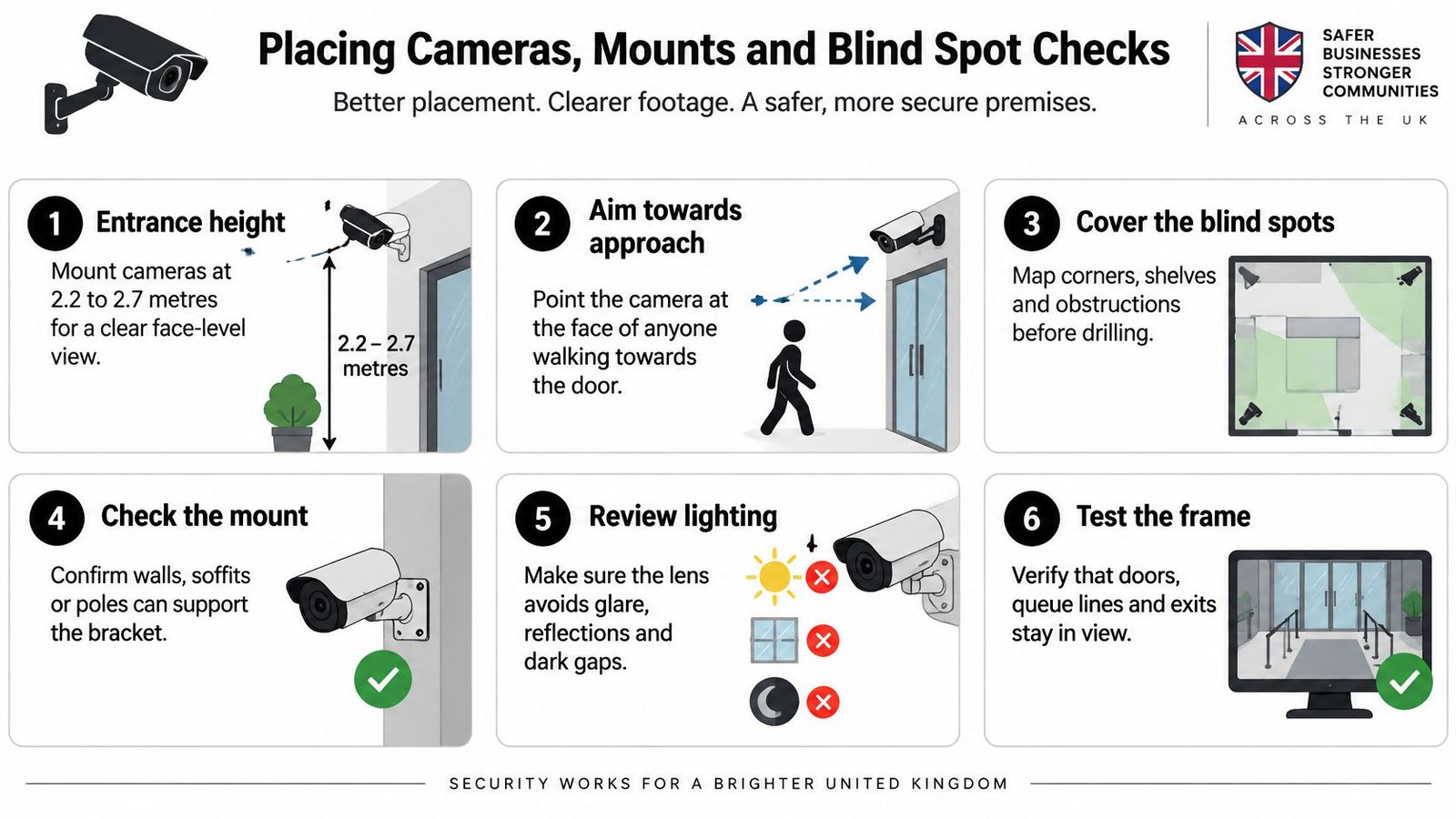
| Location | Mounting height | Aim and angle | Target quality |
|---|---|---|---|
| Main entrance | 2.2-2.7 m | Face-on, slightly down, covering the door | Identify, about 250 pixels per metre at the face |
| Till or counter | 2.2-2.5 m | Angled to see the customer face and the till | Identify at counter height |
| Yard or perimeter | 4-6 m | Angled down 20-30 degrees, long view | Recognise people, detect movement |
| Car park barrier | 1.2-2.0 m on post or wall near lane | Angled to read plates and see the driver | Plate-capture specification, confirmed with supplier |
| Loading bay | 3-4 m | Across the bay with the door opening in view | Recognise people and vehicles |
At the entrance, mount the camera 2.2 to 2.7 metres high and aim it at the face of each person walking towards the door. A high soffit angle records hats and the tops of heads, not reliable facial detail. Ensure at least one entrance camera captures every entrant with a clear, full-frontal, evenly lit face at identify quality. Set the frame rate high enough to follow movement through the doorway.
Avoid aiming into backlight from glass doors or low sun. Reposition the camera, change its angle or specify wide dynamic range, then check the image at sunset. Walk behind columns, under canopies, into recessed doorways and along side walls to expose blind spots. Overlap views at tills and exits so movement can be followed between cameras. If neighbouring windows or public pavement enter the frame, apply privacy masking and record which areas are masked.
Cabling, Power, Storage and Alarm Integration
Cabling and power decide whether the system still works in year three. Cameras rarely fail first. Cheap cable, overloaded switches, water in external joints and a recorder stuffed in a hot cupboard do.
Power Choices in Plain Terms
Use Power over Ethernet as your default. In a typical installation, one Cat6 cable carries power and data from a PoE switch, which simplifies installation and lets you reboot a camera remotely. Keep runs within the switch and cable limits your installer specifies, and use fibre or a proper extender for distant gates and outbuildings rather than daisy-chaining bargain repeaters.
Separate low-voltage power still suits some PTZ and high-power units, but long runs suffer voltage drop, especially when infrared switches on at night. A camera that works at noon and reboots at 9pm is often a power problem, not a faulty camera.
Battery and solar have a place at remote gates and temporary sites. Don't trust headline runtime. Infrared, heaters, poor mobile signal and frequent motion uploads drain batteries quickly, so demand a real overnight test in winter conditions before you rely on one.
Avoid wireless as a shortcut for permanent commercial cameras. Busy premises are full of competing networks, metal racking and machinery. Wireless also doesn't remove the need for power in most cases. If you're running a power cable anyway, run data properly.
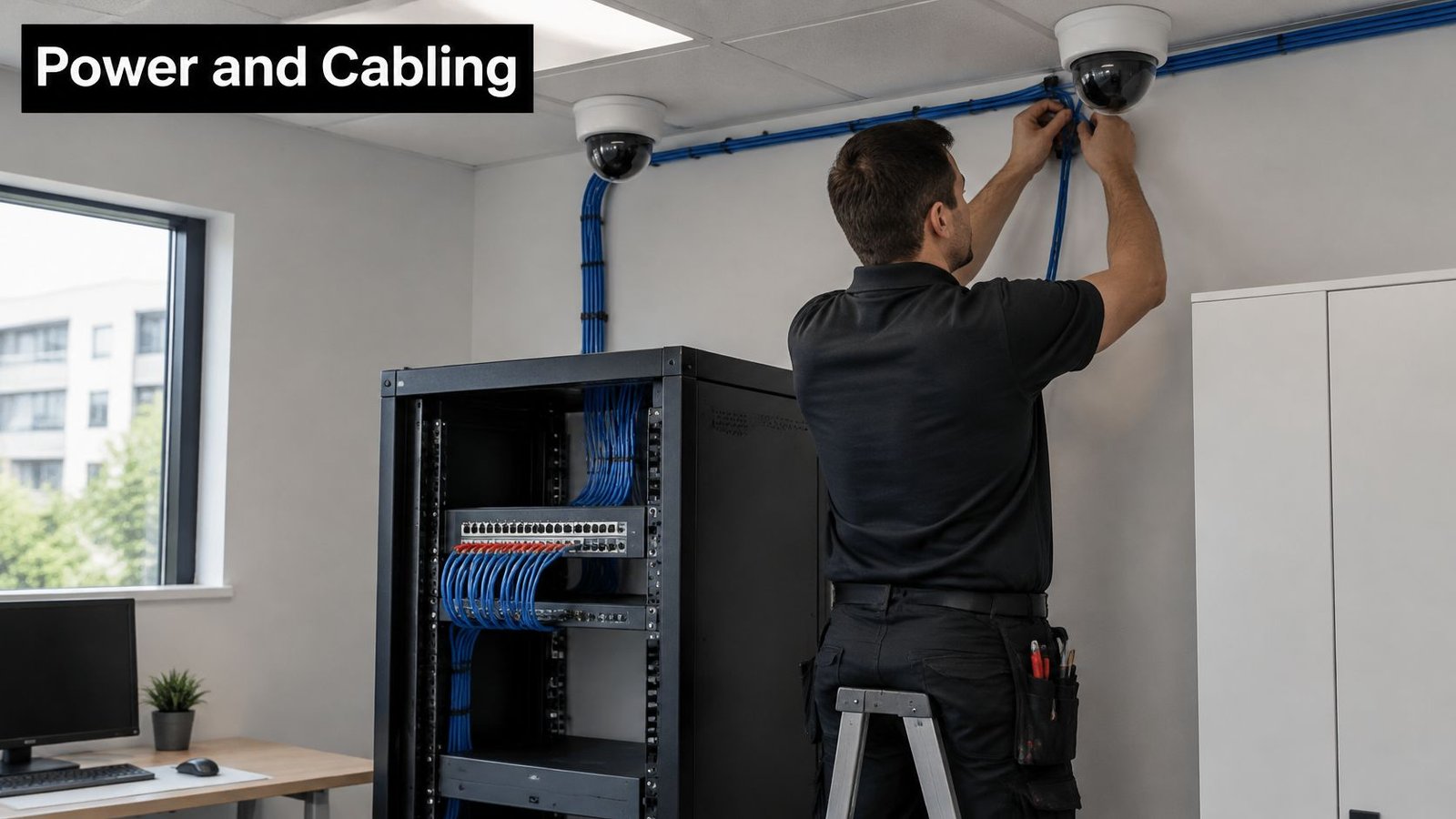
Protect external cable in conduit where it can be cut, struck by vehicles or reached from the ground. In yards and car parks, conduit usually pays for itself at the first avoided repair. Label both ends of every run and photograph routes before ceilings close.
The installation below is the standard you should expect for structured data cabling, not loose cable draped across ceiling tiles.
Local, Cloud or Hybrid Storage
A local network video recorder keeps footage on site and keeps recording if broadband fails. The obvious weakness is theft or fire destroying the evidence with the premises. Lock the recorder in a separate, ventilated cabinet or comms room, restrict physical access, and don't leave it under the till with the password on a sticky note.
If you're replacing older kit, understand the recorder choice first by checking the difference between NVR and DVR systems before an installer sells you around your existing coax.
Cloud storage removes the on-site recorder risk but depends on upload bandwidth and ongoing subscriptions. Several high-resolution streams can saturate a modest connection and compete with card payments, VoIP phones and back-office systems. Get the maths in writing, per camera, at your chosen settings.
Hybrid is often the pragmatic answer. Record continuously or on motion locally, then copy alarm clips and incident exports off site. You keep evidential quality without uploading empty car parks all night.
Storage rule: Never let an installer cut image quality just to make an undersized drive hit a retention promise. Buy the drive the specification needs.
Integration Points Installers Skip
Link intruder alarm zones to camera recording so an activation bookmarks footage and captures pre-event seconds. Send access control door events into the video timeline, so a fob entry, forced door or door held open can be reviewed without scrubbing hours of video.
Time-sync cameras, recorder, alarm and access control to the same source. A two-minute drift destroys an otherwise clean investigation. Put cameras on a separate network segment where practical, change every default password, disable unused remote access services, and keep firmware ownership named in the handover pack. Integration planned now costs a fraction of retrofitting it after ceilings and car parks are finished.
Testing, Commissioning and Ongoing Monitoring
Commissioning is not switching the monitor on and nodding. It's proving, camera by camera, that recorded footage answers the question each camera was bought to answer.
The Eight Commissioning Tests
- Walk-test in daylight and darkness: Stand and walk where subjects will be, including the far edge of each view.
- Play back at native resolution: Review on the recorder output, not a compressed thumbnail or phone preview.
- Compare recorded with live: Confirm detail, colour and frame rate haven't collapsed in recording settings.
- Export and reopen elsewhere: Save a clip, open it on a separate computer, and check faces, plates and timestamps survive.
- Trigger linked events: Open a controlled door or set off an alarm zone and confirm the event lands in the video timeline.
- Check every timestamp: Verify date, time and daylight saving settings across cameras, recorder and linked systems.
- Test remote access properly: Use mobile data away from site Wi-Fi, then test again on the office network with a non-admin account.
- Verify deletion: Confirm retention settings overwrite or delete at the justified period and don't stop recording when full.
Don't sign off until failed items are fixed and retested. A clear live image can hide excessive compression, low frame rate or a lens focused on the wall behind your subject. Playback is the evidence. Judge that.
Pick a Monitoring Model You Will Actually Staff
Self-monitoring suits low-risk premises during opening hours, provided named staff know how to review, export and escalate. It fails when alerts go to everyone and therefore to no one.
Remote video monitoring suits yards, warehouses and car parks out of hours, where an operator can challenge intruders by speaker, verify alarms and call keyholders. It only works if detection zones, lighting and audio challenges were designed in from the start.
A monitored alarm receiving centre response suits higher-risk sites where a verified intruder signal needs a formal response path. Be clear about what triggers a call, who attends, and what happens when broadband or power drops. Don't buy 24-hour monitoring for a problem that only occurs at the till at lunchtime.
| Task | Frequency | Owner |
|---|---|---|
| Clean lenses and domes | Quarterly, sooner near roads or yards | Site staff or installer |
| Playback and export test | Monthly | Business owner |
| Firmware and password review | Quarterly | Installer or IT |
| Retention and deletion check | Six-monthly | Data lead |
| Remote monitoring service | 24/7 once contracted | Monitoring provider |
Keep a dated maintenance log with who checked what, what failed and when it was fixed. Spiders, condensation, knocked mounts, new racking and changed lighting all degrade coverage. Your monthly export test will catch most of it before an incident does.
Costs and How to Confirm Your Installer Before You Sign
Get every quote split by cameras, cabling, storage, network kit, integration, commissioning and training. A single lump sum hides the undersized recorder and the missing conduit.
This is the conversation to have at your premises, with the site brief open, before any deposit changes hands.

| Scope | Typical estimate | Source and notes |
|---|---|---|
| Small property, basic setup | From £900 | Bark 2025 price guide, entry-level only |
| Small commercial, 4-6 cameras fitted with small NVR and one month local storage | £2,500-£4,500 | Atom IP 2025 cost guide |
| Large commercial installation | £1,500-£2,000 or more | Bark 2025 price guide, ranges vary widely by site |
| Multi-site or high-spec (PTZ, ANPR, alarm integration) | Priced per site from survey | Quote per site against a written specification |
For context, Atom IP's commercial CCTV cost guide estimated in 2025 that a small UK commercial CCTV installation with 4–6 cameras was £2,500–£4,500 fitted, including a small network video recorder and one month of local storage. Compare that scope with detailed UK CCTV installation costs and don't compare it with a basic kit price that excludes cabling, storage or commissioning.
Before signing, confirm public liability and professional indemnity insurance, DBS checks for engineers, SafeContractor or similar accreditation, manufacturer training, warranty terms, who prepares data protection paperwork, and who holds administrator credentials. Demand a written coverage plan and a commissioning test certificate. A competent installer will offer a free site survey and will sometimes tell you to improve lighting or move stock instead of adding a camera.
Watch the walkthrough below, then use it to challenge any quote that can't explain placement, storage and handover in the same plain terms.
If you're planning security cameras for business installation in South Wales or the South West, Wisenet Security Ltd can survey your premises free of charge, design a purpose-led CCTV system integrated with alarms and access control where needed, and commission it with the playback and export tests described above. Book that survey before you buy hardware, bring your one-page brief, and make us quote against your objectives, your retention decision and your site risks.