Door Entry Systems for Apartments: A Practical Guide
At 7pm, the block manager is still outside a 40-flat building, pressing a buzzer that has been damaged by rain. A courier is waiting in the dark, residents are calling about missed deliveries, and nobody knows whether the fault is the panel, the lock, the cabling, or the handset in one of the flats.
That's the point at which many landlords start searching for door entry systems for apartments. The mistake is choosing a panel by appearance or headline features alone. A replacement has to suit the building's wiring, resident profile, fire strategy, accessibility obligations, privacy responsibilities and long-term budget.
The modern system still follows the basic resident-to-visitor workflow established by early telephone intercoms. A widely cited history of apartment intercoms places the first telephone-based apartment intercom patent in 1894, with video capability added to door access systems in 1984. You can read the history of apartment intercom systems for the technical background. The hardware has changed, but the buying decision remains practical: who can enter, who can authorise entry, what gets recorded, and who maintains it?
Table of Contents
- What a Modern Apartment Entry System Has to Do
- The Four Main Types of Door Entry Systems
- Comparing Audio, Video and Mobile Entry for Blocks
- Compliance, Accessibility and Data Protection Essentials
- Integrating Entry Systems With CCTV, Alarms and Access Control
- Lifetime Cost and Ownership Questions Most Buyers Miss
- Choosing and Working With a Local UK Installer
What a Modern Apartment Entry System Has to Do
The failed panel outside that 40-flat block isn't just an inconvenience. It exposes the weaknesses of a system that was designed to make a phone ring, rather than manage a building.
A suitable replacement should let a visitor contact the correct resident, let that resident verify the visitor, and release the right door without residents handing fobs or keys to couriers and contractors. It should also give the managing agent a controlled way to administer residents, temporary permissions and access schedules without travelling to the site for every change.
Start with the building's daily problems
A block manager should test an entry system against real events, not a brochure demonstration:
- Deliveries: Residents need a controlled way to deal with couriers when they're away, without turning the entrance into an unrestricted doorway.
- Contractors: Maintenance teams may require access during defined working periods, not permanent credentials that remain active after the job ends.
- Temporary lets: Short-term occupants need usable access, but their permissions should be easy to withdraw.
- Multiple entrances: A main lobby, rear gate, bike store and separate risers may eventually need different access rules.
- Fault investigation: The agent should be able to establish whether a failed entry attempt came from a user, a credential, the lock or the network.
The system should record access events in a way that supports incident review. UK communal-building guidance says an access control system should record the user, location, type, time and date of every event, with storage for not less than 30 days. That requirement is discussed in UK guidance on door entry systems and safety.
Practical rule: Specify the access workflow first, then choose the hardware. A smart panel that cannot handle the block's entrances, fire interface or management process is still the wrong panel.
Don't overlook the physical installation
A good system can fail in use if the external station is badly positioned. In England, Approved Document M guidance requires external door entry controls to be mounted between 900 mm and 1000 mm above finished ground level, and at least 300 mm from an external return corner. Those dimensions are relevant to South Wales projects because Wales is largely aligned with England on these accessibility provisions. The guidance on Part M and door entry systems explains why panel location affects more than visual neatness.
Contrast, tactile identification, clear approach space and an induction loop should form part of the design conversation. So should the fire alarm interface. The controlled door must operate in line with the building's fire strategy, including the required release behaviour during an emergency.
A small external detail can also cause confusion during a refurbishment. If a simple push button needs replacing, a resource such as this brushed nickel doorbell replacement may help identify the type of finish or component required, but it isn't a substitute for specifying a complete communal door entry system.
The Four Main Types of Door Entry Systems
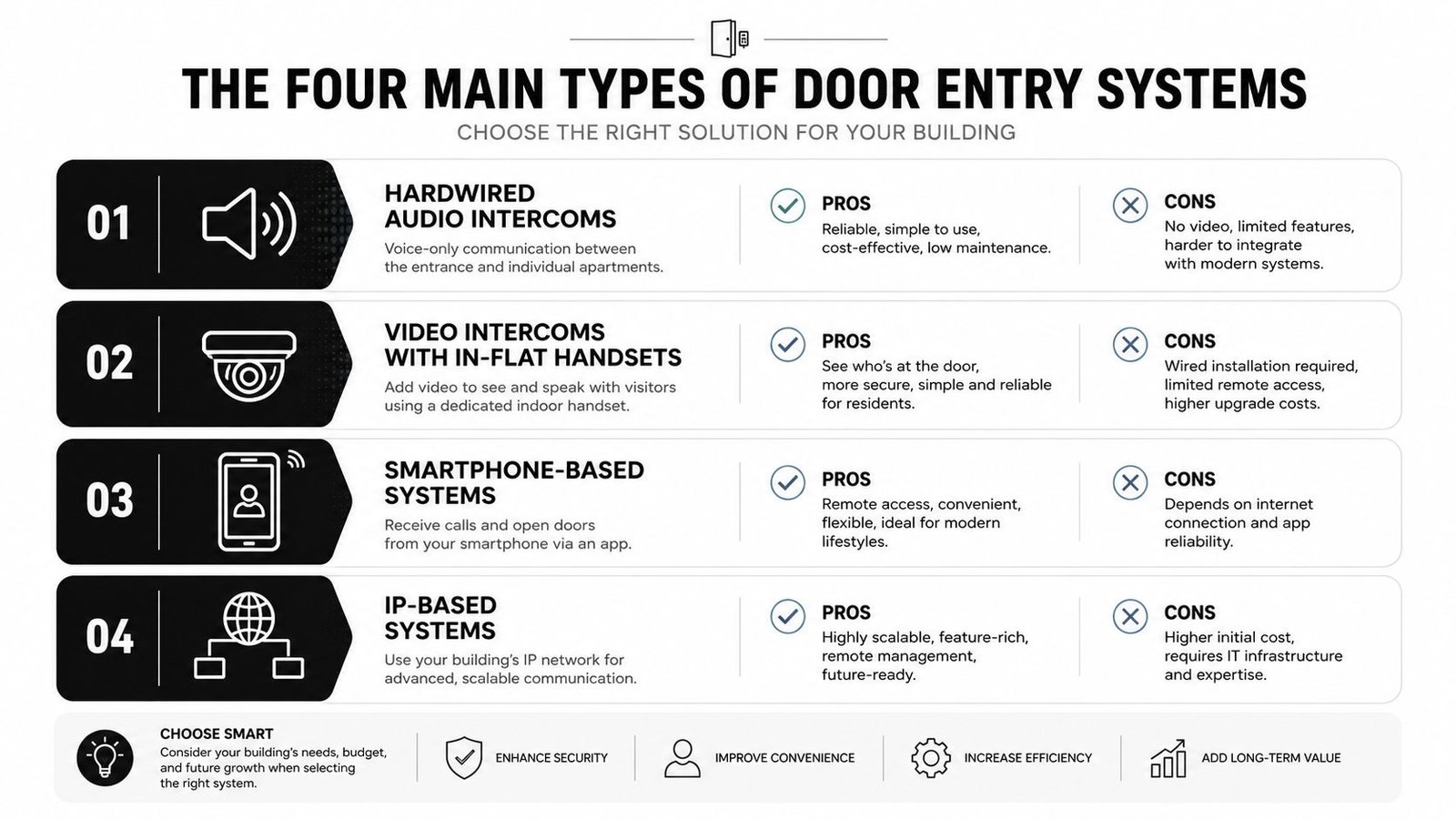
Most quotations for apartment blocks fall into four broad families. The labels vary between manufacturers, but the underlying choices are straightforward.
Hardwired audio intercoms
An audio system has an entrance panel and an in-flat handset or telephone. The visitor selects a resident, the handset rings, the resident speaks to the visitor, and a release button grants entry.
This remains the sensible option for a small converted house, a low-risk block or a budget-led replacement where existing cabling is serviceable. It's familiar and usually the least disruptive choice when the building already has compatible handsets and a straightforward single entrance.
Its weakness is identity verification. Residents hear a voice but can't see the person outside. That matters when residents are under pressure to admit delivery drivers, unknown visitors or someone claiming to be carrying out repairs.
Video intercoms
Video systems add a camera at the entrance and a screen or video handset inside each flat. Residents can make a visual check before releasing the lock, which is particularly useful in family-occupied blocks and entrances exposed to nuisance access attempts.
Video brings extra hardware, more demanding cabling and a clear privacy responsibility. The camera position must avoid capturing more of the public area than necessary, and the managing agent needs a defined process for access to recordings and event data.
Smartphone-based systems
A mobile system sends calls and access controls to a resident's smartphone. It can support remote release, temporary permissions and management from a web dashboard, making it attractive for build-to-rent schemes, short-let properties and blocks where running new cabling would cause extensive disruption.
Don't assume “mobile” means no legacy equipment. Some refurbishment designs still require handsets in flats during a transition period, or retain old cabling for part of the system. Confirm exactly what remains, what gets removed and whether every resident can use the proposed app.
Integrated access control
Integrated systems combine visitor communication with fobs, cards, PINs or other credentials. They suit larger blocks that need to manage several doors, gates, communal rooms, lift access and contractor time windows from one administration platform.
The system architecture matters more than the reader style. Ask how credentials are revoked, how logs are exported, how additional doors are added and whether the platform can connect to other security systems. For a wider overview of access control system types, focus on the credential and management model rather than the marketing name.
Comparing Audio, Video and Mobile Entry for Blocks
The cheapest installation isn't automatically the safest or the most economical over time. Audio, wired video and mobile entry solve different building problems, and the right choice depends heavily on existing infrastructure.
A UK installation guide reports that audio intercom systems can start from about £150 to £300 per flat installed, while a block-of-flats door entry system commonly costs between £800 and £3,500, depending on apartment count and complexity. The UK flats door entry system pricing guide makes clear why a basic single-door replacement and a multi-entrance project shouldn't be compared as if they were the same job.
| Factor | Audio Intercom | Wired Video Intercom | Mobile / Cloud Entry |
|---|---|---|---|
| Visitor verification | Voice only | Visual and voice verification | App-based communication, often with video capability |
| Retrofit disruption | Lowest where existing wiring works | Higher, particularly where new cabling and decoration are needed | Can reduce in-flat cabling, but depends on the selected architecture |
| Resident equipment | In-flat handset | In-flat video handset or screen | Smartphone, sometimes alongside legacy equipment |
| Management | Often local and less flexible | Usually robust, with system design determining remote administration | Strong remote administration, subject to connectivity and provider terms |
| Best fit | Small blocks and straightforward replacements | Buildings where visual confirmation is important | Build-to-rent, short-let and cabling-constrained buildings |
| Main trade-off | Lower identity assurance | Higher installation complexity | Ongoing service, app and privacy considerations |
Audio remains a deliberate budget choice
Choose audio when the existing riser cabling is reliable, the building has a modest security requirement and residents value simplicity over remote management. It's a poor choice if the entrance regularly handles unknown visitors and the block has repeated disputes about who was admitted.
Wired video protects the verification step
Video is the strongest choice when residents need to see the caller before releasing the door. In a concrete 1970s block, though, chasing walls, replacing riser cabling and repairing communal finishes can dominate the project. A proper survey should separate that work from the panel and handset price.
Mobile entry changes the management model
Mobile systems can make courier access and temporary permissions easier, but the convenience comes with an ongoing relationship with the platform provider. Ask whether software, app hosting, remote administration and support are included, charged separately or subject to renewal. The video intercom systems guide is useful when comparing visual verification with app-led access.
My recommendation is direct. Use audio for a simple, serviceable block where the budget is tight. Use wired video where visitor identity is the central concern and the cabling can be renewed properly. Use mobile entry when remote management is a genuine operational need, not because “smart” sounds modern.
Compliance, Accessibility and Data Protection Essentials
An entry panel can work perfectly and still leave the building exposed to a compliance problem. The physical position, emergency release, event logging and personal-data arrangements all need to be specified before installation.
Accessibility starts at the site survey
Approved Document M requires external door entry controls to sit between 900 mm and 1000 mm above finished ground level and at least 300 mm from an external return corner. These measurements should appear on the installer's drawing, not remain as an informal promise made during a quotation visit.
The approach must give a wheelchair user enough space to stop, reach the controls and move through the doorway. Button legends, contrast, audible feedback and induction-loop provision should be considered alongside the mounting height. A neat panel placed where a resident can't comfortably approach it isn't an accessible installation.
Safety and auditability need named owners
The entry system should be coordinated with the fire alarm and door hardware. The release arrangement must follow the building's fire design so residents aren't trapped behind a locked entrance during evacuation.
Access logs also need a management purpose. UK guidance for multi-occupancy buildings says a system should record the user, location, event type, time and date, retaining records for at least 30 days. That information can help reconstruct an incident, review repeated failed attempts and distinguish a credential problem from a mechanical fault.
Cameras and apps create a privacy project
A video intercom or mobile platform processes personal data. UK landlord guidance explains that the Data Protection Act 2018 and UK GDPR apply to security systems in rental property, and that written consent may be needed for cameras in shared areas. The UK landlord guidance on security systems and data protection also highlights the need to restrict recordings to legitimate purposes and secure access.
The block owner, freeholder, landlord or managing agent must establish who controls the footage and logs, why the system processes them, who can view them, how residents are informed and when information is deleted. Don't copy a generic CCTV policy and assume it covers app access, visitor calls and door-event histories.
| Area | Key Requirement | Who It Applies To | Practical Action |
|---|---|---|---|
| Panel position | Follow Approved Document M dimensions | Landlords, freeholders, designers and installers | Show height, corner clearance and approach space on the survey drawing |
| Usability | Provide clear controls and suitable communication aids | All communal residential schemes | Test buttons, visibility, audio and induction-loop performance |
| Fire safety | Coordinate release behaviour with the fire strategy | The responsible person and fire-system contractor | Document the interface and test it during commissioning |
| Event records | Record the relevant access details and retain them appropriately | System owner and managing agent | Define permissions, export procedures and retention |
| Video and app data | Establish a lawful purpose, secure access and resident information | Data controller and processors | Prepare notices, controls and a privacy impact assessment where needed |
The rules aren't an administrative afterthought. They determine where the panel goes, how the door behaves during an alarm and who is accountable for the information the system creates.
Integrating Entry Systems With CCTV, Alarms and Access Control
A standalone intercom controls one conversation at one doorway. An integrated system gives the managing agent a connected account of what happened across the building.
Match events across systems
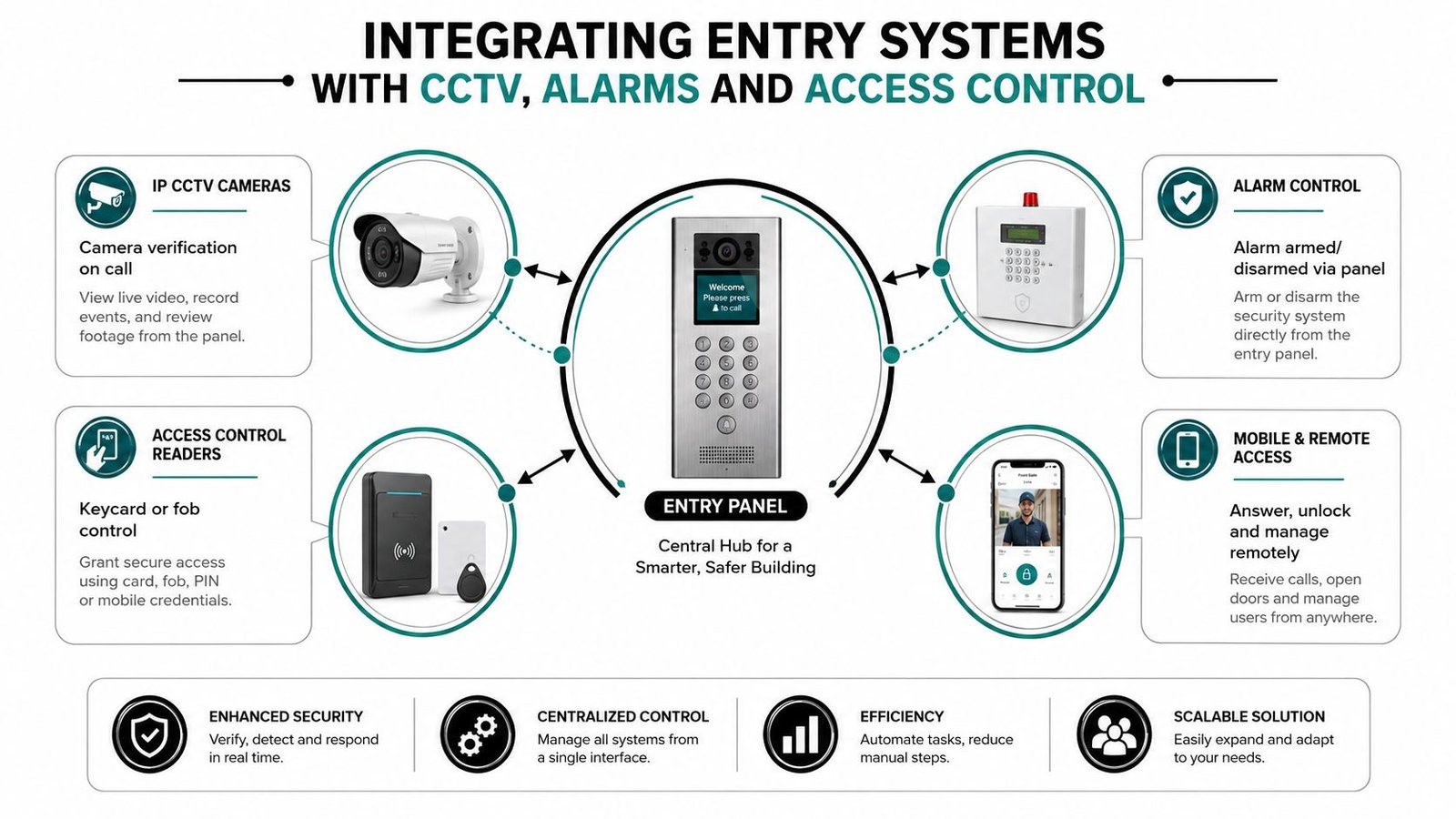
Connect the entry panel to IP CCTV so the call, door release and nearby camera footage can be reviewed together. Time synchronisation matters. If the panel reports a release at one time and the lobby camera displays another, incident review becomes needlessly difficult.
Fob or card access can also connect with alarm workflows. A credential presented at an authorised entrance might disarm a defined area, while a forced door or tamper event can generate an alert for the responsible team. These rules need careful design, because a convenience feature should never create an unintended route through the building.
Design around the fire system
Door holders, magnetic locks and electric releases must respond to the fire alarm arrangement specified for the block. The entry contractor should coordinate with the fire alarm contractor, test the interface and record the result at handover.
The same principle applies to gates, barriers and lifts. A residential site may need controlled access at a vehicle gate, a pedestrian gate, a bike store and selected floors. A high-rise scheme may also need the access platform to communicate with lift controls so a resident or visitor reaches the permitted destination rather than gaining unrestricted movement.
Demand an open architecture
Ask the installer which interfaces the proposed equipment supports. SIP can help intercoms communicate over suitable voice networks, Wiegand or OSDP can connect readers and controllers, and ONVIF can support interoperability between compatible IP video devices. The exact implementation still needs checking, but open standards generally give a managing agent more options when suppliers or contractors change.
A proprietary platform may work well while the original installer supports it. It becomes a liability if nobody else can administer the system, replace a failed controller or export the records.
Installer's view: Integration isn't about putting every device on one glossy dashboard. It's about ensuring the entrance, cameras, alarms, fire controls and credentials tell the same operational story.
Plan the network properly. Shared PoE switches, structured cabling to a secure communications room, protected power and sensible separation of security traffic all affect reliability. The management team should also receive one usable dashboard or clearly documented workflow, rather than five unrelated logins.
For the wider principles behind connecting security technologies, see this guide to security system integration.
A short visual explanation can help residents and committee members understand the relationship between the separate systems:
Lifetime Cost and Ownership Questions Most Buyers Miss
The installation quote is only the opening cost. A block can pay for the panel, cabling and handsets, then discover that the dispute concerns software renewals, failed equipment, cloud administration and the cost of adding another entrance.
A UK market source reports the access control market at USD 470 million in 2025, with a projection of USD 702.89 million by 2031. The UK access control market outlook suggests that more property owners will face upgrade decisions, but a growing market doesn't tell a leaseholder who pays the next invoice.
Price the complete system
Ask the installer to separate:
- Resident equipment: Handsets, video screens, readers and replacement parts.
- Communal hardware: Entrance panels, controllers, power supplies, locks and exit devices.
- Infrastructure: Riser cabling, network equipment, containment, access equipment and making good.
- Software and services: Cloud administration, app hosting, licences, remote support and updates.
- Maintenance: Planned inspections, emergency call-outs, door-release adjustment and replacement of worn mechanisms.
- Future changes: Additional doors, risers, gates, lift interfaces and capacity upgrades.
The earlier UK guide gives audio installation examples from about £150 to £300 per flat, and block system examples between £800 and £3,500, depending on size and complexity. Treat those figures as starting points for scope discussions, not a complete ownership forecast.
Put ownership in writing
A leasehold block needs clear answers before the order is placed. If a handset fails inside a flat, does the resident, freeholder or service charge pay? If the managing agent changes, who owns the administrator account? If the cloud provider changes its pricing or stops supporting the panel, what happens to the access permissions and event history?
Capacity is another common trap. A controller suitable for a small block may not support later entrances, gates or shared facilities. The installer should state the current capacity, expansion method and any hardware that would need replacing.
| System Type | Per-Flat Install | Annual Subscription | Typical Maintenance | 10-Year Per-Flat Total |
|---|---|---|---|---|
| Audio | Obtain a project-specific quote, using the UK guide's starting range as an initial benchmark | Confirm whether any service applies | Handset, cabling, panel and lock repairs | Require a written calculation |
| Wired video | Obtain a survey-based quote that includes cabling and making good | Confirm whether the selected system has a subscription | Screen, camera, panel, lock and cabling maintenance | Require a written calculation |
| Mobile or cloud | Include entrance hardware, network work and resident onboarding | Confirm per-flat, platform and app charges | Panel, lock, network and service support | Require a written calculation |
Don't accept a ten-year total filled with assumptions. Demand a written projection showing installation, service, support, replacements and expansion scenarios.
Choosing and Working With a Local UK Installer
Three or four quotations give you a market comparison. They don't tell you which contractor will still answer the phone when a communal door fails on a wet Sunday morning.
Start with the installer, not the product catalogue. Ask for evidence of relevant commercial approval, electrical or cabling competence, manufacturer training and experience in occupied residential buildings. For projects involving fire interfaces, gates or multiple security systems, the contractor must also explain how responsibilities are divided between trades.
Test the contractor's evidence
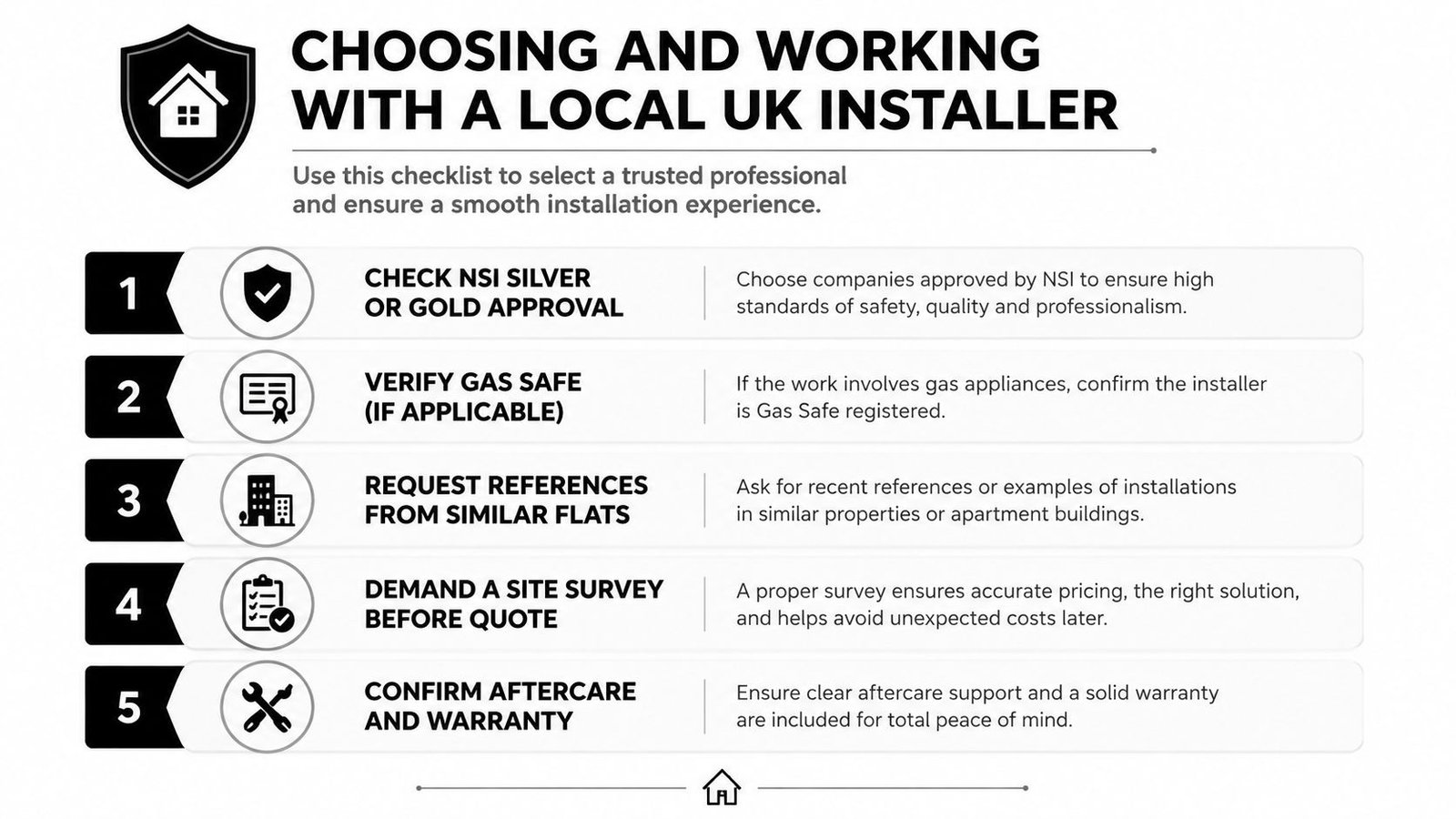
Use this checklist during the tender:
- Request relevant approval: Ask whether the company holds NSI Silver or Gold approval where that level is appropriate to the work, and check any claimed accreditation directly.
- Check the engineers: Confirm DBS checks, site-safety procedures and the team's experience working around residents, children and vulnerable occupants.
- Inspect a comparable installation: Visit a live block with similar entrance numbers, cabling constraints and resident expectations. A small retrofit in Pontypridd doesn't prove that a contractor can manage a large tower in Bristol.
- Demand a proper survey: The quote should follow an inspection of risers, door hardware, power, network routes, fire interfaces, panel position and communal finishes.
- Review aftercare: Get response times, warranty terms, remote diagnostics, planned maintenance, training and account handover in writing.
Make every quote comparable
The quotation should separate panel hardware, in-flat devices, readers, controllers, locks, cable, containment, commissioning, testing, software and ongoing support. If one bidder combines everything into a single low figure, you won't know whether the saving comes from a genuine design difference or an omitted cost.
Ask how the contractor will manage resident appointments, protect decorations, label cables and hand over system documentation. You should receive administrator credentials, drawings, test records, user instructions and a clear process for adding or removing residents.
A local locksmith may be useful for a lock, cylinder or emergency access issue, but apartment entry projects need more than a replacement mechanism. If you're comparing regional services for a separate lock-related requirement, this resource to find Cambridge locksmith services illustrates the distinction between locksmith work and a coordinated electronic access project.
Before signing: Ask one question that exposes weak bids. “Show me exactly what I'll pay when the first software renewal, failed lock and additional entrance arrives.”
For landlords and managing agents in South Wales or the South West, Wisenet Security Ltd designs, installs and maintains audio and video intercoms, access control, CCTV, alarms, fire systems and gate automation for residential properties. Visit Wisenet Security Ltd to arrange a consultation focused on your block's entrances, accessibility layout, privacy duties and lifetime ownership cost.