Business Security Camera Systems: 2026 UK Guide
You lock up after closing, check the shutters, set the alarm, and drive home. Then the questions start. Did the delivery door fully close? Did a member of staff leave the side entrance unsecured? If there's a slip, a theft, or an after-hours break-in, will you have footage that clearly shows what happened, or just blurry shapes and guesswork?
That's where most UK business owners are now. They don't need another generic article telling them cameras “improve security”. They need straight answers on what to buy, where to put it, what features matter, what GDPR will and won't allow, and whether professional installation is worth the money.
The answer is yes. In a country with approximately 21 million CCTV surveillance cameras in operation and people estimated to be captured on CCTV up to 70 times per day, CCTV isn't unusual any more. It's part of the baseline expectation for accountability, safety, and evidence in British business life, as noted in Pelco's review of CCTV use in the UK.
Table of Contents
- Securing Your Business Beyond Locks and Keys
- Decoding Your System Types and Camera Options
- Must-Have Features for Effective Business Surveillance
- Designing a System Plan for Complete Coverage
- Navigating UK Compliance and System Integration
- Calculating Costs and Return on Investment
- How to Choose the Right Local Security Installer
Securing Your Business Beyond Locks and Keys
A shop owner worries about till theft and false injury claims. A warehouse manager worries about loading bays, stock shrinkage, and whether night staff are following procedure. An office manager worries about unauthorised access, staff safety, and who entered the building after hours. Different premises, same problem. A lock only protects the door. It doesn't tell you what happened before or after.
That's why modern business security camera systems sit in the middle of risk management, not just perimeter security. They help you investigate incidents, settle disputes, verify alarm events, and give managers a clear record when memory, hearsay, and assumptions aren't enough.
Good CCTV doesn't just catch criminals. It answers awkward questions quickly.
There's also a reality many owners underestimate. Customers, insurers, staff, and regulators now assume businesses have some level of surveillance, especially around entrances, tills, stock rooms, car parks, and shared access points. If your system is old, badly placed, or impossible to retrieve footage from, you still carry the cost but miss the benefit.
A proper system changes that. It gives you visibility where losses occur, evidence when stories conflict, and a record that helps you act with confidence rather than instinct.
What business owners usually get wrong
- They buy for price first: Cheap cameras often give poor low-light footage, awkward apps, and unreliable playback.
- They copy domestic setups: A small plug-and-play kit might suit a front door at home. It won't cover a yard, warehouse aisle, or multi-entry commercial unit properly.
- They treat CCTV as separate from alarms and access control: That creates blind spots and slower response when something goes wrong.
The right approach is practical. Start with risk, then layout, then evidence quality, then compliance. That order saves money and avoids regret.
Decoding Your System Types and Camera Options
System choice sets the ceiling on what your CCTV can do. Pick the wrong platform and you end up with grainy footage, awkward exports for the police, and a system that does not play nicely with your intruder alarm, access control, or remote management.
Start with the system architecture
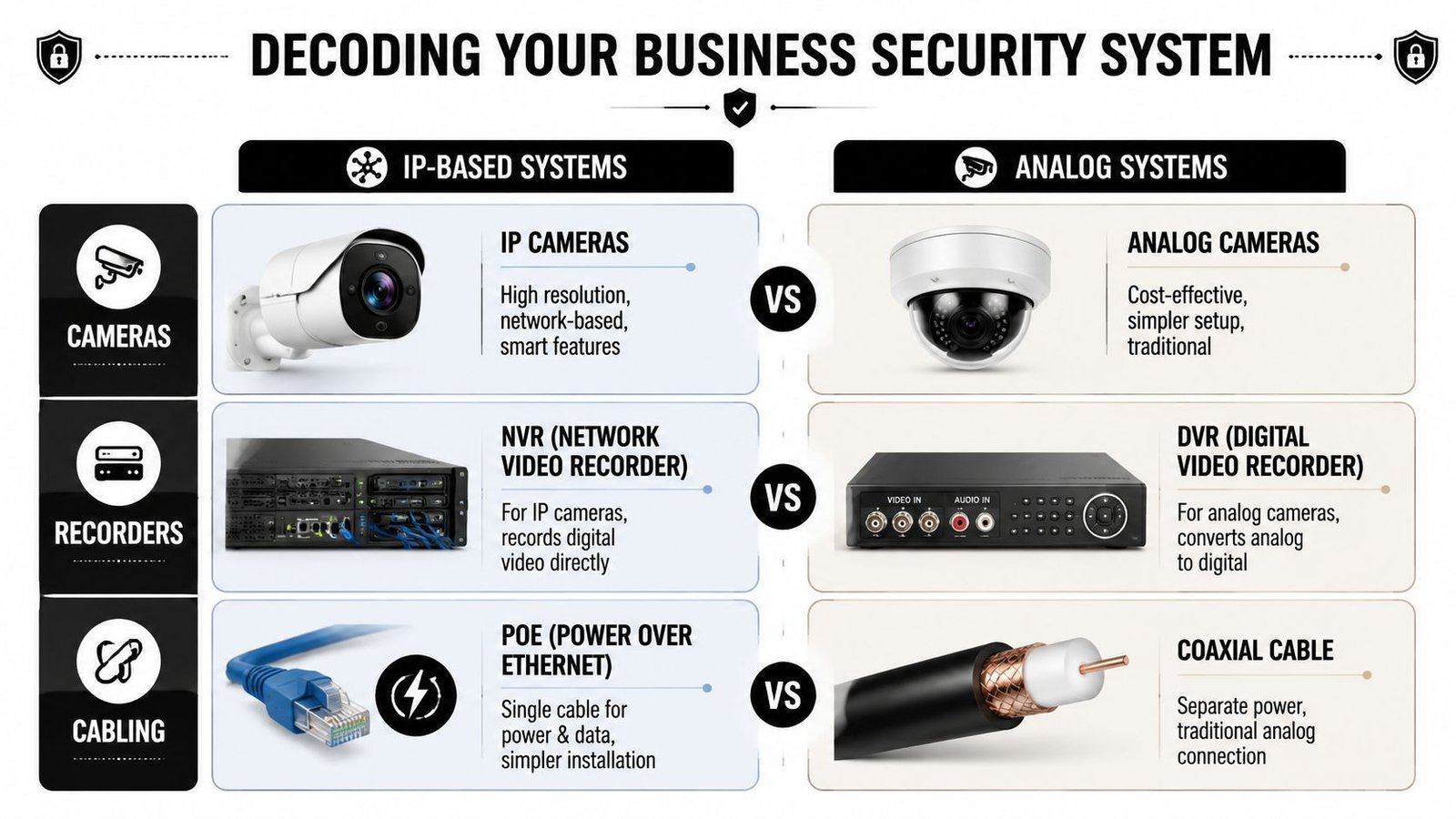
For nearly every new commercial install, I recommend IP cameras paired with an NVR. That combination gives you sharper footage, easier expansion, better user permissions, and cleaner integration with alarms and door access systems. It also makes GDPR administration more manageable because you can control who sees what, limit exports, and keep audit trails tighter than you typically can with older analogue setups.
Analogue HD still has a place. It suits some upgrade jobs where the existing coax cabling is in good condition and the budget is tight. But if you are fitting out a new office, warehouse, shop, nursery, pub, or multi-unit site, start with IP and avoid boxing yourself into old infrastructure.
If you want a plain-English comparison, this guide on the difference between IP cameras and HD analog CCTV covers the key technical split. The practical answer is simpler. IP gives you more control and more room to grow.
For most businesses, the core setup looks like this:
- IP cameras: Better detail, better remote access, and more useful analytics
- NVR: Central recording with simpler search, export, and user management
- PoE network cabling: One cable for power and data, which keeps installs tidier and fault-finding quicker
Cloud-managed systems also deserve a look if you run several sites and want central oversight without relying on someone at each branch to check recordings properly. Resources on Meraki security cameras are useful if you are comparing options for remote viewing, multi-site management, and IT-led administration.
Choose camera types by evidence requirement
Camera style is not about appearance. It is about whether the footage answers the question you will have after an incident.
| Camera Type | Best For | Key Advantage |
|---|---|---|
| Turret | Entrances, yards, loading bays, external walls | Strong low-light image quality and clear viewing angle |
| Bullet | Perimeters, car parks, long approaches | Visible deterrent and good coverage over distance |
| Dome | Retail floors, offices, receptions | More discreet and harder to tamper with indoors |
| PTZ | Warehouses, large yards, expansive car parks | Operator control over wide areas and zoomed follow-up views |
What I'd recommend in real business settings
Turret cameras are the safest default for many UK businesses. They cope well with low light, usually avoid the glare and misting issues that can affect domes, and give consistently useful footage over doors, gates, and service areas. Around industrial units in South Wales or trade premises around Bristol, they are often the best value-per-camera choice.
Bullet cameras earn their place where deterrent matters as much as evidence. Put them on rear lanes, car parks, fencing lines, and yard approaches. People notice them, and that changes behaviour.
Dome cameras work best indoors. They suit customer-facing spaces where you want coverage without making the room feel like a custody suite. Receptions, salons, hospitality venues, and retail aisles are typical examples.
PTZ cameras are often oversold. They are useful for active monitoring on larger sites, but they should support fixed cameras, not replace them. A PTZ can only look one way at a time. If a side door, till point, smoking area, or stock cage matters, fit a fixed camera there and leave the PTZ to track wider movement.
Rule of thumb: fixed cameras secure the evidence. PTZ cameras help staff watch a larger area.
The best systems are built around incidents you already know happen. Staff theft near the stock room. Disputes at the front counter. Fly-tipping by the bins. Vehicle damage in the car park. Choose the camera type that captures those events clearly, exports footage quickly, and fits into the rest of your security setup without creating extra admin.
Must-Have Features for Effective Business Surveillance
Monday morning. A member of staff says stock went missing on Friday night, a delivery driver disputes damage to the shutter, and your alarm app shows three overnight activations no one trusts because it cries wolf every time headlights hit the yard. The right camera system settles those arguments fast. The wrong one gives you blurred footage, pointless alerts, and extra admin.
Resolution decides whether footage holds up
Resolution should be chosen by task, not by marketing label.
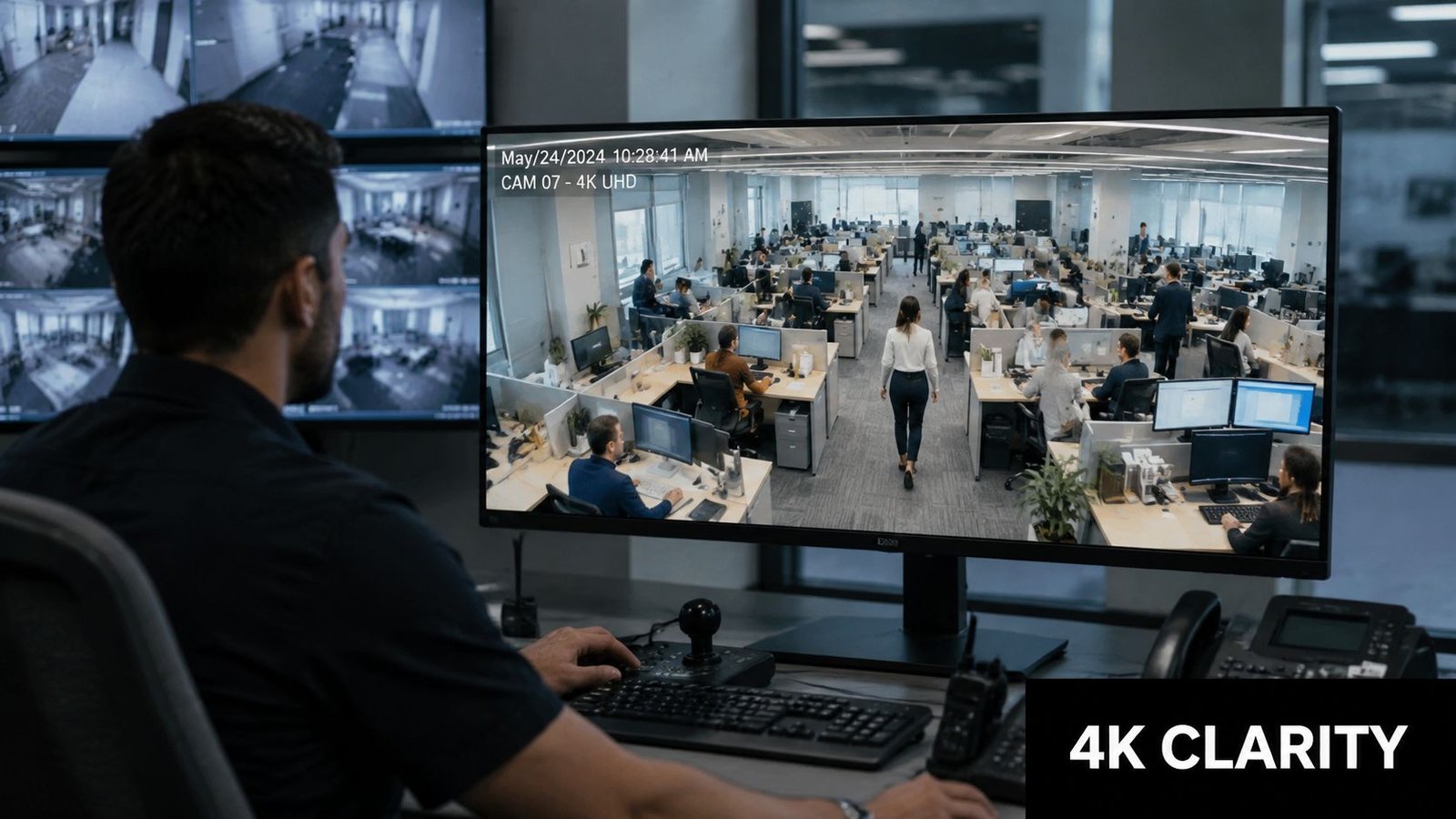
If you need to identify faces at a doorway, confirm a handover at a trade counter, or prove who entered a staff-only area, 1080p is the floor, not the target. Use 4K where one camera must cover a wider scene without losing usable detail during playback and zoom. That is often the better choice for reception areas, loading bays, and car parks where replacing one weak wide shot with several extra cameras would cost more in hardware, labour, and storage planning.
Poor image quality creates a compliance problem as well as a security one. If you retain footage for an incident review, GDPR expects your system to serve a clear purpose. Keeping hours of unusable video helps no one.
Ask a simple question before you buy. Will this camera show a face, an action, or just movement?
Typical evidence checks include:
- Did the driver hit the shutter, or was the damage already there?
- Did someone enter the stock room, or only pass the door?
- Was an item concealed, carried out, or returned properly?
- Did a staff member open the till, or only stand near it?
For a useful side-by-side explanation of newer digital systems versus older formats, this breakdown of IP cameras and HD analogue CCTV is a solid reference.
Analytics must cut false alarms and speed up response
Analytics are only worth paying for if they reduce wasted time.
Good systems filter out the rubbish. Bad systems notify you about rain, shadows, branches, and every passing car. For a business owner or keyholder, that gets old very quickly. Once staff stop trusting alerts, the system loses value.
The features that usually justify their cost are straightforward:
- Human and vehicle detection to avoid generic motion triggers
- Line crossing alerts for rear access, service corridors, and gates
- Intrusion zones around yards, compounds, and bin stores
- Mobile notifications tied to real events, not constant background movement
Facial recognition sits in a different category. It carries serious privacy implications and needs a clear lawful basis, a defined purpose, and proper documentation before you even consider it. For most SMEs, it is unnecessary and creates more compliance work than benefit.
A better target is simple. Fit analytics that help a manager respond to a real event, export footage quickly, and link the CCTV with the intruder alarm so one verified trigger gets attention. GM GROUP Services' security system review gives a useful outside view of how surveillance features fit into wider security operations.
Here's a quick product walkthrough that shows how these features look in use:
Night performance is where cheap systems get exposed
Many incidents happen after hours. That is also when weaker cameras fall apart.
Daytime demo footage proves very little. What matters is whether the camera can cope with low light, mixed lighting, reflective wet ground, security lamps, and vehicle headlights without turning people into bright outlines and number plates into white blur.
For external doors, yards, side passages, and loading areas, prioritise:
- Infrared night vision with usable range for the space you are covering
- Strong low-light sensors that preserve detail instead of smearing it
- Wide dynamic range where entrances face bright lights or daylight spill
- Correct placement and angle so the lens is not pointed into lamps or traffic
A professional installer earns their fee for good reason. On paper, two cameras can have similar specifications. On site, one is positioned to catch faces and vehicle movements cleanly, while the other records glare and guesswork. That difference shows up in incident reviews, insurance disputes, and how often your team can act on an alert without wasting time.
Buy features that solve operational problems. Clear footage protects evidence. Sensible analytics cut noise. Strong night performance covers the hours when your premises are most exposed.
Designing a System Plan for Complete Coverage
Most coverage problems start on paper, not on the wall. If your plan is weak, adding more cameras won't rescue it. You'll just spend more money recording the wrong areas from the wrong angles.
Map risk before you map cameras
Walk your premises in the order an intruder, customer, delivery driver, and member of staff would move through it. Those paths are your design map.
Start with these points:
- Entry and exit doors. Front entrance, rear service door, side access, roller shutters.
- High-value zones. Tills, stock rooms, server cupboards, tool stores, bonded goods, medicine cabinets.
- Decision points. Corridors, stairwells, reception desks, internal doors, gates.
- External exposure. Car parks, loading bays, bins areas, fence lines, blind corners.
Then ask one blunt question at each location. If something happens here, do I need to identify a person, verify an action, or monitor activity?
That answer determines the lens position, height, and resolution requirement.
If a camera sees movement but can't show who did what, coverage exists on paper only.
Placement mistakes that keep appearing
Poor installations repeat the same faults:
- Cameras mounted too high: You get heads and shoulders, not faces.
- Strong backlighting: Entrances turn people into silhouettes.
- Wide shots everywhere: Great for “general awareness”, terrible for evidence.
- One camera trying to do three jobs: Overview, identification, and deterrence are often different positions.
A proper plan uses a mix. One camera gives context. Another gives identification. That's how professionals design systems for shops, offices, schools, trade counters, and industrial units.
If you want another outside perspective on how businesses review surveillance layouts and common planning errors, GM GROUP Services' security system review is a useful comparison read.
Storage and resilience matter more than most buyers think
Once the cameras are sorted, think about what happens to the footage. You need storage that matches your actual operational needs and retention policy, not a rough guess.
A sound design decision usually includes:
- An on-site NVR for fast, reliable recording
- Cloud backup where footage resilience matters, especially if theft, fire, or deliberate damage is a concern
- PoE switching to simplify power and data runs
- Secure remote access for authorised managers
The retention period has to match your policy and lawful purpose. In practice, that means deciding how long footage is needed, then setting the recorder accordingly instead of letting it run on a default setting no one reviews.
A sensible layout for a typical SME
A small warehouse or trade unit might use:
- One fixed camera on the main entrance
- One on the roller shutter or loading bay
- One covering the yard or parking area
- One inside covering stock movement
- One at the office or till area
- One at any secondary access point
That's not about camera count for its own sake. It's about eliminating obvious blind spots while making sure each camera has a clear purpose.
Navigating UK Compliance and System Integration
This is the part many businesses get dangerously wrong. They buy decent hardware, then undermine the whole investment by handling data carelessly, recording too much, or failing to justify why the system exists in the first place.
GDPR mistakes usually start with convenience
Under UK rules, CCTV isn't just a security purchase. It's a data protection issue. If your system captures identifiable people, your business needs to treat that footage properly.
That means thinking about:
- Lawful basis
- A documented purpose
- Who can access footage
- How long it's retained
- Signage at monitored entrances
- A Data Protection Impact Assessment where required
Audio is where many firms drift into risk without realising it. The ICO guidance is clear that audio recording is considered high-risk and needs a separate, documented justification beyond standard CCTV signage, and deploying it without a specific DPIA and lawful basis can expose a business to fines of up to £17.5 million, as set out in the ICO's video surveillance guidance.
That's why I tell clients not to switch on audio just because the camera offers it.
Audio recording is not a harmless extra. In many business settings, it's the fastest route to avoidable compliance trouble.
If you need a plain-English overview of the practical side, this guide on CCTV and GDPR in the UK for businesses is worth keeping handy.
What compliant setup actually looks like
A compliant business setup usually includes these basics:
- Clear signage: People should know surveillance is taking place.
- Restricted access: Not every manager or staff member should be able to browse footage.
- Defined retention: Keep footage for a justified period, then overwrite or delete it.
- Documented review process: Know who handles requests, incidents, and exports.
- Secure storage: Protect footage from casual access or tampering.
This is also why DIY systems can become expensive. They make recording easy, but governance is often poor. Shared passwords, open-ended retention, unmanaged app access, and accidental audio capture are common problems.
Integration is what turns cameras into a working security system
A standalone camera system is better than nothing. An integrated one is what most businesses need.
The strongest commercial setups connect CCTV with:
- Intruder alarms
- Access control
- Intercoms
- Remote notifications
That creates useful cause and effect. A forced door can trigger recording priority. An alarm event can pull up the relevant camera. An access control exception can be checked against footage immediately.
Professional business CCTV also needs to integrate correctly with intruder systems to BS EN 50131 standards, which is one reason local specialist design matters more than many buyers expect.
Compliance isn't paperwork for the sake of it. It protects your business, preserves the usefulness of your evidence, and stops a sensible security investment becoming a legal headache.
Calculating Costs and Return on Investment
A Bristol retailer loses stock after a weekend break-in. The cameras captured a blurred figure, the recorder had overwritten key footage, and nobody on site knew how to export the clip for the insurer. That is what a cheap system costs you. The invoice looked small. The failure was expensive.
What you're paying for
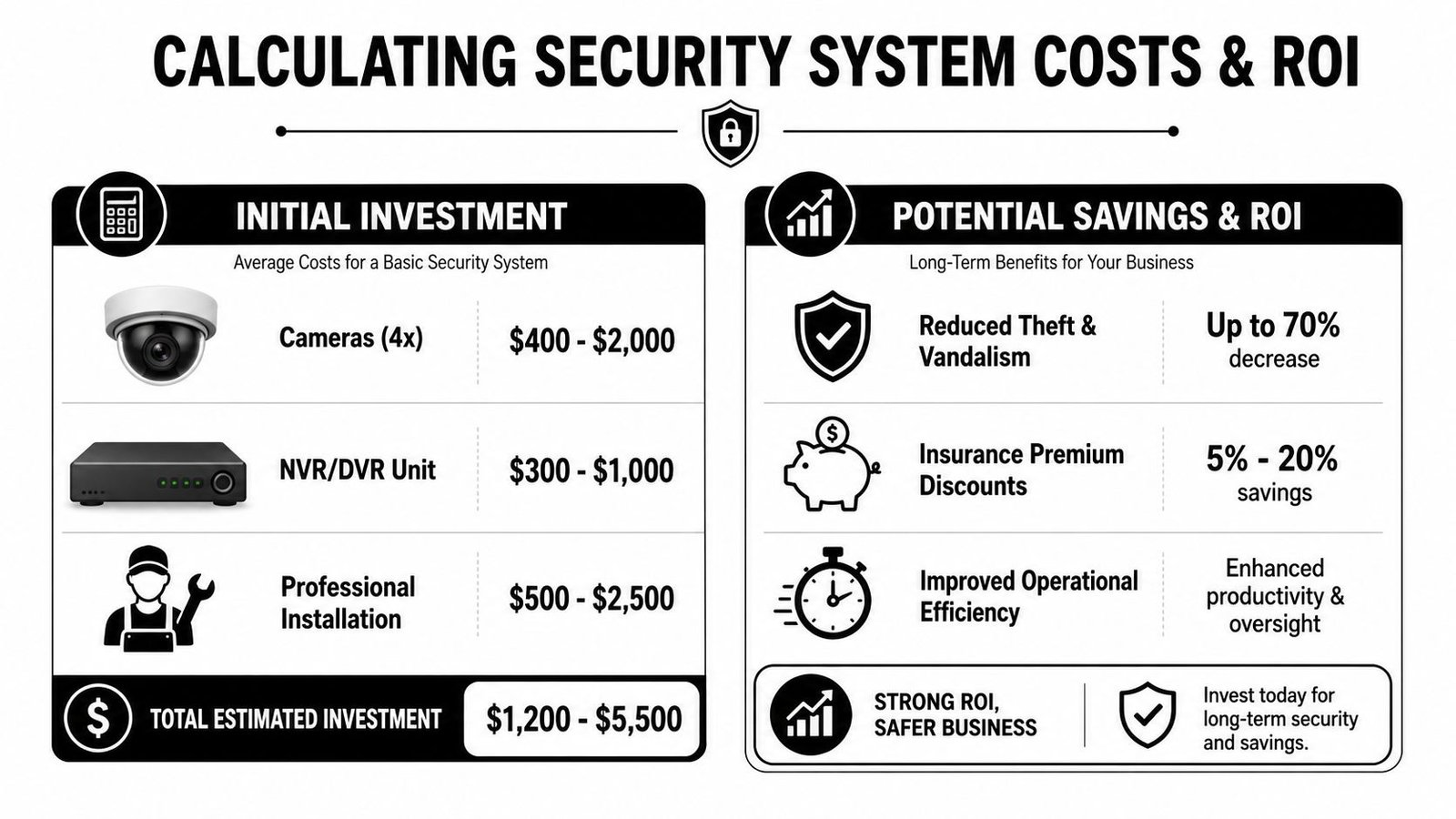
Business CCTV pricing varies widely because you are not buying cameras alone. You are paying for system design, placement, coverage standards, recording reliability, storage, setup, user access, staff handover, and support when something goes wrong. Those are the parts that decide whether footage helps you or lets you down.
Cheap kits suit low-risk sites with simple needs. Most trading premises need more than that. If your business handles cash, stock, customer incidents, staff safety concerns, or out-of-hours access, pay for a system that records properly, integrates cleanly with the rest of your security, and can stand up to scrutiny after an incident.
The main cost drivers are:
- Camera count and resolution
- Recorder and storage requirements
- Cabling routes and installation difficulty
- Access equipment for high-level fixing
- Integration with alarms, access control, or intercoms
- Commissioning, training, maintenance, and call-out support
If you want a realistic planning baseline, this guide to business CCTV installation costs is a useful place to start.
Where the return shows up
Return on investment comes from fewer losses, faster decisions, and less wasted management time.
The obvious savings are theft reduction, better evidence, and stronger insurance support. The less obvious savings matter just as much. Managers spend less time chasing conflicting accounts. Alarm activations are checked quickly. Staff incidents are reviewed with facts instead of opinion. One resolved dispute can justify a large part of the install cost.
Good systems also protect margin in ways owners often miss:
- They cut internal loss by making stock handling, cash points, and goods-in areas easier to review.
- They reduce false call-outs when alarm events can be checked against live or recorded video.
- They shorten investigations after accidents, complaints, or delivery disputes.
- They support compliance by giving you controlled access, retention settings, and auditability from day one.
That last point matters in the UK. A professionally installed system should not force you to choose between security and GDPR discipline. If your installer sets retention badly, gives half the office app access, or leaves you with unmanaged exports, your "cheap" system starts creating admin risk and legal exposure. A local specialist who configures the system properly from the outset usually delivers better value than a low headline quote from a box-shifter or national chain.
Buyers often fixate on the upfront number. Owners remember the first time clear footage settles a claim, identifies a repeat offender, or proves an alarm was genuine within minutes.
A good system does three things well. It deters some losses, documents the rest, and saves your team time every month it is in service.
How to Choose the Right Local Security Installer
At 6:45 on a wet Tuesday in Cardiff, your alarm goes off, the app shows a frozen image, and nobody can tell whether it is a break-in, a delivery driver, or a fault. That is the moment the installer earns their fee.
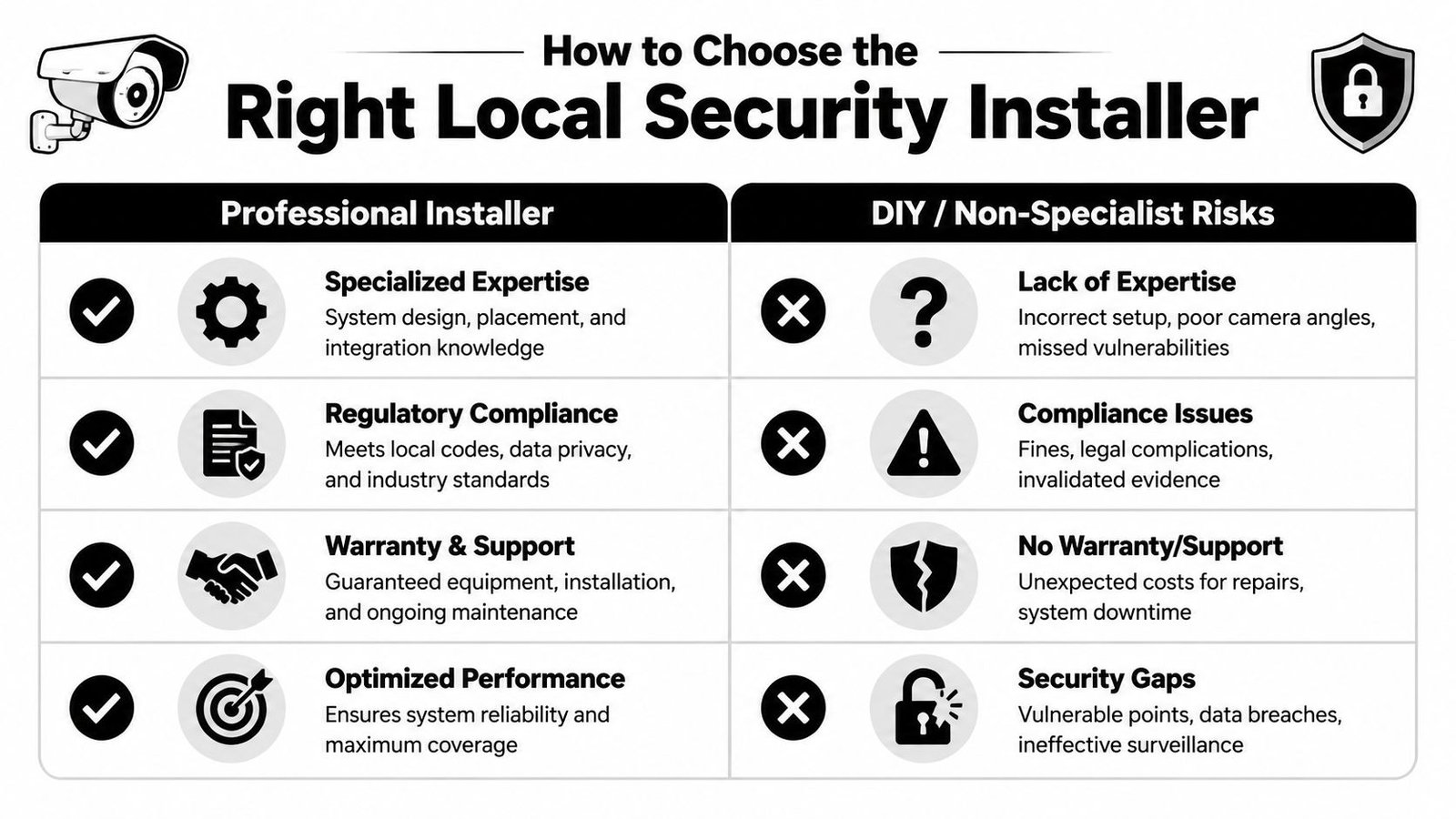
The installer matters as much as the cameras. A poor survey, weak cable routes, bad recorder settings, and sloppy user permissions will give you blind spots, compliance headaches, and footage that is no use when you need it. For most UK businesses, a capable local specialist is the right choice over DIY kits and sales-led national chains.
What to ask before you sign anything
Ask better questions than, "How much per camera?" Price matters, but design quality, aftercare, and GDPR discipline matter more.
Use this checklist:
- Ask about standards: Can they install and integrate to BS EN 50131 where intruder integration is involved?
- Ask about image quality: Have they specified the right resolution and lens for identification at each key point, such as tills, entrances, loading bays, and stock rooms?
- Ask about compliance: Will they set retention periods, user permissions, audit trails, signage, and help you address DPIA requirements where needed?
- Ask about integration: Can the CCTV work properly with your alarm, access control, intercom, or remote monitoring setup?
- Ask about support: Who answers the phone if playback fails, a camera drops offline, or your app stops working on a Friday evening?
- Ask about site fit: Have they handled sites like yours, whether that is retail, hospitality, warehousing, offices, schools, or multi-tenant buildings?
Good installers answer with specifics. They explain why one camera goes at 2.8 metres instead of 4 metres, why a rear service yard needs better lighting, and why giving every supervisor remote access is a bad idea under GDPR. That is what you are paying for.
Why local usually beats cheap
A local installer has to live with the result. If they cover South Wales and Bristol, they already know the common problems. Rear lanes with poor lighting. Shared yards. Compact high street frontages. Converted units with awkward cable runs. Patchy Wi-Fi in older buildings. That local knowledge saves time and avoids expensive rework.
National chains often sell a package first and solve the site later. DIY systems make you the surveyor, installer, network engineer, and compliance contact. That is a poor use of an owner's time, and it often ends with weak coverage in the places that matter most.
A good local installer should give you:
- A proper site survey
- A written scope with clear camera positions
- A reason for every camera
- Advice on what to record and what not to record
- Training on playback, export, and user access
- A maintenance plan with response times
- Straight answers on cabling, storage, lighting, and network load
The best firms will sometimes recommend fewer cameras. That is usually a good sign. Coverage, angle, lighting, and identification quality matter more than inflating the camera count to make a quote look impressive.
There is also a compliance and ROI angle that owners should not ignore. A professional local installer is more likely to leave you with a system your managers can use, footage you can retrieve quickly, and permissions that do not expose you to needless GDPR risk. That saves admin time every month and reduces the chance of paying twice for the same job.
Choose the company that asks the sharpest questions, gives a clear written design, and explains the trade-offs without hiding behind jargon.
If you're based in South Wales or the South West and want a system that's designed properly from day one, speak to Wisenet Security Ltd. They install and maintain CCTV, alarms, access control, fire systems, intercoms, and gate automation across Cardiff, Bristol, Newport, Swansea, and surrounding areas. If you want a clear, no-pressure view of what your site needs, book a free consultation and site survey.