CCTV System for Home Security: A Complete UK Guide
A modern home CCTV system is part of a layered security plan, not a stand-alone recorder, and the evidence base shows CCTV reduces crime by about 13% overall when it's used properly. In active systems, the reduction is roughly 15%, and the strongest results, around 34%, come when cameras sit alongside lighting, security staff, and signage.
You're probably here because something has already happened, or nearly happened. A parcel disappeared from the porch, a car got keyed on the drive, or you've noticed how easy it would be for someone to slip down the side return without being seen. That's the moment most homeowners stop thinking of CCTV as a gadget and start treating it as a practical part of the house.
Table of Contents
- What a Home CCTV System Actually Does
- Inside a Modern Home CCTV System
- Choosing the Right System Type for Your Home
- Designing Coverage That Actually Catches Intruders
- What a Good Home CCTV System Really Costs in the UK
- UK Legal and Privacy Rules You Must Follow
- Integrating CCTV With Alarms and Access Control
- Maintenance, Monitoring and Choosing an Installer You Trust
What a Home CCTV System Actually Does
A homeowner usually starts looking at CCTV after a small but annoying hit. A parcel goes missing, someone tries the gate, or a neighbour mentions a shed break-in nearby. At that point, a key question isn't whether cameras appear useful, it's what job they're supposed to do and whether they will perform it.
Deterrence, evidence, visibility
A decent cctv system for home security does four jobs. First, it deters opportunistic crime by making a property look watched. Second, it records evidence so you've got something usable after a theft, vandalism incident, or attempted entry. Third, it gives you remote visibility, which matters when you're at work, away for the weekend, or checking on deliveries. Fourth, when it's integrated properly, it helps support a faster police response because the incident is time-stamped, visible, and easier to describe.
The College of Policing evidence base is clear on the important bit, CCTV works better when it's active and part of a wider setup. Passive, record-only systems weren't statistically significant in that review, while actively monitored CCTV produced a meaningful reduction, and the strongest effect came when CCTV was combined with other measures such as lighting, security staff, and signage (College of Policing evidence summary). That's why I tell homeowners to stop thinking of cameras as the whole answer.
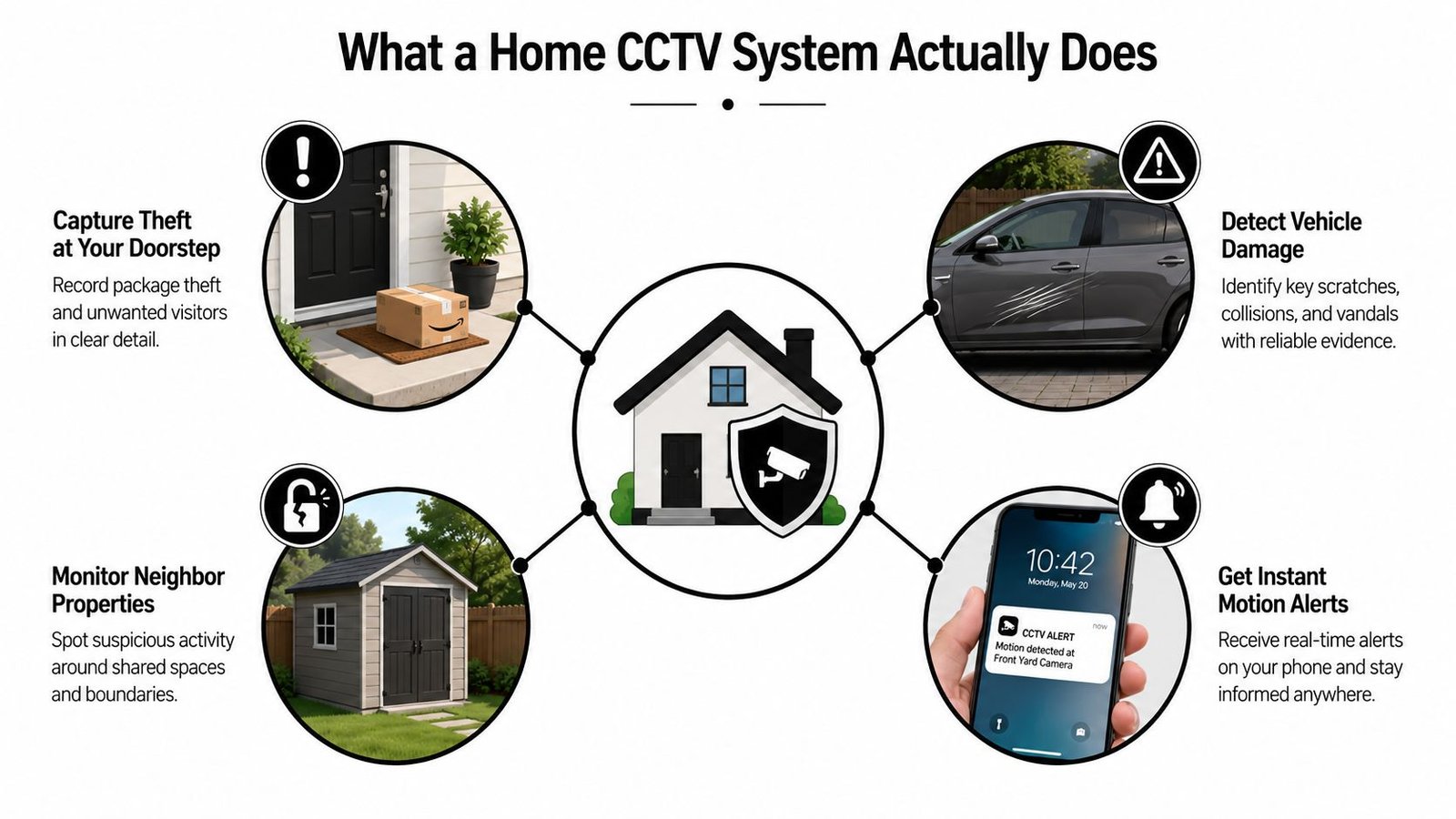
What that means on a real driveway
If a courier leaves a parcel in view, the camera gives you proof. If someone lingers by the side gate, the system gives you a live alert if it's set up properly. If a window gets forced at night, footage can show who, when, and how they approached the house. But if the camera is just pointed vaguely at the front of the property and nobody ever checks it, you've bought storage, not security.
Practical rule: buy the camera for the position, not the box. If the angle, lighting, and monitoring are wrong, the fanciest recorder in the world won't help.
UK homeowners should also think about that reminder from the same evidence base, CCTV is most useful as part of a layered security setup rather than as a stand-alone device (College of Policing evidence summary). That's the mindset that separates a deterrent from an expensive archive of disappointment.
Inside a Modern Home CCTV System
A homeowner usually asks for “a camera system” and ends up needing a full chain of parts that all do different jobs. The camera captures, the recorder keeps the footage, and the app or monitor lets you check what is happening. If one part is weak, the whole setup feels clumsy and unreliable.
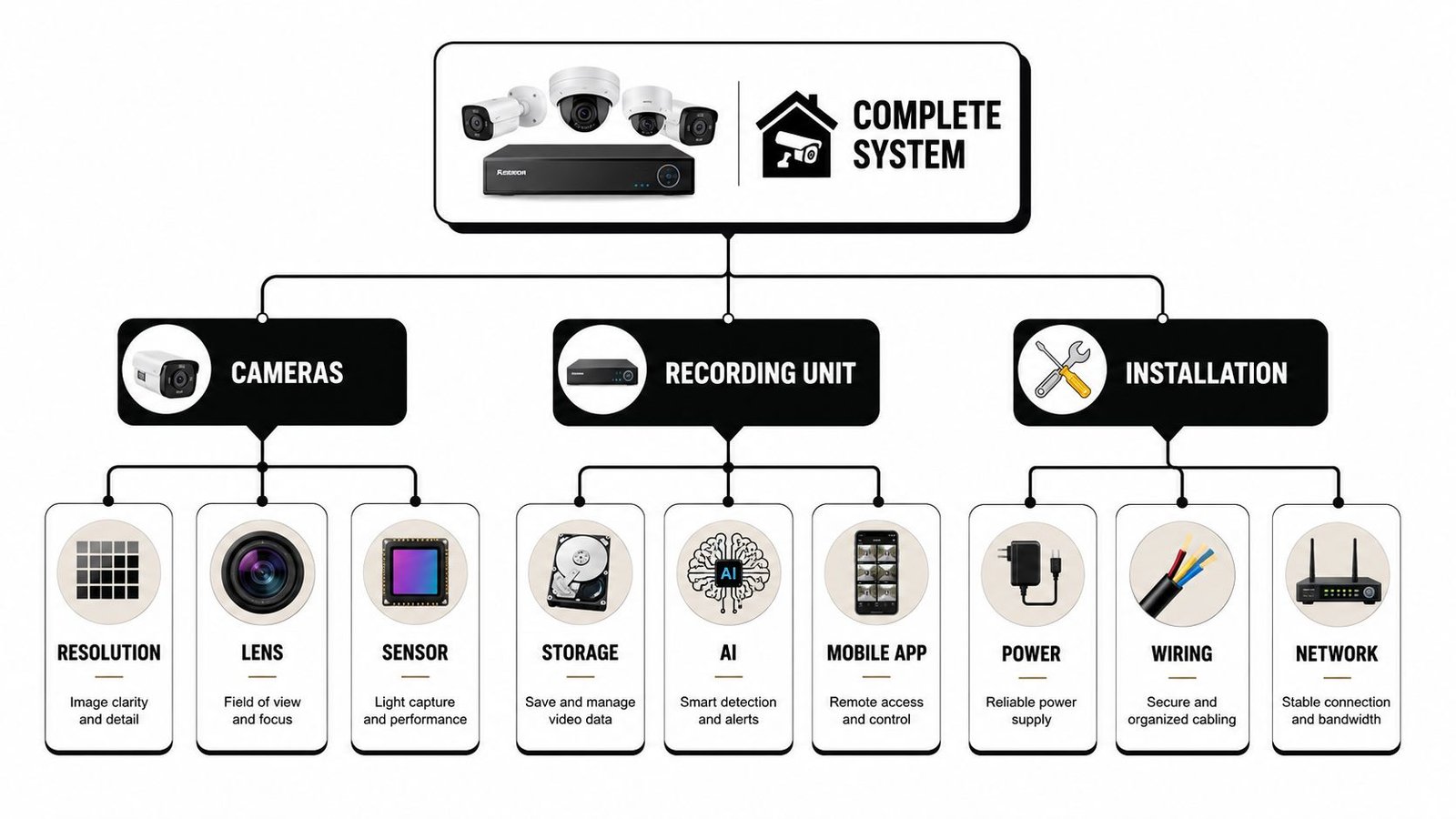
Cameras, recorders, storage and viewing
Start with cameras. Resolution matters, but only in context. A 4K/8MP camera carries about four times the pixel count of 1080p, which gives you more detail for faces and number plates at distance, although it also pushes up storage and bandwidth demand (camera planning guidance). For homeowners, that means don't buy resolution for bragging rights. Buy it because your front path, drive, or gate needs the extra detail.
Low-light performance matters just as much. Specifications like 0.05 lux colour sensitivity, 0.01 lux black-and-white, 0 lx with IR, and 100 dB wide dynamic range are the kind of figures that help in dusk, rain, and glare, because they keep images usable when lighting gets awkward (technical CCTV specification sheet). A 2.8 mm fixed lens with more than 102° coverage is built for wider scenes, while H.265+ compression helps stretch storage and remote-viewing bandwidth without filling the drive as fast (technical CCTV specification sheet).
What the recorder is really doing
The recorder is the part people ignore until something fails. DVRs suit analogue cameras. NVRs suit IP cameras. A local hard drive gives you footage even if the internet drops, while cloud or hybrid storage gives you convenience and off-site access. The trade-off is simple. Local storage keeps control on site. Cloud gives you flexibility, but usually brings subscriptions or bandwidth limits with it.
If you're comparing products, start with the camera architecture, not the sales copy. This guide to camera types used in UK CCTV systems is worth reading because the camera body, lens, and sensor choices matter more than glossy packaging.
How to read a datasheet without getting sold nonsense
Look for the numbers that affect evidence quality. Resolution, low-light sensitivity, lens coverage, and compression tell you far more than vague phrases like “smart vision” or “ultra clear.” If a seller cannot explain where the camera will be mounted, what it needs to see, and how footage will be accessed, they are selling hardware, not a working system.
Choosing the Right System Type for Your Home
The right system depends on how your house is built, how reliable your Wi-Fi is, and how much hassle you're willing to tolerate later. Don't start with brand names. Start with the property.
Wired, wireless, DVR, NVR, DIY or professional
Wired IP systems with an NVR are the safer bet for bigger homes, older houses, and properties with thick brick, stone, or render walls. They're steadier, they don't lean on battery life, and once they're in, they need less day-to-day attention. Wireless systems suit flats, smaller homes, and places where running cable would be disruptive. They're quicker to fit, but they depend on Wi-Fi quality and batteries, so you'll spend more time keeping them healthy.
DIY kits can make sense if you're comfortable with apps, routers, and basic setup. Professional installation wins when you want the cameras positioned properly, cabling hidden, and recording configured so it works reliably when needed. A badly installed system is a false economy. It might look finished, but it won't perform.
| Architecture | Best For | Strengths | Weaknesses |
|---|---|---|---|
| Wired IP with NVR | Larger homes, older UK properties, long-term ownership | Stable, reliable, cleaner recording, less upkeep | More disruptive to install, higher upfront cost |
| Wireless camera kits | Flats, smaller homes, quick retrofits | Faster install, easier repositioning, less cabling | Wi-Fi dependence, battery checks, variable reliability |
| DIY install | Confident homeowners, simple layouts | Lower labour spend, flexible timing | Setup mistakes, poor placement, weak support |
| Professional install | Complex layouts, layered security, shared boundaries | Better design, neater finish, stronger integration | Higher upfront spend |
Match the system to the house, not the brochure
If you're in a terrace with a narrow side return, choose a system that handles overlapping views and awkward access routes. If you're in a detached house with a long drive, go for wired IP where you can. If your internet drops now and then, don't build your security around cloud dependence. And if you plan to stay put, paying more upfront for a reliable wired install usually beats upgrading a cheap kit twice.
Straight answer: the best system is the one that still works after six months of rain, a router reboot, and a week when nobody's been thinking about it.
Designing Coverage That Actually Catches Intruders
Most bad CCTV installs fail in the same way. The owner covers the obvious front door, then misses the side path, the rear gate, or the blind spot created by the porch. That's why a proper coverage plan matters more than adding another camera to the box.
Start with the floor plan, not the shopping basket
Sketch the property first. Mark the front door, rear door, side passage, driveway, garden gate, and any shared boundary. Then place cameras to cover the approaches, not just the doors themselves. A camera pointed at a door can still miss the person walking up to it if the angle is too tight or the light is poor.
Use cross-coverage. One camera should watch the blind zone of another. Keep adjacent cameras overlapping by about 15 to 20%, so there's no dead strip between them. That doesn't just improve detection, it helps identification, because a person can't move through the coverage line without being seen twice.
Choose lens and angle by task
A 2.8 mm wide-angle lens is a strong choice for drives and wider front plots. A tighter lens makes more sense for a gate or side access where you want more facial detail at a narrower angle. A doorbell camera can work well at the porch, but it shouldn't be the only device covering the entrance if the front path is long or off-centre.
The biggest mistake I see on terraces and semis is over-camming the obvious bits and ignoring the hidden route. Narrow side returns, rear alleyways, and fence lines are the points intruders commonly use. One well-placed camera monitoring the approach, the boundary, and the exit route is usually more valuable than two badly aimed ones.
For tenants and shared properties, placement matters even more. If you're dealing with a rented home or a shared entrance, UK tenant referencing is a useful reminder that property access, boundaries, and responsibility need to be clear before anything gets installed.
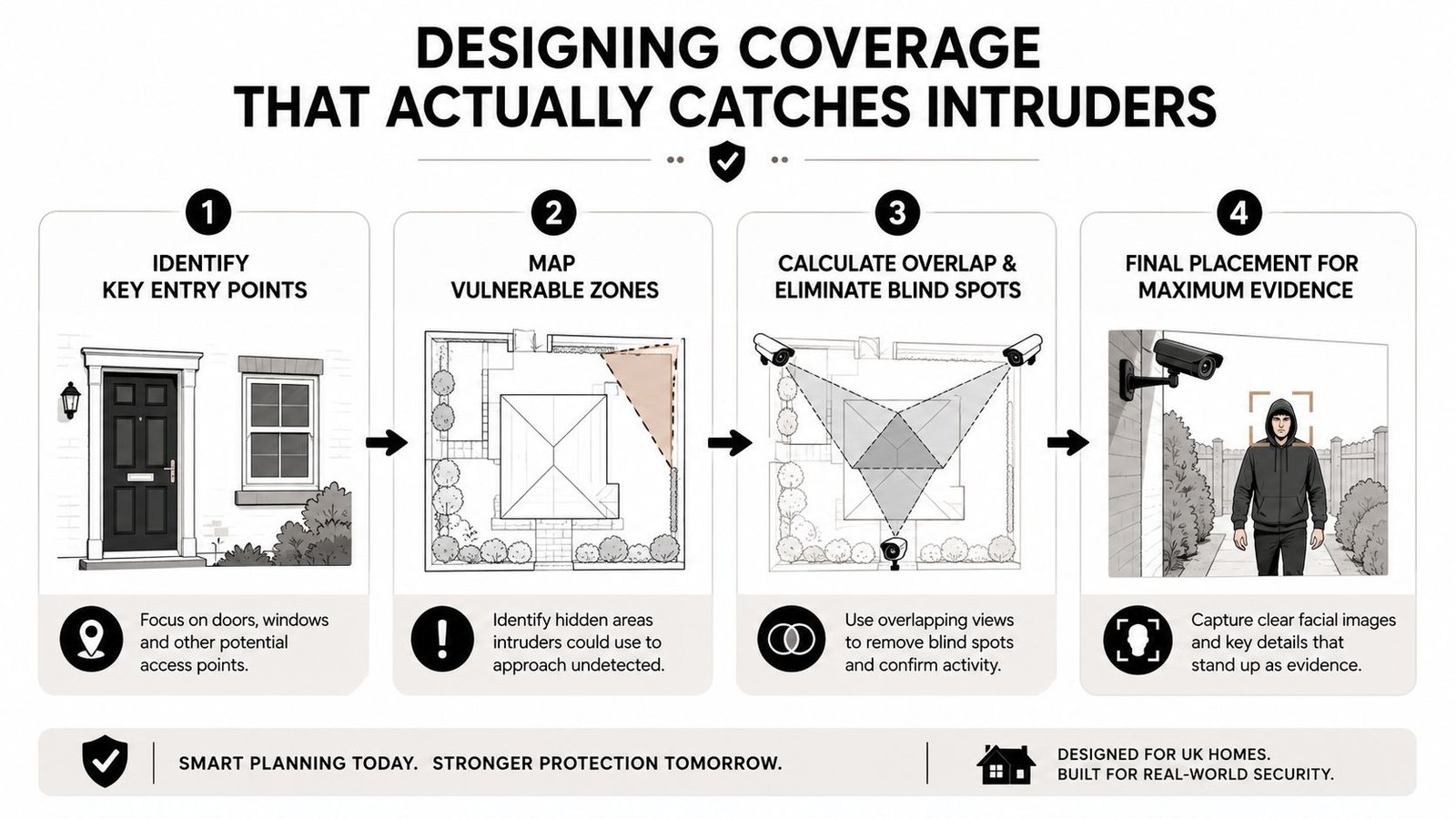
Draw the no-go lines before fitting anything
Don't point cameras where they'll intrude into a neighbour's private space. Don't assume “it's my property” makes every angle acceptable. A good installer will map the view cone before drilling a single hole, because changing a camera after fitting is always more work than planning it properly.
What a Good Home CCTV System Really Costs in the UK
Individuals often prioritize price over detailed explanations. Fair enough. A sensible UK first-year domestic CCTV outlay is often around £200 to £1,200+, depending on the system's complexity (UK home CCTV cost overview). The important thing is what each tier buys you.
What your money tends to cover
An entry-level self-installed wireless starter kit gets you convenience and basic visibility. It suits small properties and simple layouts, but it's not the place to expect polished evidence quality. A mid-range professionally installed 4-camera NVR system usually gives you better placement, neater wiring, and more dependable recording. At the upper end, a multi-camera 4K setup with active monitoring is where the system starts behaving like a real deterrent, not just a storage device.
The hidden costs are where homeowners get caught. Cabling can add work on older houses. 4K footage eats storage faster, so hard drive capacity matters. App subscriptions can turn a cheap-looking purchase into a recurring one. And if a unit fails after a few years, replacement isn't just the cost of hardware, it's time, labour, and the hassle of reconfiguring the system.
A simple way to judge value
Use this rule. The cheapest system that nobody checks is more expensive than a slightly pricier one that actively deters and records usable evidence. Paying less for a kit that misses the driveway, clips off faces, or never gets reviewed is false economy.
If you're pricing labour, this breakdown of CCTV installation costs gives a better feel for where the money goes than a random marketplace listing. That's the level of detail you want before you commit.
Budget rule: spend on coverage quality first, then storage, then convenience extras. Reverse that order and you'll regret it.
UK Legal and Privacy Rules You Must Follow
Domestic CCTV is legal in the UK, but it isn't a free-for-all. The key test is whether you're using it for a legitimate purpose such as home security and whether you're recording responsibly. The Information Commissioner's Office treats domestic CCTV differently from commercial surveillance, but the privacy expectations still matter once your camera sees beyond your boundary.
Stay inside the line, physically and legally
Don't point cameras into a neighbour's bathroom, bedroom, or private garden area. Don't use them to monitor other people's routine in a way that feels intrusive. If your lens captures part of a shared path, frontage, or parking area, be sensible about it and keep the view as narrow as possible. A clear sign saying CCTV is in operation is a smart move because it tells visitors, delivery drivers, and neighbours what's happening before they get to the door.
Audio is another trap. Recording sound can create more privacy problems than the video itself, so keep it off unless you have a clear, lawful reason for using it. And if someone complains, don't argue from the driveway. Check the camera angle, trim the view, and document what you changed.
The broader point is that CCTV used carelessly creates neighbour disputes that are completely avoidable. If you want a deeper look at the privacy side, the discussion around facial recognition and the legal landscape is relevant because it shows how quickly surveillance tools raise different questions once they start doing more than recording.
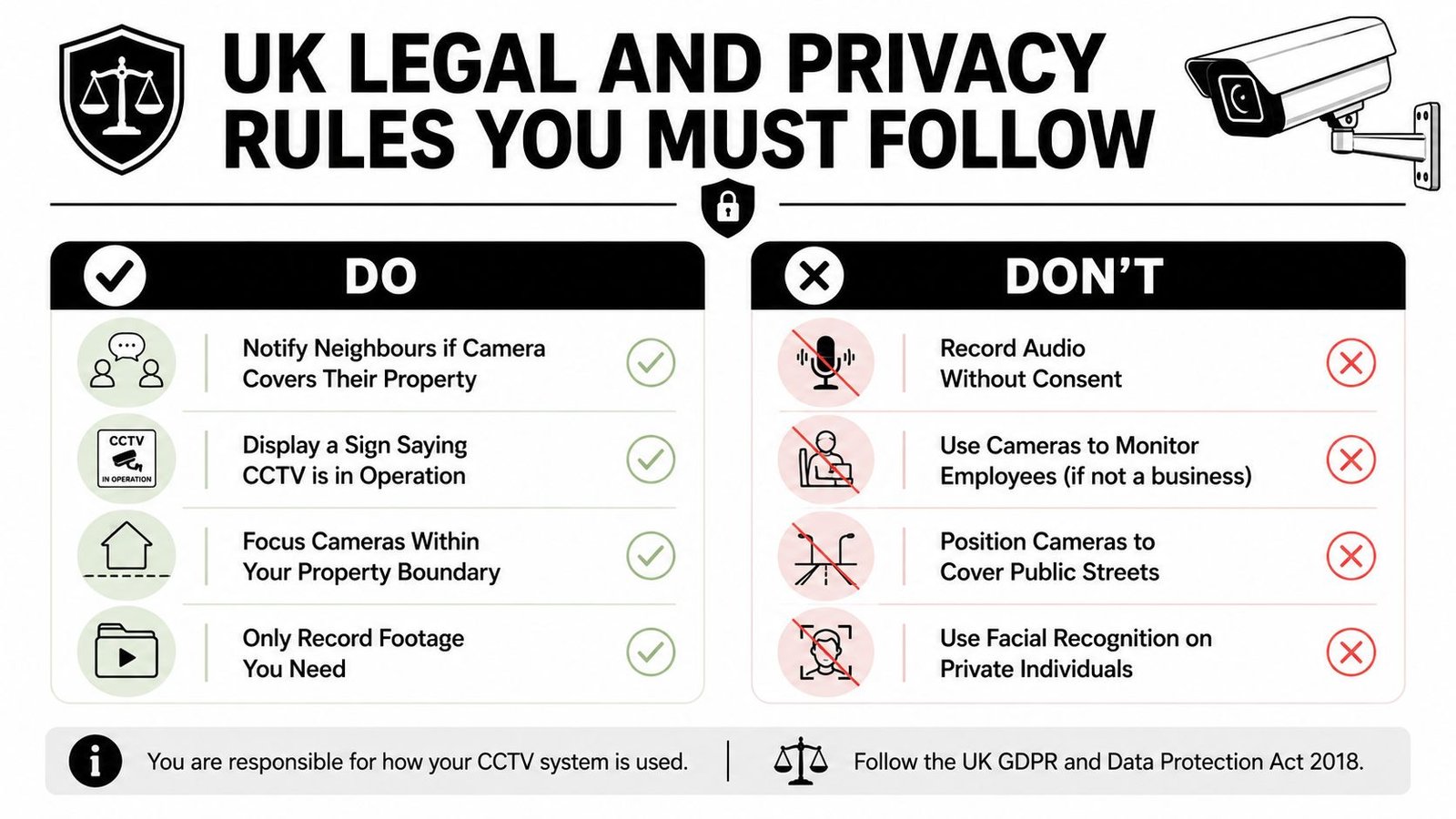
Keep the setup proportionate
For shared spaces in flats or terraces, be especially careful. The more people a camera can see, the more thought you need to give to boundaries, signage, and necessity. If you're unsure, narrow the field of view before you mount the camera permanently.
For a business-facing overview of data handling, CCTV and GDPR in the UK is a useful companion piece, even if your install is domestic. The principles around necessity, privacy, and access still shape good practice.
Integrating CCTV With Alarms and Access Control
CCTV is strongest when it's part of the response chain, not the only thing on the wall. A camera records what happened. An alarm tells you it's happening. Access control keeps the boundary controlled before anyone reaches the door.
Why the system should talk to itself
Pair CCTV with an intruder alarm that has pet-friendly PIR sensors and mobile alerts. When the alarm trips, you want a push notification and a live camera view at the same moment. That removes guesswork. You're not staring at a generic alert wondering whether it's the cat or a real event.
Access control matters too. A video intercom, keypad, fob entry, or automated gate extends security to the edge of the property. That's useful on homes with drives, side paths, or outbuildings because the camera sees the approach while the access device controls the entry point. Fire alarm integration and emergency lighting belong in the same design conversation, especially where people sleep upstairs or move through darker access routes.
Better evidence, fewer false alarms
Integrated systems reduce alert fatigue because the homeowner isn't trying to interpret five separate apps and three different noises. They also make footage more useful to police, because the alarm event and the camera clip line up on the same timeline. That time-stamped sequence is far easier to explain than a random video file with no context.
If you want a practical example of how a monitored security stack affects the monthly spend, managing your security monitoring budget is a helpful reference point. The exact package matters less than whether the alarms, cameras, and access points are acting like one system.
Maintenance, Monitoring and Choosing an Installer You Trust
A CCTV system does not stay effective on its own. Lenses get dirty. Firmware goes out of date. Hard drives wear out. Winter light changes the image. If nobody checks the system, the picture quality drops long before the homeowner spots it.
Keep the system honest after install
Clean the lenses. Check recording health. Review whether the motion zones still fit the property after leaf fall or seasonal changes. Re-aim cameras if low winter sun starts washing out the picture. If you have a hard drive, keep an eye on its health, because footage that will not play back is a failure, not a feature.
Monitoring choice matters just as much. Self-monitoring through a smartphone app works if you are responsive and disciplined. Recorded-only systems are fine if you only want evidence after the fact. Professionally monitored services make more sense when you want alerts filtered and escalated instead of dumped into your pocket all day. If you want a practical example of how that changes the monthly spend, budgeting for monitoring is a useful reference point.
Questions to ask before you sign
Ask whether the engineers are DBS-checked. Ask about manufacturer accreditations, insurance, warranty terms, and post-install support. Ask who handles firmware updates and what happens if a recorder fails. If the answers are vague, walk away.
Ask how they design coverage, not just how many cameras they can sell you. A good installer should talk about approach routes, blind spots, alarm links, access points, and where footage will help after an incident. If they only talk about camera counts and screen resolution, they are selling kit, not security.
Wisenet Security Ltd serves South Wales and the South West, including Cardiff, Bristol, Newport, Swansea, and surrounding areas. It designs, installs, and maintains CCTV, alarms, access control, fire systems, and intercoms, with over 20 years' experience, SafeContractor accreditation, and DBS-checked engineers. If you want one company to survey the property properly, plan the coverage, and build a joined-up system instead of a pile of gadgets, get a consultation and compare the options against your house layout and budget.
If you want a CCTV system that deters, records, and fits the way your home is laid out, speak to Wisenet Security Ltd and book a free consultation. They design and install integrated home security across South Wales and the South West, so you can get a system planned around your doors, drives, and boundary lines instead of guessing with a box of cameras.