Gate Access Control Systems: UK Property Guide
You can usually spot the problem before the gate stops working. Keys are shared, codes get passed around, visitors keep phoning the wrong contact, and someone's stuck outside in the rain because the one remote that works is in another car. On UK sites, that's the moment when a simple gate turns into a daily management problem, not just a security feature.
Gate access control systems solve more than entry. They help owners control who gets in, log who used the gate, and connect access with intercoms, CCTV, and automation so the site feels managed instead of improvised. The catch is that the right system has to suit the property, the traffic pattern, and the safety rules around the gate itself.
Table of Contents
- Why Gate Access Control Matters for Modern Properties
- How Gate Access Control Systems Work
- Comparing Gate Access Technologies and Credential Types
- UK Safety Standards and Compliance Requirements
- What Happens When Systems Fail or Go Offline
- Selecting and Sizing Systems for Different Property Types
- Costs, Maintenance, and Local Installation in South Wales
Why Gate Access Control Matters for Modern Properties
A landlord in Cardiff, a warehouse manager near Newport, and a homeowner in Swansea can all end up with the same headache. One person has a fob, another has the code, a contractor needs temporary access, and nobody wants to keep reissuing keys every time a tenant changes or a driver loses a remote. That's where gate access control systems earn their place, because they stop access being an informal favour and turn it into a managed process.
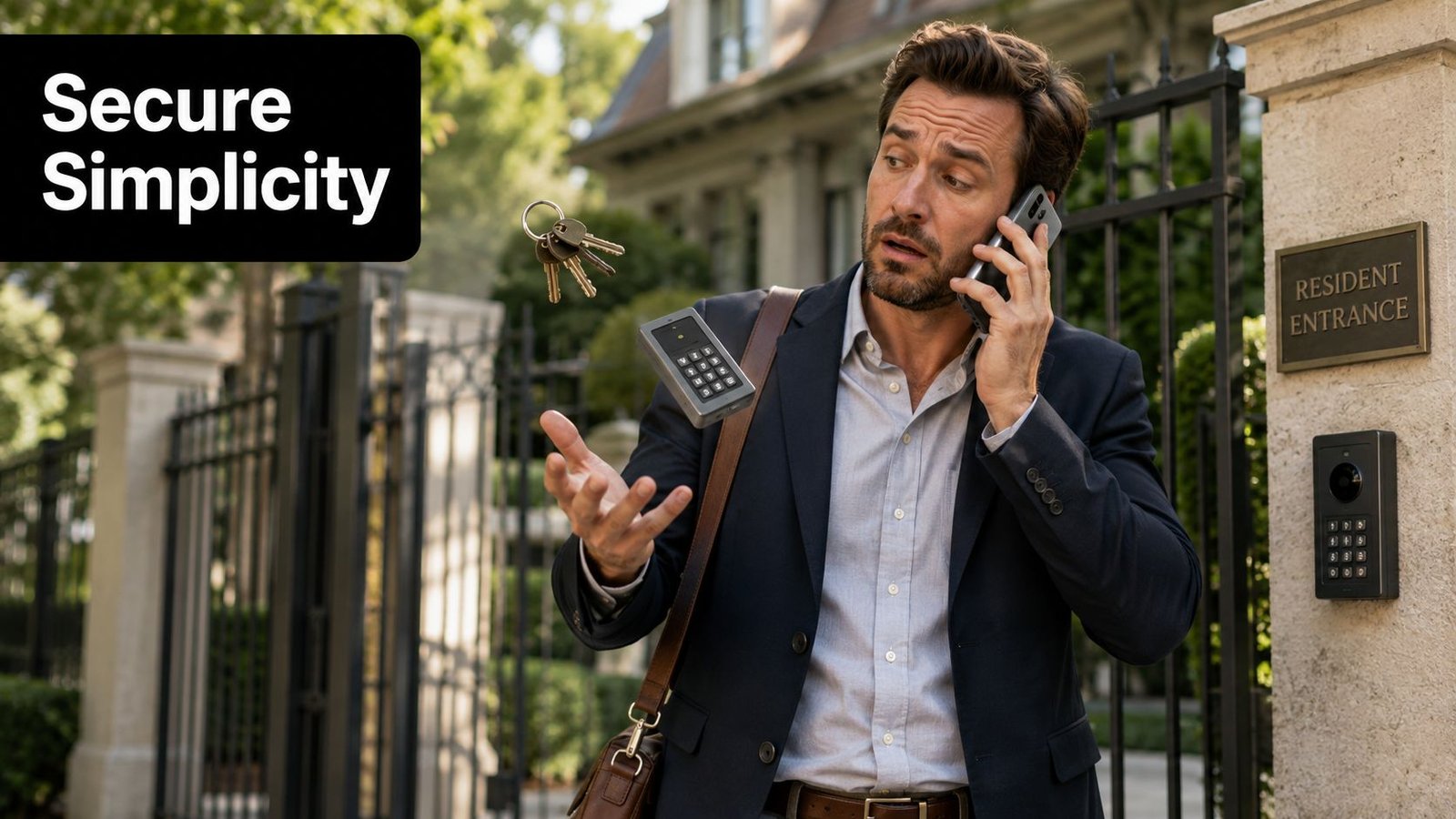
The first gain is obvious, convenience. A good gate setup lets approved users enter without chasing keys, while property managers can add or remove credentials without changing every lock on site. The second gain is less visible but more valuable, auditability. When the system records access events, you're no longer guessing who opened the gate during a missed delivery or a late-night visitor issue.
A proper system also ties the gate into the rest of the property. That matters on mixed-use sites where a gate, intercom, camera, and internal doors all need to work together instead of behaving like separate products from different jobs. If you're comparing options for a perimeter entrance, fence gate security solutions can be a useful reference point for the wider category, but the decision comes down to how the system will be used on your site.
Practical rule: if more than a handful of people need regular access, and you've already had a lost key, a code leak, or a visitor delay, the gate has probably outgrown a simple mechanical approach.
For residential properties, that usually means easier visitor handling and less key turnover. For commercial and industrial sites, it often means better control over staff, contractors, and vehicle movement. Once the site depends on controlled entry, the question stops being whether the gate should have access control, and becomes which type will survive day-to-day use without creating new problems.
How Gate Access Control Systems Work
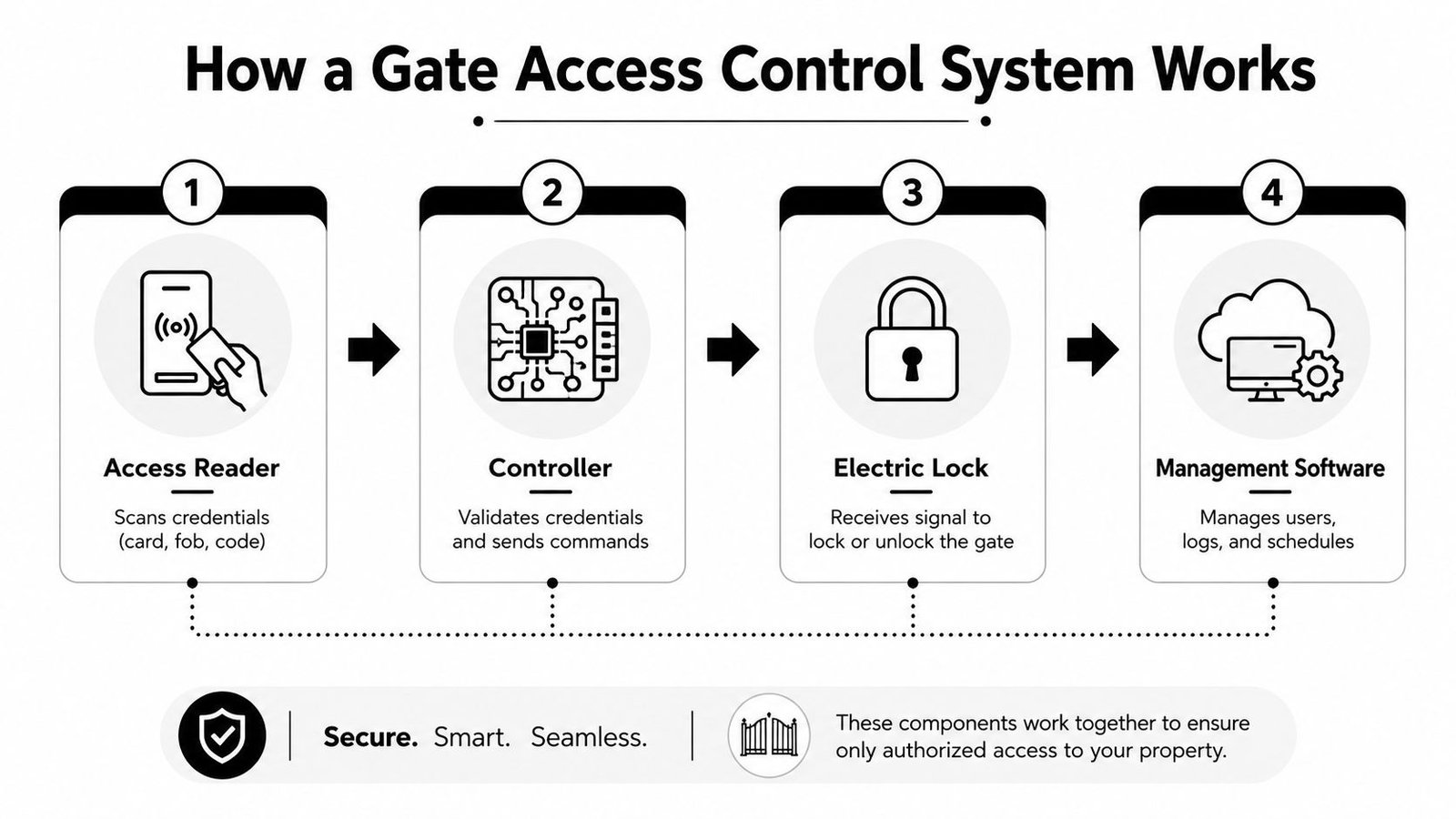
A gate system is a checkpoint made up of several parts, not a single device. One part reads the credential, another part checks whether that credential is allowed, a third part controls the lock or motor, and the management software applies the rules and stores the records. When those parts are matched properly, the gate opens only when the site's access policy and safety conditions both allow it.
The access flow from reader to release
A user presents a credential, usually a PIN, fob, card, phone, or plate registration, depending on the site design. The reader sends that input to the controller, and the controller checks it against stored permissions or a live database. If the credential is valid, the controller signals the gate operator or electric lock to release, then the gate closes again under the system's timing and safety rules.
The value sits in the rules behind the scenes. Permissions can be limited by user, time of day, vehicle type, or site zone, so the management layer matters as much as the hardware. A site with multiple gates also needs the controller logic and user database to stay aligned, or staff will end up with one gate working and another behaving as if it belongs to a different building.
For teams comparing gate layouts on mixed-use estates or retail parks, finding off-market retail sites becomes easier when access control is planned alongside the physical layout, not added after the fact. A reader on its own does not make a site secure, it just captures an input. The controller and software decide whether that input means anything.
For a clearer view of reader, controller, and credential options, the overview of the main access control system types is a useful starting point.
What the installer has to get right
The weak point on many real sites is not the credential technology, it is the wiring and the logic between components. If the reader can authorise entry but the safety devices do not confirm a safe state, the system should not release the gate. That coordination is what separates a polished installation from one that looks smart on paper and frustrates everyone at the gate.
If the user keeps presenting a valid credential and the gate still fails, the cause is often elsewhere, power, wiring, lock alignment, controller rules, or the motor drive, not the reader itself.
A proper design starts with the full access path, not the front-end device. When the reader, controller, lock, and software are matched correctly, the gate feels straightforward to the user, even though the system behind it is doing several things at once.
Comparing Gate Access Technologies and Credential Types
Different sites need different credentials, and the wrong choice usually shows up as either too much admin or too much friction. A small driveway in South Wales doesn't need the same setup as a commercial car park or a logistics yard with delivery traffic all day. The question isn't which technology sounds smartest, it's which one stays usable when weather, turnover, and human behaviour get involved.
The internal guide on card reader access control is useful if you're comparing reader formats in more depth, but the bigger picture is below.
| Technology | Security Level | Typical Cost Range | Best For | Maintenance Needs |
|---|---|---|---|---|
| Keypad with PIN | Moderate, depends on code discipline | Lower upfront | Small residential gates, simple visitor access | Code changes, keypad wear, weather exposure |
| Proximity card or fob | Moderate to strong, depending on credential control | Moderate | Offices, apartment blocks, staff entrances | Lost or cloned credentials, reader upkeep |
| Biometric reader | Strong in principle, but sensitive to site conditions | Higher | Controlled staff-only gates, higher assurance sites | Sensor cleanliness, enrolment, user support |
| Mobile credential | Strong when phones and network policy are well managed | Moderate | Managed estates, modern workplaces, multi-tenant sites | App support, account lifecycle, connectivity planning |
| LPR or ANPR | Strong for vehicle control, weaker if plates are obscured or misread | Higher | Car parks, gated driveways, fleet and visitor control | Camera placement, plate quality, database accuracy |
What tends to work in the real world
Keypads are simple, but shared codes become a habit that's hard to unwind. They suit low-risk sites where the main need is convenience, not traceability. Proximity cards and fobs work well when each user needs an individual credential, though lost or cloned items still have to be managed.
Biometrics are often over-sold. They can be useful where user identity matters more than convenience, but they're not a cure-all, and they demand cleaner hardware discipline than people expect. If the finger reader is dirty, the user is hurried, or the environment is harsh, the supposedly advanced option can become the most annoying one on the gate.
Mobile credentials are a strong fit for sites that already manage phones, apps, and remote administration. They reduce physical credential handling, but only if the onboarding and support process is tidy. LPR or ANPR is best treated as a vehicle-control tool, not a universal answer, because the decision is only as reliable as the plate visibility, camera position, and database behind it.
Choosing by user behaviour, not features
The right credential is the one your users will carry, remember, and use correctly. A system that's technically elegant but awkward in bad weather or at shift change won't feel secure, it'll feel unreliable. On busy sites, simple and durable usually beats feature-heavy and temperamental.
UK Safety Standards and Compliance Requirements
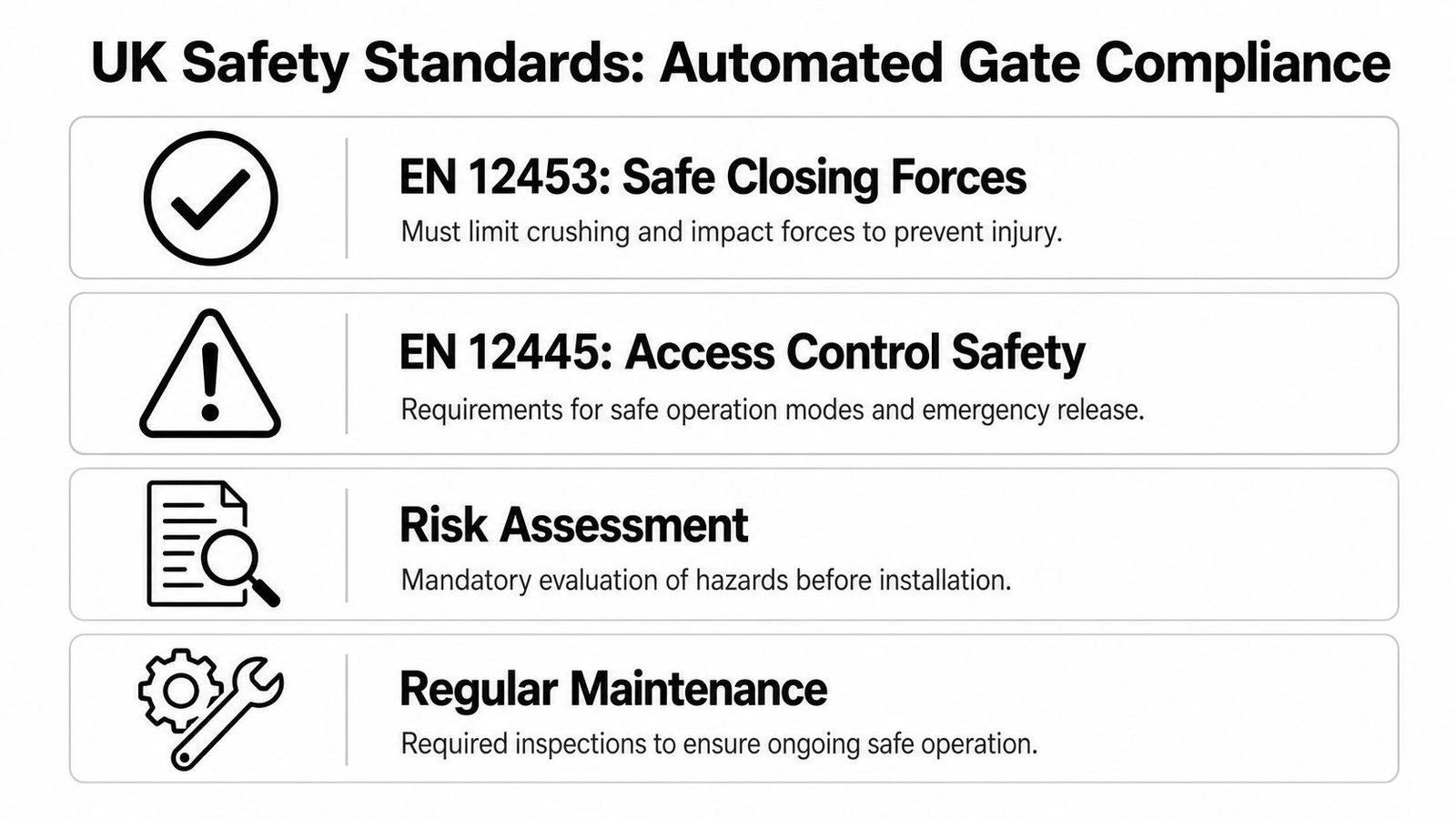
A gate can read a credential perfectly and still be unsafe in use. In the UK, automated gate design has to satisfy EN 12453 and EN 12445, which deal with safe closing forces and obstruction detection, and the practical result is simple, the operator cannot just be fitted and left alone. The access controller, safety edge or photocell chain, interlock, and motor drive all have to function as one system.
Why safety integration matters more than the reader
The Door and Hardware Federation treats automated gates as safety-critical machinery, and that is the right approach. A reader that opens the gate without checking the safety chain first can create pinch and crush risks even though the access technology itself is behaving as intended. In practice, commissioning matters, and so does periodic force testing, because a gate that was compliant at handover can drift out of tolerance later.
The installer also has to look beyond the credential device. A perfectly good keypad can still sit inside a poor system if the motor drive is wrong, the closing forces are excessive, or the obstruction detection is not proven during commissioning. That is why buying a reader and a motor separately, then assuming the site will sort itself out, is a common mistake on real jobs.
What compliant work looks like on site
A compliant installation usually starts with a risk assessment, then moves into force testing, safety device verification, and documented handover. The gate should not be allowed to close blindly, and users should still be able to exit or be released safely under fault conditions. That is also where maintenance comes in, because dirt, weather, misalignment, and wear can change how the gate behaves over time.
For practical sensor placement and fault checking, Danny's Garage Door Repair sensor tips is a useful reminder that sensor alignment and cleanliness are never trivial on outdoor systems. The same principle applies to gates. If the detection layer is unreliable, the whole system is compromised.
For inspection and compliance oversight, the Wisenet Security Ltd inspection board guidance is a sensible reference point when a site needs its checks documented properly.
Installer's rule: if a gate needs constant fiddling after installation, the design probably ignored the safety envelope or the environment around the gate.
The short version is straightforward. On a UK site, gate access control is not just an access decision, it is a safety decision. Any proposal that does not cover safe closing behaviour, obstruction response, emergency release, and ongoing testing is missing the part that matters most.
What Happens When Systems Fail or Go Offline
A lot of smart gate brochures assume the network is always available and the cloud always responds. That's not how real sites behave. Broadband fails, power cuts happen, and connected systems can lose contact with the services they depend on, which is why fallback planning should be part of the design, not an afterthought.
UK government guidance on cyber-resilience and the National Cyber Security Centre's emphasis on offline fallback both point in the same direction, resilience matters because short interruptions can have outsized operational impact. That's especially true for workplaces, car parks, and shared buildings, where one broken entrance can stall deliveries, upset tenants, or trap users outside the property rhythm.
Questions a buyer should ask before signing off
- Does the gate still operate locally? If the broadband drops, the system should have a clear on-site behaviour rather than leaving users guessing.
- What happens during a power loss? The site needs a defined state for the gate, the lock, and any emergency release arrangement.
- Where are the permissions stored? If access rules live only in a cloud platform, the installer should explain the local fallback.
- Can admins work offline? A property manager should know how to add or revoke access during an outage.
These questions matter more than a glossy app demo. A cloud dashboard is useful, but the property still needs a working gate when the wider network is unavailable. The best systems are the ones that degrade predictably, not the ones that stop dead and wait for someone else's server to recover.
Why local control still has a place
Locally managed systems can be less flashy, but they're often easier to trust when a site can't tolerate downtime. That doesn't mean cloud solutions are bad, only that they need a sensible fallback path and a clear maintenance plan. If the gate serves a business-critical entrance, resilience is a security feature, not a nice extra.
Selecting and Sizing Systems for Different Property Types
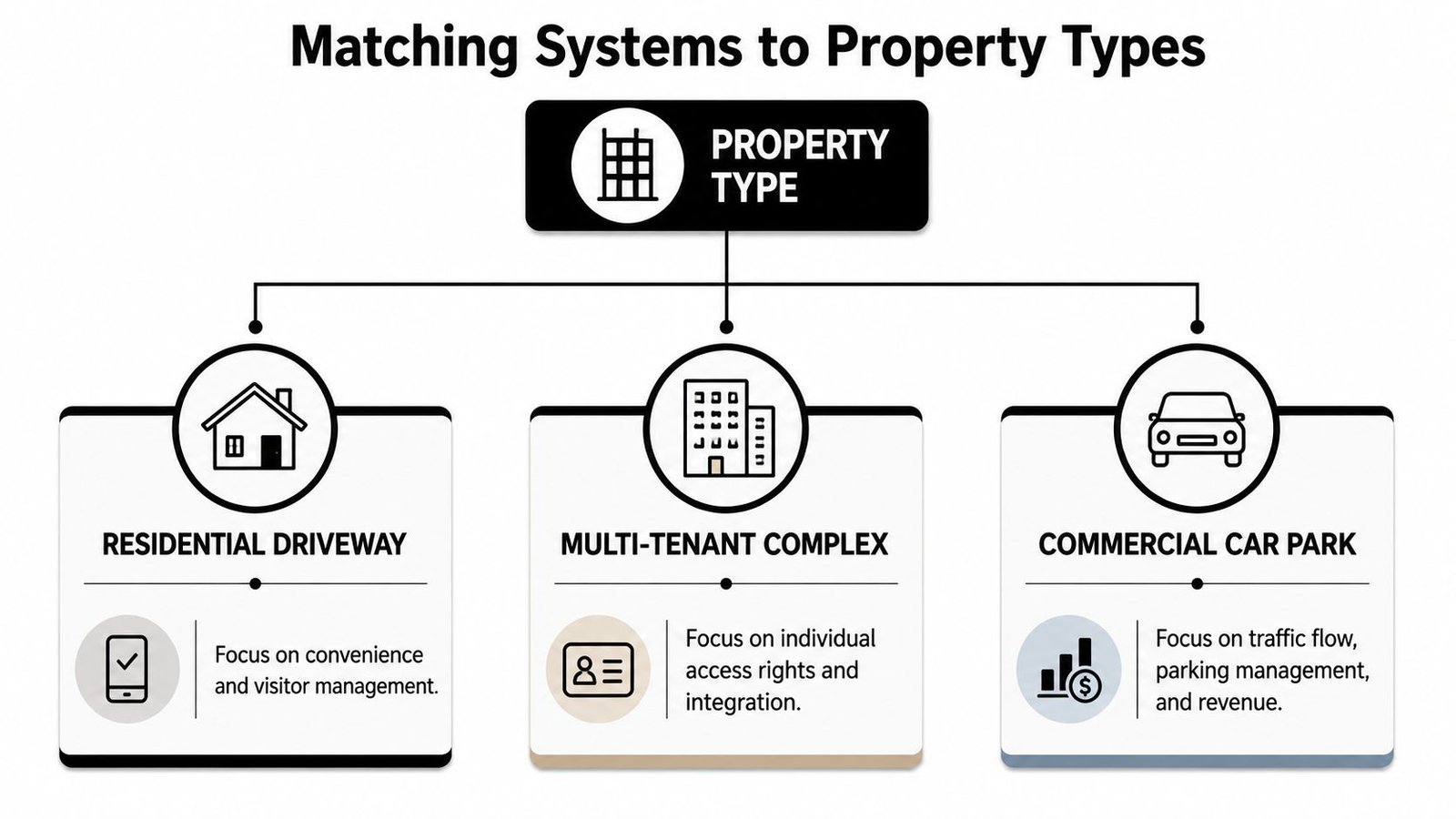
A residential driveway and a multi-tenant car park fail for different reasons, so they shouldn't be sized the same way. The first is usually about convenience, visitor handling, and a clean appearance. The second is about access rights, throughput, logging, and not turning the gate into a bottleneck at the wrong time of day.
Matching the system to the site
A residential driveway usually suits a simple, durable setup. A keypad, fob, or mobile credential can be enough if the number of regular users is small and visitors are handled informally. The mistake here is overspecifying the system so much that the owner ends up paying for complexity they never use.
A multi-tenant complex needs tighter user control. Each resident, tenant, or staff member should have a distinct credential policy, and visitor access needs to be easier to manage than a shared code passed around by text. These sites benefit from audit logs and remote administration, especially when people move in and out regularly.
A commercial car park has different priorities again. Vehicle flow, plate capture, and duty cycle matter more, and the system has to cope with repeated daily use without wearing out quickly. On those sites, traffic management matters as much as security, because a slow gate causes queues, complaints, and missed deliveries.
Common sizing mistakes
Underestimating peak traffic is a frequent one. A gate that works fine at 10 a.m. may perform badly at shift change or visitor arrival time. Another mistake is fitting a system that can't scale, so each new tenant, contractor, or entrance becomes a separate admin problem.
A gate that suits today's user count but can't grow with the site usually becomes the first thing everyone complains about.
The better approach is to match the control method to the operating pattern, then leave room for expansion. If the site is likely to grow, the controller, software, and network design should support that without forcing a full rip-out later. That is where experienced installers tend to save owners money, because they see the traffic pattern before the complaints start.
Costs, Maintenance, and Local Installation in South Wales
The total cost of a gate access control system isn't just the reader or keypad. It's the gate operator, controller, cabling, lock, safety devices, commissioning, and the ongoing work that keeps the site usable. On South Wales and South West properties, local conditions matter too, because weather exposure, long cable runs, and site layout can all affect how reliably the system behaves.
For vehicle-focused setups, a typical LPR gate controller may specify 12 to 24 V DC or 100 to 240 V AC input, around 6.4 to 7.8 W consumption, and IP67 or Type 3R protection for the functional zone, which helps reduce moisture-related failure on unattended sites. The main trade-off is simple, a tougher enclosure helps durability, but the authorisation decision is still only as good as the controller database and network behind it.
What to budget for in practice
Simple residential systems usually cost less to install, but they still need proper cabling, safe positioning, and periodic checks. More complex commercial or multi-tenant systems add software, user management, logging, and sometimes integration with CCTV or fire systems. Maintenance is not optional on either type, because outdoor hardware wears out and safety-critical gates have to be verified after installation and again over time.
Working with a local, accredited installer helps here because they know the weather exposure, the typical site layouts, and the support response expected by owners in Cardiff, Bristol, Newport, Swansea, and surrounding areas. Wisenet Security Ltd is one example of a local provider that installs access control alongside CCTV, intruder alarms, intercoms, and gate automation, which can make the integration side easier when one contractor is responsible for the full system.
Data protection and user records
Mobile credentials, ANPR, and biometric readers add a privacy layer that buyers sometimes underestimate. UK GDPR, personal data minimisation, and retention rules all matter when you're storing access logs, plate data, or biometric identifiers. The ICO's 2025 guidance on video surveillance and data protection makes the compliance burden more explicit, especially for landlords, managed estates, and SME car parks that use surveillance-linked access.
The practical answer is to define what data you need, who can see it, and how long it should remain available for operations or investigations. Many systems are technically capable of much more logging than the site should keep. The best installations are the ones that give managers the records they need without turning every entry into a long-term privacy problem.
If you're planning a new gate or trying to make an existing one more reliable, speak to a local installer who can assess the safety setup, the fallback behaviour, and the access method as one system. Visit Wisenet Security Ltd to discuss a gate access control design that fits your property, your users, and the way the site runs.