
Biometric Access Control: A Practical UK Guide for 2026
One missing fob can turn a normal week into a mess. A member of staff leaves, nobody's sure who still has access to the side door, and someone's written the alarm code on the back of a delivery note. In homes, it's the same sort of problem in a smaller space. Spare keys go to relatives, cleaners, tradespeople, and then nobody quite remembers who still has one.
That's usually the point where people start looking at biometric access control. Not because it sounds futuristic, but because they're fed up with managing things that get lost, shared, copied, or forgotten. A fingerprint reader on a staff entrance, a facial reader on a gated block, or a stronger identity check on a stock room door solves a very practical problem. It ties access to the person, not to whatever they happen to be carrying.
In the UK, that decision also comes with privacy questions, installation choices, and the usual real-world trade-offs. Some systems work brilliantly in clean office environments and struggle on a warehouse entrance. Some are easy to use but need better fallback planning. Some look cheap until you account for the compliance work and software setup.
Table of Contents
- Tired of Keys Fobs and Security Worries?
- How Biometric Access Control Really Works
- Comparing the Main Types of Biometric Systems
- Which Biometric System Is Right for Your Sector
- Understanding Security Privacy and UK GDPR
- Integrating Biometrics with Your Existing Security Systems
- Installation Costs and Long-Term Maintenance
- Your Biometric Security Partner in South Wales and the South West
Tired of Keys Fobs and Security Worries?
A common job starts with a simple complaint. Someone loses a fob. Then another one turns up in the wrong hands. Then the person running the site realises they've got no confidence in who can still enter the building after hours. That's when access control stops being an admin task and becomes a security issue.
For homeowners, it often shows up around side gates, home offices, annexes, or shared entrances. For businesses, it's staff doors, stock rooms, internal offices, and delivery entrances. The pattern is the same. Physical credentials drift. People lend them. People forget them. Nobody notices the weakness until there's an incident or a near miss.
Practical rule: If access depends on something that can be handed to someone else, your system is checking possession, not identity.
Biometric access control fixes that specific weakness. Instead of trusting a card, key, or remembered code, the system checks the person. That makes it useful for small shops, offices, warehouses, apartment entrances, and homes where convenience matters but accountability matters more.
It also needs to be installed sensibly. Good access control isn't only about the reader on the wall. Door hardware, user permissions, emergency release, audit trails, and fallback access all matter just as much. If you want a solid overview of those day-to-day design principles, Nutmeg Technologies access control insights are worth reading because they focus on the operational side, not just product features.
The Practical Questions Buyers Usually Ask
Individuals looking at biometrics are trying to answer a short list of real questions:
- Will it stop shared access? In most cases, yes. That's one of the main reasons to use it.
- Will it suit my building? Sometimes. The environment matters more than brochures suggest.
- Will it create GDPR headaches? It can, if the system is chosen badly or rolled out casually.
- Will it work with what I already have? Often yes, if the installer designs it as part of a wider system.
The rest of the decision comes down to matching the technology to the site. That's where most expensive mistakes happen.
How Biometric Access Control Really Works
Biometric access control has moved from niche deployment to a mainstream security category, with the global biometric access control systems market forecast to grow by USD 6.41 billion during 2024–2029 at a CAGR of 8.4%, according to Research and Markets' biometric access control market forecast. The reason it keeps showing up in UK specifications is simple. The underlying model is stable and easy to understand once you strip away the marketing language.
The Three Parts That Matter
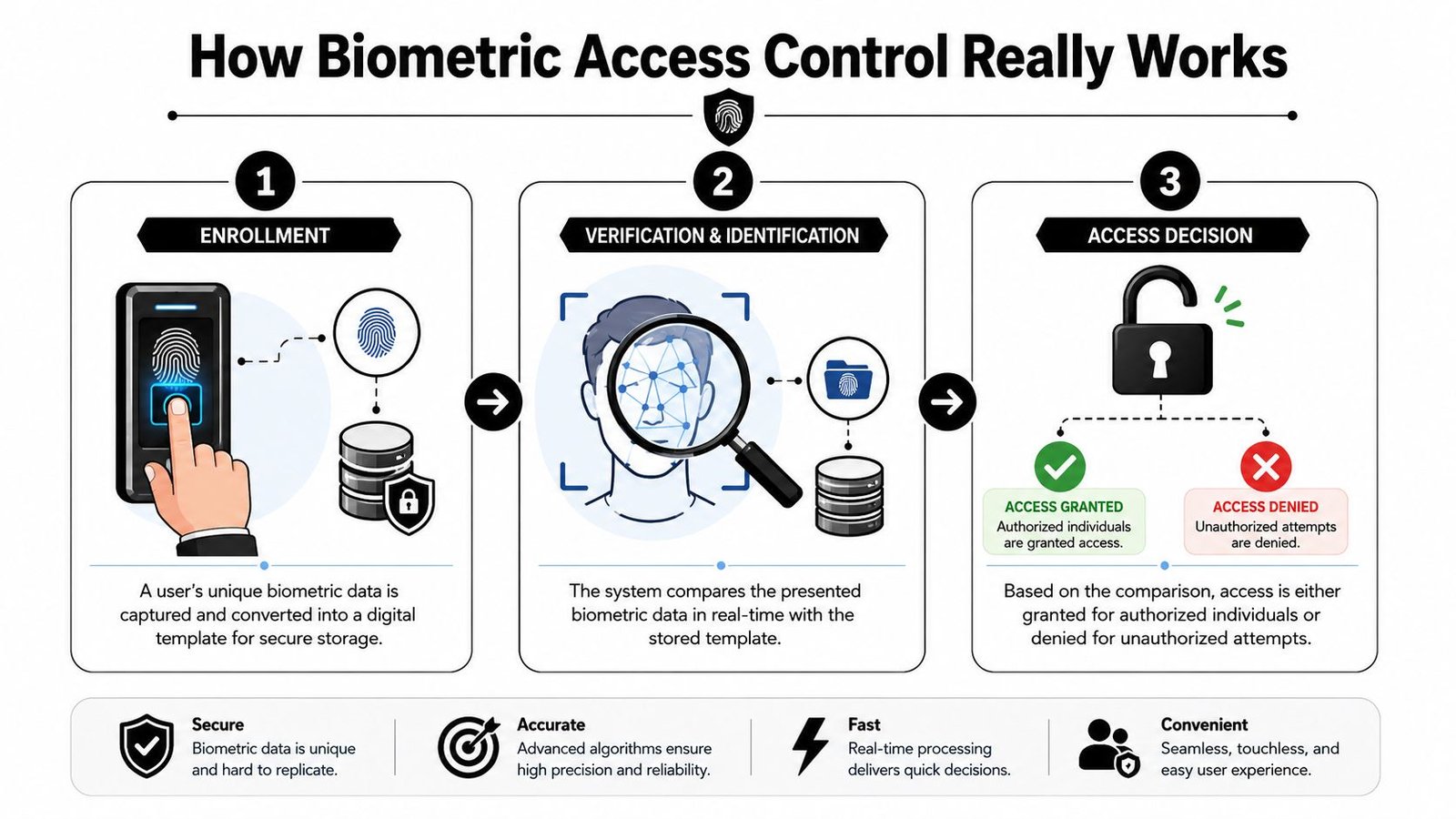
A working system has three core stages.
Enrolment
The user presents a fingerprint, face, or iris to the reader. The system captures the relevant points needed to recognise that person later.Template creation
The system converts that scan into a digital template. This is the part many people misunderstand. In normal enterprise use, the system stores a template rather than the original biometric image.Matching and decision
When the user returns to the door, the reader takes a fresh scan and compares it to the stored template. If the match meets the configured threshold, the door opens. If it doesn't, access is denied or the user is pushed to a fallback method.
A simple way to think about it is this. The system isn't storing your actual fingerprint in the way a phone gallery stores a photo. It's storing the mathematical pattern needed to recognise you again.
Here's a useful visual explanation of the workflow in context.
Why Templates Matter
That template-based design matters for two reasons. First, it makes biometric access control practical for everyday entry control. Second, it supports privacy-focused system design when the deployment is handled properly.
A lot of poor conversations about biometrics start with the wrong assumption that businesses are keeping a literal image of every finger or face. In a properly specified system, that isn't the point. The point is controlled identity matching at the door.
The reader should answer one question only. Is this enrolled person allowed through this opening right now?
That's also why biometrics work best as part of an access strategy rather than as a gadget. The hardware does the capture. The controller enforces the rule. The software logs what happened. Get those parts right and the system becomes very straightforward to manage.
Comparing the Main Types of Biometric Systems
Not all biometric systems suit all doors. Some are quick and familiar. Some are better for touch-free use. Some cope better with harsh environments. If you choose purely on price or novelty, you usually end up replacing readers or adding workarounds later.
Biometric System Comparison
| Biometric Type | Accuracy | Cost | Hygiene | Best For |
|---|---|---|---|---|
| Fingerprint | Strong in controlled conditions | Usually lower than advanced eye-based systems | Contact-based, so needs cleaning and user buy-in | Offices, staff-only rooms, homes, smaller commercial sites |
| Facial recognition | Strong when lighting, positioning, and enrolment are handled properly | Mid-range to higher depending on software and anti-spoofing features | Touch-free | Main entrances, reception areas, multi-tenant access, faster user flow |
| Iris | High-security oriented and usually very precise when users present correctly | Higher | Touch-free | Restricted rooms, critical areas, sites needing stronger identity assurance |
| Vein pattern | Strong identity method and difficult to share casually | Often higher and more specialist | Usually low-contact or touch-managed depending on device | Higher-security internal doors, specialist environments, sites with strong audit requirements |
What Each Type Is Really Like to Live With
Fingerprint readers are still the most familiar option for many buyers. They're easy to explain to staff, compact, and often fit well on a side entrance, office door, or home gate. The downside is practical rather than theoretical. Dirty hands, worn fingerprints, moisture, and heavy use can all affect the user experience. In a clean office, that's manageable. On a loading bay or workshop entrance, it can become annoying very quickly.
Facial recognition is often the easiest system for user flow because people don't need to stop and touch anything. That makes it useful at reception points, apartment entrances, and busy staff doors. It also suits sites that already care about visitor movement and camera coverage. If you're weighing up this route, it helps to understand the physical layout, mounting height, background lighting, and anti-spoofing features before you buy anything. This practical guide to facial recognition access control systems is useful if that's the direction you're considering.
Iris systems tend to sit higher up the security ladder. They're usually chosen where the business wants a stronger identity check on a restricted space such as a lab, plant room, comms room, or archive. They can work very well, but they need proper user positioning and a sensible deployment. Putting an iris reader on a casual, high-speed entrance where people are carrying boxes is usually poor design.
Vein pattern systems don't get discussed as often outside specialist circles, but they can be a strong option where identity assurance matters and the client wants something harder to lend, copy, or misuse. They're not always the first choice for small premises because they can push the budget upward and may be harder to source and support depending on the platform chosen.
What works and what doesn't
A few rules hold up in real installations:
- Use fingerprint where hands are clean enough. It works well in offices, homes, and controlled staff areas.
- Use face where throughput matters. Reception points and shared entrances usually benefit from touch-free flow.
- Use iris for tighter internal security. It's rarely the right fit for the front door of a busy building.
- Be careful with specialist biometrics. If local support, spare parts, and user training are weak, the system becomes a burden.
A biometric reader should suit the doorway, not the sales pitch.
The mistake I see most often is choosing the fanciest modality for the least suitable location. A simple, well-placed system usually outperforms a complicated one fitted in the wrong environment.
Which Biometric System Is Right for Your Sector
The right answer changes with the building. A detached home in South Wales doesn't need the same setup as a warehouse in Bristol or a managed block in Newport. The environment, the users, and the failure points all change the decision.

For UK workplaces, match quality depends heavily on the site's traffic pattern. Error rates are sensitive to sensor quality, enrolment quality, and matcher thresholds. False rejects rise when thresholds are tightened, and false accepts rise when they are relaxed, as noted in NIST-based access control guidance. That matters on sites with shift handovers, wet or dirty fingers, or exposed entrances.
Homes and Small Residential Sites
In houses and small residential properties, convenience is usually the driver. Owners want to stop key sharing and avoid lock changes every time circumstances shift. Fingerprint can work well on private side entrances, office spaces, and gates if the hardware is weather-suitable and the user count is modest.
Facial recognition can make more sense where hands are often full, where multiple family members need smooth access, or where a shared entrance benefits from touch-free use. The mistake is overcomplicating the setup. Most homes don't need a full enterprise-style deployment. They need reliable access, clear fallback, and sensible privacy handling.
Retail Warehouses and Multi-Tenant Buildings
Retail sites often need two layers. Public access stays public, but stock rooms, offices, and staff-only areas need much tighter control. Fingerprint can suit a secure back office. Face can suit a shared staff entrance where speed matters. What usually doesn't work is putting a fingerprint reader on a doorway used by staff handling deliveries, cashing up, and moving quickly at opening and closing time.
Warehouses and industrial sites are where environment starts to dominate the specification. Dust, moisture, gloves, poor weather, and shift pressure all affect reader performance. In those settings, biometrics should usually sit alongside a fallback factor such as a card or PIN, especially on critical routes where queues or lockouts would disrupt operations.
For multi-tenant buildings, the challenge is less about a single door and more about user administration. Landlords and property managers need controlled enrolment, clear leaver processes, and integration with intercoms, gates, lifts, and common entrances. Facial systems often fit well at main entry points because they reduce physical token sharing between residents and visitors. A biometric identity layer can also sit alongside more conventional methods on mixed-use systems.
Sector fit in plain terms
- Homes: Keep it simple, weather-appropriate, and easy to override safely.
- Retail: Protect staff-only areas without slowing daily routines.
- Warehouses: Design for dirt, weather, and shift change pressure.
- Multi-tenant sites: Prioritise administration, visitor handling, and controlled enrolment.
One practical example is a platform that supports both conventional credentials and biometric methods rather than forcing a full rip-and-replace. In that kind of setup, the Wisenet ACS approach can support biometric authentication using mobile device and fingerprint options where that fits the site, while other doors keep more traditional credentials. That's often a better answer than trying to make every single opening biometric.
Understanding Security Privacy and UK GDPR
Most buyers don't get stuck on the reader. They get stuck on the data question. That's the right place to be cautious, because biometric access control in the UK isn't just a hardware decision. It's a data protection decision as well.
A frequently under-answered UK question is how biometric access control complies with UK GDPR and the Data Protection Act 2018. The ICO classifies biometric data used for identification as special category data, which means organisations need a lawful basis, an Article 9 condition, and a DPIA for this kind of processing, as outlined in this summary of UK biometric compliance requirements.
Why Biometrics Trigger Extra Legal Duties
That classification changes the standard you need to meet. You can't treat a biometric system like a normal keypad install and sort the paperwork later. Before deployment, the organisation should be clear on why biometrics are necessary, what exact purpose they serve, who will be enrolled, how long templates will be retained, and what alternative route exists for people who can't enrol.
That last point gets missed all the time. A proper system needs a fallback process. Some users may be unable to enrol. Others may have a legitimate reason to use an alternative method. If there's no practical fallback, the deployment usually hasn't been thought through properly.
Privacy work isn't separate from access control design. It is part of the design.
If you want to see how another security-focused service explains transparency and data handling in plain language, how ThreatCrush handles your data is a useful example of straightforward privacy communication. It's not about door entry specifically, but it shows the tone and clarity organisations should aim for when explaining sensitive processing.
What Good Compliance Looks Like on Site
Good UK deployments usually share a few characteristics:
- Template-focused storage: The system is designed around stored templates, not casual retention of raw biometric material.
- Restricted purpose: The biometric data is used for access decisions only, not reused for undisclosed unrelated monitoring.
- Documented assessment: The DPIA is done before rollout, not after complaints start.
- Retention discipline: Templates are deleted when they're no longer needed.
- Alternative access: There's a workable route for users who can't enrol or shouldn't be forced into enrolment.
Businesses often also need to decide whether they must register and manage their broader controller responsibilities properly. This guide on whether you need to register with the ICO helps frame that side of the conversation.
Compliance done well doesn't weaken the system. It usually improves it. Clear purpose, limited data use, and strong admin rules make biometric access control easier to defend and easier to manage.
Integrating Biometrics with Your Existing Security Systems
Biometrics work best when they're used where identity matters most. They don't need to replace every card, every keypad, or every intercom in the building. In many sites, the smarter design is mixed access.
UK access-control guidance notes that modern biometric systems remove risks tied to cards, keys, or passwords being lost, copied, or shared, and that's why they're now presented as a standard option alongside cards and fobs in higher-security environments, as explained in CDVI's guide to biometric access control.
Where Biometrics Fit Best
The most effective approach is usually selective deployment. Use biometrics on the doors where identity assurance matters, and keep simpler credentials on lower-risk doors.
Examples that work well include:
- Server rooms and comms cupboards: Limit entry to named authorised staff.
- Cash offices and stock rooms: Add accountability where shrinkage or internal misuse is a concern.
- Shared entrances: Use facial recognition where lots of authorised users need smoother flow.
- Private internal areas: Keep standard card or fob access on ordinary circulation doors.
That layered approach is easier to manage and usually easier for users to accept. It also avoids turning a sensible upgrade into a full building-wide overhaul.
What Integration Should Actually Do
A proper integrated system should connect access events with the rest of the security estate.
- CCTV linkage: A denied attempt can trigger camera bookmarks or event review.
- Intruder alarm logic: Certain doors can unset or stay locked based on verified identity.
- Audit trail alignment: Access records can be checked against video and alarm activity.
- Fallback routing: If the biometric read fails, the system can move the user to a card or PIN path instead of causing a queue.
That's where installation quality shows. Anyone can fit a reader. Value is in how the controller logic, lock hardware, exits, software permissions, and monitoring all work together.
Installation Costs and Long-Term Maintenance
The reader itself is only one part of the cost. Buyers often focus on the wall unit because it's visible, but the total cost sits across hardware, software, door interfaces, cabling, power, management setup, and the time needed to make the system work properly on the day users start relying on it.
A system's design directly affects cost because compliance-led features such as encrypted templates, restricted template use, and audit logging reduce privacy risk but require a more professional setup, as outlined in Aratek's guide to biometric access control design.
What You're Actually Paying For
A proper quotation normally reflects several moving parts:
- Reader choice: Fingerprint, facial, iris, and specialist readers sit at different price points.
- Door count and lock type: A single internal office door is very different from a gate, roller shutter, or fire-rated entry.
- Software and licensing: User management, audit logs, remote administration, and integrations can change the overall cost significantly.
- Site complexity: Existing infrastructure can reduce labour, while awkward routes and upgrades push it upward.
If you're comparing physical access with broader identity control in digital spaces, this overview of network access control solutions is a useful reminder that access costs often sit in policy and administration as much as in hardware.
Maintenance That Stops Problems Later
Biometrics need looking after. Not constantly, but regularly.
- Sensor cleaning: Dirty readers create avoidable user frustration.
- Software updates: These keep management stable and security controls current.
- User database housekeeping: Leavers, role changes, and revoked permissions need to be handled promptly.
- Performance checks: Thresholds and reader behaviour should be reviewed if the site conditions change.
This practical walkthrough of what's involved in installing an access control system gives a realistic sense of why detailed surveys matter before anyone talks final numbers.
Your Biometric Security Partner in South Wales and the South West
For businesses and homeowners across Cardiff, Newport, Swansea, Bristol, and the surrounding areas, biometric access control usually makes sense when there's a clear reason to verify identity rather than just issue another credential. That reason might be protecting stock, controlling staff-only zones, tightening shared entrances, or reducing the mess that comes from lost keys and fobs.

The local part matters more than people think. Buildings in South Wales and the South West aren't all neat office blocks with ideal conditions. They're mixed-use units, older conversions, exposed external doors, busy retail entrances, and industrial sites where weather and work patterns affect every technical choice. A system that looks fine on a spec sheet can be the wrong answer once it meets rain, gloves, deliveries, and real people in a hurry.
Common Final Questions
Installer's view: The best biometric system is the one your users can live with every day, and your manager can still defend during an audit.
What happens if the power fails?
That depends on the lock type, power supply design, fire safety requirements, and whether backup power is installed. This needs to be decided at design stage, not discovered during a fault.
Can a photo fool a facial reader?
A properly specified system should be chosen and configured with anti-spoofing in mind. Cheap consumer-grade devices and properly deployed commercial systems are not the same thing.
Do I have to put biometrics on every door?
No. In many buildings, selective use is the better design. High-risk doors get stronger identity checks. General circulation keeps standard access methods.
Why Local Design Matters
Wisenet Security Ltd is a local, fully insured installer working across South Wales and the South West, with over 20 years' experience, DBS-checked engineers, SafeContractor accreditation, and experience integrating access control with CCTV, alarms, intercoms, gates, and wider site security. For biometric projects, that matters because success depends on the whole system, not only on the reader.
A sensible survey should answer the questions that affect outcome. Which doors need identity assurance. Which users need fallback. How the audit trail will be managed. Whether the site conditions suit fingerprint, face, or another method. How the system will behave when deliveries arrive, staff change shifts, or someone leaves the organisation without returning anything.
If those questions are handled properly, biometric access control becomes a practical tool rather than a novelty. It reduces shared access, improves accountability, and gives owners and managers much better control over who goes where.
If you're considering Wisenet Security Ltd for a biometric access control project, the sensible next step is a free, no-obligation consultation and site survey. That gives you a clear view of what suits your building, what needs to be integrated, and what will prove effective day to day.