Video Intercom Systems: 2026 UK Guide for Homes & Business
You're probably looking at a familiar problem. A parcel arrives when nobody's in. A driver presses an old bell at the gate and waits. A member of staff has to leave the office to check who's outside. Or someone turns up at the front door and you can't tell, from audio alone, whether it's a courier, a client, or somebody you'd rather not let in.
That's where video intercom systems earn their place. They don't just make a noise when someone arrives. They let you see the visitor, speak to them, and control the door or gate without walking over to it. In practice, that changes how homes, offices, small industrial units, apartment entrances, and carparks are managed day to day.
In the UK, I see the same pattern repeatedly. People start by asking for “a camera at the door” or “a buzzer with an app”. What they need is a system that works properly in rain, low light, and awkward building layouts, and that doesn't become unreliable the moment the Wi-Fi drops at the front gate.
Table of Contents
- An Introduction to Modern Property Access
- How Video Intercoms Work Core Concepts Explained
- Choosing Your System Wired Wireless and IP Intercoms
- Essential Features for Modern Security and Convenience
- Practical Applications for Homes Businesses and Carparks
- Installation Costs and Professional Site Surveys
- Choosing a Trusted Local Installer and Your Next Steps
An Introduction to Modern Property Access
A modern entrance system solves two problems at once. It improves security, and it removes friction from everyday life. If you can answer the door from your phone, verify the visitor on screen, and release the lock remotely, you avoid missed deliveries, unnecessary trips to the entrance, and blind trust in whoever says they're outside.
That shift isn't a niche trend. The global video intercom market was valued at USD 23.86 billion in 2023 and is projected to grow at a 13.6% compound annual growth rate, according to Grand View Research on the video intercom devices market. That matters because it shows video-enabled entry systems are now treated as mainstream security infrastructure for both homes and commercial buildings.
In South Wales and the South West, the practical reasons are easy to understand. A terraced house may need better visitor screening without running a receptionist-style setup. A business unit may want controlled access at a main entrance while staff stay at their desks. A landlord may need a front door solution that gives tenants a clearer record of who came and when.
Why old door entry systems fall short
Audio-only systems still exist, but they force you to make a decision with limited information. You hear a voice. You assume it's genuine. You buzz the door open.
That's fine until it isn't.
A proper video intercom gives you context. You can see whether the person is standing where they should be, whether they're alone, whether it is the courier they claim to be, and whether the lighting and camera angle are good enough to identify them clearly.
Practical rule: Entry control works best when it supports a decision, not a guess.
What buyers should pay attention to early
Before comparing brands or screens, get clear on the use case:
- Single front door: A house or small office usually needs simple calling, clear video, and reliable door release.
- Gate plus pedestrian entrance: A larger property often needs more than one entry point managed from one system.
- Shared building entrance: Flats and mixed-use premises usually need better audit trails, easier visitor handling, and dependable remote answering.
If you want a broader sense of how property access and building upkeep issues are discussed in the residential market, the regular JRG Property UK Ltd updates are a useful general read alongside security-specific advice.
How Video Intercoms Work Core Concepts Explained
The simplest way to understand video intercom systems is this. They're a secure video call for your door.
A visitor presses a button at the entrance. The system sends live video and audio to an indoor monitor, a handset, or a mobile app. You answer, check who it is, speak to them, and if you're satisfied, release the door or gate.
Near the start, this process view helps most people: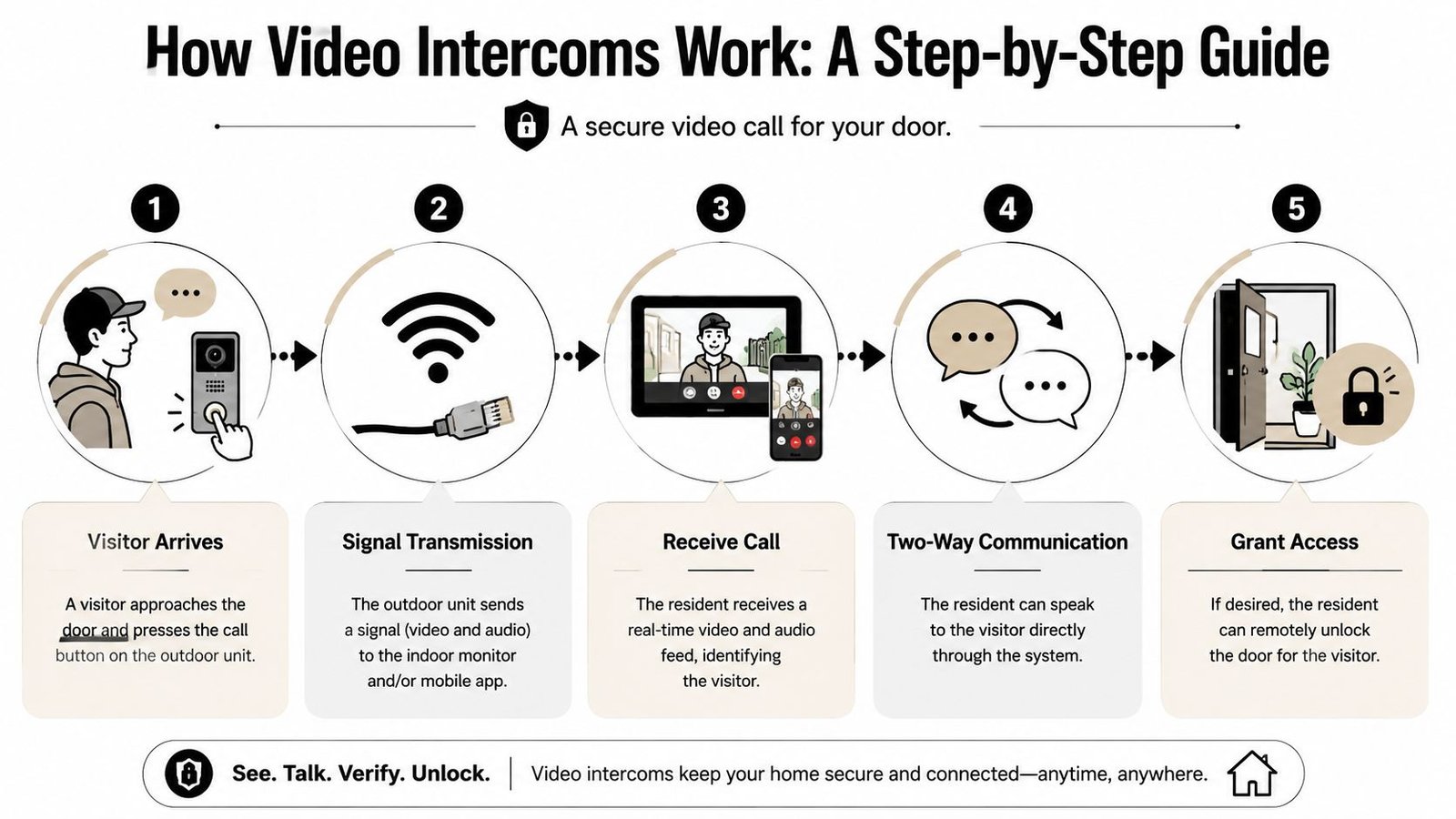
The three parts that matter
Every working system has three core elements.
The outdoor door station
This is the panel at the entrance. It normally includes a camera, microphone, speaker, call button, and often a keypad or reader as well. On better systems, it's the part built to handle poor weather and awkward light.The answering point indoors
This may be a wall-mounted monitor, a desk station, or a smartphone app. The user receives the call here, sees the visitor, and decides what to do.The lock release side
This is what physically allows access. When you press the release button, the intercom sends a signal to the lock or gate control so the door opens.
What happens in real use
A system only feels useful if the call flow is quick and obvious.
- Visitor presses the call button
- The occupant receives the video call
- Two-way audio starts
- The occupant verifies the visitor
- The occupant opens the entrance if appropriate
That's the core workflow. Everything else, app access, recording, integration, schedules, logs, sits around it.
A short video example often makes the concept easier to grasp in practice.
The part non-technical buyers often miss
The intercom isn't only a camera. It's a decision point connected to a barrier.
That means the best systems don't just show a face. They deliver live video and two-way audio reliably enough for the user to make a quick access decision. Industry guidance from Avigilon on video intercom system design also highlights the value of HD recording, low-light or night capture, and storage for later review, which becomes important if you ever need to check an incident or verify who attended the property.
If the video arrives late, the audio is broken, or the release is inconsistent, the system stops being an intercom and becomes an annoyance.
Choosing Your System Wired Wireless and IP Intercoms
Most buying mistakes happen here. People compare intercoms by screen size or app screenshots and ignore the system architecture underneath. The better question is simpler. How will this system connect, and how dependable will that connection be on your property?
For a quick side-by-side view, this comparison is useful:
Industry data shows 76% of security professionals prefer IP-based systems because of better scalability than analog hardware, and 42% of existing units are being upgraded for mobile app access, according to Market Growth Reports on the video monitor intercom security system market. That lines up with what installers see on the ground. Buyers want remote management, easier expansion, and cleaner integration with wider access control.
Wired systems
A traditional wired intercom uses physical cabling between the entrance and the answering point. In many cases, that's still the most stable option.
Where it works well
- New builds: Cabling can be planned before finishes go in.
- Long entrance runs: A gate at the end of a driveway often benefits from a hardwired path.
- Properties with weak wireless coverage: Stone walls, old masonry, and metal structures can all interfere with signal.
Trade-offs
- The install can be more disruptive in finished buildings.
- Retrofitting can involve chasing walls, lifting surfaces, or finding alternate cable routes.
- Expansion later may depend on whether spare cable capacity was planned.
Wireless systems
Wireless models appeal because they seem simpler. Sometimes they are. For a small house with a straightforward front door and good signal, they can be sensible.
The trouble starts when buyers confuse “easy to buy” with “easy to make reliable”. A Wi-Fi based call point at a gatepost is only as good as the network reaching that gatepost. If the outdoor unit sits behind thick walls or too far from the router, you'll get delayed calls, unstable audio, or intermittent video.
A wireless intercom is convenient when the property supports it. It's frustrating when the building fabric fights it.
IP systems
An IP intercom uses network infrastructure. That can mean local network cabling, managed switching, app connectivity, and integration with other systems. For larger homes, offices, apartment entrances, and sites with multiple doors, it's usually the most flexible route.
Here's what IP tends to do better:
| System type | Strength | Weak point | Best fit |
|---|---|---|---|
| Wired | Stable point-to-point performance | More disruptive retrofit work | New builds, gates, long-term fixed setups |
| Wireless | Faster initial fit in simpler settings | Signal dependence | Small homes, lighter retrofits |
| IP | Easier expansion and integration | Needs proper network planning | Businesses, multi-door sites, modernised properties |
A lot of readers at this stage are really choosing between a simple door entry device and a broader access platform. If you're comparing options around credentials, readers, door release methods, and managed entry, this overview of types of access control systems available helps place video intercoms in the wider picture.
Which one usually makes sense
There isn't one universal winner.
- A small terraced house may be best served by a neat wired or well-supported wireless unit.
- A business with staff entrances and delivery access usually benefits from IP.
- A shared or mixed-use building should be assessed with future expansion in mind, not only today's front door.
What works on site always beats what looks tidy on a brochure.
Essential Features for Modern Security and Convenience
The useful features aren't the flashy ones. They're the ones that help a person make a safe access decision quickly, and help the property operator review what happened afterwards if something goes wrong.
A modern intercom should be judged as a workflow, not as a gadget. The strongest setups bring camera, audio, and door release together so the user can verify the visitor, speak with them, grant access remotely, and keep a record of the event. That's the practical value described in Goldy Locks on how video intercom systems enhance visitor management.
This feature map is a good way to think about the priorities: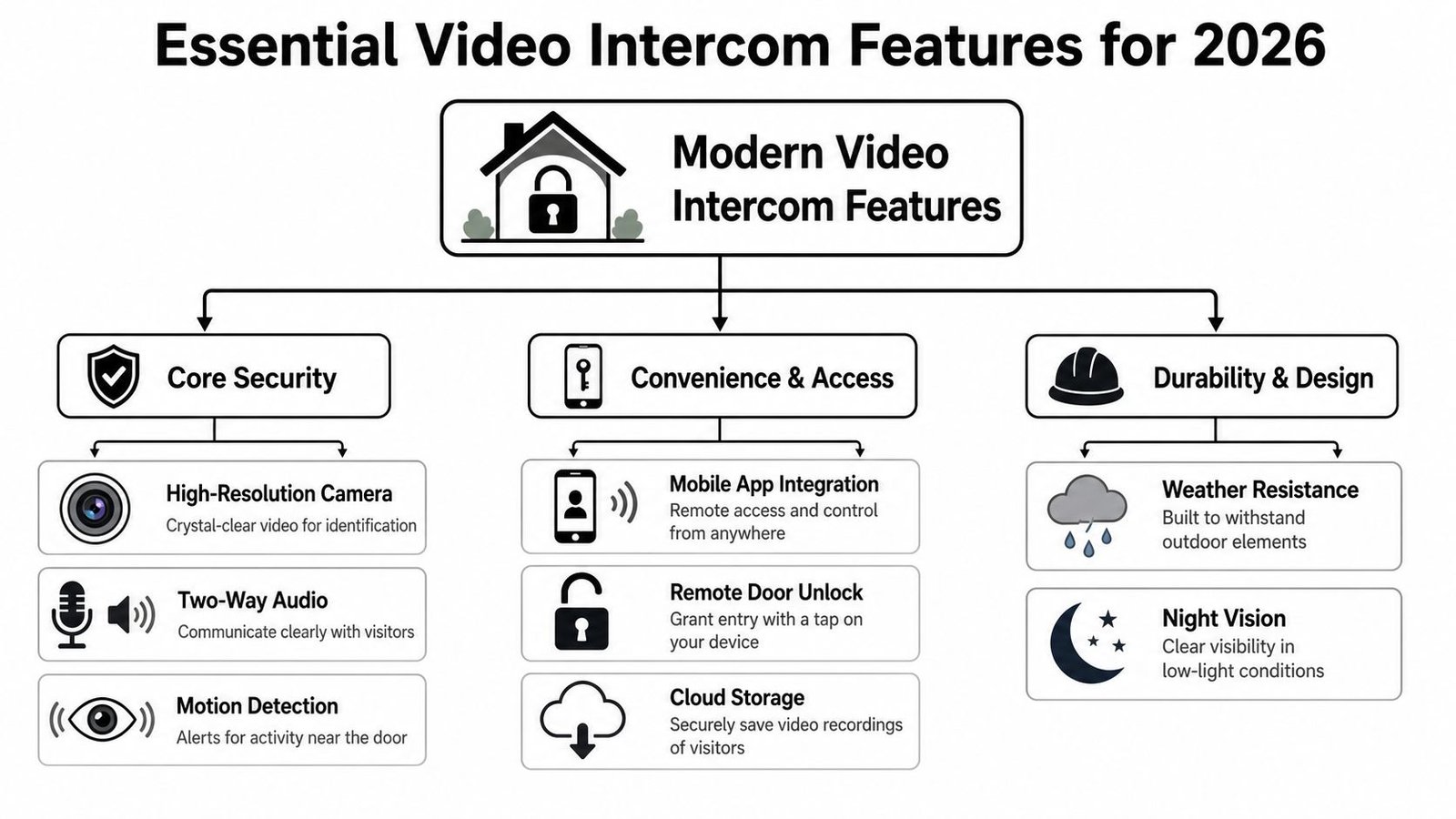
Features that matter most in day-to-day use
Some features sound good in a sales list but do very little in real operation. Others make a visible difference every day.
- Clear video quality: If you can't recognise a face in poor light, the camera isn't doing its job.
- Usable two-way audio: The microphone and speaker need to handle background noise, wind, and distance from the panel.
- Remote door or gate release: This is what turns a camera into an access tool.
- Call handling on a phone or monitor: Useful for homes and almost essential for premises that aren't staffed at the entrance.
- Event logs and clip storage: Helpful when reviewing access disputes, missed visits, or incidents.
- Night performance: A surprising number of systems look acceptable in daylight and poor after dark.
Integration is more important than feature count
The biggest jump in value comes when the intercom is tied into the rest of the security setup.
For example, if the intercom panel call is linked to door release, visitor footage, and access records, the user has one flow to work with instead of several disconnected devices. On a commercial site, that can mean the receptionist, office manager, or supervisor handles access without leaving their post. On a residential block, it can mean fewer missed calls and a clearer trail of who entered and when.
What tends to be worth paying for
If the budget has to be focused, I'd prioritise these in order:
Reliable call delivery
There's no point having a premium camera if the call doesn't reach the user consistently.Good low-light image
UK entrances spend a lot of the year in grey light, rain, shadow, or darkness.Solid integration with the lock
A delayed or failed release undermines confidence in the whole system.Easy user management
Staff changes, tenant changes, and phone changes happen. The system shouldn't be awkward to update.
Good intercom systems reduce hesitation. The user sees enough, hears enough, and can act without leaving their desk, kitchen, or reception area.
Features that often disappoint
Some extras look attractive but don't justify themselves unless the rest of the design is right.
- App-only control without a dependable network
- High resolution on paper with poor night performance
- Complex menus that confuse occasional users
- Cloud features with no maintenance plan behind them
A feature is only valuable if someone can rely on it when a visitor is standing outside in bad weather and wants access now.
Practical Applications for Homes Businesses and Carparks
The easiest way to judge video intercom systems is to put them into real places.
A homeowner in Cardiff
A homeowner in a Cardiff terrace wants to stop opening the door blind. Deliveries arrive while they're upstairs working. In the evening, the front step sits in shadow, and the old bell tells them nothing except that someone is there.
A good video intercom fixes the obvious part first. They can answer from an indoor screen or their phone, check whether it's a courier or an unexpected caller, and decide whether to engage. If the entrance is exposed to wind and rain, the outdoor unit also needs proper weather protection and a camera angle that doesn't point straight into glare.
For this type of property, overcomplication usually hurts. One entrance, a dependable call path, and clean video matter more than a long list of smart features.
A business owner in Bristol
A small business on an industrial estate in Bristol has a different problem. Deliveries, contractors, and visitors all use the same entrance. Staff are busy, nobody wants the front door left unsecured, and there isn't a full-time receptionist to manage arrivals.
Here the intercom becomes an operational tool. The office can see who's outside, speak to them, and release the door or gate remotely. If the system records events and links with access control, the business also has a cleaner view of who attended and when.
That matters in practical ways:
- Fewer interruptions: Staff don't keep walking to the door.
- Better visitor handling: Couriers and contractors aren't left waiting unnecessarily.
- Improved control: The entrance isn't opened on voice recognition alone.
A property manager in Swansea
A property manager in Swansea looks after a gated development with pedestrian access and a vehicle entrance. Residents want convenience. The manager wants control, and not another system that generates complaints every time the weather turns.
Effective video intercom implementation hinges on design choices. A video intercom can help manage both pedestrian and vehicle entry, but only if the panel locations, sight lines, and release logic are set up properly. A badly positioned camera at a gate gives you the top of a bonnet or the side of a face. A well-positioned one supports proper verification without slowing traffic flow unnecessarily.
In shared environments, the best result is usually less about the panel itself and more about how the entrance behaves during normal busy periods.
For homes, businesses, and carparks alike, the pattern is the same. The value isn't only that the system improves security. It also removes avoidable friction from daily entry management.
Installation Costs and Professional Site Surveys
This is the part many buyers underestimate. The hardware matters, but the site survey and installation standard matter just as much.
A cheap panel fitted in the wrong place will underperform. A decent system installed properly will usually outlast and outperform a supposedly better model fitted without proper thought to height, glare, cable routing, lock compatibility, and network stability.
Why quotes vary so much
Final cost depends on the site, not just the product box.
The main factors are usually:
- Number of entrances: One front door is simpler than a front door plus gate plus rear staff entrance.
- Distance and cable route: A short wall run is different from a long driveway or detached gatepost.
- Existing infrastructure: Some properties support a tidy retrofit. Others need fresh cabling or civil work.
- Locking method: The intercom has to work properly with the release hardware already in place, or with new hardware if that's being added.
- Answering method: Indoor monitor, app-based answering, or both.
If you want a broader overview of what drives security project pricing across the sector, this guide to 2026 security system costs in the UK is a useful reference point.
The mistakes I see most often
A lot of DIY and low-detail installs fail in predictable ways.
The first is camera placement. Guidance covered in Linstar's best practices for video intercom placement notes that cameras should typically sit around 4.5 to 5 feet high, with a wide field of view and positioning that reduces glare and shadows. That sounds minor until you see an installed panel aimed at chest height, or one mounted where every night call becomes a silhouette under a porch light.
The second is weather exposure. South Wales and the South West aren't kind to poor external installation work. Water ingress, wind-driven rain, and fluctuating light expose weak seals and poor positioning quickly.
The third is signal optimism. People assume the home Wi-Fi that works in the kitchen will also work at the gate. Sometimes it does. Quite often it doesn't.
What a proper survey should answer
A useful survey doesn't just measure a wall. It should answer practical questions such as:
- Where should the camera sit to capture a face clearly?
- What happens after dark or in direct sun?
- Will the app or monitor receive calls reliably from this location?
- What lock hardware is being controlled?
- How will the system be serviced later if there's a fault?
A site survey should reduce surprises, not just produce a quote.
About pricing expectations
There isn't one honest flat price for video intercom systems because a simple domestic front door install and a multi-entry commercial setup are completely different jobs. If anyone prices your system accurately without seeing the site or understanding the entrance layout, treat that cautiously.
For homes, costs often stay manageable when the route is simple and the release hardware is straightforward. For businesses and shared properties, labour, integration, and entry complexity usually matter more than the panel itself.
Choosing a Trusted Local Installer and Your Next Steps
Once you know what sort of system you need, the next question is who should install it. This matters more than many buyers realise because video intercoms sit at the junction of security, access control, cabling, networking, user management, and ongoing maintenance.
The installer should be able to explain the trade-offs clearly. If they only talk about screen size, app branding, or catalogue features, that's not enough.
What to check before you appoint anyone
Start with the basics.
- Relevant experience: Ask whether they install intercoms in homes, businesses, and shared properties, not only standalone CCTV.
- Local understanding: A contractor who works regularly across South Wales and the South West is more likely to understand older building stock, exposed entrances, and retrofit constraints.
- Accreditations and vetting: DBS-checked engineers and recognised health and safety standards matter when people are working in occupied properties.
- Maintenance support: Intercoms need ongoing reliability, especially if the system depends on apps or network connectivity.
This is also where the conversation should widen beyond the door panel itself. Modern systems increasingly act as cloud-connected access platforms that can help manage residents, deliveries, and shared areas from one app, but their value depends on the network and maintenance being looked after, as noted in Multifamily Dive on next-generation video intercom platforms.
Ask practical questions, not sales questions
A good installer should answer these comfortably:
| Question | Why it matters |
|---|---|
| How will this perform in bad weather and low light? | UK entrances fail in real conditions, not in showroom conditions |
| What happens if the network drops? | You need to understand the operational risk |
| Can this integrate with access control or gates later? | Future changes shouldn't force a full replacement |
| Who updates users and permissions? | Daily management needs to be simple |
| What maintenance will it need? | Ongoing reliability depends on upkeep |
For readers comparing entrance security more broadly, it's also worth looking at adjacent building elements. Discussions around security and comfort with new doors are a reminder that the door set, frame, closer, and lock condition all affect how well any access system performs.
One local route for integrated support
If you need an installer that also handles wider access and security integration, access control installers at Wisenet Security Ltd cover linked systems such as entry control, CCTV, alarms, and gate automation across South Wales and the South West. That's often useful where the intercom needs to be part of a broader setup rather than a standalone panel.
A visual snapshot of that kind of service environment is here:
The right next step
Don't start by picking a model from a list online. Start by defining the entrance, the users, and the operating conditions.
For a homeowner, that may mean one panel at the front door with dependable app answering. For a business, it may mean linking the entrance to staff workflow and recorded access events. For a shared property, it may mean planning for multiple users, permissions, and future maintenance from day one.
The best outcome is a system that people trust and use. Clear video. Stable calling. Sensible placement. Proper release control. Support when it needs servicing.
If you want a practical recommendation based on your property rather than a generic spec sheet, contact Wisenet Security Ltd for a free, no-obligation consultation and site survey. They can assess your entrance layout, network reliability, lock compatibility, and day-to-day access needs so you get a video intercom system that fits the building and works properly in real UK conditions.