How to Reset Security System Without Losing Protection
Your alarm's sounding, your phone's lit up with alerts, and someone's already asking you to just switch it off and on again. That's the moment most resets go wrong. The panel goes quiet, but the zone that triggered it is still open, the monitoring centre's still acting on a signal, or the evidence in the event log has just been cleared. Learning how to reset a security system properly starts with the reason for the reset, not with a button sequence.
Table of Contents
- Choose the Correct Security System Reset Method
- Prepare the System Before Resetting
- Reset Intruder and Monitored Alarm Systems
- Handle Fire Alarms Safely
- Reset CCTV Recorders and Camera Systems
- Restore Access Control and Intercom Systems
- Troubleshoot Common Security System Faults
Choose the Correct Security System Reset Method
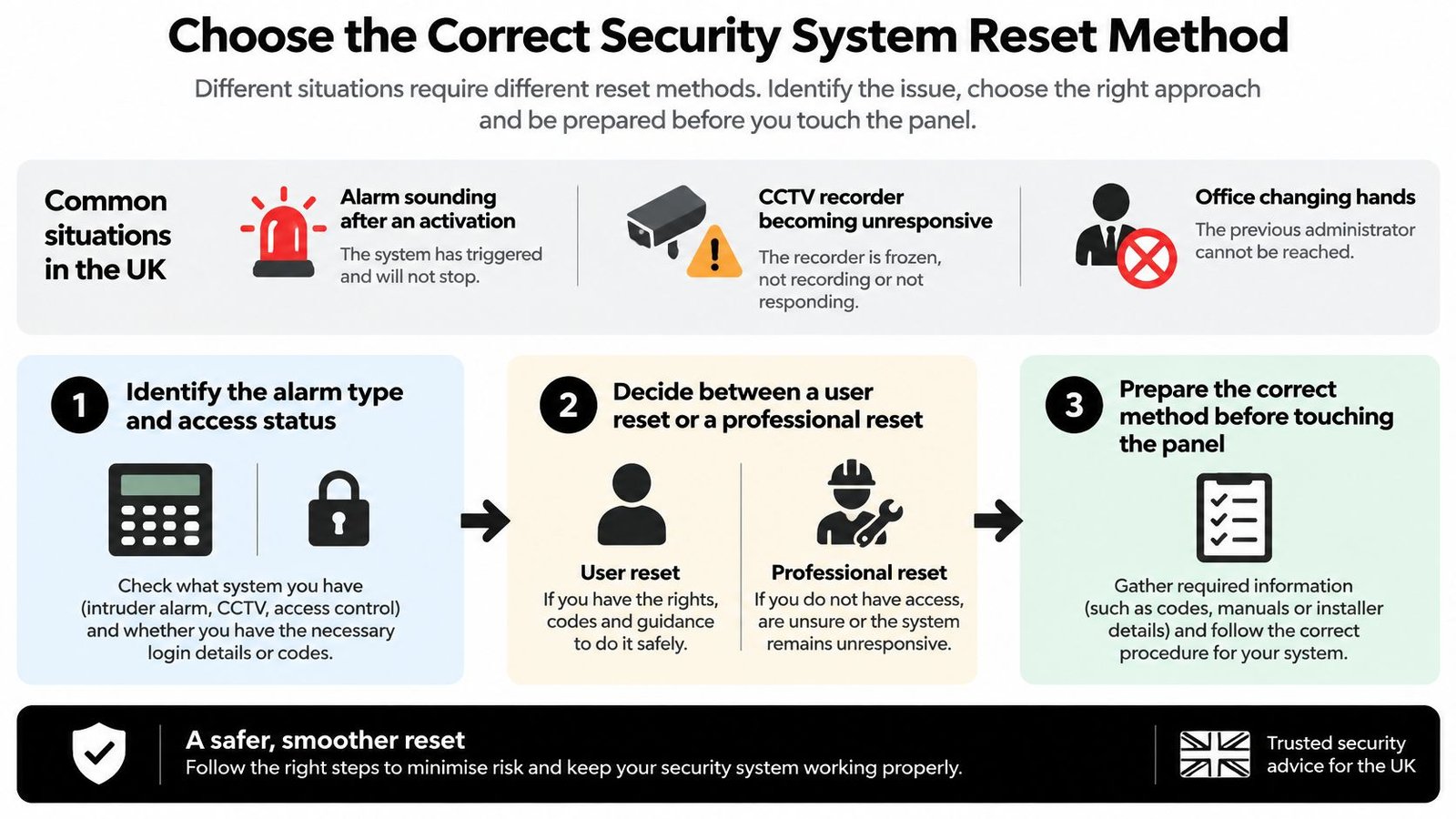
An intruder alarm sounding after a genuine activation, a CCTV recorder that's stopped responding, and an office changing hands where nobody can reach the previous administrator all get called a reset. They're three different jobs. One clears an alarm state. One restores service. One transfers control of accounts, users and remote access, and getting them mixed up can leave you unprotected without realising it.
Start by identifying what you're standing in front of. An intruder panel, a fire panel, a recorder and a door controller behave differently, and a sequence that's harmless on one can remove programming or evidence on another.
Decide Before You Touch the Controls
Work through these questions in order, because each answer narrows the safe route.
- What's the system type and grade: A domestic bell only panel, a monitored commercial intruder system and a fire panel carry different authorisation and recording duties.
- Is it monitored: If signals go to an alarm receiving centre, clearing the panel locally doesn't cancel what they've already received.
- Why did it activate: An open door, a tamper, a detector fault and a genuine break in all show as an activation, but only some should be reset straight away.
- Who's authorised: A trained user code holder, a designated responsible person and an installer with engineer access aren't interchangeable.
A user reset returns a system to its normal unset state after the cause has been checked. A factory reset is a rebuild. It can remove users, network settings, integrations, event history and remote viewing, so treat it as a recovery project rather than a quick fix. If you can't say which one the situation needs, you don't yet have enough information to proceed safely.
Prepare the System Before Resetting
Most of the damage from a bad reset happens in the two minutes before anyone presses anything. The display that tells you which zone fired, and when, is often the only clear record you'll get. Clear it and you're guessing.
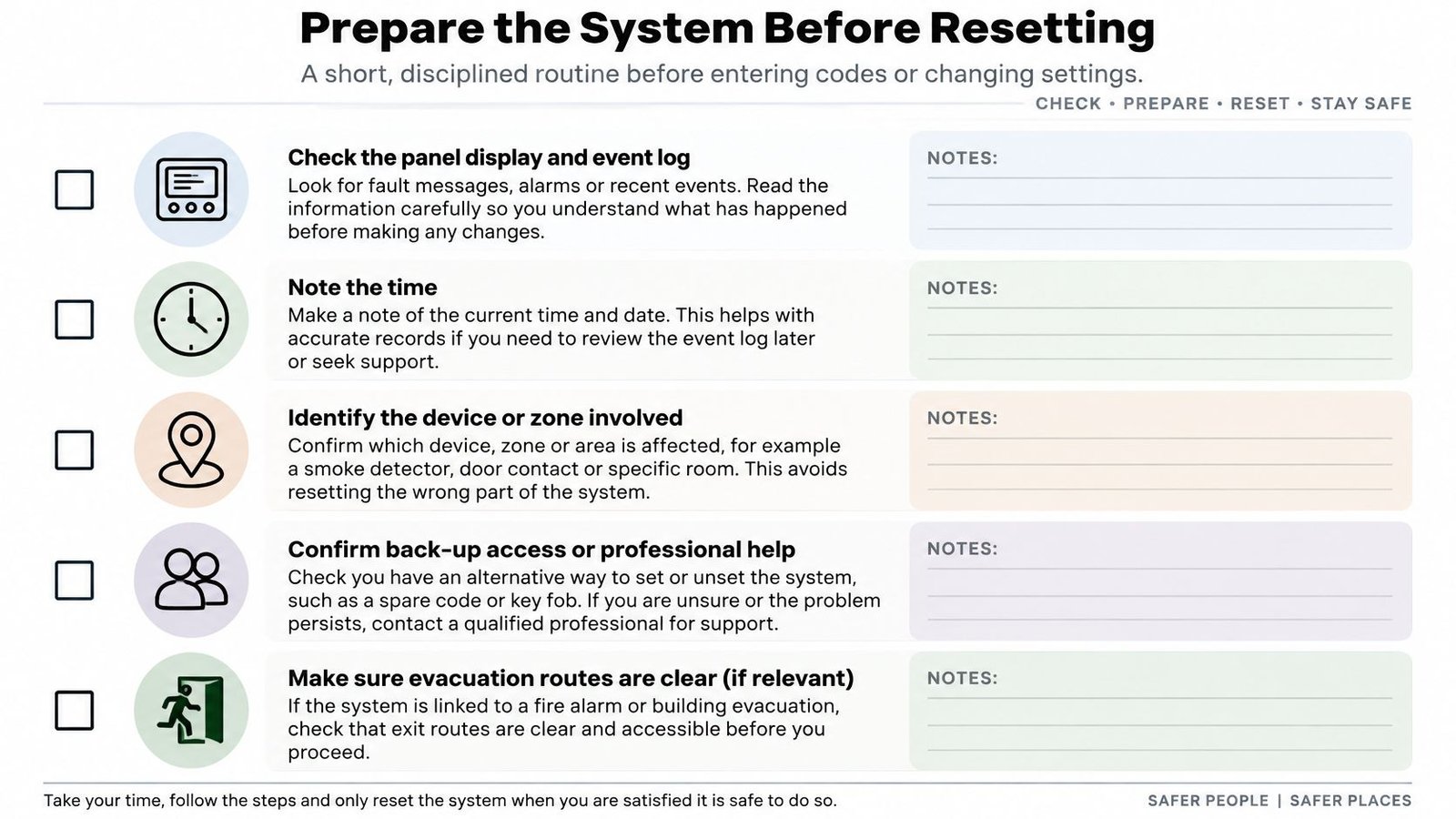
Read the panel display and event log first. Note the time, the zone or device named, and any fault or tamper indication showing alongside it. Photograph the display if your procedures allow it, because a written note made later from memory is rarely precise.
Build Your Record Before You Clear Anything
- Panel state: Record the exact display text, zone, device and time before silencing or clearing.
- Installed procedure: Confirm you have the manufacturer's instructions and the installer's programmed reset route for this panel, not a generic sequence from memory.
- Monitoring notification: Tell the alarm receiving centre before test or reset work where your contract requires it, so a test signal isn't treated as an incident.
- Connected systems: For CCTV, access control and intercoms, list current administrators, recording destinations, integrations and remote access arrangements.
- Suspected takeover: Preserve logs, user lists and configuration details before changing anything, because that's the evidence of who had access.
Practical rule: If silencing the sounders makes occupants believe the building is protected again while a zone is still faulted or bypassed, you've created a bigger problem than the noise.
You're ready when you can state the reason for the reset, the recovery point you're returning to, and who's authorised to do it. If any of those three is unclear, that's the point to escalate rather than experiment.
Reset Intruder and Monitored Alarm Systems
There's no universal code sequence for intruder alarms, and any guide that offers one is guessing at your panel. Pyronix, Honeywell, Texecom and other manufacturers programme reset behaviour differently, and installers can configure whether a user code alone can reset certain conditions or whether engineer attendance is required. What transfers between systems is the order of decisions.
Follow the Installed Procedure for Your Panel
First, establish why the alarm activated. Check the zone or device named on the display, inspect that area, and deal with the cause before resetting. A door left ajar, a detector obscured by new stock, and a disturbed tamper circuit each need resolving at source. Resetting over an open zone either fails or leaves that zone excluded, which means part of the premises isn't covered next time you set the system.
Then use the authorised user code or key exactly as the installed procedure describes, and follow the panel prompts rather than anticipating them. Where the panel reports a communication fault, treat that as a separate problem from the activation itself. Clearing the alarm memory won't restore a failed signalling path.
This standards led approach isn't bureaucracy for its own sake. UK intruder alarm requirements have passed through at least four major standard versions over 23 years, with BSI's record of BS EN 50131-1 revisions showing the 1997 version withdrawn on 30 November 2006 and successive versions running to BS EN 50131-1 2006+A3 2020. That 2020 revision added a framework for connecting to and controlling alarm systems remotely, which is why app based resets now sit inside defined requirements. The standard also supports four security grades, so the correct reset route can depend on your system's grade and configuration.
Monitored Systems Need a Second Conversation
On a monitored system, resetting the panel and resolving the incident are separate tasks. Understanding what a monitored alarm system involves helps here, because the alarm receiving centre acts on signals it has already received, including confirmed activations and communication failures. Contact them as your procedure requires, confirm the cause, and follow their instruction on whether the system can return to normal service or needs an engineer.
Don't confuse clearing an activation with cancelling monitoring or changing account details. Those are contract and account actions, not panel actions.
Finish by checking for a normal display with no outstanding fault, confirming every zone shows clear, and verifying the communication status is healthy. If the system sets successfully on the next attempt with all zones included, the reset has worked. A quiet keypad on its own proves very little.
Handle Fire Alarms Safely
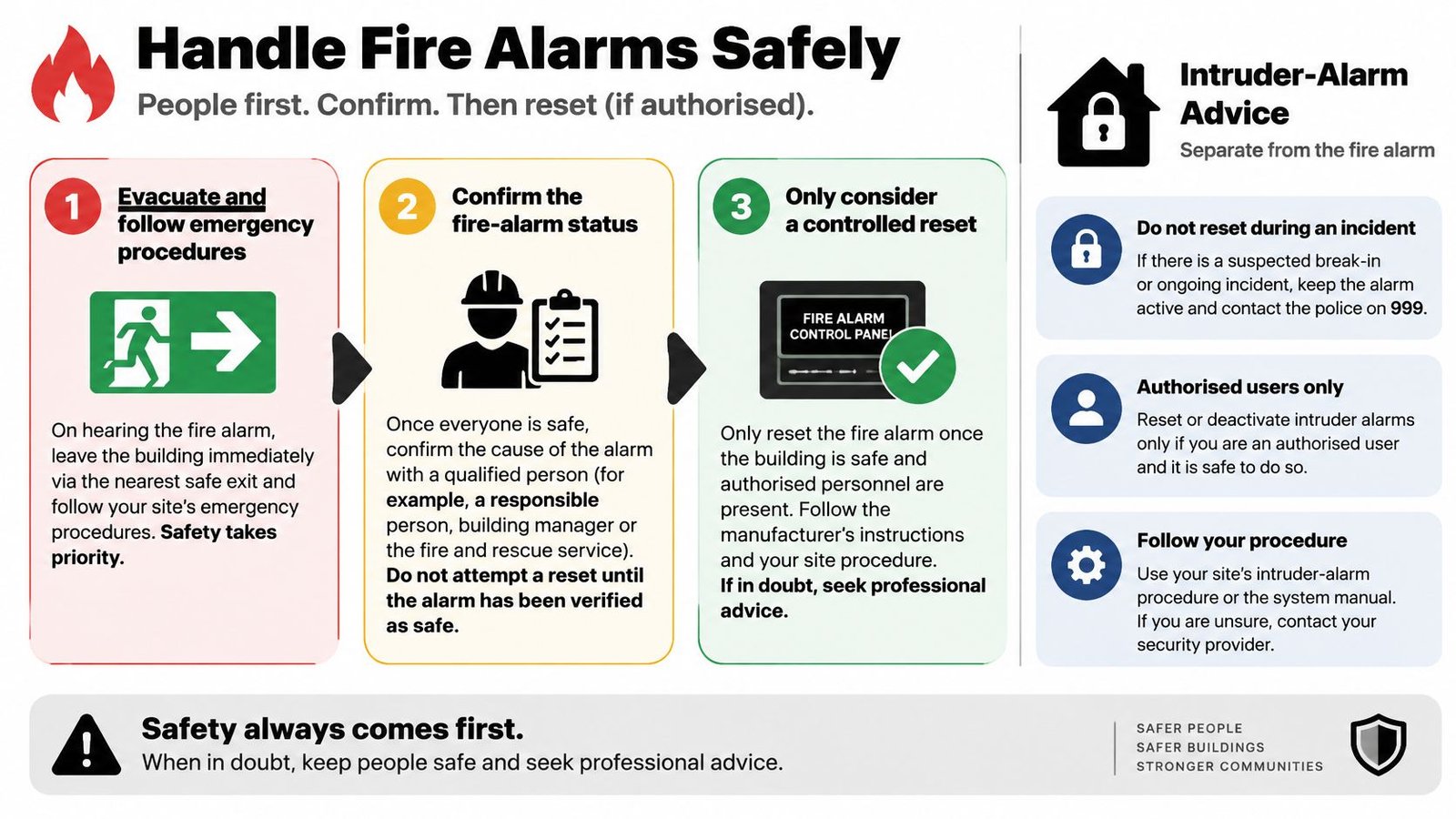
A commercial fire alarm isn't a louder intruder alarm, and resetting one is a safety decision before it's a technical task. Evacuation and your emergency procedures come first. Nobody should be standing at the panel working through a reset sequence while occupants are still leaving the building or while the cause is unknown.
The Authorised Sequence After an Activation
Confirm evacuation is complete and the cause has been investigated. If the fire service attended, don't reset until the incident is resolved or the Incident Commander authorises it. Before touching Reset, record the panel display, alarm zone or device, time, cause and corrective action in the fire alarm logbook. London Fire Brigade guidance on fire alarm management makes recording the event before reset an explicit step, because resetting early erases the diagnostic information an engineer needs.
Only then should the authorised person use the user control or code to silence sounders and the panel buzzer, restore any operated manual call point or clear smoke and heat from the detector, and press Reset. Success looks specific. You want a normal display with no alarm or fault indication remaining.
A repeat alarm after reset means the initiating condition is still present. Investigate it. Don't press Reset again and hope.
Who Carries Responsibility for the Reset
Every commercial premises needs a named Responsible Person supervising the system, procedures, training, testing and records. Northamptonshire Fire and Rescue guidance on unwanted fire signals is clear that the Responsible Person owns the system, ensures the cause is investigated, and uses a trained and competent person for resetting. Firefighters generally won't reset the system for you.
That matters in shops, warehouses, blocks of flats and multi tenanted buildings, where a reset affects evacuation arrangements, monitoring signals, insurance evidence and compliance. A silenced or partially reset panel can fail to respond properly to a subsequent fire, which is a far worse outcome than an inconvenient alarm. Pair this discipline with the routine duties covered under UK fire alarm testing regulations so resets sit inside a wider, documented regime rather than as isolated reactions.
So can you reset after a false alarm? Yes, once the building's checked, the device and location are recorded, the monitoring centre is notified where applicable, and the nominated competent person judges it safe.
Reset CCTV Recorders and Camera Systems
A frozen recorder tempts people toward the power cable. Resist that for a moment. Power cycling is a minor diagnostic check, not a diagnosis, and on a recorder that's still writing to its drives it can turn a recoverable fault into missing footage.
Start With What the Recorder Is Telling You
Check the NVR or DVR display messages and event log first, along with recording and storage status. A full drive, a failed drive warning, time drift and a lost network connection produce similar complaints from users but need entirely different responses. Knowing the difference between an NVR and a DVR matters here, because IP camera faults often live on the network between camera and recorder, while analogue faults more often sit in cabling or power.
Use the manufacturer's documented recovery procedure for the fault you've identified. Hikvision, Dahua and similar platforms each handle password recovery, configuration restore and factory defaulting differently, usually with proof of ownership steps built in. Follow those. Shortcuts published in forums frequently apply to older firmware and can lock accounts.
Understand what a full restore removes before you start. Users, network settings, remote viewing, event history and integrations with alarms or access control can all go. That's sometimes exactly what you want, particularly at handover, but only when you've recorded what needs rebuilding.
Treat Handover and Suspected Takeover as Cyber Recovery
Where a property changes hands or someone may have taken control of the system, the reset becomes a security recovery. National Cyber Security Centre guidance on regaining control of smart devices advises resetting smart devices if someone may have taken control, changing the router Wi-Fi password, and following the manufacturer's device specific procedure. It also recommends a factory reset before selling or transferring a device because it removes personal data.
Document current users and configuration first. Then change administrator credentials and the associated email account, remove former occupants or staff, rotate Wi-Fi and remote access passwords, update firmware, and reconnect only trusted networks. A factory reset alone isn't a complete fix if the old owner is still attached through a cloud account.
Finish with checks that go beyond a picture on screen. Confirm live view, actual recording and playback, correct timestamps, alert delivery, storage health and authorised mobile access for named users only. While you're reviewing the external setup, it's worth checking lighting supports the cameras rather than fighting them, and install outdoor security lighting in Florida offers useful context on placement principles even though UK wiring rules differ.
Restore Access Control and Intercom Systems
Resetting access control carries a risk the other systems don't. Get it wrong and you either lock legitimate users out of their own building or restore access for people who should no longer have it. Both failures tend to surface at the worst moment, usually first thing on a Monday.
Pin down the fault layer before changing configuration. A single rejected fob points to a credential or reader problem. Every user rejected at one door points to that controller or its lock output. Every user rejected everywhere suggests a network, server or database issue. Resetting the whole system for a single damaged card is disproportionate and destroys useful evidence.
Inventory Before You Rebuild
List credentials, cards, fobs, PINs, user groups and time schedules as they currently stand. Note administrator accounts and the email addresses tied to them on networked platforms such as Paxton Net2, along with any time and attendance integration. Then use the manufacturer or installer procedure to remove departed users, renew compromised credentials and restore authorised programming.
On networked controllers and IP intercoms, work through administrator accounts, Wi-Fi and remote access credentials, trusted network connections and firmware updates. The scale of exposure justifies the care. The UK Government Cyber Security Breaches Survey technical report identifies approximately 1,417,730 UK businesses with employees operating in this connected environment. Default credentials restored by a factory reset, left unchanged, are an open invitation in that setting.
Verify the practical outcomes afterwards. Test door releases on presentation of valid credentials, confirm rejected credentials stay rejected, check intercom calls reach the right handset or app with working video and audio, and review the event log. Confirm emergency and fire interface behaviour with the responsible person rather than assuming it survived.
If a controller governs critical doors, escape routes or business continuity, and you've lost configuration or administrator access, stop and get authorised technical help. Rebuilding permissions from memory across a multi tenanted building creates errors you'll be finding for months.
Troubleshoot Common Security System Faults
When a reset hasn't worked, the symptom is your best evidence. Work from what's observable, record what you find, and know where your authority ends. Panel internals, mains wiring and battery replacement belong with the installed documentation and competent engineers, not with trial and error.
Common Reset Fault Guide
| Symptom | Safe first check | Keep or record | Escalate when |
|---|---|---|---|
| No power or intermittent operation | Check the supply indicator and whether other equipment on the circuit works | Times of dropouts and any recent electrical work | There's no supply at the panel or dropouts repeat |
| Low or failed backup battery indication | Read the exact fault text and note panel behaviour during mains loss | Fault wording, date first shown, service history | The indication persists or the panel can't hold up |
| Sensor or zone fault | Inspect the named zone for open doors, damage or obstruction | Zone name, device location and log entries | Tamper shows, wiring looks damaged or the fault won't clear |
| Communication failure | Check router, network link and signalling status indicators | Signal type affected and time the fault appeared | The monitoring centre confirms signals aren't arriving |
| App or remote viewing failure | Test local viewing first to separate network from account faults | Which users and devices fail, local versus remote result | Administrator access is lost or unknown users appear |
| Repeat activation after reset | Recheck the initiating device and its environment | Each activation time and the device involved | It repeats without an identifiable cause |
| Missing recordings or access events | Check storage status, timestamps and schedule settings | The gap period and any drive or database warnings | Drives report errors or evidence may be affected |
Two examples show how the layers separate. A warehouse camera that views perfectly on the local monitor but not on phones isn't a camera fault. The recorder and camera are working, so you investigate the network path, remote access settings and user accounts rather than defaulting the camera. Conversely, an office door controller rejecting valid fobs straight after a user update points at permissions or database synchronisation, not at the readers. Rebuilding the reader hardware wouldn't touch the actual fault.
Verify the Whole System After Any Reset
- Zones and sensors: Walk test where your procedure allows and confirm each device reports correctly.
- Monitored communications: Confirm test signals reach the alarm receiving centre and the account shows normal.
- CCTV: Check live view, recorded playback, timestamps, storage and remote viewing for authorised users.
- Access and intercoms: Test valid and invalid credentials, door release behaviour, calls, audio and video.
- Accounts and logs: Confirm administrator ownership, remove stale users and file your reset record with date and reason.
Repeated resets are a symptom, not a solution. Escalate to a qualified engineer when you see tamper indications you can't explain, unexplained activations, damaged wiring, battery faults, failed communications, lost administrator access or any concern about evidence integrity. Contact the monitoring provider when the issue is signal handling or account status, and book an on site repair when the fault sits in hardware, wiring or configuration. Those are different phone calls solving different problems.
For premises across South Wales and the South West, Wisenet Security Ltd provides maintenance and fault restoration across integrated CCTV, intruder, access control, intercom and fire systems. The firm serves Cardiff, Bristol, Newport, Swansea and surrounding areas with DBS checked engineers, more than 20 years of experience and SafeContractor accreditation. That's the kind of single point of accountability that helps when a fault crosses system boundaries.
If your panel keeps faulting, your recorder has stopped recording, or you've inherited a system you can't fully control, Wisenet Security Ltd can diagnose the fault, restore configuration safely and verify monitoring, recording and access before handing the system back. Visit Wisenet Security Ltd to arrange a consultation covering homes, businesses and managed buildings across South Wales and the South West.