What Is the Difference Between NVR and DVR: A Clear UK Guide
You're in a familiar spot. A local installer has sent two CCTV quotes. Both include four cameras. Both look tidy on paper. One says NVR. The other says DVR.
If you're a homeowner in Cardiff, that can feel like pointless jargon attached to a box that will live in a cupboard under the stairs. If you run a shop in Bristol, it might feel like an old system question you only need to solve because one failed camera has turned into a full upgrade. Either way, that recorder choice matters more than most quotes make clear.
It affects how your cameras connect, how easy the app is to use, how well the system handles remote viewing, how painful future upgrades become, and how easy it is to export footage when the police or an insurer asks for it. In the UK, it also overlaps with data protection duties if your cameras capture identifiable people.
Most guides answer the question “what is the difference between NVR and DVR” with one short line: IP cameras versus analogue cameras. That's true, but it's incomplete. The better question is which recorder fits your property, network, internet connection, and compliance needs.
Table of Contents
- Two Quotes, One Quiet Decision
- What DVR and NVR Actually Mean
- How the Two Systems Differ Side by Side
- Resolution, Bandwidth and Storage in Real Numbers
- Where Each Recorder Fits Best in the UK
- Compliance and the Real Cost of Choosing Wrong
- A Short Buyer Checklist Before You Sign
Two Quotes, One Quiet Decision
A Cardiff homeowner gets two quotes for a front-drive and rear-garden CCTV system. Quote one uses a 4-channel DVR with analogue cameras. Quote two uses a 4-channel NVR with IP cameras. The total price gap isn't dramatic, and both installers say the footage will be viewable on a phone.
That's the moment many people stop asking questions. They compare brand names, camera count, and headline price. They don't look closely at the recorder because it sounds like the least interesting part of the system.
It often turns out to be the most important part.
A DVR usually points to a system built around older-style analogue cabling and a recorder that does the video processing itself. An NVR usually points to a networked setup where each camera is smarter and sends digital video across Ethernet. To a buyer, that changes more than wiring. It changes flexibility.
Practical rule: If two CCTV quotes look similar, the recorder often explains most of the hidden differences.
A Bristol shop owner faces a slightly different version of the same decision. The property already has older coax cable from a previous install. One installer suggests reusing it with a DVR. Another suggests replacing key runs and moving to an NVR with IP cameras for clearer till-area footage and easier remote checks from a phone.
Neither option is automatically right. If the existing cabling is sound and the goal is basic coverage, a DVR can still make sense. If the owner wants cleaner zoomed-in footage, better app access, simpler expansion, or smarter alerts later, the NVR quote may fit better even if the first invoice is higher.
The useful skill isn't picking a brand off a brochure. It's learning how to read what the recorder choice means for your day-to-day use.
What DVR and NVR Actually Mean
At the most basic level, both boxes do the same job. They record video onto a hard drive so you can review events later. The important difference is how the video reaches the recorder and where it gets processed.
DVR means the recorder does the translating
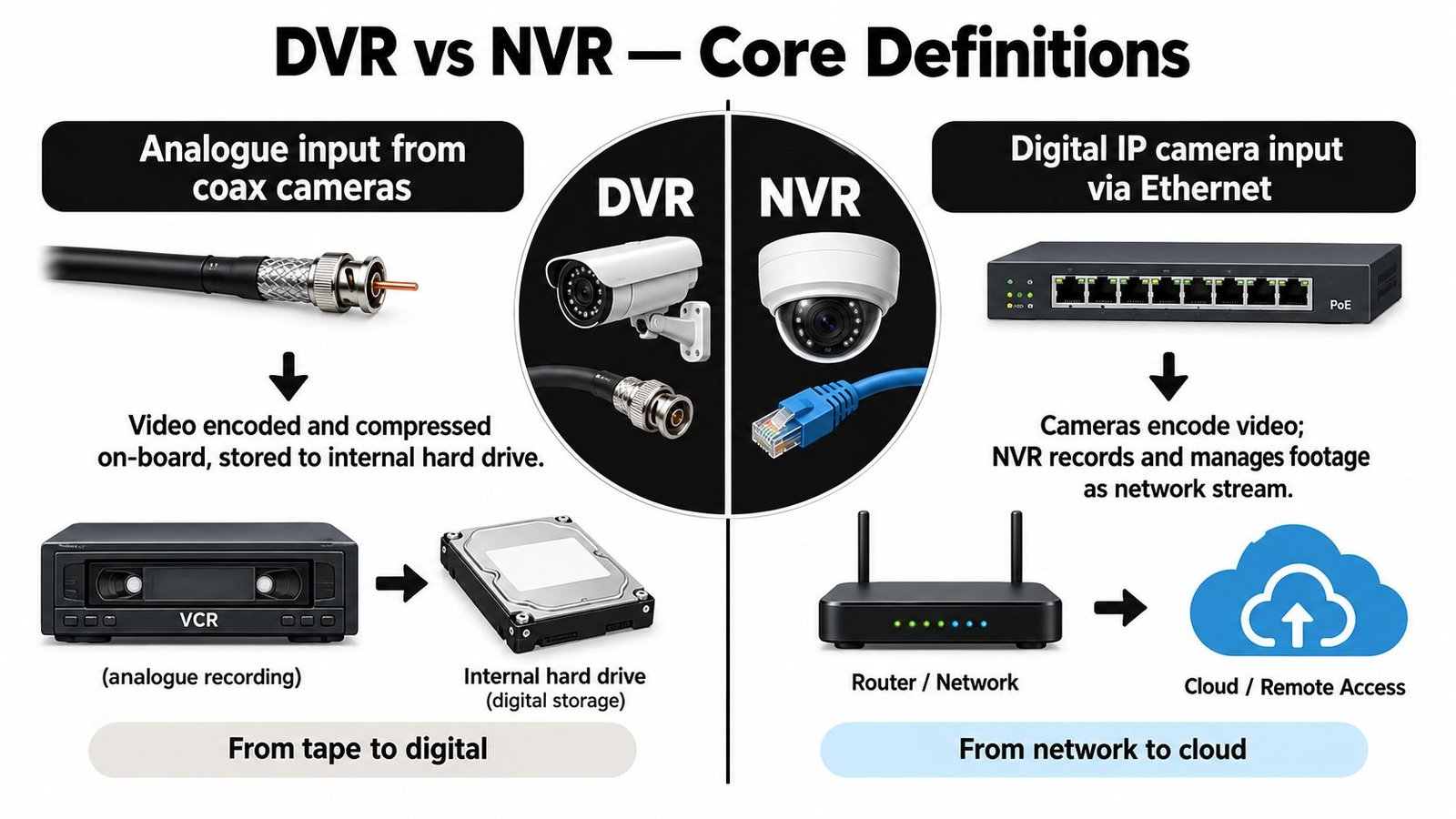
DVR stands for digital video recorder. In a traditional DVR system, the cameras are analogue. They send video over coaxial cable to the recorder.
The DVR then converts that incoming signal into a digital file, compresses it, and saves it to its internal storage. A simple way to picture it is this: the DVR is like a translator listening to a live conversation, converting it into a written language, then filing it away.
That's why the recorder in a DVR setup carries more of the processing burden. The cameras are usually simpler. The box in the cupboard does more work.
NVR means the camera does more of the work
NVR stands for network video recorder. In an NVR system, the cameras are IP cameras. They digitise and encode the video themselves, then send that finished stream over a network, usually on Cat5e or Cat6 Ethernet cable.
The NVR behaves more like a librarian than a translator. It isn't rewriting the book. It's receiving an already prepared digital file, cataloguing it, and storing it.
That difference matters because the cameras in an NVR setup are usually more capable devices in their own right. They often support better image settings, easier integration, and more advanced features through standard network methods such as ONVIF and RTSP.
If you want a broader camera-side explanation before you compare recorders, this guide to IP cameras and HD analogue CCTV helps fill in that part of the picture.
Both are digital in the end
People often get confused. They hear “analogue cameras” and assume a DVR is somehow storing tape-like footage. It isn't. The output is still digital video on a hard drive.
The distinction is not “digital versus non-digital”. It's where the encoding happens and how the signal travels.
A DVR records analogue camera feeds after converting them. An NVR records digital network streams that the camera has already prepared.
That's the foundation for every other difference you'll care about later, including cabling, image options, bandwidth demands, and remote access.
How the Two Systems Differ Side by Side
The easiest way to compare them is to stop thinking in marketing terms and look at the parts you live with after installation.
NVR vs DVR at a glance
| Feature | DVR | NVR |
|---|---|---|
| Architecture | Recorder handles video encoding and storage | Cameras encode video, recorder stores and manages streams |
| Camera type | Analogue cameras | IP cameras |
| Cabling | Coax for video, plus separate power in many installs | Single Ethernet cable can carry data and power with PoE |
| Power approach | Camera usually needs power near the camera end or via separate run | PoE can power cameras from a switch or PoE NVR |
| Expansion | Better for keeping an older analogue layout running | Better for adding modern network cameras and scaling later |
| Image flexibility | Depends heavily on recorder and analogue standard used | Usually broader image settings and easier high-resolution support |
| Audio | Often more limited and more fiddly to wire | Usually easier where IP cameras support built-in or add-on audio |
| Analytics | Basic motion recording is common | More likely to support advanced analytics through cameras or software |
| Remote access | Can work well, but older setups may feel clunky | Usually better suited to app-based and network-based remote viewing |
| Best fit | Legacy analogue properties, tighter budgets, basic coverage | Newer installs, higher image expectations, easier remote use |
Cabling changes the job more than people expect
For retrofit work in UK homes and small business units, cabling often decides the sensible path before image quality does.
If a property already has reliable coax cable from an older CCTV system, a DVR or hybrid recorder can reduce disruption. You may avoid lifting floors, chasing walls, or replacing routes that are awkward to reach. That can make a very ordinary domestic upgrade straightforward.
An NVR setup usually means Ethernet runs to each camera position. In a fresh install, that's often cleaner because one cable can carry both data and power through PoE. In an awkward retrofit, though, new cable routes can push labour up even if the equipment itself is a better long-term fit.
Smarts tend to sit with the NVR side
If you only want to know whether someone walked through the side gate, either platform can do the basics. If you want line crossing alerts, stronger user permissions, easier camera-by-camera management, or richer app access, NVR systems usually make more sense.
That's because the intelligence is more distributed. The camera is not just a lens with a wire attached. It's a network device. That gives installers and users more room to fine-tune the system.
Audio and remote access are where buyers often feel the difference
Homeowners usually notice this when they use the mobile app. Shop owners notice it when they try to review an incident from home after closing time.
A DVR can absolutely offer remote viewing, but older ones often feel like they were bolted onto the internet after the fact. Modern NVRs are usually built with network access in mind from the start. The same goes for supported audio functions where the cameras and recorder are designed to work together over the same IP environment.
If your main concern is “I just need footage if something happens”, a DVR may be enough. If your concern is “I need the system to be easy to live with for years”, that usually pushes the decision toward NVR.
Resolution, Bandwidth and Storage in Real Numbers
The NVR versus DVR choice stops being theoretical. A system can look excellent on a quote and still be badly matched to the property once you account for storage and internet limits.
Storage follows bitrate, not just camera count
With an NVR, storage planning is shaped mainly by the total bitrate coming from all cameras, not just by how many cameras you have. UK storage guidance gives a useful reference point. A 24/7 H.265 setup with 4 x 1080p cameras needs about 5 to 6 TB over 30 days, while 8 x 4MP cameras need about 15 TB over 30 days. The same guidance says motion recording can roughly halve that requirement in some cases, which has obvious implications for recorder sizing and retention planning in UK homes and businesses (UK CCTV storage guide).
That matters because many buyers still compare systems by channel count alone. A four-camera system can be modest or storage-hungry depending on resolution, codec, frame rate, and how often motion recording triggers.
Remote viewing depends on your upload speed
A lot of NVR marketing makes remote viewing sound effortless. In practice, the bottleneck may be your broadband. UK-facing guidance aimed at surveillance buyers cites upload requirements ranging from about 1 Mbps for 720p up to 15 Mbps for 4K for remote viewing scenarios (UK surveillance bandwidth guidance).
That doesn't mean your NVR won't work on a slower connection. Local recording is one thing. Smooth off-site viewing is another. If a Bristol café owner wants to watch multiple high-resolution cameras from home during busy periods, the recorder might be fine while the broadband struggles.
If you care about phone viewing, ask about your upload speed before you ask about megapixels.
Resolution vs Bandwidth vs Storage per Camera
| Resolution | Recorder | Avg Bitrate | Storage / Week (continuous) | Min Upload for Remote View |
|---|---|---|---|---|
| 720p | NVR or DVR | Qualitatively low | Lower than higher-resolution options | About 1 Mbps |
| 1080p | NVR or DVR | Moderate | Moderate | Between entry-level and high-end requirements |
| 4MP | NVR | Higher than 1080p systems | Higher than 1080p systems | Depends on stream settings and number of cameras |
| 4K | NVR | High | High | About 15 Mbps |
The table above stays broad on purpose. Real results depend on compression, frame rate, scene complexity, and whether the installer sets a lower sub-stream for mobile access.
Throughput can limit what an NVR really supports
One area many buyers never see on a quote is incoming bandwidth at the recorder. Yet it's one of the most important specifications in an IP system. UK-market examples show why. One 8-channel NVR listing advertises 384 Mbps incoming, recording, and outgoing bandwidth with support for up to 32 MP, while DVR listings in the same market tend to focus on coax inputs and more limited expansion paths for high-bitrate IP-style growth (UK CCTV recorder specification examples).
For a home with a few standard cameras, this may never be a constraint. For a warehouse, retail unit, or mixed site with several high-resolution streams, it matters a great deal. An NVR that looks generous on channel count can still become the choke point if the aggregate bitrate is too high.
If you're also weighing image detail, this separate guide on whether 4K CCTV is worth it is useful because recorder choice and camera resolution need to be judged together, not in isolation.
Where Each Recorder Fits Best in the UK
The right answer usually becomes clearer when you stop thinking about products and start thinking about premises.
Homes with simple coverage needs
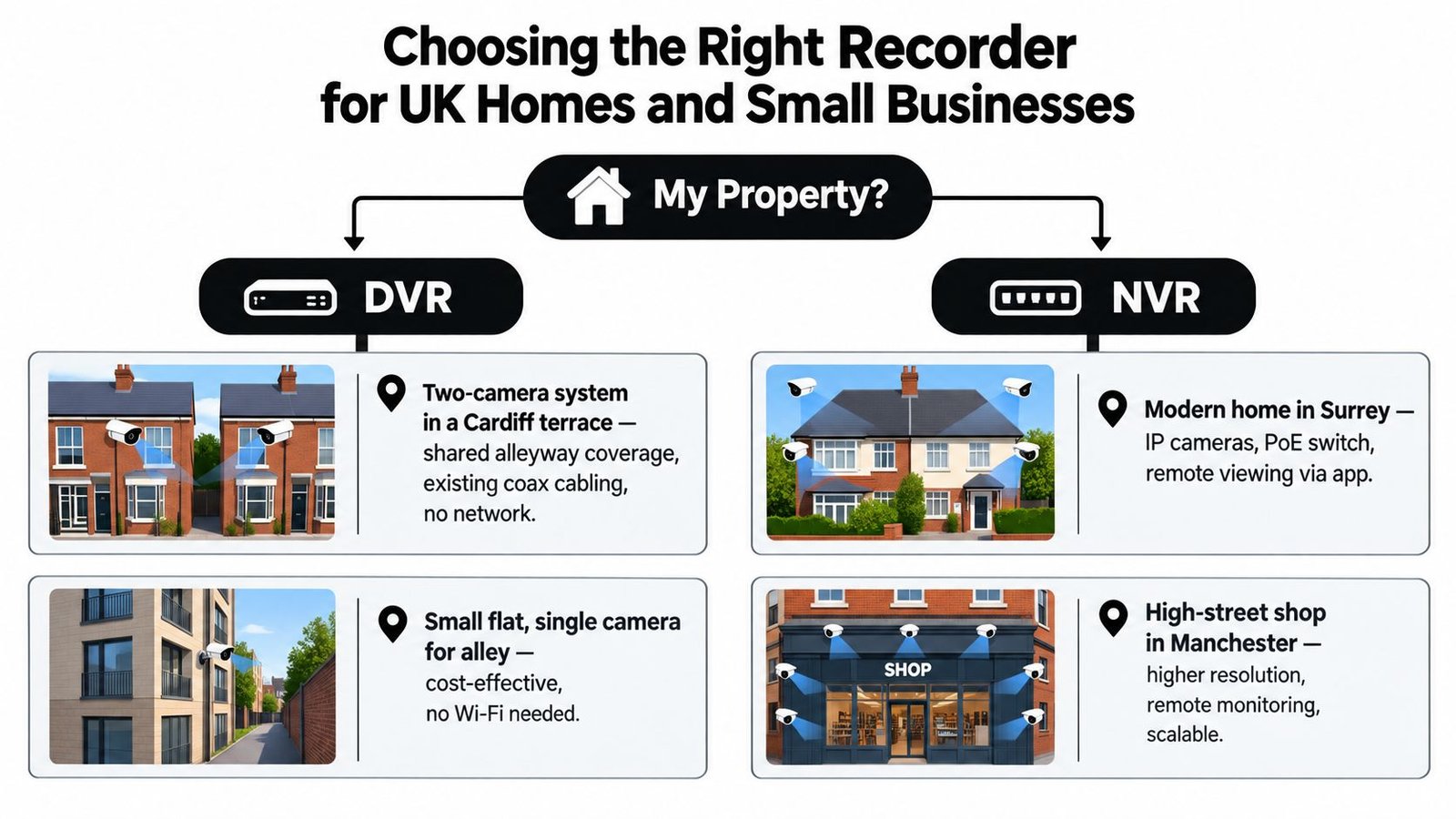
A small home with limited external coverage often doesn't need a complicated answer. If there's existing coax cabling in place and the main aim is to cover a driveway, side access, or rear garden, a DVR can still be a practical fit.
That tends to suit buyers who want dependable recording without rebuilding the property around a networked camera system. It also suits people who won't use advanced search, alerts, or regular remote viewing.
Shops and cafés where identification matters
A customer-facing business usually feels the limits of basic analogue systems faster. Till areas, entrance doors, and stock zones often benefit from the cleaner image options and easier remote checks that come with IP cameras and an NVR.
A small retailer who wants to check a delivery issue from home, review a dispute at the counter, or add another camera later will usually have a smoother path with an NVR-based system. That doesn't make DVR obsolete. It means the use case has moved.
Here's a useful visual example before we go further.
Larger or shared premises
Once you move into warehouses, multi-tenant buildings, larger retail units, and mixed indoor-outdoor sites, NVR becomes easier to justify. PoE cabling, user permissions, central management, and cleaner expansion all help when more people need access or more cameras need to be added without a messy rebuild.
This is also where permissions start to matter. If a landlord, tenant, and manager all need different levels of access to footage, networked systems usually handle that more gracefully than older DVR-style firmware.
A recorder isn't just matching the cameras. It's matching the way the building is used.
The market context in Britain
This isn't a niche buying decision. UK estimates place the national CCTV estate at about 5.2 million cameras, with roughly 96% owned by private businesses and homeowners. Another UK estimate puts the total at 4 to 6 million cameras, while local authority-controlled public cameras are only about 90,597 (UK police and surveillance camera assessment).
That matters because most NVR versus DVR decisions are not being made by councils or city control rooms. They're being made by ordinary property owners and operators in exactly the kinds of homes, shops, units, and yards discussed above.
Compliance and the Real Cost of Choosing Wrong
A lot of buyers still assume this is mainly a picture quality decision. In the UK, it isn't. The recorder you choose affects how well you can manage footage in a way that fits data protection duties.
Recording method and compliance are linked
UK public-sector guidance gives a useful historical marker here. The Surveillance Camera Commissioner's Buyers Toolkit defines an NVR as a recorder for IP cameras or analogue encoders that stores footage digitally on a hard drive, reflecting the move from older analogue recording toward network-based CCTV architecture in UK guidance. The same guidance environment also stresses that CCTV and video surveillance systems must meet UK GDPR and DPA 2018 requirements, and it refers explicitly to exporting footage in its native file format at the same quality as stored on the system (UK CCTV guidance and definitions).
That point often gets missed. The recorder is not just a box for saving clips. It shapes retention, export quality, access control, and who can view what.
The wrong system creates practical headaches
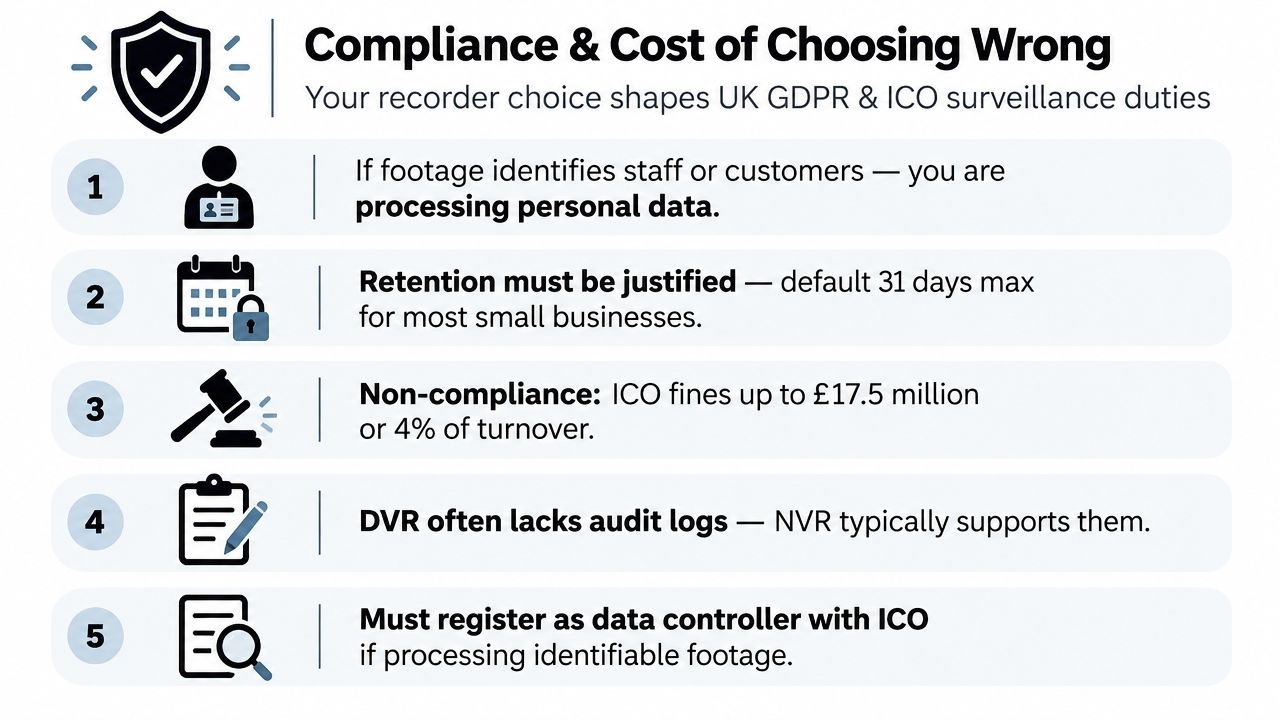
If footage identifies staff, customers, visitors, or neighbours beyond your boundary, you're dealing with personal data. That means you need a reason for recording, a sensible retention approach, and a process for who can access footage.
A recorder with weak user controls, awkward export tools, or poor audit visibility can turn a routine request into a scramble. Many businesses only discover this after an incident. That's also why some firms occasionally need wider technical security support beyond CCTV, such as counter surveillance services London for environments where privacy risks go beyond standard camera coverage.
Cost isn't only the invoice
The UK video surveillance market is projected at about £521 million in 2025, with growth being driven in part by AI analytics and VSaaS adoption (UK video surveillance market projection). That broader market shift helps explain why newer buyers increasingly ask about network access, cloud-managed options, and smarter retention, not just recorder type.
For a local installer discussion, the practical takeaway is simpler. A “cheaper” recorder becomes expensive if it makes footage hard to retrieve, hard to manage, or hard to keep within a sensible retention policy. For many businesses, compliance-friendly management ends up mattering more than squeezing the last pounds out of the hardware line.
If you run a business and want the legal side framed in plain language, this guide to CCTV and GDPR in the UK for businesses is worth reading before you approve any install.
A Short Buyer Checklist Before You Sign
Most problems can be avoided by asking better questions before the system is ordered.
Five questions that expose the real fit
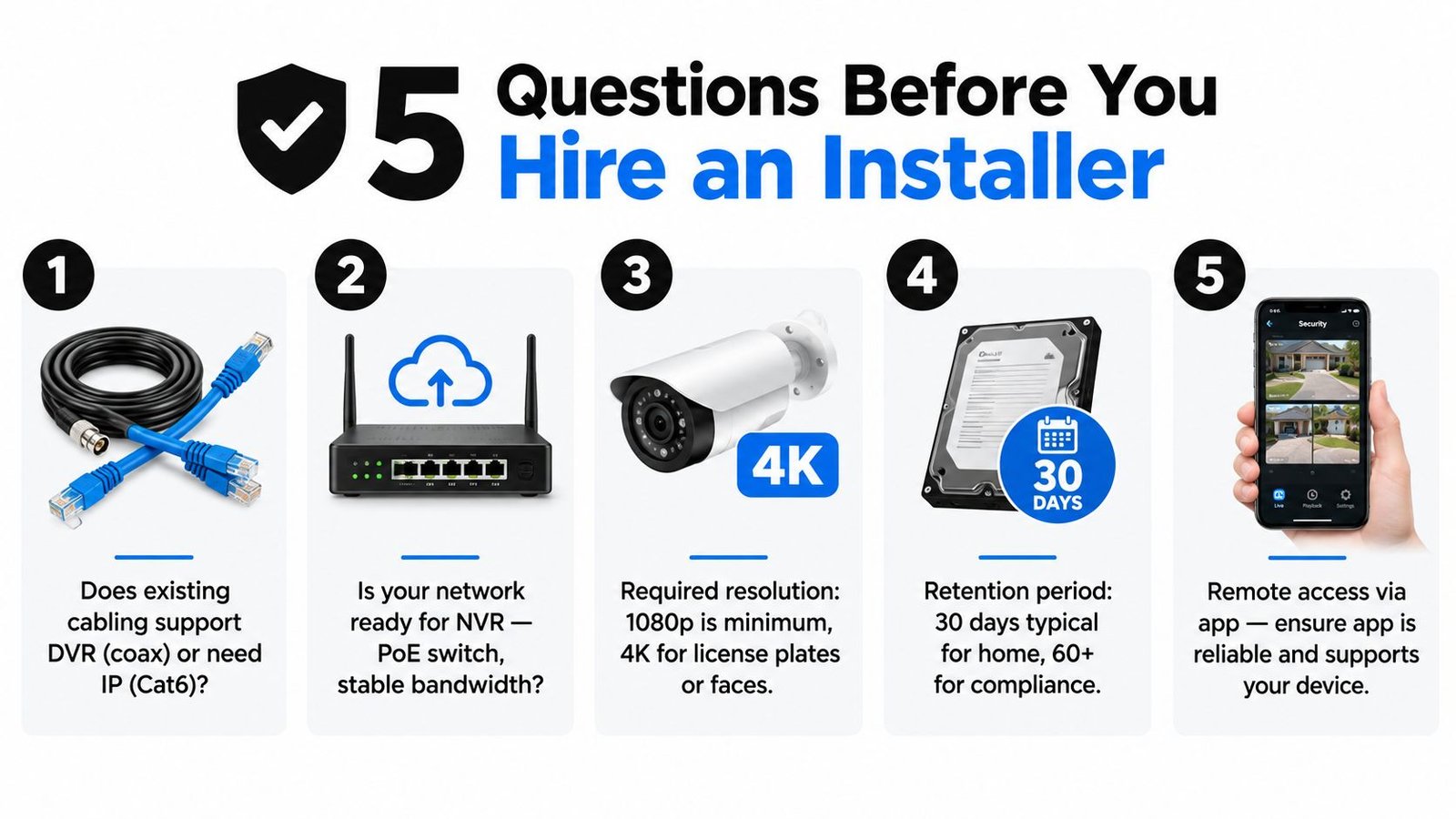
What cabling already exists at the property?
If the answer is sound coax in all the right places, a DVR or hybrid route may save disruption. If the cable routes are poor or a fresh install is happening anyway, Ethernet for NVR may be the cleaner long-term choice.How will I use the footage?
“I only need to check incidents after the fact” points in a different direction from “I want regular phone access, cleaner zoomed-in images, and easy sharing with staff or managers.”What retention period am I trying to achieve?
Don't accept a vague answer like “it stores about a month”. Ask what settings that estimate assumes, whether recording is continuous or motion-based, and what happens when the drive fills up.Is my network ready for an NVR system?
Ask about PoE switching, app access, and whether your upload speed will support the way you intend to view cameras remotely. A good installer should be able to explain this without hiding behind jargon.What does the quote leave out?
Ask for hardware, labour, storage, app setup, and ongoing support to be separated. That makes it much easier to compare a lower-cost DVR quote with a higher-spec NVR quote fairly.
A sensible rule of thumb
For legacy coax, tight budgets, and basic recording, a standalone DVR can still be the right tool. It isn't glamorous, but it can be entirely appropriate.
For new installs, regular phone viewing, easier expansion, higher image expectations, or smarter features, an NVR is usually the default direction. That's the answer most buyers end up happier with once they've looked beyond the initial box price.
Buy the recorder for the way you'll live with the system, not for the way the quote looks on day one.
If you want a local example of what that conversation should look like, Wisenet Security Ltd installs and maintains CCTV systems across South Wales and the South West with both recorder-led and full-system considerations in view, rather than treating the recorder as an afterthought.
If you're comparing CCTV quotes and still aren't sure whether DVR or NVR fits your property, Wisenet Security Ltd can assess the cabling you already have, the level of image detail you need, and whether your network is ready for reliable remote viewing. That kind of site-specific advice usually makes the recorder choice much clearer before money is spent on the wrong system.