How to Improve Security Awareness: A Practical Guide
You're probably looking at a site that feels secure on paper and messy in practice. The cameras are fitted, the alarm panels work, the fobs are issued, the intercom buzzes, and yet someone still props a fire door open for a smoke break, lets a contractor through without checking, or clicks a suspicious invoice because it looks routine. That gap is where security awareness lives, and it's why how to improve security awareness isn't a training-room question, it's an everyday operations question for homes, landlords, warehouses, shops, and offices across South Wales and the South West.
The UK's Cyber Security Breaches Survey 2024 found that 50% of businesses and 32% of charities reported a breach or attack in the previous 12 months, and phishing remained the most common type of attack among businesses that identified breaches, which makes awareness a practical control rather than a compliance extra (Cyber Security Breaches Survey 2024 summary). The answer isn't another dense annual slideshow. It's a repeatable programme that teaches people how to handle emails, phones, doors, keys, fobs, and visitors with the same discipline, because attackers and opportunists don't respect the line between digital and physical security.
If you want a useful starting point from a practical training perspective, build a human firewall is a helpful way to think about the job. For the installed side of the picture, the wider role of CCTV in day-to-day protection is worth keeping in view as well, especially if your people don't know what the system can and can't do, as covered in the real benefits of CCTV.
Table of Contents
- Why Security Awareness Matters More Than Another Camera
- Run a Baseline Assessment Before You Buy Any Training
- Build a Microlearning Curriculum People Will Actually Finish
- Test Behaviour with Phishing Simulations and Real-World Exercises
- Measure What Actually Changes with Behaviour-Led KPIs
- Connect Awareness to Your CCTV, Alarms and Access Control
- Your 90-Day Rollout Plan and Frequently Asked Questions
Why Security Awareness Matters More Than Another Camera
A Cardiff shop owner can spend a morning reviewing footage after a problem and still learn very little if nobody knows how the system should have been used in the first place. The camera recorded the scene, but the staff member who should've challenged a stranger at the loading bay didn't, the receptionist didn't verify the call, and the cleaner left the side door on the latch. That's not a hardware failure, it's a behaviour failure.
Why people, not kit, decide the outcome
The UK evidence points in the same direction. When 50% of businesses report a breach or attack and phishing remains the most common attack type, the weak point is often a person making a quick judgement under pressure (Cyber Security Breaches Survey 2024 summary). For South Wales and South West SMEs, that's usually the person on reception, in finance, in the yard, or answering the mobile phone after hours, not the IT team.
That's why awareness needs to sit beside alarms, cameras, and access control as an operating layer. A camera can confirm what happened after the fact. A trained receptionist can stop an impersonator at the intercom. A warehouse operative who knows not to share a fob can prevent an access problem before it starts.
Practical rule: if staff can't explain how they should respond to a suspicious email, a dodgy caller, or an unknown visitor, the site is relying on luck more than security.
The NCSC's Cyber Aware campaign has pushed a small set of habits since 2014, including strong separate passwords, two-step verification, and prompt updates, because people change behaviour more reliably when the message is simple and repeated (NCSC Cyber Aware overview). That same principle applies on-site. Keep the message short, repeat it often, and make it specific to the reality of gates, intercoms, keys, fobs, and contractor visits.
What good awareness looks like on a real site
Good awareness doesn't mean everybody becomes technical. It means the finance lead checks a supplier change request, the tenant knows fob sharing isn't harmless, and the site manager expects verification before an out-of-hours visit. It also means your people know where to report something without worrying they'll be blamed for asking.
The shortest path is behavioural, not theoretical. Train a few high-value habits, repeat them through short reminders, and tie them to the systems people already use. That's how awareness stops being a poster on the wall and becomes a working part of the site.
Run a Baseline Assessment Before You Buy Any Training
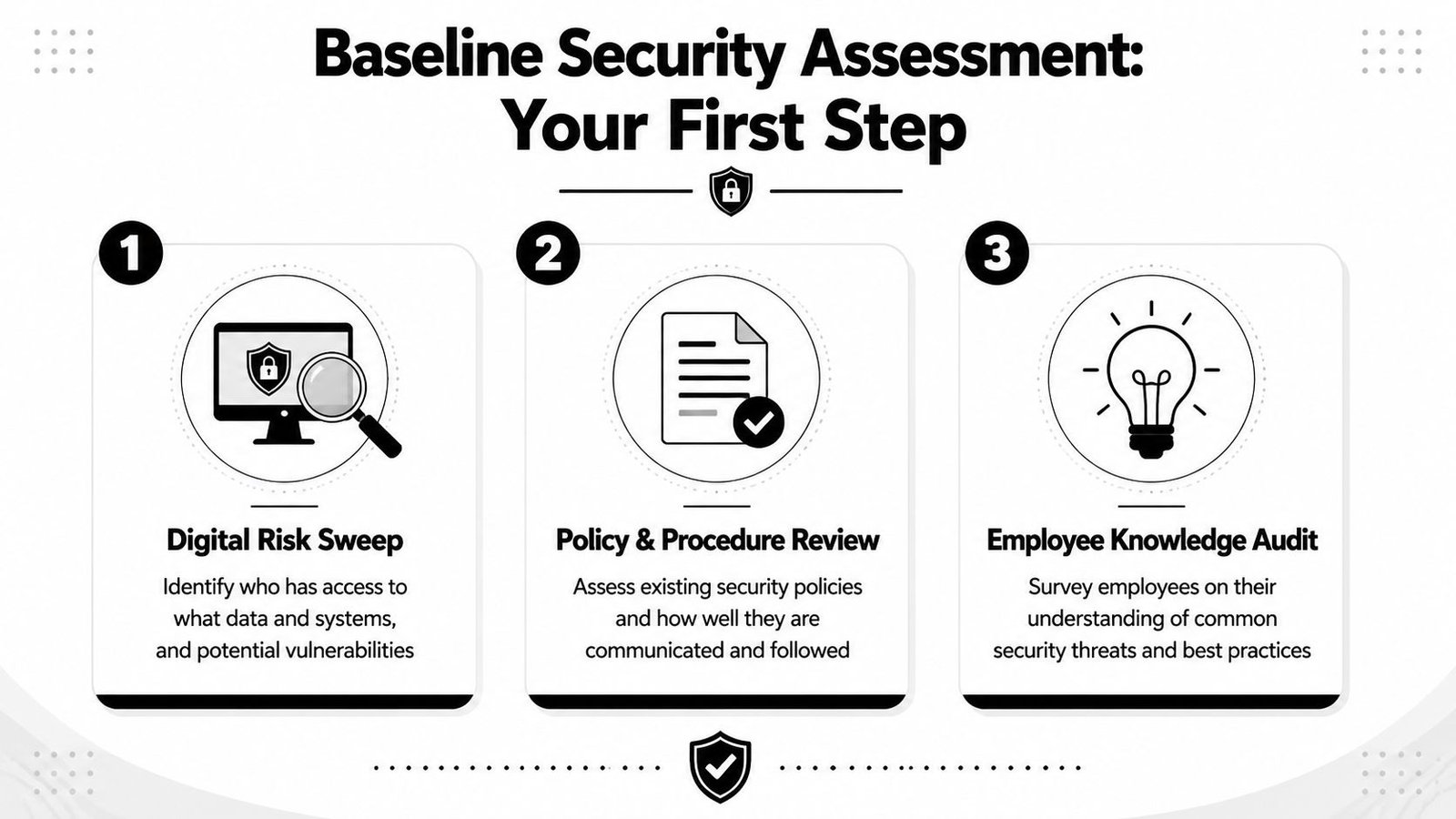
Start with one afternoon, not a procurement project. Walk the site, list the accounts, and watch how people move through doors, gates, and systems. Improvement gets much easier once you can see whether the biggest problem is digital access, physical access, or the handover between the two.
Sweep the digital layer first
Write down who has access to email, finance systems, CCTV apps, alarm portals, and shared admin accounts. Check whether passwords are reused in obvious places, whether two-step verification is on, and who still has access after a role change or tenancy change. You're not looking for perfection at this stage, just the exposed edges.
The point of this first pass is to match access to responsibility. If the person who handles invoices also has access to supplier records, that's one risk profile. If a receptionist can reset visitor records and answer the intercom, that's another. If a homeowner uses the same login for a camera app and a family email account, that's a third.
Walk the physical layer with the same discipline
Now look at the building. Are people tailgating through a side entrance, propping open a fire door, or lending a code to a colleague because it feels faster? Are contractor visits managed by habit or by a process someone can explain? Do the cameras cover the places where people enter, or only the obvious front elevation?
Use a simple three-part score for each issue, low, medium, or high. Then note the role and the place, because a receptionist's exposure isn't the same as a warehouse operative's, and a landlord-managed HMO doesn't have the same pattern as a retail store.
Audit the human handoffs
Most breaches in small sites happen where one person assumes another has checked something. That's the intercom caller who sounds familiar, the maintenance visitor who arrives “for a quick look”, or the supplier invoice that changes just before payment day.
Useful standard: if a request changes money, access, or time pressure, it gets verified through a second channel.
End the baseline with three to five themes only. For most SMEs, that means account hygiene, email and phone impersonation, visitor and contractor checks, fob and code discipline, and incident reporting. A broader list just dilutes attention.
Build a Microlearning Curriculum People Will Actually Finish
Annual training marathons are where attention goes to die. Staff sit through a long module, click through it, and forget most of it by the time the next real message arrives. Short, role-specific learning works better because it fits into the week people already have.
Keep each module narrow and relevant
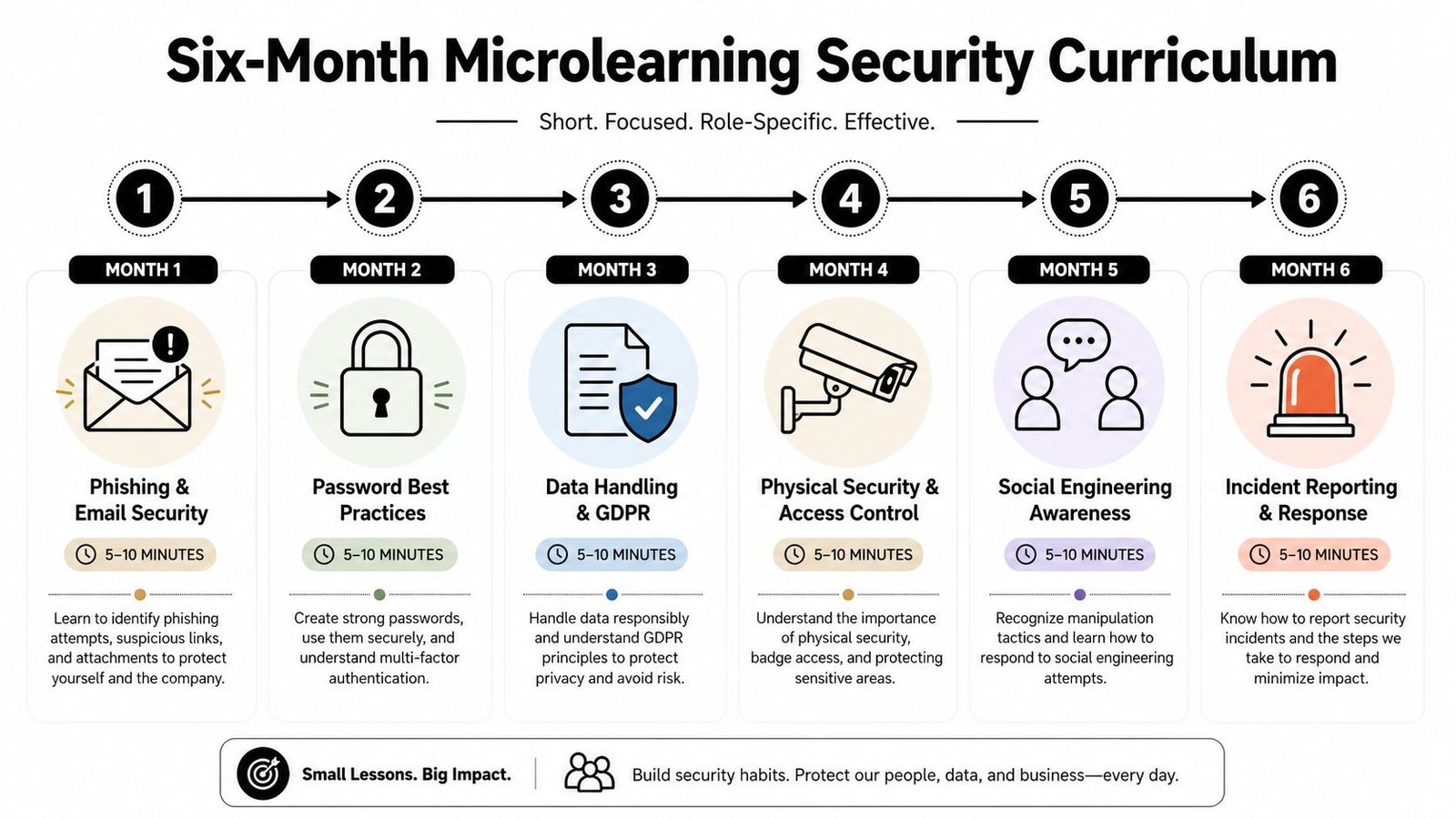
A good baseline curriculum can run for six months and still feel manageable. Month one covers phishing and email security. Month two covers password best practices. Month three covers data handling and GDPR. Month four covers physical security and access control. Month five covers social engineering awareness. Month six covers incident reporting and response.
That sequence mirrors the NCSC's long-running focus on a small set of habits, which is the right model for non-specialists (NCSC Cyber Aware overview). People don't need a lecture on the entire threat environment. They need a few dependable habits they can apply when they're rushing, distracted, or covering for someone else.
Role mapping matters more than polish. Finance sees invoice fraud and fake supplier change requests first. Warehouse teams see tailgating, gate pressure, and courier impersonation first. Landlords and property managers need a heavier emphasis on tenant turnover, code changes, and contractor access.
Make the format light enough to finish
Short modules should be a few minutes long, not a mini-course disguised as a bite-sized lesson. If you need a practical reference on structuring learning in a compact format, the guide to microlearning for course creators is a useful way to think about pacing and repetition, even if your content is security-focused rather than educational.
Rule of thumb: one lesson, one behaviour, one next action.
That means no cluttered slides and no mixed messages. If the lesson is about caller verification, the follow-up action is simple, call back on a known number. If the lesson is about fobs, the action is clear, don't share access just because someone says they're “only popping in”.
Reuse the same habits in different settings
A strong programme repeats the same core behaviour in different contexts. Ask the same question in different ways, who can approve access, who can verify identity, who should escalate, and how fast should it happen. That repetition is what turns awareness into a reflex.
You don't need a big budget to do this well. Many SMEs can record short internal clips, use screenshots from their own systems, and keep the content tightly tied to their specific environment. Generic cyber theory won't shift behaviour, but a two-minute reminder about the contractor gate process will.
Test Behaviour with Phishing Simulations and Real-World Exercises
Training feels reassuring until you test it. That's when you find out whether people recognised the lesson or just recognised the title slide. Real exercises expose the gap between knowing the right answer and doing the right thing under pressure.
Test the inbox and the front door
A quarterly phishing simulation is a good starting point, but the scenarios need to feel like they belong in the UK, not a generic global template. Think HMRC refund bait, parcel redelivery, supplier invoice changes, or a finance request that arrives when someone's busy. The purpose isn't to catch people out for sport, it's to see whether they report suspicious messages, click them, or enter details.
The same logic applies on-site. A mystery shopper can try to tailgate through a staff entrance, and a fake contractor can phone the office asking for an access code for an out-of-hours job. Those exercises show whether people challenge politely, verify properly, or wave someone through to avoid a fuss.
Treat mistakes as data, not embarrassment
The NCSC's advice to encourage reporting even when staff are unsure matters here. If people fear being blamed, they stop reporting, and you lose the signal that tells you what is happening. That's why failed exercises should produce coaching, not shame.
It helps to compare digital and physical tests side by side:
| Exercise type | Frequency | Who runs it | Primary metric | Typical failure signal |
|---|---|---|---|---|
| Phishing simulation | Quarterly | Security lead or external provider | Reported suspicious messages | Clicked link or entered details |
| Tailgating test | Quarterly | Site manager or installer | Challenge rate at entry points | Unchallenged entry |
| Contractor verification call | Quarterly | Reception or operations lead | Callback completion | Code or access shared over the phone |
A good follow-up isn't a lecture. It's a quick correction, the exact sign someone missed, the exact check they skipped, and the exact process they should use next time.
If staff can explain why they reported something, the programme is working better than if they only remember that they were told off.
For digital testing and response workflows, the cyber security resource from Wisenet is a sensible reference point if you want the awareness side to sit alongside your broader protection plan. The important part is that the exercise feeds back into the curriculum, so the next lesson addresses an actual weakness rather than a guessed one.
Measure What Actually Changes with Behaviour-Led KPIs
Completion rates look neat in a dashboard and tell you very little. A team can finish every module and still miss the suspicious email, open the wrong gate, or hand over a code without hesitation. Behaviour-led KPIs are harder to fake, and that's exactly why they're useful.
Track actions, not attendance
The main measures worth watching are the ones that show what people do when they're uncertain. That includes how often suspicious emails get reported, how quickly the first report arrives, whether repeat clicks are falling, whether tailgating attempts are succeeding, and whether fobs and codes are returned or disabled when people leave.
ENISA recommends collecting quantitative data on cybersecurity behaviour and checking trends over time, while NIST frames awareness as something you evaluate and maintain rather than finish once (ENISA awareness report). That lines up with what works on site, too. If the numbers don't change, the behaviour probably hasn't changed.
A compact monthly or quarterly dashboard can work well if it stays readable. One page, a few trends, and one sentence on what you're changing next. That's enough for leadership without drowning people in admin.
Use the data to improve the culture
The point of measurement isn't to name and shame. It's to see where people are still guessing. A receptionist who takes longer to report a dodgy caller needs a different prompt from a warehouse supervisor who keeps letting people in because they “look busy”.
The user activity monitoring guide is useful background if you're thinking about how behaviour evidence can support a wider security programme. In practice, the human side still matters most. Report rates improve when people trust the process, and they improve faster when reporting is simple and visibly appreciated.
Keep the feedback loop short
If a metric drops, adjust the lesson quickly. If tailgating attempts keep working, revisit the entrance routine and the challenge language. If suspicious emails are being ignored, change the reporting route and the reminder rhythm.
Practical rule: every KPI should point to one next action, otherwise it's just reporting for its own sake.
That's the difference between awareness as a checkbox and awareness as a control. One looks tidy. The other changes behaviour.
Connect Awareness to Your CCTV, Alarms and Access Control
Most sites already have a mix of CCTV, alarms, access readers, and maybe an intercom or two. The problem is usually not the hardware. It's that people don't know how to use it, trust it, or keep it tidy when the day gets busy.
Train the people who live with the system
If you use mobile alerts for CCTV or alarm events, staff need to know what a genuine notification looks like and what a junk message looks like. Reception teams should know how to verify an intercom caller, including when to call back using a known number rather than trusting the initial request. Site managers should understand that a triggered alarm isn't something to silence first and inspect later.
Physical access control is just as dependent on behaviour. Fobs, cards, PINs, and app credentials need active management when staff leave, tenants move out, or contractors finish a job. If that process is informal, access lingers longer than it should.
For integrated estates, integrated security solutions only work properly when the human rules match the equipment. CCTV without challenge behaviour is just evidence capture. Alarms without response discipline become noise. Access control without fob hygiene becomes an administrative headache.
Include fire and visitor routines in the same conversation
Fire alarms deserve a place in awareness training because real safety depends on people reacting correctly when the panel sounds. Staff should know where emergency routes are, what to do when an addressable panel flags a zone, and who takes charge if the normal supervisor isn't on site. That's true for a warehouse, an office, and a multi-tenant building.
Visitor management matters too, especially at gates, car parks, and loading areas where people rush to be helpful. Tailgating, fake delivery drivers, and out-of-hours maintenance calls all sit in the same risk family. One weak answer at the gate can undo a lot of good work elsewhere.
Keep the operational checklist tight
A site-side awareness checklist doesn't need to be long. It needs to be enforced.
- Alert handling: staff can tell a real app or panel alert from a spoofed message.
- Intercom verification: reception or occupants use callback checks before granting access.
- Alarm response: nobody assumes a trigger is false without checking the source.
- Fob discipline: access is removed promptly when people leave.
- Visitor checks: contractors and delivery drivers are verified, not waved through on appearance alone.
Wisenet Security Ltd fits naturally here because it designs, installs, and maintains CCTV, intruder alarms, access control, fire alarm systems, intercoms, and gate automation for homes and businesses across South Wales and the South West. The point isn't to buy more kit, it's to make the kit and the human process work as one estate.
Your 90-Day Rollout Plan and Frequently Asked Questions
A workable rollout beats a perfect plan that never leaves the desk. Over the first three weeks, complete the baseline assessment, switch on the easy fixes like two-step verification where it's missing, and tidy the most obvious access problems. From weeks four to eight, launch the first microlearning modules and run the first phishing and tailgating tests. From weeks nine to twelve, review the behaviour-led KPIs, share the findings with staff, and schedule the first quarterly refresher.
What keeps momentum after the first push
Momentum comes from rhythm, not enthusiasm. Set a fixed review point each quarter, keep the lessons short, and change the scenarios so people don't learn the pattern instead of the behaviour. If you only talk about security after an incident, it becomes a crisis topic rather than a habit.
How do you handle AI voice and video impersonation
Treat voice and video requests the same way you treat a suspicious email. Verify through a second channel, use callback procedures, and require dual approval for sensitive changes. The message for staff is simple, don't trust appearance, tone, or urgency on its own.
What does a realistic programme look like for a small site
For most SMEs and homeowners, a realistic version is small, consistent, and tied to actual tasks. A few short modules, a basic reporting route, and quarterly tests will usually outperform a bloated training library that nobody finishes. The content should reflect the site's actual risks, not a generic cyber textbook.
How often should the programme change
Change it whenever the site changes. New tenants, new staff, new contractors, new access routes, or new systems all justify a review. The goal is steady reinforcement, not annual rebranding.
Security awareness works when people know what to do before they're under pressure. If you want help connecting your people, your CCTV, your alarms, and your access control into one practical estate, visit Wisenet Security Ltd and speak to a team that installs and maintains the systems people have to live with day to day.