CCTV Cloud Storage Guide: 2026 UK Cost & GDPR Tips
You've got a camera on the front of the house or above the shutter, but when something happens you still have to hope the recorder is there, powered, and holding the right clip. That's the reason people start looking at cctv cloud storage, not because it sounds modern, but because they want footage they can reach without trudging to a cupboard, a back office, or a failed hard drive. In South Wales, where homes and small businesses deal with patchy internet, older buildings, and proper day-to-day wear and tear, the right setup is usually less about fancy features and more about whether you can still get evidence when the site has a bad day.
Table of Contents
- What CCTV Cloud Storage Actually Means
- Cloud vs Local vs Hybrid Recording Compared
- Bandwidth, Retention, and Cost Model
- UK GDPR and Data Protection Obligations for Cloud Footage
- What Happens During Internet Outages and Cyber Incidents
- Installation and Configuration for South Wales Properties
- Your CCTV Cloud Storage Decision Checklist
What CCTV Cloud Storage Actually Means
A Cardiff shop owner checks last night's footage at breakfast, not because they're being techy, but because a delivery argument kicked off before closing time and they need to know exactly what happened. That's the whole point of cloud storage for CCTV, it lets you review and archive video off-site, from a phone, laptop, or another secure device, instead of relying only on a recorder sitting on the premises.
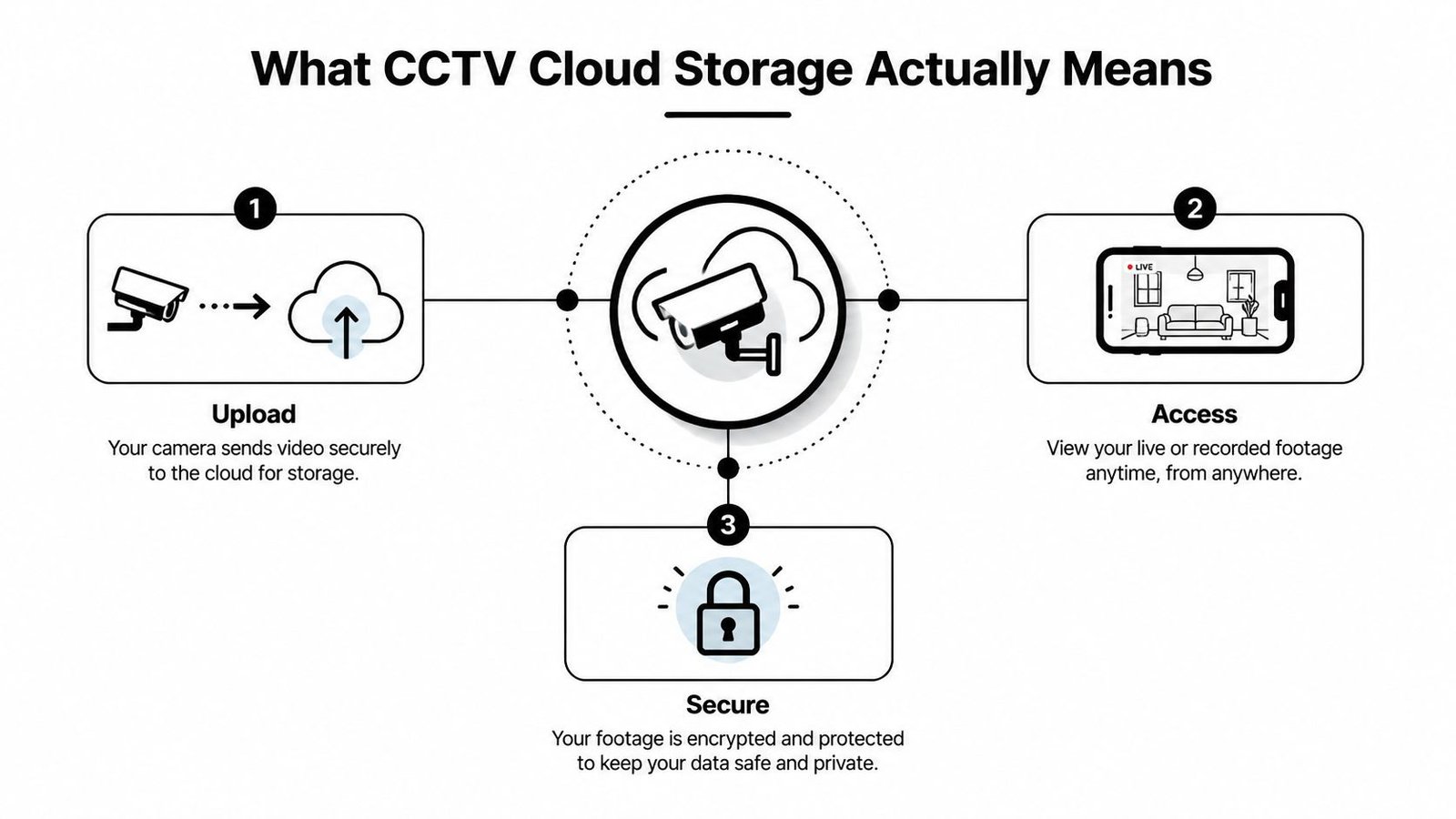
At its simplest, cameras capture video, the footage is uploaded across the internet, and it lands in an online storage platform where it can be searched, reviewed, and kept under access control. That can replace the hard drive in an NVR or DVR, or it can sit alongside one in a hybrid setup. If you want a plain-language overview of the wider security stack, the internal guide on CCTV and security systems is a useful starting point.
Edge recording versus pure cloud
Edge recording means the camera or local recorder keeps footage on site first, then syncs selected clips to the cloud. That's different from a pure cloud setup, where the cloud is the main archive. In real life, edge recording matters because it gives you a buffer when the internet is slow, unstable, or down altogether.
Cloud storage has become more practical because modern cameras generate a lot more video than older analogue systems ever did. The gap between “a few motion clips” and constant high-resolution recording is exactly why old, small hard drives fill up fast. For anyone wanting to see how large cloud platforms are built at scale, data center scale for telecom networks gives a useful sense of the underlying infrastructure, even if the use case is broader than CCTV.
Practical rule: if your camera system matters for evidence, don't think of cloud as a gadget feature. Think of it as a storage design choice that needs buffering, access control, and a recovery plan.
Cloud vs Local vs Hybrid Recording Compared
South Wales buyers usually are not choosing between old and new kit. They are choosing between three workable recording setups, and each one fails in a different place. Pure cloud gives easy remote access, local recording keeps footage on site, and hybrid tries to cover the weak points of both.
For a broader commercial comparison, the article on compare cloud and on-premise costs is worth reading alongside this. CCTV is harder to judge than generic IT, because video volume and recording continuity matter more than a tidy dashboard.
| Criterion | Pure Cloud | Local NVR/DVR | Hybrid Edge-Plus-Cloud |
|---|---|---|---|
| Upfront cost | Lower hardware burden, but the service still needs proper setup | Usually heavier on hardware at the start | Middle ground, because local kit is still required |
| Ongoing monthly spend | Ongoing subscription and data-related charges | Usually lighter on subscriptions, heavier on replacement and maintenance | Ongoing spend exists, but cloud pressure can be reduced by syncing only what matters |
| Remote access | Strong, usually the main selling point | Possible, but it depends on local setup and port/security configuration | Strong, with local fallback if the link struggles |
| Internet outage resilience | Weak unless the platform buffers locally | Strong for on-site recording, weak for off-site access | Stronger if the local layer keeps recording during outages |
| Scaling up cameras | Easier to expand if the connection and plan hold up | Limited by recorder capacity | Easier than pure local, with better continuity than pure cloud |
What each option suits
Pure cloud fits sites that need simple remote access and have a connection that can carry the load. That can work for a small office, a managed building, or a homeowner who wants phone access without another recorder sitting in the loft.
Local recording still has a proper place. If you have a stable on-site system, short retention needs, and you are willing to manage the recorder yourself, it is straightforward and familiar.
Hybrid is the option I usually recommend when evidence continuity matters. It keeps local capture running during internet problems, then uses the cloud for review, archiving, or off-site protection. For most real premises, that is the safer setup. It also makes it easier to check CCTV installation costs before you commit to a platform that looks cheap on paper but becomes costly once cameras, storage, and access requirements are all added up.
Bandwidth, Retention, and Cost Model
Cloud CCTV gets expensive or awkward when people ignore what the video is doing to their network. Storage is where cloud surveillance surprises people, because the monthly bill is driven by retention, camera count, resolution, frame rate, and whether you record continuously or only when there's motion. Vendor-neutral guidance on cloud video surveillance warns buyers to model those trade-offs early, and that advice is spot on for South Wales homes and businesses.
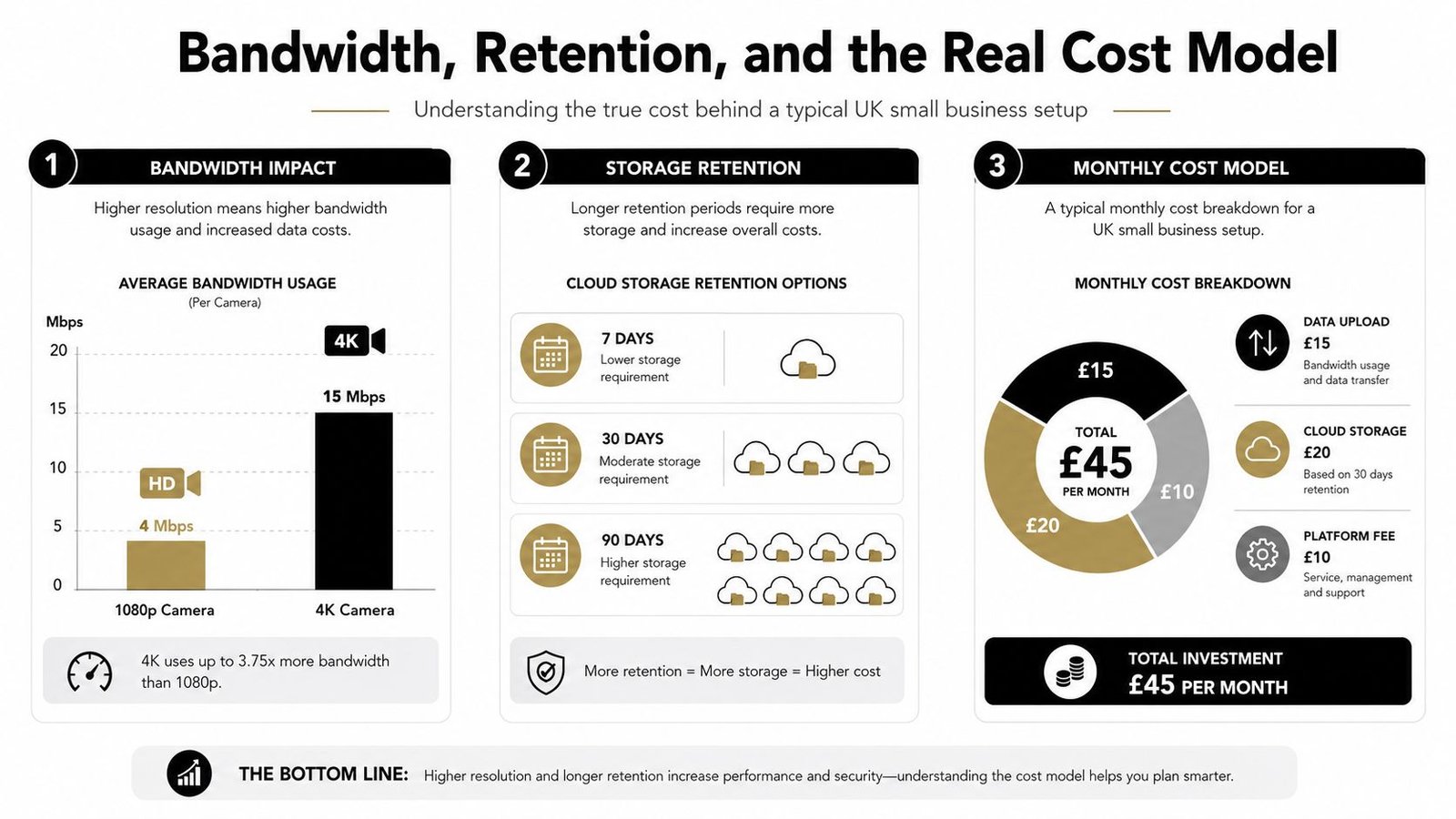
A single 4K camera can use about 72 to 144 GB per day when recording continuously, according to the cloud storage guidance in the brief (cyfuture.cloud). That is why even a modest multi-camera system can outgrow local thinking very quickly. It also explains why event-based recording is often the first sensible cost-saving move.
How to think about cost without guessing
I'd treat the cost in three layers. First is upload burden, because the internet line has to carry the footage out. Second is storage volume, which rises with resolution and retention length. Third is the platform fee, which covers the service layer around the archive.
A lot of domestic and small commercial sites do not need constant full-resolution recording from every camera. Motion recording, event clips, and sensible retention periods usually make more sense than trying to archive everything forever. If you're trying to budget a new system, the install cost overview at CCTV installation costs helps with the hardware side of the equation.
Installer's view: if your uplink is weak, don't force continuous cloud recording just because it sounds cleaner. Use a hybrid plan or reduce the data load first.
UK GDPR and Data Protection Obligations for Cloud Footage
Cloud storage doesn't remove your legal duties. In the UK, the UK GDPR and the Data Protection Act 2018 apply when footage identifies living individuals, and the ICO says organisations need a lawful basis, a defined retention period, and footage kept only for as long as necessary. That applies whether the video sits on a recorder in a back office or in a cloud archive.
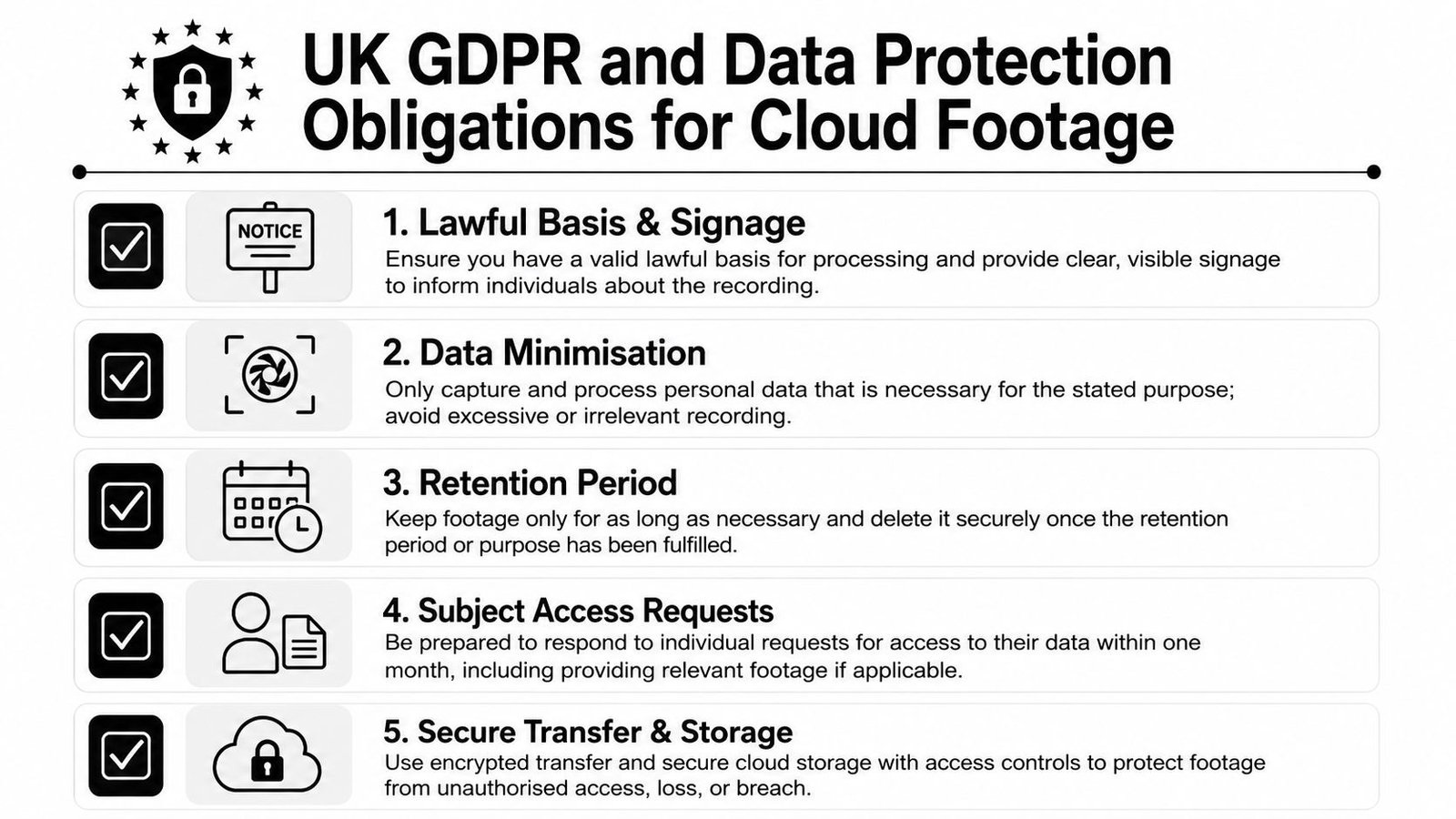
The practical point is simple. If you can't explain why you're recording, how long you're keeping the footage, and who can get to it, you're already on shaky ground. The ICO's CCTV guidance also says people recorded by cameras can request access to their images, so your storage system has to let you find, review, and remove footage cleanly when needed. The ICO registration guide at do you need to register with the ICO is a sensible companion read for business owners.
What cloud changes in practice
Cloud makes access control and retrieval more visible. That's a good thing if the platform is properly set up, because searchable archives and controlled permissions are easier to manage than random hard drives and USB exports. It's a bad thing if the provider is sloppy, because you still carry the legal responsibility.
For South Wales businesses, especially retail units, landlords, and multi-site operators, the main compliance job is to keep the recording policy tight. Use clear signage, keep retention sensible, and make sure staff know who handles subject access requests. If the cloud platform doesn't support secure sharing, deletion, and audit trails, don't buy it.
The regulator's position hasn't changed just because the footage is hosted remotely. Cloud-hosted video is still personal data when people are identifiable, so the same privacy obligations follow it around.
What Happens During Internet Outages and Cyber Incidents
A lot of marketing falls apart here. Pure cloud recording depends on an active connection, so if the internet drops, you've got an outage gap unless the system is buffering locally. That matters on homes, car parks, takeaways, workshops, and logistics yards across South Wales, because a short ISP issue is enough to interrupt evidential coverage.
A hybrid system is the practical answer when you can't afford that gap. Local buffering keeps the cameras recording during the fault, then footage syncs back up when the line returns. That's not theoretical resilience, it's basic continuity design.
Don't confuse access with resilience
Cloud is brilliant for remote review. It's not automatically better for survival under failure conditions. If a power cut, router fault, or cyber incident hits the site, you need to know whether the footage is still being written somewhere local, and whether it can be recovered later.
If the only copy of the recording depends on the WAN, then a short outage can cost you the exact clip you wanted.
Ask any provider how it handles loss of internet, loss of power, and loss of the site network. Ask where the buffer sits, how long it can hold, and how recovery works after the link comes back. If they dodge those questions, they're selling convenience, not resilience.
Cyber incidents deserve the same hard-nosed treatment. Secure credentials, locked-down user permissions, and clear recovery policy matter more than glossy app screenshots. If a platform can't explain its disaster recovery and access controls in plain English, walk away.
Installation and Configuration for South Wales Properties
The right setup for a terraced house in Newport isn't the same as a warehouse in Swansea. Thick walls, awkward lofts, old consumer units, and patchy Wi-Fi all change what will work, so a cloud system needs to be designed around the site rather than sold off a brochure. I've seen plenty of systems fail because someone assumed the cloud would fix a bad network.
A proper install starts with a survey. That means camera positions, cable routes, network quality, and whether the recorder or camera can support the cloud platform you're aiming for. If the site needs a hybrid setup, the local storage layer has to be fitted and tested before anyone talks about remote access.
What to check before signing off
- Recorder compatibility: Make sure the NVR or camera platform can work with the cloud service you want, rather than assuming it will.
- Network quality: Test the connection the system will rely on, not the one the broadband advert promised.
- Recording mode: Decide whether motion-based or continuous recording fits the site and the budget.
- User access: Set up who can view footage on the phone app, who can export clips, and who can delete recordings.
- Secure handover: Change default credentials, document the system, and make sure the owner understands the recovery process.
A professional installer also thinks about PoE switch placement, router location, and how to avoid dead spots in older buildings. In some properties, the camera positions are fine but the uplink isn't, so the answer is to reduce load or use a hybrid approach rather than forcing the system to push more video than the line can cope with.
If you want a local provider to quote, Wisenet Security Ltd is one option in South Wales for CCTV, alarms, access control, and related work, including cloud-backed video storage where the site design suits it. The point isn't to buy the flashiest app, it's to get the recording architecture right from day one.
Your CCTV Cloud Storage Decision Checklist
The easiest way to choose is to be blunt about what you're protecting. A homeowner, a small retailer, a landlord, and a warehouse manager are not buying the same thing, even if the cameras look similar on the wall. Start with the decision factors that matter, then pick the recording model that fits.
For a homeowner, ask whether you need quick mobile access, whether your broadband is stable enough for regular uploads, and whether you really need long retention. For a retail unit, focus on opening hours, staff access, and how quickly you can retrieve a clip after an incident. For a warehouse or logistics site, continuity matters more, so hybrid usually makes more sense. For a multi-tenant building, access control and retention policy need to be tighter because more people may request footage or need review rights.
If you want a broader cloud-storage buying framework for smaller firms, cloud storage guide for small business is useful background, but don't copy generic IT thinking straight into CCTV. Video has stronger evidence, continuity, and compliance demands.
Ask these questions before you buy
- What happens if the internet goes down?
- Where is the local fallback, if there is one?
- How long can the system buffer footage before sync resumes?
- Who can access, export, and delete footage?
- Can the platform support your retention policy without overpaying for storage?
- Will the setup still work if you add cameras later?
My advice is simple. If the site matters and the connection is imperfect, choose hybrid. If remote access is the main goal and the line is solid, pure cloud can work. If the site is small, simple, and you can live with local management, local recording is still fine.
Wisenet Security Ltd designs and installs CCTV, alarms, access control, and fire systems across South Wales, so if you're weighing up cloud, local, or hybrid recording, they can look at the site properly instead of guessing from a spec sheet. Visit Wisenet Security Ltd to arrange a free consultation and get a storage plan that fits your property, your broadband, and the way you use your cameras.