Security Systems for Small Business: Your 2026 Guide
You lock up at the end of a long day, glance back at the front shutter, and do the same mental check most owners in Cardiff, Bristol, Newport or Swansea do. Till emptied. Stock room shut. Side door bolted. Lights off. Then the second round starts. What happens if someone forces the back entrance at 2am? What if a freezer alarm goes unnoticed, or a delivery driver's code still works after they shouldn't have access, or the internet drops and your cameras stop being useful when you need them most?
That's usually the moment small business owners start looking seriously at security systems for small business. Not because they want gadgets, but because they want fewer unknowns. The problem is that most advice online either turns into a feature list or skips straight to a price with no explanation of what matters on a live site.
Good security isn't about buying the most equipment. It's about choosing a system that still works during bad weather, poor connectivity, staff changes, insurance disputes, and the ordinary messiness of running a business. In South Wales and the South West, where many firms operate from mixed-use units, older buildings, rural edges, industrial estates and high street premises, that practical difference matters.
Table of Contents
- Protecting Your Business Is More Than Just Locking the Door
- Why Modern Security Is a Business Asset Not Just an Expense
- The Core Components of a Modern Security System
- Monitored Protection vs Bell-Only Alarms
- Designing Your System and Budgeting for Costs
- Understanding UK Compliance Standards and Insurance Rules
- Choosing the Right Installer in South Wales and The South West
Protecting Your Business Is More Than Just Locking the Door
A lot of owners start in the same place. They've had a near miss, a neighbouring unit has been hit, a member of staff has raised a concern, or the insurer has asked awkward questions at renewal. Suddenly the old setup, usually a single bell box, a domestic-style camera kit, or nothing more than a good lock, doesn't feel like enough.
That feeling is justified. Small commercial premises carry several kinds of risk at once. There's break-in risk, of course, but also staff safety, key control, evidential quality, false alarm management, and downtime when something goes wrong out of hours. If your business relies on stock, tools, vehicles, medicines, files, servers or controlled access to rooms, security becomes part of how the business runs.
In practice, owners don't need a technical background. They need a clear way to decide what's essential, what can wait, and what will become expensive later if it's done badly now.
Good security should reduce decisions at stressful moments. You shouldn't be trying to work out who entered, whether footage exists, or whether the alarm actually reached anyone after an incident has already happened.
For businesses that also need to think about digital risk alongside physical security, structured playbooks for cybersecurity consulting can help frame how access, alerts, evidence, and response fit together across the whole operation.
A proper commercial system does three jobs. It deters. It records. It creates a response path. If one of those is missing, the system usually looks better on paper than it performs in real life.
Why Modern Security Is a Business Asset Not Just an Expense
The fastest way to waste money on security is to treat it as a box-ticking purchase. That's how owners end up with cameras that can't identify anyone useful, alarms that only annoy nearby units, or access systems nobody updates after staff changes.
Modern security is operational infrastructure. It supports claims, protects staff, controls entry, and gives owners a usable record of what happened and when. That's very different from 'having an alarm' alone.
The risk is not theoretical. The British Crime Survey for England and Wales estimates that roughly one in four business premises experience a crime in a given year, and a more useful buying question is often whether the system produces usable evidence, satisfies insurer expectations, and aligns with GDPR and ICO rules for CCTV processing after an incident, not whether it has the longest feature list (business crime and evidential focus for small firms).
Security decisions shape business outcomes
A well-designed setup helps in situations owners often overlook at purchase stage:
- Insurance claims: Clear footage, event logs, and proper system records make it easier to show what happened.
- Staff safety: Panic response, controlled entry, and after-hours visibility matter for early starts, late closes, and lone working.
- Internal accountability: Access logs and camera coverage can resolve disputes around deliveries, stock movement, and restricted rooms.
- Management visibility: Remote viewing and alerting let owners check a real event, not just wonder whether an alarm activation was genuine.
That doesn't mean every business needs every feature. It means every business should ask what evidence and response they would need the morning after an incident.
What owners often get wrong
The most common mistake is buying on resolution, app screenshots, or headline price. The best camera in the wrong place won't help. A smart lock with poor permissions management becomes a headache. A cheap recorder without dependable local storage can leave holes in the timeline.
A second mistake is assuming visible equipment alone solves the problem. Visible deterrence helps, but businesses usually need layers. Cameras tell you what happened. Sensors detect the event. Access control shows who was authorised. Monitoring creates action outside trading hours.
Practical rule: If a system can't help you answer an insurer, police officer, manager, or staff member with confidence the next day, it isn't doing the full job.
That's why good security systems for small business should be judged on evidence, continuity, and control before they're judged on novelty.
The Core Components of a Modern Security System
Commercial security has changed from isolated devices into connected platforms. Industry guidance notes that video surveillance systems originated in the 1960s, and modern systems now integrate motion sensors, door sensors, glass-break detectors, smoke and fire sensors, smart locks, biometric access control, 24/7 professional monitoring, and smartphone alerts so owners can manage security as part of day-to-day operations rather than as passive recording alone (history and evolution of integrated security).
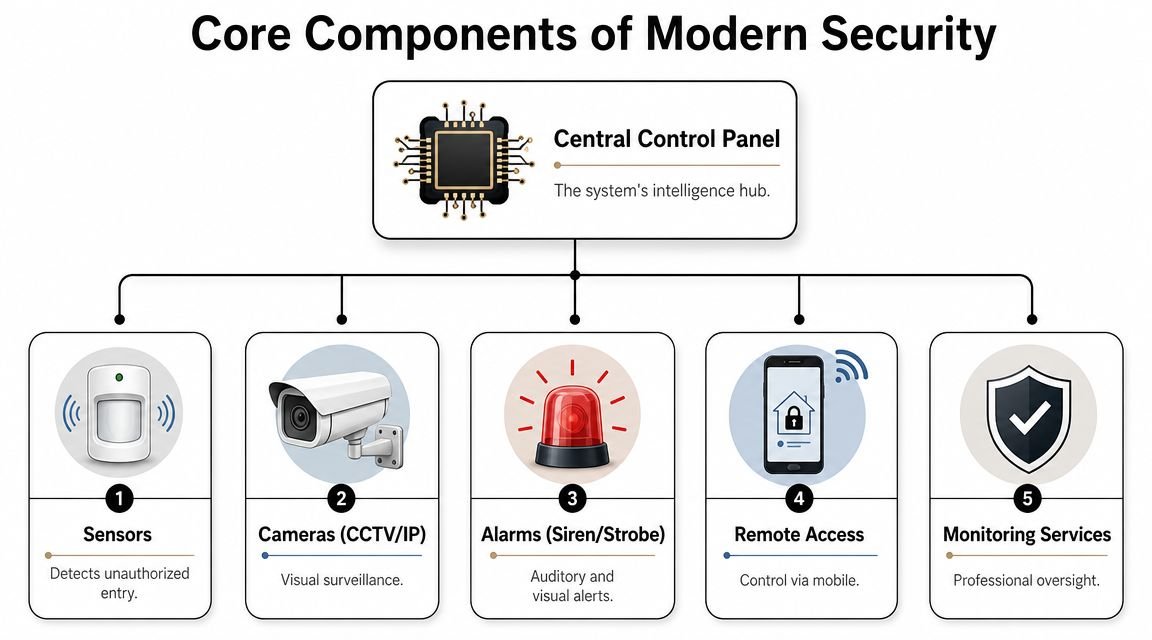
CCTV gives you evidence not just pictures
CCTV is the part owners recognise first, but commercial video should do more than show that “something happened”. It should show the right area, in usable quality, with the right retention, and with recordings that are easy to retrieve when time matters.
For small business premises, useful camera design usually means covering:
- Entry and exit points: Front door, rear access, shutters, gates, loading bays.
- High-value internal areas: Till points, stock rooms, server cupboards, tool stores.
- External approach routes: Car parks, side alleys, yard access, delivery areas.
What doesn't work is using one wide camera to cover everything. You get overview footage but poor identification. Better systems combine overview views with tighter views at choke points such as doors, counters and gates.
Intruder alarms create immediate pressure
An intruder alarm is the immediate signal that something is wrong. It shifts the site from passive observation to active response. Door contacts, motion sensors, and glass-break detection all have different jobs, and the right mix depends on layout, occupancy and how people move through the building.
A retail unit with a glazed frontage has different needs from a warehouse with roller shutters and separate offices. A salon with staff arriving in the dark needs a different entry routine from a daytime office. This is why copied packages often underperform.
Useful alarm design pays attention to:
| Component | Best use |
|---|---|
| Door contacts | Main entrances, rear exits, controlled doors |
| Motion sensors | Open floor areas, corridors, stock rooms |
| Glass-break detection | Large glazed entrances and vulnerable windows |
| Part-set options | Offices within workshops, occupied upstairs spaces, phased closing routines |
Access control decides who gets in and when
Access control is where security becomes management. Keys are simple until they're not. Once staff turnover, contractors, cleaners, deliveries and multi-site access enter the picture, physical keys create blind spots.
A commercial access system lets a business control permissions by person, door, and time period. That matters if you need someone to enter one room but not another, or only during trading hours. It also matters when someone leaves. Deleting access is cleaner than chasing keys.
Options vary from keypads to card and fob readers, through to biometric systems in sites with tighter control requirements. The right choice depends on risk, convenience, turnover, and how much audit trail you need.
The point of access control isn't to make entry complicated. It's to make permission clear.
Fire detection protects life first
Fire systems sit alongside security in many commercial properties because the same owner is usually responsible for both, and because incidents rarely respect neat categories. Fire detection is not just another feature on an app. It is life safety infrastructure.
For many small firms, the practical question is whether the fire system, alarm system, and access arrangements make sense together. Staff need to know what happens at open, close, evacuation and out-of-hours attendance. If those procedures clash, people stop following them properly.
Where systems are integrated well, owners get a cleaner operating environment. Video helps verify out-of-hours events. Access logs support incident review. Detection systems support response rather than creating confusion.
Monitored Protection vs Bell-Only Alarms
This is one of the few choices in commercial security where the difference looks small at quote stage and feels large after an activation.
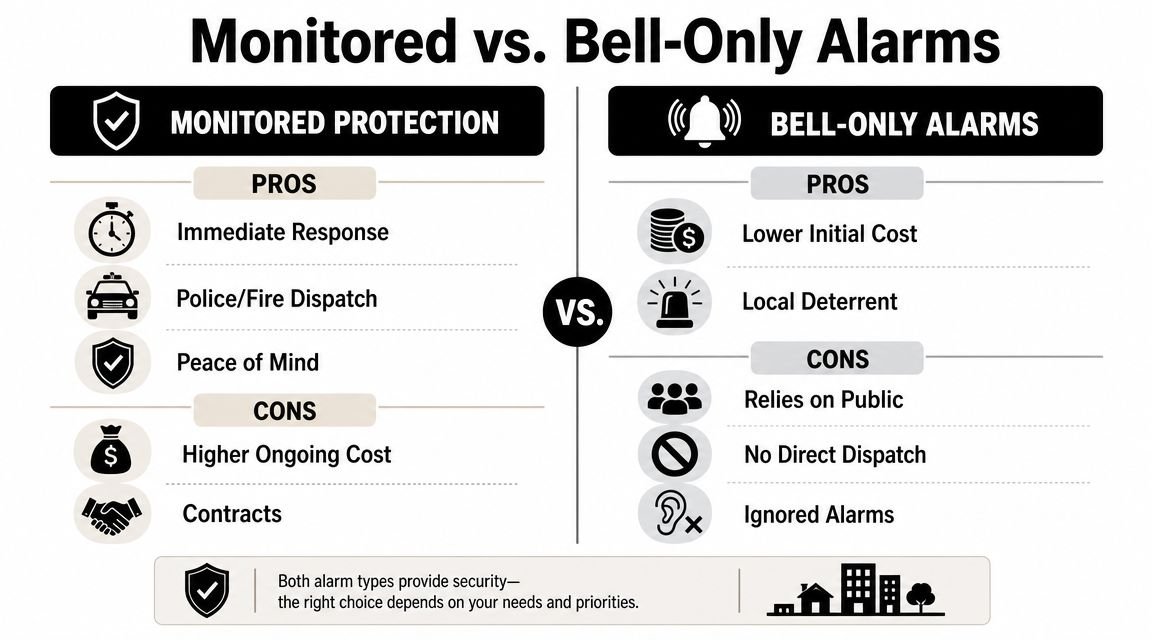
A bell-only alarm does one thing. It sounds locally. That can still deter opportunist intruders, especially where neighbouring units are close by and there's a realistic chance someone will notice. For lower-risk sites with limited budgets, it can be better than having no alarm at all.
But bell-only protection has a hard limit. It relies on somebody nearby caring, hearing it, and doing something useful with that information. Out-of-hours on quieter industrial estates, rural roads, edge-of-town retail parks, or during poor weather, that assumption becomes weak very quickly.
For a fuller explanation of how monitored setups work in practice, this guide on what a monitored alarm system is is worth reading before you compare quotes.
What a bell-only system does well
Bell-only systems can suit sites that want straightforward deterrence without an ongoing monitoring arrangement. They are simpler to understand, and the running costs are usually lighter because you're not paying for active response handling.
They can make sense where:
- The premises are low risk: Limited stock, little cash exposure, lower after-hours threat.
- Someone is always nearby: Owner-occupied sites, attached premises, or locations with dependable local oversight.
- The goal is visible deterrence: You want an audible activation and obvious alarm presence.
That said, relying on noise alone is a gamble in many commercial environments.
What monitored protection changes
Monitored protection connects alarm events to a response path. That doesn't eliminate false alarms by itself, but it does create structure. Events are handled, escalated, and verified through an agreed process rather than being left to chance.
This matters most when the owner can't realistically respond immediately. If you're at home in another town, travelling, or running multiple sites, a siren on its own doesn't close the gap.
A monitored setup is often the better fit when:
- The business closes completely overnight
- The site stores valuable stock, tools, or equipment
- There's a history of nuisance behaviour, attempted entry, or isolated location risk
- The insurer expects a stronger standard of protection
- The owner wants keyholder support and clear event handling
Later in the decision process, owners usually realise they're not only paying for detection. They're paying for continuity and procedure.
A short video can help if you're weighing those trade-offs from a non-technical starting point.
A practical comparison
| Option | Strength | Limitation |
|---|---|---|
| Bell-only alarm | Lower complexity and local audible deterrent | No structured remote response |
| Monitored alarm | Clear out-of-hours handling and escalation | Ongoing service cost and monitoring agreement |
A monitored alarm isn't automatically “better” for every site. It's better when the business can't afford silence, delay, or uncertainty after activation.
For many South Wales and South West businesses, that's the dividing line.
Designing Your System and Budgeting for Costs
A good security budget starts with how the site operates day to day. A bakery that opens at 5am, takes cash, and uses a rear delivery entrance has different risks from a trade counter with a shuttered yard and tool storage. If the design ignores those details, the quote often looks tidy at the start and expensive six months later.
Start with layers not products
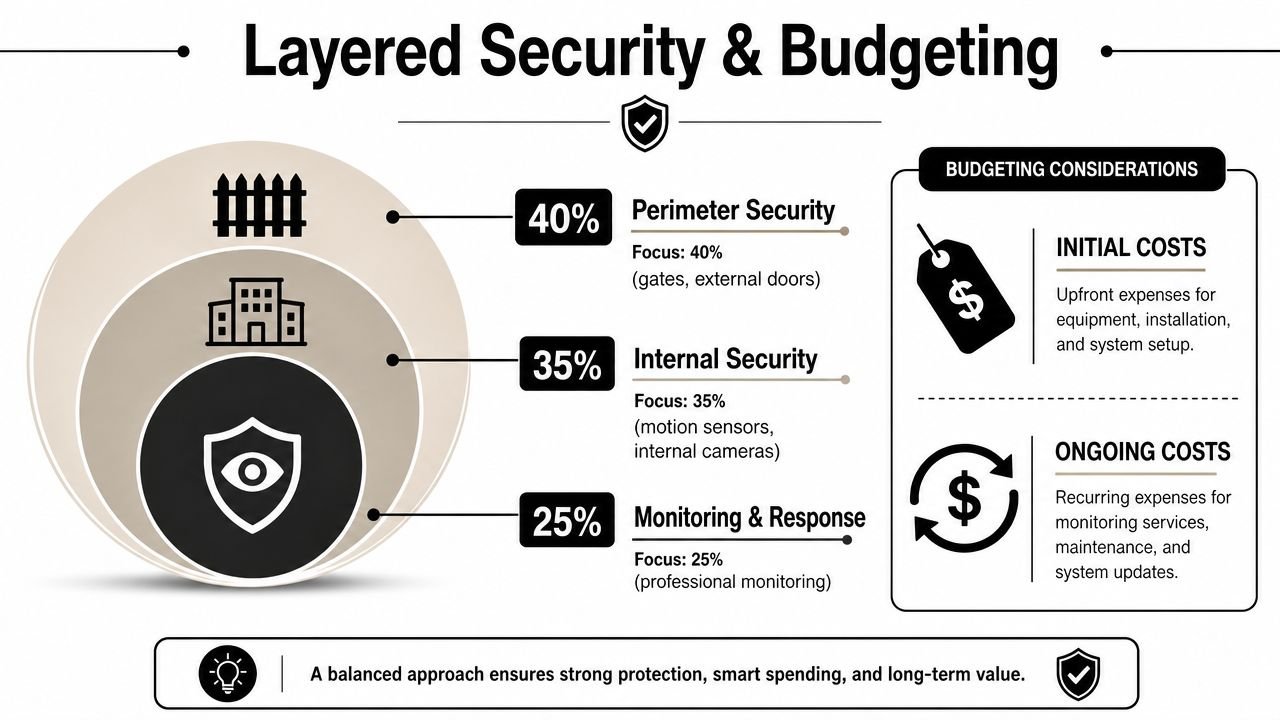
The most practical way to plan a small business system is to map protection in layers. That keeps the discussion tied to risk, response, and business continuity instead of isolated gadgets.
Start outside. External doors, shutters, gates, windows, yards, and approach routes usually set the first line of detection. Then move inward to the shell of the building and the paths an intruder would use after entry. Finally, tighten protection around the places that would cause the most disruption if hit, such as stock rooms, tills, medicine cabinets, workshop tool cages, comms cupboards, and office records.
That sequence matters.
Many small firms in South Wales and the South West lose money by buying a camera first, then adding an alarm later, then trying to bolt access control onto a system that was never planned to work together. The equipment may function, but the business ends up with duplicated apps, awkward maintenance, and gaps in coverage at the points that matter most.
A simple planning checklist helps keep the design grounded:
List key risks
Break-in, internal theft, staff safety concerns, restricted access, stock loss, lone working, after-hours incidents, and insurer requirements.Mark vulnerable routes
Rear doors, side alleys, roof lights, loading bays, shared corridors, yard gates, and delivery entrances.Identify critical areas
Cash points, high-value stock, controlled drugs, server racks, keys, tools, and records.Set the minimum operating standard during a failure
Decide what still needs to work during a power cut or broadband outage. Usually that means alarm detection, local CCTV recording, and controlled access at key doors.
Budget for ownership not just installation
The purchase price is only one part of the cost. Over five years, the bigger factors are usually maintenance, monitoring, call-outs, battery replacement, software licensing, upgrades, and the time your team spends dealing with a system that is awkward to use.
That is why a cheaper quote can cost more overall.
Published UK cost guides show a wide spread in pricing depending on site size and system scope. Typical ranges for hardware, installation, CCTV, and access control vary widely, which is why headline figures are only useful once the design is clear (UK-oriented small business security cost ranges). For a clearer view of what drives upfront and recurring spend, this breakdown of security system costs for small businesses is a useful starting point.
In practice, owners should budget for three categories:
Upfront design and installation
Equipment, cabling, commissioning, user setup, and handoverOngoing service costs
Monitoring, maintenance visits, remote support, replacement parts, and software or app subscriptions where applicableFailure and change costs
Emergency call-outs, storm or power-related faults, additions after a refit, or replacement of low-grade equipment that cannot scale
I usually advise clients to ask a blunt question before approving any quote. What will this system cost me to run, maintain, and adapt over the next five years if the business adds staff, changes opening hours, or takes on a second unit?
If the installer cannot answer that clearly, the design is not finished.
Resilience is part of the design brief
Operational resilience needs to be designed in from the start, especially for independent businesses outside city centres where power and connectivity can be less predictable. A polished phone app does not help much if the cameras stop recording locally during an outage, or if an alarm panel loses core function when the router drops.
A stronger setup keeps the site protected in a degraded state. CCTV continues recording to local storage. The intruder alarm still sets, detects, and logs events. Access-controlled doors fail in the correct way for the fire strategy and day-to-day security. Remote viewing and alerts return when the connection comes back, but the site does not become blind while waiting for that to happen.
That has a direct business value. After a break-in, flood, or disputed incident, owners often need evidence for the insurer, the police, or an internal investigation. If the only footage lived in the cloud and the broadband failed, the system may have looked modern but still failed the business.
Commercial design guidance regularly points businesses toward local recording, tuned detection, and layered protection at entry points because those choices improve evidential quality and reduce nuisance alerts (commercial video design and layered protection guidance). For sites in South Wales and the South West, that is not a technical nicety. It affects whether the system remains useful on a bad-weather night, during a power event, or after an internet fault.
Budgeting properly means paying for a system that still works when conditions are poor, not one that only performs well in a sales demo.
Understanding UK Compliance Standards and Insurance Rules
Many owners only discover the compliance side after they've bought the equipment. That's backwards. Compliance affects whether the system is acceptable to an insurer, whether CCTV is being used lawfully, and whether the records produced after an incident are useful.
Compliance affects what happens after an incident
A small business can have expensive hardware and still be poorly protected if documentation, grading, maintenance, or setup don't match the actual risk. Instead of a shopping exercise, commercial security becomes a standards exercise.
For independent retailers and warehouses, especially outside major urban centres, operational resilience during power cuts or poor connectivity is a key concern. UK guidance increasingly treats continuity planning as part of security, and businesses need to know whether cameras and alarms keep working if the internet fails. In practice, the strongest systems maintain local operation first (operational resilience and continuity planning for small business security).
That resilience point links directly to insurance and evidential quality. A system that records beautifully when everything is normal but fails during an outage can be far less valuable than a simpler one that continues to operate locally.
For businesses checking supplier credibility and recognised approval routes, it's sensible to understand what the Security Systems and Alarms Inspection Board is and why third-party inspection matters in commercial installations.
CCTV rules are operational rules
CCTV is not just a camera issue. It's a data handling issue. If your business uses CCTV, you need a clear purpose, appropriate signage, sensible retention controls, and a setup that captures what is necessary rather than everything possible.
That has day-to-day consequences:
- Signage must be clear: People should know CCTV is in use.
- Coverage should be justified: Aim cameras where they serve a legitimate business purpose.
- Retention should be controlled: Keep footage for a reasoned period, not indefinitely by habit.
- Access should be limited: Not everyone in the business should be casually browsing recordings.
Compliance is easiest when it's built into the design. It becomes awkward when owners try to retrofit policy onto a badly planned system.
Ask your insurer before you sign off
Before installation, ask your insurer what they require or prefer. Not in general terms. In writing, if possible. Some businesses assume “having CCTV” is enough, only to find the insurer was concerned about monitored detection, alarm grading, maintenance, or evidential reliability.
A strong installer should be comfortable discussing standards, logs, maintenance, and how the site will operate during faults or downtime. If that conversation never happens, the quote is incomplete.
Choosing the Right Installer in South Wales and The South West
A good installer doesn't just sell equipment. They reduce risk in the design stage, avoid weak placements, explain what the system will and won't do, and leave the business with something staff can use.
In South Wales and the South West, local experience matters because sites vary wildly. You've got high street shops, rural compounds, converted buildings, industrial units, managed offices, schools, mixed residential-commercial sites, and coastal locations where weather and exposure affect equipment choices.
Questions worth asking before you accept a quote
Don't start with price. Start with competence.
Ask each installer:
- Who surveyed the site: Was it a salesperson, or someone who understands system design and risk?
- What happens during an outage: Will cameras still record locally, will alarms still trigger, and what functions depend on internet access?
- How will footage be retrieved: Is evidence export straightforward and usable after an incident?
- How are false alarms reduced: Are sensors and detection zones being tuned to the premises rather than copied from a template?
- What support follows installation: Maintenance, call-outs, user changes, battery replacement, firmware updates, and staff training all matter.
What a strong proposal should include
A proper proposal is specific. It should identify doors, zones, camera views, storage approach, monitoring choice, access permissions, and maintenance scope. If the quote is vague, the risk is vague too.
Look for a provider that can explain trade-offs plainly. For example, why one door needs a contact rather than relying on a nearby motion detector, or why one external camera should prioritise identification while another gives wider context. The best installers speak in operational terms, not just product names.
When a firm can connect cost, resilience, compliance, and practical use, that's usually a sign you're talking to the right people.
If you're planning your first major upgrade, or replacing a patchwork setup that no longer fits the business, Wisenet Security Ltd can advise on CCTV, intruder alarms, access control, fire systems, and integrated protection for premises across South Wales and the South West. A sensible next step is a site survey that focuses on risk, resilience, compliance, and total cost of ownership rather than a generic package.