
Security and CCTV
After locking up, checking the front door, and glancing at the shutters, you still wonder whether the building is genuinely protected. Homeowners feel it when they go away for the weekend. Shop managers feel it after cash-up. Warehouse operators feel it when the last van leaves the yard. The worry is rarely about having no security at all. It's about not knowing whether the system will hold up when something real happens.
That's where most security and CCTV buying goes wrong. People shop for a camera, not a security outcome. A single device might record an incident, but a reliable system should do more than that. It should deter someone from trying, capture usable evidence if they do, alert the right person quickly, and do all of it without creating a privacy headache.
From a systems engineer's point of view, the best setups in South Wales and the South West aren't built around one box on a wall. They're built around layers. CCTV, alarms, access control, lighting, power backup, storage, remote access, and compliant operation all need to work together.
Table of Contents
- Thinking Beyond a Single Camera
- Understanding Your Security Layers
- Choosing the Right CCTV Technology
- How Integrated Systems Work Together
- UK Legal Compliance and Privacy Rules
- Security and CCTV in Action
- Installation Maintenance and Choosing Your Provider
- Answering Your Top Security Questions
Thinking Beyond a Single Camera
A lot of buyers still start with the same question. “Which camera should I get?” It sounds sensible, but it's usually too narrow.
The better question is, “What problem am I trying to control?” A front door parcel issue needs a different approach from after-hours access to a stockroom. A shared car park has different risks from a detached house. A loading bay needs clear identification and dependable night coverage, not just a wide view.
Good security and CCTV work like a chain, not a gadget. The camera is one link. The alarm trigger, recorder, app access, lighting, cabling, storage settings, and maintenance plan are the others. If one link is weak, the system can still fail at the worst moment.
Here's the practical split I use on site:
- Deterrence: visible cameras, signage, lighting, and sensible positioning.
- Detection: motion events, door contacts, alarm zones, and out-of-hours alerts.
- Verification: live viewing or recorded clips that show what occurred.
- Evidence: footage clear enough to identify a face, vehicle, or sequence of events.
- Response: a person gets notified and can act quickly.
That's why a standalone camera often disappoints. It may record movement, but if the angle is wrong, the night image is poor, or the footage is buried in a recorder nobody checks, it hasn't solved much.
Practical rule: Buy a security outcome first, then choose the cameras that support it.
If you're weighing up where CCTV fits into the wider picture, this guide on the benefits of CCTV surveillance is a useful starting point. Its true value usually comes when surveillance is treated as part of a joined-up protection plan rather than a box-ticking purchase.
Understanding Your Security Layers
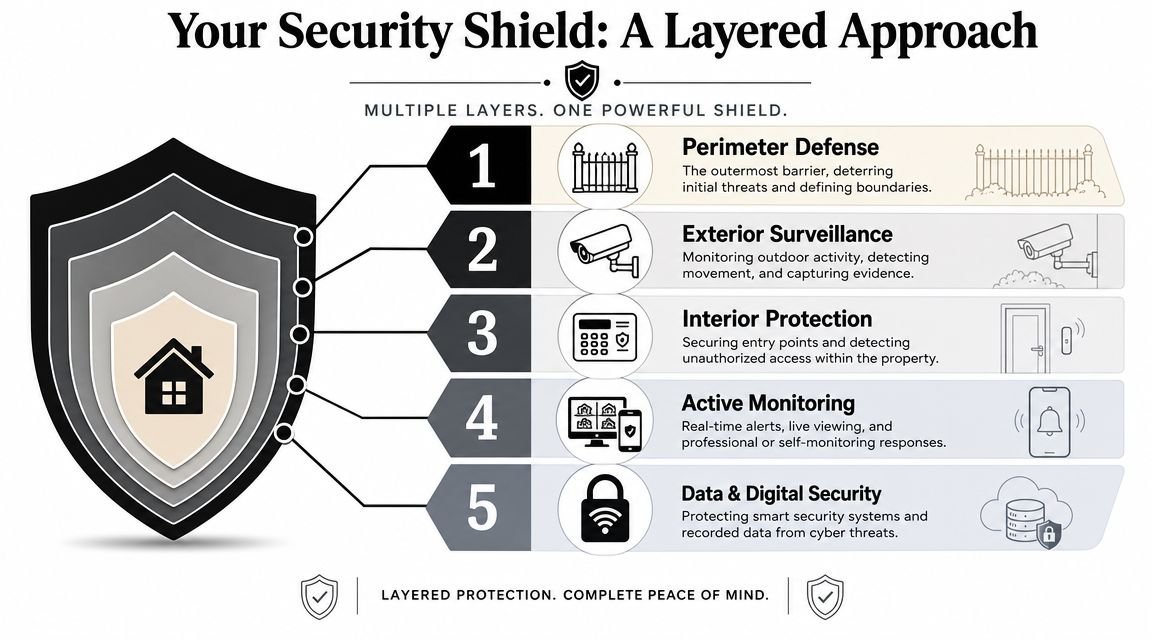
A property protected by one device is a bit like a castle with a strong wall and no gatehouse, no moat, and no watchtower. One defence helps. Several coordinated defences change the odds.
Why one layer always leaves a gap
Intruder alarms are the moat. They create an early warning when someone crosses a boundary, opens a door, or moves through a protected area. They don't show you who it was, but they tell you something is wrong.
Access control is the gatehouse. It decides who gets in, where they can go, and when. In a business, that means staff fobs, keypads, card readers, or biometric readers tied to user permissions and entry logs.
CCTV is the watchtower. It gives eyes on the site before, during, and after an event. That's why security and CCTV work best when they're paired with the other layers rather than left alone to do every job.
A straightforward way to think about it is this:
| Layer | Main job | Weakness if used alone |
|---|---|---|
| Alarm | Detects intrusion | Can't verify what happened |
| Access control | Restricts entry | Doesn't always show tailgating or misuse |
| CCTV | Observes and records | May not trigger a fast enough response |
When these systems are integrated, each one covers the blind spot of the others. Teams looking to ensure robust security often end up moving towards that layered model because it's easier to manage real incidents when detection, evidence, and response sit in one connected setup.
The UK context matters
CCTV isn't new in Britain. The first permanent UK city-centre CCTV system was installed in Bournemouth in 1985, and by the mid-1990s Britain had already become one of the world's most camera-saturated countries, which helped make visible surveillance a routine part of UK risk management long before smart features became common, as noted in this UK CCTV history overview.
That history still shapes buyer expectations now. Buyers in the UK don't judge a system by novelty. They judge it by three practical outcomes:
- Does it deter people?
- Does it capture evidence clearly?
- Is it operated lawfully?
A camera that sees everything vaguely is often less useful than one that sees the right area properly.
Choosing the Right CCTV Technology
Buyers often get pulled towards spec sheets. More megapixels. Wider angle. AI labels. App features. The problem is that camera technology only matters if it matches the job.
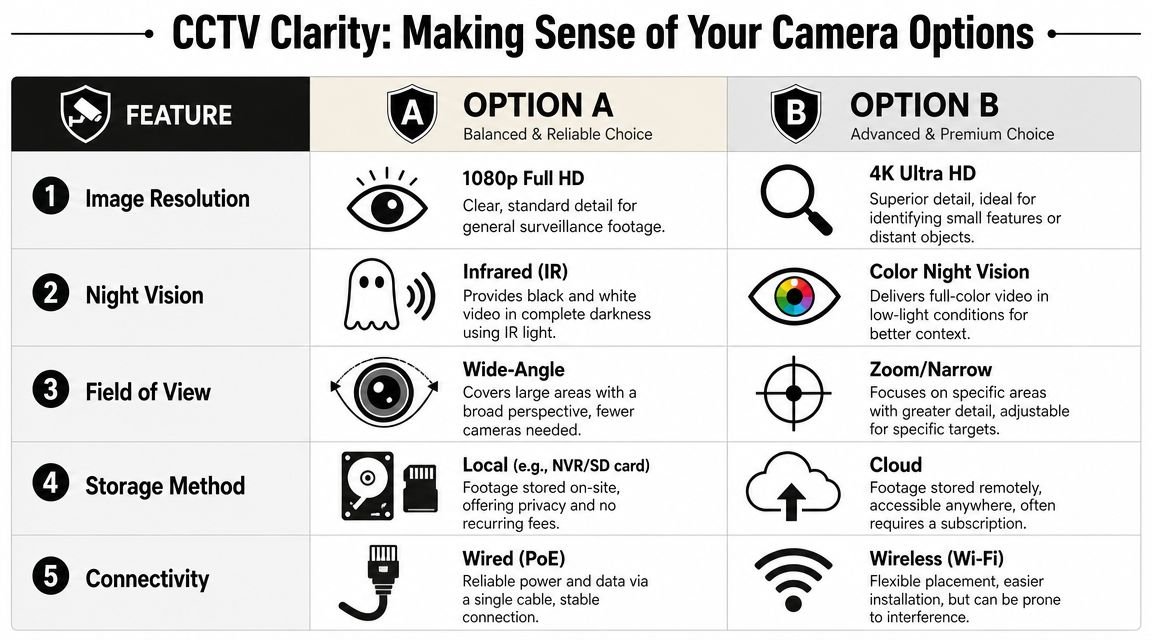
What different camera features actually change
The difference between 1080p Full HD and 4K Ultra HD isn't marketing language on a box. It shows up after an incident, when someone tries to zoom in on a face near a doorway or a vehicle in a yard. More detail gives you a better chance of identifying what matters, but only if the lens choice and mounting height are right.
Night performance creates another common misunderstanding. Infrared gives you black and white images in darkness. That can be perfectly suitable for many side alleys, rear paths, and service routes. Colour night vision gives more scene context in low light, which helps when clothing colour, vehicle colour, or environmental detail matters.
Field of view is where people often make the wrong trade-off. A very wide lens covers more area, but it spreads available detail across that wider scene. A narrower or zoomed view gives better detail in a target zone such as a gate, till, or entry point.
A simple comparison helps:
- Wide-angle cameras: better for overview and movement patterns.
- Tighter views: better for identification and evidential work.
- Wired PoE cameras: usually more stable for permanent installations.
- Wi-Fi cameras: useful where cabling is difficult, but they need careful setup and realistic expectations.
For readers comparing options on the market, it can help to look at a real example such as this outdoor unit if you want to secure your property with this camera, then measure its features against your actual site conditions rather than buying on headline specs alone.
A short visual explanation can make these trade-offs easier to grasp:
Don't buy resolution without planning storage
A significant challenge for many systems arises because higher-resolution 4K/HD IP cameras increase storage and bandwidth demand, so the system needs to be engineered around NVR capacity and network throughput to preserve evidence quality after an incident, as explained in this guidance on matching camera resolution and storage design.
In plain terms, a recorder works like a cupboard. If you keep putting larger boxes into the same cupboard, you run out of room sooner. The result can be shorter retention, lower recording quality, or both.
On site, I'd rather see fewer cameras recording the right scenes well than lots of cameras producing footage nobody can use.
That's why professional security and CCTV design starts with questions such as:
- What must be identified? Face, vehicle, movement pattern, or general overview.
- How long should footage be retained? Long enough for operations and incident review.
- Who needs remote access? Owner, manager, facilities team, or monitoring provider.
- What else shares the network? A recorder can't be planned in isolation.
How to compare real products sensibly
AI features can be useful, but they should support clear operational needs. Person detection, vehicle filtering, and smart notifications can reduce nuisance alerts. They don't replace sensible camera placement.
If you want a clearer view of where smart analytics fit into a modern system, this piece on how AI CCTV systems improve security gives a practical overview. The important point is that analytics work best when the camera angle, scene lighting, and recording setup are already sound.
How Integrated Systems Work Together
Most poor systems fail because each part works alone. The camera records. The alarm rings. The access control logs a door event. Nobody joins the dots quickly enough.
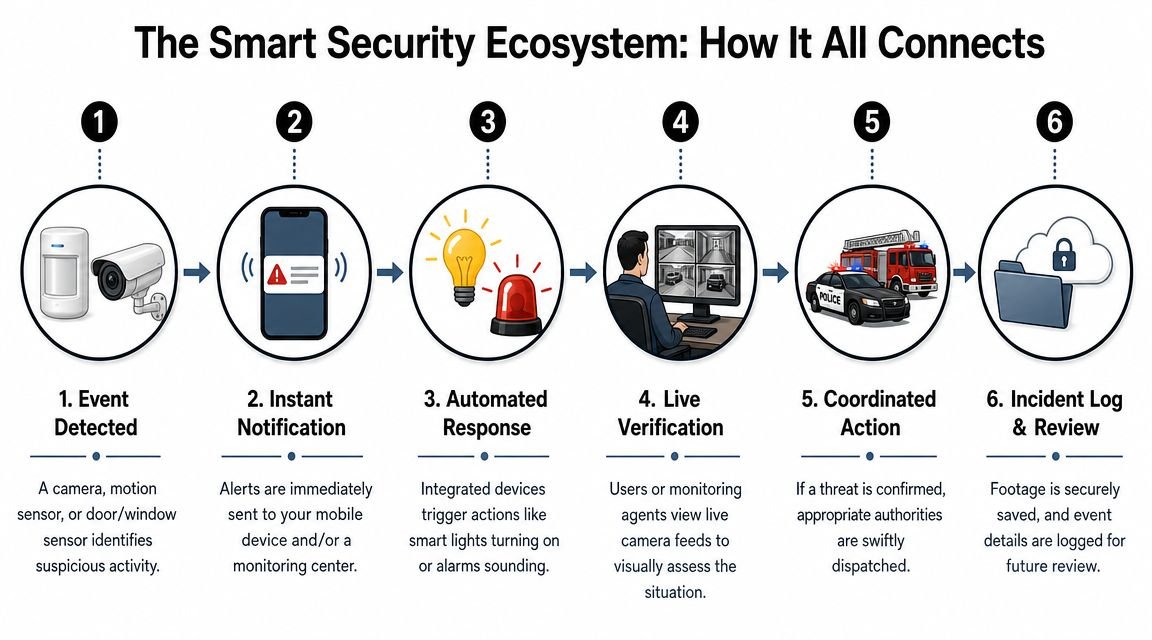
From isolated devices to event-driven security
Integrated security and CCTV use simple logic. If one event happens, the system triggers a second action automatically.
A few practical examples show how that works:
- If a rear fire exit opens out of hours, then the nearest camera can flag the event for immediate review.
- If an intruder zone triggers in a stockroom, then the site contact can receive a mobile alert and check live footage before attending.
- If a staff fob is used at a restricted door, then the access record and associated video can be reviewed together later.
That logic matters because speed matters. Operators don't want to search through hours of footage while also trying to decide whether the event is genuine. Integration cuts the delay between detection and verification.
What integration solves in practice
A connected system usually improves three things.
First, it reduces confusion. Instead of several apps and separate logs, users get one chain of events. Door opened. Alarm unset. Camera recorded. User entered.
Second, it sharpens evidence. A camera tied to a specific event is easier to review than general continuous footage with no anchor point.
Third, it supports more measured responses. Many late-night alerts turn out to be staff access, deliveries, or routine activity. Being able to verify before escalating avoids wasted callouts and unnecessary panic.
Here's the engineering point that often gets missed. Integration doesn't need to be flashy to be effective. It just needs to be dependable. A stable alarm panel, well-placed cameras, clean event logs, sensible user permissions, and reliable remote access will outperform a complicated setup full of features nobody uses.
The most useful automation is the kind that saves time during stress, not the kind that looks impressive during a demo.
For homeowners, that might mean one app showing camera views and alarm status. For a multi-tenant site, it might mean entrance events and shared-area video can be reviewed together. For a warehouse, it often means tying perimeter alerts to the right camera views so managers aren't searching blind.
UK Legal Compliance and Privacy Rules
A compliant system protects you twice. It helps protect the site, and it helps protect you from disputes after installation.
That second part gets overlooked all the time. People focus on image quality, not lawful operation. Then a neighbour complains, a tenant asks questions, or a member of staff wants to know why a camera covers a space they consider private.
Privacy problems usually start with placement
One of the most underserved parts of UK CCTV advice is what happens after the kit is mounted. Guidance often tells users not to point cameras at private spaces, but it doesn't always answer the practical questions around when domestic CCTV becomes subject to UK GDPR, how signage should be handled, and how to balance deterrence with privacy in shared spaces, as highlighted in this UK-facing guidance on common CCTV placement mistakes and privacy concerns.
For homes, the risk usually appears at boundaries. Terraced properties, shared access paths, neighbour driveways, and communal parking areas all create overlap. For businesses, the pressure points are often public-facing entrances, customer areas, and staff spaces.
A sensible starting checklist looks like this:
- Aim tightly: cover the door, gate, bay, or path you need. Don't sweep across more than necessary.
- Use masking where needed: if part of a neighbouring area falls into view, reduce capture where the system allows it.
- Think about height and angle: higher isn't always better. It can widen the privacy footprint.
- Avoid sensitive spaces: places where people reasonably expect privacy should be excluded.
What lawful operation looks like day to day
Compliance isn't just about where the camera points. It's also about what you do with the footage once it exists.
That means having clear signage, a reason for recording, sensible retention, controlled access, and a way to respond if someone raises a data question. In mixed-use or more digitally connected environments, readers sometimes also look at broader issues around identity exposure online, including guides such as this discussion of digital identity protection on Facebook, because surveillance and personal data concerns increasingly overlap in everyday life.
For businesses, the easiest mistake is informal access. Too many people can view footage, clips get shared casually, and nobody knows what's been exported. That weakens governance and can also weaken confidence in the evidence trail.
If you operate CCTV commercially, this guide on CCTV and GDPR in the UK is worth reading alongside your installation planning. The strongest systems are designed to be compliant from day one, not patched up after the first complaint.
Lawful CCTV is usually simpler than people think. Record what you need, tell people you're doing it, and control who can access it.
Security and CCTV in Action
Security design only makes sense when it solves real-world problems. The same hardware can be useful in one setting and poorly matched in another.
At home
A family heads away for a few days. They don't need a control room. They need confidence that if a side gate opens or movement appears near the back door at night, they can check the app quickly and decide whether it's a delivery, a neighbour, or something that needs attention.
That's where an integrated domestic setup earns its keep. External cameras cover likely approach routes. An alarm protects entry points. Remote viewing lets the homeowner verify an alert instead of guessing from a siren alone. The job isn't just to record. It's to remove uncertainty.
In retail
A small shop has two recurring issues. Staff feel exposed during opening and closing, and the owner keeps dealing with disputes around tills, returns, and stock movement.
In that case, the best CCTV layout usually isn't lots of general coverage. It's targeted coverage. Entrances, till positions, key aisles, stockroom access, and rear delivery points matter more than decorative wide shots. If access control is also in place for staff-only areas, reviewing incidents becomes much easier because the video and the movement trail support each other.
In warehouses and yards
Industrial and logistics sites have a different risk pattern. They need reliable coverage at perimeter lines, loading bays, shutter doors, and vehicle routes. These are spaces where darkness, weather, and distance often make cheap cameras look acceptable on installation day and poor during a live incident.
What works better is a planned mix. Overview coverage for movement. Tighter views at gates and bays. Stable recording. Dependable remote review for managers who aren't always on site.
In yards and loading areas, the question isn't “Can I see activity?” It's “Can I tell what happened well enough to act on it?”
In car parks
Car parks are one of the clearest examples of CCTV working well when the environment suits it. A UK Home Office review found the biggest reductions in car parks, where crime fell by 51%, which supports the case for well-designed surveillance in controlled settings with clear sightlines and theft-prone assets, as summarised in this review of UK CCTV effectiveness by setting.
That matches what practitioners see on the ground. A car park benefits from obvious entry and exit points, visible signage, and repeatable camera views. Good lighting helps. So does covering payment areas, pedestrian routes, and bays where vehicles are left unattended for longer periods.
For property managers in South Wales and the South West, that makes car parks a strong candidate for integrated security and CCTV. They're easier to design well than many mixed interior spaces, and they often deliver clear value in both deterrence and incident review.
Installation Maintenance and Choosing Your Provider
A solid design can still be ruined by lazy installation. A camera mounted too high, a cable left exposed, or a recorder tucked into an insecure cupboard can turn good equipment into a weak system.
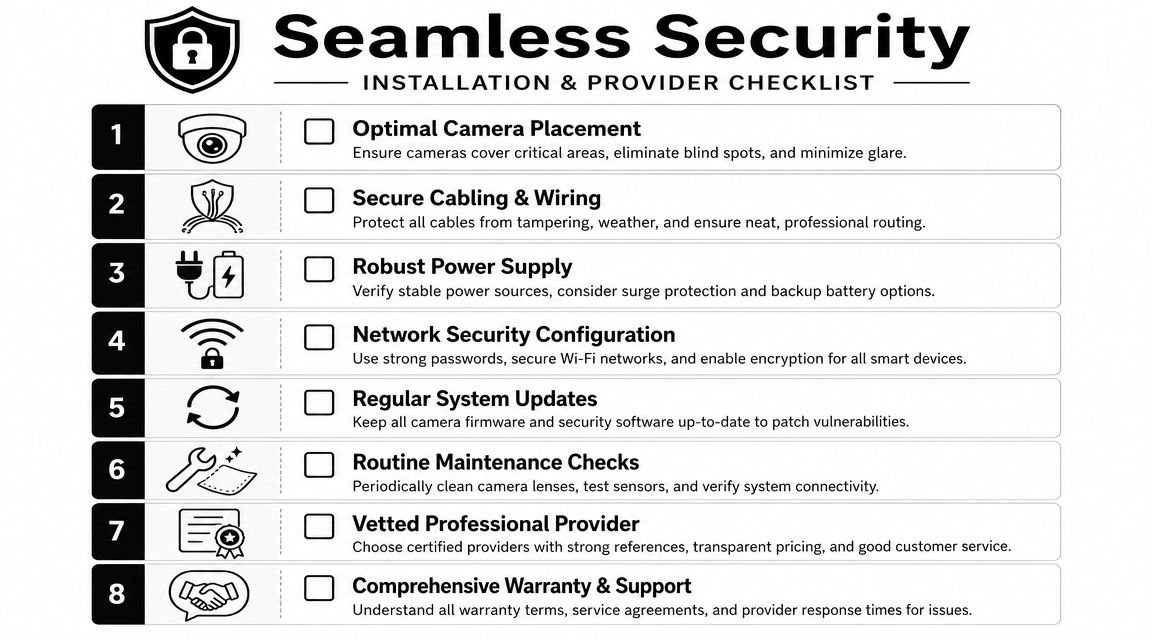
Installation details that decide whether a system works
The practical basics matter more than buyers often realise.
- Camera placement: cover approach routes, entrances, cash points, yards, and vulnerable edges without creating obvious blind spots.
- Cabling: protect it from tampering, moisture, and accidental damage. Neat routing isn't cosmetic. It prevents faults.
- Power resilience: if the site loses power easily, think about backup.
- Network setup: remote viewing should be secure and stable, not improvised.
Maintenance matters just as much. Routine inspections of camera positioning, cabling, and power supply improve reliability because faults, outages, or poor alignment can degrade image quality and interrupt monitoring, as explained in this guidance on planned CCTV maintenance for businesses.
A neglected system often fails undetected. A spider builds a web over the lens. A camera shifts slightly in wind. A power issue affects one recorder channel. Nobody notices until they need footage.
What to check before you hire anyone
When you're choosing a provider, think long term. You're not buying a telly. You're trusting someone to install a system that may be called on after a break-in, an injury, a dispute, or a fire alarm activation.
Use a shortlist like this:
- Ask about integrated systems: can they handle CCTV, alarms, and access together, or only one element?
- Check credentials: insurance, vetted engineers, and recognised accreditations matter.
- Look at support arrangements: who answers when there's a fault or app issue?
- Discuss maintenance: if they install it, can they also keep it reliable?
- Ask for a site-led design: not a generic kit list.
For example, firms such as Wisenet Security Ltd work across CCTV, intruder alarms, access control, fire alarms, intercoms, and gate automation in South Wales and the South West, which is the sort of multi-system capability many homes and businesses need when they want one joined-up security plan rather than separate trades.
Answering Your Top Security Questions
| Question | Answer |
|---|---|
| Do I need CCTV if I already have an alarm? | Usually, yes, if you want verification and evidence. An alarm tells you something happened. CCTV helps show what it was. |
| Is wireless CCTV always easier? | Easier to place sometimes, yes. Better overall, not always. Wired systems are often more stable for permanent installations. |
| How many cameras do I need? | Enough to cover the right risk points. More cameras don't automatically mean better protection. |
| Can CCTV work on its own? | It can, but it's usually stronger when tied to alarms, lighting, or access control. |
| Will one wide camera cover my whole property? | It may cover it visually, but wide views often reduce detail where identification matters. |
| Do I need signage? | In many UK use cases, clear signage is part of operating the system properly and avoiding disputes. |
| How often should a system be checked? | Regularly. Cameras, power, storage, and remote access should all be tested as part of routine maintenance. |
| Is professional installation worth it? | If you need dependable evidence, lawful operation, and clean integration, yes. The cost of getting it wrong usually shows up later, not on day one. |
If you want a practical review of your current setup or a fresh design for your home, shop, warehouse, or managed property, Wisenet Security Ltd can help assess the risks, specify the right mix of CCTV, alarms, and access control, and build a compliant system that's designed to work reliably day and night.