Recorder for CCTV Camera: How to Choose the Right One
About 80% of CCTV film was judged so poor that it was virtually unusable, according to historical Police Foundation findings summarised by Clearway's review of CCTV usage in the UK. That's the risk when choosing a recorder for CCTV camera footage: owning a recording isn't the same as having useful evidence. The box matters, but its settings, storage policy and security decide whether you can actually use what it captures.
Table of Contents
- What a CCTV Recorder Does for Your Footage
- Choosing Between DVR, NVR and Hybrid Recorders
- Codecs and Compression Without the Jargon
- Channel Counts for Homes, Shops and Warehouses
- Storage Sizing for Your Retention Period
- PoE Versus Standalone Powering and Cabling
- Remote Viewing, Compatibility and Recorder Security
- Confirm Your Recorder Spec Before You Buy
What a CCTV Recorder Does for Your Footage
A CCTV recorder captures camera feeds, stores them, helps you find the relevant camera and time window, and exports footage someone else can examine. Choose its basic type by the camera signal: DVR for analogue, NVR for IP, or hybrid for a mixture.
Think of the recorder as a library. Disk capacity gives you shelves, but the catalogue and retrieval process determine whether you can find the right item when someone needs it.
Say a shop owner finds a sharp recording of an incident, but the recorder's clock is wrong. Matching the footage to a delivery record or another camera becomes harder, even though the picture looks excellent.
Practical rule: Judge the saved and exported recording, not just the live picture on the monitor.
Useful evidence needs clear detail in the conditions that matter, uninterrupted recording, trustworthy timestamps and an export process that preserves the original file. A daytime demonstration won't establish whether the system records moving people clearly after dark.
For an accessible explanation of how cameras fit into the wider installation, use the camera system advice from Solomon's Facilities Management. Then assess the recorder as the part that must make those images searchable and retrievable.
The monitoring screen is only the visible part of that process.

Choosing Between DVR, NVR and Hybrid Recorders
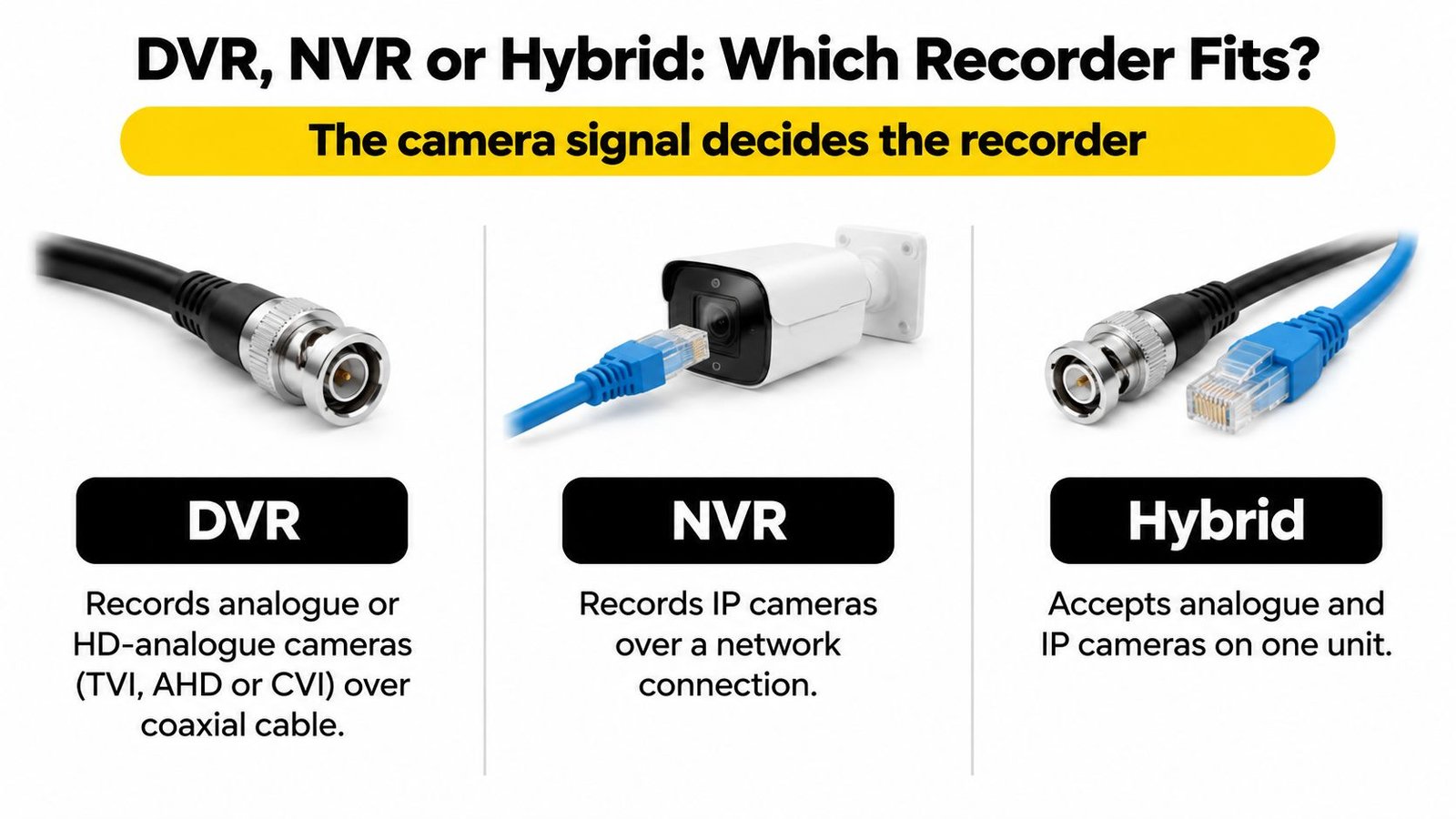
The recorder must match the camera signal. A familiar brand name or matching connector isn't enough: confirm the camera's output format and the recorder's supported inputs before ordering.
A DVR accepts analogue or HD-analogue video, including supported TVI, AHD and CVI formats, through coaxial cables with BNC connectors. An NVR receives digital streams from IP cameras over a network. A hybrid, often labelled XVR, accepts a specified combination of both.
DVR, NVR and hybrid recorders compared
| Recorder type | Camera signal | Cabling | Typical maximum resolution | Best fit |
|---|---|---|---|---|
| DVR, digital video recorder | Analogue or HD-analogue, including supported TVI, AHD and CVI | Coaxial cable with BNC connectors | Check the supported resolution and recording rate for each analogue format | Retaining serviceable analogue cameras |
| NVR, network video recorder | IP cameras | Ethernet | Check maximum recording resolution alongside incoming bandwidth | New installations and networked cameras |
| Hybrid, often sold as XVR | Analogue and IP | Coaxial and Ethernet | Separate limits apply to analogue and IP inputs | Staged upgrades using existing coax |
The distinction is easier to see when the signal paths sit side by side.
Keep useful infrastructure, not unsuitable cameras
A hybrid makes sense when sound coaxial cabling already reaches difficult locations. You can retain suitable cameras and replace others gradually, rather than paying to recable everything immediately.
However, check the hybrid's channel allocation carefully. Enabling additional IP inputs can alter the available analogue inputs, and analogue recording modes may restrict resolution or frame rate. Don't assume every socket supports the headline specification simultaneously.
For a new installation, I would normally start with an NVR design. Network cabling offers flexibility in camera placement and switching, but an NVR doesn't need an internet connection to record locally. Likewise, a DVR can operate without remote access.
Check interoperability beyond the logo
ONVIF support can help cameras and recorders from different manufacturers work together. Check the exact models for compatible profiles, such as Profile S or Profile T, and confirm which functions actually work: basic video compatibility doesn't guarantee analytics, audio or event-search integration.
For a contrasting view of recorder-centred architecture, Splash Access's discussion of why say no to network video recorders provides questions to raise when comparing local and alternative recording arrangements.
The decision is practical: retain coax with a suitable DVR or hybrid, choose an NVR for an IP installation, and avoid replacing usable infrastructure without a clear benefit.
Codecs and Compression Without the Jargon
A codec is the packing method for your footage. Think of a suitcase: better packing can reduce the space needed, but packing too aggressively can damage the detail you wanted to preserve.
H.264 and H.265, also called HEVC, are common recording formats. H.265 can reduce storage requirements compared with H.264 at comparable visual quality, but the result depends on the scene, encoder and settings. Playback devices also need to decode it properly.
Protect detail before saving space
Compression artefacts become particularly troublesome around movement and fine detail. A stationary doorway may look clean while a moving face becomes smeared, so don't approve compression settings using an empty scene.
Vendor-specific modes such as H.264+ and H.265+ can reduce the bitrate allocated to static areas. They're useful options to test, not guarantees of identical evidence at a smaller file size. MJPEG is generally a less storage-efficient choice for continuous recording.
Use these working rules:
- Match the complete chain. Confirm that the camera, recorder, export player and intended viewing device support the selected codec.
- Test movement at the target distance. Review a person walking through the entrance or a vehicle passing the capture point, including after dark.
- Keep the evidence requirement first. If compression obscures the detail needed to identify someone, increase the recording quality before expanding retention.
Don't confuse a smooth phone preview with the saved main stream. Open an exported clip on the device you'll use for reviewing incidents, and check that seeking, playback and image detail remain usable.
Channel Counts for Homes, Shops and Warehouses
A channel is a camera input. Count the views the site needs now, then leave space for realistic additions, such as a side gate, stockroom or separate till view.
Buy against a camera schedule rather than the recorder's front-panel label. The schedule should identify each camera's location, intended purpose, recording mode and planned stream settings.
Recommended channel counts by site type
| Site type | Typical camera count | Recommended channels | Planning note |
|---|---|---|---|
| Small home | Count entrance, access route and garden views | Current cameras plus a spare input | Allow for a future side-gate camera |
| Larger home or small flat | Count external and shared-access views | Next suitable capacity above the camera schedule | Check bandwidth for high-resolution cameras |
| Small shop, office or café | Count entrance, transaction and internal views | Cover the schedule plus planned additions | Treat the till and entrance as separate evidence tasks |
| Warehouse, yard or car park | Set by site survey, counted per zone | Split across recorders where the design justifies it | Assess network segments and power budgets |
| Multi-tenant building or industrial site | Set by site survey, counted per block | Networked recorders where appropriate | Define central viewing and access rights |
The bandwidth catch
Channel count doesn't guarantee full-resolution recording across every input. An NVR also has a total incoming bandwidth limit, along with decoding and playback limits.
Add the planned camera bitrates and compare the total with the recorder's incoming capacity. Then check what happens when you enable analytics, simultaneous playback or higher-quality recording modes. A recorder may accept the cameras yet struggle to display or search them together as expected.
An unused camera socket isn't useful expansion capacity if the recorder has no bandwidth left.
A car park spanning separate buildings doesn't automatically need a recorder in each building. A shared network may support central recording, while local recorders may be preferable where links are unreliable or independent operation matters.
For warehouses, separate PoE switches by zone can simplify cable routes and fault isolation. Choose the recorder arrangement after assessing the network, rather than using extra recorders to compensate for an unplanned network.
Storage Sizing for Your Retention Period
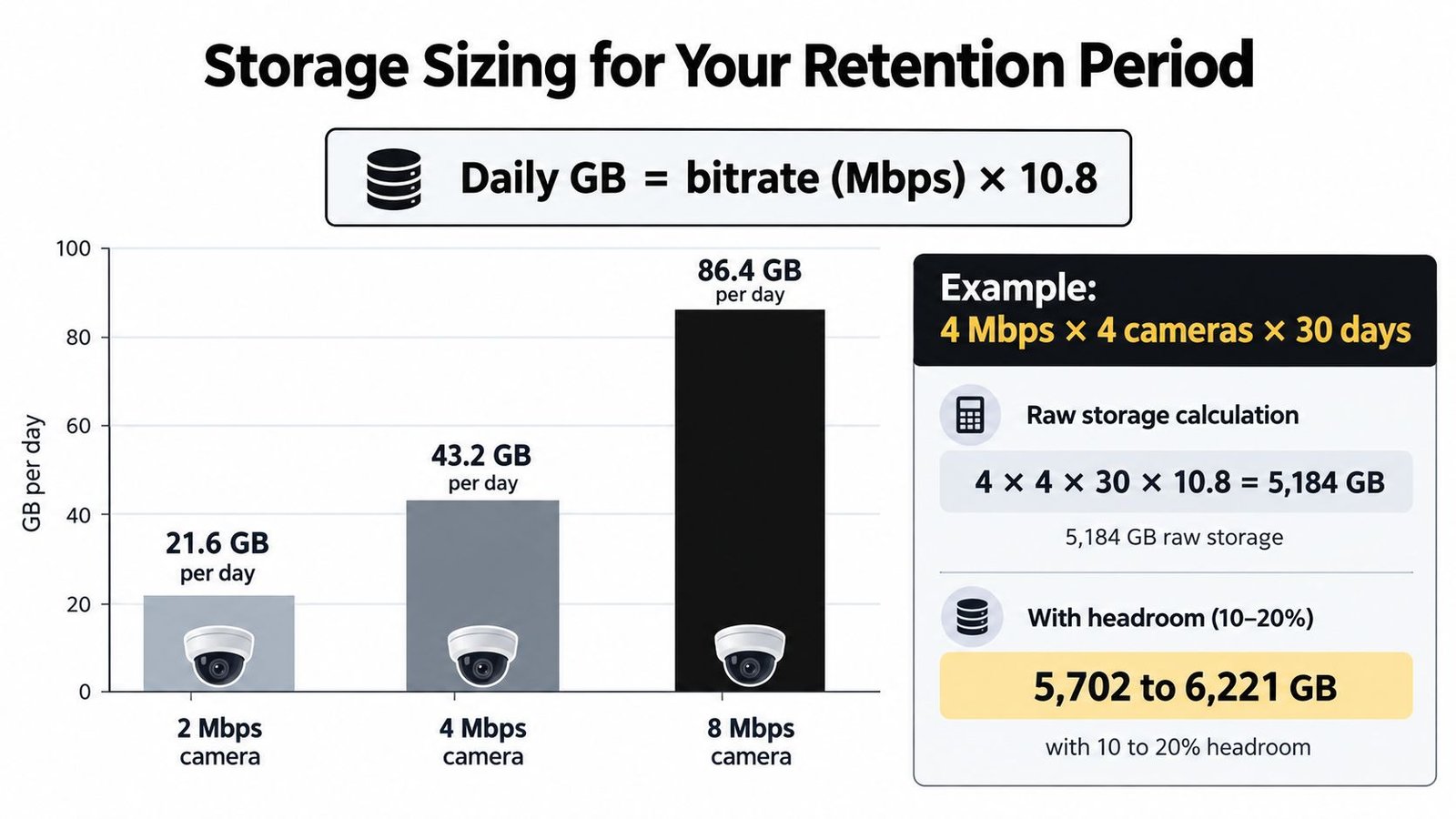
A recorder's storage requirement depends on bitrate, recording time, camera count and the retention period the footage needs to serve. Resolution alone won't tell you how much disk space you need. Size storage around when incidents are likely to be found and how long footage must remain available, not just around the biggest drive that fits.
Use representative recording settings, including busy periods and night scenes, in the recorder's storage calculator. The figures below are hypothetical worked examples for continuous recording over 31 days, not promises for a particular camera. They use decimal capacity before filesystem overhead, so allow additional usable space when selecting drives.
This chart illustrates how bitrate and retention time determine storage requirements.
Indicative storage per camera at continuous recording
| Camera setup | Example bitrate | Approximate storage for 31 days |
|---|---|---|
| Full-HD camera using H.265 | 2 Mb/s | 0.67 TB |
| Full-HD camera using H.264 | 4 Mb/s | 1.34 TB |
| Higher-resolution camera using H.265 | 6 Mb/s | 2.01 TB |
| Ultra-high-definition camera using H.265 | 12 Mb/s | 4.02 TB |
| High-resolution camera covering frequent movement | 8 Mb/s | 2.68 TB |
These are illustrative bitrate assumptions, not fixed values for each resolution or codec. Confirm the configured bitrate and recording profile, especially where movement or night-time image noise raises demand. Multiply the per-camera estimate by the camera count, then check the recorder's usable capacity after overhead and any disk arrangement requirements.
Set the purpose before the overwrite period
The ICO's surveillance guidance on data-protection principles states there is no universal minimum or maximum retention period. Keep footage only as long as necessary for its purpose, then delete it securely. Don't adopt the recorder's factory setting as your policy.
For a shop, decide when missing stock is normally discovered, who reviews incidents and how quickly relevant footage can be protected from overwrite. Those decisions set the retention requirement; the storage calculation follows.
The Police Foundation's CCTV review reproduces police requirements noting that retention beyond 31 days may help in some circumstances, provided it doesn't reduce the quality of newer footage. This is not a universal target.
More storage isn't automatically better. Keeping unnecessary footage increases the amount of personal information you must protect.
Choose recording modes deliberately
Continuous recording preserves context but uses more capacity. Motion recording can reduce storage needs, but poorly drawn detection zones, weak sensitivity settings or inadequate event buffers can omit an incident's approach. Test movement at the edge of the scene after dark.
If you need an off-site copy, compare CCTV cloud storage options with your upload capacity, retrieval arrangements and deletion controls. Calculate local disk capacity and cloud retention separately.
PoE Versus Standalone Powering and Cabling
Power over Ethernet, or PoE, carries camera data and power through the same cable. Think of a central pump supplying several outlets: installation becomes tidier, but the shared supply must support everything connected to it.
A recorder with integrated PoE ports contains that supply within the unit. Alternatively, an external PoE switch powers the cameras and sends their data to the NVR over the network.
PoE NVR versus standalone powering
| Feature | PoE NVR with integrated or external PoE switch | Standalone recorder with separate PSUs |
|---|---|---|
| Power to cameras | Sent down the Ethernet cable | Separate adaptor or suitable local PSU |
| Cable run per camera | Must stay within the supported Ethernet and PoE design limits | Data link and power route assessed separately |
| Installation speed | Often simpler because power and data share a route | Additional supplies and connections need planning |
| Power budget risk | Combined demand can exceed the switch budget | Each supply and any shared distribution must be sized |
| Power cut resilience | Back up the recorder and PoE equipment | Back up the recorder and all necessary camera supplies |
Calculate from maximum demand
Use the camera datasheet's maximum power consumption, including infrared, heaters and other enabled functions. Add those loads for the proposed switch, then check both its total power budget and each port's supported PoE standard.
Don't size the supply from daytime idle consumption. A camera that works during commissioning may restart after dark when infrared illumination increases its demand.
A suitable total budget also doesn't guarantee every camera will work. A powered pan-tilt-zoom camera may require a higher-power port than an ordinary fixed camera, so check port compatibility individually.
- For short, accessible routes, integrated PoE can keep the installation straightforward.
- For distributed premises, local switches can reduce cable congestion and make zones easier to maintain.
- For distant buildings, assess fibre with a local powered switch rather than extending copper without a proper link design.
Back up the recording path
A UPS connected only to the recorder won't help if the camera switch loses power. Identify every powered component required to keep recording, including intermediate network equipment where applicable.
Use this explanation of what an uninterruptible power supply does when planning resilience. Specify the required runtime, test the actual connected load and arrange battery maintenance, rather than treating a UPS as a permanent fit-and-forget accessory.
Remote Viewing, Compatibility and Recorder Security
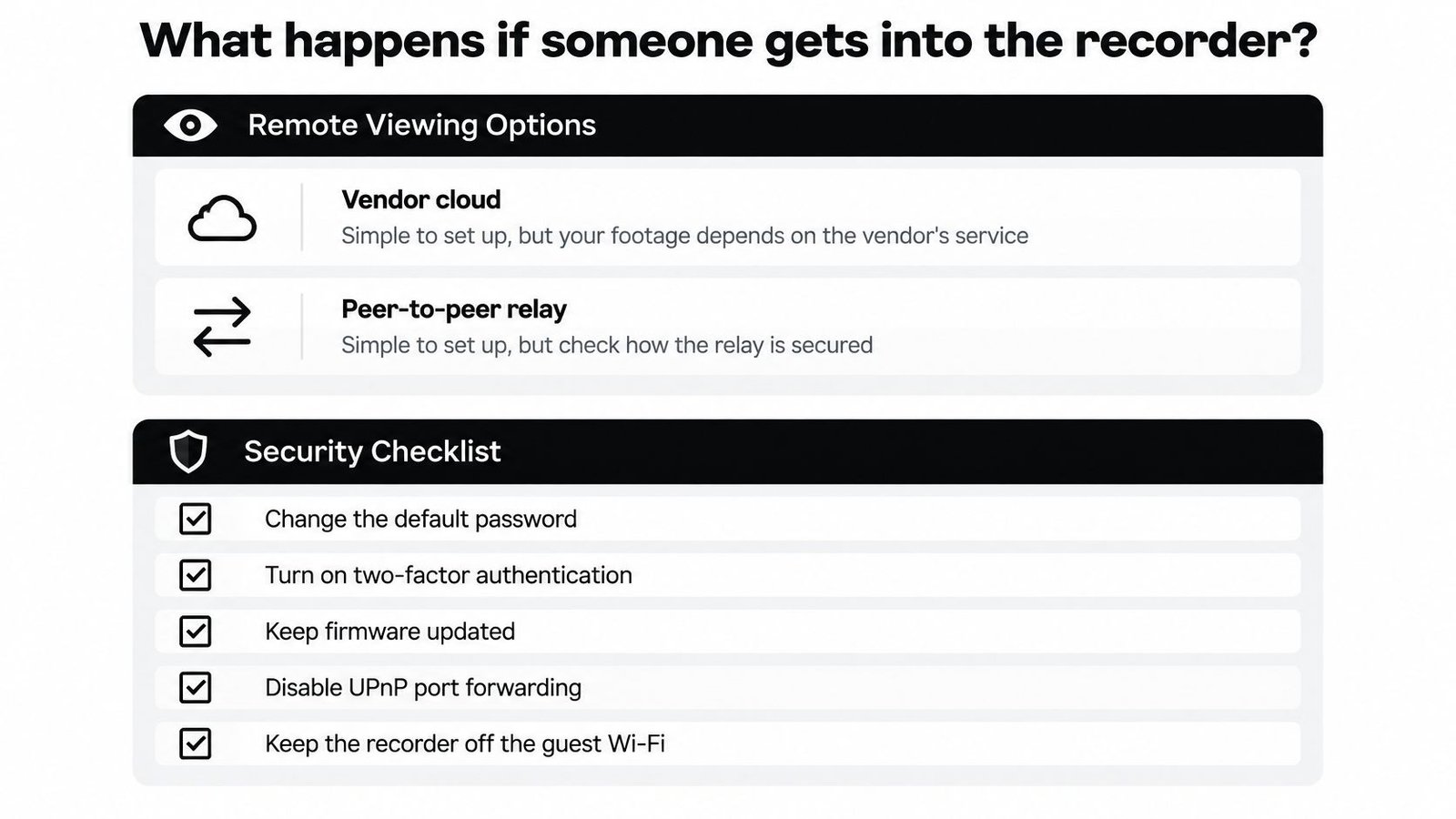
What happens if someone gets into the recorder, or physically takes it? That question matters more than whether the phone app looks polished. A compromised recorder can expose stored footage and connected camera functions; theft can remove your local evidence altogether.
Choose the remote-access route deliberately. A correctly configured VPN can provide controlled access to the site network, while vendor cloud or peer-to-peer services can simplify setup but require scrutiny of account security, data handling and service dependence. Avoid exposing recorder administration directly to the public internet through port forwarding.
Make remote access usable without weakening it
Use a lower-bandwidth sub-stream for routine phone viewing and reserve the main stream for detailed review. Test from an external connection, not just the premises' Wi-Fi, and check recorded playback as well as live video.
The practical requirements for CCTV remote viewing include upload capacity, user permissions and a supported app. Nerds 2 You Edmonton's explanation of remote access security controls is also useful when discussing authentication and controlled connections with whoever manages your network.
The checklist below highlights the controls to discuss during setup.
Protect the appliance and the accounts
The DWP's CCTV security policy sets requirements for its own systems covering strong credentials, updates, restricted services, access control, physical protection and consideration of network segregation. It's a useful security benchmark for a small-business installation, not a blanket legal specification for every home.
Apply that approach practically:
- Replace default credentials with unique passwords and named accounts.
- Separate permissions, so a viewer can't alter recording or delete evidence.
- Enable multi-factor authentication wherever the recorder or remote-access service supports it.
- Disable UPnP and unused services, then check the router for unwanted exposure.
- Isolate CCTV traffic from guest devices and restrict access between network segments.
- Maintain firmware and physical security, with the recorder in a ventilated, access-controlled location.
RAID can improve availability through supported disk failures, but RAID isn't an evidence backup. It won't protect footage from theft, ransomware or an authorised user deleting the wrong material. Preserve important incident exports separately under controlled access.
Confirm Your Recorder Spec Before You Buy
Ask for a written specification, not just a model number. It should make the proposed settings and responsibilities clear enough that another competent installer could understand the design.
Use this purchase sequence:
- Match the signal. Confirm the recorder accepts every camera's exact output or network stream.
- Check capacity. Include planned expansion and verify aggregate incoming bandwidth.
- Specify usable storage. Base it on the justified retention period and proposed disk configuration.
- Confirm codec support. Include the devices used for playback and export.
- Approve the power design. Check maximum camera demand and backup coverage.
- Define remote access. Record the connection method, account owner and disabled services.
- Write operating rules. Name who can view, export, preserve and delete footage.
Require a commissioning test
The government's domestic CCTV guidance advises keeping date and time accurate, checking recording space, deleting unnecessary footage and restricting access. Turn those principles into an acceptance test.
Ask your installer to simulate an incident, locate the correct camera and time window, then export the native recording and a readily viewable copy. Check playback on a separate system, verify the timestamps and confirm time synchronisation is enabled.
Document who exported the clip, when they did it and where it was stored. Also test camera-loss and disk-failure alerts, and confirm who receives them. Don't sign off solely because every live tile shows a picture.
For homes and businesses in South Wales and the South West, Wisenet Security Ltd offers CCTV design, installation and maintenance, including recording and remote-viewing arrangements. Send your camera list, site plan and intended retention period, and ask for a recorder specification check before you order.