Wireless CCTV vs Wired CCTV a Practical UK Buyer’s Guide
You're standing in a loft hatch or at the back of a shop, looking at a quote and asking the same blunt question everyone asks. Do I go wireless CCTV because it's quicker and cleaner, or do I pay for wired CCTV because it's the safer bet when the footage matters? In the UK, that isn't a spec-sheet choice. It's a building choice, a connectivity choice, and, for businesses, an evidence choice.
| Criterion | Wired CCTV | Wireless CCTV |
|---|---|---|
| Reliability | Best for uninterrupted recording and stable performance | Fine in the right setting, but more exposed to signal and network issues |
| Image quality | Stronger for sustained 4K recording | Good when conditions are stable, weaker when Wi-Fi degrades |
| Installation | More disruptive and labour-heavy | Faster and easier to fit |
| Long-term cost | Usually higher upfront, steadier over time | Lower entry cost, but more hidden running costs |
| Best fit | Warehouses, retail, car parks, permanent installs | Rental properties, awkward retrofits, temporary or light-use sites |
For context, more than 70% of UK businesses use CCTV cameras already, which tells you this is mainstream security, not an upgrade for enthusiasts, and the debate is reliability versus convenience, not whether CCTV belongs on site at all, as noted in UK wired vs wireless CCTV guidance.
Table of Contents
- Why This Decision Matters More in 2026
- What Wireless and Wired CCTV Actually Mean
- Reliability, Image Quality and Security Compared
- Matching the System to the Site
- The Real Cost of Ownership Over 3 to 5 Years
- UK Legal and Compliance Points You Cannot Skip
- Which System Should You Choose
- Maintenance, Troubleshooting and When to Call a Pro
Why This Decision Matters More in 2026
A homeowner in Cardiff calls about a stone-built extension with a detached garage. A warehouse manager in Bristol wants coverage over a loading bay, a yard, and a blind corner by the pallet racking. Both ask for the same thing, a camera system that works when needed. The right answer isn't the same for either of them.
The building decides more than the brochure
In homes, the attraction of wireless CCTV is obvious. It avoids chasing cables through thick walls, it suits awkward retrofits, and it gets cameras up quickly. That's why wireless has gained ground in the residential market, while wired still holds a substantial share, with approximately 42% of homeowners reportedly choosing wired and 58% preferring mobile or wireless alternatives as of 2026 according to comparison commentary on home CCTV choices.
Businesses face a harsher test. Retail units, offices, warehouses, and multi-tenant buildings don't just need pictures, they need continuity. A camera that misses one critical incident because the Wi-Fi dropped or the router rebooted has failed the job, no matter how tidy the install looked on day one.
Practical rule: If the footage may be used as evidence, design for continuity first and convenience second.
Connectivity reality beats marketing language
Too many guides assume a perfect network. That's not how UK sites behave. Some buildings have thick masonry, some have signal dead spots, some have patchy broadband, and some have shared networks that nobody fully controls. The question is whether the camera can keep recording when the local network gets messy.
That's why wired systems keep their place. They're still the conservative choice where 24/7 recording and image consistency matter most, while wireless remains the sensible answer when cable runs are the obstacle. For smaller jobs and temporary layouts, the balance shifts. For larger or more demanding sites, it usually doesn't.
The same logic appears in site-specific resources like surveillance options for job sites, where short-term practicality often drives the decision more than ideal technical purity.
What Wireless and Wired CCTV Actually Mean
Wired CCTV means the camera sends video and usually power over a physical cable back to a recorder, typically a Network Video Recorder. In most modern installs that's done with Power over Ethernet, so one cable handles both data and power. Once it's in place, the system isn't relying on Wi-Fi coverage, router quality, or a battery you forgot to check.
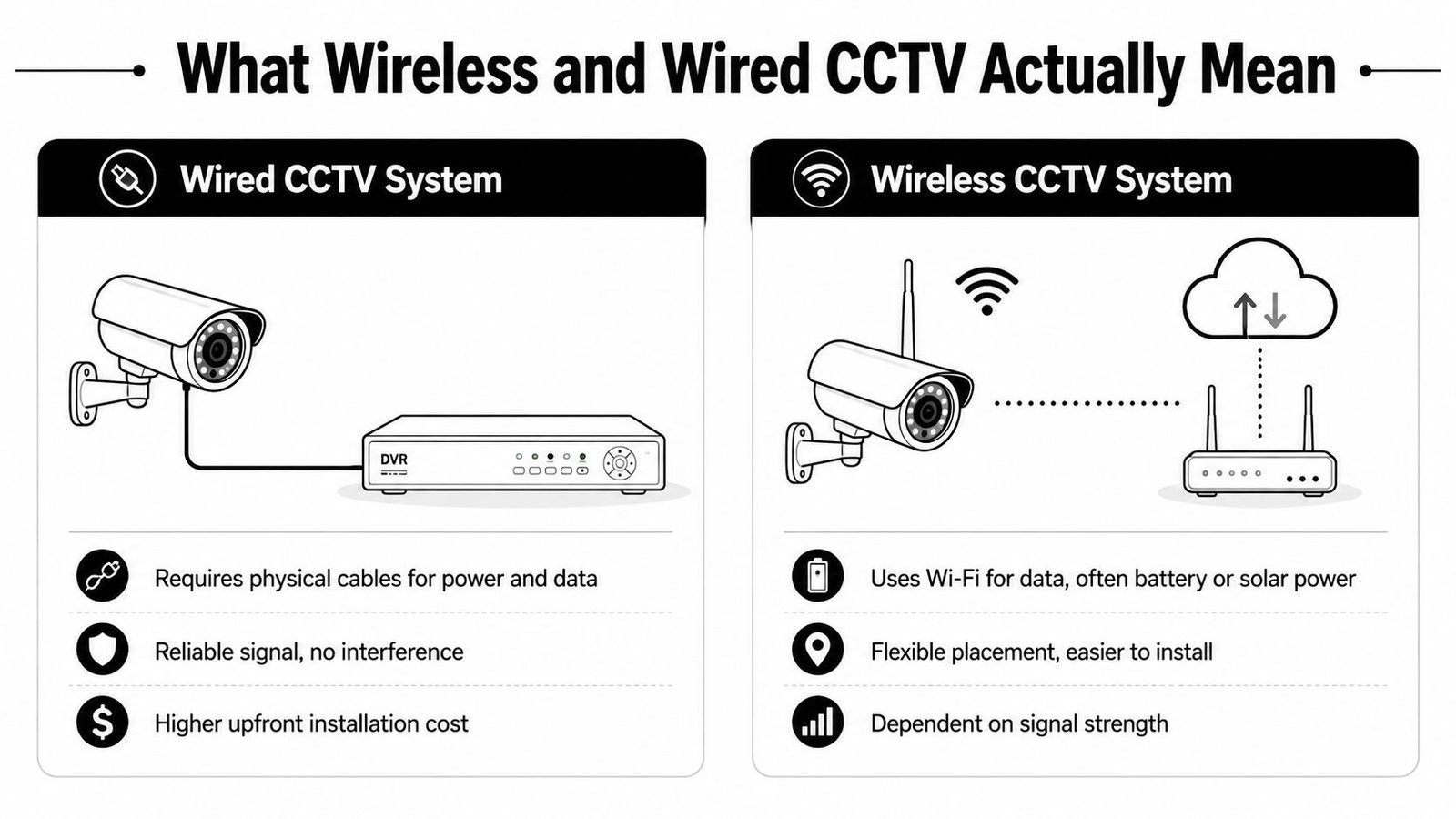
Wireless CCTV sends video over Wi-Fi or, in some setups, over mobile data. Some cameras are battery-powered, some plug into mains, and some sit in a mixed category where the power is wired but the video is still transmitted wirelessly. The label gets abused a lot by retailers, so don't let it blur the actual architecture.
Hybrid systems sit between the two
There's also the hybrid approach, and it's the one many comparison pages ignore. That usually means wired power in the key places, with wireless used where running a cable would be ugly, expensive, or impossible. On real jobs, that mix is common because buildings aren't neat little diagrams, they're messy, constrained, and already occupied.
If you want a clear technical comparison with another CCTV format, the explanation of wired vs wireless RV cameras gives a useful parallel, because the same trade-off keeps repeating, physical stability versus easy placement.
For a closer look at camera families and recorder formats, the distinction between IP and analogue systems is also worth checking in this CCTV comparison guide. It helps place wireless and wired choices in the wider system picture instead of treating them like isolated gadgets.
Reliability, Image Quality and Security Compared
The core decision comes down to whether you need a camera that is merely convenient or one that behaves like proper evidence equipment. The numbers matter here. Independent comparison data puts wired PoE systems at about 99.9% stream reliability, while wireless sits around 95 to 98%, and wired 4K cameras sustain 6 to 8 Mbps H.265 continuous recording whereas wireless 4K models often cap at around 4 Mbps or fall back to 1080p when conditions degrade, according to wired versus wireless comparison data.
| Criterion | Wired CCTV | Wireless CCTV |
|---|---|---|
| Stream reliability | Around 99.9%, best for continuous recording | 95 to 98%, good but more exposed to dropouts |
| Sustained bitrate | Better for 4K evidence capture | More likely to throttle when network quality slips |
| Latency | Lower and more predictable | Higher and more variable |
| Image integrity | Better under load and over long sessions | Can soften or downscale when bandwidth tightens |
| Cyber posture | Easier to lock down locally | More exposure through apps, cloud accounts, and updates |
| Tamper resistance | Cabling can be hidden and protected | More dependent on exposed radios and local network health |
What that means on site
A warehouse floor, a retail entrance, or a car park doesn't forgive blur or gaps. If a vehicle clips a barrier, a pallet goes missing, or a confrontation happens near a till, you need a timeline that holds together. Wired systems are better for that because they don't care about local Wi-Fi congestion or a router reboot that happens at the wrong time.
Wireless can still be a good fit for smaller spaces, lighter duty use, or awkward locations where the enemy is the drill, not the network. But don't pretend it's equal in every environment. It isn't.
Rule of thumb: If the site must record continuously without excuses, go wired. If the site needs quick placement and the footage is useful rather than critical, wireless can do the job.
Physical security matters too. Cables hidden inside walls or ceiling voids are harder to interfere with than a radio-dependent system sitting on a crowded network. For less demanding, temporary, or mobile scenarios, a wireless approach can be the practical answer, but it should be chosen with open eyes, not because the sales page made it sound modern.
For readers comparing site-specific deployment patterns, shipping container security advice is a good reminder that the environment often dictates the system, not the other way round.
Matching the System to the Site
A good surveyor doesn't ask, “Which system is best?” He asks, “What's the site asking for?” The answer changes fast once you move from a semi-detached house to a shared block or a yard full of vehicles.
Family homes with gardens and driveways
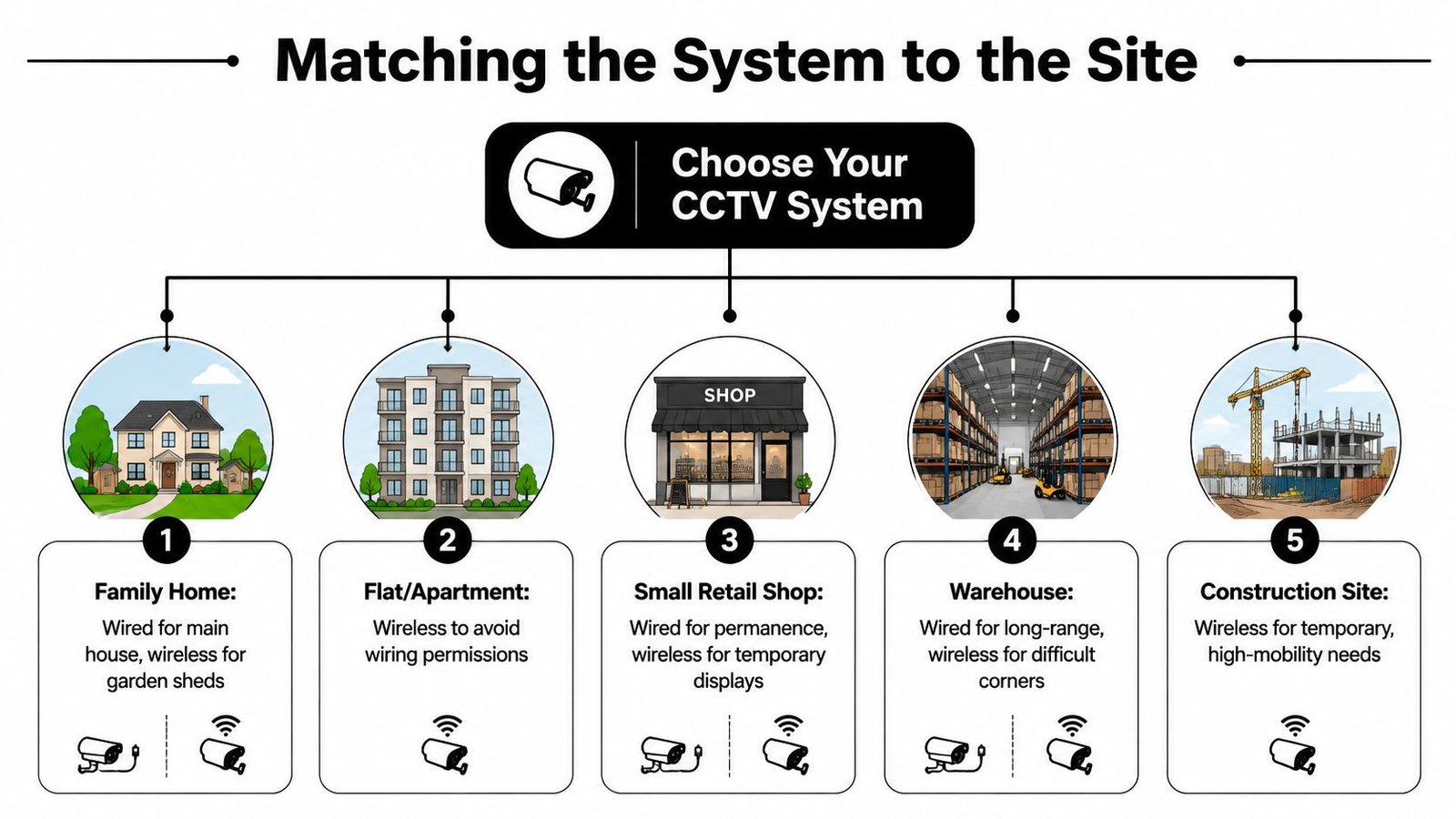
For a normal house, wired CCTV is the better default at the main building if you want dependable recording over the front door, driveway, and rear access. If the garden shed or detached garage is awkward to cable, a wireless camera can make sense there. That split keeps the most important evidence on the stable system and the outlying coverage on the flexible one.
Small shops and salons
For small retail premises, I'd usually pick wired unless there's a temporary layout or a short-term tenant change coming up. Shops need dependable coverage over tills, entrances, and stock exits. Wireless only makes sense if the fit-out is temporary or cabling would cause unacceptable disruption during trading hours.
Multi-tenant residential blocks
Blocks of flats and shared buildings need a harder conversation. Wireless often gets chosen because permissions, shared routes, and landlord approvals slow wired work down. That can be reasonable, but shared buildings also create more interference and more risk if a network path becomes unreliable. The higher the communal dependency, the stronger the case for a professionally designed wired backbone.
Warehouses and logistics hubs
Warehouses should default to wired, full stop. Long runs, large open bays, loading doors, and evidence-grade monitoring all point in that direction. Wireless only belongs in hard-to-reach corners, temporary overspill areas, or places where cabling would cause real operational disruption.
Open-air car parks
Car parks are tough because they're exposed, spread out, and often lighting-dependent. Wired is usually the right answer for permanent infrastructure. Wireless can be useful for short-term monitoring or isolated points where trenching or conduit would be disproportionate, but it shouldn't be the main plan unless the site is limited.
The best advice is simple. Match wired CCTV to the fixed core of the site, then use wireless only where the building makes wiring awkward or pointless. That's the way to stop convenience from overruling reliability.
The Real Cost of Ownership Over 3 to 5 Years
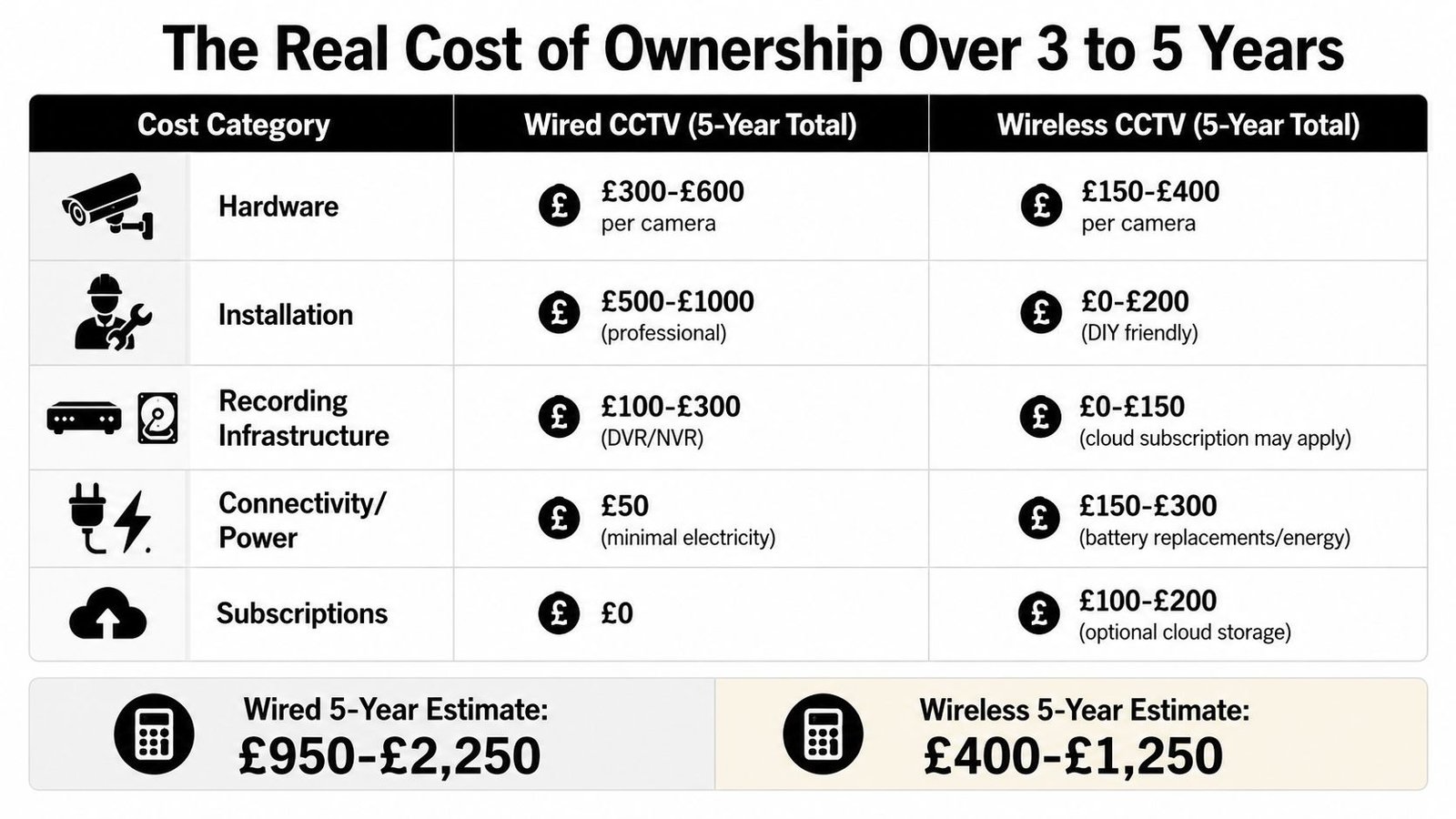
The quote on day one is the wrong number to chase. The right number is what you'll spend once the cameras are up, the app subscriptions start, the batteries age, and somebody has to keep it all working. Most wireless pitches look cheaper because they hide the running costs in monthly services and device upkeep.
Where the money actually goes
The obvious costs are hardware and installation. Wired systems usually cost more to fit because someone has to run cable cleanly and properly, and that labour is where the bill climbs. Wireless looks cheaper at the start because the install is lighter, but that's only part of the picture.
The less obvious costs are where wireless starts to bite. Cloud storage, app support, device updates, battery replacements, and possible 4G or 5G fallbacks all stack up over time. That's before you factor in the support risk if a consumer cloud feature changes or gets reduced, which is a real lifecycle issue for buyers who need long retention or multi-camera growth.
Practical takeaway: A wireless system can be cheaper to buy, but it's often more expensive to keep stable.
What to compare on quotes
Ask vendors to break the offer into the same lines every time:
- Hardware: What does each camera cost, and what's included in the recorder or hub?
- Installation: Is the price covering proper cable runs, testing, and commissioning?
- Recording: Is footage stored locally, in the cloud, or both?
- Running support: Are there subscriptions, data charges, or battery replacement cycles?
- Expansion: What happens when you add cameras later?
Wired systems usually win on lifecycle predictability because local recording doesn't depend on a consumer cloud plan. Wireless can still be the right commercial answer in smaller or awkward spaces, but the 3 to 5 year picture needs to be checked properly, not guessed at from the first invoice.
For a more detailed breakdown of how installers structure those costs, see CCTV installation costs.
UK Legal and Compliance Points You Cannot Skip
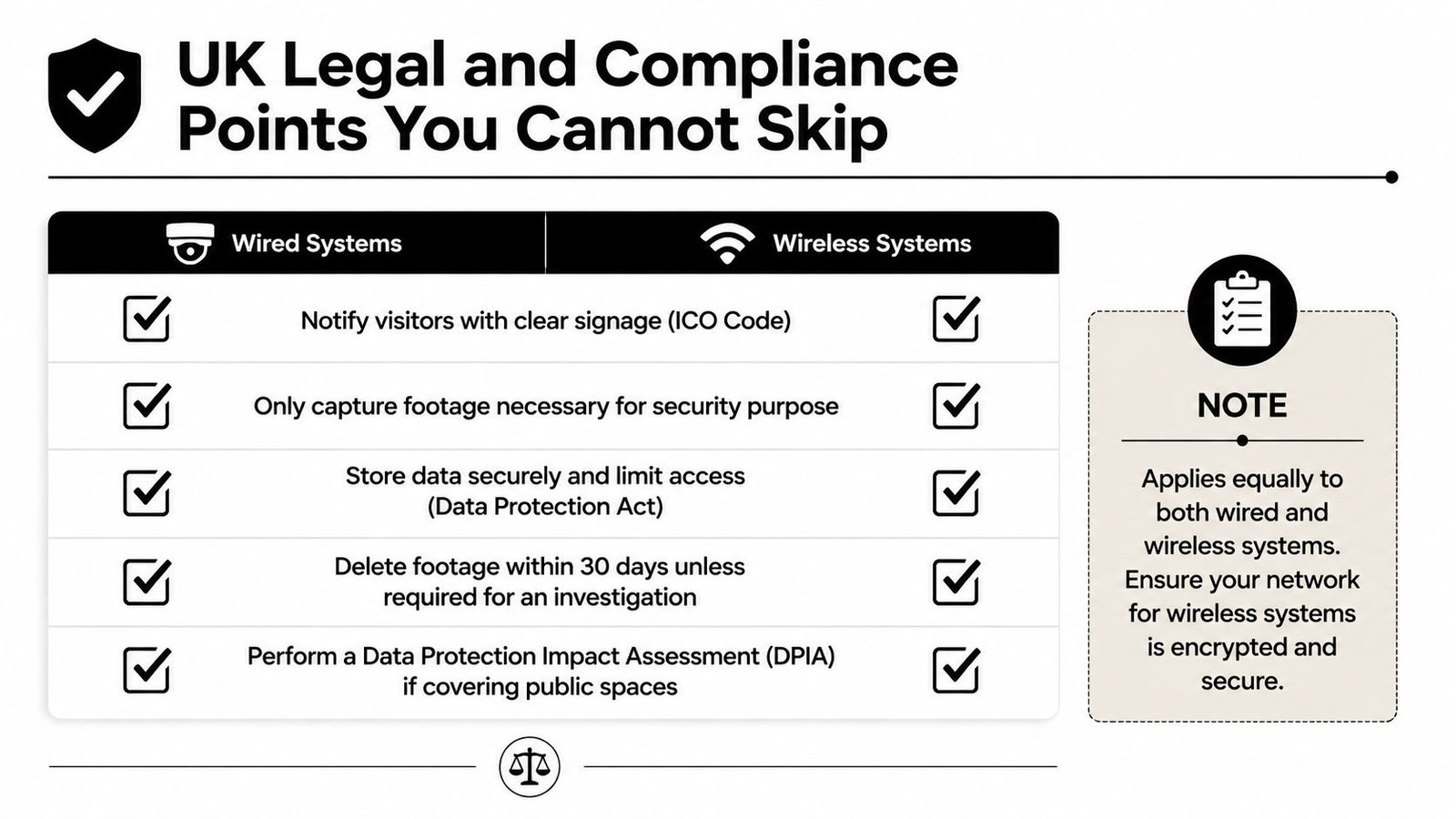
UK CCTV law doesn't care whether the camera is wired or wireless. It cares what the camera sees, why you're recording it, and how you handle the footage. If a camera covers land beyond your own boundary, or shared spaces in a block or business setting, you've moved into Data Protection Act territory and the ICO code of practice matters.
The basics every owner should get right
Start with clear signage. People should know they're being recorded. Then keep the purpose narrow. Security is fine, curiosity isn't. If a system records shared entrances, public footpaths, or neighbouring property, you need to be especially careful about what's captured and how long it's kept.
Wireless systems add a few extra checks
A local wired recorder is comparatively simple. Wireless systems that push footage through apps or cloud services add more parties to the chain, and that means more attention to access control, encryption, and account management. If the camera depends on external services, you need to know who can see the footage and how the account is protected.
A plain-English compliance checklist
- Put signage in place: Make it clear that CCTV is operating.
- Record only what you need: Keep the camera aimed at security risk, not the neighbour's window.
- Control access: Limit who can view or export footage.
- Review retention: Don't keep footage longer than needed for the purpose.
- Assess shared areas carefully: If public or communal space is covered, review whether a DPIA is needed.
For a business-focused guide to the wider UK data rules, CCTV and GDPR in the UK is worth reading before you commit to a layout.
Which System Should You Choose
My view is straightforward. If the site is permanent, business-critical, or likely to grow, wired CCTV should be your default. If the building is awkward, rented, temporary, or you need cameras up fast with minimal disruption, wireless CCTV is useful.
Use these three decision rules
- Choose wired when reliability matters most: Warehouses, logistics yards, shops, and any site where missing a frame is unacceptable belong here.
- Choose wireless when installation friction is the problem: Flats, rentals, awkward extensions, sheds, and quick retrofit jobs are the natural home for wireless.
- Choose hybrid when the site is mixed: Put wired cameras on the core risk areas, then add wireless where cable runs would be disproportionate.
That's the honest answer. The best system isn't the one with the cleanest brochure. It's the one that matches your building, your connectivity, and your tolerance for downtime.
If you're a homeowner, landlord, or business owner in South Wales or the South West, the sensible next step is a proper site survey, not a guess from a shopping cart. A good engineer will look at wall construction, cable routes, network quality, recording needs, and whether CCTV should be integrated with intruder alarms or access control.
Maintenance, Troubleshooting and When to Call a Pro
After installation, the difference between wired and wireless gets even clearer. Wired systems usually need less day-to-day attention because the cameras aren't waiting on battery life or unstable Wi-Fi. Wireless systems can be perfectly usable, but they need more checking, especially if they rely on app access or cloud services.
What fails on each system
Wired cameras usually run into problems at the recorder, the power supply, the cable path, or the camera head itself. If the picture drops, it's often a cabling or configuration issue, not a fundamental system weakness. Wireless cameras fail more often at the network layer, weak signal, app login, battery state, or router stability.
What you can do yourself
- Check the view regularly: Make sure the camera still sees the right area and hasn't drifted.
- Test playback: Don't assume recording is fine just because live view works.
- Watch for battery warnings: Wireless systems need this more than wired ones.
- Restart the router or recorder carefully: A simple reboot can clear a temporary fault, but don't use that as a substitute for a proper fix.
- Keep firmware current: Security devices need updates, especially if they're cloud-connected.
When to call an engineer
If the system is missing footage, repeatedly losing connection, or creating false alerts you can't tame, get a professional in. The same applies if you're expanding from a couple of cameras to a larger layout, because poor planning at that stage creates gaps that are painful to fix later. For business sites, a maintenance and monitoring wrap-around is often the cleanest route because someone else owns the health checks, not your office manager on a Tuesday morning.
If motion alerts are firing constantly, the camera is probably aimed badly, set too sensitively, or being triggered by trees, headlights, or passing traffic. If the timeline shows gaps, assume recording failure until you've proven otherwise. And if you're trying to integrate CCTV with an existing alarm panel, don't improvise. Get the systems designed to work together properly.
If you want a straight answer for your own building, Wisenet Security Ltd can survey the site, design the right mix of CCTV, intruder, and access-control systems, and install it properly the first time. Visit Wisenet Security Ltd to arrange a free consultation with DBS-checked engineers who understand the difference between a tidy quote and a system that performs.