Alarm System Battery Replacement: A Complete UK Guide
That nagging beep or fault light on an alarm panel has a way of turning up at the worst possible moment. The obvious reaction is to assume the backup battery has failed, order a replacement, and hope the warning disappears. In practice, a low-battery alert can mean the battery is tired, but it can also point to a charger problem, a wiring fault, a tamper issue, or a panel defect, so the quickest fix is not always the right one.
For UK property owners, that distinction matters. A properly managed alarm battery replacement is part of a wider power check, and the panel's job is to tell you when something is wrong, not to diagnose the fault for you. If you want the basic system logic first, the overview at how alarm systems work is a useful companion while you work through the fault. Even something as simple as comparing the process with how to replace my laptop battery shows the same principle, the label matters, the fit matters, and the device won't forgive the wrong part.
Table of Contents
- Is Your Alarm Battery Really the Problem
- Identifying Your Alarm Battery Type and Location
- Safe Battery Replacement Procedure
- Post-Replacement Testing and Common Problems
- Costs and When to Call a Professional
- Disposal and Long-Term Battery Maintenance
Is Your Alarm Battery Really the Problem
A low-battery warning feels decisive, but on a live alarm panel it often isn't. The panel is usually reporting a fault somewhere in the power chain, and the battery is only one part of that chain. UK fire-alarm maintenance guidance treats battery and power-supply checks as a diagnostic process, not a simple consumable swap, because the warning can come from the PSU, wiring, tamper conditions, or the panel itself as well as the battery. That's why a quick replacement can leave the fault sitting there, beeping away just as loudly as before. For a broader view of how alarm panels monitor power and faults, see how alarm systems work.
What an engineer checks first
The first check is usually the battery itself, but not in isolation. A technician will test the battery voltage, then verify the charger output from the panel or power supply to see whether the battery is being held at the right charge level. If the charger is not doing its job, a new battery will not solve the problem for long.
They'll also look for signs the panel is misreporting trouble. Loose wiring, tamper switches, and board faults can all produce an alert that looks like a battery issue to the person hearing the beep. In monitored systems, that matters even more, because a bad diagnosis can lead to unnecessary signals to the ARC and more disruption than the original fault.
Practical rule: if a battery warning comes back after a replacement, do not keep buying batteries. Check the charging path and the panel fault history first.
There's also a simple timing issue. After a mains outage or temporary interruption, some systems can hold a low-battery warning until the battery has had time to recover, so the alert does not always mean the battery is dead. If the system has just been on backup power, a measured wait can save an unnecessary callout and an unnecessary battery purchase.
If you want a plain example of how confused battery advice can get outside security work, even a guide such as how to replace my laptop battery starts with checking whether the battery is the actual fault before swapping parts.
The core lesson is simple. Battery alerts are symptoms, not verdicts. A good diagnosis starts with the panel, not the parts counter, and that is the difference between a one-off annoyance and a recurring fault that keeps coming back.
Identifying Your Alarm Battery Type and Location
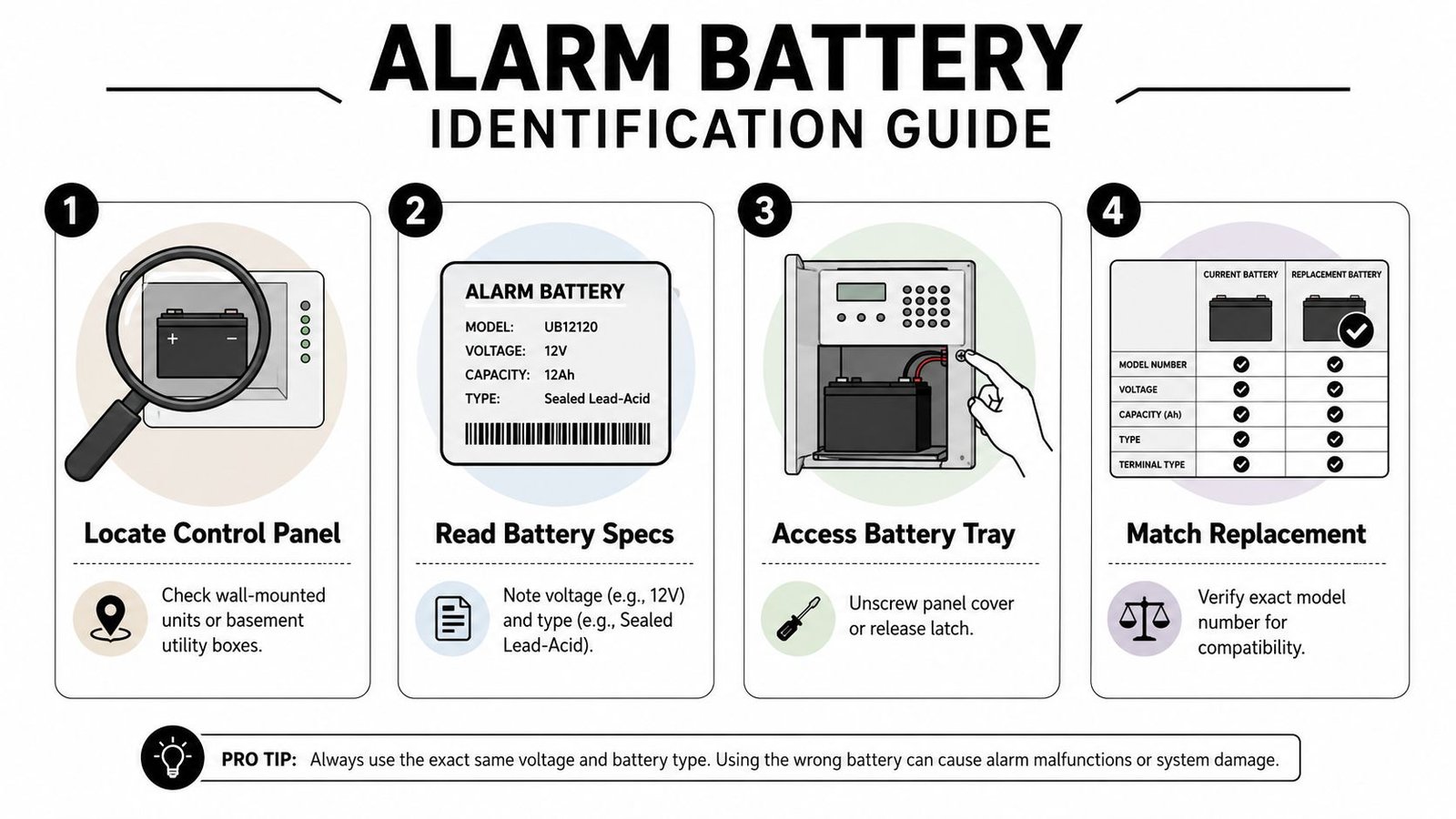
The right replacement starts with the exact battery spec already inside the system. On many UK panels, that means a sealed lead-acid battery inside the main control box, and the label on the panel or battery itself is the first place to look. NSI guidance notes that control panel batteries are commonly replaced on a planned cycle, not at random, and that the battery spec should be matched carefully when renewal is due. (NSI battery guidance)
Reading the label before you order anything
Open the panel only if you're confident it's the main alarm control box and not an unrelated consumer unit or telecoms cabinet. The battery label normally gives you the voltage, which is often 12 V DC for standby alarm batteries in UK panels, plus the capacity rating and the physical style of connector. That capacity matters because the wrong Ah rating can leave you with a battery that fits badly or charges incorrectly.
A quick photograph saves a lot of grief. Take a clear picture of the battery label, the terminal layout, and the way the wires sit before you disconnect anything. If the battery is tucked behind a fascia or under a board, a photo also helps you remember the route back in, which is useful when the old battery comes out and the wiring suddenly looks less familiar than it did five minutes earlier.
Where the battery actually lives
Not every alarm battery sits in the same place. Some systems keep the backup battery inside the main panel box, while others place batteries in keypads or remote modules. That's why it helps to cross-check the panel model against the manufacturer documentation before you buy. A battery that looks close enough on paper can still be wrong in practice if the connector type or case size doesn't match the compartment.
If the battery doesn't slide back into the tray without force, it isn't the right unit.
The safest habit is to match what's already installed, not what a generic listing claims will “fit most systems”. If you're unsure, the label, the connector style, and the panel manual should all agree before you place the order. When they don't, stop there and confirm the spec first.
Safe Battery Replacement Procedure
The physical swap is straightforward when the system is prepared properly, and messy when it isn't. The sensible sequence is to put the panel into test or maintenance mode, then work methodically so the alarm doesn't trigger faults, sirens, or unnecessary monitoring signals while the cover is open. In monitored installations, that preparation matters because an error at the terminal can create a bigger problem than the battery warning that started the job.
The order that keeps the panel safe
Start by silencing the system through the keypad or service mode. Then open the panel and inspect the battery before touching the leads, because corrosion, bulging, or leakage changes the job from a routine swap into a fault investigation. If the manufacturer allows mains isolation, follow that guidance carefully, and don't improvise with the power supply unless you know the panel design.
Disconnect the battery leads with attention to polarity. The positive and negative terminals have to go back exactly as they came off, because reverse connection can damage the panel or blow the fuse. That warning isn't theoretical, especially where the panel is linked to an ARC and the fault has to be resolved cleanly the first time.
- Check the connectors first. Loose spade terminals cause more trouble than many owners expect, so make sure they're tight before reassembly.
- Inspect for corrosion. Green or white residue on the terminals needs attention before the new battery goes in.
- Match the replacement exactly. Voltage, capacity, and physical fit all need to line up with the old unit.
- Seat the battery properly. A battery that rattles in the tray can work loose later.
If the connector is damaged, replace it rather than forcing it back into service. A quick clean of light corrosion can be enough in some cases, but acid damage, heat marks, or cracked spades call for a proper repair. Once the new battery is in, restore power, close the cover, and make sure the wiring is not pinched against the case.
The work should feel tidy when it's done. If anything looks strained, forced, or improvised, that's usually the point where a professional engineer should take over rather than guessing with the panel live.
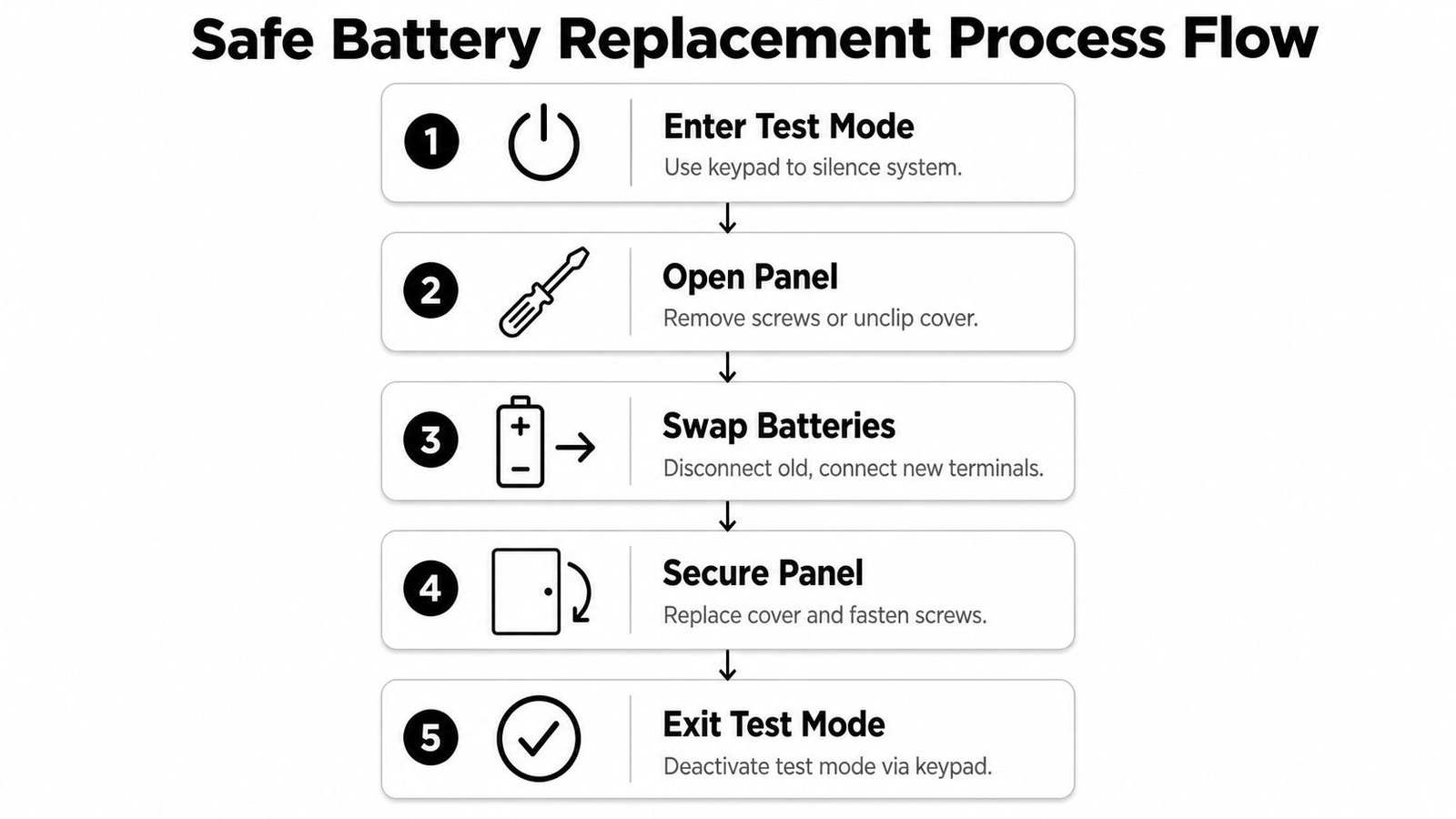
Before starting a panel that uses a serviceable keypad workflow, it helps to see the sequence laid out clearly.
Post-Replacement Testing and Common Problems
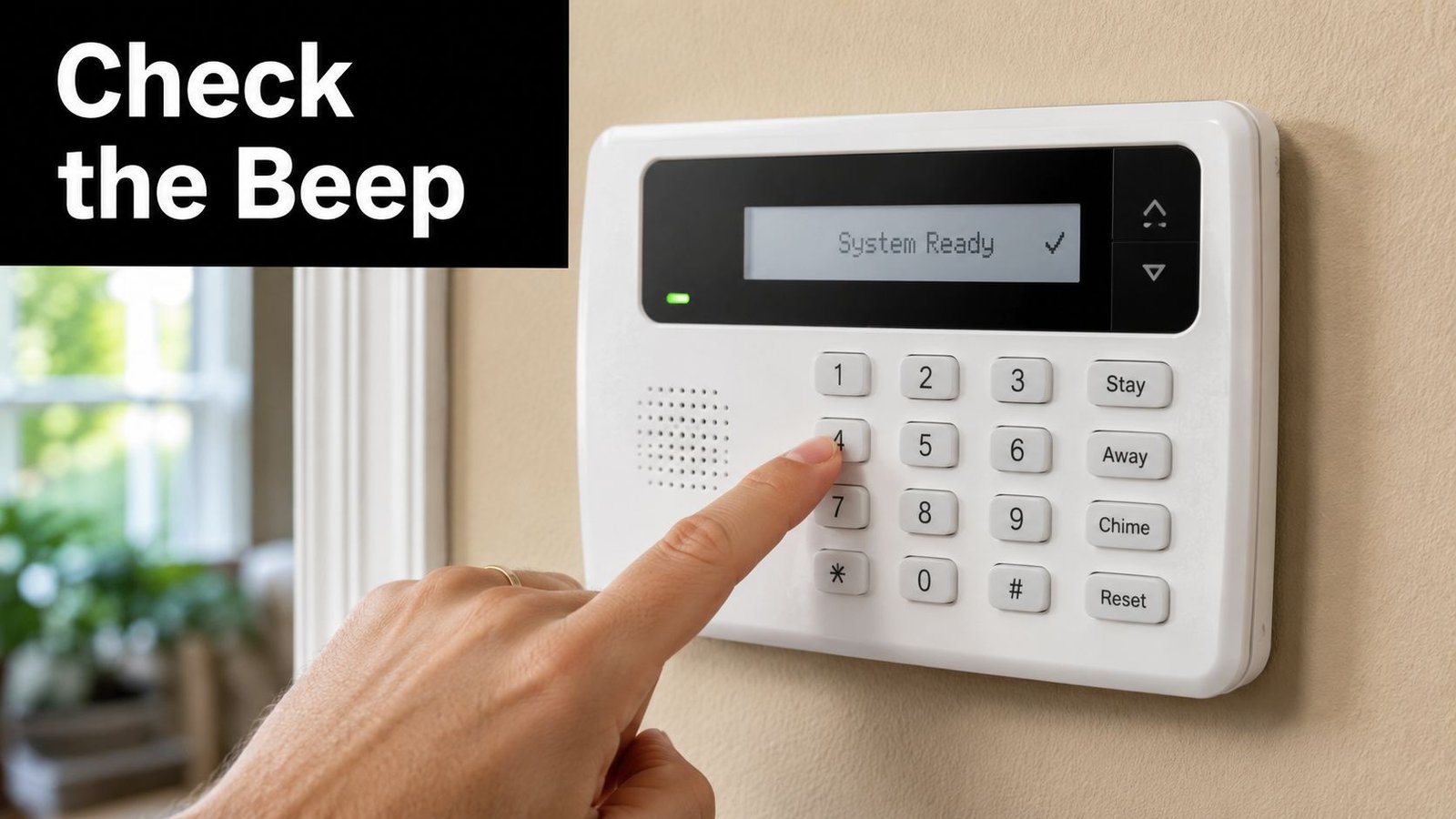
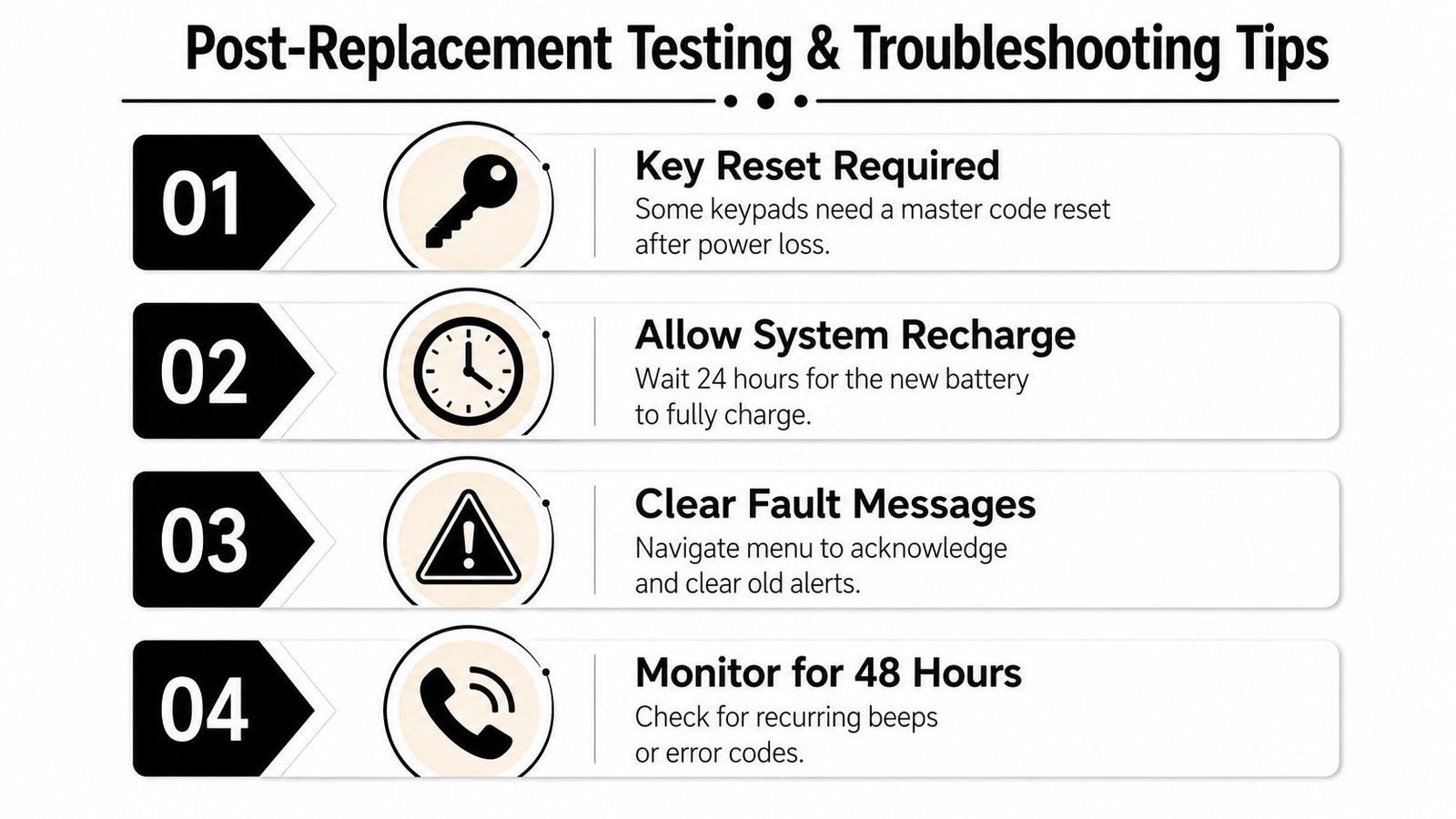
A new battery doesn't always clear the fault immediately, and that catches a lot of people out. Some keypads hold the old alert until the system is reset or re-armed, so the beep can keep going even after the replacement is physically correct. That's why the post-fit test matters just as much as the swap itself.
What to confirm after the new battery is in
The first job is to check that the low-battery message has cleared. If the warning remains, reset or re-arm the keypad if the system design calls for it, then watch the panel for a proper return to normal status. After that, verify that the new battery is charging, because a fresh battery with no charge path will drift back into fault again.
The common failure points are usually small, not dramatic. Technicians repeatedly check for loose spade connectors, corrosion on the battery terminals, and a replacement that's the wrong size or Ah rating for the compartment. Any one of those can leave the panel unhappy even though the battery looks new and unused.
When the fault points elsewhere
If the alert survives a proper reset and the terminals are clean, the battery may not be the actual problem at all. That's the moment to think about charger faults, PSU issues, panel defects, or wiring problems upstream from the battery. A continuing warning after a correct replacement is a clue, not a contradiction.
A battery swap that doesn't change the fault message is telling you something useful. The panel is pointing at the power path, not the battery case.
There's also a patience issue after a power loss. If the system has been off mains supply, the new battery may need time to settle before the panel fully recognises it, so a brief delay isn't unusual. What you don't want is to assume the first beep means failure and start tearing the system apart again without checking the charge path and reset state.
Costs and When to Call a Professional
A battery job is rarely just the price of the battery itself. Labour, callout time, access to the panel, and whether the engineer has to confirm a broader fault all affect the bill. In practice, the battery can be the cheapest part of the visit and still not be the main reason for the cost. For readers comparing how trade callouts are usually structured, Pipeline On AC cost data is a useful reminder that access and labour often outweigh the part price.
For a simple domestic panel with clear access and no monitoring, a careful DIY change can be sensible if you know the system well and can confirm the battery type first. That changes quickly once the system is monitored, linked to a fire panel, or installed in premises where the fault state has to be recorded properly. In those cases, the cost of a professional visit buys more than a swap, it buys confirmation that the panel has accepted the new battery and the fault has cleared.
Battery work can also sit inside a maintenance contract. In some buildings it is folded into the visit fee, in others it is itemised separately, so the paperwork matters as much as the screwdriver. NSI guidance makes clear that alarm back-up batteries are normally treated as planned maintenance items, not something to leave until the panel starts complaining, which is why owners should budget for replacement as part of the system's upkeep. (NSI battery guidance)
| Scenario | Battery Cost | Professional Labour | Total Estimate |
|---|---|---|---|
| Simple domestic panel, easy access | Battery only | Not always required | Lowest overall |
| Monitored intruder system | Battery only | Typically needed | Higher because of callout and testing |
| Fire alarm panel | Battery only | Professional inspection expected | Higher, due to diagnostic checks |
| Maintenance visit on a contract | Often included or charged separately | Usually bundled | Depends on agreement terms |
When to stop and bring in an engineer
Call an engineer if the fault remains after the correct battery has been fitted and the panel has been reset properly. The same applies when the battery is buried in a cramped enclosure, the terminals are damaged, or the wiring looks tired enough that a simple swap would be guesswork. A clean battery change cannot fix a poor connector, a failing charger circuit, or a problem somewhere upstream on the power path.
The threshold is lower in monitored or certified systems, where the status of the alarm has to be read correctly and the work documented. Guidance on SSAIB alarm meaning helps here, because it shows how much weight is placed on the system's condition and reporting. If the fault is not clearly confined to the battery, the sensible move is to let an engineer trace it rather than keep replacing parts and hoping the warning disappears.
Disposal and Long-Term Battery Maintenance
Once the old battery is out, keep it out of general waste. Sealed lead-acid batteries need proper recycling, and the simplest route is usually a local recycling centre or a retailer collection point that accepts automotive and standby batteries. That keeps acid and lead components out of the domestic rubbish stream, and it is the right way to handle a dead standby battery. For a wider look at compliance thinking around electronics disposal, Beyond Surplus ITAD compliance gives a useful example of why regulated disposal exists in the first place.
Building a maintenance habit that works
A low-battery alert does not always mean the battery has failed. A tired charger, poor terminal contact, or a panel fault can trigger the same warning, so the first job is to confirm whether the battery is the problem before ordering a replacement. If the unit is old, swollen, leaking, or repeatedly failing to hold charge after a proper test, replacement makes sense. If the warning returns after a reset and a known-good battery is fitted, the fault is usually elsewhere in the power path.
The right habit is planned renewal, backed by routine checks. Alarm back-up batteries are commonly replaced on a schedule rather than left until the panel starts beeping, and industry guidance such as NSI battery guidance supports regular testing at maintenance visits and replacement once the battery has reached the end of its service life. The point is simple, check regularly, replace on schedule, and treat a fault beep as a prompt to diagnose, not as proof that the battery is to blame.
Simple long-term discipline
Keep a battery log with the install date, the model, and the maintenance visit when it was tested. That gives you a clear replacement window and helps spot patterns if a site starts chewing through batteries too quickly. If a battery is repeatedly failing early, that usually points back to charging or panel health rather than bad luck.
Best practice: replace batteries as part of routine maintenance, not after the system starts complaining.
For property managers, landlords, and business owners, a planned maintenance contract removes a lot of guesswork. The engineer tests the battery at every visit, checks the power path, and replaces the unit on schedule, which is the cleanest way to avoid false alarms and avoidable downtime. For more on this, see our guide to alarm system maintenance.
If you're in South Wales or the South West and want a proper check of your alarm battery, the panel, and the wider maintenance picture, contact Wisenet Security Ltd for a free consultation and put the fault chasing behind you.