Video Intercom Systems: A Practical Guide for 2026
You're probably dealing with one of two situations right now. At home, parcels keep arriving when nobody's in, and you're left deciding whether a basic doorbell camera is enough. At work, reception or site staff keep getting interrupted by unknown callers, trades, and delivery drivers, and every interruption turns into a judgment call about whether to release a door, open a gate, or send someone to check.
That's where video intercom systems start to make sense. They're no longer just a nicer version of an entry phone. They've become part of how UK homes, offices, apartment blocks, warehouses, and mixed-use sites manage access in a practical, visible, and auditable way.
That change is also showing up in the wider market. The global video intercom devices market was valued at USD 21.70 billion in 2022 and is forecast to grow at a 13.6% CAGR through 2030, reaching USD 58.30 billion, according to Grand View Research's video intercom market analysis. For UK property owners, the point isn't the global number on its own. It's that video intercoms are now mainstream infrastructure, not a niche gadget.
Table of Contents
- Beyond the Doorbell Your Guide to Modern Visitor Management
- What Is a Video Intercom and How Does It Work
- Understanding the Core Technology IP vs Analogue and Wired vs Wireless
- Key Benefits for Modern Homes and Businesses
- How to Choose the Right Video Intercom System
- Installation and Smart Security Integration
- Budgeting Costs Maintenance and Choosing Your Installer
Beyond the Doorbell Your Guide to Modern Visitor Management
A standard doorbell tells you someone is there. A video intercom tells you who is there, lets you speak to them, and, if the setup allows, lets you decide on access without walking to the door or relying on guesswork.
That matters more than people think. In a house, it can mean confirming a delivery driver, speaking to a visitor while you're upstairs, or checking the front gate after dark. In a small office, it can mean stopping staff from releasing a locked entrance to anyone who sounds confident over an audio-only handset. In a block of flats or a warehouse office, it can cut down the back-and-forth that slows down deliveries and frustrates legitimate visitors.
Practical rule: If people on site already have to make access decisions, adding video usually improves the decision more than adding another camera elsewhere.
The best systems don't sit on their own. They work alongside door locks, gates, CCTV, and access control. That's the point many buyers miss. A video intercom isn't there to replace every other security measure. It sits at the exact moment when someone asks to come in.
Three property types tend to benefit quickly:
- Homes with regular deliveries: You can verify the caller before opening, and you don't need to rely on an unanswered knock.
- Offices and retail units with controlled entry: Staff can screen visitors without abandoning the desk.
- Multi-tenant or shared sites: Calls can be routed to the right person instead of every request turning into a manual chase.
What doesn't work is buying on features alone. A glossy app and a sharp-looking panel won't help much if the system doesn't fit the way your building handles visitors.
What Is a Video Intercom and How Does It Work
A video intercom is the control point between a visitor arriving and someone on site deciding whether to grant entry. It combines a camera, two-way audio, and a door or gate release path, so the person making that decision can see who is there instead of relying on voice alone.
In practice, that matters most at the exact moment security and convenience meet. A receptionist can verify a courier without leaving the desk. A homeowner can answer the front gate from upstairs. A manager can decide whether to release a staff entrance after hours without treating every caller as low risk.
The basic parts
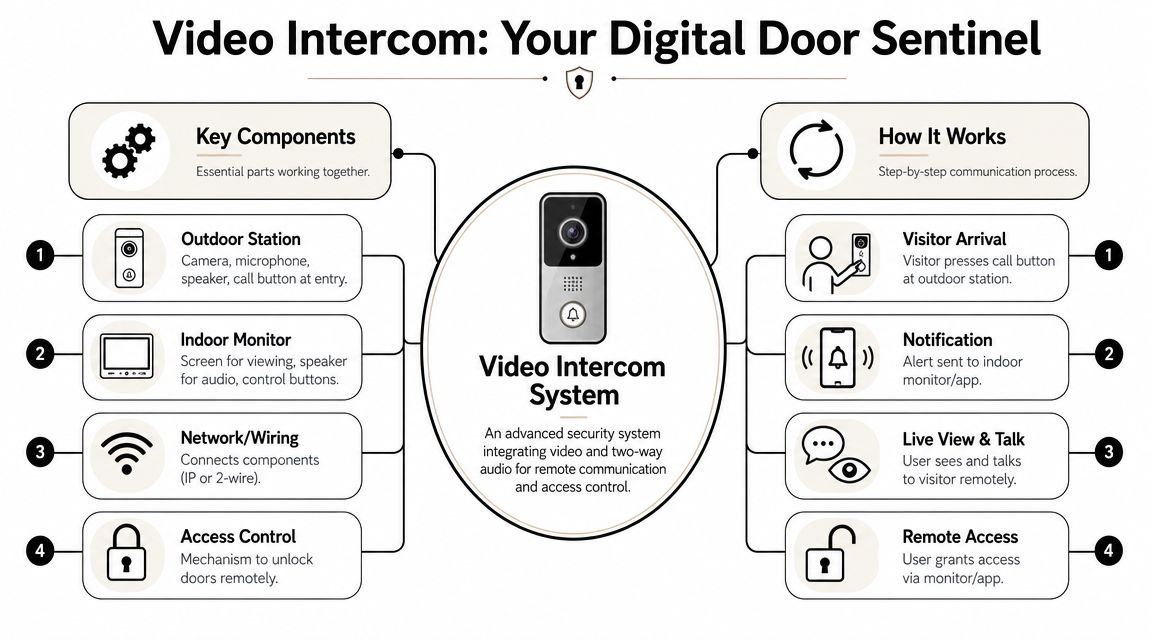
A properly specified system usually has four working parts:
- Outdoor door station: The entrance panel with the camera, microphone, speaker, call button, and in some cases a keypad, fob reader, or coded access option.
- Receiving device: An internal monitor, a desk station, a handset, or a mobile app, depending on how the property is staffed or occupied.
- Transmission path: The method that carries audio, video, and control signals between the entrance and the user. That may be network cabling, two-wire cabling, Wi-Fi, or a hybrid setup.
- Door release interface: The link to the lock, gate operator, or access control relay that permits entry.
One detail gets missed regularly. The intercom does not open the door by itself. It sends a release command. Whether the entrance releases correctly depends on the lock type, power supply, fail-safe or fail-secure setup, fire safety requirements, and how the whole entry system has been wired.
What happens when someone arrives
A visitor presses the call button at the entrance panel. The system sends that call to the assigned device or devices. The user sees live video, speaks to the visitor, and decides whether to release the door or leave it secure.
That sounds simple because it should be. The quality of the decision depends on what the system shows, how quickly the call reaches the right person, and whether the release command is tied into the correct lock hardware.
A good setup also records who made the decision and, where needed, pairs that event with CCTV footage or access logs. That is one of the main differences between a basic door-answering product and a system that supports day-to-day security management.
How modern systems work in the real world
Older entry phones were usually point-to-point. Someone pressed a button, one handset rang, and the user answered locally. Current video intercoms are often more flexible. Calls can go to an internal screen, a reception point, several users at once, or a mobile device if the building is unattended.
For sites already using IP security equipment, it helps to understand the same design choices that apply to CCTV. The difference between networked and older video approaches affects image quality, expansion, and remote access in much the same way as it does with surveillance systems. This guide to the difference between IP cameras and HD analog CCTV gives a useful comparison if you are planning both together.
The strongest installations do not treat the intercom as a standalone gadget. They connect it to electric locking, existing CCTV views, gate automation, or access control credentials, so staff or residents can make a better decision with less delay. On larger sites, the same principle applies to voice endpoints and networked communications more broadly. Businesses comparing front-of-house communications tools can also discover Wi-Fi VoIP phones when they want more flexibility at desks, receptions, or shared work areas.
The practical question is not just how the call gets answered. It is whether the system fits the way the property handles visitors, deliveries, staff access, and out-of-hours security.
Understanding the Core Technology IP vs Analogue and Wired vs Wireless
Specification mistakes usually start here. Buyers treat IP vs analogue and wired vs wireless as one decision, then end up with a system that works on day one but becomes awkward once they want app access, another entrance, or integration with locks and CCTV.
They are separate choices. One defines how the intercom carries video and signalling. The other defines how it is powered and connected on site.
IP and analogue in practical terms
An analogue intercom still has a place. For a single entrance, a short cable run, and a simple requirement to speak to a caller and release a lock locally, analogue can be dependable and cost-effective. It also suits replacement projects where existing cabling is sound and there is no need for central management, event logs, or mobile answering.
An IP intercom behaves more like the rest of a modern security system. It sits on the network, which makes it easier to send calls to multiple devices, tie visitor events to access control, and manage more than one door from the same platform. That matters in practice. A home with a gate and front door, or a business with reception and trade access, quickly exposes the limits of a basic standalone setup.
The trade-off is straightforward. IP gives more flexibility, but it needs proper network design, sensible user permissions, and attention to privacy. If recorded clips, app access, or cloud services are involved, the installer should also be clear about data handling and UK GDPR responsibilities.
A simple comparison helps:
| System type | Where it fits | What to watch |
|---|---|---|
| Analogue | Single entrance homes, basic small premises, straightforward replacements | Limited expansion, limited integration, usually fewer management options |
| IP | Offices, apartment blocks, gated properties, multi-entrance sites | Depends more on network quality, configuration, cybersecurity, and platform support |
For clients planning intercoms alongside surveillance, the same design logic appears on the camera side. This guide to IP cameras and HD analogue CCTV differences is a useful reference because the trade-off is similar. Simplicity and lower upfront cost on one side, flexibility and system-wide integration on the other.
Wired and wireless are not the same choice
A wireless intercom is not automatically the modern answer. A wired one is not old-fashioned. On permanent entrances, cable still solves a lot of problems before they happen.
Wired systems usually give the best stability. They are the safer choice for main doors, gates, and shared entrances where missed calls, poor audio, or intermittent lock release create real security and operational issues. In my experience, a neatly planned cable route is often cheaper than repeated callouts for Wi-Fi problems that were predictable from the start.
Wireless systems earn their place on retrofit jobs. Listed buildings, finished interiors, detached gates, and temporary site offices can make cabling expensive or disruptive. Wireless can work well, but only if signal strength is tested at the actual device location, not guessed from the router position indoors. Power still needs planning too. Battery devices reduce cabling, but they also add maintenance and can restrict features such as continuous availability or fast wake-up times.
For most properties, the best answer is often hybrid. Wire the door station or gate panel for stable power and reliable operation. Let users answer on indoor monitors, desk stations, or approved mobile apps.
That same principle shows up in business communications. Teams that want mobility at reception points or shared work areas often discover Wi-Fi VoIP phones, but the handset only performs as well as the wireless network behind it. Video intercom apps behave the same way.
A practical selection rule works well:
- Choose analogue wired for a simple entrance with a fixed brief and no serious need to expand.
- Choose IP wired for primary entrances where reliability, integration, audit trails, or multi-door control matter.
- Choose wireless carefully where retrofit constraints justify it and site testing confirms signal, power, and response times are good enough.
- Choose hybrid where you want a stable entrance device but flexible answering options across the property.
The right choice is the one that fits how the site will be used in two or three years, not just what gets the front door working this week.
Key Benefits for Modern Homes and Businesses
The value of video intercom systems isn't just that you can see a face on a screen. The primary advantage is that someone can make a better access decision at the moment it matters.
For many UK sites, that's the core benefit. Video intercoms act as a decision-support tool at the point of entry, reducing ambiguity for receptionists, security staff, or homeowners and speeding up legitimate access decisions, as discussed in Silva Consultants' introduction to security intercom systems.
Where the value shows up at home
In a home, convenience and security usually arrive together.
A parent can answer from the kitchen instead of rushing to the hallway handset. Someone working upstairs can check whether the caller is a courier, a neighbour, or an unexpected visitor. At a gated entrance, visual verification matters even more because a bad decision doesn't just open a door. It opens the perimeter.
Homeowners tend to notice three practical gains first:
- Fewer uncertain answers: You're not relying on voice alone.
- Better handling of callers when you're occupied: The call can reach a monitor or app instead of being missed.
- More confidence after dark: A visible doorway view is better than guessing from a knock.
Where businesses get real operational value
In business premises, intercoms earn their place when they reduce interruption and improve control.
Reception staff don't need to leave the desk every time someone buzzes. A warehouse office can check a driver or contractor before granting access to a pedestrian entrance. In a multi-tenant building, one panel can direct visitors to the right destination instead of forcing staff to manually sort every arrival.
What doesn't work is treating the intercom as a replacement for CCTV or access control. It's better seen as the decision point between those systems.
A short discussion of the privacy side is worth watching before choosing recording features or cloud options:
If nobody is responsible for deciding who gets in, the intercom adds less value. If somebody is already making that call, video usually makes them better at it.
How to Choose the Right Video Intercom System
A delivery driver arrives at the front entrance while the office manager is away from the desk, or a tradesperson calls at a side gate when nobody is near the monitor. That is where weak buying decisions show up. The right intercom is the one that still works properly when the building is busy, unattended, or being used outside its normal routine.
Start with the entry workflow
The first question is not camera resolution or app branding. It is how people arrive, how access is decided, and what happens when the usual person is unavailable.
A house with one front door can tolerate a simpler setup. A converted property with shared access, trade visitors, and parcel drops usually cannot. The same applies to business sites. A reception entrance, a gated yard, and a staff door often need different rules, even if they sit on one system.
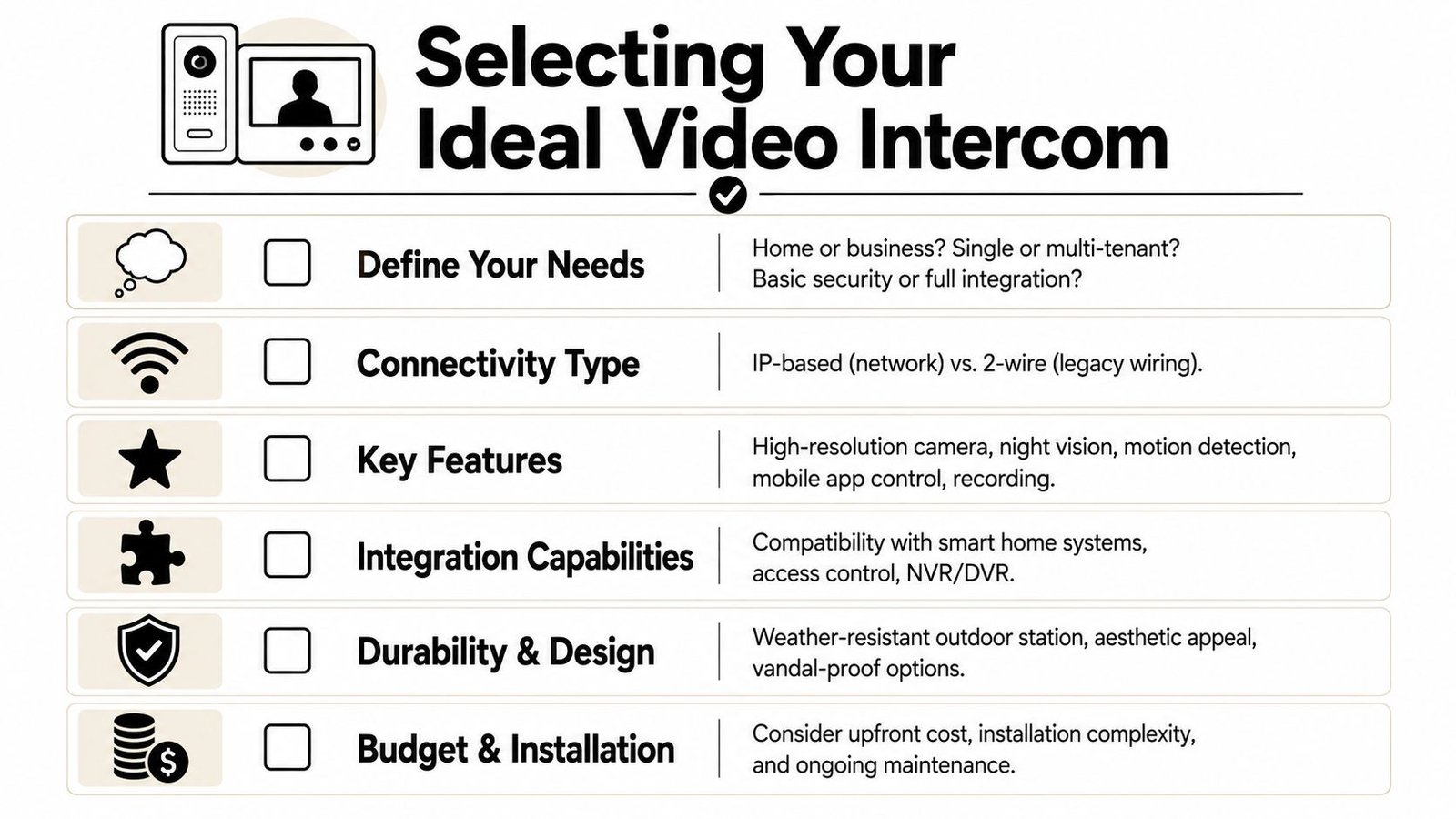
Use these questions to narrow the field:
- Who answers the call: One resident, a receptionist, multiple flats, or a rotating manager?
- How many entrances need control: Main door only, or gates, side doors, and delivery points as well?
- Do you need door release or only verification: Some sites only need two-way video and audio. Others need locks or gates triggered from a monitor or app.
- What happens when nobody answers: Missed calls need to route somewhere sensible, or the process breaks down quickly.
- Who needs access rights: Residents, staff, contractors, cleaners, and managing agents do not all need the same permissions.
Good systems fit the site routine. Poor ones force staff and occupants into workarounds within days.
Judge the system by the parts that cause trouble in practice
In real installations, the failures clients complain about are rarely the brochure features. They are poor night images, delayed audio, unreliable mobile apps, and outdoor units that struggle through a British winter.
For UK properties, these checks usually matter more than a long feature list:
- Video quality in mixed light: A doorway with bright daylight behind the visitor can make cheap cameras nearly useless.
- Low-light performance: Many entrances are used early morning, late evening, or under poor porch lighting.
- Audio clarity: If speech is muffled, people repeat themselves and wrong releases become more likely.
- Outdoor rating and build quality: Exposed panels need to cope with rain, wind, dirt, and temperature swings.
- Call handling on the app or indoor monitor: A system that answers slowly or drops notifications will not be trusted.
- Integration options: If you may later connect a lock, gate, CCTV view, or credentials, check compatibility now rather than replacing hardware later.
A useful shortlist looks like this:
| Buying factor | Why it matters in practice |
|---|---|
| Image quality | Helps the person answering make a confident decision |
| Audio performance | Reduces repeat calls, delays, and release errors |
| Outdoor durability | Cuts avoidable faults at exposed entrances |
| Integration options | Lets the intercom work with locks, gates, CCTV, and wider access control system options |
| User management | User management is critical for landlords, offices, and shared premises |
| Data handling | Affects storage, access rights, retention, and compliance |
Choose for integration, not isolation
A standalone intercom can work well at a single front door. On larger homes and business sites, it usually performs better as part of a joined-up security setup.
That means checking whether the intercom can trigger the right lock hardware, show relevant camera views, and fit the way the property is already managed. If a client already has CCTV, I want to know whether the intercom adds a useful decision point or just creates another disconnected app. For homeowners planning both at once, this easy home CCTV setup guide gives useful background on sight lines and practical placement.
The trade-off is simple. Integrated systems take more thought at specification stage, but they usually reduce friction later.
Treat privacy and governance as part of the specification
This gets left too late far too often.
If the system records footage, stores snapshots, keeps call logs, or holds resident and staff details, it needs clear rules on who can access that data, where it is stored, and when it is deleted. That matters in homes with shared entrances and in businesses where staff turnover is common.
These choices affect buying decisions immediately:
- Local or on-device storage: Often easier to control for smaller sites with straightforward requirements
- Cloud platforms: Convenient for remote management, but you need clear answers on account control, retention, and offboarding
- Recording mode: Continuous recording creates more storage and governance overhead than event-based capture
- Multi-user access: Shared buildings need defined permissions so residents, staff, agents, and contractors only see what they should
Buyer check: Ask where footage is stored, who can view it, how long it is kept, and how access is removed when staff or tenants change.
If the supplier cannot answer those points clearly, the system is not specified properly for a UK property.
Installation and Smart Security Integration
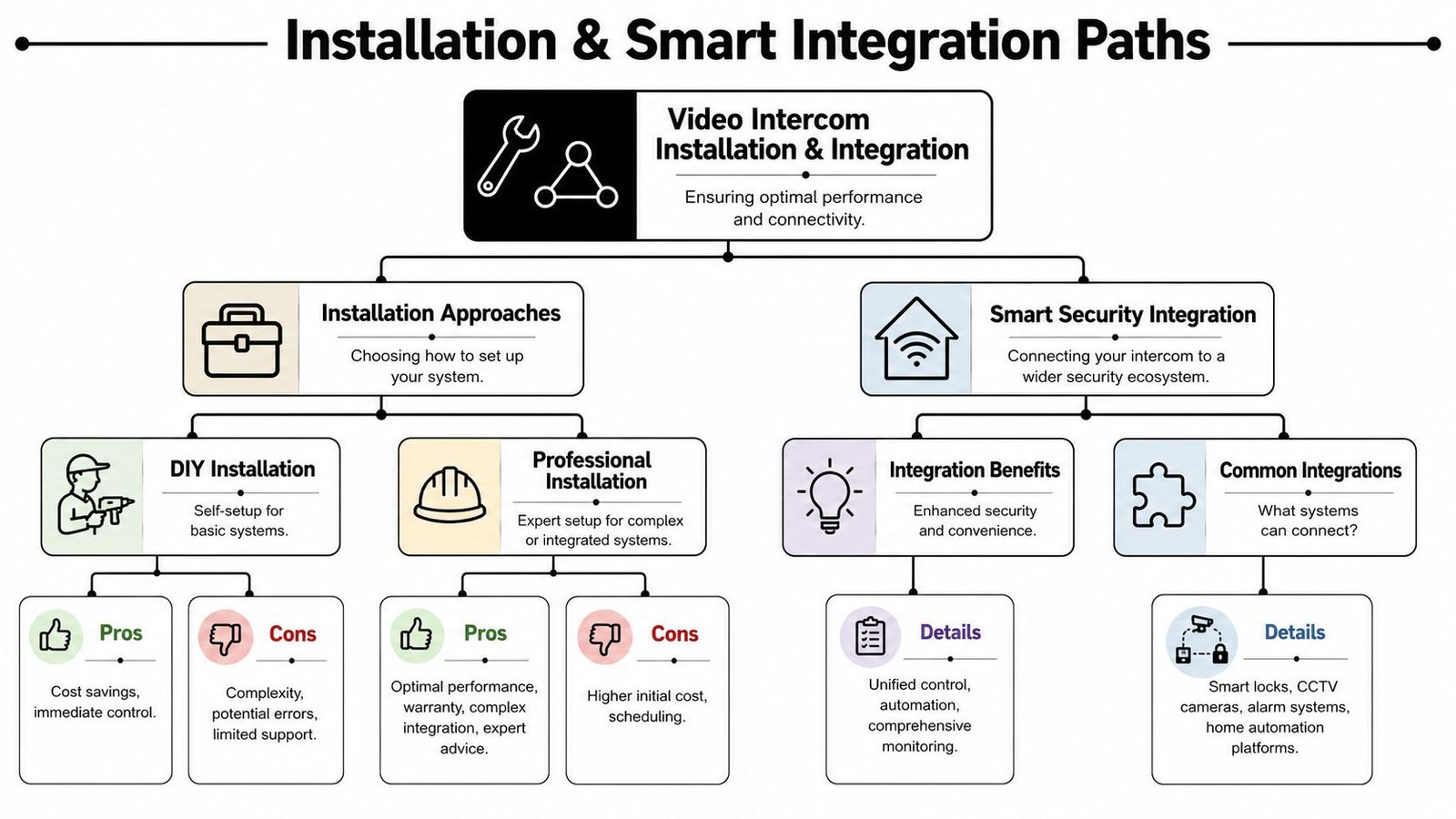
A well-specified intercom can still perform badly if the installation is rushed. Most faults I see in practice don't start with the camera module. They start with poor cable routes, weak Wi-Fi assumptions, badly positioned door stations, incorrect door release wiring, or a lock setup that fights against the way the entrance is used.
What good installation actually looks like
The outdoor unit needs the right height, angle, lighting conditions, and weather protection. The receiving endpoint needs to be somewhere people will use it. The release hardware needs to fail safely and work consistently with the door, gate, or lock type installed.
DIY can work for a basic single-door domestic unit, especially if you're replacing like-for-like and not integrating with locks or gates. If you're planning a broader security setup, the bar is much higher. Even a decent home install benefits from understanding sight lines, power, and how the intercom behaves during outages.
For homeowners adding cameras at the same time, this easy home CCTV setup guide is useful background on placement and practical installation thinking.
How integration improves day-to-day security
The most effective intercoms are part of a wider system, not a standalone button on the wall.
In the UK, modern video intercoms are increasingly designed as part of IP-based access-control networks. That allows the call event, live video, door release, and audit trail to be managed centrally, but it also means the intercom has to be treated as a networked enterprise device with proper network design and cybersecurity controls, as explained in Aiphone's comparison of analogue and IP video intercom systems.
That integration usually pays off in four ways:
- With CCTV: An operator can check the intercom view and nearby cameras before granting entry.
- With access control: The same site can manage credentials, schedules, and door behaviour more consistently. This overview of available access control system types is a useful companion if you're planning a combined setup.
- With gates and barriers: Homes with drive gates and businesses with vehicle access can manage visitors from one interface.
- With audit trails: Staff can review who called, when the door was released, and how the event was handled.
The more integrated the system becomes, the less it behaves like a doorbell and the more it behaves like managed building infrastructure.
What doesn't work is bolting an intercom onto a weak network and hoping for the best. If the site depends on mobile answering, remote release, or central management, the network and cybersecurity design are part of the project, not an afterthought.
Budgeting Costs Maintenance and Choosing Your Installer
There isn't one universal price for video intercom systems, and anyone who gives one without asking about door count, lock type, cabling, and user workflow is guessing.
The final cost usually breaks into three parts:
- Hardware: Door station, monitors or handsets, power supplies, mounts, relays, and lock interface equipment
- Installation labour: Cabling, mounting, commissioning, testing, and user setup
- Ongoing service: Maintenance visits, support, and, where applicable, cloud or app subscriptions
What changes the final price
A simple single-door domestic unit is a different job from a multi-tenant entrance with remote management, app users, and electric release tied into access control.
The main price drivers are usually:
- Number of entrances: More doors mean more hardware and more configuration
- Type of locking hardware: Releasing a latch, maglock, gate motor, or secure communal entrance involves different work
- Existing infrastructure: Reusing suitable cabling is very different from opening routes and running new services
- Integration depth: A standalone panel costs less to install than a system tied into CCTV, gates, and managed access control
- Ongoing platform choice: Some systems are largely self-contained. Others rely on cloud features that bring recurring fees
If you want a wider sense of how installation variables affect security project pricing, this guide to CCTV installation costs gives a useful reference point for how labour, equipment quality, and site complexity shape total cost.
Maintenance and installer checks
Intercoms are front-line devices. They sit outside, they get used daily, and they're expected to work in poor weather and awkward conditions. Routine maintenance matters.
A sensible maintenance plan covers cleaning the camera and speaker area, checking call quality, testing the release function, reviewing user permissions, and making sure the app or management side still matches who needs access.
When choosing an installer, check for:
- Insurance and compliance: You want a properly insured contractor who works to current standards.
- DBS-checked engineers: Especially relevant for homes, schools, and occupied sites.
- Integrated systems experience: Ask whether they've tied intercoms into locks, CCTV, and access control before.
- Aftercare: Fault response, maintenance options, and who supports the system after handover.
- A proper site survey: Good installers ask about user flow, lock type, fire door behaviour, and privacy obligations before recommending a model.
The best installer doesn't just fit a panel. They help you avoid a system that looks good on day one and causes frustration every week after that.
If you're based in South Wales or the South West and want advice grounded in real site conditions, Wisenet Security Ltd provides consultations specific to homes, businesses, landlords, warehouses, and multi-tenant properties. Their team designs, installs, and maintains integrated security systems including CCTV, access control, intercoms, alarms, fire systems, and gate automation, with fully insured service, DBS-checked engineers, and local support across Cardiff, Bristol, Newport, Swansea, and surrounding areas.