Card Reader Access Control: A Complete UK Guide for 2026
If you're running a business in Cardiff, Newport or Bristol, there's a fair chance your access setup has grown messier than you wanted. One person has the back door key, someone else still has a copy from a role they left months ago, the cleaner needs entry on certain evenings, and nobody is fully sure who can open what anymore. That usually works right up until a key goes missing, a tenant changes, or an incident forces you to work out exactly who had access and when.
That's where card reader access control stops being a “nice to have” and starts solving real operational problems. Instead of changing cylinders and chasing keys, you issue credentials, set permissions, remove access in software, and keep a usable record of entry events. For small firms, schools, warehouses and multi-tenant buildings across South Wales and the South West, that shift is often less about shiny technology and more about getting control back.
Table of Contents
- Moving Beyond the Bunch of Keys
- How Card Reader Systems Actually Work
- Comparing Access Cards and Reader Technologies
- Security Risks and System Integration Benefits
- Designing a System for Your Home or Business
- Installation and Compliance in South Wales
- Frequently Asked Questions About Card Access Control
- Can a small business justify card reader access control?
- Is a fob enough, or should I move straight to smart cards or mobile credentials?
- Can I keep my existing readers and just change the cards?
- What happens if someone loses a card or fob?
- Should I install it myself?
- What about power cuts?
- Is mobile access replacing cards completely?
Moving Beyond the Bunch of Keys
A lot of access control jobs start with a complaint that doesn't sound technical at all. It sounds like this: “We've got too many keys, staff keep swapping them around, and I don't want to change all the locks again.”
That's a familiar problem in small offices, workshops, apartment blocks and mixed-use buildings. Mechanical keys are simple, but they're blunt tools. Once they're copied, shared or lost, you're left with uncertainty. You can't quickly narrow access to one stock room, one side entrance or one shift pattern. You also can't revoke a key remotely. Someone has it or they don't.
Card reader access control fixes that by replacing unmanaged physical access with controlled permissions. A card, fob or phone becomes an assignable credential rather than a permanent key. If someone changes role, leaves the business or only needs temporary access, the permission changes without replacing the lock hardware.
The reason this has become normal rather than niche is simple. Businesses want control, records and flexibility. The wider market reflects that. The global access control readers market was valued at US$4.22 billion in 2023 and is projected to grow at a 12% CAGR from 2024 to 2030, according to market data cited by Mordor Intelligence.
Practical rule: If losing one key would force you to question your whole site's security, you've already outgrown a key-only setup.
For a local business owner, the value is usually immediate:
- Lost credential handling: Disable one card or fob rather than replace multiple locks.
- Role-based access: Give the office team, warehouse staff and contractors different permissions.
- Time control: Allow entry during working hours without handing over unrestricted access.
- Audit visibility: Check who presented a credential at a specific door and when.
That's why these systems are now common in offices, warehouses, schools and apartment blocks. They don't just open doors. They make access manageable.
How Card Reader Systems Actually Work
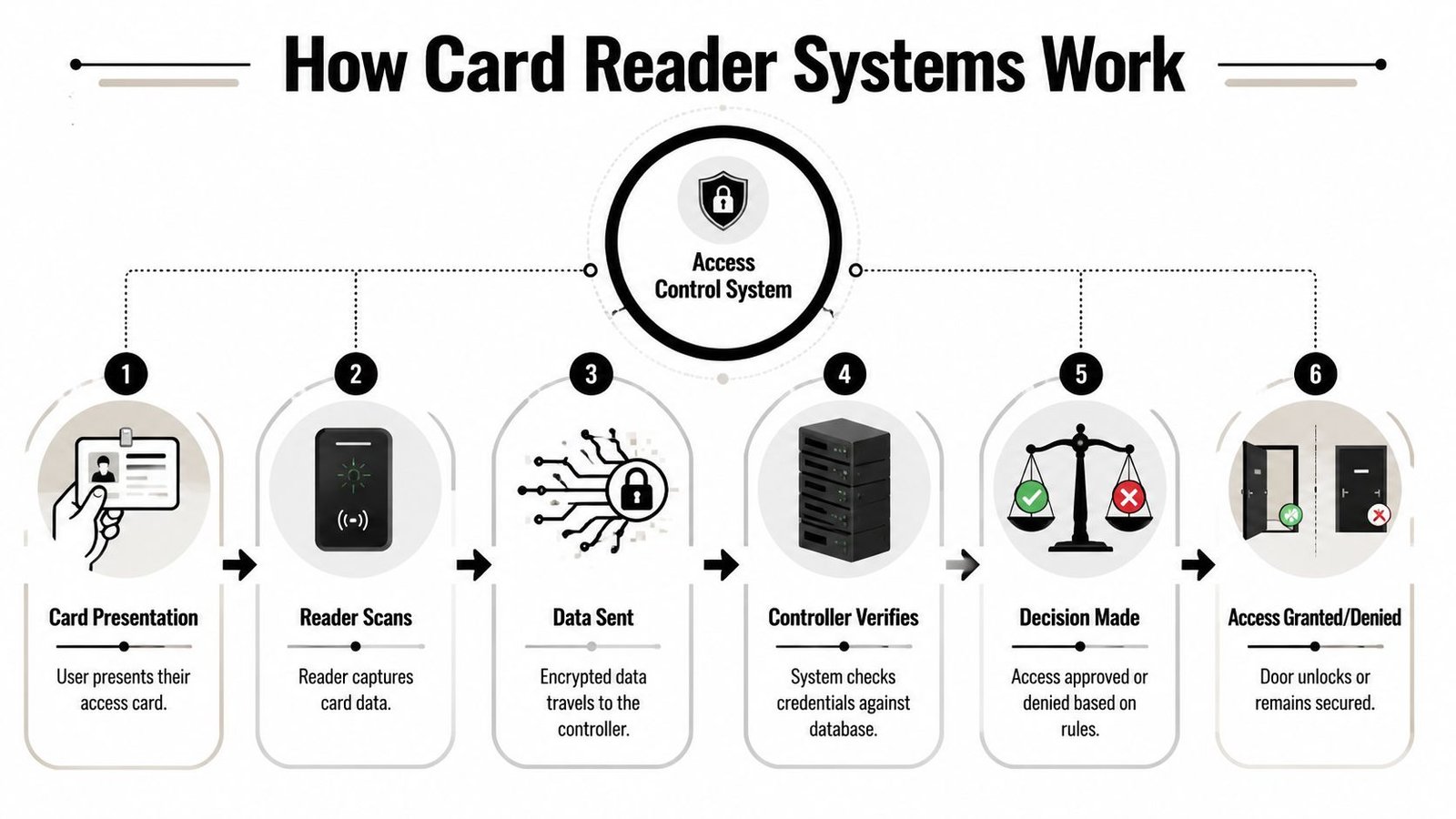
At door level, the system is less mysterious than people think. The easiest way to think about it is as a digital bouncer. A person presents a credential, the reader asks the system if that person is allowed through, and the door either opens or stays secure.
The three parts that matter
Every card reader access control system has three core pieces.
The credential
This is the thing the user carries. It might be a plastic card, a key fob, or a mobile credential on a phone.The reader
This is the wall-mounted device by the door. It detects or reads the credential and passes that information into the system.The controller
This is the decision-maker. It checks the presented credential against the permissions set for that door, that user and that time.
There's usually a fourth practical piece as well: the locking hardware. That might be a maglock, electric strike or another electronically controlled locking method. The controller doesn't physically open the door by itself. It tells the locking hardware what to do.
If you want a simple primer on the sensing side of detection hardware, this explanation of how proximity sensors work is useful background because it helps non-technical buyers understand why close-range credential reading is reliable in day-to-day use.
What happens when someone taps in
The sequence is straightforward.
- Presentation: The user holds a card, fob or phone near the reader.
- Read event: The reader captures the credential data.
- Decision: The controller checks whether that credential has permission for that door.
- Action: The lock releases or stays locked.
- Record: The event is logged so the business can review access activity later.
That basic model is the same whether you're securing a single office door or a larger estate.
Historically, UK systems didn't start here. Industry history notes the progression from punch cards in the 1960s to magnetic stripe cards in the 1970s, before RFID-enabled contactless access emerged in the 1990s, improving durability and convenience and establishing the modern pattern of assignable credentials and time-based permissions used today, as outlined in this history of door access control systems.
A short video can help if you prefer seeing the process rather than reading about it:
When a system is specified properly, the user experience feels simple. Tap, green light, entry. The complexity sits behind the scenes where it belongs.
Comparing Access Cards and Reader Technologies
One of the most common mistakes in card reader access control is assuming all cards and all readers do roughly the same job. They don't. The credential type affects security, convenience, migration cost and how much future flexibility you'll have.
What you are likely to see on UK sites
On existing premises around South Wales and the South West, four broad categories show up most often.
Magnetic stripe cards are part of the older generation. They rely on physical swiping, the cards wear out, and they're rarely the right choice for a new installation now.
125 kHz proximity credentials are still widespread. They're common on older SME sites because they're familiar and many existing readers support them. They're convenient, but they're also the technology many firms are trying to move away from for security reasons.
13.56 MHz smart cards are usually the better fit where security matters more. They support stronger credentialing approaches and suit businesses that want a more modern platform rather than a like-for-like replacement of older fobs.
Mobile credentials use a smartphone as the credential. They can work well for businesses that want easier remote issuing, fewer plastic cards and a cleaner onboarding process for staff and contractors.
Reader choice matters just as much as card choice. Many readers are now marketed as multi-technology devices, but that doesn't mean every mode offers the same security profile. A reader may support legacy proximity, smart card formats and mobile credentials, but the site still needs a proper migration plan.
For a wider look at system types around the same topic, this guide on what types of access control systems are available is a helpful companion when you're narrowing down architecture as well as credentials.
Comparison of Access Credential Technologies
| Technology Type | Security Level | Convenience | Typical Use Case |
|---|---|---|---|
| Magnetic stripe | Low by current standards | Lower, because it relies on physical swiping | Older legacy installations |
| 125 kHz proximity | Basic and widely compatible, but weaker than modern encrypted options | High for everyday use | Small offices and older retrofit sites |
| 13.56 MHz smart card | Stronger than legacy prox when properly deployed | High | Businesses wanting better security and cleaner long-term management |
| Mobile credential | Strong when paired with the right platform and policies | Very high for users who prefer phone-based access | Managed offices, multi-tenant sites, flexible workplaces |
A separate but important trade-off sits behind the wall. Reader interface affects what can be done with the rest of the system. According to PCSC's overview of reader technologies, many readers still support Wiegand for compatibility, but it's a legacy interface. Newer readers increasingly support serial communications and mobile credentials, which gives more flexibility when migrating mixed estates.
That has practical consequences:
- Retrofit compatibility: Wiegand can help when the panel is staying in place and budget won't stretch to a full replacement.
- Future migration: Serial-capable and multi-technology readers make it easier to phase out old credentials without replacing every door at once.
- Credential consistency: If the reader, panel and issued cards aren't matched properly, the site ends up carrying duplicate card stocks and extra admin.
Don't choose a reader because it “reads lots of things”. Choose it because it fits your existing panel, your next upgrade step, and the credentials you actually want to issue over the next few years.
For a small office, a basic fob system may still be enough. For a landlord with shared entrances, service areas and tenant turnover, that decision usually needs more thought.
Security Risks and System Integration Benefits
Convenience gets the sale. Security is what justifies the project properly.
A card reader access control system only improves protection if the credentials, reader technology and management process are sound. Plenty of sites still rely on old low-frequency proximity credentials because they work and nobody has forced the issue yet. The problem is that “still working” and “still appropriate” aren't the same thing.
Where older systems fall short
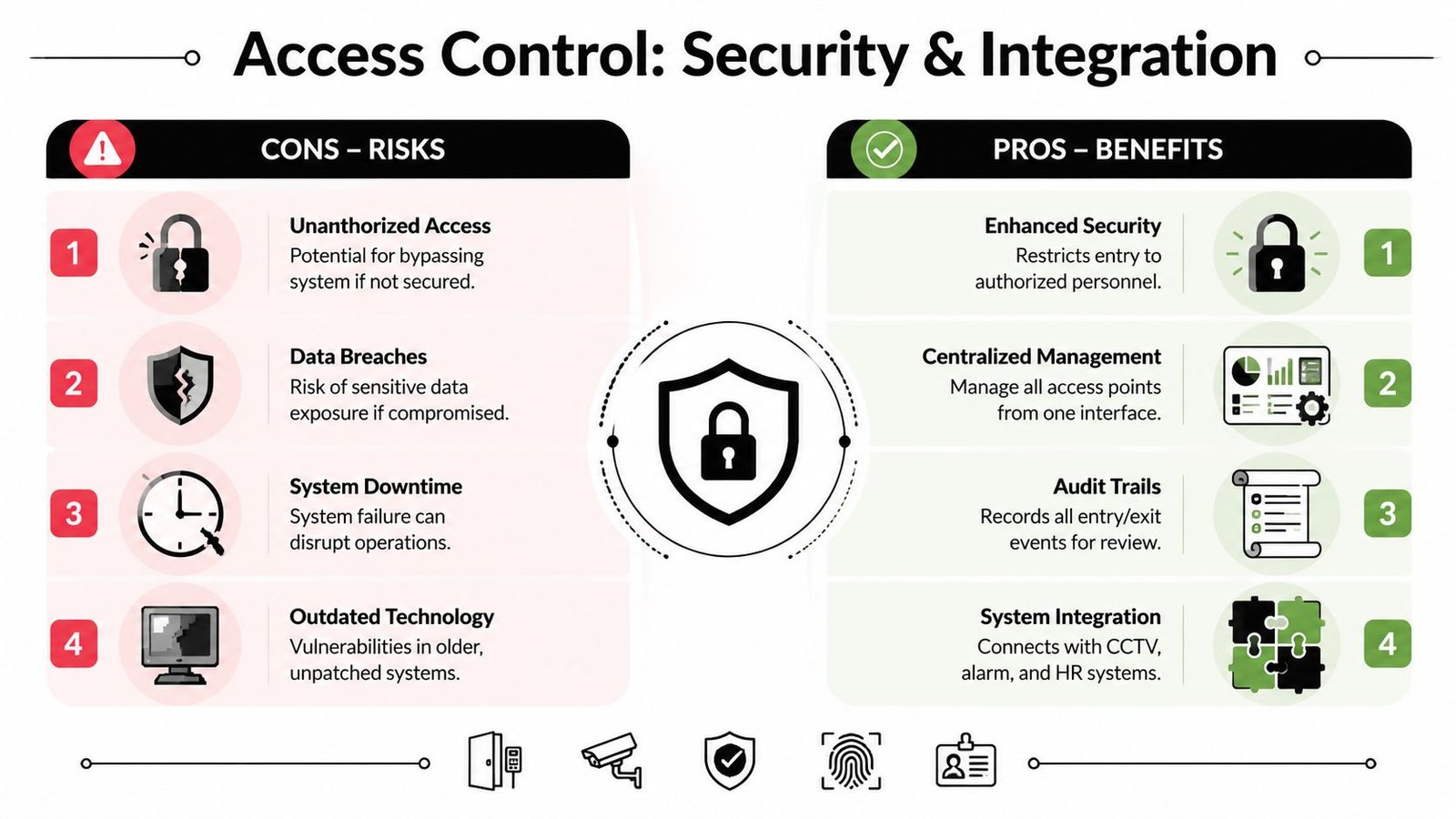
A major weakness in many legacy setups is continued dependence on 125 kHz proximity readers. The supplied industry material highlights that these credentials are vulnerable to cloning, and ties that risk back to the wider principle in UK cyber guidance that sensitive access decisions should use stronger authentication. That's the practical case for moving toward encrypted smart-card or mobile credential systems, as discussed in this article on why proximity cards are outdated and insecure.
This doesn't mean every older prox site needs ripping out tomorrow. It does mean the business should ask honest questions:
- What does this door protect? Front office access is different from a comms room, medicines cabinet or stock cage.
- Who holds credentials now? Long staff histories and poor leaver processes increase exposure.
- Is sharing happening informally? If cards are being lent around, the control layer is weaker than it looks.
A cloned card problem usually starts as a management problem. Weak issuance, poor leaver control and legacy readers tend to appear together.
Why integration changes the value of the system
Significant uplift comes when access control stops operating as a standalone door product. Integrated properly, it supports incident handling, facilities management and daily operations.
Examples that work well in practice include:
- CCTV linkage: When access is denied at a door, operators can immediately review the associated camera view.
- Intruder alarm interaction: First authorised entry can be aligned with opening procedures, reducing false activations.
- Time and attendance: Staff movement data can support attendance workflows where that's appropriate and properly managed.
- Building management: Shared buildings can coordinate doors, intercoms and common-area access more cleanly.
If you're looking at access as part of a wider resilience plan rather than a door-only purchase, this piece on how to reduce business risk with security gives useful context for taking a joined-up view of operational risk. And for the technical side of combining platforms, integrated security solutions show how access control typically fits alongside CCTV, alarms and intercoms rather than replacing them.
That joined-up approach is often where the business case becomes clearer. A reader on the wall opens a door. An integrated system gives you evidence, context and control.
Designing a System for Your Home or Business
A Cardiff office manager usually asks the same question after a staff change or a lost key. How much control do we need, and what will still work properly six months from now?
Good access control design starts with how the building is used day to day. A two-door office in Cardiff Bay, a retail unit in Swansea, and a warehouse near Bristol can all ask for fob entry, but the right layout for each site is rarely the same. The number of users matters. The type of doors matters. So do opening hours, shared areas, delivery access, and whether someone needs a clear audit trail when there is a dispute.
The first survey should focus on the property, not the product range. On smaller SME sites across South Wales, I usually see the same planning questions come up early:
- Which openings need control? Front door, staff entrance, stock room, plant room, side gate and landlord-controlled areas often need different treatment.
- Who needs access, and at what level? Staff, supervisors, tenants, cleaners, contractors and out-of-hours maintenance should not all sit in one user group.
- How will people move through the site? A single main entrance is simple. Split entrances, rear service doors and shared corridors create more admin and more failure points.
- What happens during a power or network problem? The door still needs to behave safely and predictably, especially on a busy site.
That last point gets missed more often than it should.
Home users usually want a gate, side entrance or garden office protected without relying on a physical key alone. Businesses tend to need zoning, schedules and cleaner user management. Property managers often need another layer on top of that. Fast enrolment for new tenants, simple removal of old credentials, and enough reporting to deal with complaints or contractor access queries.
Wisenet Security Ltd is one example of a managed access control provider in that market. The useful point is not the badge on the reader. The useful point is whether the system suits the way the building runs, and whether the installer can explain the upgrade path clearly. If you are comparing options, it helps to understand what is involved in the installation process of an access control system before you choose hardware.
Capacity planning is where many sites go wrong
A lot of access systems are underspecified at the controller and administration level, not at the reader. On paper, the site looks covered because every door has a reader and a lock. In practice, the trouble starts later. New staff are added in a hurry, another tenant takes space, a gate gets brought into the system, or a manager asks for separate schedules and audit history by department.
That is where a cheap early decision becomes an expensive retrofit.
The design needs enough headroom for cardholder numbers, event storage, door groups and future additions. It also needs a sensible structure. A small office might only need a straightforward setup today, but if the business expects to add a storeroom, a rear entrance, or managed contractor access, it is better to allow for that now than patch it in later.
Common design mistakes include:
- Too little controller capacity: The system works at handover, then becomes awkward as users and doors increase.
- Poorly planned user groups: Multi-tenant or mixed-use buildings become messy to administer because permissions were set person by person instead of by role.
- No allowance for peak traffic: Shift change, school pickup, clinic opening times and warehouse dispatch periods can expose bottlenecks quickly.
- Weak failover planning: The site runs fine while connected, then behaves unpredictably when communications drop.
For SMEs, there is a balance to strike. Overspending on enterprise features that will never be used is wasteful. Buying the smallest possible system is usually worse, because the first expansion often means replacing parts that should have been sized properly from the start.
Installation and Compliance in South Wales
A neat design can still fail if the installation is careless. A lot of generic online advice falls short precisely because real sites come with awkward frames, old cabling routes, mixed door types, inherited hardware and landlord restrictions.
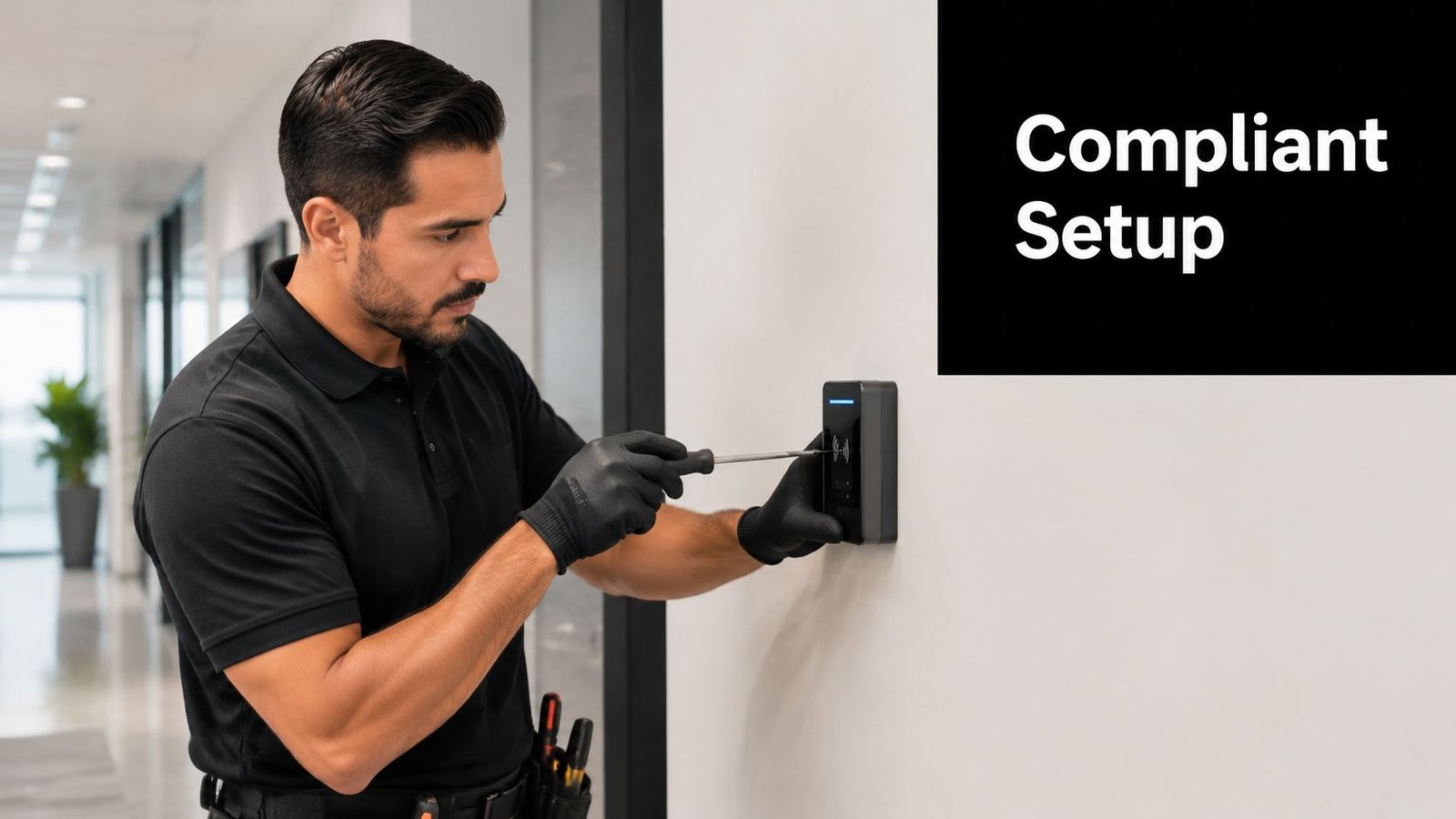
Reader wiring and retrofit realities
For retrofit work, especially in older buildings across South Wales and the South West, the engineer often has to work around what's already in the walls.
Many modern readers still support legacy interfaces because replacement of the full panel isn't always economical. But compatibility and good practice are not the same thing. If the site is using older wiring arrangements and legacy reader communication, the installer needs to be clear about what's being preserved, what risk remains, and what the upgrade path looks like.
The practical issues usually include:
- Existing cable routes: Some buildings don't make fresh cabling easy without visible containment or joinery work.
- Door construction: Aluminium shopfronts, timber doors, communal entrances and fire doors all have different hardware constraints.
- Power and lock choice: The locking method has to match the door, the use case and the life-safety requirements.
If you want a clearer picture of the project stages before work starts, this overview of what is involved in the installation process of an access control system is a sensible reference point.
Fire safety, egress and records
This part matters more than many buyers realise. In the UK, access control can't be treated as a standalone convenience product. It has to coexist properly with fire safety, emergency egress and broader building management responsibilities.
The supplied material highlights that, for retrofits in South Wales and the South West, ensuring secure doors do not impede emergency egress and that suitable audit logs are kept is a critical compliance issue for property managers, as noted in this discussion of cyber and physical security governance.
That means asking practical questions early:
- Can people exit safely in an emergency? Security hardware must not create unsafe escape conditions.
- How does the door behave on alarm activation? Release logic and fail behaviour need to match the door's purpose.
- Who keeps the records? In shared buildings, landlord and tenant responsibilities should be clear.
- What gets tested and maintained? Access equipment is not fit-and-forget.
If a secure door creates confusion during an evacuation, the design has failed no matter how tidy the install looks.
For local property managers, this is often the hardest part. Not choosing the reader. Making sure security, tenancy use, facilities management and compliance all line up.
Frequently Asked Questions About Card Access Control
Can a small business justify card reader access control?
Yes, often for management reasons as much as security. If you've got staff turnover, shared access, cleaners, contractors or stock areas, being able to issue and revoke credentials quickly is usually more practical than managing keys.
Is a fob enough, or should I move straight to smart cards or mobile credentials?
That depends on the risk at the door and the condition of the existing system. A simple setup can still be suitable on low-risk doors, but older legacy proximity technology deserves a hard look if you're protecting sensitive areas or planning a long-term upgrade.
Can I keep my existing readers and just change the cards?
Sometimes, but not always. It depends on the reader technology, the panel, the wiring and whether you're trying to improve security or just replace worn credentials. Mixed estates are common, but they need planning.
What happens if someone loses a card or fob?
You disable that credential in the system and issue another one. That's one of the biggest advantages over keys, where one missing key can leave a much bigger question hanging over the building.
Should I install it myself?
For a very basic single-door domestic setup, some people do. For most business premises, professional installation is the safer route because door hardware, release logic, fire considerations, audit requirements and integration with alarms or CCTV all need to behave properly together.
What about power cuts?
That comes down to door design and lock behaviour. Some doors are configured to release on power loss. Others stay secure. The right approach depends on the door's role, life-safety requirements and how the building is used.
Is mobile access replacing cards completely?
Not completely. It suits some businesses very well, especially where remote credential management matters, but many sites still prefer cards or fobs for simplicity, user habit or mixed-user environments.
If you need practical advice on card reader access control for a site in Cardiff, Newport, Swansea, Bristol or the surrounding area, Wisenet Security Ltd can assess the doors, users, existing hardware and compliance considerations, then recommend a system that fits the building rather than forcing a generic template.