CCTV for Business: A UK Guide to Security & Compliance
If you're looking at cctv for business, you're probably not starting from a blank page. You may already have a few ageing cameras, an alarm that works separately, a front entrance that isn't covered properly, or a manager who keeps asking for footage that turns out to be too poor to use. In Cardiff and Bristol, that's a common position. The issue usually isn't whether a business needs cameras. It's whether the system is fit for purpose, lawful, and tied into the rest of the site's security.
A decent business system should do more than record incidents after the fact. It should help you verify alarms, resolve disputes, protect staff, manage access, and do all of that without creating avoidable UK GDPR problems. That's where many businesses get caught out. They buy cameras first, then ask compliance questions later.
Table of Contents
- Why Modern Businesses Need More Than Just a Camera
- Decoding CCTV System Types and Essential Features
- Staying Compliant with UK CCTV Laws and Data Protection
- Strategic Camera Placement for Your Business Premises
- Calculating CCTV Costs and Integrating Your Systems
- How to Choose a Trusted CCTV Installer in South Wales
Why Modern Businesses Need More Than Just a Camera
Most businesses first think about CCTV as a deterrent. That matters, but it's too narrow. If your cameras only exist to make someone think twice, you're underusing a system that could be helping with operations, safety, and dispute handling every week.
The UK has lived with widespread camera use for a long time. Local authority and police use expanded significantly from the 1990s, and that helped make private CCTV a standard part of business security across commercial areas, town centres, transport hubs, and mixed-use sites, as noted in this overview of the UK CCTV market context.

Deterrent value is only the starting point
A shop in Cardiff might need clear entrance coverage for theft prevention. A warehouse outside Bristol may care more about loading bays, vehicle movements, and whether stock left the site with the right person. An office building may use video to verify who accessed reception after hours and whether a door was left unsecured.
In each of those cases, the strongest return doesn't come from the camera's mere visibility. It comes from the footage being usable.
That means:
- Faces can be recognised where they need to be. A camera aimed too wide often records activity without identifying anyone.
- Incidents can be followed from one area to another. A single good camera rarely solves a business problem on its own.
- Managers can check what happened without guessing. That saves time in customer complaints, delivery disputes, and internal investigations.
Good CCTV doesn't just tell you that something happened. It lets you establish who, where, and in what sequence.
Good footage saves time and protects people
One of the most practical uses of cctv for business is protecting staff from false or exaggerated allegations. If a customer says a team member was aggressive, or a contractor says goods were never unloaded, clear footage gives you a factual timeline. That matters just as much as theft prevention.
It also supports health and safety management. If someone slips in a corridor, a forklift clips a pallet, or a fire exit is blocked during a shift, video helps you see whether the problem was poor layout, poor supervision, or a one-off error. That's useful for incident review, retraining, and tightening procedures.
A well-designed system can also expose operational friction. In retail, that might be queues building because the till area isn't staffed at the right moments. In logistics, it may be recurring delays at the loading bay because vehicle and pedestrian routes cross awkwardly. CCTV won't solve those issues by itself, but it gives managers evidence instead of assumptions.
Businesses often regret one of two extremes. They either buy the cheapest hardware and get poor footage, or they overspend on camera specs while ignoring layout, access control, and process. Neither works well. The stronger approach is to decide what questions the system needs to answer, then build coverage around those questions.
Decoding CCTV System Types and Essential Features
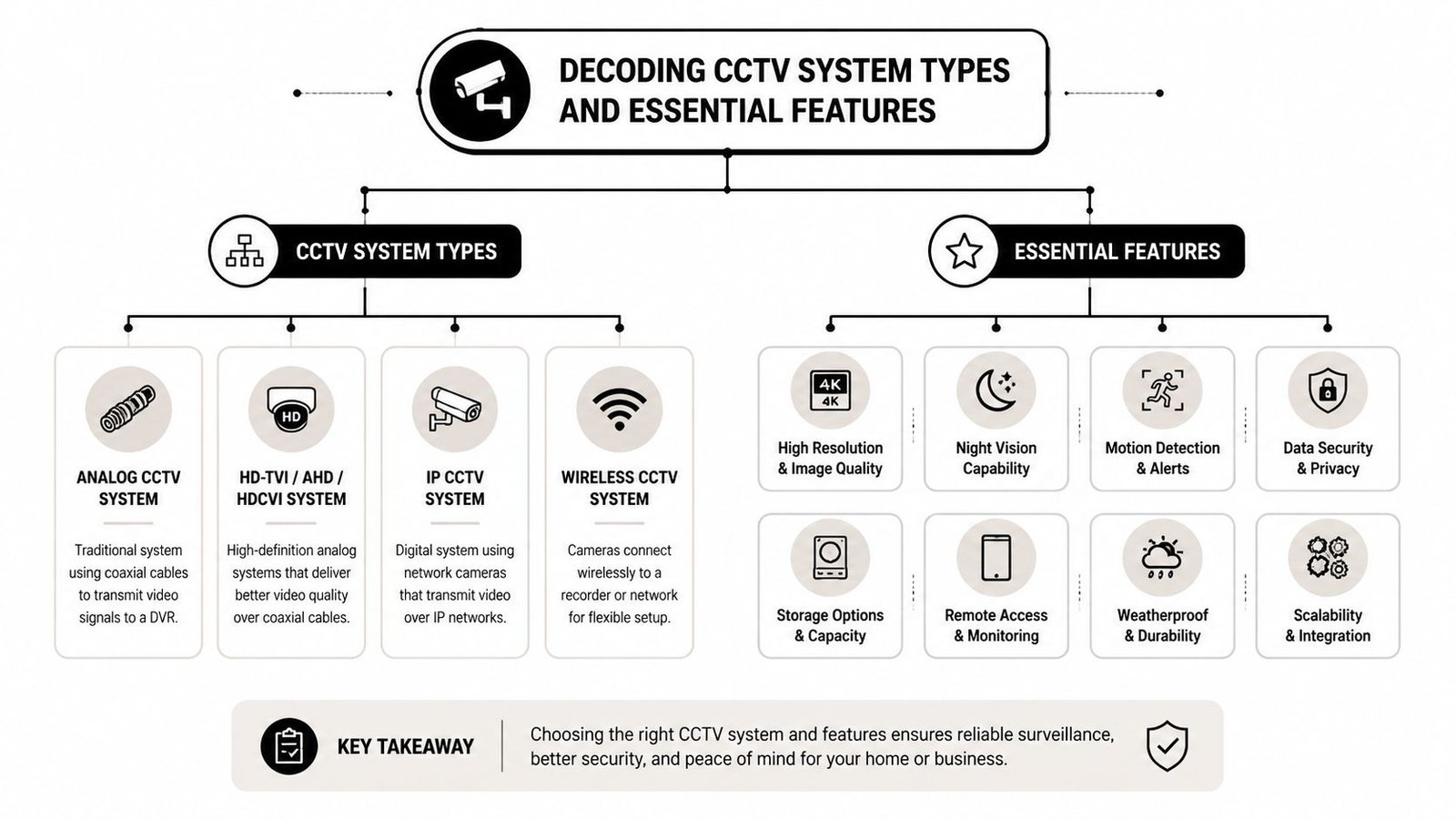
The first technical choice is still the one that shapes everything else. Are you keeping an older coax-based setup and upgrading around it, or are you moving to a networked IP system? Both can work, but they suit different buildings, budgets, and risk profiles.
Analogue and IP solve different problems
Analogue HD-TVI systems still have a place where a business already has usable cabling and needs a straightforward upgrade without major network changes. They're often simpler for small sites and can be a sensible short-term route when budget is tight.
IP systems are more flexible. They suit multi-camera sites, remote viewing, analytics, and wider integration with alarms, access control, and networked devices. They also make more sense when you want a system that can evolve rather than just replace what was there before.
The more important point is this. Hardware discussions now sit alongside cyber risk. The market has shifted from pure camera comparison to cybersecurity and AI management. The UK's NCSC advises businesses to change default passwords, keep connected devices secured, and segment security systems from wider business networks because a compromised camera can expose video or become a route into the network, as summarised in this piece on secure CCTV management and AI use.
Analogue CCTV vs IP CCTV At a Glance
| Feature | Analogue Systems (HD-TVI) | IP Systems (Network) |
|---|---|---|
| Best fit | Existing coax sites, smaller upgrades | New installs, expanding sites, integrated systems |
| Installation approach | Often simpler where old cabling can stay | More flexible, but needs proper network planning |
| Image options | Good for straightforward coverage | Better suited to higher detail and advanced features |
| Scalability | More limited as sites grow | Easier to expand across larger or split premises |
| Remote access | Available on some systems, varies by setup | Usually stronger and more flexible |
| Analytics | Basic on many setups | Better suited to people, vehicle, and event analytics |
| Cybersecurity workload | Lower network complexity, but still needs secure setup | Higher importance due to network exposure |
| Long-term flexibility | Works well for stable layouts | Better for changing business needs |
Which camera features matter in practice
Businesses often get distracted by headline specs. The better way to judge a system is to ask what it will help staff do on a normal Tuesday, not just after a serious incident.
A few features matter more than the sales brochure makes clear:
- Night performance: Car parks, rear service yards, and loading areas usually fail at night before they fail in daylight. Low light performance matters more than an impressive daytime demo.
- Remote viewing: Useful for owners and duty managers, but only if access is secure and permissions are controlled.
- AI analytics: Helpful when used for person detection, line crossing, or vehicle alerts in defined areas. Less helpful when turned on everywhere without a clear operational purpose.
- Storage design: You need footage retained long enough for genuine business use, but not kept carelessly. Recorder setup and export process matter more than most buyers expect.
- Camera type: Dome cameras suit many internal spaces. Bullet cameras often work well on perimeters. PTZ cameras help in larger external areas, but they should support a wider plan rather than replace fixed coverage.
Practical rule: If a camera is expected to identify a person, monitor a process, and cover a wide area all at once, it's probably doing none of those jobs well.
For many SMEs, the strongest setup is a mix. Fixed cameras cover entrances, tills, corridors, and stock areas consistently. A PTZ may watch a yard or larger car park. Analytics are applied selectively to out-of-hours zones where they reduce unnecessary alerts. If you want a plain-English look at where intelligent detection adds value, this guide on how AI CCTV systems improve security is a useful starting point.
Staying Compliant with UK CCTV Laws and Data Protection
A business can install excellent cameras and still get the overall job wrong. In the UK, CCTV isn't only a security decision. It's a data protection decision as well.
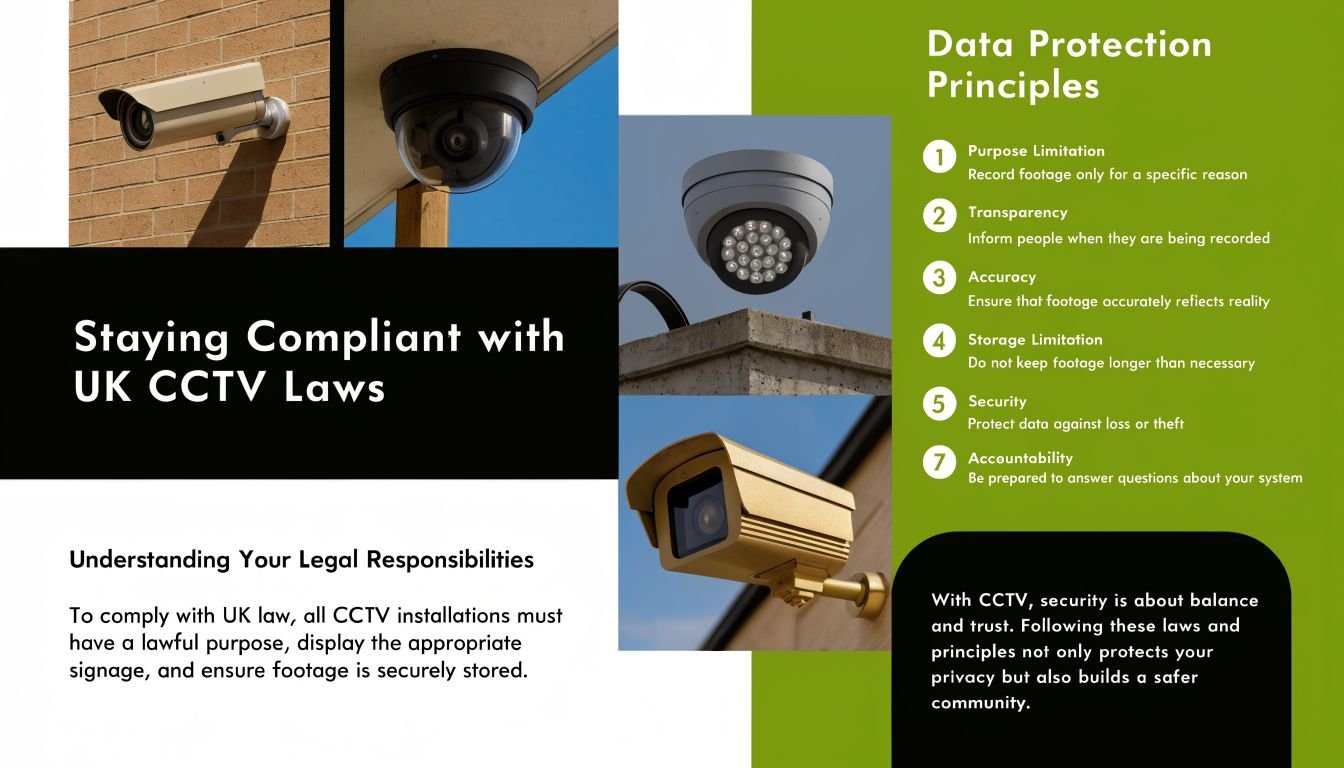
Business CCTV operators have been subject to data protection rules since the Data Protection Act 1998. The current framework under the Data Protection Act 2018 and UK GDPR requires organisations to have a lawful basis, use clear signage, and keep footage only as long as necessary, as set out in this summary of UK CCTV data protection duties.
What the law expects from a business user
The key test is whether your use of CCTV is necessary and proportionate. In plain terms, you need a real business reason for monitoring, and your setup shouldn't collect more than it needs to.
For most businesses, that means thinking through points like these:
- Lawful basis: Why are you recording? Common reasons include site security, staff safety, stock protection, and incident investigation.
- Signage: People must know they are entering an area under surveillance.
- Access control: Not every manager should be able to browse footage whenever they like.
- Retention: Keep recordings only for as long as there is a justified need.
- Policy: Staff should understand what is being recorded, why, and who handles the data.
If your cameras monitor shared entrances, public-facing forecourts, or spaces near neighbouring property, the privacy side becomes more sensitive. That's where casual installs cause problems. A camera that sees too much can create avoidable complaints even if the security intention was reasonable.
For organisations that already deal with wider compliance work, it helps to look at CCTV as part of a broader governance map. This guide to compliance mapping for professional services gives a useful framework for thinking about how operational controls, data handling, and documented process fit together.
A practical compliance routine
The businesses that stay out of trouble usually do simple things consistently rather than writing a grand policy nobody follows.
A workable routine looks like this:
- Write down the purpose of each camera. Entrance security is different from monitoring a loading bay or shared car park.
- Check the field of view. If a camera catches more public area than necessary, adjust it.
- Set user permissions properly. Limit who can review, export, or delete footage.
- Define retention in writing. If you can't explain why footage is kept for a given period, revisit it.
- Prepare for requests. If someone asks about footage containing their image, the business needs a process, not a shrug.
Businesses usually struggle with CCTV compliance for one reason. They buy equipment like it's only a physical security tool, then realise later it's part of their data handling obligations.
If you want a more focused overview of how those duties apply to commercial sites, this guide on CCTV and GDPR in the UK for businesses covers the practical side well.
Strategic Camera Placement for Your Business Premises
The easiest way to waste money on cctv for business is to buy decent cameras and put them in the wrong places. Placement decides whether you get useful evidence, meaningful oversight, and lawful coverage.
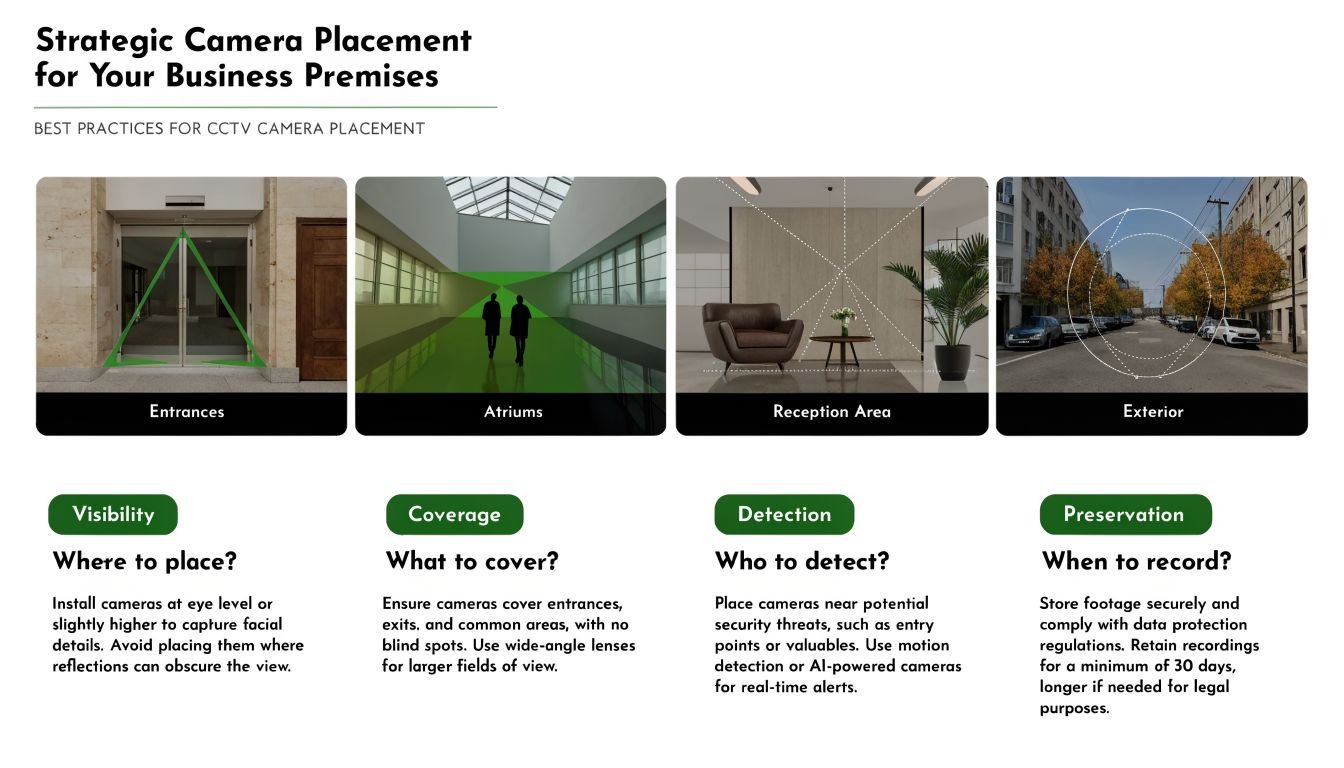
The starting point should be a site walk. Look at how people, vehicles, goods, and visitors move. Then look at where incidents are most likely to happen, where evidence would matter most, and where privacy expectations are highest.
Retail offices and warehouses need different layouts
In a retail unit, I'd usually expect priority coverage at the main entrance, till area, stockroom entrance, and any aisle or display where loss risk is higher. Front-of-house cameras should show approach and movement clearly, not just the top of someone's head. A camera aimed at the till needs to support transaction review without being placed so intrusively that it creates a staff relations problem.
In an office, reception, main entry points, delivery access, car parks, and any restricted technical room are common priorities. Internal office floors are different. Blanket monitoring across desks often creates more concern than value unless there is a very specific risk-based reason.
For a warehouse or logistics site, loading bays, roller shutters, perimeter approaches, yard gates, dispatch zones, and high-value storage areas usually matter most. A common mistake is putting too much emphasis on internal wide shots and too little on choke points where goods enter, leave, or change hands.
Where placement goes wrong
Poor placement usually falls into one of three categories.
- Too wide: The camera sees everything badly. This is common at entrances, yards, and car parks.
- Too low value: A camera records an empty corridor beautifully while the actual risk point is just outside frame.
- Too intrusive: Staff areas are monitored in a way that creates privacy concerns without clear justification.
UK guidance also pushes businesses to think in terms of privacy by design. If cameras capture public areas or neighbouring property, privacy masking should be used. For more significant surveillance projects, a DPIA may be needed to show that privacy risks were considered and reduced, as explained in this overview of privacy-aware CCTV planning.
That has practical consequences on real sites:
- Shared yard with another tenant: Mask their doorway if your camera doesn't need to record it.
- Shopfront near a pavement: Focus on your threshold and frontage, not broad public street coverage.
- Office overlooking homes or flats: Adjust angle, zoom, and masking before the system goes live.
The best camera position is rarely the one with the widest view. It's the one that captures the right event at the right level of detail without recording more than you need.
Some placements are off limits. Toilets, changing rooms, and similar spaces with a high expectation of privacy shouldn't be monitored. Break rooms also need careful thought. In most businesses, there are better ways to secure adjacent access points without pointing cameras into spaces where staff reasonably expect to switch off.
Calculating CCTV Costs and Integrating Your Systems
Most buyers ask the wrong cost question. They ask, "How much is a CCTV system?" The more useful question is, "What are we trying to solve, and what has to be included for the system to do that properly?"
A business install isn't just cameras on brackets. The cost usually includes survey work, camera selection, recorders, storage design, cabling, network configuration where relevant, mounting hardware, setup labour, user permissions, mobile access configuration, signage planning, and handover. On some sites, out-of-hours installation matters as well because the work has to avoid trading disruption.
What you are actually paying for
A sensible quote should separate the major elements so you can see where the money goes.
| Cost area | What it usually covers |
|---|---|
| Hardware | Cameras, recorder, storage drives, power supplies, mounts |
| Installation labour | Cabling, fitting, configuration, testing, tidy finish |
| System setup | Recording rules, user accounts, mobile access, export settings |
| Compliance support | Signage advice, coverage review, privacy-aware design |
| Ongoing service | Maintenance visits, fault response, firmware attention, support |
The cheapest quote often strips out the parts that determine whether the system remains usable. That usually means weak storage planning, poor night coverage, rushed positioning, or no thought given to secure remote access. If you're trying to budget properly, this breakdown of CCTV installation costs helps frame the main variables.
Why integration changes the value
Standalone CCTV is fine for some small premises, but integration is where a business system starts to work harder.
Link CCTV with an intruder alarm and you can tie recorded events to alarm activations, making after-hours review faster and more reliable. Pair it with access control and you can verify who entered a restricted room, whether the credential used matches the person seen, and what happened immediately before or after entry. Add intercom or gate control on the right site and staff can verify visitors remotely before granting access.
That gives you a much cleaner operational picture:
- Alarm event plus video: Staff don't waste time reviewing empty clips.
- Door event plus video: Entry disputes are easier to resolve.
- Out-of-hours yard alert: Managers can see whether it's a real person, a delivery issue, or a false trigger.
One practical option in this market is Wisenet Security Ltd, which installs CCTV alongside alarms, access control, intercoms, and gate automation for business premises in South Wales and the South West. That kind of integrated approach suits sites that don't want separate systems working in isolation.
A system becomes more valuable when it reduces uncertainty. That may mean fewer wasted callouts, quicker incident review, cleaner evidence trails, or less time spent piecing events together across disconnected tools.
How to Choose a Trusted CCTV Installer in South Wales
A good installer does more than fit cameras neatly. They help you avoid blind spots, poor retention setup, weak remote access, and privacy mistakes that become your problem later.
In South Wales and the South West, local knowledge matters more than many buyers expect. A contractor who regularly works in Cardiff, Newport, Swansea, or Bristol is more likely to understand mixed-use buildings, shared access arrangements, town-centre frontage issues, and the service expectations of local SMEs, landlords, and warehouse operators.
Questions worth asking before you sign anything
Don't start with brand names. Start with process.
Ask the installer these questions:
- Are you insured for this type of work? If the answer is vague, walk away.
- Will you carry out a proper site survey? Remote ballpark pricing has limits.
- Who installs the system? Ask whether engineers are DBS-checked and whether subcontracting is used.
- What happens after installation? Fault response and maintenance matter.
- How do you handle compliance concerns? They don't need to be a law firm, but they should understand signage, privacy-aware placement, and controlled access to footage.
A strong installer should also challenge you a little. If you ask for one camera to cover a whole yard, they should explain the limitation. If you propose monitoring a staff area in a way that raises privacy concerns, they should push back and suggest a better route.
What a solid local installer should provide
A reliable proposal usually includes a documented survey, a clear scope of works, camera positions, recording approach, and any assumptions about networking, electrical supply, or access. It should also explain what isn't included, which is just as important as what is.
Look for signs of professional discipline:
- Detailed quotation: You should know what hardware is being supplied and where it goes.
- Clear handover: Staff need to know how to retrieve footage and manage access.
- Support path: There should be a named route for maintenance and faults.
- Relevant credentials: SafeContractor status, insured operations, and DBS-checked engineers all help reduce risk.
For businesses comparing local providers, Wisenet's profile is straightforward. They serve South Wales and the South West, provide integrated security systems, and note that their engineers are DBS-checked and that the business is fully insured and SafeContractor accredited. Those are the kinds of checks worth making with any installer you consider, not just one.
The right choice usually isn't the installer with the longest product list. It's the one that understands your premises, explains trade-offs clearly, and designs a system that works day to day without creating compliance headaches.
If you're reviewing cctv for business and want a practical opinion on coverage, compliance, and integration, Wisenet Security Ltd can arrange a free consultation for sites across South Wales and the South West. A proper survey will tell you more than an online camera comparison ever will.